1
3
Forward: Instructions–How to Use This Manual
This manual provides information and procedures to
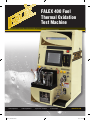
safely install, operate, and maintain the Falex 400 Thermal Oxidation Test Machine, in future refered to as Falex
400. For your own safety and protection from injury, carefully read, understand and observe the safety instructions described in this manual.
Keep this manual with the machine. If you lose this
manual or need an additional copy, please contact
Falex Corporation.
The information contained in this manual was based on
machines in production at the time of publication. Falex
Corporation reserves the right to change any portion of
this information without notice.
This operation manual is divided into sections and
addenda as listed in the “Table of Contents”. Sections
not relevant to this machine will have a page inserted
stating so.
Safety Introduction
The following safety precautions are published for your
information. This manual does not purport to detail
all of the safety concerns, if any, associated with the
equipment’s use. It is the responsibility of the user of this
equipment to establish appropriate safety and health
practices and determine the applicability of regulatory
limitations prior to use.
This machine is built with user safety in mind; however,
it can present hazards if improperly operated and
serviced. Follow operating instructions carefully! If
you have questions about operating or servicing this
equipment, please contact Falex Corporation.
This equipment should only be operated by personnel trained by Falex or a Falex approved distributor.
This operation manual contains HAZARD, WARNING,
and CAUTION callouts, which must be followed to
reduce the possibility of personal injury, damage to the
equipment, or improper service.
The Falex 400 must be electronically grounded. Do not
change the grounding requirements of the instrument.
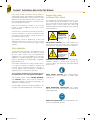
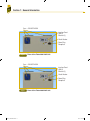
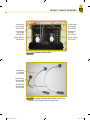
Machine Safety Labels
and Manual Safety Callouts
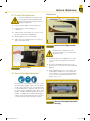
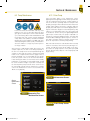
The following are safety labels placed in areas on the
test machine that may be hazardous to the operator.
These same symbols may be used in the manual to bring
attention to safety concerns. Please take caution and
understand what these labels indicate before operating
the test equipment.
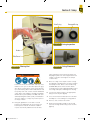
CAUTION
Hot Surface.
Do NOT touch.
. or
Allow to cool before
servicing.
HOT SURFACE HAZARD: This symbol indicates hot
surface areas on the test machine. Use caution when
working in these areas where components could be hot.
WARNING
ELECTRIC SHOCK
HAZARD.
This equipment is to be
serviced by trained
personnel only.
. or
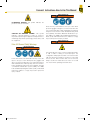
ELECTRICALSHOCKHAZARD:This symbol indicates
hazardous voltage is present when opening the
electrical cabinet. This unit is to be serviced by trained
personnel only.
WEAR SAFETY GLOVES: This symbol indicates
chemicals that may be hazardous to handle. Wear
safety gloves.
WEAR BREATHING PROTECTION: This symbol
indicates fumes that may be hazardous to inhale. Wear
breathing protection.
WEAREYEPROTECTION:This symbol indicates eye
protection need during operation.
F10572_F400Manual.indd 3
2/3/12 9:12 AM