1
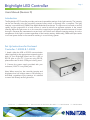
Brightlight LED Controller
Page 2
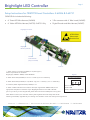
Setup Instructions for OEM PCB Level Controllers: 2-62426 & 2-62731
OEM PCB Kit includes the following:
•
6” Green LED Wire Harness (2-62424)
•
3 Pin connector with 6” Wire Leads (2-62425)
•
6” Yellow LED Wire Harness (2-62733): 2-62731 Only
•
Digital Encoder and Wire Harness (2-62427)
Brightlight Connector
ATTENTION:
Electrostatic
Sensitive Dev
Brightlight:
Mini-Din (2-62732)
Hi/Low
Power Selector
(Only on 2-62732)
USB
RS-232
Power In
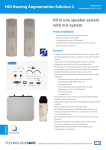
1. Attach the 3 pin connector (2-62425) to J2. (See Figure 1)
Power requirements are as follows:
Brightlight (1-40042/1-40045): 12vDC @ 500mA
Figure 1
J2 Power Connector
2. Attach Green LED (2-62424) to J3. Pin 1= Anode (+)/ Pin 2= Cathode (-)
3. Attach Yellow LED (2-62733) to J7 (2-62731 only). Pin 1= Anode (+) / Pin 2 = Cathode (-)
4. If desired, attach Digital Encoder (2-62427) to J6
5. Attach a USB or RS-232 communication cable (not supplied with OEM boards) to the
appropriate receptacle on the back of your Brightlight board and to a USB or RS-232
port on your PC. If you are using RS-232, please take note of which COM port is being used.
Pin 1 = +Power
Pin 2 = Gnd
Pin 3 = +Power from input jack
Note: When turned on, the controller intensity and brightness level will always reset to 0%
following a brief flash, regardless of prior settings. It is advised to never look directly at the light source.
navitar.com | [email protected] | 200 Commerce Dr. Rochester, NY 14623 | P: 585.359.4000 | F: 585.359.4999