1
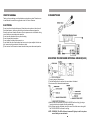
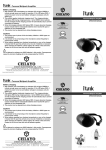
BATTERY CHARGER CHARGING THE BATTERY (HC-10)
Operation:
1.connect the DC plug of the adapter to the DC
ADAPTOR
socket of the charger.
CHARGE LCD
2.When charging , the indication lamp is (Red).
3.Press each charge/discharge button for
discharge (yellow)and press one more time
that will be back to charging (Red).
4.When full charge , (Green) and sounded .
DISCHARGING LCD
5.When connect the charging plug to the ring
output socket of the charger, the right
charger's
trough could be an external charge.
CHARGING BATTERY
6.The full charge capacity is 700mAH.
2100mA/1.2V
7.It can be charged with 4 x2100mA/1.2V or
2100mA/2.4V
2 x2100mA/2.4V.
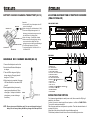
LOCATION AND FUNCTION OF PARTS OF RECEIVER
(VRA-200/VRA-220)
VRA-200 FRONT PANEL
1
2
4
3
5
6
7
8
VRA-220 FRONT PANEL
10
9
12
11
13
14
REAR PANEL
HANDHELD MIC CHARGER HOLDER(HC-20)
R
R
IN
OUT
L
L
DC IN
MAIN SPEAKER OUT
EXTERNAL SENSOR IN
1.Connect the Adapter to a wall outlet.
2.Insert infrared Wireless Microphone
to charger.
3.The red LED of charger will light up
during charging. Charging time will
be approx. 3.5 hours.
4.When charging is completed, the green
LED indicator will turn on and red LED
turn off.
5.Rechargeable battery to be exactly
same type as attached only. When
other type of battery is installed in
microphone, you can not charger
the battery.
NOTE: Be sure to use specified battery only. You can not charge other type of
battery. Do not use any battery and battery charger other than specified.
4
1. POWER ON / OFF
2. IR1 / IR2 INDICATOR
3. AF SIGNAL INDICATOR
4. LINE VOLUME CONTROL
5. AUX IN PUT R/L VOLUME CONTROL
6. TONE BASS CONTROL
7. TONE TREBLE CONTROL
8. IR1 / IR2 VOLUME CONTROL
9. SENSOR IN( 15 TO 9 SENSOR IN PUT )
10. AUX IN PUT
11. LINE IN PUT R/L
12. LINE OUT PUT
13. SPEAKER OUT x2( 16 TO 13 LOAD SPEAKER<8
14. DC IN PUT (12~15 VDC / 3A )
15.EXTEMAL SENSORE
16.LOAD SPEAKER
AUX IN
12-15V
LINE
15
16
>)
OPERATING THE SYSTEM
First, please plugged adaptor in nearby home outlet, then connect the DC plug of
adaptor to your receiver.
Connect the receiver to karaoke amplifier and speaker e.t.c< Refer to CONNECTIONS >
Turn on both receiver and amplifier.
Slide the power switch on microphone to on position. Then the channel indicator of
receiver will light up.
Adjust the volume control of amplifier to comfortable magnitude.
Find the best position with a wide view of the room then setting the receiver.
1