1
Phantom 3 Advanced User Manual
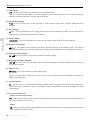
Intelligent Orientation Control (IOC)
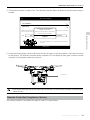
IOC allows users to lock the control orientation of the aircraft in different modes. There are three working
modes for IOC that can be selected in the DJI Pilot app. IOC only works when the aircraft is in F-mode,
therefore the user must toggle the flight mode switch to activate IOC. Refer to the table below:
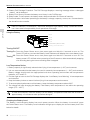
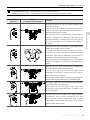
Course Lock (CL)
The nose direction, at the time that CL is set, will remain the forward direction
regardless of how the orientation and position of the aircraft changes. This will
remain fixed until you reset it or exit CL mode.
Home Lock (HL)*
Record a Home Point (HP) and enter HL mode. The forward and backward
controls will move the aircraft farther from and closer to the established Home
Pont, regardless of how the orientation and position of the aircraft changes.
Point of Interest (POI)*
Point of Interest. Record a point of interest (POI). The aircraft can then circle
around the POI and the nose will always points toward the POI.
*Home Lock and Point of Interest feature are coming soon.
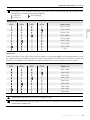
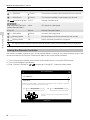
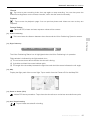
IOC Requirements
IOC is only available under the following conditions:
GPS enabled
GPS counts
Course Lock
No
None
Home Lock
Yes
POI
Yes
Appendix
Modes IOC
Flight Distance Limits
None
Aircraft
Aircraft
≥10m
5m~500m
Home Point
Point of Interest
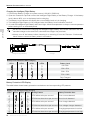
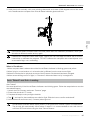
Using IOC
Toggle the Flight Mode Switch F-mode and follow the instructions prompted on the DJI Pilot app to select
the desired IOC mode.
© 2015 DJI. All Rights Reserved.
55