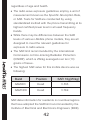
1
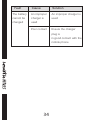
• Note: The SIM card will be locked if you input wrong PIN code for three times. To unlock the SIM card, you need to input the PUK. In general, the PUK can be obtained from the network operator. 9 15 code is provided along with the mobile phone by the manufacturer. The initial phone lock code is set to 0000 by the manufacturer. If the phone lock code is set, you need to input the phone lock code when powering on the mobile phone. PIN The PIN (Personal identification number, 4 to 8 digits) code prevents your SIM card from being used by unauthorized people. In general, the PIN is supplied with SIM card by the network operator. If PIN check is enabled, you need to input the PIN each time when you power on your mobile phone. The SIM card will be locked if you input wrong PIN code for three times. Unlocking methods as follows: Input the correct PUK according to the screen tips to unlock the SIM card. Then input the new PIN and press the OK icon. Input the new PIN again and then press the OK icon. If the input PUK is correct, the SIM card will be unlocked and the PIN will be reset.