1
Secure
Entry Client
Secure Entry Client
(WIN32/64)
Version 9.0
February 2007
With Appendix about Mobile Computing, Domain Logon and NCP Services
Disclaimer
Considerable care has been taken in the preparation
and publication of this manual, errors in content, typographical or otherwise may occur. If you have any
comments or recommendations concerning the accuracy, then please contact NCP as desired.
NCP makes no representations or warranties with respect to the contents or use of this manual, and explicitly disclaims all expressed or implied warranties of
merchantability or use for any particular purpose.
Furthermore NCP reserves the right to revise this publication and to make amendments to the content, at
any time, without obligation to notify any person or
entity of such revisions and changes.
Copyright
This manual is the sole property of NCP and may not
be copied for resale, commercial distribution or translated to another language without the express written
permission of NCP engineering GmbH, Dombühler
Str. 2, D - 90449 Nürnberg, Germany.
Trademarks
All trademarks or registered trademarks appearing in
this manual belong to their respective owners.
© 2007 NCP engineering GmbH. All rights reserved.
Total production of this manual:
Michael Lösel
Documentation + Publication
[email protected]
Pirckheimerstraße 47
D-90408 Nürnberg
Germany
2
© NCP engineering GmbH
Network
Communications
Products engineering GmbH
GERMANY
Headquarters:
Dombühler Straße 2
D-90449 Nürnberg
Tel.:+49-911-99680
Fax: +49 - 911 - 9968 299
Internet http://www.ncp.de
E-mail: [email protected]
© NCP engineering GmbH
3
Support
NCP offers support for all international users by means of Fax and Internet Mail.
Fax Hotline Number
+49 911 99 68 458
Internet Mail Address
[email protected]
When contacting NCP with your problems or queries
please include the following information:
– exact product name
– serial number
– Version number
– Accurate description of your problem
– Any error message(s)
NCP will do its best to respond as soon as possible,
but we do not guarantee a fixed response period.
4
© NCP engineering GmbH
SECURE ENTRY CLIENT
contents
Contents
1.
Overview . . . . . . . . . . . . . . . . . . .
1.1 Using this manual . . . . . . . . . . . . .
1.2 NCP Secure Entry Client – Universal IPSec Client
1.3 Secure Entry Client . . . . . . . . . . . . .
Technical Data . . . . . . . . . .
1.4 Secure Entry CE Client . . . . . . . . . . .
Technical Data . . . . . . . . . .
.
.
.
.
.
.
.
.
.
.
.
.
.
.
.
.
.
.
.
.
.
.
.
.
.
.
.
.
.
.
.
.
.
.
.
.
.
.
.
.
.
.
.
.
.
.
.
.
.
.
.
.
.
.
.
.
.
.
.
.
.
.
.
.
.
.
.
.
.
.
.
.
.
.
.
.
.
13
13
14
15
16
18
18
2.
Installation . . . . . . . . . . . . . . . .
2.1 Installation Prerequisites . . . . . . . . .
System Requirements . . . . . . .
Remote Destination . . . . . . . .
Local System . . . . . . . . . .
ISDN adapter (ISDN) . . . . . . .
Analog Modem (Modem) . . . . .
LAN adapter (LAN over IP) . . . .
xDSL Broadband Device (PPPoE) .
xDSL (AVM - PPP over CAPI) . . .
Multifunction Card (GPRS/UMTS) .
WLAN adapter (WLAN) . . . . .
Automatic Media Detection . . . .
Prerequisites for Strong Security . .
TCP/IP . . . . . . . . . . . . .
Smart Card Reader . . . . . . . .
Smart Card Reader (CT-API conform)
Smart Cards . . . . . . . . . . .
Soft Certificates (PKCS#12) . . . .
Smart Cards or Token (PKCS#11) .
2.2 Installing the Client Software . . . . . . .
Installation and Licensing . . .
Installing from CD . . . . . . .
2.2.1 Default Installation . . . . . . . .
2.3 Initial Configuration Assistant . . . . . .
2.4 Updateing and Uninstalling . . . . . . .
2.5 Upgrade to the Secure Enterprise Client . .
2.6 Project Logo . . . . . . . . . . . . . .
.
.
.
.
.
.
.
.
.
.
.
.
.
.
.
.
.
.
.
.
.
.
.
.
.
.
.
.
.
.
.
.
.
.
.
.
.
.
.
.
.
.
.
.
.
.
.
.
.
.
.
.
.
.
.
.
.
.
.
.
.
.
.
.
.
.
.
.
.
.
.
.
.
.
.
.
.
.
.
.
.
.
.
.
.
.
.
.
.
.
.
.
.
.
.
.
.
.
.
.
.
.
.
.
.
.
.
.
.
.
.
.
.
.
.
.
.
.
.
.
.
.
.
.
.
.
.
.
.
.
.
.
.
.
.
.
.
.
.
.
.
.
.
.
.
.
.
.
.
.
.
.
.
.
.
.
.
.
.
.
.
.
.
.
.
.
.
.
.
.
.
.
.
.
.
.
.
.
.
.
.
.
.
.
.
.
.
.
.
.
.
.
.
.
.
.
.
.
.
.
.
.
.
.
.
.
.
.
.
.
.
.
.
.
.
.
.
.
.
.
.
.
.
.
.
.
.
.
.
.
.
.
.
.
.
.
.
.
.
.
.
.
.
.
.
.
.
.
.
.
.
.
.
.
.
.
.
.
.
.
.
.
.
.
.
.
.
.
.
.
.
.
.
.
.
.
.
.
.
.
.
.
.
.
.
.
.
.
.
.
.
.
.
.
.
.
.
.
.
.
.
.
.
.
.
.
.
.
.
.
.
.
.
.
.
.
.
.
.
.
.
.
.
.
.
.
.
.
.
.
.
.
.
.
.
.
.
.
.
.
.
.
.
.
.
.
.
.
.
.
.
.
.
.
.
.
.
.
.
.
.
.
.
.
21
22
22
22
22
22
22
23
23
23
23
24
24
25
25
25
25
26
26
26
27
27
27
28
34
36
37
37
3.
Client Monitor . . . . . . . . . . . . . .
3.1 The Client Monitor User Interface . . .
3.1.1 Operating and Display Field . . .
3.1.2 The Apperance of the Monitors . .
Modification of the Interface .
3.1.3 Dialing-up und selecting the Profile
3.1.4 Symbols of the Monitor . . . . .
3.1.5 Status Displays . . . . . . . . .
.
.
.
.
.
.
.
.
.
.
.
.
.
.
.
.
.
.
.
.
.
.
.
.
.
.
.
.
.
.
.
.
.
.
.
.
.
.
.
.
.
.
.
.
.
.
.
.
.
.
.
.
.
.
.
.
.
.
.
.
.
.
.
.
.
.
.
.
.
.
.
.
.
.
.
.
.
.
.
.
.
.
.
.
.
.
.
.
.
.
.
.
.
.
.
.
.
.
.
.
.
.
.
.
39
40
40
41
41
42
43
44
© NCP engineering
.
.
.
.
.
.
.
.
5
SECURE ENTRY CLIENT
EAP Authentication . . . .
Smart Card Readers . . . .
PIN Status . . . . . . . .
Firewall . . . . . . . . .
3.1.6 Connection Setup Symbols .
Symbols of the NAS Dial-in
Symbols of the VPN Dial-in
4.
6
contents
.
.
.
.
.
.
.
.
.
.
.
.
.
.
.
.
.
.
.
.
.
.
.
.
.
.
.
.
.
.
.
.
.
.
.
.
.
.
.
.
.
.
.
.
.
.
.
.
.
.
.
.
.
.
.
.
.
.
.
.
.
.
.
Using the Client Monitor . . . . . . . . . . . . . . .
4.1 Connection . . . . . . . . . . . . . . . . . . . .
4.1.1 Connect . . . . . . . . . . . . . . . . . .
4.1.2 Disconnect . . . . . . . . . . . . . . . . .
4.1.3 HotSpot Logon . . . . . . . . . . . . . . .
4.1.4 Multifunction Card . . . . . . . . . . . . .
Network Search . . . . . . . . . . . . . . .
Activate GPRS / UMTS . . . . . . . . . . .
Enter SIM PIN . . . . . . . . . . . . . . .
Change SIM PIN . . . . . . . . . . . . . .
PUK Entry . . . . . . . . . . . . . . . . .
4.1.5 Connection Info . . . . . . . . . . . . . . .
Time Online . . . . . . . . . . . . . . . .
Timeout . . . . . . . . . . . . . . . . . .
Direction . . . . . . . . . . . . . . . . .
Speed . . . . . . . . . . . . . . . . . . .
Multilink . . . . . . . . . . . . . . . . .
Media Type . . . . . . . . . . . . . . . .
Compression . . . . . . . . . . . . . . . .
Encryption . . . . . . . . . . . . . . . . .
Key exchange . . . . . . . . . . . . . . .
Rx and Tx Bytes . . . . . . . . . . . . . .
4.1.6 Available Communication Media . . . . . . .
4.1.7 Certificates . . . . . . . . . . . . . . . . .
View Issuer Certificate . . . . . . . . . . .
View Client Certificate . . . . . . . . . . .
View incoming Certificate . . . . . . . . . .
Display CA Certificates . . . . . . . . . . .
Display and analysis of extensions for certificates
Display of extensions . . . . . . . . . . .
Extension checks . . . . . . . . . . . . .
4.1.8 Enter PIN . . . . . . . . . . . . . . . . .
Safeguarding PIN Use . . . . . . . . . .
4.1.9 Reset PIN . . . . . . . . . . . . . . . . .
PIN State Symbol Visible in the Client Monitor. .
PIN Handling after Logoff or Sleep Mode . . .
Displaying ACE Server Messages for RSA-Token
4.1.10 Change PIN . . . . . . . . . . . . . . . .
4.1.11 Call Control Statistics . . . . . . . . . . . .
4.1.12 Call Control Reset . . . . . . . . . . . . . .
4.1.13 Exit (Disconnect the Monitor) . . . . . . . . .
.
.
.
.
.
.
.
.
.
.
.
.
.
.
.
.
.
.
.
.
.
.
.
.
.
.
.
.
.
.
.
.
.
.
.
.
.
.
.
.
.
.
.
.
.
.
.
.
.
44
44
45
45
46
46
46
.
.
.
.
.
.
.
.
.
.
.
.
.
.
.
.
.
.
.
.
.
.
.
.
.
.
.
.
.
.
.
.
.
.
.
.
.
.
.
.
.
.
.
.
.
.
.
.
.
.
.
.
.
.
.
.
.
.
.
.
.
.
.
.
.
.
.
.
.
.
.
.
.
.
.
.
.
.
.
.
.
.
.
.
.
.
.
.
.
.
.
.
.
.
.
.
.
.
.
.
.
.
.
.
.
.
.
.
.
.
.
.
.
.
.
.
.
.
.
.
.
.
.
.
.
.
.
.
.
.
.
.
.
.
.
.
.
.
.
.
.
.
.
.
.
.
.
.
.
.
.
.
.
.
.
.
.
.
.
.
.
.
.
.
.
.
.
.
.
.
.
.
.
.
.
.
.
.
.
.
.
.
.
.
.
.
.
.
.
.
.
.
.
.
.
.
.
.
.
.
.
.
.
.
.
.
.
.
.
.
.
.
.
.
.
.
.
.
.
.
.
.
.
.
.
.
.
.
.
.
.
.
.
.
.
.
.
.
.
.
.
.
.
.
.
.
.
.
.
.
.
.
.
.
.
.
.
.
.
.
.
.
.
.
.
.
.
.
.
.
.
.
.
.
.
.
.
.
.
.
.
.
.
.
.
.
.
48
49
50
50
50
51
51
52
52
52
53
53
54
54
54
54
54
54
54
54
55
55
55
56
56
57
57
58
58
59
60
61
62
62
62
62
62
63
64
64
65
© NCP engineering
SECURE ENTRY CLIENT
4.2 Configuration . . . . . . . . . . . . . . . . . . . . . .
4.2.1 Profile Settings . . . . . . . . . . . . . . . . . . .
Entries in the profile settings . . . . . . . . . . . . .
4.2.2 Firewall Settings . . . . . . . . . . . . . . . . . .
Firewall properties . . . . . . . . . . . . . . . .
Configuration of the firewall settings . . . . . . . .
Configurationfield Basic Settings . . . . . . . . . . .
Disable Firewall . . . . . . . . . . . . . . . . .
Basic locked settings (recommended) . . . . . . . .
Basic open settings . . . . . . . . . . . . . . .
Configurationfield Firewall Rules . . . . . . . . . . .
Creating a firewall rule . . . . . . . . . . . . . .
Firewall rule / General . . . . . . . . . . . . . . .
Firewall rule / Local . . . . . . . . . . . . . . . .
Firewall rule / Remote . . . . . . . . . . . . . . .
Firewall rule/ Applications . . . . . . . . . . . . . .
Configurationsfield Friendly Networks . . . . . . . .
Automatic detection of Friendly Nets . . . . . . . . .
Friendly Net Detection via TLS . . . . . . . . . .
Configurationsfield Options . . . . . . . . . . . . .
Configurationsfield Logging . . . . . . . . . . . . .
4.2.3 WLAN Settings . . . . . . . . . . . . . . . . . .
Integrated WLAN configuration for Windows 2000/XP
WLAN Automation . . . . . . . . . . . . . . .
Search networks . . . . . . . . . . . . . . . . . .
WLAN Profiles . . . . . . . . . . . . . . . . . .
Statistics . . . . . . . . . . . . . . . . . . . . .
4.2.4 Outside Line Prefix . . . . . . . . . . . . . . . . .
4.2.5 Certificates |Configuration . . . . . . . . . . . . . .
User Certificate | Configuration . . . . . . . . . . .
Certificate . . . . . . . . . . . . . . . . . . .
Smart Card Reader . . . . . . . . . . . . . . . .
Port . . . . . . . . . . . . . . . . . . . . . .
Certificate Selection . . . . . . . . . . . . . . .
PKCS#12 File Name . . . . . . . . . . . . . . .
PKCS#11 Module . . . . . . . . . . . . . . . .
Do not disconnect when Smart Card is removed . . .
PIN request at each manual connect . . . . . . . .
PIN Policy . . . . . . . . . . . . . . . . . . . .
Minimum number of characters . . . . . . . . . .
Further policies . . . . . . . . . . . . . . . . .
Certificate renewal . . . . . . . . . . . . . . . . .
4.2.6 Call Control Manager | Configuration . . . . . . . . .
External Applications . . . . . . . . . . . . . . . .
Call Control . . . . . . . . . . . . . . . . . . . .
4.2.7 EAP Settings . . . . . . . . . . . . . . . . . . . .
4.2.8 Logon Options . . . . . . . . . . . . . . . . . . .
Logon . . . . . . . . . . . . . . . . . . . . . .
Logoff . . . . . . . . . . . . . . . . . . . . . .
© NCP engineering
contents
.
.
.
.
.
.
.
.
.
.
.
.
.
.
.
.
.
.
.
.
.
.
.
.
.
.
.
.
.
.
.
.
.
.
.
.
.
.
.
.
.
.
.
.
.
.
.
.
.
.
.
.
.
.
.
.
.
.
.
.
.
.
.
.
.
.
.
.
.
.
.
.
.
.
.
.
.
.
.
.
.
.
.
.
.
.
.
.
.
.
.
.
.
.
.
.
.
.
.
.
.
.
.
.
.
.
.
.
.
.
.
.
.
.
.
.
.
.
.
.
.
.
.
.
.
.
.
.
.
.
.
.
.
.
.
.
.
.
.
.
.
.
.
.
.
.
.
. 66
. 67
. 67
. 70
. 71
. 71
. 72
. 72
. 72
. 72
. 73
. 73
. 74
. 76
. 77
. 79
. 80
. 81
. 81
. 82
. 84
. 85
. 85
. 85
. 85
. 86
. 88
. 89
. 90
. 91
. 91
. 92
. 92
. 92
. 93
. 93
. 94
. 94
. 95
. 95
. 95
. 95
. 96
. 96
. 97
. 98
. 99
. 99
100
7
SECURE ENTRY CLIENT
External applications . . . . . .
Options . . . . . . . . . . . .
4.2.9 Configuration Locks . . . . . . .
General | Configuration Locks . .
Profiles | Configuration Locks . .
General rights . . . . . . . .
Visible profile parameter fields .
4.2.10 Profile Import . . . . . . . . . .
4.2.11 HotSpot . . . . . . . . . . . .
4.2.12 Profile Settings Backup . . . . . .
Create . . . . . . . . . . . . .
Restore . . . . . . . . . . . .
Log . . . . . . . . . . . . . . . . .
Window . . . . . . . . . . . . . . .
4.4.1 Show Profiles . . . . . . . . . .
4.4.2 Show Buttons . . . . . . . . . .
4.4.3 Show Statistics . . . . . . . . .
4.4.4 Show WLAN Status . . . . . . .
4.4.5 Always on top . . . . . . . . .
4.4.6 Autostart . . . . . . . . . . . .
4.4.7 Minimize when closing . . . . . .
4.4.8 Minimize when connected . . . .
4.4.9 Language . . . . . . . . . . .
Help . . . . . . . . . . . . . . . .
4.5.1 License Data and Activation . . . .
4.5.2 Search new Updates . . . . . . .
4.5.3 Info . . . . . . . . . . . . . .
Licensing . . . . . . . . . . . . . .
4.6.2 Test Version Validity Period . . .
4.6.2 Software Activation . . . . . . .
Online Variant . . . . . . . . .
Offline Variant . . . . . . . . .
Updates . . . . . . . . . . . . . . .
4.7.1 Software Updates . . . . . . . .
.
.
.
.
.
.
.
.
.
.
.
.
.
.
.
.
.
.
.
.
.
.
.
.
.
.
.
.
.
.
.
.
.
.
.
.
.
.
.
.
.
.
.
.
.
.
.
.
.
.
.
.
.
.
.
.
.
.
.
.
.
.
.
.
.
.
.
.
.
.
.
.
.
.
.
.
.
.
.
.
.
.
.
.
.
.
.
.
.
.
.
.
.
.
.
.
.
.
.
.
.
.
.
.
.
.
.
.
.
.
.
.
.
.
.
.
.
.
.
.
.
.
.
.
.
.
.
.
.
.
.
.
.
.
.
.
.
.
.
.
.
.
.
.
.
.
.
.
.
.
.
.
.
.
.
.
.
.
.
.
.
.
.
.
.
.
.
.
.
.
.
.
.
.
.
.
.
.
.
.
.
.
.
.
.
.
.
.
.
.
.
.
.
.
.
.
.
.
.
.
.
.
.
.
.
.
.
.
.
.
.
.
.
.
.
.
.
.
.
.
.
.
.
.
.
.
.
.
.
.
.
.
.
.
.
.
.
.
.
.
.
.
.
.
.
.
.
.
.
.
.
.
.
.
.
.
.
.
.
.
.
.
.
.
.
.
.
.
.
.
.
.
.
.
.
.
.
.
.
.
.
.
.
.
.
.
.
.
.
.
.
.
.
.
.
.
.
.
.
.
.
.
.
.
.
.
.
.
.
.
.
.
.
.
.
.
.
.
.
.
.
.
.
.
.
.
.
.
.
.
.
.
.
.
.
.
.
.
.
.
.
.
.
.
.
.
.
.
.
.
.
.
.
.
.
.
.
.
.
.
.
.
.
.
.
.
.
.
.
.
.
.
.
.
.
.
.
.
.
.
.
.
.
.
.
.
.
.
.
.
.
.
.
.
.
.
.
.
.
.
.
.
.
.
.
.
.
.
.
.
.
.
.
.
.
.
.
.
.
.
.
.
.
.
.
.
.
.
.
.
.
.
.
.
.
.
.
.
.
.
.
.
100
101
102
102
103
103
103
103
104
104
104
104
105
107
107
108
108
108
109
109
109
110
110
111
111
112
112
113
114
115
116
118
125
125
Configuration Parameters . . . . . . . . .
5.1 Profile Settings . . . . . . . . . . . .
5.1.1 Basic Settings . . . . . . . . . .
Profile name . . . . . . . . . .
Connection type . . . . . . . .
VPN to IPSec correspondent . .
Internet connection without VPN
Communication medium . . . . .
ISDN . . . . . . . . . . . .
Modem . . . . . . . . . . .
LAN (over IP) . . . . . . . .
xDSL (PPPoE) . . . . . . . .
xDSL (AVM – PPP over CAPI)
GPRS / UMTS . . . . . . . .
.
.
.
.
.
.
.
.
.
.
.
.
.
.
.
.
.
.
.
.
.
.
.
.
.
.
.
.
.
.
.
.
.
.
.
.
.
.
.
.
.
.
.
.
.
.
.
.
.
.
.
.
.
.
.
.
.
.
.
.
.
.
.
.
.
.
.
.
.
.
.
.
.
.
.
.
.
.
.
.
.
.
.
.
.
.
.
.
.
.
.
.
.
.
.
.
.
.
.
.
.
.
.
.
.
.
.
.
.
.
.
.
.
.
.
.
.
.
.
.
.
.
.
.
.
.
.
.
.
.
.
.
.
.
.
.
.
.
.
.
.
.
.
.
.
.
.
.
.
.
.
.
.
.
.
.
.
.
.
.
.
.
.
.
.
.
.
.
.
.
.
.
.
.
.
.
.
.
.
.
.
.
127
128
130
131
131
131
131
131
131
131
132
132
132
132
4.3
4.4
4.5
4.6
4.7
5.
8
contents
© NCP engineering
SECURE ENTRY CLIENT
PPTP . . . . . . . . . . . . . . .
WLAN . . . . . . . . . . . . . . .
Ext. Dialer . . . . . . . . . . . . .
Automatic media detection . . . . . .
Use this profile after every system reboot .
Use this phonebook entry after every system
Use Microsoft RAS-Dialer . . . . . . . .
5.1.2 Dial-Up Network . . . . . . . . . . . .
Username . . . . . . . . . . . . . . .
Password . . . . . . . . . . . . . . .
Save password . . . . . . . . . . . . .
Destination phone number . . . . . . . .
Alternate destination phone numbers . . .
RAS script file . . . . . . . . . . . . .
5.1.3 HTTP Logon . . . . . . . . . . . . . .
Username | HTTP Logon . . . . . . . .
Password | HTTP Logon . . . . . . . . .
Save Password | HTTP Logon . . . . . .
HTTP Authentication Script | HTTP Logon
5.1.4 Modem . . . . . . . . . . . . . . . .
Modem . . . . . . . . . . . . . . . .
COM Port . . . . . . . . . . . . . . .
Baud Rate . . . . . . . . . . . . . . .
Release Com Port . . . . . . . . . . .
Modem Init. String . . . . . . . . . . .
Dial Prefix . . . . . . . . . . . . . .
APN . . . . . . . . . . . . . . . . .
SIM PIN . . . . . . . . . . . . . . .
5.1.5 Line Management . . . . . . . . . . . .
Connection Mode . . . . . . . . . . .
Inactivity Timeout . . . . . . . . . . .
Voice over IP (VoIP) setting priorities . . .
PPP Multilink . . . . . . . . . . . . .
Multilink Threshold . . . . . . . . . .
EAP authentication . . . . . . . . . . .
HTTP authentication . . . . . . . . . .
5.1.6 IPSec General Settings . . . . . . . . . .
Gateway . . . . . . . . . . . . . . .
IKE Policy . . . . . . . . . . . . . .
IPSec Policy . . . . . . . . . . . . . .
Exch. mode . . . . . . . . . . . . . .
PFS group . . . . . . . . . . . . . . .
Policy lifetimes . . . . . . . . . . .
Duration . . . . . . . . . . . . . . .
Policy editor . . . . . . . . . . . .
IKE Policy (edit) . . . . . . . . . . . . . . .
Policy Name | IKE Policy . . . . . . . .
Authentication | IKE Policy . . . . . . .
Encryption | IKE Policy . . . . . . . . .
© NCP engineering
contents
. . .
. . .
. . .
. . .
. . .
reboot
. . .
. . .
. . .
. . .
. . .
. . .
. . .
. . .
. . .
. . .
. . .
. . .
. . .
. . .
. . .
. . .
. . .
. . .
. . .
. . .
. . .
. . .
. . .
. . .
. . .
. . .
. . .
. . .
. . .
. . .
. . .
. . .
. . .
. . .
. . .
. . .
. . .
. . .
. . .
. . .
. . .
. . .
. . .
.
.
.
.
.
.
.
.
.
.
.
.
.
.
.
.
.
.
.
.
.
.
.
.
.
.
.
.
.
.
.
.
.
.
.
.
.
.
.
.
.
.
.
.
.
.
.
.
.
.
.
.
.
.
.
.
.
.
.
.
.
.
.
.
.
.
.
.
.
.
.
.
.
.
.
.
.
.
.
.
.
.
.
.
.
.
.
.
.
.
.
.
.
.
.
.
.
.
.
.
.
.
.
.
.
.
.
.
.
.
.
.
.
.
.
.
.
.
.
.
.
.
.
.
.
.
.
.
.
.
.
.
.
.
.
.
.
.
.
.
.
.
.
.
.
.
.
.
.
.
.
.
.
.
.
.
.
.
.
.
.
.
.
.
.
.
.
.
.
.
.
.
.
.
.
.
.
.
.
.
.
.
.
.
.
.
.
.
.
.
.
.
.
.
.
.
.
.
.
.
.
.
.
.
.
.
.
.
.
.
.
.
.
.
.
.
.
.
.
.
.
.
.
.
.
.
.
.
.
.
.
.
.
.
.
.
.
.
.
.
.
.
.
.
.
.
.
.
.
.
.
.
.
.
.
.
.
.
.
.
.
.
.
.
.
.
.
.
.
.
.
.
.
.
.
.
.
.
.
.
.
.
.
.
.
.
.
.
.
.
.
.
.
.
132
133
133
134
134
135
135
136
137
137
137
137
138
138
139
140
140
140
140
141
142
142
142
142
143
143
143
143
144
145
145
146
146
146
147
147
148
149
149
150
150
150
151
151
151
152
153
153
153
9
SECURE ENTRY CLIENT
contents
Hash | IKE Policy . . . . . . . . . . . . . . . .
DH Group | IKE Policy . . . . . . . . . . . . .
IPSec Policy (edit) . . . . . . . . . . . . . . . . . .
Policy Name | IPSec Policy . . . . . . . . . . . .
Protocol | IPSec Policy . . . . . . . . . . . . . .
Transformation (ESP) | IPSec Policy . . . . . . . .
Transformation (Comp) | IPSec Policy . . . . . . .
Authentication | IPSec Policy . . . . . . . . . . .
5.1.7 Advanced IPSec Options . . . . . . . . . . . . .
Use IP compression (LZS) . . . . . . . . . . . .
Disable DPD (Dead Peer Detection) . . . . . . . .
Force UDP Encapsulation (Port 4500) . . . . . . .
5.1.8 Identities . . . . . . . . . . . . . . . . . . . .
Type | Identity . . . . . . . . . . . . . . . . .
ID | Identity . . . . . . . . . . . . . . . . . .
Use pre-shared key . . . . . . . . . . . . . . .
Use extended authentication (XAUTH) . . . . . . .
Username | Identity . . . . . . . . . . . . . . .
Password | Identity . . . . . . . . . . . . . . .
Use access data from configuration . . . . . . . .
5.1.9 IP Address Assignment . . . . . . . . . . . . . .
Use IKE Config Mode . . . . . . . . . . . . . .
Use local IP address . . . . . . . . . . . . . . .
Manual IP address . . . . . . . . . . . . . . . .
DNS/WINS . . . . . . . . . . . . . . . . . .
DNS server . . . . . . . . . . . . . . . . . .
WINS server . . . . . . . . . . . . . . . . . .
Domain Name . . . . . . . . . . . . . . . . .
5.1.10 Remote Networks . . . . . . . . . . . . . . . .
Network addresses | Remote Networks . . . . . . .
Subnet masks . . . . . . . . . . . . . . . . . .
Apply tunneling security for local networks . . . . .
5.1.11 Certificate Check . . . . . . . . . . . . . . . .
Incoming certificate’s subject . . . . . . . . . . .
Incoming certificate’s Issuer . . . . . . . . . . .
Issuer’s certificate fingerprint . . . . . . . . . . .
Use SHA1 fingerprint . . . . . . . . . . . . . .
Further certificate checks . . . . . . . . . . .
5.1.12 Link Firewall . . . . . . . . . . . . . . . . . .
Enable Stateful Inspection . . . . . . . . . . . .
Only communication within the tunnel permitted . .
Enable NetBios over IP . . . . . . . . . . . . .
If Microsoft’s dialer in use only communication within
tunnel is permitted . . . . . . . . . . . . . . .
6.
10
Establishing a Connection . . . . . . . . . . . . . . . .
Establishing a Connection to the destination system
Automatic (default): . . . . . . . . . . . .
Manual: . . . . . . . . . . . . . . . . .
.
.
.
.
. .
. .
. .
. .
. .
. .
. .
. .
. .
. .
. .
. .
. .
. .
. .
. .
. .
. .
. .
. .
. .
. .
. .
. .
. .
. .
. .
. .
. .
. .
. .
. .
. .
. .
. .
. .
. .
. .
. .
. .
. .
. .
the
. .
.
.
.
.
.
.
.
.
.
.
.
.
.
.
.
.
.
.
.
.
.
.
.
.
.
.
.
.
.
.
.
.
.
.
.
.
.
.
.
.
.
.
.
.
.
.
.
.
.
.
.
.
.
.
.
.
.
.
.
.
.
.
.
.
.
.
.
.
.
.
.
.
.
.
.
.
.
.
.
.
.
.
.
.
.
.
.
.
.
.
.
.
.
.
.
.
.
.
.
.
.
.
.
.
.
.
.
.
.
.
.
.
.
.
.
.
.
.
.
.
.
.
.
.
.
.
.
.
.
.
.
.
.
.
.
.
.
.
153
153
154
154
154
154
154
154
155
156
156
156
157
158
158
158
158
159
159
159
160
161
161
161
161
161
161
161
162
163
163
163
164
165
165
166
166
166
169
170
170
170
. . . 170
.
.
.
.
.
.
.
.
171
171
171
171
© NCP engineering
SECURE ENTRY CLIENT
Variable: . . . . . . . . . . . . .
Connect . . . . . . . . . . . . . . .
Client Logon . . . . . . . . . . . .
Passwords and User Names . . . . . .
User ID for NAS Dial-Up . . . . . .
User Name and Password for Extended
Disconnection and error . . . . . . . .
Disconnect . . . . . . . . . . . . .
Disconnect (the Monitor) . . . . . . .
7.
contents
.
.
.
.
.
.
.
.
.
.
.
.
.
.
.
.
.
.
171
171
172
173
173
174
175
175
176
Examples and Explanations . . . . . . . . . . . . . . . . . . . .
7.1 IP Functions . . . . . . . . . . . . . . . . . . . . . . . . .
7.1.1 IP Network Devices . . . . . . . . . . . . . . . . . . .
7.1.2 IP Address Structure . . . . . . . . . . . . . . . . . .
7.1.3 Subnet Masks . . . . . . . . . . . . . . . . . . . . .
Standard masks . . . . . . . . . . . . . . . . . . . .
Reserved addresses . . . . . . . . . . . . . . . . . . .
7.1.4 Using IP Addresses: . . . . . . . . . . . . . . . . . . .
7.2 Security . . . . . . . . . . . . . . . . . . . . . . . . . . .
7.2.1 IPSec – Overview . . . . . . . . . . . . . . . . . . . .
IPSec – General Functional Description . . . . . . . . . .
7.2.2 Firewall Settings . . . . . . . . . . . . . . . . . . . .
7.2.3 SA Negotiation and Policies . . . . . . . . . . . . . . .
Phase 1 (IKE Policy) . . . . . . . . . . . . . . . . . .
Phase 2 (IPSec Policy) . . . . . . . . . . . . . . . . .
Control Channel and SA Negotiation . . . . . . . . . .
IKE Modes . . . . . . . . . . . . . . . . . . . . . .
7.2.4 IPSec Tunneling . . . . . . . . . . . . . . . . . . . .
Implemented Algorithms for Phase 1 and 2: . . . . . . . .
Supported authentication methods for phase 1 (IKE policy)
Supported symmetric encryption algorithms (phase 1 & 2) .
Supported asymmetric encryption algorithms (phase 1 & 2)
Supported hash algorithms . . . . . . . . . . . . . .
Additional phase 2 support . . . . . . . . . . . . . .
Default mode proposals . . . . . . . . . . . . . . . . .
7.2.5 Further Configuration . . . . . . . . . . . . . . . . . .
Basic configurations depending on the IPsec gateway . . . .
Gateway does not support XAUTH . . . . . . . . . . .
Gateway supports IKE config mode . . . . . . . . . .
Gateway does not support IKE config mode . . . . . . .
7.2.6 IPsec ports for connection establishment and data traffic . . .
7.3 Certificate Checks . . . . . . . . . . . . . . . . . . . . . .
7.3.1 Selection of the CA Certificates . . . . . . . . . . . . . .
7.3.2 Check of Certificate Extensions . . . . . . . . . . . . . .
extendedKeyUsage . . . . . . . . . . . . . . . . . . .
subjectKeyIdentifier / authorityKeyIdentifier . . . . . . . .
7.8.3 Checking Revocation Lists . . . . . . . . . . . . . . . .
7.4 Stateful Inspection Technology for the Firewall- Settings . . . . . .
.
.
.
.
.
.
.
.
.
.
.
.
.
.
.
.
.
.
.
.
.
.
.
.
.
.
.
.
.
.
.
.
.
.
.
.
.
.
177
178
178
178
180
181
182
182
183
183
183
185
186
186
186
187
188
190
190
190
190
190
191
191
192
194
194
194
194
194
196
197
197
197
198
198
198
199
© NCP engineering
. . . . . . .
. . . . . . .
. . . . . . .
. . . . . . .
. . . . . . .
Authentication
. . . . . . .
. . . . . . .
. . . . . . .
.
.
.
.
.
.
.
.
.
11
SECURE ENTRY CLIENT
contents
Abbreviations and Technical Terms . . . . . . . . . . . . . . . . . . 203
Index . . . . . . . . . . . . . . . . . . . . . . . . . . . . . . . 217
Appendix: Mobile Computing via GPRS/UMTS and
Domain Login via NCP Gina . . . . . . . . . . . . . . .
Appendix: Secure Client Services . . . . . . . . . . . . . . . . . .
12
A 1
A23
© NCP engineering
SECURE ENTRY CLIENT
1.
product overview
Overview
This manual describes Installation, Configuration, Features and User Interface of the
NCP Secure Entry Client and its Components
The NCP Secure Client Software works according to the principle of Ethernet LAN
emulation and supports the routable protocol TCP/IP.
Additional information on upgrades and product variants are available on the NCP
website: http://www.ncp.de
1.1
Using this manual
The structure of this manual is presented below to help you quickly find what you need
in this documentation.
The manual is subdivided into seven larger sections that offer step-by-step descriptions, or that describe the structure of the graphic user interface according to the respective object. Two appendices providing additional information and definitions of specialized terms follow these sections.
1. Product overview with brief description of the performance range of the software
2. Installation instructions
3. Description of the graphic user interface
4. Description of the configuration possibilities in the monitor
5. Description of the parameters listed in the telephone book
6. Description of a connection establishment
7. Examples and explanations, particularly for IPsec
–
Appendices with a glossary (abbreviations and terms) and an index
Cross references appear in the text in parenthesis and cite the reference with the title,
or after a comma, with the subtitle. An exclamation mark in the margin indicates that
the text so marked is of particular significance.
Naturally the software also offers context-sensitive help.
© NCP engineering GmbH
13
SECURE ENTRY CLIENT
1.2
product overview
NCP Secure Entry Client – Universal IPSec Client
The NCP Secure Entry Client can be used in any VPN environment. The client communicates on the basis of the IPsec standard (see → Examples and explanations, Security,
IPsec) with the gateways provided by a wide variety of vendors* and is the alternative
to the uniform IPsec client technology offered on the market. The Secure Entry Client
has additional features that introduce the user into a holistic remote access VPN solution.
The NCP Secure Entry Client offers:
þ Support of all major operating systems
þ Dial-in over all transmission networks
þ Compatibility with VPN gateways from a wide variety of vendors*
þ Integrated personal firewall for more security
þ Dialer protection (no misuse by third parties)
þ Higher speed in the ISDN (channel-bundling)
þ Saving telephone charges (charges and connection management)
þ Convenient operation (graphic interface)
þ Central management**
*) Compatibility list available on the NCP website www.ncp.de
**) optional
14
© NCP engineering GmbH
SECURE ENTRY CLIENT
1.3
product overview
Secure Entry Client
The NCP Secure Entry Client communicates with VPN gateways supplied by a wide
range of manufacturers, on the basis of the IPSec standard. This involves client software that can be used as an alternative to the software clients offered on the market in
the firewall and router area.
The Secure Entry Client is differentiated from other IPSec clients through its feature
set and through its software architecture.
Secure Entry Client advantages:
¨ Support of all major Windows operating systems, including Windows CE
¨ Dial-in over all public data transmission networks
¨ Compatibility with virtually all VPN gateways on the market
¨ Integrated personal firewall
¨ Dialer Protection
¨ Intelligent Line Management for minimizing transmission costs and increasing transparency (Charge Manager)
¨ Channel bundling for high transmission speed in ISDN
¨ Graphic user interface
Like all NCP Secure Communications Products, the Secure Entry Client supports the
use of digital certificates in a Public Key Infrastructure (PKI). An upgrade to the NCP
Secure Enterprise Solution with high-performance, central management is available as
an option.
© NCP engineering GmbH
15
SECURE ENTRY CLIENT
product overview
Technical Data
n
LAN-Emulation
Ethernet adapter with NDIS interface
n
PC Operating Systems
Windows 98se, Windows NT (V4.0 SP5), Windows 2000, Windows ME, Windows XP
Prof.
n
Network Protocols
– IP
– IPSec VPN: Supports Pre-Shared Key and certificates, central configuration of IPSec
proposals, e.g. the central VPN gateway determines the policies (for IKE, IPSec Phase
2) for the Secure Entry Client.
– IPSec in accordance with RFC 2401-2409, additionally the drafts (XAUTH, IKEConfig, DPD, NAT-T, IP-Comp) are supported for optimization in Remote Access environments (see RFCs and Drafts below*).
– EAP-MD5, EAP-TLS Extensible Authentication Protocol, extended authentication
relative to switches and access points (Layer 2)
n
Encryption
–
–
–
–
–
–
–
n
Personal Firewall
–
–
–
–
–
–
–
n
Triple DES (128, 192 Bit)
Blowfish (128 Bit)
AES (128, 192, 256 Bit)
RSA (1024, 2048 Bit)
Hash processes
SHA1 (Secure Hash Algorithm 1)
MD5 (Message Digit 5)
IP-NAT Network Address Translation
Stateful Inspection
Filter rules assigned to applications and certain connections
Filter rules assigned to certain protocols, ports and addresses
Identification of friendly networks
Automatic hotspot logon
Extensive logging options
Filtering
IP Broadcasts, Netbios over IP
16
© NCP engineering GmbH
SECURE ENTRY CLIENT
n
product overview
PKI
– Public Key Infrastructure in accordance with X.509 v.3 standard, Entrust (Entrust
Ready)
– Smartcards: PKCS#11, TCOS 1.2 and 2.0–CardOS M4 (via CT-API or PC/SC)
– Soft certificate: PKCS#12
– PIN policy: Administrative specification for PIN entry of any complexity
– Revocation lists: Checking the CRL (Certificate Revocation List) and ARL (Authority Revocation List)
– Certificate control: Verification and notification of a certificate’s validity period
n
One Time Password
convenient entry by separating PIN and password (RSA-ready)
n
DynDNS (Dynamic DNS)
Accessing the central VPN gateway with changing public IP addresses, query of the
current IP address via a public DynDNS server
n
IP Adress Allocation
DHCP Dynamic Host Control Protocol
n
Point-to-Point Protocols
–
–
–
–
–
–
–
–
–
–
n
PPP
PPP
PPP
PPP
PPP
PPP
PPP
PPP
PPP
PPP
over ISDN
over GSM (V.110)
over PSTN (Modem)
over Ethernet (xDSL)
LCP Link Control Protocol
IPCP IP Control Protocol
MLP Multilink Protocol
Call Back negotiation in the LLCP
PAP Password Authentication Protocol
CHAP Callenge Handshake Authenication Protocol
Dialer
– NCP Dialer
– alternatively: Microsoft RAS-Dialer for ISP access via dial-in script
n
Line Management
Short hold, timeout (time-controlled and charge-controlled)
n
Channel Bundling in ISDN
Dynamic, freely configurable threshold value
© NCP engineering GmbH
17
SECURE ENTRY CLIENT
n
product overview
Client Monitor
Configuration of the teleworkstation, connection control and monitoring
n
Connection Manager
For international access. Support for: Gric, Infonet, UUNet
1.4
Secure Entry CE Client
Technical Data
n
LAN Adapters
– Ethernet-Adapter with NDIS Interface
– Wireless LAN-Adapter
n
Operating Systems
Mobile end device: Windows CE 3.0 (Handheld PC 2000, Pocket PC 2002), Windows
CE.net 4.2 (Windows Mobile 2003 for Pocket PC)
Configuration PC: Windows 98se/ NT 4.0 from SP5/ 2000/XP
n
Network Protocols
– IP
– IPSec-VPN: support of Pre-Shared-Key and certificates, central configuration of IPSec proposals, e.g. the central VPN gateway determines the policies (for IKE, IPSec
Phase 2) for the Secure Entry Client.
– IPSec in accordance with RFC 2401-2409, additionally the drafts (XAUTH, IKEConfig, DPD, NAT-T, IP-Comp) are supported for optimization in Remote Access environments (see RFCs and Drafts below*).
18
© NCP engineering GmbH
SECURE ENTRY CLIENT
n
Encryption
–
–
–
–
n
product overview
Triple DES (128, 192 Bit)
Blowfish (128 Bit)
AES (128, 192, 256 Bit)
RSA (1024, 2048 Bit)
Hash Process
– SHA1 (Secure Hash Algorithm 1)
– MD5 (Message Digit 5)
n
Firewall Functionalities
– IP-NAT Network Address Translation
– LAN adapter protection PC protection against access from other systems at VPN connection
n
Filtering
– IP broadcasts
– Netbios over IP
n
PKI
– Public Key Infrastructure in accordance with the X.509 v.3 standard
– Smart cards: TCOS 1.2 and 2.0 – CardOS M4 (PC/SC)
– Soft certificate: PKCS#12
n
IP Adress Allocation
DHCP Dynamic Host Control Protocol
n
Point-to-Point Protocols
–
–
–
–
–
–
n
PPP
PPP
PPP
PPP
PPP
PPP
LCP Link Control Protocol
IPCP IP Control Protocol
CCP Compression Control Protocol
PAP Password Authentication Protocol
CHAP Callenge Handshake Authenication Protocol
ECP Encryption Control Protocol
Compression Process
Stac
n
Line Management
Short Hold, Timeout (time-controlled)
© NCP engineering GmbH
19
SECURE ENTRY CLIENT
n
product overview
Client Monitor
– The PDA is configured on a standard PC via the Client Monitor
– The “PDA Monitor” is used for status display and for dialing the destination
n
Dialer
– NCP-Dialer
– Microsoft RAS-Dialer
n
Options
– Central NCP Secure Enterprise VPN/PKI Gateway
– Upgrade to NCP Secure Enterprise Solution with central Management Tool and High
Availability Services
n
RFCs and Drafts
RFC 2401– Security Architecture for the Internet Protocol
RFC 2403 – The Use of HMAC-MD5-96 within ESP and AH
RFC 2404 – The Use of HMAC-SHA-1-96 within ESP and AH
RFC 2406 – IP Encapsulating Security Payload (ESP)
RFC 2407 – The Internet IP Security Domain of Interpretation for ISAKMP
RFC 2408 – Internet Security Association and Key Management Protocol (ISAKMP)
RFC 2409 – The Internet Key Exchange (IKE)
RFC 3947 – Negotiation of NAT Traversal in IKE
RFC 3498 – UDP Encapsulation of IPSEC ESP packets
DRAFT – Draft-beaulieu-ike-xauth-05 (XAUTH)
DRAFT – Draft-dukes-ike-mode-cfg-02 (IKECFG)
DRAFT – Draft-ietf-ipsec-dpd-01 (DPD)
DRAFT – Draft-ietf-ipsec-nat-t-ike-01 (NAT-T)
DRAFT – Draft-ietf-ipsec-nat-t-ike-02 (NAT-T)
DRAFT – Draft-ietf-ipsec-nat-t-ike-03 (NAT-T)
DRAFT – Draft-ietf-ipsec-nat-t-ike-05 (NAT-T)
DRAFT – Draft-ietf-ipsec-udp-encaps-06 (UDP-ENCAP)
20
© NCP engineering GmbH
SECURE ENTRY CLIENT
2.
installation
Installation
A Setup program performs the installation of the Client Software quickly and smoothly. The following text describes the procedures for installing the Client Software under
Windows 2000/XP and Windows Vista.
Prior to executing Setup be sure that the following prerequisites are fulfilled.
© NCP engineering GmbH
21
SECURE ENTRY CLIENT
2.1
installation
Installation Prerequisites
System Requirements
In order to be able to communicate with the Client Software it is essential to have either Microsoft Windows 2000, Windows XP or Windows Vista installed on your PC
(min. 128 MB RAM). During the installation you are asked to have your or disks ready, as these will be needed for updating your PC’s driver database files. Please insert
these when prompted to do so.
Remote Destination
The parameters of the remote destination must be entered in the profile settings. In order to communicate with the remote destination it must support one of the following
media types: ISDN, PSTN (analog modem), LAN over IP or PPP over Ethernet.
Local System
One of the following communication devices and its respective drivers must be properly installed on the Client Software PC.
n
ISDN adapter (ISDN)
The device (e.g. internal or external adapter) must support the ISDN CAPI 2.0 Kernel
Mode standard. When using PPP Multilink the software can bundle up to 8 ISDN BChannels. Any ISDN device supporting the ISDN CAPI 2.0 can be used. Please check
your device to be sure that such a driver is available. The Client Software does not support TAPI based ISDN devices.
n
Analog Modem (Modem)
The Client Software can communicate with any industry standard analog PC modem,
provided that it and the modem drivers have been properly installed and the modem initialization string and the COM port definition for the modem is correct. The modem
has to support Hayes AT commands.
Mobile (cellular) telephones can also be used for data communication, after the associated software has been installed that presents itself to the client precisely as if it were
an analog modem. The serial interface, IR (infrared) interface, or Bluetooth can be
used as interface between mobile phone and PC. The opposite side must have the
22
© NCP engineering GmbH
SECURE ENTRY CLIENT
installation
appropriate dial-in platform depending on the transfer rate (GSM, v.110, GPRS or
HSCSD). The initialization string in the Secure Client modem configuration must be
obtained from the ISP or the manufacturer of the mobile (cellular) phone.
n
LAN adapter (LAN over IP)
When the communication medium LAN has been defined the Client Software may be
used as a IPSec client in a LAN that communicates across a LAN network and associated router to a central site VPN Gateway. When defined as a LAN Client, the Client
Software can also be used as a VPN or VPN/PKI plugin for Microsoft’s RAS (Dial-Up
Network) client.
n
xDSL Broadband Device (PPPoE)
Cable modems, splitters (e.g. for ADSL), etc. can be used in conjunction with PPP over
Ethernet (PPPoE), which is supported by the Client Software.
n
xDSL (AVM - PPP over CAPI)
If an AVM Fritz DSL card is to be used then this communication medium may be selected. AVM specific initialization strings may be entered in the field “Destination
phone number” (“Dial-Up Network” group) for the connection.
It is recommended to use the standard setting “xDSL (PPPoE)” with Windows operating systems as this provides direct communication over the network interfaces.
No additional network card is necessary with the AVM Fritz! DSL card.
n
Multifunction Card (GPRS/UMTS)
If you are using a multi-function card, special features of the mobile computing can be
used depending on the card characteristics (see the appendix of the handbook “Mobile
Computing). Due to the direct support of the multi-function card for
UMTS/GPRS/WLAN through the Secure Client, installation of management software
from the card implemented, is not necessary. The VPN connection is established via
the integrated NCP Dialer independent of the Microsoft data communications network.
Currently supported multi-function cards:
– T-Mobile Multimedia NetCard
– Vodafone Mobile Connect Card
– KPN Mobile Connect Card
– T-Mobile DSL card 1800
– integrated Card of the Lenovo Notebooks (Sierra Chipset)
– Vodafone EasyBox USB-Adapter for UMTS/GPRS
© NCP engineering GmbH
23
SECURE ENTRY CLIENT
n
installation
WLAN adapter (WLAN)
Under Windows 2000/XP the WLAN adapter can be operated with the link type
“WLAN”. In the monitor menu the special “WLAN settings” menu item is displayed
where the access data for the wireless network can be saved in a profile. If this “WLAN
configuration” is activated, then the management tool of the WLAN card, or the Microsoft tool must be deactivated. (Alternatively the management tool of the WLAN card or
the Microsoft tool can be used as well.)
If the link type WLAN is set for the destination system in the phonebook, then under
the graphic field of the Client Monitor an additional area is shown where the field
strength and the WLAN network are displayed.
Please read the description of the parameters “Link Type” in the section “Configuration
parameters / Profile Settings”.
n
Automatic Media Detection
If various link types could be used, the client detects automatically which link type actally can be used und selects the fastest one.
On the basis of a pre-configured destination system, those link types that are currently
available for the Client PC are detected and implemented, and if multiple alternative
transmission paths are available, the fastest will be selected automatically. The link
type priority is specified in the following sequence in a search routine: 1. LAN, 2.
WLAN, 3. DSL, 4. UMTS/GPRS, 5. ISDN, 6. MODEM.
The configuration is executed in the phonebook with the link type “Automatic media
detection” under “Destination system”. If desired, all destination systems for the VPN
gateway that are pre-configured for this Client PC can be assigned to this automatic
media detection. This renders manual selection of a medium (WLAN, UMTS, LAN,
DSL, ISDN, MODEM) from the profile entries superfluous. Input data for the connection to the ISP are transferred from the available profile entries in a manner that is transparent for the user.
Please note the description “Destination System / Link Type”.
24
© NCP engineering GmbH
SECURE ENTRY CLIENT
installation
Prerequisites for Strong Security
If you are using the Client Software with certificates (X.509), then the following prerequisites must be fulfilled:
n
TCP/IP
The protocol TCP/IP must be installed on your PC.
n
Smart Card Reader
The Client Software supports all Smart Card readers that are PC/SC conform. Subsequently such readers will only be entered in the Client Software Smart Card reader
list after the Smart Card reader including the associated driver software has been installed on the PC. The Client Software detects the Smart Card reader automatically after the PC has been booted. The Smart Card reader can then be selected as described
above and used accordingly.
In order to use the features of the Smart Card, configure the Smart Card by selecting
“Configuration → Certificates” in the pull-down menu of the Client Software Monitor. When you insert your Smart Card in the Smart Card reader, you can enter your
PIN.
n
Smart Card Reader (CT-API conform)
Please note the following instructions when using a Smart Card reader that is CT-API conform:
þ The current software includes drivers for the Smart Card readers SCM Swapsmart and
SCM 1x0 (PIN Pad reader). These Smart Card readers can be set in the Monitor under
“Configuration → Certificates”. If, however, the Smart Card reader does not work
with the drivers, which are included in the software, or a Smart Card reader is to be
used, which does not show up in the configuration selection of supported readers, then
ask the supplier or producer of the Smart Card (or the respective website) reader for
the current hardware driver and install it. In this case the client software requires
some modifications:
Use an ASCII editor to edit the NCPPKI.CONF file. You find this file in the installation directory. Enter the name of the connected Smart Card reader as “ReaderName”
(xyz) and the name of the installed driver as DLLWIN95 or DLLWINNT respectively.
For operating systems based on Windows NT like Windows 2000 and Windows XP the
modulname DLLWINNT has to be used. (The default name for CT-API conform drivers is CT32.DLL.)
Important: Only those drivers that have been appropriately set with “visible = 1” will
be displayed in the list!
© NCP engineering GmbH
25
SECURE ENTRY CLIENT
Modulname
DLLWIN95
DLLWINNT
= SCM Swapsmart (CT-API)
= scm20098.dll
= scm200nt.dll
installation
→ xyz
→ ct32.dll
→ ct32.dll
þ After rebooting the PC the new “ReaderName” is displayed in the Monitor under
“Configuration /Certificates / Smart Card reader”. Now you select that Smart Card reader.
n
Smart Cards
Currently, the following Smart Cards are supported:
– Signtrust
– NetKey 2000
– TC Trust (CardOS M4)
– Telesec PKS SigG
n
Soft Certificates (PKCS#12)
Instead of a Smart Card you can also use soft certificates or tokens.
n
Smart Cards or Token (PKCS#11)
Drivers in the form of a PKCS#11 library are supplied with the software for the card
reader or token. This driver software must first be installed. Then the NCPPKI.CONF
file must be edited.
þ Edit the NCPPKI.CONF file located in the installation directory by entering the name
of the connected reader or token (xyz) as “module name”. The name of the DLL must
be entered as PKCS#11-DLL. The associated “Slotindex” is manufacturer-dependant
(standard = 0).
Important: Only those drivers are visible in the list that have been set to visible with
“visible = 1”.
Modulname
= xyz
PKCS#11-DLL = Name of the DLL
Slotindex
=
þ After rebooting the PC the new “ReaderName” is displayed in the Monitor under
“Configuration / Certificates / Smart Card reader”. Now you select that Smart Card
reader.
26
© NCP engineering GmbH
SECURE ENTRY CLIENT
2.2
installation
Installing the Client Software
The actual version and later versions of the Client will be tested by the quality assurance only according to the operation systems Windows 2000, Windows XP and Windows
Vista. Full functionality cannot be garanteed when using the client under Windows NT,
Windows 98 or older Windows versions.
The initial installation steps for the Client Software are almost the same for Windows
2000, Windows XP and Windows Vista. Please note that there are some differences
when installing from a hard disk, CD or removable disk.
You can obtain the software as EXE file by downloading it from the website under:
www.ncp.de.
Installation and Licensing
First the NCP Secure Entry Client is installed as a test version. If you posess a license,
you can enter the license data after a reboot of the software by selecting the monitor
menu option “License Info and Activation”. The test version is valid for 30 days. Without software activation or licensing it will no longer be possible to setup a connection after this 30-day period expires. When 10-days validity remain, a message box will
be displayed to remind you that the software has not yet been licensed. For licensing
the software please refer to the chapter “Licensing” in the handbook.
Please note when installing the Software under Windows XP/Vista
Windows XP informs the user as soon as a driver software is being installed which is
not licensed by Microsoft. Windows XP runs a Microsoft specific “compatibility test”
and warns the user not to install the software. This test does not check the compatibility of the software with Windows XP. Since the software is not licensed by Microsoft,
the warning occurs when the client is installed on a Windows XP machine. What to do:
þ You can modify the Windows XP default settings so that any software can be installed
without the Microsoft compatibility check. Open the Windows Control Panel and then
“System (Properies) - Driver Signing”. Set the install procedure to “Install the software
anyway and dont’t ask for my approval”!
þ You can ignore the warning when installing the client. After the warning pops up you
click on “proceed Installation” Windows XP will let you install the client adapter. The
installation will not have any negative effect on the operating system.
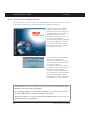
Installing from CD
After inserting the CD in the drive of your PC, the welcome window appears on the
monitor. Click on “Install Products” and then select the Client Software version to be
installed. All further installation procedures are identical with the installation procedures for installing from removable disk, from the window “Choose Setup Language”.
© NCP engineering GmbH
27
SECURE ENTRY CLIENT
installation
2.2.1 Default Installation
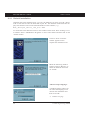
Installing the Client Software First you copy the EXE file you have got with a download or with the CD onto the hard disk of your PC. The filename of the EXE file displays the number of the verion and build number of the software, e. g.:
NCP_EntryCl_Win32_900_028.EXE
To install the Client Software select in the windows main menu: Start / Settings / Control Panel. Select “Add/Remove Programs” in the Control Panel and then click on the
“Install” button.
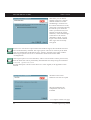
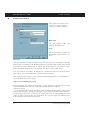
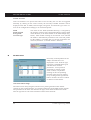
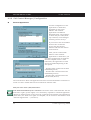
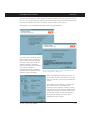
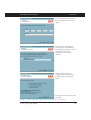
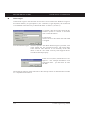
Click on “Next” when the
window appears which
requests the installation CD.
When the following window
appears click on “Browse” to
select the EXE file and click
on “Finish”.
“Choose Setup Language”
A window appears where you
can select the language to be
used for the installation and
then click “OK”.
→ continue next page
28
© NCP engineering GmbH
SECURE ENTRY CLIENT
installation
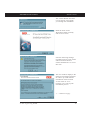
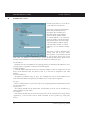
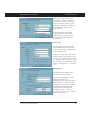
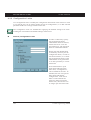
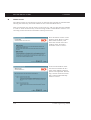
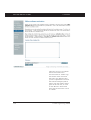
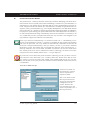
The “Install Shield Assistant”
is now started. It will guide
you through the installation.
Read the terms of the
Welcome window carefully
and click on “Next”.
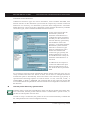
Note the following message
und deactivate any VPN Client
and Personal Firewall of
another manufacturer to avoid
data loss.
The next window displayes the
Software Licensed Agreement.
In order to proceed with the
installation of the licensed
version click on “Yes”.
Clicking “No” will stop the
installation process.
→ continue next page
© NCP engineering GmbH
29
SECURE ENTRY CLIENT
installation
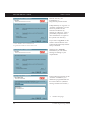
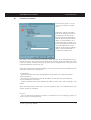
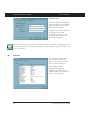
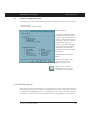
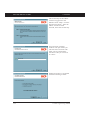
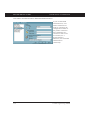
Default directory for
installation* is:
Programs\ncp\SecureClient
Undependently of “Typical” or
“Custom” installation you can
select any folder for the
software installation by
clicking on “Browse”. This is
particularly important if the
user should have no rights on
the system root directory.
* Under Windows Vista it could also be:
Program Files\Funkwerk Secure IPSec Client
If you select “Typical” in this
window the installation will
continue automatically and the
setup is finished.
Selecting the “Custom“
Installation you can define
settings according to your
requirements.
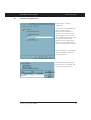
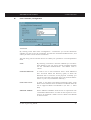
In the following window of the
“Custom" installation you
define the programmfolder for
the client software. (Default
setting “NCP Secure Client”)
→ continue next page
30
© NCP engineering GmbH
SECURE ENTRY CLIENT
installation
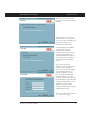
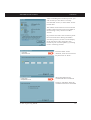
Moreover you can have the
program icon displayed on the
desktop.
Only User defined Installation!
Please contact your system
administrator or your internet
service provider for additional
information about your
communication gateway.
Only User defined Installation!
Communication with DHCP
(Dynamic Host Control
Protocol) means that a
temporary IP Address will be
assigned automatically for
each communication session.
If required, click on “Obtain
an IP Address from DHCP
Server”.
If you “Specify an IP
Address”, enter the IP address
in this window. Default
Gateway: If a network adapter
with a Default Gateway is
already installed, you will
have to delete this Default
Gateway Address. It is not
possible to have more than one
network adapter with a Default
Gateway. DNS Address: You
should only enter a DNS
Address if you have been
assigned one from your system
administrator or ISP.
Only User defined Installation!
End of User defined Installation!
→ continue next page
© NCP engineering GmbH
31
SECURE ENTRY CLIENT
installation
Thereafter you can define
whether a logon to a remote
domain should occur after
establishing a connection to
the remote destination’s NAS,
which may necessitate entering
the PIN for your certificate
and/or your Password (if not
already stored in the Client
Software). After establishing a
connection to the remote
destination’s NAS, you can
logon to the remote domain.
This logon will be already
encrypted.
Please note: Activate this option before the Windows logon, thus the NCP Gina will
also be automatically installed. The logon options can also be used only if the NCP
Gina is installed after the Windows Gina - which is possible in this setup window.
These logon options can be set via the Monitor menu of the Client under
“Configuration”.
If the logon option is not activated here, and if it will be used at a later point in time,
then the NCP Gina can be permanently installed after this setup using the command
rwscmd /ginainstall
See the description “Secure Client Services” in this regard, in the appendix of this
manual.
The data of the Client
Software will now be copied.
The associated network
components will now be
installed.
→ to complete continue next page
32
© NCP engineering GmbH
SECURE ENTRY CLIENT
installation
This completes the installation
of the Client Software. Click
the “Finish” button. Before
using the Client Software it is
necessary to reboot your PC.
Click on “Yes, I want to restart
my computer now” and then
click on “Finish” to reboot
your PC.
© NCP engineering GmbH
33
SECURE ENTRY CLIENT
2.3
installation
Initial Configuration Assistant
Once you have installed the Client Software and rebooted your PC, the Client Monitor
will be automatically displayed on your PC. The “Initial Configuration Assistant” will
also be displayed, provided that you have installed the Client Software for the first
time on your PC and that no previous Phonebook exists from an earlier Client Software. It is located in the installation directory.
If you do not use the assistant for creating such test destinations, then no entries will
be added to the phonebook. In this case you will have to create your own phonebook
entries, as described in the chapter “Client Monitor” under “New Entry / Destination”.
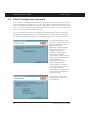
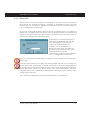
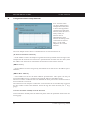
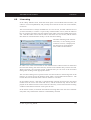
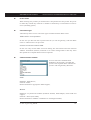
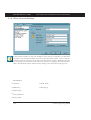
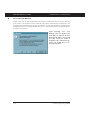
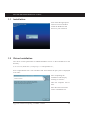
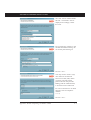
If you use the assistant, click
on “Next”. If selected then an
IPSec test destination will be
added to the client’s
phonebook and the assistant
will guide you through the
definition of generic
parameters. The following
access data are created
automatically: VPN protocol is
IPSec, the Tunnel Endpoint of
the VPN gateway is:
62.153.165.36, XAUTH
userID and Password is
“ncpipsecnative”. The link
type is LAN. If a connection
via an ISP should be
established, the parameters for
dial-up must be configured in
the profil settings.
Setting up the variant with
strong security you can use a
test certificate.
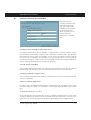
34
© NCP engineering GmbH
SECURE ENTRY CLIENT
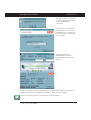
installation
The PIN of the test certificate
is “1234" and must be entered
wenn establishing the
connection.
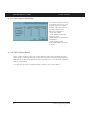
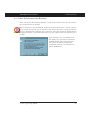
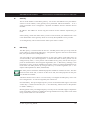
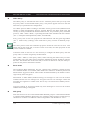
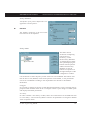
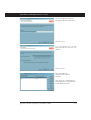
Once you have saved the test
configuration, you can set up
immediately a test connection
(in LAN mode) by clicking the
“Test” button.
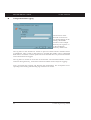
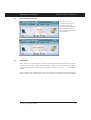
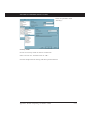
After the connection is
established the monitor is
displayed like shown on the
left side.
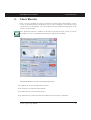
For further configuration of any profile refer the descriptions under “Client Monitor,
Profile Settings” and “Configuration Parameters, IPSec General Settings”.
For activation note the section 4.6 Licensing in this handbook.
© NCP engineering GmbH
35
SECURE ENTRY CLIENT
2.4
installation
Updateing and Uninstalling
If you are already using a previous version of the Software it will be detected when attempting to install the new Client Software. If this is the case, then you will be asked if
you wish to update your current Client Software to the newer version now in your possession. During the update the current profile settings, certificate data and call control
manager statistics will be applied to the new client.
In order to uninstall the Client Software go to: “Start” → “Settings” → “Control Panel”. Now click on “Add/Remove Software” and then select the client from the list of
programs and then click on the “Add/Remove” button. The Uninstall Shield Program
will now delete the client software from your PC.
Important: After the removal of the software components, the profile and configuration
settings are still saved and can be restored in the event a newer version of the client is
installed. In order to completely delete everything; manually remove the installation directory (default \Windows\ncple).
36
© NCP engineering GmbH
SECURE ENTRY CLIENT
2.5
installation
Upgrade to the Secure Enterprise Client
You upgrade from a Secure Entry Client to a Secure Enterprise Client by replacing the
licensing and the software. This can be done manually on-site, or via an Update Server.
For a manual upgrade the software is reinstalled from the CD, and “NCP Secure Enterprise Client” is entered as the product to be installed. In this process the install program recognizes that a software version has previously been installed and executes an
update after appropriate confirmation. Then the new activation key with serial number
must be entered in the Pop-up menu.
For an upgrade via an Update Server - the IP address of the Update Server is entered in
the client’s telephone book (see → DNS / WINS). In this case the Secure Client software will be downloaded automatically the next time the client dials into the corporate
network. At the next dial-in with this new software a CNF file (profile settings) with
licensing key will be downloaded. This concludes the update process.
2.6
Project Logo
The logo is displayed in a panel of the Client over the entire width of the Monitor at
the very bottom. An ini file (ProjectLogo.ini) must be created for the logo, where the
following can be entered:
–
–
–
–
Project logo for small fonts
Project logo for large fonts
Info text (ToolTip) if the cursor is positioned on the logo
HTML file if there is mouse click on the logo.
For the installation a “ProjectLogo.ini” is copied into the installation directory that
contains further explanations for creating the logo.
© NCP engineering GmbH
37
SECURE ENTRY CLIENT
installation
===============================================================
ProjectLogo.ini
===============================================================
[GENERAL]
Picture_96=
Picture_120=
ToolTip1=
HtmlLocal=
#
#
#
#
#
#
#
#
#
#
#
#
#
#
#
#
#
#
#
#
#
#
#
#
#
#
#
#
#
#
#
#
#
#
#
#
#
#
#
38
Picture_96
==========
Bitmap of the project logo for view with small fonts (96 DPI)
Height: 24 pixels (minimal)
Width: 328 pixels (precise)
If a path is not specified, then the file is searched in the
current directory of the Secure Client. E.g.:
Picture_96=C:\programs\ncp\SecureClient\MyProjectPicture.bmp
Picture_120
==========
Bitmap of the project logo for view with large fonts (120 DPI)
Height: 29 pixels (minimal)
Width: 404 pixels (precise)
If a path is not specified, then the file is searched in the
current directory of the Secure Client. E.g.:
Picture_96=C:\programs\ncp\SecureClient\MyProjectPicture.bmp
ToolTip[1] ... ToolTip[X]
=========================
Info text for the ToolTip of the project logo.
For each line in the info text a ToolTip entry with
consecutive number (ToolTip[x]) must be created.
e.g. ToolTip1=the info text for the project logo
ToolTip2=———————————————————ToolTip3=third
line ...
ToolTip4=fourth line ...
HtmlLocal
=========
HTML file that will be displayed, if there is a mouse click
on the project logo. The file must be available locally on
the computer. If a path is not specified, then the file is
searched in the current directory of the Secure Client. E.g.:
HtmlLocal=C:\programs\ncp\SecureClient\MyProjectInfo.html
© NCP engineering GmbH
SECURE ENTRY CLIENT
3.
client monitor
Client Monitor
Once you have installed the Client the Monitor should appear automatically on PCs
screen. To manually display the Monitor click on: Start / Programs / NCP Secure Client
/ Secure Entry Client Monitor. The Client Monitor will be loaded and displayed on the
screen or in the task bar.
Note: When the monitor is loaded it will either be displayed on the screen (as well as
the taskbar) or if it is not displayed but loaded it appears in the taskbar.
The Client Monitor serves 4 important purposes:
þ to display the current communications status
þ for selection of communication medium
þ for definition of call control parameters
þ for definition of profiles and associated destination and security parameters
© NCP engineering GmbH
39
SECURE ENTRY CLIENT
3.1
client monitor
The Client Monitor User Interface
3.1.1 Operating and Display Field
The Client Monitor consists of:
¨ A title header indicating the
security version of the client,
¨ the main menu bar,
¨ A display of the selected
Profile and a window for
Outside Line Prefix,
¨ the graphic status field,
displaying the communication status,
The field that displays signal
strength only opens for
connection types
UMTS/GPRS/WLAN,
¨ the button bar with
“connect” and “disconnect”
¨ and the statistics field
The user interface is conform Windows standards, and operation is similar to that of
other Windows applications. The monitor can either be operated by using pull down
menus from the menu bar, or by using buttons from the button bar, or via the context
menu (right mouse button).
40
© NCP engineering GmbH
SECURE ENTRY CLIENT
client monitor
3.1.2 The Apperance of the Monitors
The monitor can be displayed in different sizes according to the setup in “Window”
from the monitor menu (see → Window).
The communication medium
is shown in the statistic
window or can be entered
by defining the profile so
that is displayed in the
status field as well.
Modification of the Interface
The monitor appearance can be modified by the administrator. This is particularly relevant for the menu choices “Link Information”, “Certificates”, “Link Control” and
“Logon Options”. Also the administrator can suppress profile parameter fields and can
suppress individual parameters or set them to “non configurable”. The suppressed and
deactivated features and parameters simplify software operation, they do not influence
the performance of the software or your work. Refer the section 3.3 Configuration,
3.3.8 Configuration Locks.
© NCP engineering GmbH
41
SECURE ENTRY CLIENT
client monitor
3.1.3 Dialing-up und selecting the Profile
Once the software has been installed and a profile has been configured correctly (see →
3.2.3 Configuration), you are ready for dialing up to the selected destination.
The profile can be selected
in two ways: either from the
pull-down menu, or from
the pop-up menu invoked by
clicking on the right mouse
button. (see illustration)
In order to establish a
connection it is therefore
not necessary to start the
client monitor itself or to
dial-up manually. The only
software that must be
started is the desired
application software (Email,
Internet browser, terminal
emulation, etc.). The
connection will then be
established automatically
(see → Line Management,
Connection Mode,
automatically).
It is also possible to
manually establish the
connection to a selected
destination by selecting
“Connection” in the main
menu and click on
“connect” Alternatively
you can click on the
“connect” button in the tool
bar.
When the connection is established (see → illustration above), the monitor displays a
thick green bar from the Client to the Server under which the text “Connection is established” is displayed. At the same time, the traffic lights change from red to green. The
green traffic light denotes an established connection and occuring costs.
42
© NCP engineering GmbH
SECURE ENTRY CLIENT
client monitor
3.1.4 Symbols of the Monitor
The Client’s Monitor interface has been informatively designed with icons. They provide information about the current status of the connection or about specific configured
features via appearance and color.
The traffic light icon
is always visible
when the Client
starts. If you
minimize (close) the
Monitor, this icon
will be displayed in
the taskbar. Double
click on this icon to
re-open the Monitor.
The traffic light icon
only disappears when
the Monitor is closed.
The other icons are
described in details on
the following pages.
Firewall
EAP Authentication
Chip Card Reader
PIN Status
Dial-in
Authentication
Encryption
Compression
In addition either WLAN
panel or a UMTS / GPRS
panel will be displayed in the
monitor depending on
configuration
Display of
and installation of a
the Field Strength
multifunction card.
In the UMTS / GPRS panel
you can select the desired data
transmission process by
clicking on the respective
label. Then the icon will be
displayed in green.
© NCP engineering GmbH
VPN Tunnel
Symbol
for WLAN
or HotSpot (below)
Display of the WLAN
or of the HotSpot
Button for Network Search (UMTS/GPRS)
or Profile Selection (WLAN)
43
SECURE ENTRY CLIENT
client monitor
3.1.5 Status Displays
The graphic field of the Client Monitor displays different icons depending on the configuration; these icons can take on different status settings depending on the phases of
the connection setup. Tooltips provide brief comments relative to function when you
move the cursor over one of the icons. The status displays are described below in the
sequence in which they are shown in the illustration below, from left to right.
Status Displays
PIN Status
Chip Card Reader
EAP Authentication
n
Firewall
Headquarters
Corporate Network
EAP Authentication
If an extended authentication via the Extensible Authentication Protocol (EAP) has
been activated in the “EAP options” then this will be displayed via the EAP icon. The
color yellow indicates the EAP negotiation phase, red indicates unsuccessful authentication, green indicates successful authentication with EAP. Double click on the EAP
icon to reset the EAP. Then a new EAP negotiation will be executed automatically.
If the Client is successfully authenticated relative to a network component, the opposite
side will indicate which protocol was used; this information is always displayed with a
green icon and the designation MD5 or TLS.
If an EAP icon is displayed in red and the connection has been set up nonetheless; this
means that EAP has been configured in the Client, however the network component
does not require EAP.
n
Chip Card Reader
If a smart card reader has been installed and configured (see Monitor menu -> Configuration / Certificate), then its icon will be displayed in blue.
If the smart card is inserted in the reader, this icon will be displayed in green.
44
© NCP engineering GmbH
SECURE ENTRY CLIENT
n
client monitor
PIN Status
A PIN icon in gray always means that the system is still waiting for the PIN to be entered for the respectively configured certificate. Double click on this icon to open the
dialog for entering the PIN. An incorrect PIN is acknowledged with an error message,
and remaining number of possible PIN entry attempts will be reduced.
After successfully entering the PIN the icon will be displayed in green. This color indicates that the entered PIN is valid, even if a connection has not been set up. If you want
to ensure that unauthorized persons cannot establish a connection in your absence, then
the PIN must be reset (see Monitor menu -> Reset Connection / PIN) or the “PIN query
function for each connection setup” must be activated under “Configuration / Certificate. In the latter case the dialog for PIN entry will not be displayed after double clicking
on the grey icon, it will only be displayed after connection setup.
n
Firewall
The firewall icon is always visible if a firewall is activated. If the global firewall (Personal Firewall) with defined rules is active, and the link-specific firewall is not active,
then the icon will be displayed in red without arrows.
If the administrator has specified a Friendly Net (Friendly Net Detection), and if the
Client is in a friendly net, then the firewall icon will be displayed in the color green.
Friendly Net Detection specifications are made in the Monitor Configuration menu under “Settings / Friendly Nets”, either by specifying static network routes, or by activating automatic Friendly Net Detection. In this regard, see the description under “Firewall Settings / Configuration Field - Friendly Nets”.
If Link Firewall is activated, the icon will be displayed with arrows, regardless of whether the global firewall is active or inactive.
If the Link Firewall has been switched active in the Phonebook with “Activate Stateful
Inspection -> Always” and the system is configured so that communication is only allowed in the tunnel then the firewall icon will be displayed with two red arrows.
If the option “Only allow communication in the tunnel” is switched off then the icon
will be displayed with one green arrow and one red arrow.
If Stateful Inspection is only activated for an existing connection then arrow icons are
only displayed after a connection setup.
The arrow symbols appear in front of a green firewall, if in addition to Link Firewall
options, a Friendly Net where the Client is currently located has been defined in the
global firewall.
© NCP engineering GmbH
45
SECURE ENTRY CLIENT
client monitor
3.1.6 Connection Setup Symbols
In addition to the status displays the graphic field of the Client Monitor also includes
connection set up icons.
Symbols of the NAS Dial-in
NAS/Internet Dial-in
Dial-in
(ISP)
Authentication (ISP)
n
Internet
Service
Provider
Symbols of the NAS Dial-in
If a dial-in to the Network Access Server or Internet Service Provider (ISP) is taking
place on the Internet then the dial-in connection will be indicated by a thin yellow line.
The dial-in is concluded and the connection to the ISP is established when the thin connection line is displayed in green.
The colors of the NAS dial-in icons change color concurrently with the start of the connection setup.
Dial-in to the ISP is displayed with a green globe; authentication at the ISP is indicated
with a handshake. During the connection setup its color changes from gray
to
blue
, then flashes green, and finally is displayed as constant green to indicate
successful connection set up.
The parameters for NAS dial-in are located in the profile settings under “Network DialIn”. If the profile will be used for “Automatic Media Detection” (see -> Profile Settings / Basic Settings), then it is strictly required that you enter a user ID and a password under “Network Dial-In”.
n
Symbols of the VPN Dial-in
After NAS dial-in is concluded, the VPN dial-in to the corporate gateway can take
place. In this process the dial-in connection will be symbolized with a thick yellow
line. If the dial-in is concluded and the connection to the VPN Gateway is successfully
established then the thin connection line will be displayed in green.
46
© NCP engineering GmbH
SECURE ENTRY CLIENT
client monitor
The colors of the VPN dial-in icons change color concurrently with the start of the connection setup to the gateway. Dial-in and authentication on the VPN gateway are displayed in precisely the same manner as they are displayed for NAS dial-in. In addition
there are icons for key negotiation (keys) and compression (pliers), if configuration of
these icons is prescribed from the gateway side.
Symbols of the VPN Dial-in
VPN Dial-in
VPN Tunnel to the Gateway
of the Corporate Network
Dial-in
(GW)
Headquarters
Compression (GW)
Encryption (GW)
Corporate Network
Authentication (GW)
The colors of the icons change from gray to black, then flash green, and finally are displayed as constant green to indicate successful connection set up. In this regard the
dial-in and authentication processes on the gateway must always be executed; encryption and compression are optional. From left to right the VPN dial-in icons are:
Dial-in on the VPN Gateway:
The target address of the VPN gateway is specified in the profile settings under “IPSec
Settings / Gateway”.
Authentication on the VPN Gateway:
The necessary parameters are in the profile settings under “Identity”. “Extended Authentication (XAUTH)” is always used. User ID and password are either read from the
configuration under these parameters, or they are read from the certificate. A certificate
that will be used is configured in the Monitor menu under “Configuration / Certificates”, and the issuer certificate of the gateway that will be selected must agree with the
user certificate.
Encryption:
Either a pre-shared key or the private key from a certificate are used for encryption.
Both alternatives are set in the profile settings under “Identity”. If the pre-shared key is
used, then the “Shared Secret” must be entered here. If the “pre-shared key” is not used
then the certificate will be used automatically. The gateway specifies which encryption
will be used.
Compression:
Compression is only used if it is also supported by the gateway. You make the compression settings in the profile settings under “Use Extended IPSec Options / IP Compression”.
© NCP engineering GmbH
47
SECURE ENTRY CLIENT
4.
client monitor
Using the Client Monitor
The description follows the menu items in the menu bar.
The menu-bar consists of the following items from left to right:
¨ Connection
¨ Configuration
¨ Log
¨ Window
¨ Help
48
© NCP engineering GmbH
SECURE ENTRY CLIENT
4.1
client monitor
Connection
With this choice you will find commands for Link establishment and Link break-off. You will
also find information windows displaying the current link establishment and the implemented
certificates. In addition Link control statistics can be read here and if required the Link control barrier can be deleted if a threshold value that you have set is exceeded.
© NCP engineering GmbH
49
SECURE ENTRY CLIENT
client monitor
4.1.1 Connect
This command is used to initiate a connection. A connection can only be made if a profile has been properly defined and selected in the Profile Settings (see → Profile Settings, Basic Settings). The selected profile is displayed in the “Profile” field of the monitor.
Selecting the function “Connect” the connection will be established manually to the destination system. Whether the link is built manually or automatically depends on the
“Connection Mode” defined for the profile in the Line Management folder of the profile settings as well as the communication medium being used (see → Profile Settings,
Line Management, Connection Mode).
4.1.2 Disconnect
A connection can be terminated manually by clicking on “Disconnect” in the Connection
pull-down menu or by clicking the right mouse button. As soon as the connection has
been terminated, the “traffic light” switches from green to red.
4.1.3 HotSpot Logon
Requirements: The user must be in the receiving range of a hotspot, with an activated
WLAN card. There must be a connection to the hotspot and the wireless adapter must
have an assigned IP-address. (Windows XP provides you with the needed configurations concernig access to WLANs).
The clients firewall makes sure that only the IP-address assignment is being done by
DHCP without any further possibilities of access to or from the WLAN. The firewall
has intelligent automated processes for clearing the ports of one or more https so as to
make logins and -outs to the hotspot available. Durig this process only data traffic to
the hotspot server is possible. In this way a public WLAN can only be used for connecting VPN to the central data network, direct internet access is excluded. For opening
the homepage of a hotspot in the browser a possible existing proxy-configuration must
be deactivated.
At present the clients hotspot access works only with those hotspots, that redirect inquiries with the help of browsers to the homepage of the public WLAN provider (for
example T-Mobile or Eurospot).
Under previously described conditions a click on the menu option “HotSpot Logon”
opens the website to log into the standard browser. After entering the access data the
VPN-connection to, for example, the company’s headquarters can be established and
safe communication is possible.
50
© NCP engineering GmbH
SECURE ENTRY CLIENT
client monitor
After this menu option has been selected different connection messages will be displayed on the screen:
– If the user is already connected to the Internet he will be connected with the start
page http://www.ncp.de. A window with the following message will appear:
“You are already connected to the Internet. Hotspot logon is not necessary or has already been executed.”
This text can be changed by the administrator by entering the address of a different
HTML start page in the form
http://www.mycompagnie.de/error.html
And the text of error.html is changed accordingly.
– If the user is not yet logged on, then a window will be displayed requesting the user
to enter user ID and password for logon to the hotspot operator.
– If the user has not reached a website, then the Microsoft error message “...not found”
will be displayed.
4.1.4 Multifunction Card
This menu item is displayed after a multifunction card has been installed (see the Appendix in this manual). In addition the field with the display for UMTS / GPRS will be
displayed in the Monitor and the WLAN panel will be hidden (see “Monitor icons”
above).
n
Network Search
After the monitor starts, the installed multifunction card automatically searches for a
wireless network and displays it with the appropriate field strength as soon as it is
found (T-Online in the Fig. below). Another network search can be triggered by selecting the menu item or by clicking on the button for “Network Search”.
If the field strength is insufficient, the card will automatically switch over from UMTS
as data transmission technology to GPRS, and the connection will remain intact. When
the field strength increases, the card will automatically switch back.
© NCP engineering GmbH
51
SECURE ENTRY CLIENT
client monitor
If a network search was executed,
the window for network selection
will be displayed (left). The
desired network can be selected
from a list. If you do not desire
another network search each time
the Monitor is called, is then this
function, which is active by
default, must be switched off via
the Check button.
n
Activate GPRS / UMTS
The data transmission technology can also be changed manually. To do this click on
the text with the desired transmission technology, or select this menu item. When changing the medium manually the connection will first be disconnected. The connection
will then be re-established automatically, if “Automatic Connection Set Up” has been
installed in the Phonebook.
n
Enter SIM PIN
The dialog for entering the SIM
PIN is automatically displayed for
a connection setup.
Use this menu item to also enter
the SIM PIN even before a
connection setup.
n
Change SIM PIN
You can only change the SIM PIN if the previous SIM PIN has been entered correctly.
52
© NCP engineering GmbH
SECURE ENTRY CLIENT
n
client monitor
PUK Entry
After three incorrect attempts to
enter the SIM PIN the window for
entering the PUK (Personal
Unblocking Key), which
accompanies the SIM card, will be
displayed. After correctly entering
the PUK you will be able to enter a
new SIM PIN.
4.1.5 Connection Info
Upon selecting the menu parameter “Connection Info” link statistics are displayed.
The window also displays the type of security features being used as well as the IP addresses that have been assigned between the IPSec client and the destination resulting
from the PPP negotiation. The information in the connection info window is “readonly” and has no influence on the functionality of the IPSec client.
The field “Connection Info” could be suppressed by the administrator. In this case the
menu item could not be activated.
If the connection info is faded, the most important information concerning data transfere, statistic and security can be seen in the statistic field of the monitor (see → Window, Show Statistics).
© NCP engineering GmbH
53
SECURE ENTRY CLIENT
n
client monitor
Time Online
Time Online indicates the total amount of time that the PC is actually connected to the
destination, regardless of any timeouts (disconnects). The value is reset to zero (0) either as a result of (re)booting your PC or when you change the destination.
n
Timeout
The Client Monitor displays the time remaining until the next timeout (disconnect) occurs, which begins immediately following the last exchange of data over the Link (including any handshaking). (See → Phonebook, Line Management).
n
Direction
Direction indicates the current direction of communications as follows:
Out
=
outbound or outgoing call is currently being executed.
In
=
inbound or incoming call is currently taking place.
n
Speed
The displayed number varies according to the current data throughput.
n
Multilink
If a connection is established via several ISDN-B channels, the statistic showes “on”.
n
Media Type
The following Media Types are supported: ISDN, Modem, LAN over IP, xDSL
(PPPoE), xDSL (AVM – PPP over Capi), GPRS and PPTP.
n
Compression
Compression is always defined by the gateway. IPSec compression is displayed with
“IPSec Compression (LZS)”.
n
Encryption
The used encryption type is diasplayed. Following types of encryption are supported:
AES, Blowfish, 3DES. The encryption type is assigned by the central site (gateway).
54
© NCP engineering GmbH
SECURE ENTRY CLIENT
n
client monitor
Key exchange
Display what Session Key exchange method is used:
Static Key
= The same Static Key must be used at both endpoints of communication. It is entered under “Profile Settings → Identity”
IKE (IPSec)
= To transfer the Session Key, the encrypted Control Channel
of Phase 1 negociation is used.
n
Rx and Tx Bytes
Rx and Tx Bytes indicates the amount of data being sent (out) and received (in) for
each protocol and for each communications session. The amount of data is expressed in
Bytes (1 byte = 1 character). The total amount of data sent and received for all protocols is also displayed.
4.1.6 Available Communication Media
The purpose of this
window is only to
inform about the
available communication
media and the currently
used communication
medium. On the basis of
a pre-configured
destination system, those
link types that are
currently available for
the Client PC are
detected and
implemented, and if
multiple alternative
transmission paths are
available, the fastest will
be selected automatically.
The available communication media are displayed with yellow signal lamps and the
automatically selected with a green signal lamp.
For configuration purposes note the description of “Automatic Media Detection” in the
parameterfolder “Destination System” of the phonebook.
© NCP engineering GmbH
55
SECURE ENTRY CLIENT
client monitor
4.1.7 Certificates
In the pulldown menu “Connection” you will find the entry “Certificates” which consists of the
following submenus “Configuration”, “View Issuer Certificate”, “View Client Certificate”,
“View Incoming Certificate” and “Display CA Certificate”.
Certificates are normally created by a CA (Certification Authority) utilizing some sort of PKIbased architecture and they may be implemented on a Smart Card in addition to a digital signature(s). Such Smart Cards represent an individual “personal identity card”.
n
View Issuer Certificate
In order to view the Issuer Certificate select “Connection → Certificate → View Issuer
Certificate”. Upon doing so the individual assigned data will be displayed (read-only)
for your review purposes.
Certificate Authority =
(CA)
The CA and the issuer of a Issuer Certificate are normally
identical (self-signed certificate). The CA of the Issuer Certificate has to be identical with the CA of the Client Certificate (see → View Client Certificate).
Serial Number
=
The serial number of the certificate can be compared with
the registered serial number in the Revocation List of the
Certification Authority.
Validity
=
The validity of certificates is limited. Normally the validity
of a Issuer Certificate is longer than the validity of a Client
Certificate. Upon expiration of the Issuer Certificate, the validity of the Client Certificate of the same CA expires as
well.
Fingerprint
=
Hash value. The Hash value is the signature of the certificate. The Hash value is encrypted with the private key of the
CA.
56
© NCP engineering GmbH
SECURE ENTRY CLIENT
n
client monitor
View Client Certificate
In order to view the Client Certificate select “Connection → Certificate → View Client Certificate”. Upon doing so the individual assigned data will be displayed (readonly) for your review purposes.
n
Certification Authority
(CA)
=
The CA and the issuer of a Client Certificate is normally
identical (self-signed certificate). The CA of the Client Certificate has to be identical with the CA of the Issuer Certificate (see → Issuer Client Certificate).
Serial Number
=
The serial number of the certificates can be compared with
the registered numbers in the Revocation List of the Certification Authority. (see → strong Radius Authentication)
Validity
=
The validity of certificates is limited. Normally the validity
of a Issuer Certificate is longer than the validity of a Client
Certificate. The expiration of validity erases the functionality of certificates.
Fingerprint
=
Hash value. The Hash value is the signature of the certificate. The Hash value is encrypted with the private key of the
CA.
View incoming Certificate
Display of the certificate that is communicated in the SSL negotiation from the other
side (Secure Server). You can see, for example, whether you have accepted the issuer
displayed here in the list of your CA certificates (see below).
If the incoming user certificate is one of the CAs not known from the list “Display CA
Certificates”, then the connection will not take place.
If no certificates are stored in the installation directory under CACERTS\, then no verification takes place.
© NCP engineering GmbH
57
SECURE ENTRY CLIENT
n
client monitor
Display CA Certificates
Multiple issuer certificates
are supported with the client
software (multiple CA
support). The issuer
certificates must be
collected in the installation
directory under CACERTS\
for this. In the client
monitor the list of CA
certificates read in is
displayed under the menu
item “Connection →
Certificates → Display CA
Certificates”,
If the issuer certificate of another side is received, then the client determines the issuer,
then searches for the issuer certificate, first on Smart Card or in the PKCS#12 file, and
then in the CACERTS\ directory.
If the issuer certificate is not known, then the connection will not be established (No
Root Certificate found). If no CA certificates are present in the installation directory
under CACERTS\, then a connection that implements certificates is not permitted.
n
Display and analysis of extensions for
incoming certificates and CA certificates
Certificates can contain extensions. These serve for the linking of additional attributes
with users or public keys, that are required for the administration and operation of the
certification hierarchy and the revocation lists. In principle, certificates can contain
any number of extensions, including those that are privately defined. The certificate
extensions are written in the certificate by the issuing certification authority.
Three extensions are significant for the IPSec client and the gateway:
¨ extendedKeyUsage
¨ subjectKeyIdentifier
¨ authorityKeyIdentifier
58
© NCP engineering GmbH
SECURE ENTRY CLIENT
client monitor
Display of extensions
To display the extensions of
an incoming or CA
certificate you have to
proceed as follows:
The Ca certificate which
extension should be
displayed, has to be opened
by a doubble click in the
window of Ca certificates.
Upon doing so the next
window with general
information is opened.
For the incoming certificate
this window is already
opened after “View
incoming certificate” was
selected in the certificate
menu.
The window “General”
displays the general
certificate data
The window “Extensions”
displays the certificate
extensions if available.
© NCP engineering GmbH
59
SECURE ENTRY CLIENT
client monitor
Extension checks
KeyUsage
If the KeyUsage extension is contained in an incoming certificate, then it will be verified. The following KeyUsage bits are accepted:
– Digital Signature
– Key Encipherment (key transport, key management)
– Key Agreement (key exchange process)
If one of the bits is not set, then the connection is interrupted.
extendedKeyUsage
If the extendedKeyUsage extension is present in an incoming user certificate, then the
Secure Client checks whether the defined extended application intent is “SSL Server
Authentication”. If the incoming certificate is not intended for server authentication the
connection will be refused. If this extension is not present in the certificate, it will be
ignored.
Please note that the SSL server authentication is direction-dependent. This means that
the initiator of the tunnel establishment checks the incoming certificate of the other
side, which, if the extendedKeyUsage extension is present, must contain the intended
purpose “SSL Server Authentication”. This applies also for a callback to the Client via
VPN.
Exception: For a server call-back to the client after a direct dial-up, without VPN but
with PKI, the server checks the client certificate for the extendedKeyUsage extension.
If this is present, then the intended purpose “SSL Server Authentication” must be contained otherwise the connection will be rejected. If this extension is not present in the
certificate it will be ignored.
subjectKeyIdentifier / authorityKeyIdentifier
A key identifier is an additional ID (hash value) to the CA name on a certificate. The
authoritykeyidentifier (SHA1 hash over the issuer’s public key) on the incoming certificate must agree with the subjectKeyIdentifier (SHA1 hash over the public key of the
owner) on the corresponding CA certificate. If no CA certificate is found then the connection is rejected.
CDP (Certificate Distribution Point)
The URL for downloading an CRL is stored in the CDP. If the CPD extension is contained in the certificate, then after the connection is setup, the CRL is downloaded via
the specified URL and checked. If the system determines that the certificate is invalid
the connection is disconnected. During this process the CRL is stored in the ncple\crls
directory, under the common name of the CA.
60
© NCP engineering GmbH
SECURE ENTRY CLIENT
client monitor
4.1.8 Enter PIN
The PIN entry can be executed before establishing a connection, after the monitor has
been started. If a connection requiring a certificate is established at a later time, then
the PIN entry can be omitted – unless the configuration for the certificate requests it
(see → Configuration, Certificates).
If you have configured the IPSec client for the use of a Smart Card or of a PKCS#11
module (see →Configuration, Certificates), then a light blue symbol for the Smart Card
appears in the status field. If you have inserted your Smart Card in the card reader, the
symbol color changes from light blue to green.
If the PIN has not been entered before a
connection establishment, then the PIN
entry dialog appears when the first
connection requiring the use of a
certificate is to be established to a
destination at the latest. Thereafter the
PIN entry can be comitted in the case of
repeated manual connection
establishment, if this has been configured
(see → Configuration, Certificates).
Using a soft certificate the PINcan have of 4 digits. Using a Smart Card it must have at
least 6 digits.
Incorrect entries and incorrect PINs are acknowledged with the error message “Incorrect PIN!” after approximatly 3 seconds. At this point a connection establishment is
not possible. Please note that a Smart Card or a token can be blocked after multiple incorrect PIN entries. In this case, please contact your remote administrator. An established connection will, by default, be disconnected if the Smart Card or token is removed during the operation.
The connection establishment can only be executed after correct PIN entry.
© NCP engineering GmbH
61
SECURE ENTRY CLIENT
client monitor
Safeguarding PIN Use
If you activate the function, “PIN request at each connection”, in the certificate configuration, then the PIN can no longer be entered via the “Enter PIN” Monitor menu option. The menu option “Enter PIN” is thus switched to inactive automatically. This ensures that the PIN will only be queried and can only be entered directly before the connection is set-up.
Activate this function to prevent an unauthorized user from setting up an undesired
connection if the PIN has already been entered.
Likewise, if the “Change PIN” function has been switched active, then the PIN that has
already been requested in other function contexts is no longer used – i.e. when setting
up a connection, or in the “Enter PIN” connection menu. Instead you can always select
the menu option “Change PIN” and the new PIN will be automatically reset immediately after the change.
This ensures that when configuring “PIN query at every connection set-up” on an unauthorized Client Monitor, a PIN entered previously by an unauthorized user cannot be
used at anytime to set-up a connection.
4.1.9 Reset PIN
This menu item can be selected for deleting the PIN, for making the valid PIN useless
to other users. It can be helpful for example if you leave your client temporary or if the
user changes. Afterwards a valid PIN must be reentered again for authentication.
n
PIN State Symbol Visible in the Client Monitor.
If a valid PIN is entered this is symbolized by a green check next to the PIN display in
the client monitor. If the PIN has not yet been entered correctly the green check will
not appear.
n
PIN Handling after Logoff or Sleep Mode
When a user logs off Windows NT/2000/XP the PIN cache is cleared and must be reentered at next logon. When the machine enters sleep mode the PIN cache is also cleared.
n
Displaying ACE Server Messages for RSA-Token
If messages are sent by the ACE server because of the RSA token they will be displayed on the monitor in an input field (for example “Expiration of valid PIN”).
62
© NCP engineering GmbH
SECURE ENTRY CLIENT
client monitor
4.1.10 Change PIN
The PIN for a Smart Card or
for a soft certificate can be
changed under the menu item
“Change PIN”, if the correct
PIN number has previously
been entered. This menu item
will not be activated without
the previous entry of a valid
PIN number.
For security reasons, after
opening this dialog the still
valid PIN must be entered a
second time. This is to insure
PIN change for the authorized
user only. The digits of the PIN
are displayed in this entry field,
and in the next entry fields as
asterisks “*”.
Then enter your new PIN and confirm it by repeating it in the last entry field. With a
click on “OK” you have changed your PIN. PIN policies that need to be complied with
are displayed under the entry field. They can be set in the main menu under “Certificate
→ PIN Policies”.
By entering a new PIN the red X will change to a green check as soon as the guidelines
are fulfilled. (see illustration above)
© NCP engineering GmbH
63
SECURE ENTRY CLIENT
client monitor
4.1.11 Call Control Statistics
Call Control Statistics provide
you with an overview of your
communications on a daily,
monthly and yearly basis. It
accurately displays the
following information:
– total time online
– total number of connects
(outgoing calls)
– total number of charge/units
(if available)
– total amount of data
(expressed in Bytes) sent and
received
4.1.12 Call Control Reset
If the “Limits” defined in the Call Control Manager have been exceeded, the IPSec
client issues a “Warning Message” and blocks any further communications until such
time that the “Call Control Reset” has been activated (see → “Connection” pull-down
menu in the Monitor).
A connection can only be established after clicking “Call Control Reset”.
64
© NCP engineering GmbH
SECURE ENTRY CLIENT
client monitor
4.1.13 Exit (Disconnect the Monitor)
Have you already disconnected the link, a click on this menu item or on the “Disconnect” button closes the monitor.
If the connection is still established, with a click on this menu item or on the “Disconnect” button the monitor can be closed as well. Please note that closing the Monitor
does not automatically terminate the connection. If the link should be established although the monitor is closed and fees may occur, the software asks you explicitly for a
prompt.
Upon selecting “No” your desktop will
not display any icon and you will not be
notified that the link is active and fees
may occur! In order to terminate the
connection correctly you would have to
restart the Monitor!
© NCP engineering GmbH
65
SECURE ENTRY CLIENT
4.2
client monitor
Configuration
You can specify all settings for work with the IPSec Client, which should work longer than
one session, with this menu choice. Specifically this means creating profiles, configuration for
IPSec links, choosing communication media, as well as obtaining an outside line for connections to telecommunications systems.
In addition you can individually configure precisely how certificates should be used, how the
call control manager should work and which configuration rights the user receives.
66
© NCP engineering GmbH
SECURE ENTRY CLIENT
client monitor
4.2.1 Profile Settings
n
Entries in the profile settings
After installing the Secure Client for the first time it will be necessary to define a profile for your requirements in the profile settings. For this purpose there is a “Configuration Assistant”, which will walk you through the configuration steps of a profile. In this
way the first profile will be created.
The profile settings provide the basis for defining and configuring destinations (profiles) which can be modified or reconfigured at any time according to requirements.
Upon clicking “Profile Settings” in the Monitor menu “Configuration” the menu is opened and displays an overview of the defined profiles and their respective names and the
telephone numbers of the according destinations.
There is also a toolbar with the following function buttons: Configure, New Entry, Duplicate,
Delete, OK, Help and Cancel.
n
New Entry – Profile
In order to define a new Destination, click on “Profile Settings”. When the window
opens click on “New Entry”. Upon doing so the “Configuration Assistant” opens and
walks you through the configuration of a new Profile according to your requirements.
Upon entering all items in the assistant the new profile is entered in the Profile Settings
based on these parameters. All other parameters are assigned a default value.
© NCP engineering GmbH
67
SECURE ENTRY CLIENT
client monitor
Using the configuration assistant, connections can be
quickly established with
the Internet or to the corporate network. The profile is created after a few
configuration questions, in
accordance with the selection of the desired basic
setting.
Below are the required data for the configuration:
Link to Corporate Network using IPSec:
→
→
→
→
→
→
→
→
→
Profile Name
Communication Medium
Access data for Internet Service Provider (User ID, Password, Phone Number)
VPN-Gateway selection (Tunnel Endpoint IP address)
Access data for VPN Gateway (XAUTH, User ID, Password)
IPSec Configuration (Exch. Mode, PFS Group, Compression)
Static key (Preshared Key), without certificate (IKE ID Type, IKE ID)
IP Address Assignment (IP address of the client, DNS/WINS Server)
Firewall Settings
Link to the Internet:
→ Profile Name
→ Communication Medium
→ Access data for Internet Service Providers (User ID, Password, Phone Number)
The new profile is displayed now in a list of profiles with its assigned name. If no
further parameter settings are necessary you can close the profile settings by clicking
on “Ok”. The new profile is immediately available in the monitor. It can be selected in
the monitor and via the menu “Connection → Connect” a connection to the relating destination can be established.
68
© NCP engineering GmbH
SECURE ENTRY CLIENT
n
client monitor
Configure – Profile
If you want to change any default profile data and parameters, start by selecting the appropriate profile and then click on the “Configure” button. Upon doing so a folder
opens and displays a list of the following parameter folders on the left side:
Basic Settings
Dial-Up Network
Modem
Line Management
IPSec General Settings
Identity
IP Address Assignment
Remote Networks
Certificate Check
Firewall Settings
Upon selecting one of the folders the associated parameters will be displayed (see → 4.
Configuration Parameters).
n
Ok – Profile
Upon clicking “OK” in the configuration window the configuration of a profile is concluded. The new or modified profile is available in the monitor. It can be selected in
the monitor and via the menu “Connection → Connect” a connection to the relating destination can be established.
n
Duplicate – Profil
You may want to use an existing profile for the basis of a new profile, perhaps however
with slight modifications. In order to do so first select the profile to be duplicated and
then click on the “Duplicate” button. Upon doing so the “Basic Settings” parameter folder will open. You must now enter a new name for the profile and then click on “OK”.
A new profile is now created with parameters identical to the profile that was duplicated except for the Proflie Name.
Important: It is not possible to have 2 or more profiles with identical names. Each profile must be assigned its own unique name.
n
Delete – Profile
If you want to delete a profile select the appropriate profile and then click on the “Delete” button.
© NCP engineering GmbH
69
SECURE ENTRY CLIENT
client monitor
4.2.2 Firewall Settings
All firewall mechanisms are optimized for Remote Access applications and are activated when the computer is started. This means that in contrast to VPN solutions with
autonomous firewall, the teleworkstation is already protected against attacks before
actual VPN utilization.
The Personal Firewall also offers complete protection of the end device, even if the
client software is deactivated.
Please note that the firewall settings are globally valid, i.e. they apply for all destination systems in the telephone book.
On the other hand the Link Firewall Setting that is made in the telephone book can only
be effective for the associated telephone book entry (destination system) and the connection to this destination system.
70
© NCP engineering GmbH
SECURE ENTRY CLIENT
client monitor
Firewall properties
The firewall works in accordance with the principle of packet filtering, in conjunction
with Stateful Packet Inspection (SPI). The firewall checks all incoming and outgoing
data packets and decides whether a packet will be forwarded or rejected on the basis of
the configured rules.
Security is ensured in two ways. First unauthorized access to data and resources in the
central data network is prevented. Secondly the respective status of existing connections is monitored via Stateful Inspection. Moreover the firewall can detect whether a
connection has opened “Spawned connections” – as is the case with FTP or Netmeeting
for example – whose packets likewise must be forwarded. If a rule is defined for an
outgoing connection, which permits an access, then the rule automatically applies for
the corresponding return packets. For the communication partner a Stateful Inspection
connection is represented as a direct line, which can only be used for an exchange of
data that corresponds to the agreed rules.
The firewall rules can be configured dynamically, i.e. it is not necessary to stop the
software or restart the system.
The firewall settings in the configuration menu of the Client Monitor permit a more
precise specification of firewall filtering rules. They have a global effect. This means
that regardless of the currently selected destination system, the rules of the extended
firewall settings are always worked through first, before the firewall rules from the telephone book are applied.
A combination of the global and link based firewall can be quite effective in certain
scenarios. However generally, the global setting possibilities should be able to cover
virtually all requirements.
Please note that the link-based firewall settings take priority over the global firewall
settings at activation. For instance if the Link Firewall is set to “Always” and “Only allow communication in the tunnel”, then in spite of global configuration rules that may
possibly be different, only one tunnel can be set-up for communication. All other traffic will be rejected by the Link Firewall.
Configuration of the firewall settings
The filter rules of the firewall can be defined application-based as well as (additionally) address-oriented, relative to friendly/unknown networks.
To avoid any conflict between the rules of the Link Firewall in the phonebook and the
global firewall, we recommend to switch off the Link Firewall when using the advanced global firewall. The IP addresses of the respective links (to the VPN gateway) can
be inserted in the filter rules of the global firewall.
© NCP engineering GmbH
71
SECURE ENTRY CLIENT
n
client monitor
Configurationfield Basic Settings
In the basic settings you
decide how the extended
firewall settings will be
used.
Disable Firewall
If the extended firewall is deactivated, then only the firewall configured in the telephone book will be used. This means that all data packets will only be worked through via
the security mechanisms of this connection-oriented firewall, if they have been configured.
Basic locked settings (recommended)
If this setting is selected, then the security mechanisms of the firewall are always active. This means that without additionally configured rules all IP data traffic will be
suppressed. The exception are the data packets that are permitted (permitted through)
by the separately created active firewall rules (Permit Filter). If a characteristic of a
data packet meets the definition of a firewall rule, then at this point the work through
of the filter rules is ended and the IP packet is forwarded.
In the blocked basic setting mode in a convenient manner an IPSec tunnel connection is
released. For this, the data traffic can be globally permitted in the configuration field
“Options”, via the VPN protocol IPSec.
Basic open settings
In the open base setting all IP packets are first permitted. Without additional filter rules
all IP packets are forwarded.
The exception are the data packets that are filtered out (not permitted through) by the
separately created active firewall rules (Deny Filter). If one of the characteristics of an
IP packet coming into the server/client meets the definition of a Deny Filter, then at
this point the working through of filtering rules ends, and the IP packet will not be forwarded. Data packets that do not meet a suitable Deny Filter are forwarded.
72
© NCP engineering GmbH
SECURE ENTRY CLIENT
n
client monitor
Configurationfield Firewall Rules
The rules for the extended
firewall are brought together in this configuration
field. The display options
are all active by default
and correspond to the selected networks, for which
the respective rule can be
defined, and whether this
rule will be valid regardless of application:
–
–
–
–
–
Unknown networks
Friendly networks
VPN networks
Rules with applications
without applications
These selection fields for the displays of rules are only for overview purposes and have no effect on the application of a filter rule. The most important characteristics are displayed for
each defined rule:
–
–
–
–
Name
State
Networks
Application
Clicking on these characteristic buttons sorts the displayed rules.
Creating a firewall rule
Use the buttons underneath the display line to generate or edit the rules. To create a
firewall rule click on “New”. A filter rule is created via four configuration areas or
tabs:
– General: In this configuration field you specify the network and the protocol for
which the rule will apply.
– Local: Enter the values of the local ports and IP addresses in this configuration field.
– Remote: Enter the port and address values of the other side in the remote field.
– Applications: In this configuration field the rule can be assigned to one or more applications.
© NCP engineering GmbH
73
SECURE ENTRY CLIENT
n
client monitor
Firewall rule / General
The created rule is always executed as an exception to the basic
setting (see → Basic Settings).
Rule name
The rule appears under this
name in the display list.
State
The rule will only be applied to
data packets, if the status is “active”.
Direction
With the direction you specify whether this rule will apply for incoming or outgoing
data packets. According to the Stateful Inspection principle, data packets are received
that come in from a destination, to which data packets may be sent and vice versa.
However Stateful Inspection is only used for TCP/IP protocols (UDP, TCP).
You can switch to “incoming” for instance if a connection will be set-up from the remote side (e.g. for “incoming calls” or administrator accesses).
The “bi-directional” setting is only practical if Stateful Inspection is not available, e.g.
for the ICMP protocol (for a ping).
Apply rule to following networks
When creating a rule, at first do not assign it to any network. A rule can only be saved
if the desired allocation has been made and if a name has been assigned.
Unknown networks
– are all networks (IP network interfaces), that can neither be allocated to a known nor
VPN. These include for example connections via the Microsoft remote data transmission network or also direct or unencrypted connections with the integrated dialer of the
client, as well as Hotspot WLAN connections. If a rule will apply for unknown networks then this option must be activated.
74
© NCP engineering GmbH
SECURE ENTRY CLIENT
client monitor
Known networks
– are defined in the tab of the same name in the “Firewall settings” window. If a rule
will apply for known networks then this option must be activated.
VPN networks
– are all IPSec connections in the set-up condition. Moreover under this group there are
also all encrypted direct dial-in connections via the client’s integrated dialer. If a rule
will apply for VPN networks then this option must be activated.
Protocol
Select the appropriate protocol depending on the application:
TCP, UDP, ICMP, GRE, ESP, AH, IGRP, RSVP, IPv6 or IPv4, all
Line management
Use this parameter to influence the type of connection.
For example, you select the option that the rule configured here “is only valid at inactive VPN connection”, if you an Internet connection with concurrently present VPN connection to be excluded, otherwise the Internet connections to unknown networks should
be allowed. For this, this rule for “unknown networks” must be used, i.e. this rule must
permit access to unknown networks.
The option, “no automatic connect” is only practical if in the telephone book the connection set-up has been set to “automatic” in the “Line Management” parameter field.
For the data packets defined via this rule, automatic connection set-up does not take
place when activating this function, it does for other data packets.
© NCP engineering GmbH
75
SECURE ENTRY CLIENT
n
client monitor
Firewall rule / Local
On this tab the filter are set for the local IP addresses and IP ports.
If the basic setting is blocked then
those data packets will be let
through to the outside by the
firewall whose source address
agrees with the address under
“Local IP address” or is within the
range of validity. Of the incoming
data packets those are let through
whose destination address agrees
with the address under “Local IP
addresses” or is within the validity
area.
The same is true for blocked basic
setting with the IP ports. Those
data packets are permitted outside
by the firewall whose source port
falls under the definition of the local port. Of the incoming data packets those are let
through whose destination port falls under the definition of the local port.
Any IP address
– includes all source IP addresses of outgoing packets or destination IP addresses of incoming packets, regardless of the local network adapter.
Explicit IP address
– is the IP address defined for the local network adapter. It can be assigned to the address of the Ethernet card, the WLAN card, or it can also be assigned to the VPN
adapter.
Several IP addresses
– designates an address range or pool. For example this can be the IP address pool,
from which the address assigned by the DHCP server to the client originates.
Any port
– allows communication via all source ports for outgoing packets and destination ports
for incoming ports.
Explicit port
– This setting should only be used if this system makes a server service available (e.g.
remote desktop on port 3389).
Several ports
– This setting should only be used if the local ports can be combined in a range, that is
required by a services that will be made available on this system (e.g. FTP ports
20/21).
76
© NCP engineering GmbH
SECURE ENTRY CLIENT
n
client monitor
Firewall rule / Remote
On this tab the filters are set for
the remote IP addresses and IP
ports.
If the basic setting is blocked
then those data packets will be
let through to the outside by
the firewall whose destination
address agrees with the address
under “Local IP address” or is
within the range of validity. Of
the incoming data packets those
are let through whose source
address agrees with the address
under “Local IP addresses” or
is within the validity area.
The same is true for blocked basic setting with the IP ports. Those data packets are permitted outside by the firewall whose destination port falls under the definition of the
local port. Of the incoming data packets those are let through whose source port falls
under the definition of the local port.
With the settings under remote IP address you can specify the remote IP addresses with
which the system may communicate.
Any IP address
– permits communication with any IP address of the other side, without limitation.
Explicit IP address
– only allows communication with the IP address on the other side specified here.
Several IP addresses / IP ranges
– permits communication with different IP address on the other side according to the
entries.
With the settings under remote ports, you can specify the ports via communication with
remote systems is permitted.
Any port
– sets no limitations whatsoever relative to destination port for outgoing packets or
source port for incoming packets.
© NCP engineering GmbH
77
SECURE ENTRY CLIENT
client monitor
Explicit port
– only allow communication via the specified port, if this port if it is present al destination port in the outgoing data packet, or if it is present a source port in the incoming
packet. If for example a rule only permits Telnet to a different system, then port 23
must be entered here.
Several ports / ranges
– can be used if multiple ports will be used for a rule (e.g. FTP port 20/21).
78
© NCP engineering GmbH
SECURE ENTRY CLIENT
n
client monitor
Firewall rule/ Applications
Assign rule to a certain
application
– this means that with blocked
(basic setting) for this
application a connection is
possible. It is selected via the
“Select application” button a
local installed application, such
as ping.exe, thus only this
application can communicate.
In this case according to this
rule only pings can be executed.
In this example you should also
note that ICMP is permitted
from the protocol.
Please note that the assigned
Port has als to be selected. For
e-mail application port 80.
© NCP engineering GmbH
79
SECURE ENTRY CLIENT
n
client monitor
Configurationsfield Friendly Networks
If in “Firewall rules”
you have defined in the
configuration field, that
a rule will be applied to
connections with known
network, then this rule is
always used, if a
network can be
identified as known
network according to the
criteria that is entered
here, e.g. the LAN
adapter is in a known
network.
The LAN adapter of the client is considered to be in a known network if:
[IP network and Network mask]
– the IP address of the LAN adapter originates from the specified network range. If for
example the IP network 192.168.254.0 is specified with the mask 255.255.255.0, then
the address 192.168.254.10 would effect an allocation to the known network.
[DHCP server]
– the IP address has been assigned by the DHCP server that has the IP address specified here;
[DHCP MAC address]
– if this DHCP server has the MAC address specified here. This option can only be
used if the DHCP server is located in the same IP subnet as the DHCP client.
The more of these conditions that are fulfilled the more precise the verification that a
known network is involved.
The allocation of an adapter to unknown or known network is automatically logged in
the log window of the Client Monitor and in the log file of the firewall (see → Logging).
Activate automatic friendly network detection
About automatic friendly network detection please refer the parameter field on the following page.
80
© NCP engineering GmbH
SECURE ENTRY CLIENT
n
client monitor
Automatic detection of Friendly Nets
The administrator
centrally specifies what
constitutes a Friendly
Net. A Friendly Net is
indicated in the monitor
by the Firewall icon,
which is green as soon
as the Client has
dialed-in to a Friendly
Net.
IP address of the Friendly Net detection service
A Friendly Net Detection Server (FNDS) is required; this is an NCP software component that must be installed in a network that is defined as “Friendly Net”. This Friendly
Net Detection Server must be reachable via IP, and its IP address must be entered
here.To increase redundancy the IP address of a second FND server can be entered after the first IP address, after a comma. The IP address of the first available FND server
will be selected automatically for friendly net detection.
User ID, Password (FNDS)
The Friendly Net Detection Server is authenticated via MD5 or TLS. The user ID and
password entered here must agree with those that have been stored on the FNDS.
Incoming certificate’s subject (user)
The incoming certificate of the FNDS is checked for this string. It a Friendly Net only
if there is agreement.
Issuer’s certificate fingerprint
In order to offer maximum security against counterfeiting, the fingerprint of the issuer
certificate must be capable of verification. It must agree with the hash value entered
here.
Friendly Net Detection via TLS
If the Friendly Net will be detected via TLS, (including authentication via the issuer
certificate fingerprint), then this issuer certificate must be located in the “CaCerts” program directory, and its fingerprint must agree with the fingerprint configured here.
© NCP engineering GmbH
81
SECURE ENTRY CLIENT
n
client monitor
Configurationsfield Options
With blocked basic
setting the set-up of
VPN connections via the
“Options” tab can be
globally permitted. The
following protocols and
ports required for the
tunnel set-up are
released per generated
filter:
For IPSec:
UDP 500 (IKE
ISAKMP),
IP-protocol 50 (ESP),
UDP 4500 (NAT-T),
UDP 67 (DHCPS),
UDP 68 (DHCPC)
This global definition saves you the set-up of dedicated single rules for the respective
VPN variants.
Please note that only the tunnel set-up is enabled with this. If no additional rules exist
for VPN networks, that permit a communication in the tunnel, then no data transfer can
occur via the VPN connection.
Continue to activate firewall with stopped client
The firewall can also be active if the client is stopped, if this function is selected. In
this state however each incoming and outgoing communication is suppressed, so that
no data traffic at all is possible, as long as the client is deactivated.
If the above mentioned function is not used and the client is stopped, then the firewall
will also be deactivated.
82
© NCP engineering GmbH
SECURE ENTRY CLIENT
client monitor
UDP Pre-filtering
In the default setting when you start the Client (independent of the Firewall) UDP pakkets will be filtered out so that a connection to the Client PC from the outside is not
possible. If you start an application with server function on the Client PC, which is based on UDP data transfer (e. g. terminal applications or NTP), then this default setting
can have a disturbing effect on data communication. Consequently this default setting
can be switched off, or it can be limited to UDP packets of unknown networks.
Always: Default setting. In this switch position when you start the Client no UDP pakkets reach the Client PC.
Only for unknown networks: In this switch position UPD filtering will discard all pakkets from unknown networks.
Off: If the filter is switched off, all UDP packets reach the Client PC. This setting
should only be used if problems occur with an application.
Allow HotSpot logon for external dialers
If this function is activated, then HotSpot logon can be executed via an external dialer.
You must call the command line interface rwscmd.exe for this. (See the description in
the “Services” Appendix in this manual for more information in this regard!) With the
command
rwscmd /logonhotspot [Timeout]
the firewall will be released for ports 80 (HTTP) and 443 (HTTPS). This generates a
dynamic rule that allows data traffic until the transferred timeout (in seconds) has elapsed.
© NCP engineering GmbH
83
SECURE ENTRY CLIENT
n
client monitor
Configurationsfield Logging
The activities of the
firewall are written to
log file depending on the
setting. The default
location of the “Output
directory for log files” is
in the installation
directory under LOG\
The log files for the firewall are written in pure text format and are named Firewallyymmdd.log. They contain a description of “rejected data traffic” and or “Permitted
data traffic”. If neither of these options has been selected then only status information
on the firewall will be logged.
The log files are written at each start of the firewall. The maximum number is maintained in the log directory, as has been entered as number of the “Days for logging”.
Note: Activating the Logging will decrease the performance. For each packet corresponding to this setting, an according log text has to be written.
84
© NCP engineering GmbH
SECURE ENTRY CLIENT
client monitor
4.2.3 WLAN Settings
Integrated WLAN configuration for Windows 2000/XP
Under Windows 2000/XP the WLAN adapter can be operated with the connection type
“WLAN” (see → Phonebook / Parameters / Destination system). In the monitor menu
“Configuration / WLAN settings” the access data for the wireless network can be saved
in a profile.
WLAN Automation
In the “WLAN Settings” under “WLAN Profile” select the profile with which a connection will be setup to the access point. Other than the profile selected here, there are
other profiles that can be used for dialing into the access point, if these have been configured with the connection type “Automatic”, and if the function “Use profiles with
automatic connection type for connection setup” has been activated in the “WLAN”
settings.
In other words, multiple profiles have been created with the connection type “Automatic” and if the function “Use profiles with automatic connection type for connection setup” is used then the last selected profile will be referenced for a possible connection
setup. If the SSID does not match, so that a connection to the access point cannot be setup with this profile, then subsequently the profiles that have been referenced as “automatically” configured will be referenced for the connection setup and the appropriate
SSID will be used.
n
Search networks
If this “WLAN Configuration”
is activated, then the
management tool of the WLAN
card must be deactivated.
(Alternatively the management
tool of the WLAN card can
also be used; in this case the
WLAN configuration in the
monitor menu must be
deactivated.)
Adapter
If a WLAN adapter is installed,
then it will be displayed.
© NCP engineering GmbH
85
SECURE ENTRY CLIENT
client monitor
WLAN networks
After an automatic scan process that takes a few seconds, (this can also be triggered
manually by clicking on the “Scan” button), the currently available networks will be
displayed with data on SSID, field strength, encryption, and network type. These values can be configured accordingly in an associated profile:
SSID
Field strength
Encryption
Network type
n
The name for the SSID (Standard Security) is assigned by
the network operator and is displayed under the graphic field
of the Monitor, in the same manner as the field strength (Fig.
below). After double clicking on the network to be selected
the SSID is automatically transferred into a WLAN profile
for this adapter, if a profile has not yet been created for this
network (see below → WLAN Profiles / General).
WLAN Profiles
Previously created profiles for the
adapter selected above are
displayed in a list. Network type,
encryption, and SSID must agree
with the above network
parameters. A new profile is
generated by clicking on the
“New” button, or by double
clicking on the corresponding
network in the previous window,
or by clicking on the right mouse
button. Profiles can also be edited
or deleted via the buttons.
General Profile Settings
The name can be freely assigned, and for a new profile generation after double
clicking on the scanned network, it is initially identical with the SSID of this network.
The procedure is the same with the network type, which must be identical with the
network type that is sent in the broadcast of the wireless network.
86
© NCP engineering GmbH
SECURE ENTRY CLIENT
client monitor
The network type must then be
switched to “Ad-hoc” manually if
you want to set-up a profile for a
direct connection from PC to PC.
If the WLAN adapter permits this
then the Energy Mode can be
selected for it.
If the connection type of the
selected profile is switched to
“Automatic”, this profile can be
used for the WLAN autimation
(see above).
Encryption
The encryption mechanism must
be specified by the Access Point
(WLAN router) and communicated
by the administrator.
If WPA is used with EAP (TLS),
then the EAP options must be activated in the configuration menu of
the monitor and a certificate must
be configured (in the monitor menu
under “Configuration / Certificates”).
IP Addresses
Configure the IP address of the
WLAN card in this window.
The settings made here are only
effective if the WLAN
configuration has been activated as
described above. In this case the
configuration entered here will be
transferred into the Microsoft
configuration of the network
connections. (See → Network
connections / Properties of Internet
protocol (TCP/IP)).
© NCP engineering GmbH
87
SECURE ENTRY CLIENT
client monitor
Authentication
The access data for the HotSpot
must be entered in this window.
These user data are only used
for this WLAN profile.
Authentication can be executed
by entering user ID and
password, or via script. The
script automates the logon to
the HotSpot operator.
Please note that there are charges associated with the connection via a HotSpot operator. You must agree to the terms and conditions of the HotSpot operator in order to set
up the connection.
n
Statistics
The statistics window for the
WLAN settings shows the
status of the connection to the
Access Point in plain text.
The statistics window
completes the graphical
displays in the monitor with
additional data. The connection
state is not concerned!
88
© NCP engineering GmbH
SECURE ENTRY CLIENT
client monitor
4.2.4 Outside Line Prefix
A special number or dial prefix is
generally required when
communicating via a PBX in order to
acquire an outside line. The number
entered in this field, depending on the
type of PBX, will then be used for all
outgoing calls until changed or
deleted. This eliminates the need for
modifying the destination phone
number(s) in the phonebook,
particularly when travelling.
The outside line prefix within the
graphical user interface or the NCP
logon is limited to the numbers 0 to 9
and the characters “#" and “*”.
By entering the comma “,” you can
configure a dial pause through the
outside line.
© NCP engineering GmbH
89
SECURE ENTRY CLIENT
client monitor
4.2.5 Certificates |Configuration
By clicking on the menu item “Configuration – Certificates” you can first determine whether
you want to use the certificates, and thus the “Extended Authentication”, and where you want
to store the user certificates. The PIN entry policies and the interval of validity are specified
in a second parameter field.
Certificates are normally created by a CA (Certification Authority) utilizing some sort of
PKI-based architecture and they may be implemented on a Smart Card in addition to a digital signature(s). Such Smart Cards represent an individual “personal identity card”. You can
use certificates with the length of the private key up to 2048 Bits.
The system monitors whether the PKCS#12 file is present. If, for example, this file is stored
on USB stick or an SD card, then after pulling out the SD card the PIN is reset and an existing connection is disconnected. This process corresponds to the “Connection disconnect
when smart card is removed”, which can be set when using a smart card, under “Configuration, Certificates” in the monitor menu. If the SD card is later re-inserted, then the connection can be restored, after another PIN entry.
The environment variables (users) of the operating system can be inserted in the certificate
configuration. The variables are changed when closing the dialog, and when copying the telephone book, and they are written back into the configuration. If an environment variable does
not exist, then it is removed from the path when converted, and a log entry is written into the
logbook. If a % sign (syntax), is missing then the variable remains, and a log entry is written,
as above.
90
© NCP engineering GmbH
SECURE ENTRY CLIENT
n
client monitor
User Certificate | Configuration
Certificate
By clicking on the menu item “Configuration – Certificates” you can first determine
whether you want to use the certificates, and thus the “Extended Authentication”, and
where you want to store the user certificates.
The PIN entry policies and the interval of validity are specified in a second parameter
field.
None:
By choosing “Certificate” from the submenu you can determine whether or not you want to use the certificate and thus
use the “Extended Authentication”. The default value is
“None”.
from PKCS#12 File:
In order to use a Soft Certificate select “from PKCS#12
File” and then define the directory (path) in which the
PKCS#12 file is stored for access purposes. Normally you
will receive this file (encrypted) from your network administrator or your CA (Certification Authority).
from Smart Card:
In order to use Smart Card based Certificates select “from
Smart Card” and then select the Smart Card Reader from the
list of supported Smart Card Readers. (see also → Enter
PIN)
PKCS#11-Module:
Select “PKCS#11-Module” from the list in conjunction with
“Extended Authentication” in order for the respective Certificate to be read from a Smart Card in a Smart Card Reader
or from a Token.
© NCP engineering GmbH
91
SECURE ENTRY CLIENT
client monitor
Smart Card Reader
In order to use the Smart Card’s Certificate with your card reader, select the respective
Smart Card reader from the list (see also → PIN Entry).
Smart Card Reader (PC/SC conform)
The Client Software automatically supports all PC/SC conform Smart Card readers.
The Client software automatically recognizes the Smart Card reader each time the PC
is re-booted. Thereafter the installed Smart Card reader can be selected and used as required.
Smart Card reader (CT-API conform)
Together with the current Client Software the following drivers are included for: SCM
Swapsmart and SCM 1x0 (PIN Pad reader). In the event that the Smart Card reader
does not work together the drivers that are included or another Smart Card reader is installed, then please contact the respective manufacturer. Also make the following settings in the Client Software: Edit the file NCPPKI.CONF, which is located in the installation directory by entering the “ReaderName” of the Smart Card reader (xyz) connected to your PC and enter as DLLWIN95 or DLLWINNT the name of the installed
driver. For operating systems based on Windows NT like Windows 2000 and Windows
XP the modulname DLLWINNT has to be used. (The default name for CT-API conform drivers is CT32.DLL).
Important: Only those drivers that have been appropriately set with “visible = 1" will
be displayed in the list!
ReaderName = SCM Swapsmart (CT-API) -> xyz
DLLWIN95
= scm20098.dll
-> ct32.dll
DLLWINNT
= scm200nt.dll
-> ct32.dll
The “ReaderName” will be displayed in the Monitor Menu after re-booting.
Port
If the Installation has been executed correctly, the card reader will automatically be assigned a port. Should problems arise, COM Ports 1-4 can be manually assigned.
92
© NCP engineering GmbH
SECURE ENTRY CLIENT
client monitor
Certificate Selection
1. Certificate ... 3.:
(Standard = 1) Up to 3 different certificates, located on the
Smart Card, can be selected from the list. The number of
certificates on the Smart Card is dependent on the Registration Authority that has issued the Smart Card. For further information please contact your System Administrator.
The Smart Cards issued by Signtrust and NetKey 2000 come with three certificates:
(1) for digital signing,
(2) for encryption and decryption,
(3) for Authentication (optional with NetKey 2000)
PKCS#12 File Name
If you are using the PKCS#12 format, then you will receive a file from your system administrator that must be copied to your PC’s hard disk. In this case enter the path and
filename of the PKCS#12 file or alternatively after clicking the selection button select
the file.
PKCS#11 Module
If you are using the PKCS#11 format, then you will receive a DLL from your Smart
Card reader manufacturer that must be copied to your PC’s hard disk. In this case enter
the path and filename of the driver.
Edit the NCPPKI.CONF file located in the installation directory by entering the name
of the connected reader or token (xyz) as “module name”. The name of the DLL must
be entered as PKCS#11-DLL. The associated “Slotindex” is manufacturer-dependant
(standard = 0).
Module name = xyz
PKCS#11-DLL = Name of the DLL
Slotindex
=
After a boot process the “Module name” you entered appears in the monitor menu if
the file NCPPKI.CONF for the drivers have been set to visible with “visible = 1".
You can use an assistant to search for installed PKCS#11 modules and then select the
desired module with the associated slot. For this click the button “PKCS#11-Module".
© NCP engineering GmbH
93
SECURE ENTRY CLIENT
client monitor
Do not disconnect when Smart Card is removed
The connection is not necessarily broken off when the Smart Card is removed. Whether
“Do not disconnect when Smart Card is removed” occurs is set via the main menu of
the monitor under the menu item “Configuration – Certificates”.
PIN request at each manual connect
Default: If this function is not used, the PIN request is displayed only for the first connect of the VPN/PKI Client.
If this function is activated, the PIN will be requested at each connect.
Important: If the monitor has not started, then no PIN dialog will take place. In this
case, the connection will be established without renewed PIN entry in the case of an
automatic connection establishment.
94
© NCP engineering GmbH
SECURE ENTRY CLIENT
n
client monitor
PIN Policy
You can specify PIN
guidelines that must be
complied with during
PIN entry or PIN
modification.
Minimum number of characters
Standard is a 6-digit PIN. An 8-digit PIN is recommended for security reasons.
Further policies
It is recommended to implement all PIN policies, other than the one specifying that
only numbers may be contained. Additionally, the PIN should not begin with a number.The specified policies are displayed when the PIN is changed, and the policies that
are only fulfilled at entry are highlighted in green (see → Change PIN).
n
Certificate renewal
In this configuration
field you can specify
whether a message is
given out that warns of
the expiration of
validity, and you can
specify how many days
before the certificate
validity expiration this
message should go out.
As soon as the set time
frame before expiration
goes into effect, a
message will appear
each time a certificate is
used, indicating the
expiration date of the
certificate.
© NCP engineering GmbH
95
SECURE ENTRY CLIENT
client monitor
4.2.6 Call Control Manager | Configuration
n
External Applications
Use this configuration to start
applications or batch files,
depending on the Client
Monitor. The external
applications are added as
described below. The sequence,
in which they are called, from
top to bottom, can be changed
with the green arrow keys.
If you want to start the standard
browser after connection
set-up, then activate this
function and enter the website
of the browser.
After you have selected the
function “Start external
applications or batch files” you
can select an application or batch file
from the computer via the “Add”
button that, this application or batch
file will be loaded depending on the
start option.
– Execute before connection has been
established (precon)
– Execute after connection has been
established (postcon)
– Execute after connection has been
disconnected (discon)
The wait function “Wait until application has been executed and ended” can then be relevant if a series of batch files will be executed one after the other.
Deny the start of the “(dis)connect.bat”
This fuction should always be activated if execution of the cited batch files with administrator rights (system rights) is not necessarily required for a desired application.
(Please see the description in the “Services” Appendix in the manual). The applications
(batch files) for which user rights are adequate, can be started in the Monitor menu
“External Applications...” (see above).
96
© NCP engineering GmbH
SECURE ENTRY CLIENT
n
client monitor
Call Control
The Call Control Manager is a
feature devised to help control
and limit communication costs.
The following “Limit” factors
can be defined:
– the maximum time online
– the maximum number of
connects (outgoing calls)
– the maximum number of
charge/units that may be
incurred.
The time period for which these
limits are to adhere to may also
be defined. It is possible to
define that a “Warning
Message” be displayed upon
reaching 90% of any limit. In
the event that the set “Limit(s)”
are exceeded, the link will be
automatically disconnected and
a “Warning Message” will be
displayed in the monitor. Any
further communications is
denied until the “Call Control
Reset” is activated (see →
“Connection” pull-down menu
in the monitor).
© NCP engineering GmbH
97
SECURE ENTRY CLIENT
client monitor
4.2.7 EAP Settings
You can specify whether EAP
authentication will only be
executed via WLAN cards,
LAN cards, or via all network
cards, in the “EAP Options” of
the Monitor menu. The setting
made here applies globally for
all phonebook entries. In an
activation box the EAP
authentication can be set as
follows:
–
–
–
–
Deactivated
For all network cards
Only for WLAN cards
Only for LAN cards
This protocol can then be used if a switch, a hub, or if an access point is used, which
support 802.1x and the according Authentication Mode for the access to the wireless
LAN.
You can prevent unauthorized users from getting into the LAN via the hardware interface with the Extended Authentication Protocol (EAP MP5).
You can use either “Username” with “Password” (from the configuration field “Identity”) or your own “EAP User ID” with an “EAP Password”.
Certificate content can be automatically transferred if in the Phonebook under “Tunnel
parameters” VPN User ID and VPN Password are transferred from the certificate, and
if “Use VPN User ID and VPN Password” is activated in the EAP options.
For EAP-TLS (with certificate) now the EAP user name can be directly referenced
from the certificate configuration. The following content of the configured certificate
can be used by entering the appropriate placeholders in the EAP configuration:
Commonname : %CERT_CN%
E-mail
: %CERT_EMAIL%
After configuration of the certificate these placeholders are entered in the monitor
menu under: Configuration / EAP Options / User ID and Password. Double click on the
EAP icon to reset the EAP. Subsequently a new EAP negotiation will be executed automatically.
98
© NCP engineering GmbH
SECURE ENTRY CLIENT
client monitor
4.2.8 Logon Options
The logon options are only effective when the computer has booted.
n
Logon
Because the connection setup to the gateway occurs prior to the Windows logon, the
logon to the remote domain is already encrypted and the firewall is activated.
Show connection dialog befor Windows logon
The NCP Gina dialogs can be hidden via the Monitor menu without de-installing the
Gina. Thus Gina concatenations that may possibly be necessary for the respective work
environment remain intact. If you want to display the Gina dialog, then note that the
NCP Gina must be installed in any case. This can be done in three ways:
– With the software installation,
here the system asks the user if he
wants to use the Windows logon
via the NCP Gina. If yes, it will be
installed.
– Retroactive installation is
possible via the command line
interface rwscmd.exe, likewise
retroactive de-installation is also
possible.
– The Gina is also installed if an
appropriate phonebook is provided
via Secure Enterprise Management.
If the Gina dialog does not appear then the connection to the domain server cannot be
set-up via the NCP Gina. In other words you must have the “Display dialog for connection before Windows logon” so that in the boot phase the connection to the VPN gateway can already be set-up. For this connection set-up you must enter access data for
the network dial-in, or PIN and SIM PIN must be entered before the Windows logon.
Windows logon
The following Windows logon can be executed automatically or manually depending
on configuration.
© NCP engineering GmbH
99
SECURE ENTRY CLIENT
client monitor
“Execute manually” means that the user must enter his logon data manually in the
Windows logon screen.
“Automatically” means that the Client software will transfer the data entered here to
the Microsoft Gina without user intervention.
If you use the logon option with callback then “Negotiate PPP callback” must be activated (see → parameter field “Callback” in the Phonebook).
To select the destination with the logon option please see the section “Setup a connection - Client logon” and the Appendix for Mobile Computing.
n
Logoff
The Client connection to the VPN
Gateway or ISP can be maintained
when a Windows logon is executed.
This permits a change of Windows
users on the computer, without
having to disconnect the VPN
connection.
n
External applications
Use this configuration field to start
applications or batch files,
depending on the Client Monitor
(no Windows programs!).
The external applications are
added as described on the next
page. The call sequence from top
to bottom can be changed with the
green arrow keys.
100
© NCP engineering GmbH
SECURE ENTRY CLIENT
client monitor
After you have selected the function
“Start external applications or batch file”
you can select an application or batch file
from the computer (see previous page),
this application of batch file is then
loaded depending on the start option:
- Execute before a connection has been
established (precon)
- Execute after a connection has been
established (postcon)
In addition, the application can be started depending on the connection type of the destination system that is selected in the Gina dialog. The application always starts if the
connection type “All” has been selected.
“Wait for domain preparation (postdom)” means that after the initialization period, the
application will be started immediately. The wait function “Wait until application has
been executed and ended” can then be relevant if a series of batch files will be executed
one after the other.
n
Options
Windows requires a certain
initialization time between network logon and domain logon.
This preparation time for the
domain logon can be activated and
set here. The Windows logon will
only be executed after the connection setup, after the initialization
time set here has elapsed. The
standard value is 45 seconds and
can be changed as needed.
Perform EAP authentication before destination selection
The standard situation is that EAP authentication takes place prior to establishing the
connection to the VPN gateway. If EAP will be used without subsequently setting up a
connection via the Client (pure EAP Client) then this function must be activated. If
EAP with certificate is implemented, then the PIN dialog for authentication appears on
the network components. Thereafter the destination can be selected. If the function is
not activated then EAP authentication will only be executed after the destination has
been selected.
Using the Logon Options refer also the appendix “Mobile Computing via
GPRS/UMTS”.
© NCP engineering GmbH
101
SECURE ENTRY CLIENT
client monitor
4.2.9 Configuration Locks
Use configuration locks to modify the configuration main menu in the monitor in such
a way that the user can no longer modify the pre-set configurations, or so that selected
parameter fields are no longer visible for the user.
The configuration locks are enabled after applying the defined settings with “OK”.
Clicking the cancel button the default settings will be used.
n
General | Configuration Locks
In order to effectively specify
the configuration blocks,
identification must be entered,
which consists of “User ID”
and “Password”. The password
must be confirmed thereafter.
Please note that identification
is absolutely necessary for the
configuration block, in order to
activate the blocks, or to cancel
the configuration blocks. If the
identification is forgotten there
is no other possibility to cancel
the blocks!
Now authorization to open
menu items under the main
menu item, “Configuration”,
can be limited for the user. As
standard, the user can open all
menu items and edit the
configurations. If the check
mark is removed from the
respective menu item with a
mouse click, then the user can
no longer open this menu item.
102
© NCP engineering GmbH
SECURE ENTRY CLIENT
n
client monitor
Profiles | Configuration Locks
The editing rights for the parameters in the profile settings are divided into two groups:
– General rights
– Visible profile parameter fields
General rights
The general rights refer only to
(configuration of) the profiles.
If you specify “Profiles may be
created”, then “Profiles may be
configured”, however remains
excluded, thus while new
profiles can indeed be defined
with the assistant, subsequent
modification of individual
parameters will then no longer
be possible.
Visible profile parameter
fields
The parameter fields of the
profile settings can be
suppressed for the user.
Please note as well that
parameters of a non-visible
field cannot be configured.
4.2.10 Profile Import
With this function profile settings can be imported by the client. The profile settings to
be imported can be created as INI-file by the destination system or edited by hand. You
will find the files IMPORT_D.TXT and IMPORT_E.TXT in the installation directory
for example. In those files the syntax and the values of the parameters are described.
© NCP engineering GmbH
103
SECURE ENTRY CLIENT
client monitor
4.2.11 HotSpot
The configuration for hotspot
logon is executed via this menue
option. The following settings are
possible:
– “Use standard browser for hotspot logon” is the default setting. If the check mark is
removed from the checkbox then a different browser can be specified in the form:
%PROGDIR%\Mozilla\Firefox\firefox.exe.
In addition the MD5 hash value of the browser exe file can be determined and entered
in the “MD5 Hash” field. In this manner the system ensures that a hotspot connection
is only realized with this browser.
– Under “Start Page / Address” the start page described above is entered in the form:
http://www.mycompagnie.de/error.html.
4.2.12 Profile Settings Backup
If a secure profile setting has not yet been generated, for instance in the case of a first
installation, then a first profile setting (NCPPHONE.SAV) will automatically be created.
n
Create
A profile setting backup will be created after each click on the “Create” menu item,
and after a confirmation question, that contains the configuration up to this point.
n
Restore
The last profile setting backup will be read in after each click on “Restore”. Thus,
changes in the configuration that have been made since the last profile setting backup
will be lost.
104
© NCP engineering GmbH
SECURE ENTRY CLIENT
4.3
client monitor
Log
This feature automatically logs (records) all communication transactions (but not the data)
going via the Client. Selecting the Log function will open the window of the logbook.
The contents of the log
are stored in memory
and are accessible until
such a time that you
(re)boot your PC.
Alternatively, if required, the log can also be written (stored) to a file. The log function
automatically stores all actions of the Client for a period of seven days. Log files older
than 7 online days will be automatically deleted. This is where the log files are stored
and are named NCPyymmdd.LOG (yy=year, mm=mouth, dd=date). The file can be
opened and analyzed with a text editor.
n
Logbook
The buttons of the “Logbook” window have the following functions:
–
–
–
–
Create File
Close File
Clear Screen
Close – Logbook
Create File
Clicking this button will open a
window where you can enter the name
and path of the file to be created for
the log feature to write (record) to
(default name = ncptrace.log).
© NCP engineering GmbH
105
SECURE ENTRY CLIENT
client monitor
All communication transactions (but not the data) will then be written to the file until
such a time that the “Close File” command is initiated. Creating a log file will enable
you to make a more detailed review or analysis of your communication transactions
over a longer period of time.
Close File
Clicking on the “Close” button will close the file that was established with “Create
File”. Once the file has been closed it can then be used to make a detailed review or
analysis of the communication transactions that have been stored.
Clear Screen
Clicking this button will delete the contents of the log screen and empty the buffers.
Close – Logbook
When you click on “Close” the logbook closes and returns to the monitor. Any recorded data remains unchanged.
106
© NCP engineering GmbH
SECURE ENTRY CLIENT
4.4
client monitor
Window
This feature lets you influence the way in which the monitor is displayed on your screen.
4.4.1 Show Profiles
Left side the minimized
representation.
When “Show Profiles” is activated
the configured destinations could
be selected by clicking on the
listed names (picture left side).
© NCP engineering GmbH
107
SECURE ENTRY CLIENT
client monitor
4.4.2 Show Buttons
When “Show Buttons” is activated
the buttons concerning to
“Connect” and “Disconnect” are
displayed therefore the size of the
window is larger.
4.4.3 Show Statistics
When “Show Statistics” is
activated all information available
from the monitor is displayed; the
size of the window will be larger.
4.4.4 Show WLAN Status
Undepending on the connection medium of the current link profile, in the Monitor
menu “window” under “Show WLAN status”, you can open or close a separate field for
graphic display of WLAN field strength, if a WLAN configuration has been activated
in the the Monitor menu “Configuration”, under “WLAN settings”. If a multifunction
card has been configured, then the menu item “WLAN panel” is not active.
108
© NCP engineering GmbH
SECURE ENTRY CLIENT
client monitor
4.4.5 Always on top
When “Always on Top” is activated the monitor will always be displayed in the foreground of your desktop regardless of what application is currently active.
4.4.6 Autostart
This menu item allows to set the monitor to be started after booting. Use this menu
item to set the following options:
¨ no Autostart: after booting do not automatically start the system
¨ minimize start: after booting start the monitor and minimize the display
¨ maximize start: after booting start the monitor and display it in its normal size
If you require the use of the IPSec client often and need the information displayed on
the monitor, you should select the Autostart option “maximize start”. It is, however,
not mandatory for communicating with the destination to start the monitor.
4.4.7 Minimize when closing
If the monitor is closed during an existing connection via the close button [x] in the upper right hand side of the (active) titel bar [Alt + F4], then a message window alerts
you that no icon (tray icon) will appear in the task bar, this means that the user then
cannot recognize on his screen whether connection charges are accrueing, how long
connection charges will accrue, or whether the connection has already ended.
(In this case, the monitor must be restarted to determine the status of the connection
and to correctly end the connection.)
The “Minimize when closing” menu item has been added under “Window”. If this
menu item is active, then the monitor is only minimized when closing via the [x] in the
(active) titel bat or via [Alt + F4]. Clicking on the close button [x] in the header has the
same effect in this setting as clicking on the minimize button [-] in the (active) titel bar.
(The possible destination system can be read and the connection can be established or
terminated with a right mouse click on the icon, or the monitor can also be ended if the
connection is terminated.
By clicking “Disconnect” in the connection menu the monitor can be terminated.
© NCP engineering GmbH
109
SECURE ENTRY CLIENT
client monitor
4.4.8 Minimize when connected
If this menu item is activated the monitor will be minimized when the connection is established successfully.
Closing the monitor is only possible via the main menu “Connection – Exit”.
4.4.9 Language
The client software has been designed for international language support. The default
language is English. In order to choose a language, click on “Language” in the Window
pulldown menu and then select the desired language. In the near future the client will
have additional language support.
110
© NCP engineering GmbH
SECURE ENTRY CLIENT
4.5
client monitor
Help
Select the “Help” menu option to open the online help context-independently with Table of
Contents and Index. Moreover you can enter the license key and read the version number of
the software here.
4.5.1 License Data and Activation
The software version implemented,
and possibly the licensed version with
serial number, are shown under the
menu option “License Data and
Activation”.
If the software is used as a test
version, then the remaining validity
period is displayed in the popup.
In order to use a valid full version that
is not subject to time restrictions, the
software must be released with the
license key and serial number
received.
The licensing process for the
software requires your
acceptance of the license
conditions; these conditions can
be viewed via mouse click.
The license data can be entered
either online or offline via an
assistant. Please refer to the
chapter “Licensing”.
© NCP engineering GmbH
111
SECURE ENTRY CLIENT
client monitor
License key and serial number
can be entered after you have
clicked on the licensing button.
Later the correctly entered
license data is no longer
displayed at this point.
4.5.2 Search new Updates
Use this menu option to check whether updates are available for the software (test versions as well). For more information see the “License” section below.
4.5.3 Info
The info window shows the
product designation and the
version number of the software
you are using.
112
© NCP engineering GmbH
SECURE ENTRY CLIENT
4.6
licensing
Licensing
In the “Help” Monitor menu, under the menu option “License Data and Activation”, the
software version implemented, and possibly the licensed version with serial number,
are shown.
The Client software is always installed first as a test version, if Client software has not
yet been installed, or if there is a previously installed older version, then the software
has not yet been activated. This also applies if the older version has already been licensed – then this older version will be reset to the status of a test version, and the license
data must be re-entered within 30 days via the activation dialog.
The time remaining until software
activation, i.e. the validity period
of the test version, is displayed in
the message bar of the monitor
next to the activation button.
In order to use a full version with no time limitations the software must be released in
the activation dialog with the license key and the serial number that you have received.
With activation you accept the license conditions that you can view in the activation
dialog after clicking on the appropriate button.
The activation dialog can be opened via the activation button in the message bar of the
monitor, as well as the via the monitor menu “Help / License data and activation”. The
license data can be entered either online or offline via a wizard.
In the offline variant, a file that is generated after entering the license key and serial
number must be sent to the NCP web server, and the activation key that is then displayed on the website must be noted. This activation key can be entered in the licensing
window of the Monitor menu at a later point in time.
In the online variant, an assistant forwards the licensing data to the web server immediately after entry and thus the software is immediately released.
© NCP engineering GmbH
113
SECURE ENTRY CLIENT
licensing
4.6.2 Test Version Validity Period
The test version is valid for 30 days. Without software activation or licensing it will no
longer be possible to setup a connection after this 30-day period expires.
After installation, each time the
software is started the validity
period will be shown in the popup
window. Moreover in a footer of
the Monitor the system will
display how long the test version
can still be used, and when
10-days validity remain, a message
box will be displayed to remind
you that the software has not yet
been licensed. This message box
will appear once a day.
If the test phase has expired, then
only those connections to
destination systems can be setup
with the Entry Client software that
are used for software
activation/licensing. Thus one of
the profiles of the Entry Client can
be used to set-up an Internet
connection for licensing purposes.
Or a connection to the NCP Secure
Enterprise Management can be
established in order to download a
licensed version of the software.
You must have at least a version 9.0 to activate the Client software under
Windows Vista. This is the prerequisite.
If a no-charge update to version 9.0 is available to you, then you will receive
the associated license key when the software is activated.
Otherwise, updates to version 9.0 can be purchased in the NCP E-store or
purchased from your NCP dealer.
114
© NCP engineering GmbH
SECURE ENTRY CLIENT
licensing
4.6.2 Software Activation
At the latest when the test phase has expired
the software must be either activated or
de-installed. For activation, select the menu
option “License data and activation” in the
monitor menu “Help”.
Here you can see which software version
you have and how the software is licensed,
i.e. you can see that the test version has
expired and that the software has not yet
been activated/licensed.
Click on the license conditions to display the
license agreement text. By activating/
licensing the software you accept the license
conditions.
Click on the “Activation” button to license
the software.
In the window that appears you
can select an online variant or
an offline variant.
In the offline variant, a file that
is generated after entering the
license key and serial number
must be sent to the NCP web
server, and the activation key
that is then displayed on the
website must be noted. In the
online variant, an assistant
forwards the licensing data to
the web server immediately
after entry and thus the
software is immediately
released.
© NCP engineering GmbH
115
SECURE ENTRY CLIENT
licensing
After selecting the type of
activation the license data will
be entered in the appropriate
fields. Click on “Next”!
n
Online Variant
With the online variant the license data will be transmitted to the NCP Activation Server via an Internet connection. This Internet connection can either be established via the
Data Communications Dialer, via DSL, or via the Entry Client.
If the Internet connection is not set-up via the Entry Client, then the connection must
first be established in order to then start the activation assistant via the Monitor menu
option, “Help” / License data and activation".
If the Entry Client is used to
set-up the connection on the
Internet, then a suitable profile
must first be established for the
Entry Client. Ensure in this
regard that port 80 is released
(for HTTP) if the firewall is
activated. (If a proxy server
will be configured in the
operating system, then these
settings can be transferred.)
After the profile has been
selected, click on “Next”.
116
© NCP engineering GmbH
SECURE ENTRY CLIENT
licensing
The Internet connection via the Entry Client does not have to be set-up prior to activation. It is set-up automatically after the desired existing profile has been selected in the
assistant for software activation, and after clicking on the “Next” button.
The software is activated automatically in the specified sequence.
As soon as the Activation Server
detects that you are entitled to a
newer software license and that
the license key agrees with the
installed software, then with
online activation the new license
key will be transferred
automatically (license update),
and thus the new features of the * Please see the section “Updates” at the end of this section
for more information in this regard.
software will be released.*
After concluding the activation process, in
the window for the license data you can see
that you now have a correctly activated full
version.
The number of the software version and of
the licensed version can differ if the
licensing is only valid for an older version,
otherwise the licenses must be updated with
a newer license key. To do this click on the
“Licensing” button. See the description at
the end of the offline variant for more
information in this regard.
© NCP engineering GmbH
117
SECURE ENTRY CLIENT
n
licensing
Offline Variant
The offline variant is executed in two steps. In the first step a file that is generated after
entering the license key and serial number is sent to the NCP Web Server.
Then an activation key will be shown on the web site, and you must note this number
in order to enter the license key in the licensing window of the Monitor menu in a second step, which can also be executed at a later point in time.
Start the offline variant via the
monitor menu “Help / License
Data and Activation”, and
select this variant in the first
window of the Activation
Assistant. Click on “Next”.
In the second window of the
Activation Assistant the two
steps of the offline activation
process are explained. The first
step, creation of the activation
file is selected automatically.
Click on “Next”!
118
© NCP engineering GmbH
SECURE ENTRY CLIENT
licensing
In the following window enter
the license data and click on
“Next”.
Enter name and path for the
activation file. The default is
the installation directory of the
software and the name
ActiData.txt (with serial
number).
Now the activation file is
created and this file must be
transferred to the Activation
Server.
For this the NCP web site must
be called:
http://www.ncp.de/english/services/license
© NCP engineering GmbH
119
SECURE ENTRY CLIENT
licensing
There are two ways to transfer
the activation file to the
Activation Server. Either copy
the content of the activation
file with Copy & Paste, after
you have opened the activation
file with the Notepad (ASCII
editor), into the window that is
open on the web site, or click
on the “Browse” button and
select the activation file. Click
on “Send”!
120
© NCP engineering GmbH
SECURE ENTRY CLIENT
licensing
Then the activation code will be generated and
displayed on the web site. Note the activation
code and continue the activation process under
the menu option “Help” / License data and
activation", by executing the second step of the
activation in the offline variant.
IF the Activation Server detects that you are
entitled to a newer software license and that the
license key agrees with the installed software,
then with the online activation the new license
key will be displayed automatically. If you
want to activate the new features then note the
new license key, conclude the activation
process, and then use the new license key.
(Please see the section “Scenarios” at the end
of this section for more information in this
regard.)
© NCP engineering GmbH
121
SECURE ENTRY CLIENT
licensing
The second step of the offline
variant is triggered via the
Monitor menu “Help” “License
data and activation”. After the
offline variant has been
selected, select the second step.
An Activation Assistant
window will open where you
can enter the activation code.
After you have entered the
activation code you can click
on “Next”.
Offline activation is concluded
with the following window.
122
© NCP engineering GmbH
SECURE ENTRY CLIENT
licensing
After concluding the activation process, you
will see that you now have a correctly
activated full version, in the window for the
license data.
The number of the software version and the
number of the licensed version can differ if
the licensing is only valid for an older
version.
If you have received a new license key from
the Activation Server during the offline
activation process (see above in the display
of the activation code), then enter this
license key for a license update, by clicking
on the “Licensing” button.
In next window of the
Assistant, enter the new license
key and click on “Next”.
The license data will be
verified and then transferred.
Click on “Finished” when the
verification has been concluded.
© NCP engineering GmbH
123
SECURE ENTRY CLIENT
licensing
In the window with the license data you will
see that the number of the software version
and the number of the licensed version now
agree.
124
© NCP engineering GmbH
SECURE ENTRY CLIENT
4.7
licensing
Updates
Under the Menu option “Check for updates” in the Monitor menu under “Help” you
can check whether a version of the software that is newer than the version you have installed is available at NCP. This is also possible if a test installation has been installed.
If a newer version is available at NCP, then a software update is always possible. Information on the performance range of the latest software is always available on the web
site:
http://www.ncp.de/english/services/whatsnew/index.html
The software update always costs money if the newer version is a major release, which
is indicated by the change on the first decimal place. For example: If a version 8.26 is
installed and the next software version has the number 8.3 then a software update from
8.26 to 8.3, as well as use of the new features, will cost money. The new license key
was activated as described above under software activation. The new license key is generated by entering the serial number and the update key that can be purchased locally
from the reseller, on the following web site:
http://www.ncp.de/english/services/updkeys/index.html
The software update always available free of charge if the newer version is a service release, this is indicated by the change of the second decimal place. For example: If a
version 8.26 is installed and the next software version has the number 8.27 then a software update from 8.26 to 8.27, as well as use of the new features, will be free of charge. The new features can be used without activation with a new license key, as soon as
the new software has been installed. A service release contains bug fixes, an extension
of hardware support and compatibility extensions.
4.7.1 Software Updates
After you have selected the
menu option “Check for
updates” you will see the
adjacent window. In order to
check for new updates you will
need an Internet connection. If
the Entry Client will be used to
set-up the Internet connection,
then ensure that port 80 (for
HTTP) is released if the
firewall is active.
© NCP engineering GmbH
125
SECURE ENTRY CLIENT
licensing
(If a proxy server will be configured in the
operating system, then these settings can be
transferred.)
If the proxy settings are correctly
configured, then click on “OK”. The
Assistant will now search for newly
available software updates via the Internet
connection.
If a software update is available
then it is displayed as shown in
the next window.
(In this case the version is
differentiated only via the build
number.)
Click on “Next” if you want to
use the more current version.
The new features are described
under:
http://www.ncp.de/english/services/whatsnew/index.html
This downloads the installation
package for the newest
software.
Click on “Finish” to end the
Monitor and start the
installation of the software
update.
After starting the Install shield
Wizard select the installation
language (as you would for the
standard installation), and then
answer the update query with
“Yes”. Then the installation
will be executed automatically.
It is concluded when you
reboot the computer.
126
© NCP engineering GmbH
SECURE ENTRY CLIENT
5.
configuration parameters/profile settings
Configuration Parameters
With the IPSec client you can define and configure numerous individual profiles for
corresponding destinations, in accordance with your communication requirements.
In this section all parameter descriptions are listed and they are arranged in the same
sequential order as displayed in the monitor.
© NCP engineering GmbH
127
SECURE ENTRY CLIENT
5.1
configuration parameters/profile settings
Profile Settings
Upon clicking “Profile Settings” in the monitor menu, the menu is opened with an
overview of the definied profiles and the phonenumbers of the assigned destinations.
The buttons
located to the
right can be used
to add, remove,
copy and modify
the entries of the
profiles.
In order to define a new profile click on “Profile Settings” in the monitor menu under
“Configuration”. Upon doing so the menu opens displaying any defined profiles. Click
on “New Entry”. Enabeling the “Configuration Assistant”, which assists in the creation
of a new profile definition. All other parameters will be assigned default values.
To edit these default values, in order to fulfill the requirements of the profile, select the
desired profile and then “Configure” to gain access to the individual parameters. (See →
Profile Settings, Configure)
In order to duplicate a profile click on “Duplicate”
In order to delete a profile click on “Delete”.
128
© NCP engineering GmbH
SECURE ENTRY CLIENT
configuration parameters/profile settings
Parameterfolders:
Parameters which specify the connection via the profile to the destinations, are found
in the configuration folders. The name of the profile appears in the titel bar (see →
Profile Settings, Configure). Within the configuration folder the connection parameters
pretaining to this profile can be configured.
01 Basic Settings
02 Dial-Up Network
03 HTTP Logon
04 Modem
05 Line Management
06 IPSec General Settings
07 Advanced IPSec Settings
08 Identities
09 IP Address Assignment
10 Remote Networks
11 Certificate Check
1 Link Firewall
12
© NCP engineering GmbH
129
SECURE ENTRY CLIENT
configuration parameters/profile settings
5.1.1 Basic Settings
In the folder “General” enter “Profile name”, the “Communication type” and the “Communication medium” you wish to use and is available to Windows.
Parameters:
¨ Profil name
¨ Connection type
¨ Communication medium
¨ Use this entry for automatic media detection
¨ Use Microsoft RAS-Dialer
¨ Use this phonebook entry after every system reboot
130
© NCP engineering GmbH
SECURE ENTRY CLIENT
n
configuration parameters/profile settings
Profile name
When entering new profiles you should enter a unique name for each profile. The profile name may include any character or number as desired up to a maximum of 39 characters (including spaces).
n
Connection type
Alternatively there are two connection types available with the IPSec client:
VPN to IPSec correspondent
In this case you dial into the corporate network (or into the gateway) with the IPSec
client. A VPN tunnel is set up for this.
Internet connection without VPN
In this case only use the IPSec client for dialing into the Internet. Here the Network
Address Translation (IPNAT) continues to be used in background so that only those
data packets are accepted that have been requested.
n
Communication medium
You can select the communication
medium for each profile, provided that
you have the required device installed on
your PC and recognized by Windows.
ISDN
Hardware: ISDN device;
Network: ISDN;
Remote destination: appropriate ISDN support;
Modem
Hardware: Asynchronous modem (PCMCIA modem, GSM adapter) with COM Port
support;
Network: PSTN (also GSM);
Remote destination: Modem or ISDN device with digital modem;
© NCP engineering GmbH
131
SECURE ENTRY CLIENT
configuration parameters/profile settings
LAN (over IP)
Hardware: LAN adapter;
Networks: Ethernet or Token Ring based LAN;
xDSL (PPPoE)
Hardware: Ethernet adapter;
Networks: Broadband (e.g. ADSL);
Remote destination: Access Router in the xDSL;
xDSL (AVM – PPP over CAPI)
If an AVM Fritz DSL card is to be used then this communication medium may be selected.
AVM specific initialization strings may be entered in the field “Destination Phone
Number” (“Dial-Up Network” group) for the connection. It is recommended to use the
standard setting “xDSL (PPPoE)” with Windows operating systems as this provides direct communication over the network interfaces. No additional network card is necessary with the AVM Fritz! DSL card.
Networks: Broadband (e.g. ADSL);
Remote Destination: Access Router in the xDSL
GPRS / UMTS
If a mobile (cellular) telephones is to be used (GRPS) then this communication medium
may be selected. Note the description under “Installation Prerequisites” to “Analog modem”.
PPTP
Microsoft Point-to-Point Tunnel Protocol;
Hardware: Ethernet-Adapter, xDSL Modem;
Networka: xDSL;
Remote destinations: Access Router in the xDSL;
132
© NCP engineering GmbH
SECURE ENTRY CLIENT
configuration parameters/profile settings
WLAN
Hardware: WLAN adapter;
Networks: WLAN;
Other sides: Access Point;
Under Windows 2000/XP/Vista the WLAN adapter can be operated with the connection type “WLAN”. In the monitor menu the special “WLAN settings” menu option is
displayed where the access data for the wireless network can be saved in a profile. If
this “WLAN configuration” is activated, then the management tool of the WLAN card
must be deactivated. (Alternatively the management tool of the WLAN card can also be
used; in this case the WLAN configuration in the Monitor menu must be deactivated.)
If the connection type WLAN is set for the destination system in the phonebook, then
under the graphic field of the Client Monitor an additional area is shown where field
strength and the WLAN network are displayed (see -> WLAN Settings).
Ext. Dialer
If this connection type is set, then a pre-configured EXE file (e.g. the iPass dialer) will
start when you press the “Connect” button. This EXE file must first set-up the connection to the Internet and then trigger the set-up of the VPN connection to the client via
“RWSCMD / connect”. In this case our dialer works in LAN mode.
This connection type will only work with manual connection setup.
With connection type “Ext. Dialer” in order not save yourself the trouble of entering
the complete path for the dialer in the DAT file, alternatively the path can be read out
of the registry. Two new INI entries have been created to detect the path for the dialer.
Under “DialerExec” the EXE name of the dialer is all that must still be entered.
Example for Ipass:
The installation path of the Ipass dialer, “Software\Ipass\iPassConnectEngine” is located in the registry, under “InstallPath”. The EXE file must be entered manually:
DialerInstallPathKey
DialerInstallPathValue
DialerExec
Caption
© NCP engineering GmbH
=
=
=
=
Software\Ipass\iPassConnectEngine
InstallPath
IPassConnectGUI.exe
iPassConnect
133
SECURE ENTRY CLIENT
configuration parameters/profile settings
Automatic media detection
If different connection types are used in alternation, such as modem and ISDN, then
manual selection of the destination system with the respectively available connection
medium is not necessary, if a destination system has been configured for “Automatic
media detection”, and in each case a destination system with the alternatively available
connection types, such as modem and ISDN has been selected.
In this regard ensure that the
destination system with
automatic media detection is
configured with all parameters
necessary for the connection to
the VPN Gateway (particularly
the IP address of the VPN
gateway), on the other hand the
destination systems with the
alternative connection types
must be configured in such a
manner that each desired
connection type (possibly the
modem parameters as well) is
set and the function “Entry for
automatic media detection” is
activated.
In addition for the respective
connection medium the input
data to the ISP must be set in
the “Network dial-in parameter
field.
For connection setup the Client automatically detects which connection types are currently available and selects the fastest of these, and if there are multiple alternative
transmission paths it automatically selects the fastest. The connection type priority is
specified in the following sequence in a search routine: 1. LAN, 2. WLAN, 3. DSL, 4.
UMTS/GPRS, 5. ISDN, 6. MODEM. The incoming data for the connection for the ISP
are transferred from the phonebook entries that have been configured for automatic media detection.
n
Use this profile after every system reboot
Normally after a restart the Client Monitor opens with the last profile used. If this function is activated, then the profile referred to here is loaded after a system re-start, regardless of which profile was last used.
In order to setup a connection, this profile can also be selected manually. assumed that
the VPN parameters have been configured correctly.
134
© NCP engineering GmbH
SECURE ENTRY CLIENT
n
configuration parameters/profile settings
Use this phonebook entry after every system reboot
Normally after a restart the Client Monitor opens with the last profile used. If this function is activated, then the profile referred to here is loaded after a system re-start, regardless of which profile was last used.
n
Use Microsoft RAS-Dialer
Microsoft’s RAS Dial-Up Networking can be used for dialing in to an ISP. This is necessary when then access point requires a dial-up script. The RAS Dial-Up Networking
supports this script. The option “Use Microsoft RAS Dialer” is located in the Client’s
Phonebook under Destination. The RAS Script file including its path and name can be
entered in the parameter folder “Dial-Up Network” (see -> RAS Script file).
With the “Never” setting the NCP Dialer is used exclusively to dial-in. If the data communications dialer will be used “only for script dial-in”, then select this option. For a
dial-in point that does not require a script, the system automatically switches to the
NCP Dialer. If the data communications dialer will always be used, then the appropriate setting must be made.
© NCP engineering GmbH
135
SECURE ENTRY CLIENT
configuration parameters/profile settings
5.1.2 Dial-Up Network
This folder contains the parameters Username and Password, which are needed to properly
identify you when accessing the destination. From a technical standpoint these two items are
included as part of the PPP negotiation to the ISP (Internet Service Provider). If the Communication media “LAN over IP” has been selected, then this folder will not appear since these
parameters are not relevant for LAN operation.
Parameters:
¨ Username
¨ Password
¨ Save password
¨ Destination phone number
¨ Alternate destination phone numbers
¨ RAS script file
136
© NCP engineering GmbH
SECURE ENTRY CLIENT
n
configuration parameters/profile settings
Username
This parameter is used to identify yourself to the remote Network Access System
(NAS) when establishing a connection to your destination, or alternatively to your Internet Service Provider (ISP) if you are communicating across the Internet. The username may consist of up to 254 characters. Normally the username will be assigned to you
by your destination (e.g. your company Headquarters, User Help Desk, Internet Service
Provider, etc.), because it must be supported and accepted by the NAS, Radius or
LDAP server for authentication purposes.
n
Password
This parameter is used for identifying yourself to your Internet Service Provider (ISP)
if the Internet is used. The password can include up to 128 characters. Normally the
password will be assigned to you by your destination (e.g. your company Headquarters,
User Help Desk, Internet Service Provider, etc.), because it must be supported and accepted by the NAS, RADIUS or LDAP Server for authentication purposes.
Upon entering your password all characters will be displayed as an asterisk (*) in order
to keep them from being detected by someone else. Therefore it is necessary to be very
careful that you enter your password exactly the way in which it was assigned to you
(also with regards to the use of upper case and lower case characters).
If the user chooses not to enter and save the password he will be prompted to manually
enter it with every connection attempt.
n
Save password
This parameter should be activated when it is desired that the Password (if entered) is
to be stored. Otherwise it will be removed from memory when (re)booting the PC or
changing the profile. Default is the activated function.
Important: For security purposes you must be aware that should some unauthorized
person use your PC, they will be able to use your password. Therefore caution should
be used when your PC is left unattended.
n
Destination phone number
You must define a phone number for those destinations using ISDN/PSTN/GSM otherwise the Client will not be able to dial up and establish a connection to the destination
or ISP. The phone number must be entered exactly in the same manner as if you were
dialing the number from a telephone. You must enter any required prefixes, country
codes, area codes, extensions, etc. etc.
© NCP engineering GmbH
137
SECURE ENTRY CLIENT
configuration parameters/profile settings
In order to acquire an outside line when communicating via a PBX it is necessary to define an “Outside Line Prefix” (see → Outside Line Prefix) in the monitor menu “Configuration”.
Example: Making a connection from Germany to UK:
00 (gets you an international line when dialing from Germany)
44 (this is the country code for United Kingdom)
171 (prefix for London)
1234567 (the number you want to reach)
The following number will be used by the Client for dialing purposes and it will be displayed in the Phonebook as follows: 00441711234567.
The destination phonenumber may include up to 30 characters.
n
Alternate destination phone numbers
It could be that the destination you want to communicate with uses a Network Access
System (NAS) that is equipped with multiple phone numbers. If this is the case, then it
may be useful to enter more than one phone number for the destination if for example
the primary Destination Phone Number is occupied. The alternate destination phone
number(s) can be entered following the primary destination phone number and separated by a colon (:).
A maximum of 30 digits can be entered in the Destination phone number field. The IPSec client supports a maximum of 8 alternate phone numbers.
Example: 00441711234567:00441719876543
The first number is the primary Destination Phone Number and will always be dialed
first. The second number is the Alternate Destination phone number and will be dialed
when a connection to the primary number is not possible.
Important: This will only work if the protocol settings associated with alternate Destination phone number are the same as the primary Destination phone number
n
RAS script file
If Microsoft’s RAS Dial-Up networking is to be used, the RAS script file including its
path and name must be entered.
(See → Basic Settings, Use Micosoft RAS-Dialer)
138
© NCP engineering GmbH
SECURE ENTRY CLIENT
configuration parameters/profile settings
5.1.3 HTTP Logon
The automatic HTTP logon can be executed automatically with the settings in this parameter
field. Centrally created logon scripts and the stored logon data can be transferred from the
access point hotspot without opening a browser window.
Please note that there are charges associated with the connection via a HotSpot operator.
You must agree to the terms and conditions of the HotSpot operator in order to set up the
connection.
Parameters:
¨ User name | HTTP Logon
¨ Password | HTTP Logon
¨ Save Password | HTTP Logon
¨ HTTP Authentication Script | HTTP Logon
© NCP engineering GmbH
139
SECURE ENTRY CLIENT
configuration parameters/profile settings
The logon at the HotSpot is automated with these data. This is executed as follows; for
a connection setup to the Access Point an HTTP redirect to the Client with a website
for logon is executed from the Access Point. Instead of a browser start for HTTP authentication, the authentication occurs automatically in background, with the entries
made here.
For script driven logon you can use a script from the installation directory
<install>\scripts\samples
and you can modify it for other HotSpots
For the WLAN connection type the authentication data for the HotSpot are transferred
from the WLAN settings.
n
Username | HTTP Logon
This is the user name that you have obtained from your HotSpot operator.
n
Password | HTTP Logon
This is the password that you have obtained from your HotSpot operator. The password
is concealed with asterisks (*) when entered.
n
Save Password | HTTP Logon
After the password has been entered it can be saved
n
HTTP Authentication Script | HTTP Logon
Click on the Browse button [...] to select the saved logon script.
Incoming certificates can be verified with HTTP authentication. For this the variable
CACERTDIR must have been set in the script. In addition WEB server certificate content can also be verified. Additional variables are available in this regard:
CACERTVERIFY_SUBJECT
Checks the content of the subject (e.g. cn=WEB Server 1)
CACERTVERIFY_ISSUER
Checks the content of the issuer
CACERTVERIFY_FINGERPRINT
Checks the MD5 fingerprint of the issuer certificate
If the content of the variable does not agree with the entered certificate, then the SSL
connection will not be established and a log message will be output in the Monitor.
140
© NCP engineering GmbH
SECURE ENTRY CLIENT
configuration parameters/profile settings
5.1.4 Modem
This parameter field is only displayed if your selected communication medium is “Modem”.
All necessary parameters for this link type are listed here.
Parameters:
¨ Modem
¨ COM Port
¨ Baud Rate
¨ Release COM Port
¨ Modem Init. String
¨ Dial Prefix
¨ APN
¨ SIM PIN
© NCP engineering GmbH
141
SECURE ENTRY CLIENT
n
configuration parameters/profile settings
Modem
This field will view the modem(s) installed on your PC. Select the required modem.
Selecting a Modem causes the corresponding COM Port and Modem Init. String for
this Modem to be automatically entered in the appropriate Phonebook Link Definition
parameter fields.
All other parameters for this communication media can be configured in the control panel of your PC.
Note: We recommend that you install your Modem prior to installing and configuring
the Secure Client. In this case the Secure Client will automatically use the driver and
values installed with the Modem.
n
COM Port
In this field you can define the COM Port to be used by your Modem. Normally when
you install a Modem under Windows the COM Port will be defined during the installation of the Modem. If you then select Modem under the Link Definition field, the COM
Port already assigned to the Modem will be automatically enter in the COM Port field.
Note: We recommend that you first select the appropriate modem in the field “Modem”. Thereafter the Secure Client will automatically import and use the pre-defined
COM Port.
n
Baud Rate
Baud Rate refers to the transmission rate between the PC’s Com Port and the Modem.
If for example your Modem is able to transmit data at 14.4 Kbits, then the Baud Rate
should be set to 19200 (factory default setting).
The following rates may be selected:
1200, 2400, 4800, 9600, 19200, 38400, 57600 und 115200
n
Release Com Port
If you are using an analog modem for communications in conjunction with the IPSec
client, it may be desirable upon conclusion of each communications session to release
the Com Port for other communication applications (e.g. Fax, Answering Machine). As
long as this parameter is set to “OFF” (factory default setting), the Com Port will be assigned exclusively to the Secure Client, and no other application will be able to use it.
142
© NCP engineering GmbH
SECURE ENTRY CLIENT
n
configuration parameters/profile settings
Modem Init. String
AT commands can be required, depending on the mobile (cellular) phone or modem
and the link mode. For these commands, refer to the respective user manual or obtain
the information from your telco or provider. Complete each command with <cr> (Carriage Return).
n
Dial Prefix
This field is optional. Normally it will not be necessary to enter anything in this field,
provided that your modem has been properly installed and is available to the client as a
standard communications driver. However, if it is desirable to enter a “Dial Prefix”, refer to your Modem manual for more detailed information.
Following are some examples of Dial Prefixes:
ATDT
ATDP
ATDI
ATDX
n
APN
The APN (Access Point
Name) is required for the
GPRS and UMTS dial-in.
You obtain this name from
your provider. The APN is
used particularly for administrative purposes.
n
SIM PIN
If you use an SIM plug-in
card for GPRS (UMTS also),
then enter the PIN for this
card here. If you use a mobile phone, then this PIN must
be entered on the mobile
phone.
© NCP engineering GmbH
143
SECURE ENTRY CLIENT
configuration parameters/profile settings
5.1.5 Line Management
In the “Line Management” you can define the Connection Mode as well as Timeout values
used for automatically disconnecting the link.
If the client is using the communication medium ISDN you can activate channel bundling in this
folder. In order for channel bundling to work requires that your PC be equipped with a communications device that supports multiple ISDN B-Channels. It is also necessary that the Network
Access System that you are communicating with supports the same number of channels.
The required authentication before VPN connect is assigned by the network of the hotspot
operator.
Parameters:
¨ Connection Mode
¨ Inactivity Timeout
¨ Voice over IP (VoIP) setting priorities
¨ PPP Multilink
¨ Multilink Threshold
¨ EAP Authentication
¨ HTTP Authentication
144
© NCP engineering GmbH
SECURE ENTRY CLIENT
n
configuration parameters/profile settings
Connection Mode
You can define how the client builds a link via the profile to the destination. There are
three Modes to select from:
automatic
=
(default) Means that the Secure Client will automatically activate a connection in accordance with your application program requirements to the profile setting. A disconnect also
occurs automatically, provided that the Inactivity Timeout
parameter is set to any value other then zero.
manual
=
Means that you must manually activate a connection. Disconnect will be activated by the Inactivity Timeout provided
that this parameter has been set to any value other the zero
(0).
variable
=
When this mode is selected, the connection must be established “manually”. Subsequently, the mode adapts according
to the manner in which the connection was terminated:
– If the connection was terminated as a result of a timeout,
then the following connection will be automatically initiated
as required.
– If the connection was terminated manually, then the following connection must also be established manually.
Important: When setting the Connection Mode to “Manual” you should also set the Inactivity Timeout parameter to any value other than zero (0) in order for an automatic
disconnect to be made. Otherwise you may incur unnecessary communication costs if a
Disconnect is not executed.
n
Inactivity Timeout
This parameter is for setting the time delay to be used following the last transmission
of data before automatically executing disconnect. Time is expressed in seconds. Possible settings are from 1 to 65356 seconds. The default value is “100"..
If your communications connection (regardless of link type) receives a Charge/Unit impulse from the network provider, this will be used by the Secure Client Timeout feature
for achieving an optimal disconnect time with regard to the value set in the Inactivity
Timeout. This optimized timeout feature will further help to reduce communication
costs.
Note: In order for the Inactivity Timeout to be activated it is necessary to enter any value from 1 to 65356. The value “0" (zero) means that no automatic timeout (disconnect)
will be executed. When the Inactivity Timeout is set to ”0" (zero) you must manually
execute Disconnect.
Important: The Inactivity Timer only begins counting down after the last data transmission and after any communications handshaking has stopped.
© NCP engineering GmbH
145
SECURE ENTRY CLIENT
n
configuration parameters/profile settings
Voice over IP (VoIP) setting priorities
If this Client is used for communication with Voice over IP, then this function should
be activated in order to send and receive the voice data without delay and without distortion.
n
PPP Multilink
When using PPP Multilink the Secure Client can bundle up to 8 ISDN B-Channels,
therefore in order to take advantage of this your PC must be equipped with the necessary number of ISDN BRI (Basic Rate Interface) ports.
In order for Multilink to work requires that your PC be equipped with an ISDN device
that supports multiple ISDN B-Channels. It is also necessary that the Network Access
System (NAS) that you are communicating with support Multilink operation. When
using PPP Multilink additional costs will be incurred for each B-Channel used.
This parameter defines how additional links will be added if requested. There are 3
possible settings:
off
Tx
Rx
TxRx
n
(default setting)
(links are added according to the bit rate demanded by the transmitter)
(links are added according to the bit rate demanded by the receiver)
(links are added according to the bit rate demanded by both transmitter
and receiver.
Multilink Threshold
This parameter tells the client the bit rate (as a percent of the current bit rate) at which
a new link (B-Channel) is to be added. Possible settings are from 1 to 100. The default
setting is “20". The Threshold setting is common to both transmitter and receiver.
In order for this value to be activated it is necessary to have Tx, Rx or TxRx under PPP
Multilink selected.
Important: In order for PPP Multilink to work it must be supported by the destination’s
Network Access System.+
146
© NCP engineering GmbH
SECURE ENTRY CLIENT
n
configuration parameters/profile settings
EAP authentication
If the Client must authenticate itself at the Access Point (HotSpot) with EAP (Extensible Authentication Protocol), then this function must be activated. It means that for this
destination system the EAP configuration in the Monitor menu under “EAP options”
will be used.
Please note that the EAP configuration in the monitor menu is valid for all destination
systems and must be switched active if this link-specific setting will be effective.
EAP is used if an Access Point is used for the wireless LAN that is 802.1x capable, and
it demands a corresponding authentication. This can prevent unauthorized users from
plugging into the LAN via the hardware interface.
After configuration of the EAP a status display must appear in the graphic field of the
Monitor. If this is not the case then the EAP configuration must be switched active in
the Monitor menu. Double click on the EAP icon to reset the EAP. Then the EAP is renegotiated.
n
HTTP authentication
This function must be activated for automatic HTTP authentication at the access point
(HotSpot).
For this an additional parameter field “HTTP Logon” must be switched on in the phonebook, where the authentication data can be entered thereafter (see -> Next parameter
field).
The HTTP logon is not switched on in the phonebook for a link with the connection
type WLAN! Instead, activation of this function causes the authentication data from the
WLAN settings in the Monitor menu to be used for this destination system.
© NCP engineering GmbH
147
SECURE ENTRY CLIENT
configuration parameters/profile settings
5.1.6 IPSec General Settings
In this parameter folder you enter the IP address of the gateway. Furthermore you determine
the policies to be used for the IPSec connection in the negotiation of phase 1 and 2. Using the
automatic mode, the client accepts the policies assigned by the gateway. Should the client use
its own policies as the initiator of the connection, you have to configure them with the policy
editor. The advanced options could be used according to the requirements of the gateway.
Parameters:
¨ Gateway
¨ Exch. mode
¨ IKE Policy
¨ PFS group
¨ IPSec Policy
¨ Policy lifetimes
¨ Policy editor
148
© NCP engineering GmbH
SECURE ENTRY CLIENT
n
configuration parameters/profile settings
Gateway
This is the IP address of the IPSec gateway. You receive the address from your administrator as an IP number, if the gateway has a permanent official IP address – or as a
string “hostname” that is mapped to a dynamic IP address from the Internet Service
Provider.
IP address: The address is 32 bits long and consists of four numbers separated by periods.
Name (String): Enter the name which you have received from your administrator. This
is the DNS Name of this gateway which is stored by the DynDNS service provider.
A second gateway can be entered in the same syntax after a comma.
n
IKE Policy
The IKE policy is selected from the list box. All IKE policies that you set up with the
policy editor are listed under IKE policy. The policies appear in the box with the name
that you specified in the configuration.
You will find two pre-configured policies in the policy editor under IKE policy as
“Pre-shared Key” and “RSA Signature”. Contents and name of these policies can be
changed at any time, i.e. new policies can be added. Every policy lists at least one proposal for authentication and encryption algorithms (see → IKE Policy (editing)). This
means that a policy consists of different proposals. There are functional differences between these two IKE policies by using a static key or an RSA signature (see → Examples and Explanations, IPSec, IKE Modes).
The same policies with their affiliated proposals should be valid for all users. This means that on the client side, as well as on the server side, the same proposals for the policies should be available.
Automatic mode: In this case it is not necessary to configure the IKE policy in the “IPSec Configuration”. It will be assigned by the remote site.
Pre-shared Key: This preconfigured policy can be used without PKI support. The same
“Static Key” is used on both sides (see → Pre-shared key, Shared secret in the parameter folder “Identity”).
RSA Signature: This preconfigured policy can only be set with PKI support. Implementation of the RSA signature as additional strong authentication only makes sense when
using a Smart Card or a soft certificate.
© NCP engineering GmbH
149
SECURE ENTRY CLIENT
n
configuration parameters/profile settings
IPSec Policy
The IPSec policy is selected from the List box. All IPSec policies that you set up with
the policy editor are listed under IPSec policy. The policies appear in the box with the
name that you specified in the configuration.
Two IPSec policies differ according to the IPSec security protocol AH (Authentication
Header) or ESP (Encapsulating Security payload. Because the IPSec mode with AH
security is totally unsuitable for flexible remote access, only an IPSec policy with ESP
protocol, “ESP - 3DES - MD5", is preconfigured and comes standard with the software
(see → Examples and Explanations, IPSec, AH and ESP).
Every policy lists at least one proposal for authentication and encryption algorithms
(see → IPSec Policy (editing)). This means that a policy consists of different proposals.
The same policies with their affiliated proposals should be valid for all users. This
means that on the client side, as well as on the server side, the same proposals for the
policies should be available.
Automatic mode: In this case it is not necessary to configure the IPSec policy with the
policy editor. It will be assigned by the destination.
ESP - 3DES - MD5 (or other policy name): When selecting the name of the pre-configured IPSec policy the same policies with their affiliated proposals should be valid for
all users. This means that on the client side, as well as on the server side, the same proposals for the policies should be available.
n
Exch. mode
The Exchange Mode determines how the “Internet Key Exchange” should proceed.
Two different modes are available; Main Mode also referred to as Identity Protection
Mode and the Aggressive Mode. These modes are differentiated by the number of messages and by their encryption.
Main Mode: in Main Mode (standard setting) six messages are sent over the Control
Channel and the last two messages are encrypted. The last two messages contain the
username, the signature or a hash value. This is why it is also known as Identity Protection Mode.
Aggressive Mode: in Aggressive Mode only three messages are sent over the Control
Channel and nothing is encrypted.
n
PFS group
With the selection of one of the offered Diffie Hellman groups it is determined whether
a complete Diffie Hellman, (DH Group), key exchange (PFS, Perfect Forward Secrecy)
should occur in Phase 2 in addition to the SA negotiation. The Standard is “none”.
150
© NCP engineering GmbH
SECURE ENTRY CLIENT
configuration parameters/profile settings
Policy lifetimes
The lifetime of the policies defined here are
applicable to all the policies.
n
Duration
The number of Kbytes or the size of the
time interval can be adjusted.
Policy editor
This menu item is
clicked for configuring
policies and, if
necessary, a static
Secure Policy Database.
A configuration window
will open displaying the
branch with the policies
and the Secure Policy
Database as well as
buttons for operation in
the right-hand part of the
configuration window.
Use the mouse to select the policy whose values are to be modified. The buttons will
then be active. The (default) values of the policies can be edited, i.e. the parameters
can be set or modified according to the requirements for the link to the defined
destination
Configure
If you want to change any Policy or SPD data and parameters, start by selecting the appropriate name and then click on the “Configure” button. Upon doing so a folder opens
and displays the IPSec parameters.
New Entry
In order to define a new Policy or SPD, select one of the Policies or the SPD and click
on “New Entry”. The new Policy/SPD is entered. All parameters are assigned a default
value except the Name.
© NCP engineering GmbH
151
SECURE ENTRY CLIENT
configuration parameters/profile settings
Duplicate
You may want to use an existing Policy or SPD for the basis of a new one, however
with some slight modifications. In order to do so first select the Policy or SPD to be
duplicated and then click on the “Duplicate” button. Upon doing so a parameter folder
will open. You must now enter a new name for this group and then click on “OK”. A
new Policy or SPD is now created with parameters identical to those that were duplicated except for the Name.
Delete
If you want to delete a Policy or SPD from the IPSec configuration tree select the appropriate group and then click on the “Delete” button. Upon executing “Delete” the Policy or SPD will be permanently deleted.
Close
When you click on “Close” the IPSec folder closes and returns to the Monitor.
IKE Policy (edit)
The parameters in this
field relate to phase 1 of
the Internet Key Exchange
(IKE) with which the control channel for the SA negotiation was established.
You determine the IKE
mode (Exchange Mode),
main mode or aggressive
mode, in the Phonebook
under “IPSec General Settings”.
The IKE policies that you
configure here will be listed for the policy selection.
Contents and name of these policies can be changed at any time, i.e. new policies can be added. Every policy lists at least one proposal for authentication and encryption algorithms.
This means that any policy can consist of several proposals.
The same policies with their affiliated proposals should be valid for all users. This means
that on the client side, as well as on the server side, the same proposals for the policies should
be available.
You can extend the list of proposals or delete a proposal from the proposal list by using the
buttons “Add” and “Remove”.
152
© NCP engineering GmbH
SECURE ENTRY CLIENT
n
configuration parameters/profile settings
Policy Name | IKE Policy
Give this policy a name over which later an SPD can be allocated.
n
Authentication | IKE Policy
Both sides must have been successfully authenticated in order to establish a control
channel for phase 1 (IKE Security Association).
The authentication mode is limited to the use of pre-shared keys. This means for mutual authentication a static key is used. You define this key in the parameter folder “Identity”.
n
Encryption | IKE Policy
Symmetrical encryption of messages 5 and 6 in the control channel occurs according to
one of the optional encryption algorithms if Main Mode (“Identity Protection Mode”)
is used. Choices are DES, 3DES, Blowfish, AES 128, AES 192, and AES 256.
n
Hash | IKE Policy
This is mode that determines how the hash value over the ID is formed, or in other
words this determines which hash algorithm is used in the IKE negotiation. Choices
are: MD5 (Message Digest, version 5), SHA (Secure Hash Algorithm), SHA 256, SHA
384 and SHA 512-bit.
n
DH Group | IKE Policy
The selection of one of the offered Diffie Hellman groups determines the level of security for the key exchange in the control channel. Later a symmetrical key will be generated according to this selection. The higher the DH group the more secure the key exchange will be.
© NCP engineering GmbH
153
SECURE ENTRY CLIENT
configuration parameters/profile settings
IPSec Policy (edit)
The IPSec policies (Phase
2 parameters) that you configure here will be listed
for the policy selection.
The same policies with
their affiliated proposals
should be valid for all
users. This means that on
the client side, as well as
on the server side, the
same proposals for the policies should be available.
You can extend the list of
proposals or delete a proposal from the Proposal
List by using the buttons
“Add” and “Remove”.
n
Policy Name | IPSec Policy
Give this policy a name over which an SPD can later be allocated.
n
Protocol | IPSec Policy
The fixed default value is ESP.
n
Transformation (ESP) | IPSec Policy
One can specify which encryption algorithms (DES, Triple DES, Blowfish, AES 128,
AES 192, and AES 256) are to be used within the ESP (Encrypted Security Payload).
Multiple IPSec proposals with different security combinations can be defined.
n
Transformation (Comp) | IPSec Policy
IPSec compression. The data transmission with IPSec can also be compressed as in
transfer without IPSec. This enables a maximum threefold increase in throughput. After
selecting the “Comp” (compression) protocol you can select between LZS and deflate
compression.
n
Authentication | IPSec Policy
The authentication mode can be specifically set here for the security protocol ESP.
Choices are: MD5, SHA, SHA 256, SHA 384 and SHA 512-bit
154
© NCP engineering GmbH
SECURE ENTRY CLIENT
configuration parameters/profile settings
5.1.7 Advanced IPSec Options
In this filed you can enter further IPSec settings.
Parameters:
¨ Use IP compression (LZS)
¨ Disable DPD (Dead Peer Detection)
¨ Force UDP Encapsulation
© NCP engineering GmbH
155
SECURE ENTRY CLIENT
n
configuration parameters/profile settings
Use IP compression (LZS)
The data can be compressed in order to increase transmission rates. By enabeling compression the throughput can be increased to up 3 times that the regular transmissions
without compression.
n
Disable DPD (Dead Peer Detection)
DPD (Dead Peer Detection) and NAT-T (NAT Traversal) are automatically executed in
the background if supported by the destination gateway. The IPSec client uses DPD to
check, in regular intervals, whether the other side is still active. If the other side is inactive, then an automatic connection-disconnect occurs.
With this function you can disable DPD.
n
Force UDP Encapsulation (Port 4500)
With UDP encapsulation only port 4500 should be released on the external firewall,
(this is different than the situation with NAT Traversal or UDP 500 with ESP). The
NCP Gateway detects UDP encapsulation automatically.
If UDP encapsulation is used then the port can be freely selected. Standard for IPSec
with UPD is port 4500, for IPSec without UDP port 500.
156
© NCP engineering GmbH
SECURE ENTRY CLIENT
configuration parameters/profile settings
5.1.8 Identities
According to the security mode setting IPSec a more detailed parameter setting can take
place.
Parameters:
¨ Type | Identity
¨ ID | Identity
¨ Use pre-shared key
¨ Use extended authentication (XAUTH)
¨ Username | Identity
¨ Password | Identity
¨ Use access data from configuration
© NCP engineering GmbH
157
SECURE ENTRY CLIENT
n
configuration parameters/profile settings
Type | Identity
For IPSec there is a differentiation of incoming and outgoing connections. The value
that the initiator selected as ID for outgoing connection must also be selected by the recipient as the ID for incoming connection.
The following ID Types are available:
– IP Address
– Fully Qualified Domain Name
– Fully Qualified Username
(entspricht der E-Mail-Adresse des Benutzers)
– IP Subnet Address
– ASN1 Distinguished Name
– ASN1 Group Name
– Free String used to identify Groups
n
ID | Identity
For IPSec there is a differentiation of incoming and outgoing connections. The value
that the initiator selected as ID for outgoing connection must also be selected by the recipient as the ID for incoming connection.
According to the selected ID type the character string i.e. the address range (with minus “-”) must be entered in this field.
n
Use pre-shared key
The pre-shared key is a string of the max. length of 255 characters. Any (alpha)numeric characters can be used. If the other side expects a pre-shared key during the IKE
negotiation, then this key must be entered in the field “Shared secret”.
Please confirm the shared secret in the field below. The same pre-shared (static) key
must be used at both end points of the communication.
n
Use extended authentication (XAUTH)
The authentication for “IPSec Tunneling” can be dealt with utilizing extended authentication (XAUTH protocol, Draft 6). If “XAUTH” is to be used, and supported by the gateway, enable “Use extended authentication (XAUTH)”. In addition to pre-shared key,
username and password can be defined:
Username = Username of the IPSec user
Password = Password of the IPSec user
158
© NCP engineering GmbH
SECURE ENTRY CLIENT
n
configuration parameters/profile settings
Username | Identity
Contact your System Administrator for your “Username”. The name can be up to 256
characters long.
Note: This parameter pertains only to accessing the gateway at the remote site.
n
Password | Identity
Contact your System Administrator for your “Password” for XAUTH. The password
can be up to 256 characters long.
Note: This parameter pertains only to accessing the gateway at the remote site.
n
Use access data from configuration
You can select one of the following methods for authenticating the VPN tunnel against
the gateway:
Use access data from configuration:
The VPN tunnel will be authenticated based on the User ID and Password entered in
the respective fields above.
Use access data from certificate field “e-mail”:
The VPN tunnel will be authenticated based on the contents of E-Mail field of the selected certificate.
Use access data from certificate field “cn”:
The VPN tunnel will be authenticated based on the contents of “Customer” field of the
selected certificate.
Use access data from certificate field “serial no.”:
The VPN tunnel will be authenticated based on the contents of “Serial No.” field of the
selected certificate.
© NCP engineering GmbH
159
SECURE ENTRY CLIENT
configuration parameters/profile settings
5.1.9 IP Address Assignment
In this parameterfield you can determine how to assign IP addresses. Moreover the server,
assigned automatically by the PPP negotiation, can be changed with an alternativ server.
Therefore the network settigs of the operation system must be switched to DNS mode.
Parameters:
¨ Use IKE Config Mode
¨ Use local IP address
¨ Manual IP address
¨ DNS/WINS
¨ DNS server
¨ WINS server
¨ Domain Name
160
© NCP engineering GmbH
SECURE ENTRY CLIENT
n
configuration parameters/profile settings
Use IKE Config Mode
IP addresses and DNS servers are assigned via the IKE Config Mode protocol (Draft
2). All WAN interfaces can be used for the NAS dial-in.
DPD (Dead Peer Detection) and NAT-T (NAT Traversal) are automatically executed in
the background for “IPSec Tunneling” if supported by the destination gateway. The IPSec client uses DPD to check, in regular intervals, whether the other side is still active.
If the other side is inactive, then an automatic connection-disconnect occurs. Using
NAT Traversal is automatic with the IPSec client and is always necessary if network
address translation is used on the side of the destination system device.
n
Use local IP address
In this case the currently configured IP address (DHCP as well) of the PC is used for
the IPSec client.
n
Manual IP address
This is the IP address and the subnet mask; these can be freely entered here. In this
case the address entered here is used, regardless of the configuration in the network settings.
n
DNS/WINS
IKE Config Mode, if configured and available, enables dynamic assignment of client IP
addresses, DNS / WINS server addresses and domain name.
Activating this function you can define an alternative DNS Server as opposed to using
the one that is automatically assigned during the PPP negotiation to the NAS/ISP.
n
DNS server
The IP address of the DNS server entered will be the one used instead of the DNS server assigned during the PPP negotiation.
n
WINS server
The IP address of the WINS server entered will be the one used instead of the WINS
Server assigned during the PPP negotiation.
n
Domain Name
This is the domain name, which otherwise is transferred to the system per DHCP in the
network settings.
© NCP engineering GmbH
161
SECURE ENTRY CLIENT
configuration parameters/profile settings
5.1.10 Remote Networks
In this folder you can precisely define the IP Network(s) to which the Client can communicate
with via VPN tunnels. If you are using tunneling and you have made no entries in this folder,
then your communications will always be established only to the tunnel end-point (VPN gateway). However if you would like to alternatively communicate with your central site using
tunneling as well as the Internet, then you must define the IP Networks in your company that
you wish to communicate with. Then you can toggle between the Internet and your company’s
VPN gateway. This is also referred to as “Split Tunneling”.
Parameters:
¨ Network addresses | Remote Networks
¨ Subnet masks
¨ Apply tunneling security for local networks
162
© NCP engineering GmbH
SECURE ENTRY CLIENT
configuration parameters/profile settings
Click on the “New” button to enter
the IP address of the network and the
network mask in the window that will
appear (left).
n
Network addresses | Remote Networks
In this window enter the address of the IP Network(s) that you want to reach via the
gateway. These addresses are available from your administrator.
Note: Be sure that IP addresses entered in this field are not the same subnet as the gateway.
n
Subnet masks
In this window enter the address(es) and netmask(s) of IP Network(s) that you want to
reach via the gateway. These addresses are available from your administrator.
Note: Be sure that IP addresses entered in this field are not the same subnet as the gateway.
n
Apply tunneling security for local networks
If you wish to encrypt the local LAN traffic by means of VPN tunneling enable this
function.
© NCP engineering GmbH
163
SECURE ENTRY CLIENT
configuration parameters/profile settings
5.1.11 Certificate Check
You can specify in the “Certificate Check” parameter field, per destination system, which entries must be present in a certificate from the other side (Secure Server) (see → Display Incoming Certificate, General). See also →Further Certificate Checks.
See also:
¨ Incoming certificate’s subject
¨ Incoming certificate’s Issuer
¨ Issuer’s certificate fingerprint
¨ Use SHA1 fingerprint
¨ Further certificate checks
164
© NCP engineering GmbH
SECURE ENTRY CLIENT
n
configuration parameters/profile settings
Incoming certificate’s subject
All attributes of the user, to the extent known – even with wildcards -, can be used as
user certificate entries of the other side (server). In this regard compare the entries that
are always listed under users for “Display Incoming Certificates”.
Use the attribute name abbreviations for this. The attribute type abbreviations for certificate entries have the following meaning:
cn
s
g
t
o
ou
c
st
l
email
=
=
=
=
=
=
=
=
=
=
Common Name / Name
Surname / Nachname
Givenname / Vorname
Title / Titel
Organisation / Firma
Organization Unit / Abteilung
Country / Land
State / Bundesland, Provinz
Location / Stadt, Ort
E-mail
Example:
cn=VPNGW*, o=ABC, c=de
The common name of the security server is verified here only until the wildcard “*”.
All following positions can be as desired, like 1 - 5 as numbering. The organizational
unit must always be ABC in this case and Germany must be the country.
n
Incoming certificate’s Issuer
All attributes of the user, to the extent known – even with wildcards -, can be used as
user certificate entries of the other side (server). In this regard compare the entries that
are always listed under users for “Display Incoming Certificates”.
Use the attribute name abbreviations for this. The attribute type abbreviations for certificate entries have the following meaning:
cn
s
g
t
o
ou
c
st
l
email
=
=
=
=
=
=
=
=
=
=
Common Name / Name
Surname / Nachname
Givenname / Vorname
Title / Titel
Organisation / Firma
Organization Unit / Abteilung
Country / Land
State / Bundesland, Provinz
Location / Stadt, Ort
E-mail
© NCP engineering GmbH
165
SECURE ENTRY CLIENT
configuration parameters/profile settings
Example:
cn=ABC GmbH
Only the common name of the issuer is verified here.
n
Issuer’s certificate fingerprint
To prevent an unauthorized person that imitates a trusted CA, from using a counterfeited issuer certificate, the issuer’s fingerprint can also be entered if it is known.
n
Use SHA1 fingerprint
The algorithm for fingerprint generation can be either MD5 (Message Digest version 5)
or SHA1 (Secure Hash Algorithm 1).
Further certificate checks
In addition to the certificate verification according to content a certificate check is
executed on the Secure Client in many respects.
1. Selection of the CA Certificates
The corporate network administrator specifies which issuers of certificates can be
trusted. This is done by copying the CA certificates of his choice into the \ncple\cacerts\ Windows directory. The copying over can be automated with diskettes in a software distribution, if the issuer certificates are located in the root directory of the first
diskette at the installation. Afterwards issuer certificates can be automatically distributed via the Secure Update Server, or if the user has the requisite write authorizations in
the designated directory – they can be set by the user himself (see → Display CA Certificates.
The formats *.pem and *.crt are supported for issuer certificates. They can be viewed
in the monitor under the menu item “Connection / Certificates / Display CA Certificates”.
If the issuer certificate of another side is received, then the client determines the issuer,
then searches the issuer certificate, first on Smart Card or in the PKCS#12 file, and
then in the NCPLE\CACERTS\ directory. If the issuer certificate cannot be located,
then the connection cannot be established.
If no issuer certificates are present, then no connection will be permitted.
166
© NCP engineering GmbH
SECURE ENTRY CLIENT
configuration parameters/profile settings
2. Check of Certificate Extensions
Certificates can contain extensions. These serve for the linking of additional attributes
with users or public keys, that are required for the administration and operation of the
certification hierarchy and the revocation lists. In principle, certificates can contain any
number of extensions, including those that are privately defined. The certificate extensions are written in the certificate by the issuing certification authority.
Three extensions are significant for the Secure Client and the Secure Server:
– extendedKeyUsage
– subjectKeyIdentifier
– authorityKeyIdentifier
extendedKeyUsage:
If the extendedKeyUsage extension is present in an incoming user certificate, then the
Secure Client checks whether the defined extended application intent is “SSL Server
Authentication”. If the incoming certificate is not intended for server authentication,
then the connection will be refused. If this extension is not present in the certificate,
then this will be ignored.
Please note that the SSL server authentication is direction dependent. This means that
the initiator of the tunnel establishment checks the incoming certificate of the other
side, if the extendedKeyUsage extension is present, then the intended purpose must
contain “SSL Server Authentication”. This applies as well for callback to the Client via
VPN.
subjectKeyIdentifier / authorityKeyIdentifier:
A key identifier is an additional ID (hash value) to the CA name on a certificate. The
authoritykeyidentifier (SHA1 hash over the issuer’s public key) on the incoming certificate must agree with the subjectKeyIdentifier (SHA1 hash over the public key of the
owner) on the corresponding CA certificate. If no CA certificate is found then the connection is rejected.
The keyidentifier designates the public key of the certification authority and thus not
only one, but a series of certificates if required. The use of the key identifier allows a
greater flexibility for the determining a certificate path. In addition, the certificates that
possess the authoritykeyidentifier extension do not need to be revoked if the CA issues
a new certificate when the key remains the same.
© NCP engineering GmbH
167
SECURE ENTRY CLIENT
configuration parameters/profile settings
3. Checking Revocation Lists
The Secure Server can be provided with the associated CRL (Certificate Revocation
List) for each issuer certificate. It will be copied into the \ncple\crls\ Windows directory. If a CRL is present, then the Secure Client checks the incoming certificates to see if
they are listed in the CRL. The same applies for an ARL (Authority Revocation List)
that must be copied into the \ncple\arls\ Windows directory.
If incoming certificates are contained in the CRL or ARL lists, then the connection is
not permitted.
If CRLs or ARLs are not present, then no check takes place in this regard.
168
© NCP engineering GmbH
SECURE ENTRY CLIENT
configuration parameters/profile settings
5.1.12 Link Firewall
The Link Firewall configuration field with extended configuration possibilities is included in
this client. The firewall settings can also be used to protect the RAS connections. The activated firewall is displayed on the monitor as a symbol (wall with arrow). A firewall’s fundamental task is to prevent hazards from the Internet from spreading within the corporate network. This is why a firewall is also installed at the junction between corporate network and
the Internet. It checks all incoming and outgoing data packets and decides whether a data
packet will be permitted through or not, on the basis of previously specified configurations.
The implemented technology is Stateful Inspection. Stateful Inspection is a very recent firewall technology and offers the high-est security available today for Internet connections and
thus the corporate network. Security is insured from two perspectives. On one hand, this functionality prevents unauthorized access to data and resources in the central data network. On
the other hand it monitors the respective status of all existing Internet connections as a control instance. Additionally, the Stateful Inspection firewall recognizes whether a connection
has opened; “spawned connections” – such as is the case with FTP or Netmeeting – whose
packets likewise must be forwarded. The Stateful Inspection connection presents itself as a direct line to the communication partner that may only be used for a data exchange that corresponds to one of the agreed upon rules.
Parameters:
¨ Enable Stateful Inspection
¨ Only communication within the tunnel permitted
¨ If Microsoft’s dialer in use
only communication within
the tunnel is permitted
¨ Enable NetBios over IP
© NCP engineering GmbH
169
SECURE ENTRY CLIENT
n
configuration parameters/profile settings
Enable Stateful Inspection
off: The firewall’s security mechanisms will not be used.
always: The firewall’s security mechanisms will always be used, this means the PC is
protected from unauthorized accesses even if no connection is established.
when connected: The PC is not vulnerable if a connection exists.
n
Only communication within the tunnel permitted
Only communication within the tunnel permitted: This function can also be switched
on with activated firewall to additionally filter IP packets so that only VPN connections are possible.
n
Enable NetBios over IP
This parameter switches off a filter, which prevents NetBios frames from being transmitted over IP links.
The default setting is “Off”, meaning that NetBios frames are filtered will be filtered
out of the data stream.
When this parameter is activated, NetBios frames will be included in the data stream
over IP. This may be desirable when using Microsoft Networking in conjunction with
the Secure Client.
n
If Microsoft’s dialer in use only communication within the tunnel is permitted
When using the Client Monitor this function prevents communication to the Internet
via the RAS Dialer.
170
© NCP engineering GmbH
SECURE ENTRY CLIENT
establishing a connection
6.
Establishing a Connection
n
Establishing a Connection to the destination system
Provided the software is installed properly and the profile parameters are configured
correctly a dial-up to the destination system can take place. Part of the configuration is
to define the mode with which this connection is to be established. There are three modes to select from: automatic, manual and variable. You define the connection mode of
the destination system in the Phonebook under “Line Management – Connection
Mode”.
Automatic (default):
The Client works on the principle of LAN emulation, whereas with Microsoft RAS,
every connection has to be established manually. This means that the Secure Client will
automatically activate a connection in accordance with your application program requirements to the destination selected in the Phonebook.
Manual:
This means that you must manually activate a Connect. This is done by clicking on
“Connection” in the Monitor and than selecting “Connect”.
Variable:
When this mode is selected, the connection must be established “manually”. Subsequently, the mode adapts according to the manner in which the connection was terminated:
– If the connection was terminated as a result of a timeout, then the following connection will be automatically initiated as required.
– On the other hand if the connection was terminated manually, then the following connection must then also be established manually.
n
Connect
Independent of the connection mode, the monitor always displays the connection status
as explained in the section 3.1.6 Symbols of the Dial-in.
© NCP engineering GmbH
171
SECURE ENTRY CLIENT
n
establishing a connection
Client Logon
If the Client Logon to the Network Access Server occurs before the Windows Logon to
the remote domain, (“Logon Options” (see → Monitor, Logon Options), the connection
is established in the same way as described under “Connect” (see above).
To initiate a link to be built, select the destination system to connect to and then
click on the OK button.
Local logoff:
With a click on this button the link build
is stopped.
Activate Domain Logon: With this option a safe WAN domain logon is possible, even
if the logoff was not executed correctly. The logon takes
some seconds. This function is not necessary if the shut
down of the PC was made correctly and mapped drivers
were disconnected properly.
If the use of a (Soft-) Certificate was configured – like example destination Test
connection SSL – you first have to enter
the PIN.
The following stations of the link built in the same procerure as described above under
3.1.6 Symbols of the Dial-in.
172
© NCP engineering GmbH
SECURE ENTRY CLIENT
n
establishing a connection
Passwords and User Names
The password (see → Dial-Up Network, Password) is used for identifying yourself to the remote Network Access System (NAS) when establishing a connection to your Destination, or
alternatively to your Internet Service Provider (ISP) if you are communicating across the Internet. The password ID can include up to 256 characters. Normally the password will be assigned to you by your Destination (e.g. your company Headquarters, User Help Desk, Internet
Service Provider, etc.), because it must be supported and accepted by the NAS, for authentication purposes. Upon entering your password all characters will be displayed as an asterisk (*)
in order to keep them from being overlooked by someone else. Therefore it is necessary to be
very careful that you enter your password exactly the way in which it was assigned to you
(pay attention to upper case and lower case characters).
Even if you selected “automatically” as connection mode (see → “Establishing a Connection to the destination system”), you have to establish the first connection manually
and enter the password. For every additional automatically established connection the
password is adopted automatically, until you reboot your PC or you select a different
destination system. This means that even though the function “Save Password”(see →
Dial-Up Network) was not activated, automatic connections can still be made where
this cached password is used to authenticate. When (re)booting your PC the once entered password is then deleted (Please notice → Logon Options).
If you do not want to delete the password when (re)booting your PC you have to activate the function “Save Password” (see → Dial-Up Network). Please notice that for security reasons you must be aware that should some unauthorized person use your PC,
they will be able to use your password. Therefore caution should be used when your PC
is unattended.
User ID for NAS Dial-Up
If the Password has not
been entered or saved it
will be requested in a
seperate window.
The “User Name”of the
Dial-Up Network must
always be entered in the
configuration of the
profile. Without this
User ID a dial-up to the
NAS is impossible (see →
Dial-Up Network)
© NCP engineering GmbH
173
SECURE ENTRY CLIENT
establishing a connection
User Name and Password for Extended Authentication
If you use Extended
Authentication, User
Name and Password
must be entered in the
configuration folder of
the profile. Otherwise
the establishing of a
connection will not be
successful (see →
Profile Settings,
Identities, Use extended
authentication
(XAUTH)).
174
© NCP engineering GmbH
SECURE ENTRY CLIENT
n
establishing a connection
Disconnection and error
If an error occurs, a
connection will not be
established and the
reason is displayed in the
monitor (please notice
the passage “ISDN CAPI
Error Codes“)
n
Disconnect
With the function “Disconnect” a connection can be manually terminated. If you want
to keep the possibility to disconnect manually you have to set the connection mode to
“manually” and deactivate the active Timeout by setting it to zero (0) ( → Connection
Mode).
If the connection is terminated, the color of connection line changes until it disappears
and the lamps of the traffic light changes from green to red during the period of offline.
© NCP engineering GmbH
175
SECURE ENTRY CLIENT
n
establishing a connection
Disconnect (the Monitor)
If the connection is still established, with a click on this menu item or on the “Disconnect” button, the monitor can be closed as well. Please note that the connection is not
automatically terminated by closing the Monitor. If the link should be established although the monitor is closed and fees may occur , the software asks you explicitelly for
a prompt (see picture )
Upon selecting “No” your
desktop will not display any
icon and you will not be notified that the link is active and
fees may occur! In order to
terminate the connection correctly you would have to restart the Monitor!
176
© NCP engineering GmbH
SECURE ENTRY CLIENT
7.
examples and explanations
Examples and Explanations
This section of the handbook discusses some essential routing concepts. The Secure
Client configuration is illustrated with several different examples.
© NCP engineering GmbH
177
SECURE ENTRY CLIENT
7.1
examples and explanations
IP Functions
To correctly configure an IP network, you must adhere to the procedure for IP addressing. Below you will find some guidelines and terminology. For additional information
about IP networks the standard literature is recommended.
7.1.1 IP Network Devices
IP addresses are assigned to the component interfaces of an IP network. These components are also called hosts or computers. Multiple networked components (e.g. routers)
may also be allocated to various addresses. The term host-address marks the IP address
of the host of an IP process, regardless of the actual physical structure of the components or the interfaces.
7.1.2 IP Address Structure
IP addresses have a length of four octets, 32 bits (4 bytes) and are written in dotted decimal or hexadecimal notation. E.g.:
198.10.6.27 or
C6.0A.06.1B or
0xC6.0x0A.0x06.0x1B
The addresses are divided into a network segment, which identifies the network, and a
local address, the host segment, identifying the host of the network. All hosts within a
unique network share the same host segment. All devices inside a unique network share
the same network segment. Each also has a unique host segment.
There are three classes of Internet addresses each is used according to how many bytes
the IP address uses for network segment and host segment.
Class A, large networks: network numbers 1 - 127
For class A addresses the highest bit is equal to zero, the next seven bits represent the
network segment and the remaining 24 bits represent the host segment.
The network segment needs 1 byte (max. 126 different networks)
The host segment needs 3 bytes (max. 2 to the 24th power = 16.777.216 various hosts).
In this manner a maximum of 127 different networks, each with maximum of
16.777.216 different hosts may be addressed.
178
© NCP engineering GmbH
SECURE ENTRY CLIENT
examples and explanations
Class B, mid-size networks: network numbers 128 -191
For class B addresses the two highest bits have the values 1 and 0, the following 14 bits
represent the network segment and the remaining 16 bits represent the host segment
The network segment needs 2 Byte (max. 16.384 various networks)
The host segment needs 2 bytes (max. 2 to the 16th power = 65.526 different hosts)
In this manner a maximum of 16.384 different networks, each with maximum of 65.526
different hosts may be addressed.
Class C, small networks: network numbers 192 - 223
For class C addresses the three highest bits have the values 1, 1 and 0, the following 21
bits represent the network segment and the remaining 8 bits represent the host segment.
The network segment needs 3 bytes (max. 2.097.152 various hosts)
The host segment needs 1 byte (max 256 various hosts)
In this manner a maximum of 2.097.152 various networks, each with maximum of. 256
different hosts may be addressed.
e.g.:
Class A:
Class B:
Class C:
Network
Host
122. | 087.
156.
045
162.
143. | 085.
132
195.
076.
212. | 024
Please note, when assigning the addresses, that each physical host must be able to use
several IP addresses. A workstation can function with one IP address. A router needs
an IP address for each interface however at least two – one for the connection to the local network (LAN IP Address) and one for the connection to the WAN side.
© NCP engineering GmbH
179
SECURE ENTRY CLIENT
examples and explanations
7.1.3 Subnet Masks
In a wide area network various physically separated nets (LANs) may belong to the
same network (WAN) with the same network number. On the basis of the network
number alone no router can decide if it should create a connection to a physically different network within the WAN or not. Thus the network (WAN) must be subdivided
into smaller segments (LANS) that each receive their own address block. Each address
block of the individual physical networks is designated as a subnet. Through this subdivision of a network into subnets the hierarchy network and computer is extended to a
hierarchy of network, subnet, and computer.
This extended hierarchy makes it easier to locate a computer in the total network
(WAN). An example using the telephone nomenclature can illustrate how this works.
The area code designates in which area the telephone is located. This hierarchy insures
also a certain access security. For example a computer on a subnet will not automatically have access to the resources of another subnet. Or to use a specific case a production worker does not have access to the personnel department data provided that the
subnet masks have been selected according to corporate departments.
The subnet mask indicates the location of the subnet field in an IP address. The subnet
mask is a binary 32-bit-number like an IP address. It has a “1" in every position of the
network segment and an IP address (according to the network class within the first to
the third octet). The next octet shows the position of the subnet field. The digits 1 adjacent to the subnet field indicate the subnet bits. All remaining positions with ”0" remain for the host segment.
Examples
Example 1:
The subnet mask is used for the interpretation of the IP address. Accordingly an address 135.96.7.230 with the mask 255.255.255.0 may be interpreted as follows: The
network has the address 135.96.0.0, the subnet has the number 7, the host number 230.
An IP address with 135.96.4 belongs a to a different subnet (4) on the same network.
Binary representation:
135.96.7.230
135.96.4.190
255.255.255.0
255.255.248.0
= 10000111
= 10100000
= 11111111
Network
= 11111111
11000000 | 00000111 |
10010101 | 00000100 |
11111111 | 11111111 |
| Subnet
|
11111111 | 11111|000
11100110
10111110
00000000
00000000
If the net mask did not have a standard value of 255.255.255.0 in the example shown
above, but rather an IP address of 255.255.248.0 then the IP addresses would be located in the same subnet, and routing would not take place.
180
© NCP engineering GmbH
SECURE ENTRY CLIENT
examples and explanations
Example 2:
Two IP addresses with 160.149.115.8 and 160.149.117.201 and the subnet mask
255.255.252.0 are located in the same network, but belong to different subnets.
Binary description:
160.149.115.8
= 10100000 10010101
160.149.117.201 = 10100000 10010101
255.255.252.0
= 11111111 11111111
network
|
|
|
|
011100|11 00001000
011101|01 11001001
111111|00 00000000
subnet|
The choice of a suitable subnet mask depends on the network class, the quality of the
possible subnets, their quantity and their growth potential. For planning purposes please
refer to the standard tables or to a subnet calculator.
Subnet tables class C:
Subnet bits
2
3
4
5
6
| Host bits
6
5
4
3
2
| netmask
255.255.255.192
255.255.255.224
255.255.255.240
255.255.255.248
255.255.255.252
| subnets
2
6
14
30
62
| host
62
30
14
6
2
(Calculation: 2 to the power of n minus 2 = quantity of subnets / computers
where n is the quantity of subnets / host bits)
With the subnet mask 255.255.255.240 a class C network is divided into subnets. This
net mask allows a total of 14 subnets each with a maximum of 14 computers.
255.255.255.240
11111111 11111111 11111111 | 1111 | 0000
199. 9. 99.130
11000111 00001001 01100011 | 1000 | 0010
Subnet-Nummer 8
199. 9. 99.146
11000111 00001001 01100011 | 1001 | 0010
Subnet-Nummer 9
Netzwerk
|Subnet| Host
n
Standard masks
Subnet mask for class A:255. 0. 0.
0
Subnet mask for class B:255. 255. 0.
Subnet mask for class C:255. 255. 255.
© NCP engineering GmbH
0
0
181
SECURE ENTRY CLIENT
n
examples and explanations
Reserved addresses
Some IP addresses may not be assigned to network devices. These include the network
or subnet address and the circular address for networks ref. subnets. Network addresses
consist of network number and the host field filled with binary 0’s (e.g. 200.1.2.0,
162.66.0.0., 10.0.0.0) – also Loop Back, there is no transmission into the network. The
circular address consists of network numbers and the host segment with binary 1’s (e.g.
200.1.2.255, 162.66.255.255., 10.255.255.255) – therefore also an “All One
Broadcast”, all components of a network will be addressed.
Example:
198.10.2.255
255.255.255.255
0.0.0.0
addressed to all stations in the network 198.10.2.
addressed to all stations of all connected nets
All Zero Broadcast: invalid address.
Please note that this is often used for standard settings.
7.1.4 Using IP Addresses:
¨ Each address in your enterprise-wide network should be unique. Make sure that this is
the case when connecting to the Internet or linking new networks.
¨ Use a logical, comprehensible addressing scheme, e.g. organized according to administrative units, buildings, departments etc.
¨ For connection to the Internet, you will need an official, unique, Internet address.
¨ If possible, do not assign any addresses in which the network or host segment end in
“0". This might lead to misinterpretations and to undefined errors in the network.
¨ Subnet masks will only be evaluated by the Internet protocol, if the network numbers
of all communication partners are the same.
The subnet masks have network segments of different length just as do the address
classes.
182
© NCP engineering GmbH
SECURE ENTRY CLIENT
7.2
examples and explanations
Security
Configuration parameters for IPSec for implementation in remote access environments are collected in the parameter field “IPSec General Settings”. This section
describes some possibilities of configuration.
7.2.1 IPSec – Overview
IPSec can only be implemented for IP data traffic. The IPSec specification includes not
only Layer 3 tunneling but also includes all necessary security mechanisms like strong
authentication, key exchange and encryption.
The IPSec RFC’s (2401-2409) permit the development of a VPN with specified IP
security. IPSec tunneling and security are thoroughly described making a complete
VPN framework available. In principle it is possible to use vendor-independent components. For site-to-site VPN’s the gateways may be supplied by different manufacturers,
for end-to-site gateways the clients may be supplied by another manufacturer.
The establishment of a connection to IPSec traffic is based on the Internet Key Exchange Protocol (IKE).
n
IPSec – General Functional Description
In every IP host (client or gateway) that supports IPSec there is an IPSec module i.e. an
IPSec engine. This module examines each packet for certain characteristics in order to
apply the appropriate security negotiation to it.
Testing of the outgoing IP packets from the IP stack occurs relative to a Secure Policy
database (SPD). With this all configured SPDs will be processed. (When using the IPSec Client, the SPDs are only stored at the central site gateway.)
The SPD consists of multiple entries (SPD entries), which in turn contain a filter portion. The filter portion or Selector of an SPD entry consists primarily of IP addresses,
UPD, and TCP ports as well as other IP header-specific entries. If the values of an IP
packet agree with the values from the SPD entry Selector portion, then further determination as to what should be done with this IP packet is made from the SPD Entries. The
packet can simply be allowed through (permitted), or discarded, or certain security policies of the IPSec process can be imposed on the packet. These security policies are
also described in the SPD entry.
If, in this manner, it is determined that an IP packet is linked with an SPD entry that
triggers an IPSec process, then it will be examined to see whether a security association
© NCP engineering GmbH
183
SECURE ENTRY CLIENT
examples and explanations
(SA) exists for this SPD entry. If an SA does not yet exist then first an authentication
and a key exchange will take place before the negotiation of an SA (see below → IPSec
Negotiation Phase 1)
After the SA negotiation, negotiations follow for data packet encryption (ESP) and/or
authentication (AH) of the data packets.
The SA describes which security protocol should be used. ESP (Encapsulating Security
Payload) supports the encryption and authentication of IP packets. AH (Authentication
Header) supports only the authentication of IP packets. The SA also describes the operating mode in which the security protocol should be used either Tunnel or Transport
mode. In Tunnel mode an IP header is inserted, in Transport mode the original header
is used. Additionally the SA describes which algorithm will be used for authentication,
which encryption method (for ESP) and which key should be used. Of course the other
side should work according to the same SA.
If the SA is negotiated, then each packet will be processed according to the operating
mode and protocol, either Tunnel or Transport, and either ESP or AH respectively. The
IPSec Client uses always the IP protocol in Tunnel mode.
184
© NCP engineering GmbH
SECURE ENTRY CLIENT
examples and explanations
7.2.2 Firewall Settings
The firewall settings consists mainly of IP addresses, UDP and TCP ports, as well as
other IP header-specific entries. If the values of an IP packet agree with values from
the selector portion, then further determinations from the SPD entries specify how to
proceed with this IP packet.
Following, the entries for configuring the IPSec Client:
¨ Command
permit, deny, disabled
¨ IP Protocol
This is the transport protocol that can be ICMP, TCCP, or UDP. One of these offered
protocols can be selected or (any) can be used.
¨ Source IP address
This can be a simple IP address or an address range. The latter is necessary if a shared
SA, behind a firewall, supports multiple output systems for example.
¨ Destination IP address
This can be a simple IP address or an address range. The latter is necessary if a shared
SA, behind a firewall, supports multiple output systems for example.
¨ Source Port
These can be either individual TCP or UDP port numbers or a range of port numbers.
You determine the port numbers with allocated service by using the Select button [...].
¨ Destination Port
These can be either individual TCP or UDP port numbers or a range of port numbers.
You determine the port numbers with allocated service by using the Select button [...].
© NCP engineering GmbH
185
SECURE ENTRY CLIENT
examples and explanations
7.2.3 SA Negotiation and Policies
In order to initiate the IPSec filter process the SA must first have been negotiated. One
SA negotiation takes place for the phase 1 (IKE policy) and at least two (for incoming
and outgoing connection) for phase 2 (IPSec policy). [For every destination network
(see → Profile Settings, Remote Networks) two SAs are also negotiated.].
n
Phase 1 (IKE Policy)
IPSec establishes the control channel in tunnel mode over the IKE protocol to the IP
address of the secure gateway. In Transport mode it is established directly to the IP Address of the other side.
You define parameters to determine encryption and authentication type over the IKE
protocol in the IKE Policies. Thus an authentication can be achieved via a pre-shared
key or RSA signature. (These IKE guidelines are referenced in the IPSec editor.)
n
Phase 2 (IPSec Policy)
The SA negotiation is concluded over the control channel. From the IPSec engine the
SA is handed-off to the IKE protocol that it transmits over the control channel to the
IPSec engine.
186
© NCP engineering GmbH
SECURE ENTRY CLIENT
examples and explanations
Control Channel and SA Negotiation
Control Channel
Phase 1
IKE
IKE
UDP (Port 500)
UDP (Port 500)
IP
IPSec
NIC1
IP
SA
WSUP
SA negotiation
Phase 2
SA
NIC1
IPSec
WSUP
Description of the Graphic:
The SA must first have been negotiated in order for the IPSec process to start. This SA negotiation takes place once per SPD (which can be created for different ports, addresses, and
protocols). This SA negotiation requires a control channel.
First the client must create a Layer 2 (PPP) link to the provider. With this link the client is assigned a new IP address each time he dials in. The IPSec module in the client receives an IP
frame with the destination address of the corporate network. An SPD entry for this IP frame
will be found but no SA exists at this time. The IPSec module then issues a request to the IKE
module to negotiate an SA. Thus the requested security policies as present in the SPD entry
are handed off to the IKE module. Negotiating an IPSec-Security Association (IPSec-SA) is
considered a Phase 2 negotiation. However before an IPSec-SA can be negotiated with the
other side (Secure Server) a kind of control channel from the client to the Secure Server
(VPN) gateway must first exist. This control channel is established via the Phase 1 negotiation whose result is an IKE- Security Association (IKE-SA). Thus the Phase 1 negotiation undertakes the complete authentication of the client relative to the Secure Server and generates
an encrypted control channel. Then the Phase 2 negotiation (IPSec-SA) can immediately take
place over this control channel. The Phase 1 negotiation is a handshake over which the exchange of certificates is possible and it contains key exchange for the control channel.
© NCP engineering GmbH
187
SECURE ENTRY CLIENT
n
examples and explanations
IKE Modes
Essentially two types of IKE policies can be configured. They differ according to the
type of authentication, which can be either over Pre-shared Key or RSA signature.
Each of the two types of Internet Key Exchange can be executed in two different modes. These are; Main Mode also referred to as Identity Protection Mode or Aggressive
Mode. These modes are differentiated by the number of messages and by the encryption.
In Main Mode (standard setting) six messages are sent over the Control Channel and
the last two messages are encrypted. The last two messages contain the user ID, the signature, the certificate and, if required, a hash value. This is why it is also known as
Identity Protection Mode.
In Aggressive Mode only three messages are sent over the Control Channel and nothing
is encrypted.
You determine the IKE mode (Exchange Mode), Main Mode or Aggressive Mode
“Security” parameter fields under “Link Profiles” (for a dynamic SPD) and under “IPSec, Secure Policy Database” (for a static SPD). (See also → Exchange Mode).
IKE Main Mode (Identity Protection Mode)
with Preshared Keys
Initiator
Destination
Message #1: Header, Security Association
Message #2: Header, Security Association
Message #3: Header, Key Exchange, Nonce
Message #4: Header, Key Exchange, Nonce
Message #5: Header, ID, Hash
Message #6: Header, ID, Hash
If the pre-shared key method is used in Main Mode then the client on the VPN/Gateway must
be clearly identifiable by his IP address. This is because the pre-shared key will be introduced
into the symmetric key calculation and encrypted before the transfer of any other information
that could identify the client. However a client dialing in to the provider is not identifiable by
an IP address because he receives a new one with each dial in. This means that in Main Mode
only the same pre-shared key can be given out which weakens the authentication.
188
© NCP engineering GmbH
SECURE ENTRY CLIENT
examples and explanations
IKE Aggressive Mode
with Preshared Keys
Initiator
Destination
Message #1: Header, SA, Key Exchange, Nonce, ID
Message #2: Header, SA, Key Exchange, Nonce, ID, Hash
Message #3: Header, Hash
One possibility to avoid a general pre-shared key would be to use the Aggressive Mode (see
above graphic), however in this case the client ID is not encrypted.
IKE Main Mode (Identity Protection Mode)
with RSA Signatures
Initiator
Destination
Message #1: Header, Security Association
Message #2: Header, Security Association
Message #3: Header, Key Exchange, Nonce
Message #4: Header, Key Exchange, Nonce
Message #5: Header, ID, Certificate, Signature
Message #6: Header, ID, Certifikate, Signature
If RSA signatures have been set (Graphic above and below), then this means that certificates
will be used and thus pre-configuration of all “secrets” is no longer relevant.
IKE Aggressive Mode
with RSA Signatures
Initiator
Destination
Message #1: Header, SA, Key Exchange, Nonce, ID
Message #2: Header, SA, Key Exchange, Nonce, ID, Certificate, Signature
Message #3: Header, Certificate, Signature
© NCP engineering GmbH
189
SECURE ENTRY CLIENT
examples and explanations
7.2.4 IPSec Tunneling
The compatibility with other manufactures relies on the ability to conform to the IPSec
RFC’s and to some drafts (official or not). The IPSec Client running in IPSec compatible mode supports the following RFC’s and drafts:
RFC 2104 - Keyed-Hashing for Message Authentication
RFC 2401 - Security Architecture for the Internet Protocol
RFC 2403 - The Use of HMAC-MD5-96 within ESP and AH
RFC 2404 - The Use of HMAC-SHA-1-96 within ESP and AH
RFC 2406 - IP Encapsulating Security Payload (ESP)
RFC 2407 - The Internet IP Security Domain of Interpretation for ISAKMP
RFC 2408 - Internet Security Association and Key Management Protocol (ISAKMP)
RFC 2409 - The Internet Key Exchange (IKE)
DRAFT - draft-beaulieu-ike-xauth-05 (XAUTH)
DRAFT - draft-dukes-ike-mode-cfg-02 (IKECFG)
DRAFT - draft-ietf-ipsec-dpd-01 (DPD)
DRAFT - draft-ietf-ipsec-nat-t-ike-01 (NAT-T)
DRAFT - draft-ietf-ipsec-nat-t-ike-02 (NAT-T)
DRAFT - draft-ietf-ipsec-nat-t-ike-03 (NAT-T)
DRAFT - draft-ietf-ipsec-nat-t-ike-05 (NAT-T)
DRAFT - draft-ietf-ipsec-udp-encaps-06 (UDP-ENCAP)
n
Implemented Algorithms for Phase 1 and 2:
Supported authentication methods for phase 1 (IKE policy)
– RSA signature.
– PSK (Pre-shared Key)
Supported symmetric encryption algorithms (phase 1 & 2)
– DES.
– 3DES.
– AES-128, AES-192, AES-256.
Supported asymmetric encryption algorithms (phase 1 & 2)
– DH 1,2,5 ( Diffie-Hellmann )
– RSA
190
© NCP engineering GmbH
SECURE ENTRY CLIENT
examples and explanations
Supported hash algorithms
– MD5
– SHA-1
Additional phase 2 support
– PFS (Perfect Forward Secrecy)
– IPCOMP (LZS)
– Seamless re-keying
When a profile entry with IPSec tunneling is defined some defaults will be set automatically.
These defaults are:
– IKE phase 1 policies - Automatic Mode
– IKE phase 2 policies - Automatic Mode
– IKE phase 1 mode RSA - Main Mode.
– IKE phase 1 mode PSK - Aggressive Mode.
These policies and negotiation modi are set automatically but, alternatively they can be
configured manually in the Phonebook. They can therefore be modified if necessary for
other requirements.
© NCP engineering GmbH
191
SECURE ENTRY CLIENT
n
examples and explanations
Default mode proposals
1. With the setting “Assigned by Destination” and the “Preshared Key” field left empty,
the following proposals for the IKE policy will be sent to the destination by default and
a certificate will be used for authentication (refer to → IKE Policy, Phase 1 Parameter):
Notation:
EA
HASH
AUTH
GROUP
LT
LS
KL
=
=
=
=
=
=
=
EA
AES_CBC
AES_CBC
AES_CBC
AES_CBC
AES_CBC
AES_CBC
AES_CBC
AES_CBC
AES_CBC
AES_CBC
AES_CBC
AES_CBC
AES_CBC
AES_CBC
AES_CBC
AES_CBC
AES_CBC
AES_CBC
AES_CBC
AES_CBC
DES3
DES3
DES3
DES3
DES3
DES3
DES3
DES3
Encryption Algorithm (Verschlüsselung)
Hash Algorithm (Hash)
Authentication Method (Authentisierung)
Diffie-Hellmann Group Number (DH-Gruppe)
Life Type (Dauer)
Life Seconds (Dauer)
Key Length (Schlüssellänge)
HASH
SHA
MD5
SHA
MD5
SHA
MD5
SHA
MD5
SHA
MD5
SHA
MD5
SHA
MD5
SHA
MD5
SHA
MD5
SHA
MD5
SHA
MD5
SHA
MD5
SHA
MD5
SHA
MD5
AUTH
XAUTH_RSA
XAUTH_RSA
RSA
RSA
XAUTH_RSA
XAUTH_RSA
RSA
RSA
XAUTH_RSA
XAUTH_RSA
RSA
RSA
XAUTH_RSA
XAUTH_RSA
RSA
RSA
XAUTH_RSA
XAUTH_RSA
RSA
RSA
XAUTH_RSA
XAUTH_RSA
RSA
RSA
XAUTH_RSA
XAUTH_RSA
RSA
RSA
GROUP
DH5
DH5
DH5
DH5
DH2
DH2
DH2
DH2
DH5
DH5
DH5
DH5
DH5
DH5
DH5
DH5
DH2
DH2
DH2
DH2
DH5
DH5
DH5
DH5
DH2
DH2
DH2
DH2
LT
SECONDS
SECONDS
SECONDS
SECONDS
SECONDS
SECONDS
SECONDS
SECONDS
SECONDS
SECONDS
SECONDS
SECONDS
SECONDS
SECONDS
SECONDS
SECONDS
SECONDS
SECONDS
SECONDS
SECONDS
SECONDS
SECONDS
SECONDS
SECONDS
SECONDS
SECONDS
SECONDS
SECONDS
LS
28800
28800
28800
28800
28800
28800
28800
28800
28800
28800
28800
28800
28800
28800
28800
28800
28800
28800
28800
28800
28800
28800
28800
28800
28800
28800
28800
28800
KL
256
256
256
256
256
256
256
256
192
192
192
192
128
128
128
128
128
128
128
128
0
0
0
0
0
0
0
0
If a specific IKE proposal is entered in the IPSec configuration of profile settings, the
same proposal will automatically be generated with Extended Authentication and sent.
192
© NCP engineering GmbH
SECURE ENTRY CLIENT
examples and explanations
2. If a string is entered in the “Preshared Key” field, the following proposals for the IKE policy
will be sent to the destination by default and no certificate will be used for authentication.
EA
AES_CBC
AES_CBC
AES_CBC
AES_CBC
AES_CBC
AES_CBC
AES_CBC
AES_CBC
AES_CBC
AES_CBC
AES_CBC
AES_CBC
AES_CBC
AES_CBC
AES_CBC
AES_CBC
AES_CBC
AES_CBC
AES_CBC
AES_CBC
DES3
DES3
DES3
DES3
DES3
DES3
DES3
DES3
HASH
SHA
MD5
SHA
MD5
SHA
MD5
SHA
MD5
SHA
MD5
SHA
MD5
SHA
MD5
SHA
MD5
SHA
MD5
SHA
MD5
SHA
MD5
SHA
MD5
SHA
MD5
SHA
MD5
AUTH
XAUTH_PSK
XAUTH_PSK
PSK
PSK
XAUTH_PSK
XAUTH_PSK
PSK
PSK
XAUTH_PSK
XAUTH_PSK
PSK
PSK
XAUTH_PSK
XAUTH_PSK
PSK
PSK
XAUTH_PSK
XAUTH_PSK
PSK
PSK
XAUTH_PSK
XAUTH_PSK
PSK
PSK
XAUTH_PSK
XAUTH_PSK
PSK
PSK
GROUP
DH5
DH5
DH5
DH5
DH2
DH2
DH2
DH2
DH5
DH5
DH5
DH5
DH5
DH5
DH5
DH5
DH2
DH2
DH2
DH2
DH5
DH5
DH5
DH5
DH2
DH2
DH2
DH2
LT
SECONDS
SECONDS
SECONDS
SECONDS
SECONDS
SECONDS
SECONDS
SECONDS
SECONDS
SECONDS
SECONDS
SECONDS
SECONDS
SECONDS
SECONDS
SECONDS
SECONDS
SECONDS
SECONDS
SECONDS
SECONDS
SECONDS
SECONDS
SECONDS
SECONDS
SECONDS
SECONDS
SECONDS
LS
28800
28800
28800
28800
28800
28800
28800
28800
28800
28800
28800
28800
28800
28800
28800
28800
28800
28800
28800
28800
28800
28800
28800
28800
28800
28800
28800
28800
KL
256
256
256
256
256
256
256
256
192
192
192
192
128
128
128
128
128
128
128
128
0
0
0
0
0
0
0
0
The client sends the following IPSEC (phase2) default proposals.
Notation:
PROTO
TRANS
LT
LS
KL
COMP
PROTO
ESP
ESP
ESP
ESP
ESP
ESP
ESP
ESP
ESP
ESP
ESP
ESP
ESP
ESP
-
Protocol (Protokoll)
Transform (Transformation (ESP))
Life Type (Dauer)
Life Seconds (Dauer)
Key Length (Schlüssellänge)
IP Compression (Transformation (Comp))
TRANS
AES
AES
AES
AES
AES
AES
AES
AES
AES
AES
AES
AES
DES3
DES3
AUTH
MD5
SHA
MD5
SHA
MD5
SHA
MD5
SHA
MD5
SHA
MD5
SHA
MD5
MD5
LT
SECONDS
SECONDS
SECONDS
SECONDS
SECONDS
SECONDS
SECONDS
SECONDS
SECONDS
SECONDS
SECONDS
SECONDS
SECONDS
SECONDS
© NCP engineering GmbH
LS
28800
28800
28800
28800
28800
28800
28800
28800
28800
28800
28800
28800
28800
28800
KL
128
128
128
128
192
192
192
192
256
256
256
256
0
0
COMP
Yes
Yes
No
No
Yes
Yes
No
No
Yes
Yes
No
No
Yes
No
LZS
Yes
Yes
No
No
Yes
Yes
No
No
Yes
Yes
No
No
Yes
No
193
SECURE ENTRY CLIENT
examples and explanations
7.2.5 Further Configuration
Pre-shared Key or RSA Signature: According to the defaults through the other side, the
automatic setting “Automatic Mode” can be changed as IKE policy to, “Preshared Key”
or “RSA Signature” (certificate). If the other side expects “Pre-shared key”, then the
key must be entered in the field. (The “Preshared Key” must be identical for all clients
in this case.)
IP addresses and DNS server are assigned via the IKE Config Mode protocol (Draft 2)
(currently compatible only against Cisco). All previous WAN interfaces can be used
for the NAS dial-in.
The authentication for IPSec Tunneling is handled via the XAUTH protocol (Draft 6).
If “IPSec Tunneling” is used, then additionally the following parameters must still be
set in the “Identities" configuration field:
Username
Password
User access data
from configuration
=
=
User Name of the IPSec user
Password of the IPSec user
=
optional
DPD (Dead Peer Detection) and NAT-T (NAT Traversal) are automatically executed in
the background for “IPSec Tunneling” when supported by the destination. The IPSec
client uses DPD to check, in regular intervals, whether the other side is still active. If
the other side is inactive, then an automatic connection-disconnect occurs. Using NAT
Traversal is automatic with the IPSec client and is always necessary if network address
translation is used on the side of the destination system device.
n
Basic configurations depending on the IPsec gateway
The configuration possibilities that you must be aware of depending on whether the Ipsec gateway supports Extended Authentication (XAUTH) and IKE config mode or not,
are listed below.
Gateway does not support XAUTH
As initiator, the IPSec Client always suggests Extended Authentication as standard.
This property cannot be configured. If the gateway does not support Extended Authentication, then it will not be executed.
Gateway supports IKE config mode
If the gateway supports the IKE config mode, the function “Use IKE Config Mode” in
the paramaeter field “IP Address Assignment” could be activated.
Gateway does not support IKE config mode
194
© NCP engineering GmbH
SECURE ENTRY CLIENT
examples and explanations
If the gateway does not support the IKE config mode, then two configurations are possible.
1. The IP address is defined as “Manual IP address” (see → Profile Settings, IP Address
Assignment), the IP address must be entered which has been specified by the gateway
or by the administrator.
2. The function “Use local IP address” (see → Profile Settings, IP Address Assignment)
causes the private IP address to be set equal to the public IP address, that the client gets
per each Internet session from the provider, or if under the “LAN” connection type, the
address that the LAN adapter has.
If the “private IP address” has been set and the ”Type" is set to “IP address” in the parameter folder “Identities”, then there is no need to enter an IP address in the field for
the “ID”. This is the only way to ensure that each current public IP address will be
transferred to the gateway automatically for phase 1 identification.
© NCP engineering GmbH
195
SECURE ENTRY CLIENT
examples and explanations
7.2.6 IPsec ports for connection establishment and data traffic
Please note that the server requires exclusive access to UDP port 500. If NAT Traversal
is used, then access to port 4500 is also required. Without NAT Traversal the IP protocol ESP (protocol ID 50) is used. Port 500, which is used for connection establishment
under Windows systems, is used as standard by the IPsec policies. To change this,
proceed as follows:
1. To determine which ports
are currently being used
by your system, you can
enter the following command under the Command Prompt:
netstat -n -a
to display current network status.
2. If the port is used, then
the “System / Services Administration” window
must be opened in the
Windows Start menu.
The “IPsec policy agent”
is highlighted in this window, the service stops
and the “Autostart type”
is set to “Manual”.
3. If the Autostart type
change has been executed, then the command:
netstat -n -a
can be executed again. In
this case UDP port 500
should no longer be listed
under the active connections.
196
© NCP engineering GmbH
SECURE ENTRY CLIENT
7.3
examples and explanations
Certificate Checks
In addition to the certificate verification according to content a certificate check is
executed on the Secure Client in many respects.
7.3.1 Selection of the CA Certificates
The corporate network administrator specifies which issuers of certificates can be
trusted. This is done by copying the CA certificates of his choice into the \ncple\cacerts\ Windows directory. The copying over can be automated with diskettes in a software distribution, if the issuer certificates are located in the root directory of the first
diskette at the installation. Afterwards issuer certificates can be automatically distributed via the Secure Update Server (see → Update Server Manual), or if the user has the
requisite write authorizations in the designated directory – they can be set by the user
himself (see → Display CA Certificates.
The formats *.pem and *.crt are supported for issuer certificates. They can be viewed in the monitor under the menu item “Connection – Certificates – Display CA
Certificates”.
If the issuer certificate of another side is received, then the NCP Secure Client determines the issuer, then searches the issuer certificate, first on Smart Card or PKCS#12, and
then in the NCPLE\CACERTS\ directory. If the issuer certificate cannot be found, then
the connection cannot be established. If no issuer certificates are present, then no connection will be permitted.
7.3.2 Check of Certificate Extensions
Certificates can experience extensions. These serve for the linking of additional attributes with users or public keys, that are required for the administration and operation of
the certification hierarchy and the revocation lists. In principle, certificates can contain
any number of extensions, including those that are privately defined. The certificate extensions are written in the certificate by the issuing certificate authority.
Three extensions are significant for the Secure Client and the Secure Server:
¨ extendedKeyUsage
¨ subjectKeyIdentifier
¨ authorityKeyIdentifier
© NCP engineering GmbH
197
SECURE ENTRY CLIENT
n
examples and explanations
extendedKeyUsage
If the extendedKeyUsage extension is present in an incoming user certificate, then the
Secure Client checks whether the defined extended application intent is “SSL Server
Authentication”. If the incoming certificate is not intended for server authentication,
then the connection will be refused. If this extension is not present in the certificate,
then this will be ignored.
Please note that the SSL server authentication is direction-dependent. This means that
the initiator of the tunnel establishment checks the incoming certificate of the other
side, if the extendedKeyUsage extension is present, then the intended purpose must
contain “SSL Server Authentication”. This applies as well for callback to the Client via
VPN.
Exception: For a server call-back to the client after a direct dial-up, without VPN but
with PKI, the server checks the client certificate for the extendedKeyUsage extension.
If this is present, then the intended purpose “SSL Server Authentication” must be contained otherwise the connection will be rejected. If this extension is not present in the
certificate, then this will be ignored.
n
subjectKeyIdentifier / authorityKeyIdentifier
A key identifier is an additional ID (hash value) to the CA name on a certificate. The
authoritykeyidentifier (SHA1 hash over the issuer’s public key) on the incoming certificate must agree with the subjectKeyIdentifier (SHA1 hash over the public key of the
owner) on the corresponding CA certificate. If no CA certificate is found then the connection is rejected.
The keyidentifier designates the public key of the certification authority and thus not
only one, but a series of certificates if required. The use of the key identifier allows a
greater flexibility for the determining a certificate path.
In addition, the certificates that possess the authoritykeyidentifier extension do not
need to be revoked if the CA issues a new certificate when the key remains the same.
7.8.3 Checking Revocation Lists
The Secure Server can be provided with the associated CRL (Certificate Revocation
List) for each issuer certificate. It will be copied into the \ncple\crls\ Windows directory. If a CRL is present, then the Secure Client checks the incoming certificates to see if
they are listed in the CRL. The same applies for an ARL (Authority Revocation List)
that must be copied into the \ncple\arls\ Windows directory.
If incoming certificates are contained in the CRL or ARL lists, then the connection is
not permitted. If CRLs or ARLs are not present, then no check takes place in this regard.
198
© NCP engineering GmbH
SECURE ENTRY CLIENT
7.4
examples and explanations
Stateful Inspection Technology
for the Firewall- Settings
The Stateful Inspection firewall technology can be used for all network adapters as
well as for RAS connections. It is activated on the client in the telephone book under
“Firewall settings” (see → Configuration parameters, Firewall settings). It is then active on the gateway if the “Protect LAN adapter” function has been switched on in the
Server Manager under “Routing interfaces – General”.
The fundamental task of a firewall is to prevent hazards from other networks or external networks (Internet), from spreading in your own network. This is why a firewall is
also installed at the junction between corporate network and the Internet, for instance.
It checks all incoming and outgoing data packets and decides whether a data packet
will be allowed through, or not, based on previously specified configurations.
Stateful Inspection is the Firewall technology that currently offers the highest possible
security for Internet connections, and thus for the corporate network. Security is assured in two aspects. On one hand this functionality prevents unauthorized access to data
and resources in the central data network. On the other hand, it monitors the status of
all existing Internet connections as control instance. Furthermore the Stateful Inspection firewall recognizes whether a connection has opened “spawned connections” – as is
the case for instance with FTP or Netmeeting – whose packets likewise must be forwarded. The Stateful Inspection Internet connection appears as a direct line to the communication partner, which may only be used for a data transfer according to the agreed
upon rules. Alternative designations for Stateful Inspection are: Stateful Packet Filter,
Dynamic Packet Filter, Smart Filtering, and Adaptive Screening.
Stateful Inspection conceptually unifies the protective possibilities of packet filter and
application level gateways; this means it integrates the functions of both security
processes as a hybrid and works on the network layer as well as on the user layer. With
“condition-dependent packet filtering” not only are the Internet and transport layer taken into consideration, but the dependencies from the state of a connection are also taken into consideration. All current and initiated connections are stored with address
and allocated port in a dynamic connection table. The Stateful Inspection filter decides
which packets belong to which connection based on a specified raster (information).
States can be: connection establishment, transfer, or connection disconnect, and they
apply for TCP as well as for UDP connections. An example using a Telnet session: The
state “Connection establishment” is defined in that user authentication has yet taken
place. If the user has logged in with user name and password, then this connection is
set to the “normal connection” state. Because the respective state of a connection is
constantly monitored, access to the internal corporate network remains denied to unauthorized parties.
The advantage relative to static packet filters is that the decision whether a Gateway or
Client will forward a packet or not, is not based on source address, destination address
or ports. The security management also checks the state of the connection to a partner.
Only those packets are forwarded that belong to an active connection. Data packets that
© NCP engineering GmbH
199
SECURE ENTRY CLIENT
examples and explanations
cannot be assigned to an established connection are rejected and recorded in the log
file. New connections can only be opened according to the configured rules.
In the simplest firewall function, only the incoming and outgoing connections are tested and monitored relative to the protocol (TCP/IP, UDP/IP, ICMP, IPX/SPX), the appropriate ports, and the participating computers. Connections are permitted or blocked
depending on a specified system of rules. Further tests (such as content or transferred
data) do not take place.
The Stateful Inspection filters are a further development of the dynamic packet filter
and offer a more complex logic. The firewall checks whether a connection allowed on
the port filter can also be established for the defined purpose.
The following additional information about a connection is also managed:
–
–
–
–
–
–
Connection identification number
State of the connection (such as establishment, data transfer, disconnect)
Source address of the first packet
Destination address of the first packet
Interface through which the first packet came
Interface through which the first packet was sent
Based on this information the filter can decide which subsequent packets belong to
which connection. Thus a Stateful Inspection system can also eliminate the UDP problem. This involves the relative ease with which UDP packets can be forged, such as is
the case with UDP-based DNS service. Because Stateful Inspection filters can note the
current status and context information of a communication relationship, it is necessary
that source and destination address as well as source and destination port, and also the
DNS header in the query packet be included when saving the status and context information. The system executes an interpretation on the application layer.
Example: An incoming connection to port 21 of a computer is an FTP connection for a
pure port filter. An additional test does not take place. On the other hand, the Stateful
Inspection filter additionally checks whether the data transferred via this connection
belong to an established FTP connection. If not, then the connection will be disconnected immediately. In addition, a Stateful Inspection filter is able to adapt rules depending on necessary communication processes. If, for example, an outgoing FTP connection is allowed, then the firewall also automatically enables the establishment of the associated reverse channel. The corresponding information (ports) is read out of the control connection.
One advantageous aspect of Stateful Inspection filters is the capability to check the
data on all protocol layers (this means from the network layer to the application layer).
Thus for example an FTP-GET can be allowed, however an FTP-PUT can be prohibited. A positive effect of the increased intelligence relative to conventional packet filters is the option of assembling individual packets during a communication relationship, and thus bring extended possibilities for user authentication to the application.
Stateful Inspection filters are not immune to certain attacks that take place on the lower
protocol layers as a consequence of the undependable separation of the network seg200
© NCP engineering GmbH
SECURE ENTRY CLIENT
examples and explanations
ments. Thus for instance, fragmented packets (usually from outside to inside) will be
allowed through without further testing.
© NCP engineering GmbH
201
SECURE ENTRY CLIENT
examples and explanations
For your notes →
202
© NCP engineering GmbH
SECURE ENTRY CLIENT
abbreviations and technical terms
Abbreviations and Technical Terms
3DES
TripleDES. Standard of Encryption with 112 Bits.
AES
Abbreviation for Advanced Encryption Standard.
It is a European development of Belgian encryption experts Joan Daemen and Vincent Rijmen
(“Rijndael algorithm”), and supercedes DES (Data
Encryption Standard). This is an encryption algorithm that has key lengths of up to 256 bits. Thus
N to the 256th power is the measuring unit for the
number of possible keys that can be generated with
this algorithm. In spite of increasing processor
speeds it is expected that the AES algorithm will
offer acceptable security for the next 30 years.
AES will soon find wide distribution in VPN and
SSL encryptions.
AH
Authentication Header RFC 2402
Analog Interface
This is an interface for connecting analog devices
(e.g. modems, facsimile group 3 machines, analog
telephones etc.). The current international standard
connector for analog devices is RJ11.
Asymmetric Encryption
(Public Key Process) In an asymmetric encryption
each participant has two keys: a secret private key
and a public key. Both keys stand in a mathematically defined relationship to each other (2 Key Service). The participant’s private key is strictly secret; the public key is available to anyone. Key
management is straightforward even with large
numbers of participants. For example: Two keys
per participant generate a total of 2000 keys to enable secure communication for 1000 participants
in all sender-recipient combinations. RSA is the
best-known asymmetric encryption process. The
disadvantage of the asymmetric encryption process
is that it is calculation-intensive and thus comparatively slow.
Basic Connection
A type of ISDN connection with So-interface. (“S”
(So / BRI = Basic Rate Interface) stands for subscriber interface: user interface). It
© NCP engineering GmbH
203
SECURE ENTRY CLIENT
abbreviations and technical terms
consists of a D-Channel (bandwidth: 16 kBits/s)
for controlling and two B-Channels (bandwidth:
64 kBits/s each) for data transmission.
Basic Rate Interface (BRI)
An ISDN subscriber service that uses 2 B-Channels (64 Kbps) and 1 D-Channel (16 Kbps) to
transmit data, audio, voice and video signals over
a digital dial-up circuit. BRI’s are available from
your local PTT.
BCP
Bridge Control Protocol
BITS
Bump In The Stack - A type of IPSec implementation.
BITW
Bump In The Wire - A type of IPSec implementation.
Blowfish
Encryption Standard with 128/448 Bit
Browser (Web Browser)
This is the user interface to the Internet. With its
HTTP (Hypertext Transfer Protocol) capability it can
handle different formats (for example HTML, GIF,
CAD) that are required for a multi-media (sound and
graphics) representation of the information.
CA (Certification Authority)
Also Trust Center (for example D-trust, a combined
undertaking of Debis and the Federal Printing
Office). With PKI Manager Software a CA issues
digital, signed confirmations (certificates) and
stores them on a Smartcard (Chipcard). A CA can
be a private service provider or a public institution.
These certifying authorities do not need government permission and the private service provider or
public institution is liable for the correctness of the
certificates.
CAPI
Common Application Program Interface. This interface is designated as a common ISDN API in
ISDN and corresponds to the PCI interface (Programmable Communication Interface). The interface direct access to ISDN and the lower protocol
layers (Layers 1-3). Higher-level protocols (applications) like telex and file transfer can be used regardless of the hardware platform implemented. There
are two versions of CAPI, 1.1 and 2.0. The ISDN
applications are programmed accordingly either
for CAPI 1.1 or CAPI 2.0, or for the specific CAPI
requirements. A hybrid CAPI allows implementation of application software for CAPI 1.1 as well as
for CAPI 2.0 (see Hybrid CAPI).
204
© NCP engineering GmbH
SECURE ENTRY CLIENT
abbreviations and technical terms
CCP
Compression Control Protocol
Certificates
Certificates are issued by a CA (Certification
Authority) with a PKI Manager (software) and
stored on a Smartcard. This Smartcard contains digital signatures in addition to the Certificates. These digital signatures are equivalent to a digital personal identity card.
CHAP
Challenge Authentication Protocol
CLI
Calling Line Identification (Caller ID - EuroISDN)
COSO
Charge One Side Only. The low level callback is
negotiated via D-Channel and uses call waiting via
D-Channel. This method is very popular, because
as opposed to PPP no local charge is assessed to
the caller when dialing-up or connecting to the remote destination. The caller initiates the request
for a connection on the ISDN D-Channel. The receiver establishes the connection and is charged.
Cryptography
Applications are encryption, electronic signature,
authentication, and Hash Value Calculation. These
are mathematical processes that are used with a
key.
CTAPI
Interface to Smartcard Readers
CUG
Closed User Group (Euro-ISDN)
DES
Data Encryption Standard
DHCP
Communicating with DHCP (Dynamic Host Control Protocol) means that an IP Address is automatically assigned to you for every session.
Directory Service
Remote Accesses like Email addresses, telephone
numbers etc. are stored in directories of various
databases. Two problems are associated with this
directory multiplicity, they are (1) large volumes
of the same data must be captured many times (2)
individual entries are not linked to each other. The
maintenance required is enormous and inconsistencies cannot be ruled out. A standardized procedure
is required that will facilitate the capture and
maintenance of all information in a central directory. NCP Security Management supports the stand-
© NCP engineering GmbH
205
SECURE ENTRY CLIENT
abbreviations and technical terms
ardized protocols RADIUS (Remote Authorization
dial-In User Service), and LDAP (Lightweight Directory Access Protocol). The latter insures access
to centralized directory services.
DMZ
Demilitarized Zone - an area between the Firewall
and the enterprise network with Web Servers,
Email Servers and VPN Servers.
DNS
The Domain Name Server (DNS) makes the IP
address available for an Internet session after
dial-in with user name and password. It provides
additional Internet routing in that it retranslates the
given desired destination names into IP addresses
and creates the connection to this address.
DNS Server
A computer with a database containing all relevant
host computers (domain name addresses) and their
corresponding IP addresses. When queried, the
DNS Server responds by returning the IP address
corresponding to the domain name address.
D-Channel Protocol
The D-Channel insures that terminals can communicate with the network. Among other things it
monitors connection setup and breakdown. It includes Layers 2 and 3. HDLC is implemented on
Layer 2 in ISDN for the logical data transfer. The
actual D-Channel protocol resides on Layer 3. Currently DSS1 is available throughout Europe as DChannel protocol.
DSA
Directory System Agent
DSS1
Abbreviation for the European standard Digital
Subscriber System No.1. This is the European
ISDN protocol for D-Channel.
DUA
Directory User Agent
ECP
Encryption Control Protocol
EDI
This is an abbreviation for Electronic Data Interchange, which is a set of standards for controlling
the transmission of business documents (e.g. purchase orders and invoices) between computers.
ESP
Encapsulating Security Payload RFC 2406
206
© NCP engineering GmbH
SECURE ENTRY CLIENT
abbreviations and technical terms
Euro-ISDN
The International Telecommunications Union
(ITU) standard for European ISDN, refers to the
D-Channel Protocol DSS1 as well as various service features (e.g. Time & Charges, Completion of
Calls to Busy Subscriber, Call Forwarding, Call
Waiting, etc.). In Euro-ISDN the individual terminals are addressed with the D-Channel protocol
DSS1 with the multiple subscriber number (MSN).
Firewall
A division between public network and private
network. It is a protection mechanism that regulates the station access. A firewall computer seals
off a network from unauthorized access, particularly from the WAN side. For example, authorization
of incoming and outgoing connections is regulated
by filtering out certain network participants and
network services and by determining access rights.
From the WAN perspective it is usually web servers, Email servers, and VPN servers that are located behind the firewall in the DMZ.
FTP
File Transfer Protocol. Based on TCP and TELNET (Port 21).
FTP Server
A fileserver that supports the File Transfer Protocol enabling users to download or upload files
through the Internet or any other TCP/IP Network.
GPRS
Standard for fast handy communication
GRE
Generic Router Encapsulation. CISO specific
tunneling protocol.
GSM
Global System Mobile. Standard for cellular communications
Hash Value
see Signature
HBCI
Standard for Smartcard Readers (Online Banking)
HTTP
Hypertext Transfer Protocol. (Port 80)
Hybrid Encryption
High performance and high security: Hybrid encryption combines the advantages of symmetric
and asymmetric processes. While communication
content is secured with fast symmetric algorithms,
participant authentication and key exchange occur
on the basis of asymmetric processes. Actual document data encryption is determined by a random
© NCP engineering GmbH
207
SECURE ENTRY CLIENT
abbreviations and technical terms
number (session key) that is generated for each individual communication connection. This one-time
key is encrypted with the recipient’s public key
and the message is added. Then the recipient reconstructs the session key with his private key and
decrypts the message.
IETF
Internet Engineering Task Force.
IKE
Internet Key Exchange, which is part of IPsec for
secure key management, separate security association negotiation, and key management protocol
RFC 2409.
Internet
The Internet is a worldwide open computer network. It is open to all. Every company and each individual can connect to the Internet and can communicate with all other connected users regardless
of the computer platform or the respective network
topology. A general shared network protocol is necessary to insure that data exchange between the
different computers and networks is possible (see
TCP/IP).
Intranet
A network within a company or organization employing applications associated with the Internet,
such as Web pages, Web browsers, FTP Sites, E
Mail, etc. However these are only accessible to
those within the company or organization.
IP Address
Each computer in the Internet has an IP address (Internet Protocol Address) that clearly identifies it for
as long as it is part of the Internet. An IP address is
32 bits long and consists of four numbers separated from each other by a dot. There are 8 bits
available for each number thus it can take on 256
values. However the total number of possible IP
addresses remains limited. The internet user thus
does not receive a one-time non-modifiable number assigned to him, rather for every one of his
sessions he gets the IP address that has not yet
been assigned. The IP addresses are assigned for
the duration of a time slice. This assignment of
address is usually an automatic PPP negotiation
over DHCP. Special programs can translate the
IP address into a name. These programs run on a
Domain Server.
208
© NCP engineering GmbH
SECURE ENTRY CLIENT
abbreviations and technical terms
IP Network Address Translation IP Network Address translation is already setup
when the workstation software is installed and it is
activated as default when a new destination system
is created! When IP network address translation is
used all transmitted frames are sent with the negotiated (PPP) IP address. The workstation software
translates this official IP address into the system’s
own Internet address, or in the case of a workstation, into its own user defined IP address. In general it is possible with NAT to work in a LAN with
unofficial IP addresses that are not valid in the Internet and, in spite of that fact, access the Internet
from the LAN. To make this possible the unofficial IP addresses are translated into official IP addresses by the software. This saves official Internet
addresses, that are not available in unlimited numbers on the one hand, and on the other hand NAT establishes a certain protection (Firewall) for the LAN.
IPCP
Internet Protocol Control Protocol
IPsec
IETF Standards: RFC’s 2401-2412 (12/98)
IPX
Internet Packet Exchange, Netware protocol from
Novell
IPXCP
Internetwork Packet Exchange Control Protocol
ISDN
Integrated Services Digital Network. A digital network that integrates all narrow band communication
services (for example telephone, telex, fax, teletext,
videotext) consisting of channels with a transfer
speed 64.000 bit/s. A basic connection in the socalled narrow band ISDN has three transmission
channels: channel B1 64,000 bits/ s, B2 64,000
bits/s, D-Channel 16,000 bits/s. The total transmission rate is 144,000 bits/s. By the end of the millennium this network should be uniformly extended
throughout Europe. The specifications for ISDN
are worked out by ITU and CEPT.
ISDN Adapter
The products of the NCP Arrow family are ISDN
adapters. They make it possible to connect existing
non-ISDN capable terminals to the ISDN network.
The adapter handles the software and the hardware
adaptation of the terminal interface to the ISDN interface (So). An ISDN adapter with Upo terminal
interface enables the conversion of ISDN two wire
© NCP engineering GmbH
209
SECURE ENTRY CLIENT
abbreviations and technical terms
interface Upo (range 3.5 km) on bus-capable ISDN
4 wire interface So (range 150 m) with ISDN TK
equipment in accordance with Telekom Guidelines.
ISP
Internet Service Provider
ISO/OSI Reference Model
The ISO standardized model that describes communication in 7 layers (7. Application Layer, 6.
Presentation Layer, 5. Session Layer, 4. Transport
Layer, 3. Network Layer, 2. Data Link Layer, 1.
Physical Layer). Data transmitted in a network are
processed consecutively 7 -1 as above. The order
is reversed on the receiver side.
L2F
Tunnel / VPN protocol Layer 2 Forwarding
L2TP
Tunnel / VPN protocol Layer 2 Tunneling Protocol
L2Sec
NCP designation, functional description in RFC
2716
LCP
Link Control Protocol
LDAP
Lightweight Directory Access Protocol (see Directory Service)
MAC Address
This stands for Medium Access Control Layer Address. It is a physical address in the network.
MIB
Management Information Base
MD5
Message Digit 5. Used to generate a hash value.
Name
Exact Internet name, it is supposed to make it easier for the users to work on the Internet. The names are entered in the Internet browser and are
then translated into IP addresses by the Domain
Server.
NAS
Network Access System
NetBios
Network Basic Input Output System an interface
that offers datagram and stream-oriented communication.
OCSP
Abbreviation for Online Certificate Status Protocol. It is a protocol used for online verification of
certificates.
210
© NCP engineering GmbH
SECURE ENTRY CLIENT
abbreviations and technical terms
PAP
PAP Password Authentication Protocol. Security
mechanism inside the PP for authenticating the
other side. PAP defines a method according to
which the establishment of a connection whereby
the rights of the sender are checked based on a
user name and password. In this process the password is sent over the line in clear text. The recipient compares the parameters with his own data
and if in agreement releases the connection.
PBX
An abbreviation for Private Branch Exchange,
which is an automatic telephone switching system
that enables users within a company to place calls
to each other without having to go through the
public telephone network. Users of course can also
make calls and receive calls from the public telephone network.
PC/SC
Interface to Smartcard readers
PEM
An older form of Soft Certificates (without private
key).
Personal Firewall
Client software security mechanisms combine
tunneling processes and personal Firewalling, IP
Network Address Translation (IP-NAT), as well as
universal filter mechanisms. IP Nat is of central
importance then it ensures that only outgoing
connections from the computer to the Internet are
possible. Incoming data packets are checked on the
basis of refined filtering for precisely defined
characteristics and are discarded if there is no
agreement. This means that the Internet port of the
respective computer is completely camouflaged
and the establishment of undesired connections is
impossible.
PIN
Personal Identification Number
PKCS
Abbreviation for Public Key Cryptography System,
an encryption system with public key.
PKCS#10
A method defining how a certificate is transferred
from the PKI manager to the CA (Certification
Authority). Usually via Http - encrypted with SSL
as Https.
PKCS#11
Basis for Smartcard standards
© NCP engineering GmbH
211
SECURE ENTRY CLIENT
abbreviations and technical terms
PKCS#12
Soft certificate. A standard that describes the data
structure syntax.
PKCS#15
Smartcard pointer description. Indicates where
what will be found on the Smartcard
PKI
This is used for Key Management. Transaction-based
security requires a clear partner authentication by
means of certificates that have been issued by a trustworthy PKI. Particularly for E-commerce PKI offers
the framework for confidentiality (secrecy), Integrity
(counterfeit security), authenticity (identity security)
and indisputability.
PoP
Point of Presence
POP3
Protocol, used for downloading Emails. Counterpart to SMTP (Port 10).
PPP
Point-to-Point Protocol. Transmission protocol in
connection oriented networks.
PPP negotiation
In a PPP negotiation the IP address is assigned
automatically after the logon at the provider.
PRI
Primary Rate Interface. (ISDN interface, primary multiplex S2m with 30 B-Channels and 2 D-Channels.
Radius
Remote Authorization Dial-In User Service, see
Directory Service
RA
Registration Authority. For the most part the registering location is the site that accepts the certificate application. The RA is also the site where the
loss or deterioration of a valid certificate is reported. It is also the site that issues revocation lists
for certificates that have become invalid.
RAS
Remote Access services. Company Specific (Microsoft) dial in help for Remote Access Routing
Information Protocol, also routing mode.
Revocation list
The revocation list includes client certificates that
have been revoked or blacklisted. When a user for
example notifies the CA that their Smartcard has
been stolen, the certificate will be revoked by the
CA and entered in the Revocation List. Certificates
that expire will not be listed in a revocation list.
Revocation Lists are regularly updated.
212
© NCP engineering GmbH
SECURE ENTRY CLIENT
abbreviations and technical terms
RIP
Routing Information Protocol, also Routing Mode
RFC
Request for Comment. Blueprint for a standard or
a pre-standard that is in discussion and will be
kept in the list of RFC’s as long as it proves itself
in practice. Earlier forms of RFC’s are drafts.
Routing Tables
Routers require information about the best routes
from the source to the destination for route selection
in the network. With the routing table’s help these
segments are calculated. With static routing the
tables have been firmly defined. In dynamic routing
the router receives information about the network
through router information protocols (for example
RIP, NLSP, OSPF) that is collected and continuously
updated in self-learning router tables.
RSA
The first procedure that fulfilled the demands for
public key cryptographics. Invented 1977 by Ron
Rivest, Adi Shamier and Leonard Adlemann.
SHA
Secure Hash Algorithm, see also Signature
Signature
A digital signature requires the generation of a mathematical link between document and the secret
personal signature key of the participant. The
document sender generates a checksum or so-called Hash Value, this he in turn codifies with his secret key and thus creates a digital signature addition to the original document. The document recipient can check the signature with the sender’s
public key by constructing on his side the Hash value from the message and comparing it to the encrypted signature. Because the sender’s signature
is directly bound into the document every later
modification would be noticed. Also interception
or eavesdropping of the signature through data interception is to no avail. The digital signature cannot be emulated or copied because it uses the secret key. It is impossible to determine the secret
key from the signature.
Smartcard
If you use the functionality of the Smartcard after
CHAP Authentication (User ID and Password)
then the Strong Authentication with the stored certificates on the Smartcard and the Gateway will be
executed. Among other things the user certificate,
© NCP engineering GmbH
213
SECURE ENTRY CLIENT
abbreviations and technical terms
the root certificate, and the secret private key, are
stored on the Smartcard. The Smartcard can only
be used with a valid PIN.
SMTP
Simple Mail Transport Protocol. Internet standard
to distribute Email. Based on TCP (Port 25). It is
text oriented.
SNA
Systems Network Architecture. Hierarchically
oriented network for the control of terminals and
for application access support in IBM host systems.
SNMP
Simple Network Management Protocol. Network
management protocol based on UDP/IP.
Source Routing
The possibility to optimize route selection between
bridges in Token-Ring networks. With SNA, route
information hanging on the datablock is also transmitted. In this manner the confirmation route is
also clearly manifest.
SPD
Security Policy Database
SSL
Secure Socket Layer. According to the SSL protocol Dynamic Key Exchange can be used. SSL, developed by Netscape, in the meantime has be-come
the standard protocol for Dynamic Key Exchange
SSLCP
Secure Socket Layer Control Protocol
STARCOS
Operating system for Smartcards
Symmetric Encryption
Sender and recipient use the same key for symmetric encryption and decryption. Symmetric algorithms are very fast and very secure - only if the
key transfer between the sender and the recipient
is not endangered. If an unauthorized person is in
possession of the key then this person can decrypt
all messages. In other words using the key he will
appear as the message sender. If for larger groups
of participants symmetric encryption is to be used
so that each participant can only read messages addressed to him, then an individual key is required
for each sender-recipient pair. This results in a somewhat cumbersome key management. For example, for 1000 participants 499,500 different keys are
necessary (!) to support all possible relationships.
Currently the best-known symmetric encryption is
the DES algorithm.
214
© NCP engineering GmbH
SECURE ENTRY CLIENT
abbreviations and technical terms
TCP/IP
An abbreviation for Transfer Control Protocol / Internet Protocol, which is a network protocol used
by computers to communicate with each other.
TCP/IP can be used in most any LAN or WAN, regardless of the underlying topology (Token Ring,
Ethernet, X.25, ISDN, Frame Relay etc.). TCP/IP
also includes various Internet standards: FTP: File
Transfer Protocol (for File Transfer) / SMTP:
Simple Mail Transport Protocol (for E Mail) /
TELNET: Teletype Network (for Terminal Emulation) / RLOGIN: Remote Login (for remote control purposes)
TECOS
Operating system for Smartcards (V. 1.2, 2.0)
Token Ring
Ring structure network topology from IBM.
UDP
User Data Protocol. This builds directly on the
underlying Internet protocol. It was defined to
also provide application processes with the direct
possibility to send datagrams. UDP delivers over
and above the capabilities of TCP/IP simply a port
number and checksum of the data. Due to the lack
of overhead such as receipts and security mechanisms it is particularly fast and efficient.
UMTS
Universal Mobile Telecommunications Service. Future Standard for fast mobile phone communication.
VPN
Virtual Private Network. A VPN can be implemented as a virtual network over all IP carrier networks
- that means the Internet as well. Two specifications have crystallized for the realization of a VPN:
L2F (Layer 2 Tunneling) and L2TP (Layer 2 Tunneling Protocol) both processes serve to establish a
tunnel that can be considered a “virtual leased
line”. In addition to IP frames also IPX data, SNA
data, and NetBios data are transparently transmitted
over such a logical connection. At the end of the
tunnel the data packets must be interpreted and
transformed into a DataStream on the basis of the
protocol used.
WAN
Abbreviation for Wide Area Network, which is a
communications network that connects networks
that are separated geographically. (normally LAN
= Local Area Network). WANs are normally pro-
© NCP engineering GmbH
215
SECURE ENTRY CLIENT
abbreviations and technical terms
vided by PTTs or Carriers and generally speaking
offer high speed connection (64 Kbps - 2 Mbps or
higher).
WAP
Wireless Application Protocol. Developed by Nokia, Ericsson and Motorola.
WINS
An abbreviation for Windows Internet Naming
Service, which is a Windows NT Server method
for linking a computer’s host name to its address.
This was the original Microsoft derivative of DNS,
and is also referred to as INS = Internet Naming
Service.
X.25
An ITU (International Telecommunications Union)
recommendation that specifies the connection between an end device (e.g. PC or terminal) and a
packet switched network. X.25 and is based on
three definitions. (1) the physical connection between the end device and the network, (2) the transmission access protocol, and (3) the implementation of virtual circuits between network users. Together, these definitions specify a synchronous, full
duplex end device (terminal) to network connection.
X.509 v3
A Standard of Certification
216
© NCP engineering GmbH
SECURE ENTRY CLIENT
index
Index
3DES . . . . . . . . . . . . . . . . . . . . . . . . . . . . . . 153
802.1x . . . . . . . . . . . . . . . . . . . . . . . . . . . . . . . 98
A
access data from configuration . . . .
Activate GPRS / UMTS . . . . . . . .
AES 128, AES 192, AES 256 . . . . .
Analog Modem . . . . . . . . . . . . .
Analog Interface . . . . . . . . . . . .
APN . . . . . . . . . . . . . . . . . . .
Applications, Firewall . . . . . . . . .
ARL (Authority Revocation List) . .
Authentication . . . . . . . . . . . . .
authorityKeyIdentifier . . . . . . . . .
Automatic detection of Friendly Nets
Automatic Media Detection . . . . . .
Automatic mode . . . . . . . . . . . .
AVM - PPP over CAPI . . . . . . . .
.
.
.
.
.
.
.
.
.
.
.
.
.
.
.
.
.
.
.
.
.
.
.
.
.
.
.
.
.
.
.
.
.
.
.
.
.
.
.
.
.
.
.
.
.
.
.
.
.
.
.
.
.
.
.
.
.
.
.
.
.
.
.
.
.
. . . . . . . 159
. . . . . . . . 52
. . . . 153, 19*
. . . . . . . . 22
. . . . . . . 203
. . . . . . . 143
. . . . . . . . 79
. . . . . . . 198
. . . . 153, 154
60, 167, 197, 198
. . . . . . . . . 81
. . . . . . 24, 134
. . . . . . . . 149
. . . . . . . . . 23
Basic locked settings
Basic open settings .
Baud Rate . . . . . . .
Blowfish . . . . . . .
Blowfish 124 or 448 .
Bluetooth . . . . . . .
Broadband Device . .
B
.
.
.
.
.
.
.
.
.
.
.
.
.
.
.
.
.
.
.
.
.
.
.
.
.
.
.
.
.
.
.
.
.
.
.
.
.
.
.
.
.
.
.
.
.
.
.
.
.
.
.
.
.
.
.
.
.
.
.
.
.
.
.
.
.
.
.
.
.
.
.
.
.
.
.
.
.
.
.
.
.
.
.
.
.
.
.
.
.
.
.
.
.
.
.
.
.
.
.
.
.
.
.
.
.
.
.
.
.
.
.
.
.
.
.
.
.
.
.
.
.
.
.
.
.
.
.
.
.
.
.
.
.
.
.
.
.
.
.
.
.
.
.
.
.
.
.
. 72
. 72
142
153
. 54
. 22
. 23
CA Certificate . . . . . . . . . . . .
Call Control . . . . . . . . . . . . .
Call Control Manager . . . . . . . .
Call Control Reset . . . . . . . . . .
Call Control Statistics . . . . . . . .
CDP (Certificate Distribution Point)
Certificate Authority . . . . . . . . .
Certificate Extensions . . . . . . . .
Certificate renewal . . . . . . . . . .
Certificates . . . . . . . . . . . . . .
Certificates, Configuration . . . . .
Certification Authority . . . . . . .
Change SIM PIN . . . . . . . . . . .
Chip Card Reader . . . . . . . . . .
Client Certificate . . . . . . . . . . .
Client Logon . . . . . . . . . . . . .
COM Port . . . . . . . . . . . . . . .
Communication medium . . . . . .
Compression . . . . . . . . . . . . .
Configuration Locks . . . . . . . . .
Connect . . . . . . . . . . . . . . . .
Connection Info . . . . . . . . . . .
Connection Mode . . . . . . . . . .
Connection type . . . . . . . . . . .
CRL (Certificate Revocation List) .
.
.
.
.
.
.
.
.
.
.
.
.
.
.
.
.
.
.
.
.
.
.
.
.
.
.
.
.
.
.
.
.
.
.
.
.
.
.
.
.
.
.
.
.
.
.
.
.
.
.
.
.
.
.
.
.
.
.
.
.
.
.
.
.
.
.
.
.
.
.
.
.
.
.
.
.
.
.
.
.
.
.
.
.
.
.
.
.
.
.
.
.
.
.
.
.
.
.
.
.
.
.
.
.
.
.
.
.
.
.
.
.
.
.
.
.
.
.
.
.
.
.
.
.
.
.
.
.
.
.
.
.
.
.
.
.
.
.
.
.
.
.
.
.
.
.
.
.
.
.
.
.
.
.
.
.
.
.
.
.
.
.
.
.
.
.
.
.
.
.
.
.
.
.
.
.
.
.
.
.
.
.
.
.
.
.
.
.
.
.
.
.
.
.
.
.
.
.
.
.
.
.
.
.
.
.
.
.
.
.
.
.
.
.
.
.
.
.
.
.
.
.
.
.
.
.
.
.
.
.
.
.
.
.
.
.
.
.
.
.
.
.
.
.
.
.
.
.
.
.
.
.
.
.
.
.
.
.
.
.
.
.
.
.
.
.
.
.
.
.
.
.
.
.
.
. . . 58
. . . 97
. . . 96
. . . 64
. . . 64
. . . 60
. . . 56
. . 197
. . . 95
. . . 56
. . . 90
. 56, 90
. . . 52
. . . 44
. . . 57
. . 172
. . 142
. . 131
. . . 54
. . 102
50, 171
. . . 53
. . 171
. . 131
. . 198
C
© NCP engineering GmbH
217
SECURE ENTRY CLIENT
index
D
Default Gateway . . . . . . . . . . . . . .
deflate compression . . . . . . . . . . . .
Destination phone number . . . . . . . . .
Destination phone number, alternate . . .
DH Group . . . . . . . . . . . . . . . . . .
DHCP (Dynamic Host Control Protocol)
Dial Prefix . . . . . . . . . . . . . . . . .
Diffie-Hellmann . . . . . . . . . . . . . .
Disconnect . . . . . . . . . . . . . . . . .
Display CA Certificate . . . . . . . . . .
Displaying ACE Server Messages . . . .
DNS/WINS . . . . . . . . . . . . . . . . .
Domain Name . . . . . . . . . . . . . . .
DPD (Dead Peer Detection) . . . . . . . .
.
.
.
.
.
.
.
.
.
.
.
.
.
.
.
.
.
.
.
.
.
.
.
.
.
.
.
.
.
.
.
.
.
.
.
.
.
.
.
.
.
.
.
.
.
.
.
.
.
.
.
.
.
.
.
.
.
.
.
.
.
.
.
.
.
.
.
.
.
.
.
.
.
.
.
.
.
.
.
.
.
.
.
.
.
.
.
.
.
.
.
.
.
.
.
.
.
.
.
.
.
.
.
.
.
.
.
.
.
.
.
.
.
.
.
.
.
.
.
.
.
.
.
.
.
.
.
.
.
.
.
.
.
.
.
.
.
.
.
.
. 31
154
137
138
153
. 31
143
190
. 50
. 56
. 62
161
161
156
EAP Authentication . . . . . . . . .
EAP Settings . . . . . . . . . . . . .
Encryption . . . . . . . . . . . . . .
Encryption Lamp . . . . . . . . . . .
Enter SIM PIN . . . . . . . . . . . .
Establishing a Connection . . . . . .
Exch. Mode . . . . . . . . . . . . . .
Extended Authentication . . . . . .
Extended Authentication (XAUTH)
extendedKeyUsage . . . . . . . . . .
Extension checks . . . . . . . . . . .
extension, certificate . . . . . . . . .
External Applications . . . . . . . .
External Dialer . . . . . . . . . . . .
.
.
.
.
.
.
.
.
.
.
.
.
.
.
.
.
.
.
.
.
.
.
.
.
.
.
.
.
.
.
.
.
.
.
.
.
.
.
.
.
.
.
.
.
.
.
.
.
.
.
.
.
.
.
.
.
.
.
.
.
.
.
.
.
.
.
.
.
.
.
. . . . . . 44, 147
. . . . . . . . . 98
. . . . . . . . 153
. . . . . . . . . 54
. . . . . . . . . 52
. . . . . . . . 171
. . . . . . . . 150
. . . . . . . . 192
. . . . . 158, 174
60, 167, 197, 198
. . . . . . . . . 60
. . . . . . 60, 167
. . . . . . 96, 100
. . . . . . . . 133
Fingerprint . . . . . . . . . .
Firewall . . . . . . . . . . . .
Firewall Settings . . . . . . .
Firewall, Basic Settings . . .
Firewall, Logging . . . . . .
Firewall, Options . . . . . . .
Friendly Networks, Firewall
.
.
.
.
.
.
.
.
.
.
.
.
.
.
.
.
.
.
.
.
.
.
.
.
.
.
.
.
.
.
.
.
.
.
.
.
.
.
.
.
.
.
.
.
.
.
.
.
.
.
.
.
.
.
.
.
.
.
.
.
.
.
.
.
.
.
.
.
.
.
.
.
.
.
.
.
.
.
.
.
.
.
.
.
.
.
.
.
.
.
.
.
.
.
.
.
.
.
.
.
.
.
.
.
.
. . . 56
. . . 45
70, 185
. . . 72
. . . 84
. . . 82
. . . 80
Gateway (IPSec)
Gateway, IPSec .
GPRS . . . . . .
GPRS/UMTS . .
GSM . . . . . . .
.
.
.
.
.
.
.
.
.
.
.
.
.
.
.
.
.
.
.
.
.
.
.
.
.
.
.
.
.
.
.
.
.
.
.
.
.
.
.
.
.
.
.
.
.
.
.
.
.
.
.
.
.
.
.
.
.
.
.
.
.
.
.
.
.
.
.
.
.
.
.
.
.
.
.
.
.
.
.
.
. . 149
. . 149
23, 132
. . . 23
. . . 23
Hardware Certificate . . . . .
Hash . . . . . . . . . . . . . .
Hash | IKE-Richtlinie . . . .
HotSpot Logon . . . . . . . .
HSCSD . . . . . . . . . . . .
HTTP Authentication . . . .
HTTP Authentication Script
HTTP Logon . . . . . . . . .
.
.
.
.
.
.
.
.
.
.
.
.
.
.
.
.
.
.
.
.
.
.
.
.
.
.
.
.
.
.
.
.
.
.
.
.
.
.
.
.
.
.
.
.
.
.
.
.
.
.
.
.
.
.
.
.
.
.
.
.
.
.
.
.
.
.
.
.
.
.
.
.
.
.
.
.
.
.
.
.
.
.
.
.
.
.
.
.
.
.
.
.
.
.
.
.
.
.
.
.
.
.
.
.
.
.
.
.
.
.
.
.
.
.
.
.
.
.
.
.
.
.
.
.
.
.
.
.
E
F
G
.
.
.
.
.
.
.
.
.
.
.
.
.
.
.
.
.
.
.
.
.
.
.
.
.
.
.
.
.
.
H
.
.
.
.
.
.
.
.
. 57
153
153
. 50
. 23
147
140
139
I
ID | Identität . . . . . . . . . . . . . . . . . . . . . . . . . . 158
Identity . . . . . . . . . . . . . . . . . . . . . . . . . . . . . 158
IKE Config Mode . . . . . . . . . . . . . . . . . . . . 161, 194
218
© NCP engineering GmbH
SECURE ENTRY CLIENT
index
IKE Policy . . . . . . . . . . .
Inactivity Timeout . . . . . . .
Incoming certificate . . . . . .
Incoming certificate’s subject
IP compression (LZS) . . . . .
IPCOMP (LZS) . . . . . . . .
IPSec Policy . . . . . . . . . .
IR (infrared) interface . . . . .
ISDN . . . . . . . . . . . . . .
Issuer Certificate . . . . . . . .
Issuer’s certificate fingerprint
.
.
.
.
.
.
.
.
.
.
.
.
.
.
.
.
.
.
.
.
.
.
.
.
.
.
.
.
.
.
.
.
.
.
.
.
.
.
.
.
.
.
.
.
.
.
.
.
.
.
.
.
.
.
.
.
.
.
.
.
.
.
.
.
.
.
.
.
.
.
.
.
.
.
.
.
.
.
.
.
.
.
.
.
.
.
.
.
.
.
.
.
.
.
.
.
.
.
.
.
.
.
.
.
.
.
.
.
.
.
149, 152, 186
. . . . . 145
. . . . . . 58
. . . . . 165
. . . . . 156
. . . . . 191
150, 154, 186
. . . . . . . 22
. . . . 54, 131
. . . . . . . 56
. . . . . . 166
.
.
.
.
.
K
Key exchange . . . . . . . . . . . . . . . . . . . . . . . . . . 55
L
LAN adapter . . . . . . . . . . . . . . .
LAN over IP . . . . . . . . . . . . . . .
License Data and Activation . . . . . .
Licensing . . . . . . . . . . . . . . . . .
Line Management . . . . . . . . . . . .
Link Firewall . . . . . . . . . . . . . . .
Link to Corporate Network using IPSec
Link to the Internet . . . . . . . . . . .
Logbook . . . . . . . . . . . . . . . . .
Logon Options . . . . . . . . . . . . . .
Lokales System . . . . . . . . . . . . .
LZS . . . . . . . . . . . . . . . . . . . .
.
.
.
.
.
.
.
.
.
.
.
.
.
.
.
.
.
.
.
.
.
.
.
.
.
.
.
.
.
.
.
.
.
.
.
.
.
.
.
.
.
.
.
.
.
.
.
.
.
.
.
.
.
.
.
.
.
.
.
.
.
.
.
.
.
.
.
.
.
.
.
.
.
.
.
.
.
.
.
.
.
.
.
.
.
.
.
.
.
.
.
.
.
.
.
.
.
.
.
.
.
.
.
.
.
.
.
.
. . . 23
. . . 54
. . 111
. . . 27
. . 144
. . 169
68, 131
68, 131
. . 105
. . . 99
. . . 28
54, 154
MD5 . . . . . . . . . . . . . . .
MD5 (Message Digest, version
Media Type . . . . . . . . . . .
Microsoft RAS-Dialer . . . . .
Microsoft’s dialer . . . . . . .
Mobile (cellular) telephones .
Modem . . . . . . . . . . . . .
Modem Init. String . . . . . . .
Multifunction Card . . . . . .
Multilink . . . . . . . . . . . .
Multilink Threshold . . . . . .
. .
5)
. .
. .
. .
. .
. .
. .
. .
. .
. .
.
.
.
.
.
.
.
.
.
.
.
.
.
.
.
.
.
.
.
.
.
.
.
.
.
.
.
.
.
.
.
.
.
.
.
.
.
.
.
.
.
.
.
.
.
.
.
.
.
.
.
.
.
.
.
.
.
.
.
.
.
.
.
.
.
.
.
.
.
.
.
.
.
.
.
.
.
.
.
.
.
.
.
.
.
.
.
.
.
.
.
.
.
.
.
.
.
.
.
. . . . . 191
. . . . . 153
. . . . . . 54
. . . . . 135
. . . . . 170
. . . . . . 22
54, 141, 142
. . . . . 143
. . . . 23, 51
. . . . . . 54
. . . . . 146
NAT Traversal . . . . . . .
NAT-T (NAT Traversal) .
ncoming certificate’s Issuer
NCPPKI.CONF . . . . . .
NetBios over IP . . . . . .
NetBIOS über IP zulassen .
NetKey 2000 . . . . . . . .
Network addresses . . . . .
Network Search . . . . . .
.
.
.
.
.
.
.
.
.
.
.
.
.
.
.
.
.
.
.
.
.
.
.
.
.
.
.
.
.
.
.
.
.
.
.
.
.
.
.
.
.
.
.
.
.
.
.
.
.
.
.
.
.
.
.
.
.
.
.
.
.
.
.
.
.
.
.
.
.
.
.
.
.
.
.
.
.
.
.
.
.
.
.
.
.
.
.
.
.
.
.
.
.
.
.
.
.
.
.
M
N
.
.
.
.
.
.
.
.
.
.
.
.
.
.
.
.
.
.
.
.
.
.
.
.
.
.
.
.
.
.
.
.
.
.
.
.
.
.
.
.
.
.
.
.
.
.
.
.
.
.
.
.
.
.
.
.
.
.
.
.
.
.
.
161
194
165
. 26
170
170
. 26
163
. 51
O
Offline Activation . . . . . . . . . . . . . . . . . . . . . . . 118
Online Activation . . . . . . . . . . . . . . . . . . . . . . . 116
Outside Line PrefixSettings . . . . . . . . . . . . . . . . . . . 89
P
Password . . . . . . . . . . . .
PFS (Perfect Forward Secrecy)
PFS group . . . . . . . . . . . .
PIN . . . . . . . . . . . . . . .
© NCP engineering GmbH
.
.
.
.
.
.
.
.
.
.
.
.
.
.
.
.
.
.
.
.
.
.
.
.
.
.
.
.
.
.
.
.
.
.
.
.
.
.
.
.
137, 159, 173
. . . . . . 191
. . . . . . 150
. . . . . . . 61
219
SECURE ENTRY CLIENT
index
PIN Handling . . . . . .
PIN Policy . . . . . . .
PIN request . . . . . . .
PIN State Symbol . . .
PIN, change . . . . . . .
PIN, reset . . . . . . . .
PKCS#11 . . . . . . . .
PKCS#11-Module . . .
PKCS#12 . . . . . . . .
PKCS#12 File . . . . .
Policy editor . . . . . .
Policy lifetimes . . . . .
Policy Name . . . . . .
PPP Multilink . . . . . .
PPTP . . . . . . . . . .
Pre-shared Key . . . . .
Profile Import . . . . . .
Profile name . . . . . .
Profile Settings . . . . .
Profile Settings Backup
Protocol, Firewall . . .
Protocol, IPSec Policy .
Proxy Configuration . .
PUK Entry . . . . . . .
.
.
.
.
.
.
.
.
.
.
.
.
.
.
.
.
.
.
.
.
.
.
.
.
.
.
.
.
.
.
.
.
.
.
.
.
.
.
.
.
.
.
.
.
.
.
.
.
.
.
.
.
.
.
.
.
.
.
.
.
.
.
.
.
.
.
.
.
.
.
.
.
.
.
.
.
.
.
.
.
.
.
.
.
.
.
.
.
.
.
.
.
.
.
.
.
.
.
.
.
.
.
.
.
.
.
.
.
.
.
.
.
.
.
.
.
.
.
.
.
.
.
.
.
.
.
.
.
.
.
.
.
.
.
.
.
.
.
.
.
.
.
.
.
.
.
.
.
.
.
.
.
.
.
.
.
.
.
.
.
.
.
.
.
.
.
.
.
.
.
.
.
.
.
.
.
.
.
.
.
.
.
.
.
.
.
.
.
.
.
.
.
.
.
.
.
.
.
.
.
.
.
.
.
.
.
.
.
.
.
.
.
.
.
.
.
.
.
.
.
.
.
.
.
.
.
.
.
.
.
.
.
.
.
.
.
.
.
.
.
.
.
.
.
.
.
.
.
.
.
.
.
.
.
.
.
.
.
.
.
.
.
.
.
.
.
.
.
.
.
.
.
.
.
.
.
.
.
.
.
.
.
.
.
.
.
.
.
.
.
.
.
.
.
.
.
.
.
.
.
.
.
.
.
.
.
.
.
.
.
.
.
.
.
.
.
.
.
.
.
.
.
.
.
.
.
.
.
.
.
.
.
.
.
.
.
.
.
.
.
.
.
.
.
.
.
.
.
.
.
.
. . . . . . 62
. . . . . . 95
. . . . . . 94
. . . . . . 62
. . . . . . 63
. . . . . . 62
. . . . . . 26
. . . 91, 93
. . . . . . 26
. . . 91, 93
. . . . . 151
. . . . . 151
. . 153, 154
. . . 22, 146
. . . . . 132
149, 158, 193
. . . . . . 103
. . . . . . 131
. . . . 67, 128
. . . . . . 104
. . . . . . . 75
. . . . . . 154
. . . . . . . 50
. . . . . . . 53
RAS script file . .
Release Com Port
RSA Signature . .
Rx . . . . . . . . .
.
.
.
.
.
.
.
.
.
.
.
.
.
.
.
.
.
.
.
.
.
.
.
.
.
.
.
.
.
.
.
.
.
.
.
.
.
.
.
.
.
.
.
.
.
.
.
.
.
.
.
.
.
.
.
.
.
.
.
.
SA Negotiation . . . . . . . . .
Seamless re-keying . . . . . . .
Search new Updates . . . . . .
Security . . . . . . . . . . . . .
Serial Number . . . . . . . . .
Serial Number, Certificate . .
SHA (Secure Hash Algorithm)
SHA-1 . . . . . . . . . . . . . .
SHA-1 fingerprint . . . . . . .
Signtrust . . . . . . . . . . . . .
SIM PIN . . . . . . . . . . . . .
Slotindex . . . . . . . . . . . .
Smart Card . . . . . . . . . . .
Smart Card Reader . . . . . . .
Smartcard . . . . . . . . . . . .
Soft Certificate . . . . . . . . .
Software Activation . . . . . .
Speed . . . . . . . . . . . . . .
Stateful Inspection . . . . . . .
Stateful Packet Inspection . . .
subjectKeyIdentifier . . . . . .
Subnet masks . . . . . . . . . .
.
.
.
.
.
.
.
.
.
.
.
.
.
.
.
.
.
.
.
.
.
.
.
.
.
.
.
.
.
.
.
.
.
.
.
.
.
.
.
.
.
.
.
.
.
.
.
.
.
.
.
.
.
.
.
.
.
.
.
.
.
.
.
.
.
.
.
.
.
.
.
.
.
.
.
.
.
.
.
.
.
.
.
.
.
.
.
.
.
.
.
.
.
.
.
.
.
.
.
.
.
.
.
.
.
.
.
.
.
.
.
.
.
.
.
.
.
.
.
.
.
.
.
.
.
.
.
.
.
.
.
.
.
.
.
.
.
.
.
.
.
.
.
.
.
.
.
.
.
.
.
.
.
.
.
.
.
.
.
.
.
.
.
.
.
.
.
.
.
.
.
.
.
.
.
.
. . . . . . . . 186
. . . . . . . . 191
. . . . . . . . 112
. . . . . . . . 183
. . . . . . . . . 56
. . . . . . 56, 57
. . . . . . . . 153
. . . . . . . . 191
. . . . . . . . 166
. . . . . . . . . 26
. . . . . . . . 143
. . . . . . . . . 26
. . . . . . 26, 91
. . . . . . 25, 92
. . . . . . 56, 90
. . . . . . . . . 26
. . . . . . . . 115
. . . . . . . . . 54
. . . . . 169, 199
. . . . . . . . . 71
60, 167, 197, 198
. . . . . . . . 163
Test Version Validity Period
Time Online . . . . . . . . .
Timeout . . . . . . . . . . . .
TLS . . . . . . . . . . . . . .
Token . . . . . . . . . . . . .
.
.
.
.
.
.
.
.
.
.
.
.
.
.
.
.
.
.
.
.
.
.
.
.
.
.
.
.
.
.
.
.
.
.
.
.
.
.
.
.
.
.
.
.
.
R
.
.
.
.
.
.
.
.
.
.
.
.
.
.
.
.
.
.
.
.
.
.
.
.
.
.
.
.
.
.
.
.
138
142
149
. 55
S
T
220
.
.
.
.
.
.
.
.
.
.
.
.
.
.
.
.
.
.
.
.
.
.
.
.
.
.
.
.
.
.
. . 114
. . . 54
54, 145
. . . 98
. . . 26
© NCP engineering GmbH
SECURE ENTRY CLIENT
index
Transformation (Comp) . . . . . . . . . . . . . . . . . . . . 154
Tx . . . . . . . . . . . . . . . . . . . . . . . . . . . . . . . . . 55
U
UDP Encapsulation (Port 4500) . . . .
UMTS . . . . . . . . . . . . . . . . . . .
Upgrade to the Secure Enterprise Client
User Certificate, Configuration . . . . .
Username . . . . . . . . . . . . . . . . .
.
.
.
.
.
.
.
.
.
.
.
.
.
.
.
.
.
.
.
.
.
.
.
.
.
.
.
.
.
. . . . . 156
. . . . . 132
. . . . . . 37
. . . . . . 91
137, 159, 173
v.110 . . . . . . . . . . . .
Validity . . . . . . . . . . .
View Client Certificate . .
View Incoming Certificate
View Issuer Certificate . .
.
.
.
.
.
.
.
.
.
.
.
.
.
.
.
.
.
.
.
.
.
.
.
.
.
.
.
.
.
.
.
.
.
.
.
.
.
.
.
.
.
.
.
.
.
.
.
.
.
.
WAN domain logon . . . . . . . . . . . .
WLAN . . . . . . . . . . . . . . . . . . .
WLAN adapter . . . . . . . . . . . . . . .
WLAN adapter under Windows 2000/XP
WLAN networks . . . . . . . . . . . . . .
WLAN Profiles . . . . . . . . . . . . . . .
.
.
.
.
.
.
.
.
.
.
.
.
.
.
.
.
.
.
.
.
.
.
.
.
.
.
.
.
.
.
.
.
.
.
.
.
.
.
.
.
.
.
.
.
.
.
.
.
. . 172
85, 133
. . . 24
. . . 24
. . . 86
. . . 86
X.509 . . . . . . . . . .
XAUTH protocol . . . .
xDSL . . . . . . . . . .
xDSL (AVM - PPP over
xDSL (PPPoE) . . . . .
.
.
.
.
.
.
.
.
.
.
.
.
.
.
.
.
.
.
.
.
.
.
.
.
.
.
.
.
.
.
.
.
.
.
.
.
.
.
.
.
. . . 25
. . 194
23, 132
54, 132
54, 132
V
.
.
.
.
.
.
.
.
.
.
.
.
.
.
.
.
.
.
.
.
.
.
.
.
.
.
.
.
.
.
.
.
.
.
.
. .
56,
. .
. .
. .
23
57
56
56
56
W
X
© NCP engineering GmbH
. . . .
. . . .
. . . .
Capi)
. . . .
.
.
.
.
.
.
.
.
.
.
.
.
.
.
.
.
.
.
.
.
.
.
.
.
.
.
.
.
.
.
221
SECURE ENTRY CLIENT
222
index
© NCP engineering GmbH
SECURE ENTERPRISE/ENTRY CLIENT
Appendix to the
NCP Secure Enterprise Client and NCP Secure Entry Client:
Mobile Computing via GPRS/UMTS and
Domain Login via NCP Gina
Network
Communications
Products engineering GmbH
GERMANY
Headquarters
Dombühler Str.2
D-90449 Nürnberg
Tel.: +49-911-9968-0
Fax: +49-911-9968-299
internet http:// www.ncp.de
E-mail: [email protected]
Appendix: Mobile Computing via GPRS / UMTS
A1
SECURE ENTERPRISE/ENTRY CLIENT
Contents
1.
Mobile Computing via “GPRS/UMTS” . . . . . . . . . . . . . . . . A5
1.1 Installation . . . . . . . . . . . . . . . . . . . . . . . . . . . A6
1.2 Driver Installation . . . . . . . . . . . . . . . . . . . . . . . . A6
2.
Configuring a Destination System (Profiles) . . . . . . . . . . . . . . A8
2.1
Configuring with a Wizard . . . . . . . . . . . . . . . . . A8
2.2
Configuration in the Phonebook . . . . . . . . . . . . . . A12
3.
The Monitor . . . . . . . . . . . . . . . . . . . . . . . . . . .
A14
4.
Domain Login via NCP Gina . . . . . . . . . . . . . . . . . . . .
4.1 Logon Options . . . . . . . . . . . . . . . . . . . . . . . .
A17
A19
5.
Log Files . . . . . . . . . . . . . . . . . . . . . . . . . . . . .
A21
Appendix: Mobile Computing via GPRS / UMTS
A2
SECURE ENTERPRISE/ENTRY CLIENT
Appendix: Mobile Computing via GPRS / UMTS
A3
SECURE ENTERPRISE/ENTRY CLIENT
For your notes
→
Appendix: Mobile Computing via GPRS / UMTS
A4
SECURE ENTERPRISE/ENTRY CLIENT
1.
Mobile Computing via “GPRS/UMTS”
If you are using a multi-function card* for UMTS/GPRS/WLAN, then with the NCP
Client software**, special features of the mobile computing can be used depending on
the card characteristics.
Due to the direct support of the multi-function card for UMTS/GPRS/WLAN through
the Secure Client, installation of management software from the card implemented, is
not necessary.
The NCP Secure Client combines all communication and technical security mechanisms for economic data communication on the basis of the end-to-end principle of
security. The Client Monitor has visual displays of all connection states, field strength,
the selected network, and the provider. Also the integrated dynamic Personal Firewall
is optimized for remote access and protects the mobile teleworkstation (even at system
start) against any attacks and guarantees maximum security, also during the automatic
hotspot login. The VPN connection is established via the integrated NCP Dialer independent of the Microsoft data communications network.
* Currently supported multi-function cards:
T-Mobile Multimedia NetCard
Vodafone Mobile Connect Card
KPN Mobile Connect Card
** Alternative versions of the NCP Client Software:
Enterprise Client from version 8.10 SP1
Entry Client from Version 8.21
Appendix: Mobile Computing via GPRS / UMTS
A5
SECURE ENTERPRISE/ENTRY CLIENT
1.1
Installation
First install the appropriate
software version and then
install the PCMCIA card
driver on your notebook.
1.2
Driver Installation
The driver for the Qualcomm 3G CDMA PCMCIA card is on the included CD in the
directory
Software\Modems\Language Independent\
Start “OptionFusion.exe” with a double click and confirm the query that is displayed
with “OK”.
After completing the
installation end setup by
clicking on “Finish”.
Then the computer will reboot.
After the reboot insert the
card in a PCMCIA slot.
Appendix: Mobile Computing via GPRS / UMTS
A6
SECURE ENTERPRISE/ENTRY CLIENT
Please note the following if using the Windows XP operating system
If Windows XP is used with Service Pack 2 and security packages, then a connection
cannot be established via the card.
The software will display an error message when attempting to establish a connection
(see Fig. to the left).
In this case a new driver must be installed. The file OptionCardInstaller.exe is
available from NCP for this purpose.
A newer driver is on the driver CD for the newer Multimedia NetCard from T-Mobile,
which only supports UMTS/GPRS.
Appendix: Mobile Computing via GPRS / UMTS
A7
SECURE ENTERPRISE/ENTRY CLIENT
2.
Configuring a Destination System (Profiles)
Create a new destination system (profile) in the NCP Client software. Follow the instructions provided in the Client Software Manual.
2.1
Configuring with a Wizard
Click on “New entry” and
follow the wizard’s
instructions. Afterwards you
can complete the configuration
in the telephone book.
A connection to the corporate
network is provided below as
an example.
An NCP Gateway is used as the
destination system for this test
connection.
Click on “Next”
Enter a name for this
destination system
(profile).
Click on “Next”
Select GPRS/UMTS as
connection type.
Appendix: Mobile Computing via GPRS / UMTS
A8
SECURE ENTERPRISE/ENTRY CLIENT
The card “Fusion UMTS GPRS
WLAN - 3G modem” will be
displayed accordingly. Select
this card.
Do not make any changes to the
modem initialization string. Do
not switch pulse dialing on.
Click on “Next”
You only need to enter a (any)
user name for the Internet
Service Provider (ISP) unless
you have received special
passwords from the provider.
Billing (and the identification)
is executed via the SIM card.
For a test connection to an NCP
Gateway enter as telephone
number:
*99#
Click on “Next”
Appendix: Mobile Computing via GPRS / UMTS
A9
SECURE ENTERPRISE/ENTRY CLIENT
Read the description of the
gateway parameters.
If you want to setup a test
connection to the NCP
Gateway then enter as tunnel
endpoint:
62.153.165.36
as tunnel secret:
secret
Compression is not necessary.
Click on “Next”
You do not need a certificate
for a test connection to the
NCP Gateway.
Click on “Next”
Enter the following as access
data for the NCP VPN Gateway:
VPN User ID:
ncpuserl2tp
Click on “Save VPN Password”
and enter the following as VPN
password:
ncpuserl2tp
Click on “Next”
Appendix: Mobile Computing via GPRS / UMTS
A 10
SECURE ENTERPRISE/ENTRY CLIENT
Do not change the static key
setting for the test connection.
Click on “Next”
It is not necessary to set the
Link Firewall for the test connection.
Click on “Next”
This concludes the
configuration with the
assistant.
Now click on “Configuration”
and complete the configuration
in the telephone book.
Appendix: Mobile Computing via GPRS / UMTS
A 11
SECURE ENTERPRISE/ENTRY CLIENT
2.2
Configuration in the Phonebook
For the test connection select
the parameter “Modem” and
make the following entries:
APN
The APN (Access Point Name) is required for the
GPRS and UMTS dial-in. You get the APN from
your provider. The APN is used primarily for
administrative purposes.
The AT command
at+cgdconf=1,"ip",
is standard for the transferring the APN to the SIM
card, however it can vary depending on the provider.
The APN
“internet.t-d1.de”
varies depending on the SIM card and only applies
for the SIM D1 card from T-Mobile.
SIM PIN AT command
When using a GPRS/UMTS card the specific AT
command must be entered. This command
AT+CPIN=
is standard and causes the SIM PIN to be correctly
detected.
SIM PIN
If you are using a SIM card for GPRS or UMTS
then enter the PIN for this card here. If you are
using a mobile phone, then this PIN must be entered
on the mobile phone.
Appendix: Mobile Computing via GPRS / UMTS
A 12
SECURE ENTERPRISE/ENTRY CLIENT
Select the parameter field
“Security”.
Security Mode
Do not use security mode for the test connection!
Select “Do not use” and then click on “OK”.
Save the telephone book setting and then open the Monitor.
Appendix: Mobile Computing via GPRS / UMTS
A 13
SECURE ENTERPRISE/ENTRY CLIENT
3.
The Monitor
Start the Monitor.
The Monitor of the
VPN/PKI client (Enterprise
Client) must look like the
adjacent illustration. The
Entry Client Monitor is
essentially the same.
The field strength of the
wireless network must be
displayed between the
graphic field and the toolbar.
If the field strength is not displayed, then an error
message will appear which refers to a modem error. In
this case proceed as described under “1.1 Driver
installation”.
After the Monitor starts the
card will automatically
search for a wireless
network and displays it with
the corresponding field
strength, once a wireless
network has been found
(T-Mobile D" in the fig. to
the left).
If the network is displayed,
then another network search
can be triggered by clicking
on the [...] button.
Appendix: Mobile Computing via GPRS / UMTS
A 14
SECURE ENTERPRISE/ENTRY CLIENT
After searching for an
alternative network the
window for network
selection will be displayed.
The desired network can be
selected from a list.
If a new network search is
not desired every time the
Monitor is called up, then
this function (which is
active by default) must be
switched off via the Check
button.
The connection set-up can
be executed precisely in the
same manner as for a
stationary network (see
“Connection setup” in the
Client Software Manual),
alternatively the connection
can be setup with the modes
“automatic”, “manual” or
“alternating”.
The connection type is
displayed in green
(“UMTS” to the left).
Once the connection is
set-up, then you can work in
the same manner you work
in your local corporate
network.
This also applies if the card
automatically changes from
the connection medium
UMTS to GPRS due to low
field strength. In this case
the connection remains
intact.
If the field strength
increases again, then the
card automatic switches
back.
Appendix: Mobile Computing via GPRS / UMTS
A 15
SECURE ENTERPRISE/ENTRY CLIENT
You can also change the
connection medium
manually. Click on the
desired medium with the
mouse, in the Fig. to the
left, “Activate GPRS”.
However if you change the
medium manually the
connection will be
disconnected.
Then the connection will be
reestablished automatically,
if this is what has been
configured for the
connection setup in the
phonebook.
Appendix: Mobile Computing via GPRS / UMTS
A 16
SECURE ENTERPRISE/ENTRY CLIENT
4.
Domain Login via NCP Gina
The Client software starts in
background in the boot
phase and captures the call
“Crtl-Alt-Delete”.
The integrated Personal
Firewall provided by the
NCP software is already
active at this time, so that
the PC is already protected.
The destination system that
has been configured for the
connection medium
GPRS/UMTS can be
selected during the boot
phase.
(The function “Activate
domain login” is only
required if there was
previously an incorrect
logoff! The search for
available alternative
networks takes a few
seconds and is usually only
significant abroad.)
The SIM PIN must then
only be entered if it has not
yet been entered in the
configuration of the
destination system (profile)
in the “Modem” parameter
field in the telephone book
or if the saved PIN does not
agree with SIM you are
using.
Appendix: Mobile Computing via GPRS / UMTS
A 17
SECURE ENTERPRISE/ENTRY CLIENT
Then the signals of the card
will be displayed, after the
network search the wireless
network found is shown
with the respective field
strength.
If search for alternative
networks has been
activated, then a different
network as well as a
different connection
medium can be selected
manually.
Then click on “OK” in order
to continues with domain
login.
(Use “Local login” to exit
the domain login dialog.)
If use of the certificate has
been configured for this
connection, then at this
point its PIN must be
entered.
Then click on “OK”.
This establishes the
connection and a tunnel into
the central corporate
network is setup.
Further procedure depends
on the configuration in the
Monitor menu under
“Configuration / Logon
options”.
Appendix: Mobile Computing via GPRS / UMTS
A 18
SECURE ENTERPRISE/ENTRY CLIENT
1. The user enters the
request login data as in the
standard Windows login
(see “Standard Windows
login” in the Fig. below)
2. The Client software
transfers the requested login
data into this screen (the
MS0GINA) automatically,
so that the user does need to
enter anything else for the
Windows login. For this
“Use saved login data” must
be activated in the logon
options, and the data must
be entered in the fields.
4.1
Logon Options
The logon options are selected via the “Configuration” Monitor menu.
Please note the descriptions in your handbook of the client about possible settings in
this windows.
In this window you can
decide wether via “the
connection dialog before
Windows logon” on a
remote domain the
connection from the client
to the gateway should be
established. For connection
setup to the gateway it may
be necessary to enter the
PIN for the certificate, as
well as for the SIM card,
and the (non-saved)
password for network
dial-in prior to entering the
password for the Windows
login.
Appendix: Mobile Computing via GPRS / UMTS
A 19
SECURE ENTERPRISE/ENTRY CLIENT
If the connection setup takes place prior to the Windows logon, then the login to the remote domains will be encrypted.
If you use the logon option with callback, then “Negotiate PPP callback” must be
executed (see →“Callback”).
The computer must be rebooted after every change of logon options made in the Monitor.
This function can only be activated with administrator rights!
Appendix: Mobile Computing via GPRS / UMTS
A 20
SECURE ENTERPRISE/ENTRY CLIENT
5.
Log Files
If a multi-function card for UMTS/GPRS is installed, then a log file is written in the
log directory of the Secure Client, with the following columns:
1st Column: Time
2nd Column: Current field strength
3rd Column: Average field strength of the last minute
4th Column: Average field strength of the last 5 minutes
5th Column: Average field strength of the last 10 minutes
6th Column: Current network type (UMTS or GPRS)
7th Column: Current network
An entry is created every 10 seconds; however the entries are only written to the file
every 5 minutes.
A log file is created with the name “mfc<DATE>.log” for each day.
The log files for the last 7 days are saved.
Appendix: Mobile Computing via GPRS / UMTS
A 21
SECURE ENTERPRISE/ENTRY CLIENT
For your notes
→
Appendix: Mobile Computing via GPRS / UMTS
A 22
SECURE ENTERPRISE/ENTRY CLIENT
services
Appendix to the
NCP Secure Enterprise Client and NCP Secure Entry Client:
Services and Applications of the Secure Client
Network
Communications
Products engineering GmbH
GERMANY
Headquarters
Dombühler Str.2
D-90449 Nürnberg
Tel.: +49-911-9968-0
Fax: +49-911-9968-299
internet http:// www.ncp.de
E-mail: [email protected]
Appendix: Secure Client Services
A 23
SECURE ENTERPRISE/ENTRY CLIENT
A 24
services
Appendix: Secure Client Services
SECURE ENTERPRISE/ENTRY CLIENT
services
Contents
1.
Services and Applications of the Secure Client . . . . . . . . . . . .
1.1 Overview of the ports of the NCP Secure Client . . . . . . . . . .
for Win2000/XP: . . . . . . . . . . . . . . . . . .
for 98/ME: . . . . . . . . . . . . . . . . . . . . .
additinal ports: . . . . . . . . . . . . . . . . . . .
1.2 Registry Entries for the NCP Secure Client . . . . . . . . . . . .
Key: Software\Ncp Engineering GmbH\NCP RWS/GA\6.0
Key: Software\Ncp Engineering GmbH\NCP Secure Client
.
.
.
.
.
.
.
.
A27
A30
A30
A30
A30
A31
A32
A32
2.
rwsrsu.exe – Update Client . . . . . . . . . . . . . . . .
2.1 Functional Description . . . . . . . . . . . . . . . .
2.2 Configuration . . . . . . . . . . . . . . . . . . . .
2.2.1 Configuration of the Update Client (rwsrsu) . . . . .
Configuration compare via the Management Server .
Update Interval (CheckInterval): . . . . . . . .
Block Size (BlockSize): . . . . . . . . . . .
Additional Configuration Settings in the Registry . .
2.2.2 Automating the Initial Logon . . . . . . . . . . .
Example . . . . . . . . . . . . . . . . . .
2.2.3 Configuration on the Management Server (ncprsu.exe)
2.2.4 Management Server / Settings . . . . . . . . . . .
[General] . . . . . . . . . . . . . . . . . .
[Clients] . . . . . . . . . . . . . . . . . .
[Authentication] . . . . . . . . . . . . . . .
[ClientAuthentication] . . . . . . . . . . . .
[CONNMAN] . . . . . . . . . . . . . . . .
[CMP] . . . . . . . . . . . . . . . . . . .
[RADIUS] . . . . . . . . . . . . . . . . .
[Log] . . . . . . . . . . . . . . . . . . .
[Syslog] . . . . . . . . . . . . . . . . . .
[Console] . . . . . . . . . . . . . . . . . .
2.2.5 Update of the Update Client . . . . . . . . . . .
.
.
.
.
.
.
.
.
.
.
.
.
.
.
.
.
.
.
.
.
.
.
.
A33
A33
A34
A35
A35
A35
A35
A35
A37
A37
A39
A40
A40
A44
A45
A46
A47
A47
A48
A48
A49
A49
A50
3.
ncpbudgt.exe – Budget-Manager (Connection Management/Statistics) . . A51
4.
rwscmd.exe – Command Line Interface . . . . . .
4.1 Transferring Commands to the NCP Secure Client
4.2 Prerequisite for Program Use . . . . . . . . .
4.3 Description of the Commands . . . . . . . .
5.
ncprwsnt.exe
.
.
.
.
.
.
.
.
.
.
.
.
.
.
.
.
.
.
.
.
.
.
.
.
.
.
.
.
.
.
.
.
.
.
.
.
.
.
.
.
.
.
.
.
.
.
.
.
.
.
.
.
.
.
.
.
.
.
.
.
.
.
.
.
.
.
.
.
.
.
.
.
.
.
.
.
.
.
.
.
.
.
.
.
.
.
.
.
.
.
.
.
.
.
.
.
.
.
.
.
.
.
.
.
.
.
.
.
.
.
.
.
.
.
.
.
.
.
.
.
.
.
.
.
.
.
.
.
.
.
.
.
A52
A52
A53
A53
. . . . . . . . . . . . . . . . . . . . . . . . . . . A56
connect.bat . . . . . . . . . . . . . . . . . . . . . . A56
disconnect.bat . . . . . . . . . . . . . . . . . . . . . A56
Appendix: Secure Client Services
A 25
SECURE ENTERPRISE/ENTRY CLIENT
A 26
services
Appendix: Secure Client Services
SECURE ENTERPRISE/ENTRY CLIENT
1.
services
Services and Applications of the Secure Client
The services ncpsec.exe, ncprwsnt.exe, and rwrsu.exe can be called from the Windows
system service overview (accessed via the Windows start menu under “Control Panel –
Administrative Tools – Services”, the NCP services are highlighted in the Fig. below).
You can view the properties of these services from this Windows screen, or you can
start or stop the services.
All services of the Secure Client
are started automatically from the
installation directory after the
software is installed.
Appendix: Secure Client Services
A 27
SECURE ENTERPRISE/ENTRY CLIENT
services
In addition to the services there are also applications in the installation directory:
ncptrcw.exe
Trace-Monitor; can also
be started via “Windows
– Programs – Secure
Client Tracer”. This is
an autonomous
application program for
qualified system
technicians. For example
it can used to create
traces for
troubleshooting
purposes. The tracer is
not intended for the
normal user!
ncpmon.exe
insrnt5.exe
starts the Client Monitor; can be started by
double clicking on the traffic light icon in
the toolbar or via “Windows – Programs –
Secure Client Monitor”. Monitor operation
and menu prompts are described in detail in
the manual for the respective Secure Client.
installation program for Windows
2000/XP
uninst.exe
ncpike9x.exe
The Secure Client can be deinstalled
with this program by bypassing the
Windows software administration.
IKE protocol for Windows 95/98
3monapl.exe
ncpike.exe
Field strength display for UMTS/GPRS
when using a multi-function card.
IKE protocol for Windows 2000/XP
ncpauth.exe
lbtrace.exe
is used for http authentication
tracer on driver level for virtual
NCP adapter
inst95.exe
installation program for Windows 95/98
A 28
ncprwsnt.exe
Responsible for data communication
frame processing via NCP PPP and
VPN, as well as the dial services.
Appendix: Secure Client Services
SECURE ENTERPRISE/ENTRY CLIENT
services
rwsrsu.exe
Update Client; corresponds to the program ncprsu.exe on
the Management Server, see →below
rwsrsuhlp.exe
Help program for rwsrsu.exe; start it with:
rwsrsu -h
ncprndll.exe
Is used by the Update Client and calls a DLL that stops or restarts the Client when there is an update.
ncpbudgt.exe
Budget Manager, see →below
ncpmsg.exe
Corresponds to the Budget Manager and if configured in the Client Monitor, it opens
the message window with the appropriate warning for the user.
rwscmd.exe
Command line interface, see →below
ncppopup.exe
Program for entering license data and viewing the software version information; it can
be started via “Windows – Programs – Secure Client Popup”.
ncpsec.exe
PKI module of the Client software; this program is only necessary when using digital
certificates. The configuration of smart card readers and soft certificates is described in
detail in the respective Secure Client manual, in the “Monitor” section.
ncpepsec.exe
Module for endpoint security between the Secure Client and VPN Gateway; the policies for endpoint security are configured on the Secure Enterprise Management system
with the plug-in “Endpoint Policy Enforcement”. Consequently Endpoint Policy Enforcement is only possible if NCP Secure Enterprise Management is implemented. The
security policies of all endpoints of the components implemented can only be uniformly allocated to all endpoints with this central management tool. While the Endpoint
Security Policies are output from the Enterprise Management system, download of the
security policies (which the Management Server prescribes) must be activated on the
Appendix: Secure Client Services
A 29
SECURE ENTERPRISE/ENTRY CLIENT
services
VPN Gateway. This is done on the Secure Server Manager in the configuration branch
“Client Policy Enforcement”. If endpoint security is activated then the current policies
are compared and downloaded via the program ncpepsec.exe.
The following services and applications are described in more detail below:
rwsrsu.exe
ncpbudgt.exe
rwscmd.exe
ncprwsnt.exe
1.1
Overview of the ports of the NCP Secure Client
for Win2000/XP:
ncpmon.exe
ncpsec.exe
ncprwsnt.exe
rwsrsu.exe
10544
10522, 10542
1701, 500, 10523, 10530, 10550, 10600, 10610
dynamic port after 12501 (Management Server)
for 98/ME:
ncpmon.exe
ncpbudgt.exe
ncpike9x.exe
rwsrsu.exe
10544
10522, 10542
1701, 500, 10523, 10530, 10550, 10600, 10610
dynamic port after 12501 (Management Server)
additinal ports:
PKI
PPPoE
IPHlp
WSUP (Driver)
DNS Client
A 30
10523
10550
10560
10600
10610
Appendix: Secure Client Services
SECURE ENTERPRISE/ENTRY CLIENT
1.2
services
Registry Entries for the NCP Secure Client
The registry entries can be found under two directory paths with the registry editor:
Software\Ncp Engineering GmbH\NCP RWS/GA\6.0
and
Software\Ncp Engineering GmbH\NCP Secure Client
(see fig. below)
Appendix: Secure Client Services
A 31
SECURE ENTERPRISE/ENTRY CLIENT
services
Key: Software\Ncp Engineering GmbH\NCP RWS/GA\6.0
SeClCsi
DWORD
Secure Client Connection state Information
Key: Software\Ncp Engineering GmbH\NCP Secure Client
InstallDir
STRING
Installation directory
ProductName
STRING
Name of the product e.g: NCP Secure Client
OemVersion
DWORD
0=Ncp,
2=T-Online,
4=Dlink,
5=LanCom,
6=Bintec
DisableRws
DWORD
1=Client is inactiv,
0=Client is activ
PrgFolder
STRING
Name des start menu
PrgVersion
STRING
Version as string
z.B. 8.01
IconMonitor
STRING
Menu name of the monitor
IconPopup
STRING
Menue name of the popup
IconTracer
STRING
Menue name of the tracer
MonVer
DWORD
????
UninstKey
STRING
Name for deinstalltion key in the registry
A 32
Appendix: Secure Client Services
SECURE ENTERPRISE/ENTRY CLIENT
2.
services
rwsrsu.exe – Update Client
The service rwsrsu.exe is used for communication between Secure Client and Enterprise Management (formerly Update Server) and functions as Update Client. Use
rwsrsu.exe to trigger an automatic update of soft certificates, configurations, and software.
2.1
Functional Description
The Secure Client and Enterprise Management (formerly Update Server) are compared
for each encrypted VPN connection of a Secure Client to the NCP Secure Server. (This
Update Service cannot be used for pure dial-in connections!)
If an Enterprise Management Server (Update Server) is installed and the appropriate
configuration is executed, then the NCP Secure Server (VPN Gateway) sends the IP address of the Management Server (Update Server) to the Client, after authenticating the
Client. If the Update Client has been configured accordingly (see the registry entries
below) then an extended log output is generated in which the IP address of the Management Server can be located under the entry, PRIDLS (Primary Download Server). If the
NCP Secure Enterprise Management Server is installed behind an external VPN gateway, then its IP address must be saved in the Phonebook of the Secure Client (under
“DNS/WINS – Management Server”).
Then the Client’s rwsru service contacts the Management Server (Update Server) to
execute a version compare. This is done after each restart of the Secure Client for the
first VPN connection to the central gateway (at least).
As soon as the rwsrsu service detects that a newer version is ready for the Secure Client, then depending on the configuration a new software program, an updated configuration (Phonebook), a PKCS#12 file (soft certificate), as well as CA certificates, are
transmitted to the Secure Client.
In this process a Phonebook or a certificate is updated depending on the VPN user ID
that is used on the Client. Here you can specify whether each user will receive an individual directory for stored configurations, or whether a general directory will be referenced for all VPN users for this purpose. The latter option however is only available in
conjunction with certificates.
Appendix: Secure Client Services
A 33
SECURE ENTERPRISE/ENTRY CLIENT
2.2
services
Configuration
The Management Server, as well as the Update Client (NCP Secure Client) can be set
especially for communication to each other.
If configurations are executed then the service, i.e. the program must first be stopped
and then restarted so that the changes become effective.
for Management Servers with:
net stop ncprsu
net start ncprsu
for the Update Client under Windows NT/XP/2000 with:
net stop rwsrsu
net start rwsrsu
for the Update Client under Windows 98/ME in the directory installdir\ncple\ with:
rwsrsu /stop
rwsrsu /start
A 34
Appendix: Secure Client Services
SECURE ENTERPRISE/ENTRY CLIENT
services
2.2.1 Configuration of the Update Client (rwsrsu)
n
Configuration compare via the Management Server
The rwsrsu (Remote Software Update) service that is always active on the Secure Client is first set by the Management Server. The Update Client receives the Update interval for this and the block size for the compare. These data are transmitted from the configuration of the Management Server to the Client when it (the Client) logs on.
Update Interval (CheckInterval):
As delivered the setting for the update interval is one day. Use the update interval to
specify a time period in seconds, after which the Secure Client or the RWSRSU will
contact the Management Server, in order to check whether updated files are present.
Block Size (BlockSize):
The block size designates the maximum size (in bytes) of the data packets that will be
transmitted. The block size should not exceed 64-kByte.
n
Additional Configuration Settings in the Registry
Additional settings for the Update Client can be made in the file ncpmon.ini under the
header RWSRSU:
Registry Entry
Meaning
RsuPort
Port for TCP connection to the Management Server
Standard is 1250
The port must agree with the RsuPort in the file
NCPRSU.CONF on the Management Server.
RsuLogLevel
If this entry exists, then extended log outputs are generated
in the file installdir\RWSRSU.LOG.
Permitted values are 0 - 9.
RsuLogFileSize
aximum size of the log file in bytes
Standard is 200,000 bytes
Appendix: Secure Client Services
A 35
SECURE ENTERPRISE/ENTRY CLIENT
RsuAutoAnswer
A 36
services
This setting can also be changed with:
...\installdir\rwscmd/rwsautoanswer
If this entry is present then you can determine how the Update Client will handle the update when a software update is
ready to be provided:
0 = off (standard)
The question as to whether an update should be executed is
displayed for the user. The user selects yes or no.
1= yes
All updates are executed automatically, without asking the
user.
2 = no
The update will not be executed.
Appendix: Secure Client Services
SECURE ENTERPRISE/ENTRY CLIENT
services
2.2.2 Automating the Initial Logon
For a rollout the initial logon (initialization logon) of the Client on the Management
Server can be automated via batch files. User inputs that he gets from the information
in the PIN letter, for example, can be transferred to a tool via appropriate parameters
and batches, instead of interactively. Use the program rwscmd.exe (starting with Secure Client v. 7.21) for this automatic init user procedure, with the following commands:
rwscmd /setinituser <name> [<auth code>]
Writes the specified VPN user ID and the authentication code into the registry; the Update Client reads it from the registry.
rwscmd /rsuautoanswer <off | yes | no>
Notes the desired mode in the registry
off = Ask user whether a software update should be executed
yes = always execute software update
no = do not execute a software update
rwscmd /select [Destination Name]
Selects the specified Phonebook destination
In addition please note: After a successful init logon the Update Client checks whether
the file rsuinit.bat is present in the installation directory. If this is the case, then it is
automatically executed after the disconnect. Note that the complete path information
(e.g. when calling RWSCMD) is strictly required as the standard path is not the installation directory.
Example
A batch file for the initial logon with the “Multiple user” must be started manually and
can look like the following:
STARTINIT.BAT
c:\installdir\rwscmd /setinituser <name> [<auth code>]
c:\installdir\rwscmd /rsuautoanswer yes
c:\installdir\rwscmd /connect [Destination Name]
Appendix: Secure Client Services
A 37
SECURE ENTERPRISE/ENTRY CLIENT
services
The RSUINIT.BAT, which must bear precisely this name in order to be called automatically, can look like this:
RSUINIT.BAT
c:\installdir\rwscmd /rsuautoanswer off
c:\installdir\rwscmd /select [Destination Name]
c:\installdir\rwscmd /connect
del c:\installdir\rsuinit.bat
In order to execute an automated, non-interactive InitLogon, the following parameters
must be written in ncp.ini with rwscmd.exe:
Name
Meaning
RsuInteractive
= 0 →automatic InitLogon.
In this case the following 2 values are read.
RsuLogonUserId
the VPN user ID to be used
RsuLogonPw
Authentication Code (only necessary for LDAP Auth.)
A 38
Appendix: Secure Client Services
SECURE ENTERPRISE/ENTRY CLIENT
services
2.2.3 Configuration on the Management Server (ncprsu.exe)
The Update Clients obtain the information relative to the IP address of the Management
Server within the PPP negotiation when establishing the connection to the VPN Gateway. If the Management Server is installed behind an external VPN gateway then its IP
address must be saved in the Phonebook of the Secure Client (under “DNS/WINS –
Management Server”).
The computer with the Management Server must be reachable from the NCP Secure
Server (VPN Gateway) per TCP/IP in the network.
If the Management Server is installed on the same computer as the Secure Server (VPN
Gateway), then ensure that the IP address of the Management Server is not identical to
the address of the tunnel endpoint that the clients use to set-up the tunnel. Otherwise
the rwsrsu service would attempt to set-up a connection to the Management Server outside of the tunnel, a function that in most cases has already been suppressed by the
Firewall.
The subsequent configuration of the Management Server is executed by editing configuration data in the main menu of the Management Console under “Management Server / Settings”.
Appendix: Secure Client Services
A 39
SECURE ENTERPRISE/ENTRY CLIENT
services
2.2.4 Management Server / Settings
In the Management Console open “Settings” under the main menu option, “Management Server”.
The parameters are
ordered according to
groups.
The values can be
changed by double
clicking on the
appropriate parameters.
Please restart the Management Server after editing the parameter values so that the new
configuration will be effective.
[General]
RsuPort
= 12501
(Standard = 12501) Must agree with the setting on the Update Client (see above →registry entry).
MgmPort
= 12502
(Standard = 12502, sollte nicht verändert werden) management port through which the Client Manager sets the Phonebooks.
MgmSSLPort
= 12504
(Standard = 12504, should not be changed) management port
through which the Client Manager sets the Phonebooks via
SSL.
A 40
Appendix: Secure Client Services
SECURE ENTERPRISE/ENTRY CLIENT
ReplPort
services
= 12505
(Standard = 12505, should not be changed) management port
through which the Management Server creates a backup.
ReplDBPort
= 12506
(Standard = 12506, should not be changed) management port
through which the Client Manager replicates the database.
MaxSessions
= 50
Number of Client sessions that the Management Server will
process concurrently. A maximum of 200 Client sessions are
possible.
PrimaryIPAddr
= 127.0.0.1
If the Management Server is used as Backup Server, then the
IP address of the primary server is specified here. This configuration is made in the Windows start menu prior to starting
the Management Server, under “NCP Management Server –
Configuration” (see fig. above).
Appendix: Secure Client Services
A 41
SECURE ENTERPRISE/ENTRY CLIENT
ServerType
services
=0
0 = Management Server is used as primary Server
2 = Management Server is used as backup Server
This configuration (under Windows) is made prior to starting the Management Server in the Windows start menu under “NCP Management Server – Configuration” (see fig.
above).
ReplSecret
If the Management Server is used as Backup Server then the
“Shared Secret” is entered for the Primary Server. This configuration (under Windows) is made prior to starting the Management Server in the Windows start menu under “NCP
Management Server – Configuration” (see Fig. above).
DeletePKCS12
AfterDownload
=0
Standard = 0; after a download the soft certificate is deleted
from the database.
1 = the certificate is not deleted.
A 42
Appendix: Secure Client Services
SECURE ENTERPRISE/ENTRY CLIENT
LogTraceLifetime
services
=2
Number of days until the log entries are deleted.
LogLevel
=9
(possible values = 0 - 9) With the value the depth of the analysis level is determined for the log file.
LogFile
= ncprsu
The file name of the log file: ncprsu.log
LogPath
= ./log
The directory underneath the installation directory where the
log file is located: <Installationdirectory>\log\ncprsu.log
LogFileSize
= 2000000
This parameter entry is optional!
If the value of the log file entered here in bytes (standard =
2000000) is reached, then the current log file is renamed to
<name>. old, a previous <name>.old is deleted.
UseDefaultPhonebook
=0
This switch for the Phonebook selection can be used to specify whether the Management Server will make a uniform
Phonebook available to all users, or whether it will make an
individual phonebook available to each user.
UseDefaultPhonebook = 0
each user gets his individual phonebook
UseDefaultPhonebook = 1
each user gets the same phonebook
InitUserId
= inituser
This is where you enter the user ID for initial logon on the
Management Server. This “initial” user ID for the rollout is
the same for all Clients. Consequently the parameter “Allow
multiple users” must be activated on the Secure Server for
this user ID. If the Client dials in with this ID then the Management Server will send the request for entry of personal
VPN user ID and password/ authentication code back to the
Appendix: Secure Client Services
A 43
SECURE ENTERPRISE/ENTRY CLIENT
services
Client. Only after entry of the personal access data can the
user receive a personalized Phonebook or soft certificate.
(If a Client logs on with this InitUserID, and if LDAP authentication is not configured, then the Client will only be
asked for his VPN user ID. In this process the system
checks whether a directory exists on the Update Server for
this entered VPN user ID. If this is not the case then the logon will be rejected; the user will get another chance to enter
a
VPN
user
ID.
Compare
parameter
“ChekkUserDirAfterInitLogon”)
CheckUserDir
AfterInitLogon
=1
This parameter entry is optional! (Standard = 1)
1 = For the first logon (InitLogon) without authentication
code, with VPN user ID the system checks whether a directory exists for this new user. If this is not the case, e.g. for
misspelled VPN user ID, the logon fails and the user is again
requested to enter his VPN user ID.
0 = The logon is executed in such a manner that the system
searches for a Phonebook or soft certificate for this user. If
nothing is found then the following appears in the log window of the user Monitor: Configuration at current level.
[Clients]
CheckInterval
= 86400
The update interval is specified in seconds and as delivered
the parameter is set to one day (86400 seconds). The update
interval describes a time period in seconds, after which the
Secure Client or the RWSRSU will contact the Management
Server, in order to check whether updated files are present.
BlockSize
= 20000
The block size designates the maximum size (in bytes) of the
data packets that will be transmitted. The block size should
not exceed 64 kByte (=65536). The Update Client compares
its value with the block size for each connection with the
Management Server.
A 44
Appendix: Secure Client Services
SECURE ENTERPRISE/ENTRY CLIENT
services
[Authentication]
The complete configuration section under [Authentication] is used for rollout, if an
LDAP Server is also available.
UseLdapAuthentication = 1
0 = LDAP authentication is not used
1 = LDAP authentication is used
If LDAP authentication is used, then the following parameter values must be used accordingly. These values must
agree with those that have been configured with the Server
Manager on the Secure Server (VPN Gateway) (see the Server Manual →LDAP Server)
LdapHost
= 127.0.0.1
IP address of the LDAP host in the corporate network. (Corresponds to the parameter “LDAP Host” in the server manual.)
LdapPort
= 389
The port number of the LDAP Server. Only change this value if the LDAP Server definitively runs under a different
port number than the standard number specified here (389).
(Corresponds to the parameter “Port | LDAP Host” in the
server manual.)
LdapAdminDN
= cn=xxx,o=xxx,c=xxx
This Distinguished Name (DN) indicates where the configuration for the administrator is located on the LDAP Server.
(Corresponds to the parameter “Administrator DN” in the
server manual.)
LdapPassword
= xxx
The administrator password that enables access to the LDAP
Server. (Corresponds to the parameter “Administrator | Password” in the server manual.)
LdapBaseDN
= cn=xxx,o=xxx,c=xx
LDAP search path; the user-specific configurations of the
link profiles for the Clients can be found on the LDAP Serv-
Appendix: Secure Client Services
A 45
SECURE ENTERPRISE/ENTRY CLIENT
services
er below this search path. These Clients access the Management Server via the associated VPN Gateway (see above).
The username is searched as Common Name (cn) under the
LdapBaseDN.
LdapAuthAttribute
= ncpUserAuthenticationCode
If the user ID is found, then the value entered in this attribute is allocated to this user ID as authentication code.
[ClientAuthentication]
AuthCodeMinLen
=6
The minimum length of the authentication code. (Standard =
6)
AuthCodeValidDays
= 14
This is used to specify the validity period of the authentication code in days after it has been generated.
AuthCodeMaxErrCnt
= 10
This number determines how often the authentication code
can be entered incorrectly. If the entered error number is reached, then the client can no longer dial in. It is only possible to cancel the disable via the Management Console.
AuthCodeDisableRest
A 46
= 0; With configuration downloads the authentication code
is reset. 1 = ... not reset.
Appendix: Secure Client Services
SECURE ENTERPRISE/ENTRY CLIENT
services
[CONNMAN]
In this section the parameters are set for automatic update of the foreign phonebook for
T-Online.
URL
= http://www.t-update.de/securevpn/phb.zip
Phonebook file URL of the Connection Manager. (Check
this entry in the configuration file.)
Interval
= 800000
Time interval in which a new foreign Phonebook should be
downloaded from T-Online. The time starts running after a
Client requests a T-Online Phonebook for the first time.
ProxyHost
= xxx.xxx.xxx.xxx
IP address of the HTTP Proxy Server, if necessary.
ProxyPort
= 80; Port of the Proxy Server.
ProxyAuthName
= User ID for the Proxy Server
ProxyAuthPwd
= Password for the Proxy Server
[CMP]
CmpPort =
829; CMP Listen Port.
0 = CMP Server disabled
CmpPollTime
= 15; CMP polling interval in seconds
LogLevel
=0
CMP Log Level. (possible values = 0 - 9) The value determines the depth of the analysis level for the log file.
Appendix: Secure Client Services
A 47
SECURE ENTERPRISE/ENTRY CLIENT
services
[RADIUS]
Enabled
=1
The integrated RADIUS Server of the Management System
is activated with 1, and deactivated with 0.
AuthPort
= 1812
Authentication Port (Standard = 1812, should not be changed)
AccPort
= 1813
Accounting Port (Standard = 1813, should not be changed)
LogLevel
=0
RADIUS Log Level. (Possible values = 0 - 9) The value determines the depth of the analysis level for the log file.
[Log]
The value determines the depth of the analysis level for the log file. (Possible values =
0 - 9)
LogLevel
=0
SessLogLevel
=0
MgmLogLevel
=0
ReplLogLevel
=0
PackageLogLevel
=0
LogPath
= ./log
The path is specified with the directory for the log files.
A 48
Appendix: Secure Client Services
SECURE ENTERPRISE/ENTRY CLIENT
services
Number of days until the log entries are deleted:
LogLifetimeSecurity
LogLifetimeConfig
LogLifetimeLogins
LogLifetimeAdmin
Logins
LogLifetimeSystem
LogLifetimeTasks
LogLifetimeTrace
LogLifetimeAccounting
LogLifetimeSyslog
LogLifetimeRadius
= 90
= 90
= 90
=
=
=
=
=
=
=
90
30
90
2
90
90
90
[Syslog]
Hosts
= 127.0.0.1; Syslog Server Hostname
Port
= 514; Syslog Destination Port (Standard = 514)
Facility
= 20000; Facility Base
LogTrace
= 0; Facility Base + 1
LogConfig
= 0; Facility Base + 2
LogSecurity
= 0; Facility Base + 3
LogLogins
= 0; Facility Base + 4
LogAdminLogins
= 0; Facility Base + 5
LogSystem
= 0; Facility Base + 6
LogRadius
= 0; Facility Base + 7
ListenPort
= 0;
Standard = 514
0 = Listening disabled
[Console]
Console
Console
= 0; aus
= 1; an
Appendix: Secure Client Services
A 49
SECURE ENTERPRISE/ENTRY CLIENT
services
2.2.5 Update of the Update Client
A new Update Client is installed like a software package on the Management Server
computer, by starting UpdRWSRSU2xx.exe.
The new Update Client files are stored in the database of the Management Server in the
directory rwsrsu\v200\* independent of the version number.
It is not necessary to restart the Management Server thereafter.
A 50
Appendix: Secure Client Services
SECURE ENTERPRISE/ENTRY CLIENT
3.
services
ncpbudgt.exe – Budget-Manager
(Connection Management/Statistics)
After installation of the Client Software the so-called Budget Manager runs automatically for connection management and statistics when the monitor starts.
The Budget Manager is responsible for monitoring Client software connections in accordance with precisely defined criteria.
These criteria are specified in the Monitor menu under “Configuration / Connection
Management”. (See the manual for the Secure Client, Monitor, and Connection Management)
Activating Connection Management in the monitor menu is only practical if the connections are not routed to a corporate network gateway, or if charges are incurred for
connection time or frequency of the connections. Otherwise charge management can be
administered centrally.
If the Budget Manager is not used then it can be removed from the registry (see Fig.
below). In this regard, note that it is automatically re-installed for an update or for a
new installation. Thereafter it must be deleted again with regedit.
Key: Software\Microsoft\Windows\CurrentVersion\Run\NCPBudget
Appendix: Secure Client Services
A 51
SECURE ENTERPRISE/ENTRY CLIENT
4.
services
rwscmd.exe – Command Line Interface
Attention! The following description only applies for Windows systems.
4.1
Transferring Commands to the NCP Secure Client
With rwscmd.exe the NCP Secure Client (Entry/Enterprise/GovNet Client) has a command line interface that can be used for other applications. The prerequisite to use the
rwscmd.exe program is Client software of at least version 7.0 (Enterprise Client) or 8.0
(Entry Client).
At installation the command line interpreter is copied into the ncple directory under
Windows. It is called from this directory (e.g.):
C:\Windows\ncple>rwscmd /<Kommando>
If the syntax is not observed, or if a command is
specified incorrectly, or incompletely, then a
window will be displayed that lists the possible
commands:
connect
connect [Destination Name]
disconnect
lock
unlock
start
stop
select [Destination Name]
setinituser InitUserId [Password]
rsuautoanswer off/yes/no
ginaon
ginaoff
ginainstall
ginaunins
logonhotspot [Timeout]
A 52
Appendix: Secure Client Services
SECURE ENTERPRISE/ENTRY CLIENT
4.2
services
Prerequisite for Program Use
¨ The services ncprwsnt, ncpsec, and rwsrsu, must be started. These services start as a
standard function after installation of the Client Software – they are located in the directory
C:\Windows\ncple>
¨ It is only necessary to start the Monitor if passwords or PIN entries are required, since
rwscmd.exe does not start a PIN dialog..
¨ In addition write authorizations must exist to the registry key:
KEY_LOCAL_MACHINE\
Software\NCP engineering GmbH\NCP Enterprise Monitor
4.3
Description of the Commands
rwscmd /connect
Required Windows authorization: User rights
Description: Connection setup with the last destination entry set in the Monitor.
connect [Destination Name]
e.g.: rwscmd /connect “LAN via Router (IP)”
Required Windows authorization: User rights
Description: Connection setup with the transferred destination entry.
Apostrophes are set instead of the square brackets. They are necessary because this is a
transfer with spaces.
rwscmd /disconnect
Required Windows authorization: User rights
Description: Disconnects the current connection.
rwscmd /lock
Required Windows authorization: User rights
Description: Locks the Client, connection setup is no longer possible
Appendix: Secure Client Services
A 53
SECURE ENTERPRISE/ENTRY CLIENT
services
rwscmd /unlock
Required Windows authorization: User rights
Description: Unlocks the Client, resets the lock that was set with Lock
rwscmd /start
Required Windows authorization: Administrator rights
Description: Starts all services, popup and monitor of the NCP Secure Client
If called again the message “Secure Client is already open” is displayed.
rwscmd /stop
Required Windows authorization: Administrator rights
Description: Stops all services, popup and Monitor of the NCP Secure Client
Also note that if the command rwscmd /stop has been executed then the command
rwscmd /start must be executed thereafter, so that the services and the monitor can be
restarted. In this case a reboot is not sufficient, as the popup and the monitor are not
started.
rwscmd /select “Destination Name”
Required Windows authorization: User rights
Description: In the Secure Client the system goes to the desired destination.
Apostrophes are set instead of the square brackets. They are necessary because this is a
transfer with spaces.
rwscmd /setinituser UserId “Passwort”
Required Windows authorization: Administrator rights
Description: If you do not want a window to be displayed for the initial connection,
then the user ID, and optionally the password, can be transferred for the initial logon
for the initprocess.
Apostrophes are set instead of the square brackets. They are necessary because this is a
transfer with spaces.
rwscmd /rsuautoanswer off/yes/no
Required Windows authorization: Administrator rights
Description: This is where you set how the system will respond to queries for a software update.
yes
Client software automatically gets an update without query.
no
Automatic software update is rejected and not executed.
off
With the off setting the system asks (in a message window) whether the
software should be updated.
A 54
Appendix: Secure Client Services
SECURE ENTERPRISE/ENTRY CLIENT
services
rwscmd /ginainstall
Required Windows authorization: Administrator rights description: Installs the NCP
Gina, if this has not yet occurred in the software installation (see the section “Installation” in the Client manual).
rwscmd /ginaunins
Required Windows authorization: Administrator rights
Description: Deinstalls the NCP Gina. If an external Gina calls the NCP Gina, then
deinstallation is not possible with this command. In this case it must be removed from
the registry manually, or the Ginas must be deinstalled again in the reverse sequence
(see the section “Logon options” in the Client manual.
rwscmd /ginaon
Required Windows authorization: Administrator rights
Description: Switches the NCP Gina dialogs for logon to the VPN Gateway so that they
are visible if the NCP Gina has been installed.
rwscmd /ginaoff
Required Windows authorization: Administrator rights
Description: Switches the NCP Gina dialogs invisible and thus skips the VPN Gateway
logon with the NCP Gina.
rwscmd /logonhotspot [Timeout]
If a hotspot logon will be executed via an external dialer, then the firewall can be released for ports 80 (HTTP) and 443 (HTTPS) with this command. This generates a dynamic rule that allows data traffic for this hotspot logon, until the transferred timeout (in
seconds) has elapsed.
Because the firewall can thus be released via the command line, the parameter “Allow
hotspot logon for external dialers” has been added under “Options” in the firewall settings. The command can only be executed via rwscmd if this parameter is active. (See →
Configuration parameters / Phonebook, Firewall settings).
Appendix: Secure Client Services
A 55
SECURE ENTERPRISE/ENTRY CLIENT
5.
services
ncprwsnt.exe
Responsible for data communication frame processing via NCP PPP and VPN, as well
as the dial services.
Applications which need system rights can be started with this service automatically after a connect or a disconnect. For that purpose two batch files in the installation directory have to be edited:
connect.bat
This batch file includes the executable programs or batch files which should be executed after a connect.
disconnect.bat
This batch file includes the executable programs or batch files which should be executed after a disconnect.
Note the parameter "Deny the start of the (dis)connect.bat". It is located in the monitor
menu “Call Control Manager / Ext. Applications” under the item "Configuration".
This function should always be activated, exceptionally the execution with of one of
the batch files administrator rights is absolutely necessary.
Applications (batch files) which require only user rights can be started via this monitor
menu “Configuration / Call Control Manager / Ext. Applications” by entering their names (see → Client Monitor / Call Control Manager).
A 56
Appendix: Secure Client Services