1
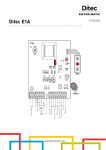
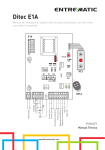
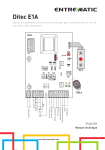
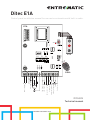
Ditec E1A
Control panel installation manual for one motor automation with built-in radio.
E1A
CT
1
2
3
4
5
J12
PRG
RF
SIG
SE
C
O
M
FU
F2
ON
JR4 JR10
SO 6>4
NIO
IN
JR3
1 2 3 4
TC
TM
A
N
T
AUX
R1
PT3
JR6
11 12
12 0 11
F1
POWER
FU
SA
SE
N C U W V
12 11 0 1 5 6 8 9 41
GOL4
Step by step
Stop safety device
Safety reopening
Stop
Safety test
Accessories output
M1
1~
Limit switch
Limit switch
Power supply
L N
Lamp
Flashing light
com
L N
IP2045EN
Technical manual
www.ditecentrematic.com
24
IP2045EN - 2014-09-22
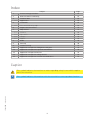
Index
Subject
Page
1.
General safety precautions
26
2.
EC declaration of conformity
27
3.
Technical data
27
Applications
27
Commands
28
Self-controlled safety edge
29
5.
Outputs and accessories
30
6.
Adjustments
31
6.1
Trimmer
31
6.2
Dip-switch
32
6.3
Jumper
32
6.4
Signals
33
7.
Radio
34
8.
Start-up
35
9.
Troubleshooting
36
10.
Application example for sliding doors and gates
37
11.
Application example for in-parallel automations
38
12.
Application example for barriers
39
13.
Application example for rolling shutters
39
14.
Application example for sectional overhead doors
40
3.1
4.
4.1
Caption
This symbol indicates instructions or notes regarding safety issues which require
particular attention.
This symbol indicates informations which are useful for correct product function.
IP2045EN - 2014-09-22
i
25
1. General safety precautions
Failure to observe the information in this manual may result
in minor personal injury or damage to equipment.
Save these instructions for future reference.
This installation manual is intended for qualified personnel only.
Installation, electrical connections and adjustments must be performed in accordance with
Good Working Methods and in compliance with applicable regulations.
Before installing the product, carefully read the instructions. Bad installation could be hazardous.
The packaging materials (plastic, polystyrene, etc.) should not be discarded in the environment or left within reach of children, as these are a potential source of hazard.
Before installing the product, make sure it is in perfect condition.
Do not install the product in an explosive environment and atmosphere: gas or inflammable
fumes are a serious hazard risk. Before installing the motors, make all structural changes
relating to safety clearances and protection or segregation of all areas where there is risk of
being crushed, cut or dragged, and danger areas in general.
Make sure the existing structure is up to standard in terms of strength and stability. The motor
manufacturer is not responsible for failure to use Good Working Methods in building the frames
to be motorized or for any deformation occurring during use.
The safety devices (photocells, safety edges, emergency stops, etc.) must be installed
taking into account: applicable laws and directives, Good Working Methods, installation
premises, system operating logic and the forces developed by the motorized door.
The safety devices must protect any areas where the risk exists of being crushed, cut or gragged,
or where there are any other risks generated by the motorized door.
Apply hazard area notices required by applicable regulations.
Each installation must clearly show the identification details of the motorized door.
When necessary, connect the motorized door to a reliable earth system made in accordance
with applicable safety regulations. During installation, maintenance and repair, interrupt the
power supply before opening the lid to access the electrical parts. The protective casing of the
automation must be removed by qualified personnel only.
To handle electronic parts, wear earthed antistatic conductive bracelets. The motor
manufacturer declines all responsibility in the event of component parts being fitted that
are not compatible with the safe an correct operation.
For repairs or replacements of products only original spare parts must be used. The installer
shall provide all information relating to automatic, manual and emergency operation of the
motorized door, and provide the user with operating instructions.
Secure the control panel permanently. Drill a hole into the lower side of the container so as to
run the cables through it. Secure the cables, if they are accessible, by means of appropriate
gland plates (not provided by us). Keep the line and motor conductors separate (at least 8 mm)
from the control conductors at the terminal board connection points (for example, by means
of clamps). Connect the line and motor protection conductors (yellow-green) by means of the
transformer and control panel using the clamp provided. At the end of the installation to close
again the container.
26
IP2045EN - 2014-09-22
1.1 Installation warning
2.EC Declaration of conformity
The manufacturer Entrematic Group AB with headquarters in Lodjursgatan 10, SE-261 44
Landskrona, Sweden
declares that the control panel Ditec E1A is in conformity with the provisions of the following EC
directives:
EMC Directive 2004/108/CE;
Low energy Directive 2006/95/CE.
R&TTE Directive 1999/5/CE
Landskrona, 29-01-2013
Marco Pietro Zini
(President)
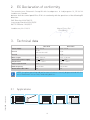
3. Technical data
Ditec E1A
Ditec E1AJ
Power supply
230 V~ 50 Hz
120 V~ 60 Hz
Fuse F1
F6,3A
F8A with NIO=OFF
F6,3A
Fuse F2
/
F6,3A
Motor output
230 V~ 5A max
120 V~ 6,3A max
Accessories power supply
24 V
24 V
Temperature
-20 °C - +55 °C
-20 °C - +55 °C
Degree of protection
IP55
IP55
Radio frequency
433,92 MHz
433,92 MHz
Memorizable radio codes
200
200
i
0,5 A
0,5 A
NOTE: the given operating and performance features can only be guaranteed with the
use of Entrematic accessories and safety devices.
IP2045EN - 2014-09-22
3.1Applications
27
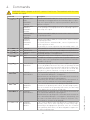
4.Commands
WARNING: Make a jumper on all N.C. contacts if not in use. The terminals with the same
number are equal.
1
41
41
1
1
0
0
0
0
Function
5 N.O. STEP-BY-STEP
WITH
AUTOMATIC
CLOSING
STEP-BY-STEP
WITHOUT
AUTOMATIC
CLOSING
OPENING WITH
AUTOMATIC
CLOSING
OPENING
WITHOUT
AUTOMATIC
CLOSING
Description
With DIP1=OFF and TC<MAX, the closure of the contact activates
an opening or closing operation in the following sequence: openstop-close-open. NOTE: the stop is not permanent, but has the
duration set by TC.
With DIP1=OFF and TC=MAX, the closure of the contact activates an opening or closing operation in the following sequence:
open-stop-close-open.
With DIP1=ON and TC<MAX, the closure of the contact activates
an opening operation.
With DIP1=ON and TC=MAX, the closure of the contact activates
an opening operation.
If 6→4=ON, with the automation idle, contact 1-5 performs the
closure operation as well.
If 6→4=OFF, the closure operation is performed by contact 1-6.
With 6→4=OFF, the closure of the contact activates a closing operation.
6 N.O. CLOSING
6 N.C. SAFETY STOP
The opening of the safety contact stops and prevents any movement.
8 N.C. REVERSAL SAFETY Opening the safety contact triggers a reversal of the movement
DEVICE
(reopening) during a closing operation.
9 N.C. STOP
Opening the safety contact stops the current operation.
EMERGENCY STOP To enable the emergency stop function (e.g. with a specific red
button), connect the opening and closing controls to terminal 9
instead of 1 (9-5, 9-6).
Permanently opening the safety contact enables the operator
9 N.O. HOLD-TO-RUN
FUNCTION
presence dependent function. In this state, the opening (1-5) and
closing (1-6) controls function only if held in the pressed position,
and the automation stops when the controls are released. Any
safety devices, plus the automatic closing, are disactivated.
11 N.C. CLOSING
With DIP2=OFF, the opening of the contact blocks the movement
LIMIT SWITCH
of the automation during the closing phase.
With DIP2=ON, the opening of the contact blocks the movement
of the automation during the opening phase.
Alternatively, you can connect the limit switch to the fastons 0-11
(in this case, the terminals 0-11 must not be jumped).
11 N.O. CLOSING
In the event of obstacle detection during closing and before the
PROXIMITY
activation of the proximity limit switch, the door wing reopens;
SWITCH
after the activation of the proximity limit switch, the door wing
blocks against the mechanical closing stop.
With DIP2=OFF, the opening of the contact blocks the movement
12 N.C. OPENING
LIMIT SWITCH
of the automation during the opening phase.
With DIP2=ON, the opening of the contact blocks the movement
of the automation during the closing phase. Alternatively, you
can connect the limit switch to the fastons 0-12 (in this case,
the terminals 0-12 must not be jumped).
12 N.O. OPENING
In the event of obstacle detection before the activation of the
PROXIMITY
proximity limit switch while opening, the door wing stops,
SWITCH
performing a disengagement operation; after the activation
of the proximity limit switch, the door wing blocks against the
mechanical opening stop.
28
IP2045EN - 2014-09-22
Command
1
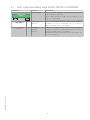
4.1 Self-controlled safety edge SOFA1-SOFA2 or GOPAVRS
Command
Function
SAFETY TEST
SOFA1-SOFA2
GOPAV
6
N.C.
STOP SAFETY
DEVICE
1
8
N.C.
REVERSAL
SAFETY
DEVICE
IP2045EN - 2014-09-22
1
Description
Place the SOFA1-SOFA2 or GOPAVRS device into its housing for plug-in cards AUX.
Connecting terminal 41 enables a safety edge test cycle
before every operation.
If the test fails the SA led flashes and the test is repeated.
Connect the output contact of device SOFA1-SOFA2 to
terminals 1-6 on the control panel (in series with the
photocell output contact, if installed).
Connect the output contact of device SOFA1-SOFA2 to
terminals 1-8 on the control panel (in series with the
photocell output contact, if installed).
ATTENTION: for quick operation on the safety edge, connect it to contact 1-6.
29
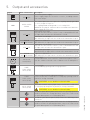
5. Output and accessories
Value - Accessories
0 1 2 3 4 9
24 V 0,5 A
-+
AUX
SOFA1-SOFA2
GOPAV
11 ... 1
24 V 3 W
QIKLUX
24 V 120 mA max
12 ... 1
24 V 3 W
QIKLUX
24 V 120 mA max
U W V
M1
N W ...
N C ...
230 V~ 5 A
120 V (E1AJ)
LAMP
230 V~ 25 W
120 V~ (E1AJ)
LUXK7
230 V~ 60 W
120 V~ (E1AJ)
230 V~ 100 W
120 V~ (E1AJ)
J12
Description
Accessories power supply.
Power supply output for external accessories, including automation status lamps.
The control panel has one space for coupling board, type radio
receivers, magnetic loops etc.
The coupling board working mode is selected by DIP1.
WARNING: the plug-in cards must be inserted and removed with the
power supply disconnected.
Automation open lamp.
Only with the limit switch 0-11 (N.C.) connected and DIP2=OFF will
the light switch off when the automation is closed.
Automation closed lamp.
With DIP2=ON, the light switches off when the automation is open.
Light kit for QIK barrier.
With DIP2=ON, the light switches off when the automation is open.
Automation closed lamp.
Only with the limit switch 0-12 (N.C.) connected and DIP2=OFF will
the light switch off when the automation is open.
Automation open lamp.
With DIP2=ON, the light switches off when the automation is closed.
Light kit for QIK barrier.
With DIP2=OFF, the light switches off when the automation is open.
Motor 1 (M1).
Terminal W must be connected to the common motor phase connection. The condenser must be connected between the U and V phases.
Flashing light.
Activated during opening and closing operations.
Courtesy light in CROSS sliding automation.
Comes on for 180 seconds after receiving any opening (total or
partial) or closing command.
WARNING: use a double insulated cable
Drive unit external courtesy light. Comes on for 180 seconds after
receiving any opening (total or partial) or closing command.
WARNING: use a double insulated cable
Membrane push-button panel (PT3). Starts the opening operation.
NOTE: to activate the closing operation, connect the connector of
the push-button panel to J12 (rotated by 180°).
Membrane push-button panel (PT3). Causes the blocking of the
movement.
Membrane push-button panel (PT3). Starts the closing operation.
NOTE: to activate the opening operation, connect the connector of
the push-button panel to J12 (rotated by 180°).
30
IP2045EN - 2014-09-22
Output
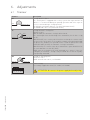
6.Adjustments
6.1Trimmer
Trimmer
Description
R1
Setting obstacle thrust.
The control panel is equipped with a safety system that stops motion if an
obstacle is encountered during an opening operation and either stops or
reverses motion during a closing operation.
R1=MIN gives maximum obstacle sensitivity (minimum thrust).
R1=MAX disables detection (maximum thrust).
MIN
MAX=disabled
TC
120 s
MIN=0 s
TM
MIN=10 s
RF
60 s
MAX=120 s
Setting the operating time.
From 10 to 120 s.
NOTE: with NC limit switch, set TM=MAX.
Power setting.
Sets voltage supplied to motor (CT-1=MIN / CT-5=MAX).
ATTENTION: disconnect the power supply before adjusting.
IP2045EN - 2014-09-22
CT 1 2 3 4 5
MAX=disabled
Setting automatic closing time.
From 0 to 120 s.
With TC=MAX, the automatic closing is disactivated.
The count begins from the blocking of the automation, for the time set by
the TC.
With DIP3=OFF, once a safety switch has been activated, the counter starts
as soon as the safety switch is released (for example, after passing through
the photocells), and lasts for a period of time set with TC (50%). Note: with
DIP3=OFF and 6→4=OFF, the automatic closing is immediate.
With DIP3=ON, the counter starts when automation is opened and lasts for
the entire duration set with TC (100%).
NOTE: after the activation of the stop command, once contact 1-9 has closed again, the automatic closing is only activated after a total or step-bystep opening command.
31
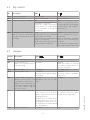
6.2Dip-switch
DIP
Description
OFF
ON
DIP1
Control 1-5 function.
Step-by-Step.
Opening.
DIP2
Direction selection.
Opens towards right.
Opens towards left.
DIP3
Restore automatic closing time. 50%
Immediate if 6→4=OFF.
NOTE: the setting of DIP3=OFF
and 6→4=OFF is recommended
for the immediate reclosing of
the barriers.
DIP4
Automation status at power on.
Indicates how the control panel
considers automation when powered up.
Open.
If DIP1=OFF, the first command
1-5 activates the closing.
If DIP1=ON, the first command 1-5
activates the opening.
NOTE: with a limit switch installed, preferably set DIP4=OFF.
100%
NOTE: the setting of DIP3=ON is
recommended for overhead and
sectional doors, and condominial entrances.
Closed.
The first command 1-5 activates
the opening.
NOTE: the automatic closing will
not be the first command, even
if enabled.
If the automatic closing function is
not used, preferably set DIP4=ON.
Jumper Description
OFF
ON
JR3
Incorporated radio receiver.
Disabled.
Enabled.
JR4
Overtravel reduction.
Disabled.
Reduces the overtravel distance
for the door wing.
Enabled.
NOTE: preferably set JR4=ON
if the door wing performs an
excessive overtravel.
JR6
Application type.
Sliding gate.
Other applications.
JR10
Maximum power start.
Disabled.
Enabled.
The motor starts with the voltage The motor starts at maximum
set with RF.
power for 1 s.
NIO
Electronic antifreeze system.
Enabled.
Disabled.
Maintains motor function even ATTENTION: do not use with
at low ambient temperatures. E1AJ.
NOTE: for correct operation, the
control panel must be exposed
to the same ambient temperature as the motors.
SO
Reversal safety switch function. With the automation blocked, With the automation blocked, if
if the contacts 1-8 or 41-8 are the contacts 1-8 or 41-8 are open,
open, it is possible to activate the any operation is impossible.
opening operation.
NOTE: after the activation of the
proximity limit switch closes the
opening of the safety contact 1-8,
41-8 provokes the STOP during
the closing phase.
6→4
Control 1-6 function.
Closing.
Stop.
32
IP2045EN - 2014-09-22
6.3Jumper
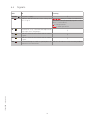
6.4Signals
LED
On
Flashing
POWER
24 V power supply
SA
Indicates that at least one of the safety conSafety test failure (terminal 41).
tacts is open.
Operations count performed (only when control
panel is switched on):
= 1000 operations
= 10000 operations
IN
Activated at every command and adjustment
to the dip-switch and jumper.
/
11
Indicates that the 0-11 limit switch contact
is open.
/
12
Indicates that the 0-12 limit switch contact
is open.
/
SIG
Activated during the radio reception phase or Indicates the absence of the memory module.
transmitter memorisation.
IP2045EN - 2014-09-22
/
33
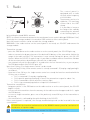
7.Radio
Receiver
CH1
CH2
CH3
CH4
PRG
1
2
10 s
3
The control panel is
equipped with a radio
receiver with a frequency
of 433.92 MHz.
The antenna consists of a
rigid wire, 173 mm long,
connected to the ANT
clamp.
It is possible to increase
the range of the radio by
connecting the antenna
of the flashing lights, or
Transmitter storage:
- press the PRG button on the radio receiver or on the control panel; the SIG LED lights up;
- make a transmission by pressing one of the desired CH buttons of the transmitter (within the
range of the radio receiver). The transmitter is now stored. During this phase, the SIG LED
flashes. When the SIG LED is again lit up, it is possible to validate another transmitter. Validate
all the new transmitters by making a transmission as indicated;
- you automatically exit the procedure 10 seconds after the last transmission, or you can press
the PRG button again (the SIG LED goes off).
Up to four CH keys of a single remote control can be stored:
- if only one (any) CH key of the remote control is stored, command 1-5 (step-by-step/opening) is
carried out;
- from two to four CH keys of a single remote control are stored, the functions matched with the
CH keys are as follows:
• CH1 = command 1-5 step-by-step/opening;
• CH2 = partial opening command, it causes the automation to open for about 1 m;
• CH3 = command to switch on/off the courtesy light;
• CH4 = stop command, equivalent to impulsive command 1-9.
Transmitter cancellation:
- keep pressed for 3 s the PRG button on the radio receiver or on the control panel, the SIG LED
begins to flash;
- to erase all the transmitters from the memory of the radio receiver keep pressed for 3 s again
the PRG button;
- to erase a single transmitter, press one of the previously stored CH keys of the transmitter to
be erased;
- the cancellation is confirmed by the quick flashing of the SIG LED.
If the control panel is replaced, the storage module being used can be inserted in the new
control panel.
ATTENTION: the insertion and extraction of the BIXMR2 memory must be carried out in
the absence of a power supply.
i
For further information see the user manual for GOL series transmitters.
34
IP2045EN - 2014-09-22
by installing the tuned BIXAL antenna.
NOTE: to connect the external antenna to the control panel, use a coaxial cable type RG58 (max 10 m).
Check that the storage module is inserted on COM connector of the control panel.
Up to 200 remote controls can be stored in the storage module.
WARNING: if the radio receiver on the control panel is not used, set JR3=OFF and remove the
storage module.
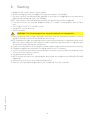
8.Starting
• Bridge the NC safety contacts with a jumper.
• Before starting up, check the application type selected (see JR6 jumper).
• Any limit switches installed must be adjusted so that they are triggered near the mechanical
opening and closing end stops. Set TM=MAX.
NOTE: limit switches must be kept pressed until the operation has been completed.
• If no limit switches are installed, bridge terminals 0-11 and 0-12 with jumpers and set TM to
half.
• Set TC=MAX. Set RF=CT-3 and R1 to half.
• Using DIP2, set the direction.
• Switch on power.
WARNING: The following operations are performed with no safety devices.
• Perform opening and closing commands and check that the automation functions correctly
IP2045EN - 2014-09-22
and that the limit switches (if installed) are correctly set.
NOTE: if mechanical stops are used to block the stroke of the automation, or a proximity limit switch
with N.O. contact, adjust the TM trimmer in order to obtain an operation time 2-3 s greater than
the time effectively taken by the automation.
• Connect the safety devices (removing the relative jumpers) and check that they function correctly.
• If required, regulate the automatic closing by means of the TC trimmer.
• Set RF to a position that allows the automation to function correctly while ensuring the safety
of the user in the event of collision.
• Set obstacle thrust with R1.
• NOTE: ensure that the forces exerted by the door wings are compliant with EN12453-EN12445
regulations.
• Connect any other accessories and check operation.
• Once the start up and check procedures are completed, close the container.
35
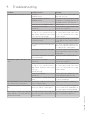
9. Troubleshooting
Problem
Possible causes
Automation does not open or close. No power.
(POWER led off).
Remedy
Check that the control panel is
powered correctly.
Short circuited accessories.
(POWER led off).
Disconnect all accessories from
terminals 0-1 (voltage must be 24
V=) and reconnect one at a time.
Blown line fuse. (POWER led off).
Replace fuse.
Safety contacts are open.
(SA led on).
Check that the safety contacts are
closed correctly (N.C.).
Safety contacts not correctly connected or self-controlled safety
edge SOFA1-SOFA2 not functioning
correctly. (SA led flashing).
Check connections to terminals 6-8
on control panel and connections
to the self-controlled safety edge
SOFA1-SOFA2.
Release microswitch open.
(11 and 12 led on).
Check that the hatch is closed correctly and the microswitch makes
contact.
The motor thermal overload switch Check for continuity between the
is open.
phases U-V-W of the motor disconnected from the control panel.
The remote control does not work. Check the correct memorisation
of the transmitters on the incorporated radio.
The remote control does not work. Memory module BIXMR2 absent.
(SIG led flashing).
Automation opens but does not Safety contacts are open.
close.
(SA led on).
Check that the safety contacts are
closed correctly (N.C.).
Safety contacts not correctly connected or self-controlled safety
edge SOFA1-SOFA2 not functioning
correctly.
(SA led flashing).
Check connections to terminals 6-8
on control panel and connections
to the self-controlled safety edge
SOFA1-SOFA2.
Photocells activated.
(SA led on).
Check that the photocells are
clean and operating correctly.
The automatic closing does not Check that the TC trimmer is not
work.
set at the maximum.
The automation is very weak and The motor’s condenser has an in- Replace the motor’s condenser.
does not invert the movement.
correct capacity value.
External safety devices not activat- Incorrect connections between the Connect NC safety devices together
ing.
photocells and the control panel.
in series and remove any bridges on
the control panel terminal board.
IP2045EN - 2014-09-22
The remote control has limited The radio transmission is impeded Install the antenna outside. Substirange and does not work with the by metal structures and reinforced tute the transmitter batteries.
automation moving.
concrete walls.
36
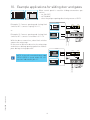
10. Example applications for sliding door and gates
When control panel is used for sliding automations operations:
- set JR6=OFF;
- set TM=MAX;
- select the proper opening direction by means of DIP2.
(Example 1). Connect opening and closing limit
switches N.C. contacts to plug 12-0-11;
or
DIP2=OFF
<MAX
ON
1 2 3 4
1 2 3 4
R1
12 0 11
12 11 0 1 5 6 8 9 41
ON
Limit switch
1 2 3 4
Limit switch
With the above connections, when limit switches
operate the wing stops.
In the event of obstacle detection, the wing stops
and releases during opening operation and reopens during closing operation.
TC TM
JR6
DIP2=ON
(Example 2). Connect opening and closing limit
switches N.C. contacts to terminals 0-11-12.
MAX
ON
DIP2=OFF
<MAX
ON
1 2 3 4
i
NOTE: if the self-controlled safety edge
SOFA1-SOFA2 is used, make the connections indicated in par. 4.1.
1 2 3 4
R1
12 0 11
DIP2=ON
ON
12 11 0 1 5 6 8 9 41
Limit switch
Limit switch
IP2045EN - 2014-09-22
TC TM
JR6
1 2 3 4
37
MAX
ON
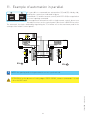
11. Example of automation in parallel
It is possible to command two automations [A] and [B] side by side,
making the connections indicated in figure.
Commands 1-5 and the remote control (with DIP1=ON) are equivalent
to a total opening command.
To manage both automations with a single remote control, do not use
the radio receivers on the control panels, but insert a BIXLR22 receiver.
The automatic closing is obtained by regulating the TC trimmer not at the maximum, and in the
same position in both control panels.
A
B
JR1 JR2
OUT2
BIXLR22
TC
JR3
<MAX
R1
R1
1 2 3 4
ON
1 2 3 4
<MAX
TC
E1A A
E1A B
NOTE: the opening and closing movements are not synchronised.
ATTENTION: in the absence of safety edges SOFA1-SOFA2, connect commands 1-6 and
1-8 to the SWT card.
IP2045EN - 2014-09-22
i
SWT
6 8
TM
41 9 8 6 5 1 0 11 12
ON
0 6 8 41
6 8
12 11 0 1 5 6 8 9 41
0 6 8 41
TM
SWT
38
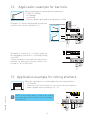
12.Application example for barriers
When control panel is used for barriers operations:
- set RF=CT-5 (MAX);
- set TM=MAX;
- set JR6=ON;
- select the proper opening direction by means of DIP2.
(Example 1). Connect opening and closing limit
switches N.C. contacts to plug 12-0-11.
CT
1
2
3
4
5
DIP2=OFF
ON
1 2 3 4
MAX
ON
1 2 3 4
12 0 11
DIP2=ON
RF=CT-5
R1
TC TM
JR6
12 11 0 1 5 6 8 9 41
ON
6>4
Limit switch
Limit switch
1 2 3 4
DIP3=OFF
ON
(Example 2). Control N.C. 1-6 (safety stop) can
be changed into control N.O. 1-4 (closing) setting
6→4=OFF.
To have the barrier close again soon after transit
between the photocells (or other safeties connected to 1-8), set DIP3=OFF.
1 2 3 4
R1
TC TM
12 0 11
JR6
Opening
Closing
12 11 0 1 5 6 8 9 41
13. Application example for rolling shutters
When the control panel is used in applications for rolling shutters:
- set JR6=ON
- connect the N.C. limit switches in succession to the motor phases
- make a jumper with the terminals 0-11-12.
<MAX
<MAX
i
1 2 3 4
NOTE: if the control panel is used in the hold to
run mode, disconnect terminal 9 (see example 1
in Section 14).
12 0 11
N C U W V
Limit switch
M1
1~
39
R1
TC TM
JR6
com
IP2045EN - 2014-09-22
ON
12 11 0 1 5 6 8 9 41
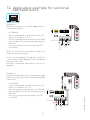
14.Application example for sectional
overhead doors
(Example 1)
When the control panel is used in applications for
sectional automations:
6>4
MAX
J12
ON
1 2 3 4
- set TM=MAX;
- connect opening and closing limit switches N.C.
contacts to terminals 0-11-12:
- select the opening control by means of DIP1=ON;
- select the direction of the movement by means of
DIP2=OFF;
- select the closing control by setting 6→4=OFF.
- set JR6=ON;
R1
TC TM
12 0 11
JR6
12 11 0 1 5 6 8 9 41
PT3
A
NOTE: to use electronic control panel in hold to run
mode, disconnect terminal 9.
Opening
Closing
Limit switch
Limit switch
C
In this case, the opening (1-5) and the closing (1-6)
controls operate only if kept pressed, if released the
automation will stop.
Automatic closing and radio remote controls are
disabled.
(Example 2)
If you have connected the self-controlled safety edge
SOFA1 in closing, it is possible to make the following
connections:
SOFA1
AUX
OUT1
PT3
6>4
MAX
ON
1 2 3 4
R1
12 0 11
TC TM
Opening
Closing
Limit switch
Limit switch
C
IP2045EN - 2014-09-22
JR6
12 11 0 1 5 6 8 9 41
A
40
1 41 IN1
- set TM=MAX;
- connect opening and closing limit switches N.C.
contacts to terminals 0-11-12:
- select the opening control by means of DIP1=ON;
- select the direction of the movement by means of
DIP2=OFF;
- select the closing control by setting 6→4=OFF;
- set SO=OFF.
J12
IP2045EN - 2014-09-22
All rights related to this material are the exclusive property of Entrematic Group AB.
Although the contents of this publication have been compiled with the greatest possible care, Entrematic
Group AB cannot accept liability for any damage that might arise from errors or omissions in this publication.
We reserve the right to make modifications without prior notice.
No part of this publication may be copied, scanned, adapted or modified without prior permission in writing
from Entrematic Group AB.
41
IP2045EN - 2014-09-22
Entrematic Group AB
Lodjursgatan 10
SE-261 44, Landskrona
Sweden
www.ditecentrematic.com