1
Deliverable D4.2
Technical report and user manual (Final System)
Proj. No. 257872
30. August 2013
time of the client is used as current time. This can cause problems if the local time
and remote time, where the message was created, differ. To avoid showing
messages in future, the timeline manages an offset. If a Reflection Tool client
receives a landmark which has a time stamp from the future, the offset to the local
time is calculated and this offset is used to layout all messages. For reflection on the
process it is important to be able to see the whole process as well as to see some
specific points in detail. As default setting the Reflection Tool uses an automatic
zoom to show the whole learning process in the available space. This is disabled if a
student uses manual zoom-in or out and the state is shown in with a checkbox.
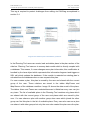
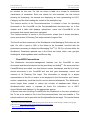
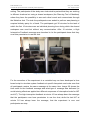
Image 11 shows the buttons for zoom-in, fit to available screen space, zoom-out and
the toggle checkbox for automatic zoom in the upper left corner. A student can select
a landmark by clicking on its card representation and the default enabled keep focus
feature of the Reflection Tool - which is shown as fifth button in Image 11 - keeps this
landmark in the center of the screen while zooming. A selected landmark is also
highlighted with a red border and the description of the selected landmark is shown in
the toolbar. The arrow buttons allow students to step to the previous or next
landmark.
If a new XML action appears in the analysis channel, the Reflection Tool evaluates
the action and keeps the information as LandmarkData in memory. With this
implementation all landmarks, which were produced after starting the Reflection Tool
module (i.e. synchronously) are available, but no old landmarks. Yet, the historic
landmarks are needed to allow reflection of the whole learning process (synchronous
and asynchronous process awareness as explained in section 2.1.1). To solve this
problem the Reflection Tool loads all old landmarks, if the first new landmark for a
group and challenge combination appears, or when the first user requests such a
combination. It is useful to load old landmarks if new ones appear to avoid long
response times when the students open the Reflection Tool. To get the old
landmarks, the Reflection Tool uses the history request servlet of the Metafora
Service Module 47. This servlet allows it to start an SQL query on the logger database
46F
and returns the found actions as plain text. On client side the start time of the timeline
is by default the local page load time. If a client receives a landmark which is older
47
Please take a look at section architecture of the Metafora platform for details.
METAFORA – Restricted
Page 37 of 65