1
LDL-Series Ironless Linear Servo
Motors
Catalog Numbers
LDL-N030xxx-xHT11, LDL-N050xxx-xHT11, LDL-N075xxx-xHT11,
LDL-T030xxx-xHT11, LDL-T050xxx-xHT11, LDL-T075xxx-xHT11,
LDL-N030xxx-xHT20, LDL-N050xxx-xHT20, LDL-N075xxx-xHT20,
LDL-T030xxx-xHT20, LDL-T050xxx-xHT20, LDL-T075xxx-xHT20,
LDL-N030xxx, LDL-N050xxx, LDL-N075xxx,
LDL-T030xxx, LDL-T050xxx, LDL-T075xxx
User Manual
Important User Information
Solid state equipment has operational characteristics differing from those of electromechanical equipment. Safety Guidelines
for the Application, Installation and Maintenance of Solid State Controls (publication SGI-1.1 available from your local
Rockwell Automation sales office or online at http://literature.rockwellautomation.com) describes some important differences
between solid state equipment and hard-wired electromechanical devices. Because of this difference, and also because of the
wide variety of uses for solid state equipment, all persons responsible for applying this equipment must satisfy themselves
that each intended application of this equipment is acceptable.
In no event will Rockwell Automation, Inc. be responsible or liable for indirect or consequential damages resulting from the
use or application of this equipment.
The examples and diagrams in this manual are included solely for illustrative purposes. Because of the many variables and
requirements associated with any particular installation, Rockwell Automation, Inc. cannot assume responsibility or liability
for actual use based on the examples and diagrams.
No patent liability is assumed by Rockwell Automation, Inc. with respect to use of information, circuits, equipment, or
software described in this manual.
Reproduction of the contents of this manual, in whole or in part, without written permission of Rockwell Automation, Inc., is
prohibited.
Throughout this manual, when necessary, we use notes to make you aware of safety considerations.
WARNING
IMPORTANT
ATTENTION
Identifies information about practices or circumstances that can cause an explosion in a
hazardous environment, which may lead to personal injury or death, property damage, or
economic loss.
Identifies information that is critical for successful application and understanding of the product.
Identifies information about practices or circumstances that can lead to personal injury or death,
property damage, or economic loss. Attentions help you identify a hazard, avoid a hazard, and
recognize the consequence
SHOCK HAZARD
Labels may be on or inside the equipment, for example, a drive or motor, to alert people that
dangerous voltage may be present.
BURN HAZARD
Labels may be on or inside the equipment, for example, a drive or motor, to alert people that
surfaces may reach dangerous temperatures.
Allen-Bradley, Rockwell Automation, Kinetix, Ultra3000, LDL-Series Ironless Linear Servo Motors, RSLogix 5000, and TechConnect are trademarks of Rockwell Automation, Inc.
Trademarks not belonging to Rockwell Automation are property of their respective companies.
Table of Contents
Preface
About This Publication . . . . . . . . . . . . . . . . . . . . . . . . . . . . . 7
Who Should Use This Manual . . . . . . . . . . . . . . . . . . . . . . . . 7
Additional Resources. . . . . . . . . . . . . . . . . . . . . . . . . . . . . . . 7
Chapter 1
Safety Considerations
Introduction . . . . . . . . . . . . .
Labels. . . . . . . . . . . . . . . . . .
High Energy Magnets . . . . . .
Unpacking and Handling .
Air Freight Restrictions . .
Vertical or Incline Installation
Operational Guidelines . . . . .
.
.
.
.
.
.
.
.
.
.
.
.
.
.
.
.
.
.
.
.
.
.
.
.
.
.
.
.
.
.
.
.
.
.
.
.
.
.
.
.
.
.
.
.
.
.
.
.
.
.
.
.
.
.
.
.
.
.
.
.
.
.
.
.
.
.
.
.
.
.
.
.
.
.
.
.
.
.
.
.
.
.
.
.
.
.
.
.
.
.
.
.
.
.
.
.
.
.
.
.
.
.
.
.
.
.
.
.
.
.
.
.
.
.
.
.
.
.
.
.
.
.
.
.
.
.
.
.
.
.
.
.
.
.
.
.
.
.
.
.
.
.
.
.
.
.
.
.
.
.
.
.
.
.
.
.
.
.
.
.
.
. 9
. 9
10
10
11
12
13
Introduction . . . . . . . . . . . . . . . . . . . . . . . .
Catalog Number Explanation . . . . . . . . . . .
Linear Motor Components . . . . . . . . . . . . . .
Design Consideration . . . . . . . . . . . . . . . . .
Motor Air Gap . . . . . . . . . . . . . . . . . . . .
Bumpers, Shock Absorbers, or End Stops
Linear Encoder . . . . . . . . . . . . . . . . . . .
Carriage/Heat Sink. . . . . . . . . . . . . . . . .
Maintenance . . . . . . . . . . . . . . . . . . . . . . . .
Motor Storage . . . . . . . . . . . . . . . . . . . . . . .
.
.
.
.
.
.
.
.
.
.
.
.
.
.
.
.
.
.
.
.
.
.
.
.
.
.
.
.
.
.
.
.
.
.
.
.
.
.
.
.
.
.
.
.
.
.
.
.
.
.
.
.
.
.
.
.
.
.
.
.
.
.
.
.
.
.
.
.
.
.
.
.
.
.
.
.
.
.
.
.
.
.
.
.
.
.
.
.
.
.
.
.
.
.
.
.
.
.
.
.
.
.
.
.
.
.
.
.
.
.
.
.
.
.
.
.
.
.
.
.
15
16
17
18
18
18
19
19
19
19
Chapter 2
Start
Chapter 3
Installing the LDL-Series Linear
Motor
Introduction . . . . . . . . . . . . . . . . . . . . .
Unpacking and Inspection. . . . . . . . . . .
Installing the Linear Motor Components .
Required Tools: . . . . . . . . . . . . . . . .
Mount the Magnet Channel . . . . . . .
Mount the Motor Coil. . . . . . . . . . . .
.
.
.
.
.
.
.
.
.
.
.
.
.
.
.
.
.
.
.
.
.
.
.
.
.
.
.
.
.
.
.
.
.
.
.
.
.
.
.
.
.
.
.
.
.
.
.
.
.
.
.
.
.
.
.
.
.
.
.
.
.
.
.
.
.
.
.
.
.
.
.
.
.
.
.
.
.
.
.
.
.
.
.
.
.
.
.
.
.
.
21
21
22
22
22
25
.
.
.
.
.
.
.
.
.
.
.
.
.
.
.
.
.
.
.
.
.
.
.
.
.
.
.
.
.
.
.
.
.
.
.
.
.
.
.
.
.
.
.
.
.
.
.
.
.
.
.
.
.
.
.
.
.
.
.
.
.
.
.
.
.
.
.
.
.
.
.
.
.
.
.
.
.
.
.
.
.
.
.
.
.
.
.
.
.
.
.
.
.
.
.
.
.
.
.
.
.
.
.
.
.
.
.
.
.
.
.
.
.
.
.
.
.
.
.
.
27
27
27
28
28
28
29
29
Chapter 4
LDL-Series Linear Motor
Connector Data
3Publication LDL-UM001A-EN-P - March 2009
Introduction . . . . . . . . . . . . . .
Linear Motor Coil Connectors .
Power Connector . . . . . . . .
PTC Thermistor Connector .
Hall Effect Module Connectors.
Feedback Connector . . . . .
PTC Thermistor Connector .
Encoder Connector . . . . . .
.
.
.
.
.
.
.
.
.
.
.
.
.
.
.
.
.
.
.
.
.
.
.
.
.
.
.
.
.
.
.
.
.
.
.
.
.
.
.
.
.
.
.
.
.
.
.
.
.
.
.
.
.
.
.
.
3
Table of Contents
Chapter 5
Wiring the LDL-Series Linear
Motor
Introduction . . . . . . . . . . . . . . . . . . . . . . . . . . . . . . . . .
Connect the Linear Motor Coil . . . . . . . . . . . . . . . . . . . .
Signal and Wire Definitions for Flying Lead Components
Linear Motor Coil . . . . . . . . . . . . . . . . . . . . . . . . . . .
Hall Effect Module . . . . . . . . . . . . . . . . . . . . . . . . . .
Making Your Own Extension Cables . . . . . . . . . . . . . . .
Mounting and Wiring Two Identical Coils in Tandem . . .
Cables Exit to the Right . . . . . . . . . . . . . . . . . . . . . .
.
.
.
.
.
.
.
.
.
.
.
.
.
.
.
.
.
.
.
.
.
.
.
.
31
31
33
33
34
34
35
35
Introduction . . . . . . . . . . . . . . . . . . . . . . . . . . . . . . . . . .
Before You Begin . . . . . . . . . . . . . . . . . . . . . . . . . . . . . .
Motor Direction Defined . . . . . . . . . . . . . . . . . . . . . .
What You Need . . . . . . . . . . . . . . . . . . . . . . . . . . . . . . .
Required Files . . . . . . . . . . . . . . . . . . . . . . . . . . . . . . . .
Follow These Steps . . . . . . . . . . . . . . . . . . . . . . . . . . . . .
Update Linear Motor Database. . . . . . . . . . . . . . . . . . . . .
Set Up Connection to Kinetix 6000 or Kinetix 2000 Drive .
Set Up the Connection to an Ultra3000 Drive . . . . . . . . . .
Verify Motor Encoder Direction . . . . . . . . . . . . . . . . . . . .
Verify Motor Encoder Resolution . . . . . . . . . . . . . . . . . . .
Verify Linear Motor Wiring and Function . . . . . . . . . . . . .
.
.
.
.
.
.
.
.
.
.
.
.
.
.
.
.
.
.
.
.
.
.
.
.
39
39
39
40
40
41
41
42
47
49
50
50
Chapter 6
Configure and Start Up the
LDL-Series Linear Motor
Appendix A
Specifications and Dimensions
4
Introduction . . . . . . . . . . . . . . . . . . . . . . . . . . . . . . .
Performance Specifications . . . . . . . . . . . . . . . . . . . .
Common Performance Specifications . . . . . . . . . .
LDL-Series Ironless Linear Motor
Performance Specifications. . . . . . . . . . . . . . . . .
General Specifications . . . . . . . . . . . . . . . . . . . . . . . .
Weight Specifications . . . . . . . . . . . . . . . . . . . . . .
Carriage Weight and Heat Sink Area Requirements
Environmental Specifications . . . . . . . . . . . . . . . .
Certifications . . . . . . . . . . . . . . . . . . . . . . . . . . . .
Product Dimensions . . . . . . . . . . . . . . . . . . . . . . . . .
Motor Coil Dimensions. . . . . . . . . . . . . . . . . . . . .
Magnet Channel Dimensions . . . . . . . . . . . . . . . .
. . . . . 55
. . . . . 56
. . . . . 56
.
.
.
.
.
.
.
.
.
.
.
.
.
.
.
.
.
.
.
.
.
.
.
.
.
.
.
.
.
.
.
.
.
.
.
.
.
.
.
.
.
.
.
.
.
57
61
61
62
62
62
63
64
66
Publication LDL-UM001A-EN-P - March 2009
Table of Contents
Appendix B
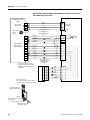
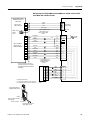
Interconnect Diagrams
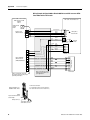
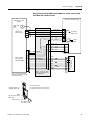
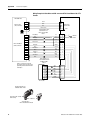
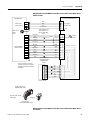
Introduction . . . . . . . . . . . . . . . . . . . . . . . . . . . . . . . . . . . . 67
Wiring Examples. . . . . . . . . . . . . . . . . . . . . . . . . . . . . . . . . 67
Appendix C
Sin/Cos Linear Encoder and
Kinetix 6000 Drives
Introduction . . . . . . . . . . . . . . . . . . . . . .
Kinetix 6000 Drive Feedback Connection .
Encoder Counting Direction . . . . . . . . . .
Set Up the Axis Properties . . . . . . . . . . . .
.
.
.
.
.
.
.
.
.
.
.
.
.
.
.
.
.
.
.
.
.
.
.
.
.
.
.
.
.
.
.
.
.
.
.
.
.
.
.
.
.
.
.
.
.
.
.
.
.
.
.
.
.
.
.
.
77
77
78
78
Index
Publication LDL-UM001A-EN-P - March 2009
5
Table of Contents
Notes:
6
Publication LDL-UM001A-EN-P - March 2009
Preface
About This Publication
This manual provides detailed installation instructions for mounting,
wiring, and maintaining your LDL-Series Ironless Linear Servo Motors.
Who Should Use This
Manual
This manual is intended for engineers or technicians directly involved
in the installation, wiring, and maintenance of LDL-Series ironless
linear motors.
If you do not have a basic understanding of linear motors, contact
your local Rockwell Automation sales representative for information
on available training courses before using this product.
Additional Resources
The following documents contain additional information concerning
related Rockwell Automation products.
Resource
Description
Kinetix 2000 Multi-axis Servo Drive User Manual, publication
2093-UM001
How to install, setup, and troubleshoot a Kinetix 2000 drive
Kinetix 6000 Multi-axis Servo Drive User Manual, publication
2094-UM001
How to install, setup, and troubleshoot a Kinetix 6000 drive
Ultra3000 Digital Servo Drives Installation Manual, publication
2098-IN003
How to install, setup, and troubleshoot an Ultra3000 drive
Ultra3000 Digital Servo Drives Integration Manual, publication
2098-IN005
Ultra3000 Digital Servo Drives User Manual, publication
2098-UM001
Instruction on configuring Ultra3000 and Ultra500 drives, creating and
configuring project, source, and header files and creating and running
programs.
Motion Analyzer CD, download at http://ab.com/e-tools.
Drive and motor sizing with application analysis software
Motion Modules in Logix5000 Control Systems User Manual,
publication LOGIX-UM002
Information on configuring and troubleshooting your ControlLogix and
CompactLogix SERCOS interface modules, and using the home to
torque-level sequence
System Design for Control of Electrical Noise Reference Manual,
publication GMC-RM001
Information, examples, and techniques designed to minimize system
failures caused by electrical noise
Kinetix Motion Control Selection Guide, publication GMC-SG001
Information about Kinetix products
Safety Guidelines for the Application, Installation, and
Maintenance of Solid State Controls, publication SGI-IN001
Characteristics, application, installation, and maintenance of solid
state controls
Allen-Bradley Industrial Automation Glossary, publication AG-7.1
A glossary of industrial automation terms and abbreviations
Rockwell Automation Product Certification Website, publication
available at http://www.ab.com
For declarations of conformity (DoC) currently available from Rockwell
Automation
National Electrical Code. Published by the National Fire
Protection Association of Boston, MA.
An article on wire sizes and types for grounding electrical equipment
You can view or download publications at
http://literature.rockwellautomation.com. To order paper copies of
technical documentation, contact your local Rockwell Automation
distributor or sales representative.
7Publication LDL-UM001A-EN-P - March 2009
7
Preface
Notes:
8
Publication LDL-UM001A-EN-P - March 2009
Chapter
1
Safety Considerations
Introduction
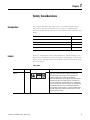
This chapter describes the safety issues encountered while using a
linear motor and the precautions you can take to minimize risk.
Potential hazards discussed here are identified by labels affixed to the
device.
Labels
Topic
Page
Labels
9
High Energy Magnets
10
Vertical or Incline Installation
12
Operational Guidelines
13
Here you will find the safety and identification labels affixed to your
linear motor components. To prevent injury and damage to the linear
motor, review the safety label and its details and location before using
the linear motor.
Safety Label
Title
Location Label
Magnetic Field
Danger
A
9Publication LDL-UM001A-EN-P - March 2009
Details
DANGER
MAGNETIC FIELDS
LOCATED IN THIS AREA.
Can be harmfull to
pacemakers and other
sensitive equipment.
The Magnetic Fields label identifies non-ionizing radiation
found in the magnet channels. Magnetic channels are
constructed with strong magnets. Strong magnets can
disrupt the functionality of automatic implantable
cardioverter defibrillators (AICD); people with a pacemaker
should not work near the magnet channels. Maintenance
personnel working near the magnet channels should avoid
the use of metallic tools and secure items such as badge clip
and other personal effects that could be attracted by the
strong magnets. Strong magnets can erase magnetic media.
Never let credit cards or electronic media contact or come
near the magnet channels.
9
Chapter 1
Safety Considerations
Identification Labels
Title
Location Label
Coil Name Plate
B
CAT. NO. LDL-XXXXXXX-XHTXX
SERIAL NO. XXXX-X-XXXX
www.ab.com
Magnet Channel
Name Plate
Details
C
This name plate shows the magnet channel catalog number,
serial number.
CAT. NO. LDL-XXXXXXXXX
SERIAL NO. XXXX-X-XXXX
www.ab.com
RoHS Compliant
This name plate shows the coil catalog number, serial
number operating voltage and frequency.
CLASS B, 230 VAC, 0-167 Hz, 3Ø
E230241
MADE IN USA
D
MADE IN USA
LDL-Series linear motor components are RoHS compliant.
RoHS COMPLIANT
Directive 2002/95/EC
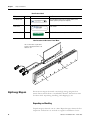
Label Locations for LDL-Series Linear Motor
The coil shown here is upside down
relative to the magnet channel so the
labels are seen.
D
C
02
20
iv
ect
ir
w
w.
a
b.
co
m
CA
SE T. N
RIA O.
L N LD
O. L-C
XX 050
XX 20
X-X 0-D
-X HT1
XX 1
X
CL
E2 ASS
30 B
24 , 23
1 0
VA
M C,
AD 0E 167
IN H
USA z,
3Ø
D
Ro
H
S
e
CO
5/E
M
PL
/9 I
A
N
T
B
w
GER
DAN
LDS EA.
AR
C FIE S
ETI THI
GN D IN ll to er
MA ATE mfu oth
LOCbe harrs and ent.
Canemakeequipm
pacsitive
sen
A
IES
SER
ww
b.
w.a
A
00
756
M0 XXX
L-N X-X
. LD XXNO O. XX
.
T
CA L N
IA
SER
E IN
USA
MAD
com
C
High Energy Magnets
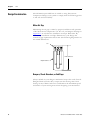
Linear motor magnet channels contain high energy magnets that
attract ferrous metals from a considerable distance. Precautions must
be taken while unpacking, handling, and shipping by air.
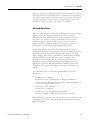
Unpacking and Handling
Unpack magnet channels one at a time. Repack magnet channels after
inspection and before it is stocked or staged for installation. Leave
10
Publication LDL-UM001A-EN-P - March 2009
Safety Considerations
Chapter 1
protective wrapping, cardboard and flux containment plates in place
until magnet channel is installed. Clear the inspection and repacking
area of any ferrous metals that will attracted to or attract the magnetic
assembly. If magnet channels must be unpacked at the same time
maintain a distance of 1.5 m (5 ft) between assemblies.
Air Freight Restrictions
When air freighting linear motor special preparations and precautions
must be taken. The following information outlines the basic
requirements at the publication date of this document. However,
regulations are subject to change and additional area or carrier
restrictions may be imposed. Always check with your carrier or
logistics specialist regarding current local, regional, and national
transportation requirements when shipping this product.
Linear motor magnet channels contain magnetized material, as
classified by International Air Transport Association (IATA) Dangerous
Goods Regulations. An IATA trained individual must be involved
when shipping this product via domestic or international air freight.
Packing Instruction 902 provides information regarding the
preparation of this product for air transportation. Follow these
regulations for general marking and labeling requirements, the
application of specific Magnetized Material Handling Labels, and
instructions for preparing the Shipper's Declaration for Dangerous
Goods.
As a minimum, refer to the following IATA Dangerous Goods
Regulations:
• Subsection 1.5: Training
• Subsection 3.9.2.2: Classification as Magnetized Material
• Subsection 4.2: Identification as UN 2807, Magnetized Material,
Class 9, Packing Instruction 902
• Subsection 7.1.5: Marking
• Subsection 7.2: Labeling
• Subsection 7.4.1: Magnetized Material Label
• Section 8: Shipper's Declaration for Dangerous Goods
When shipped via ground in the United States, these products are not
considered a U.S. D.O.T. Hazardous Material and standard shipping
procedures apply.
Publication LDL-UM001A-EN-P - March 2009
11
Chapter 1
Safety Considerations
Vertical or Incline
Installation
A linear motor driven system mounted vertically or on an incline will
not maintain position when the power is removed. Under the
influence of gravity the motion platform and its payload will fall to the
low end of travel. Design engineers should allow for this by designing
in controlled power down circuits or mechanical controls to prevent
the linear motor driven system and its payload from being damaged
when the power fails.
ATTENTION
ATTENTION
ATTENTION
12
Linear motors are capable of high accelerations, sudden and
fast motion. Rockwell Automation is not responsible for
misuse, or improper implementation of this equipment.
Linear motor driven systems must have end of travel bumpers.
They must be designed to take a large impact from uncontrolled
motion. The payload must be secured to the system such that it
will not sheer off in the event of an impact in excess of the
bumper ratings.
The Hall effect module contains an electrostatic discharge
(ESD) sensitive devise. You are required to follow static-control
precautions when you install, test, service, or repair this
assembly. If you do not follow ESD control precautions,
components can be damaged. If you are not familiar with static
control precautions, refer to Guarding Against Electrostatic
Damage, publication 8000-4.5.2, or any other applicable ESD
awareness handbook.
BURN HAZARD
When the linear motors are running at their maximum rating the
temperature of attached heat sink can reach 100 ºC (212 ºF).
SHOCK HAZARD
An assembled linear motor will generate power if the coil or
magnet channel is moved. Un-terminated power cables present
an electrical shock hazard. Never handle flying leads or touch
power pins while moving the motor.
Publication LDL-UM001A-EN-P - March 2009
Safety Considerations
Operational Guidelines
Chapter 1
Please read and follow the guidelines shown here to safely operate
the linear motor created from the these linear motor components.
ATTENTION
ATTENTION
IMPORTANT
Observe maximum safe speed. Linear motors are capable of
very high forces, accelerations, and speeds. The maximum
obtainable acceleration and speed is based on the drive output
(bus voltage and current settings). The allowable maximum
speed is application specific and partly based on the linear
motion mechanics supplied by others.
Moving parts can cause injury. Before operating the linear
motor, make sure all components are secure and magnet
mounting hardware is below magnet surface. Remove all
unused parts from the motor travel assembly to prevent them
from jamming in the motor air gap and damaging the coil or
flying off and causing bodily injury.
You are responsible for making sure the servo control system
safely controls the linear motor with regards to maximum safe
force, acceleration, and speed, including runaway conditions.
A runaway condition can be caused by incorrect motor, hall
effect, and position feedback wiring resulting in violent
uncontrolled motion.
ATTENTION
ATTENTION
Publication LDL-UM001A-EN-P - March 2009
Keep away from the line of motor travel at all times. Always
have bumpers in place and securely fastened before applying
power to your linear motor.
High Voltage can kill. Do not operate with exposed wires. Do
not go near electrically live parts.
13
Chapter 1
Safety Considerations
WARNING
Large Position Error Tolerances, such as those calculated
by the Auto Tune function in RSLogix 5000 programming
software, or when configuring a new axis with RSLogix
5000 software, can lead to undetected and repetitive
high energy impacts against axis end stops if proper
precautions are not in place. These tolerances can also
lead to undetected and repetitive high energy impacts
against unexpected obstructions. Such impacts can lead
to equipment damage and/or serious injury.
To identify the safety concerns that you have with
default Position Error Tolerance or after an Auto-Tune
Function go to the Rockwell Automation Knowlegebase.
Click on Find Technical Support Answers and search for
Answer Id 55937.
14
Publication LDL-UM001A-EN-P - March 2009
Chapter
2
Start
Introduction
15Publication LDL-UM001A-EN-P - March 2009
Use this chapter to become familiar with the linear motor
components, their maintenance needs, and their configuration.
Topic
Page
Catalog Number Explanation
16
Linear Motor Components
17
Design Consideration
18
Maintenance
19
Motor Storage
19
15
Chapter 2
Start
Catalog Number
Explanation
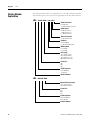
An ironless linear motor is comprised of a coil and a magnet channel.
The following keys show the catalog definition for the linear motors.
LDL - x xxx xxx - x x x x x
Cable Termination
0 = Flying leads
1 = Circular DIN-Type connector
Cable Length
0 = 300 mm (12.45 in.)
1 = 600 mm (23.62 in.)
2 = 1000 mm (39.37 in.)
Thermal Protection
T = PTC Thermal Sensor
Feedback
N = No Feedback
H = Hall Effect (Trapezoidal)
Winding Code
D = D winding
E = E winding
Coil Length
120 = 120 mm (4.72 in.)
240 = 240 mm (9.45 in.)
360 = 360 mm (14.17 in.)
480 = 480 mm (18.90 in.)
Frame Size
030
050
075
Coil Designation
N = Standard Coil
T = Thick Coil
Bulletin Number
LDL - xx xxx xxx
Magnet Channel Length
120 = 120 mm (4.72 in.)
480 = 480 mm (18.90 in.)
Frame Size
030
050
075
Coil Designation
NM = Standard Coil
TM = Thick Coil
Bulletin Number
16
Publication LDL-UM001A-EN-P - March 2009
Start
Linear Motor Components
Chapter 2
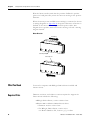
Use the diagrams and descriptions to identify the unique components
of the linear motor.
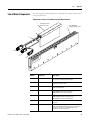
Components of Ironless Linear Motor Coil and Magnet Channel
1
LDL-N075120-xHT11
Motor Coil Shown
2
LDL- NM075480
Magnet Channel Shown
7
6
GER
DAN
LDS EA.
AR
C FIE S
ETI THI
GN D IN ll to er
MA ATE mfu oth
LOCbe harrs and ent.
Canemakeequipm
pacsitive
sen
5
4
3
IES
SER
ww
Publication LDL-UM001A-EN-P - March 2009
b.
w.a
A
00
756
M0 XXX
L-N X-X
. LD XXXXO
.N .
CAT L NO
IA
SER
E IN
USA
MAD
com
Component
Number
Component
Description
1
Ironless motor coil
Copper coils contained in an epoxy form. When powered,
the coil interacts with the magnet channel.
2
Magnet channel
High powered static magnets create the flux field the
powered coil interacts with.
3
Encoder connector
Connect your encoder here using connector kit, catalog
number LDC-ENC-CNCT.
4
Feedback connector
Connect to your drive feedback using either catalog number
2090-CFBM4DF-CDAFxx (for moving coil) or
2090-XXNFMF-Sxx (for moving magnet).
5
Power connector
Connect to your drive power using either catalog number
2090-CPWM4DF-xxAFxx (for moving coil) or
2090-XXNPMF-xxSxx (for moving magnet).
6
Thermistor connector
Connects the PTC thermistor signal to the feedback
connector.
7
Hall effect module
This module provides input signals for commutation
start-up. Replacement catalog numbers for the Hall effect
module are LDL-HALL-C for LDL-xxxxxxx-xHT11 and
LDL-HALL-F for LDL-xxxxxxx-xHT20.
17
Chapter 2
Start
Design Consideration
The information provided here is critical to using linear motor
components. Design your system to comply with the following points
to run safe and successfully.
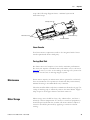
Motor Air Gap
Maintaining the air gap is critical to proper installation and operation
of the linear motor components. Use the coil, and magnet drawings in
Appendix A to calculate the installation envelope dimension. By
maintaining installation envelope dimension in your design the
vertical air gap requirement will be met. The following diagram shows
the critical dimensions.
Coil
Overall dimension
Magnet Channel
Bumpers, Shock Absorbers, or End Stops
Always include in your design a mechanical stop at the ends of travel.
Designed them such that they can prevent the moving mass from
leaving its travel limits. Take into consideration the maximum speed
and inertia of your moving mass when designing your mechanical
18
Publication LDL-UM001A-EN-P - March 2009
Start
Chapter 2
stops. The following diagram shows a minimal system with
mechanical stops.
Carriage/Heat Sink
Mechanical Stops
Mechanical Stops
Encoder strip
Encoder readhead
Linear Encoder
Your linear motor components needs to be integrated with a linear
encoder purchased from a third party.
Carriage/Heat Sink
The linear motor coil requires a heat sink to maintain performance.
The heat sink requires a minimal mass and surface area as shown on
page 62. It can as so serve as the carriage in moving coil system or be
designed into the base in moving magnet system.
Maintenance
Linear motors require no maintenance when operated in a relatively
clean environments. For operation in harsh and dirty environments,
minimal cleaning is recommended every 6 months.
Clean the metallic debris and other contaminants from the air gap. Use
a strip of masking tape to effectively remove the metal debris. Apply a
strip of tape in the magnet channel and then remove it.
Motor Storage
Publication LDL-UM001A-EN-P - March 2009
Motor storage area should be clean, dry, vibration free, and have a
relatively constant temperature. If a motor is stored on equipment, it
should be protected from the weather. All motor surfaces subject to
corrosion should be protected by applying a corrosion resistant
coating.
19
Chapter 2
Start
Notes:
20
Publication LDL-UM001A-EN-P - March 2009
Chapter
3
Installing the LDL-Series Linear Motor
Introduction
Unpacking and Inspection
The following section shows you how to safely unpack and install
your linear motor components.
Topic
Page
Unpacking and Inspection
21
Installing the Linear Motor Components
22
Mount the Magnet Channel
22
Mount the Motor Coil
25
Inspect motor assemblies for damage that may have occurred in
shipment. Any damage or suspected damage should be immediately
documented. Claims for damage due to shipment are usually made
against the transportation company. Contact Rockwell Automation
immediately for further advise.
ATTENTION
Linear motors contain powerful permanent magnets which
require extreme caution during handling. When handing
multiple magnet channels do not allow the channels to come in
contact with each other. Do not disassemble the magnet
channels. The forces between channels are very powerful and
can cause bodily injury. Persons with pacemakers or Automatic
Implantable Cardioverter Defibrillator (AICD) should maintain a
minimum distance of 0.33 m (1 ft) from magnet assemblies.
Additionally, unless absolutely unavoidable, a minimum
distance of 1.5 m (5 ft) feet must be maintained between
magnet assemblies and other magnetic or ferrous composite
materials. Use only non-metallic instrumentation when
verifying assembly dimension prior to installation
• Compare the purchase order with the packing slip.
• Check the quantity of magnet channels received matches your
job requirements.
• Identify the options that came with your linear motor.
• Inspect the assemblies and confirm the presence of specified
options.
21Publication LDL-UM001A-EN-P - March 2009
21
Chapter 3
Installing the LDL-Series Linear Motor
Installing the Linear Motor
Components
Use the following procedures to install the magnet channel and the
motor coil.
Required Tools:
• Aluminum straight edge
• Non-magnetic M4 or M5 hex wrench
• Magnet channel alignment tool
IMPORTANT
TIP
The alignment tool is shipped attached to the cables next to the
Hall effect module. Remove before operating the linear motor.
Non-magnetic tools and hardware made of beryllium copper,
300 series stainless steel, and others should be used. If not
available, proceed carefully since magnetic and ferrous items
will be attracted to the magnet channel.
Mount the Magnet Channel
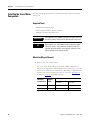
1. Select screw size and quantity.
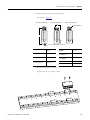
The size of the Socket Head Cap Screw (SHCS) depends on
mounting configuration. The diagram shows three ways you can
mount your linear motor components. Mounting configuration B
de-rates the motor continuous force by 10%. See Appendix A
starting on page 66 for SHCS quantity.
22
Mounting
Configuration
Require
SHCS
A
B and C
SHCS Torque
Black Oxide Steel
N•m (lb•ft)
Stainless Steel
N•m (lb•ft)
M6
16.0 (11.8)
10.8 (8.0)
M5
9.5 (7.0)
6.36 (4.7)
Publication LDL-UM001A-EN-P - March 2009
Installing the LDL-Series Linear Motor
Chapter 3
2. Verify installation envelope dimensions.
See table on page 23.
Mounting Configuration A
Mounting Configuration B
Mounting Configuration C
W1
0.10 mm (0.003 in.)
J
0.83 ±0.30 mm (0.003 ±0.011 in.)
Coil Cat. No.
Dimension H
mm (in.)
Magnet Channel
Cat. No.
Dimension W
mm (in.)
LDL-x 030xxx-xxxxx
80.0 (3.15)
LDL-NM030xxx
LDL-NM050xxx
36.4 (1.43)
LDL-x 050xxx-xxxxx
100.0 (3.94)
LDL-TM030xxx
LDL-TM050xxx
37.7 (1.48)
LDL-NM075xxx
38.05 (1.50)
LDL-x 075xxx-xxxxx
130.0 (5.12)
LDL-TM075xxx
39.35 (1.55)
3. Install the first magnet channel.
Tighten but do not torque screws.
Publication LDL-UM001A-EN-P - March 2009
23
Chapter 3
Installing the LDL-Series Linear Motor
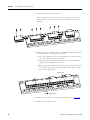
4. Install additional magnet channels.
Place a magnet channel on the mounting surface at a distance
from the previously installed magnet channel and slide it into
position.
2
3
4
5. Align the magnet channels with an aluminum straight edge and
the alignment tool and tighten the screws.
a. Place the alignment tool in the alignment hole at the butting
end of the first two magnet channels.
b. Align the edges of the magnet channel with the aluminum
straight edge and tighten the screws.
c. Repeat alignment between the fixed magnet channel and the
next magnet channels needing alignment until all the magnet
channels are tightened.
Alignment tool
Aluminum straight edge
6. Torque all the screws to values listed in the table on page 22.
7. Remove the alignment tool.
24
Publication LDL-UM001A-EN-P - March 2009
Installing the LDL-Series Linear Motor
Chapter 3
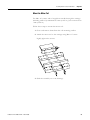
Mount the Motor Coil
Use M4 x 0.7 screws with a length that extends through the carriage
mounting surface by minimum of 5 mm (0.197 in.), but not more than
7 mm (0.276 in.).
Follow these steps to mount the motor coil.
1. Clean and remove burrs from the coil mounting surface.
2. Attach the motor coil to the carriage using M4 x 0.7 screw.
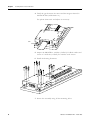
Lightly tighten the screws.
3. Slide the assembly on to the bearings.
Publication LDL-UM001A-EN-P - March 2009
25
Chapter 3
Installing the LDL-Series Linear Motor
4. Verify the gap between the motor and the magnet channel is
0.83 ±0.30 mm (0.033 ±0.011 in.).
Use plastic shim stock and adjust as necessary.
Shim
5. Torque the M4 SCHS to 4.6 N•m (3.4 lb•ft) for black oxide steel
screw or 3.10 N•m (2.3 lb•ft) for stainless steel screws.
6. Install the bearing fasterners.
7. Secure the assembly using all the mounting holes.
26
Publication LDL-UM001A-EN-P - March 2009
Chapter
4
LDL-Series Linear Motor Connector Data
Introduction
Linear Motor Coil
Connectors
This chapter provides power, thermistor, and Hall effect cable
connector information for the linear motor coil and Hall effect
module.
Topic
Page
Linear Motor Coil Connectors
27
Hall Effect Module Connectors
28
There are two connectors on the linear motor coil, catalog number
LDL-xxxxxxxx-xxT11, the power and the Positive Temperature
Coefficient (PTC) thermistor.
Power Connector
The following tables identify the power signals for DIN style circular
connector.
Pin
Color
Signal
A
Red
U (A) Phase
B
White
V (B) Phase
C
Black
D
Green/Yellow Ground
Case
Shield
ATTENTION
27Publication LDL-UM001A-EN-P - March 2009
W (C) Phase
Cable Shield
and GND
B
A
L
C
G
F
H
D
E
Intercontec P/N BKUA090NN00420220000
Mating Connector Kit Allen-Bradley 2090-KPBM4-12AA
Properly ground the coil as described in this manual and the
drive manual.
27
Chapter 4
LDL-Series Linear Motor Connector Data
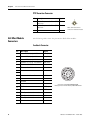
PTC Thermistor Connector
Pin
Description
Signal
1
Positive Temperature Coefficient (PTC)
thermistor +
TS+
Positive Temperature Coefficient (PTC)
thermistor -
TS-
–
Reserved
3
4
Hall Effect Module
Connectors
4
1
3
Mates with PTC thermistor
connector on Hall effect module.
The following tables show the pinouts the Hall effect module.
Feedback Connector
Pin
Description
Signal
1
A Quad B TTL (1 V p-p), + A Differential
AM+ (SIN+)
2
A Quad B TTL (1 V p-p), - A Differential
AM- (SIN-)
3
A Quad B TTL (1 V p-p), + B Differential
BM+ (COS+)
4
A Quad B TTL (1 V p-p), - B Differential
BM- (COS+)
5
TTL + Index Mark Differential
IM+
6
TTL - Index Mark Differential
IM-
7
Reserved
–
9
Encoder and Hall Sensor Power
+5V DC
10
Common
Common
11
Reserved
–
12
Common
Common
13
PTC Thermistor
PTC Temp+
14
PTC Thermistor
PTC Temp-
15
TTL - Trapezoidal Hall Commutation
S1
16
TTL - Trapezoidal Hall Commutation
S2
17
TTL - Trapezoidal Hall Commutation
S3
Case
Shield
–
8
28
11 12 1
10 16 13 2
9
3
17
8 15 6 14 4
7 5
Intercontec P/N AKUA015NN00400220000
Mating Connector Kit Allen-Bradley 2090-KFBM4-CAAA
Publication LDL-UM001A-EN-P - March 2009
LDL-Series Linear Motor Connector Data
Chapter 4
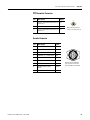
PTC Thermistor Connector
Pin
Description
Signal
1
Positive Temperature Coefficient (PTC)
thermistor +
TS+
4
Reserved
–
3
Positive Temperature Coefficient (PTC)
thermistor -
TS-
4
3
1
Mates with PTC thermistor
connector on linear motor coil.
Encoder Connector
Publication LDL-UM001A-EN-P - March 2009
Pin
Description
Signal
1
A Quad B TTL, + A Differential AM+
2
A Quad B TTL, + B Differential
BM+
3
TTL + Index Mark Differential
IM+
4
A Quad B TTL, - A Differential
AM-
5
A Quad B TTL, - B Differential
BM-
6
TTL - Index Mark Differential
IM-
7
5V DC Return
Common
8
Encoder and Hall Sensor
Power
+5V DC
9
Shield Drain
–
3
6
9
1
4
7
Mating connector available a
part of encoder connector kit
catalog number LDC-ENC-CNCT.
29
Chapter 4
LDL-Series Linear Motor Connector Data
Notes:
30
Publication LDL-UM001A-EN-P - March 2009
Chapter
5
Wiring the LDL-Series Linear Motor
Introduction
Connect the Linear Motor
Coil
This section shows you how to wire your LDL-Series linear motor.
Topic
Page
Connect the Linear Motor Coil
31
Signal and Wire Definitions for Flying Lead Components
33
Making Your Own Extension Cables
34
Mounting and Wiring Two Identical Coils in Tandem
35
Use the following procedure to connect your linear motor, catalog
number LDL-xxxxxxx-xHT11.
1. Using the Encoder Connector Kit, catalog number
LDC-ENC-CNCT, and the connector data on page 29, wire your
encoder to the connector.
ATTENTION
Be sure that cables are installed and restrained to prevent
uneven tension or flexing at the cable connectors. Use Bulk
Head Connector Kit, catalog number LDC-BULK-HD, for
mounting these connectors.
Excessive and uneven lateral force at the cable connectors may
result in the connector’s environmental seal opening and
closing as the cable flexes.
Failure to observe these safety precautions could result in
damage to the motor and its components.
2. Connect your encoder to the encoder connector on the Hall
effect module.
3. Attach the feedback and the power cables.
ATTENTION
Do not connect or disconnect the motor feedback cable or the
power cable while power. It may result in unexpected motion or
cause damage to the components.
d. Align flats on each connector.
31Publication LDL-UM001A-EN-P - March 2009
31
Chapter 5
Wiring the LDL-Series Linear Motor
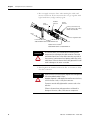
e. Do not apply excessive force when mating the cable and
motor connectors. If the connectors do not go together with
light hand force, realign and try again.
Power
Connector
Feedback
Connector
Encoder
Connector
Connect your encoder using
Encoder Connector Kit, catalog
number LDC-ENC-CNCT.
To User Supplied Encoder
Power Extension Cable
2090-CPWM4DF-xxAFxx or 2090-XXNPMF-xxSxx
To Drive
Feedback Extension Cable
2090-CFBM4DF-CDAFxx or 2090-XXNFMF-Sxx
ATTENTION
Be sure that cables are installed and restrained to prevent
uneven tension or flexing at the cable connectors. Excessive
and uneven lateral force at the cable connectors may result in
the connector’s environmental seal opening and closing as the
cable flexes. Failure to observe these safety precautions could
result in damage to the motor or encoder.
f. Hand tighten the knurled collar with five to six turns to fully
seat the connector.
ATTENTION
Keyed connectors must be properly aligned and hand-tightened
the recommended number of turns.
Improper alignment is indicated by the need for excessive force,
such as the use of tools, to fully seat connectors.
Connectors must be fully tightened for connector seals to be
effective.
Failure to observe these safety precautions could result in
damage to the motor, cables, and connector components.
32
Publication LDL-UM001A-EN-P - March 2009
Wiring the LDL-Series Linear Motor
Signal and Wire Definitions
for Flying Lead Components
Chapter 5
For linear motors, catalog numbers LDL-xxxxxxx-xHT20, wire using
wiring diagram on page 70. Wire colors and signal types are shown
here, for wire gauge information see page 65.
Linear Motor Coil
The following shows the wire color and signals for the linear motor
coil power and PTC thermistor cables, catalog
number LDL-xxxxxxx-xxT20.
Power Signals
Color
Signal
Red
Motor Phase U (A)
White
Motor Phase V (B)
Black
Motor Phase W (C)
• Consult drive manual or supplier for specific
wiring instructions to the drive. Wiring is
phase/commutation sensitive.
Green
Motor Ground
• Terminate per drive manual instructions.
Shield
Cable Shield
• Shield is not connected to the motor frame.
ATTENTION
Comments
• Observe maximum applied voltage
specification.
Disconnect input power supply before installing or servicing
motor.
Motor lead connections can short and cause damage or injury if
not well secured and insulated.
Insulate the connections, equal to or better than the insulation
on the supply conductors.
Properly ground the motor per selected drive manual.
PTC Thermistor Signals
Publication LDL-UM001A-EN-P - March 2009
Color
Description
Signal
Black
Positive Temperature Coefficient (PTC)
thermistor +
TS+
Black
Positive Temperature Coefficient (PTC)
thermistor -
TS-
33
Chapter 5
Wiring the LDL-Series Linear Motor
Hall Effect Module
This table shows the signal and wire colors for Hall effect module
with flying leads, catalog number LDL-HALL-F.
Making Your Own
Extension Cables
Color
Signal
Signal Spec
Red
+V
5…24V DC Hall supply, 20 mA.
Black
VRTN
Hall effect signal common.
White
S1
–
Blue
S2
Orange
S3
Silver braid
Cable shield
Terminate at drive end per drive
manual instructions.
Flying lead coil and Hall effect modules require circular DIN style
connectors to interface with Allen-Bradley extension cables. The
following connectors kits are available for terminating flying lead coils
and Hall effect modules.
Connector Kit Cat. No.
Application
2090-KFBM4-CAAA
Feedback flex extension cable
2090-KPBM4-12AA
Power flex extension cable
2090-KFBE7-CAAA
Feedback non-flex extension cable
2090-KPBE7-12AA
Power non-flex extension cable
The cable length from the coil to drive should be limited to 10 m
(32.8 ft). If longer cables are necessary a 1321-3Rx-x series line reactor
is required. Refer to 1321 Power Conditioning Products Technical
Data, publication 1321-TD001, to choose a line reactor for
applications requiring cable longer than 10 m (32.8 ft).
34
Publication LDL-UM001A-EN-P - March 2009
Wiring the LDL-Series Linear Motor
Mounting and Wiring Two
Identical Coils in Tandem
Chapter 5
This type of installation requires custom motor database file which is
available upon request. Contact Application Engineering at
631.344.6600 to request this file.
The following tables and diagrams show the wiring and spacing for
two identical coils mechanically top mounted(1) to the same plate and
driven by one amplifier. There are three configurations shown here
for mounting motors in tandem: power and encoder cables exiting on
the right, the center, and on opposite ends.
ATTENTION
Coils must have identical part numbers. Using mis-matched
coils will cause a hazardous condition resulting in damage to
the equipment and a possible fire.
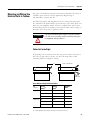
Cables Exit to the Right
If mounting coils in tandem, such that the power cables exit both of
the coils on right side as shown, use the following table to find
mounting distance and phase wiring.
L1
Coil #1 is the master
Coil #1
Coil #2
Hall Effect
Phase Wiring for Right Exit Power Cables
L1
mm (in.)
Coil # 1
Master(1)
Coil # 2
Slave(2)
Amplifier
Phase
80 (3.15)
Red
White
U
White
Black
V
Black
Red
W
Red
Black
U
White
Red
V
Black
White
W
120 (4.72)
(1) Contact Application Engineering (631.344.6600) for side mounting of the coils.
Publication LDL-UM001A-EN-P - March 2009
35
Chapter 5
Wiring the LDL-Series Linear Motor
Phase Wiring for Right Exit Power Cables
L1
mm (in.)
Coil # 1
Master(1)
Coil # 2
Slave(2)
Amplifier
Phase
160 (6.30)
Red
Red
U
White
White
V
Black
Black
W
(1) Master has Hall effect module.
(2) Slave has no Hall effect module.
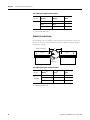
Cables Exit in the Center
If mounting coils in tandem, such that the power cables exit in the
center, as shown, use the following table to find mounting distance
and phase wiring.
Coil #1 is the master
L1
Coil #2
Coil #1
Hall Effect
Phase Wiring for Center Exit Power Cables
L1
mm (in.)
Coil # 1
Master(1)
Coil # 2
Slave(2)
Amplifier
Phase
90 (3.54)
or
150 (5.91)
Red
White
U
White
Red
V
Black
Black
W
(1) Master has Hall effect module.
(2) Slave has no Hall effect module.
36
Publication LDL-UM001A-EN-P - March 2009
Wiring the LDL-Series Linear Motor
Chapter 5
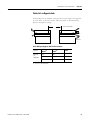
Cables Exit on Opposite Ends
If mounting coils in tandem, such that the power cables exit opposite
to each other, as shown, use the following table to find mounting
distance and phase wiring.
Coil #1 is the master
Coil #1
Coil #2
Hall Effect
Phase Wiring for Opposite End Exit Power Cables
L1
mm (in.)
Coil # 1
Master(1)
Coil # 2
Slave(2)
Amplifier
Phase
90 (3.54)
or
150 (5.91)
Red
Red
U
White
Black
V
Black
White
W
(1) Master has Hall effect module.
(2) Slave has no Hall effect module.
Publication LDL-UM001A-EN-P - March 2009
37
Chapter 5
Wiring the LDL-Series Linear Motor
Notes:
38
Publication LDL-UM001A-EN-P - March 2009
Chapter
6
Configure and Start Up the LDL-Series Linear
Motor
Introduction
Before You Begin
This section covers the setup and connection verification of a linear
motor with either Kinetix 6000, Kinetix 2000, or an Ultra3000 drive.
Topic
Pages
Before You Begin
39
What You Need
40
Required Files
40
Follow These Steps
41
Update Linear Motor Database
41
Set Up the Connection to Kinetix 6000 or Kinetix 2000 Drive
42
Set Up the Connection to an Ultra3000 Drive
47
Verify Motor Encoder Direction
49
Verify Motor Encoder Resolution
50
Verify Linear Motor Wiring and Function
50
This chapter assumes you have wired your linear motor and
Allen-Bradley drive as shown on wiring diagrams in Appendix B
starting on page 67.
IMPORTANT
It is important that the motor be wired correctly to get positive
motion when commutated.
Please read and understand Motor Direction Defined.
Motor Direction Defined
Positive motion is dependent on encoder orientation, encoder wiring,
and coil or magnet channel motion.
Most linear encoders are installed with the encoder cable facing the
same direction as the coil cable.
39Publication LDL-UM001A-EN-P - March 2009
39
Chapter 6
Configure and Start Up the LDL-Series Linear Motor
Wire the linear encoder such that the position feedback is positive
(phase A+ leads phase B+) when the motor is moving in the positive
direction.
When the motor power and Hall sensor wiring is connected as shown
in wiring diagrams in Appendix B, the positive direction of motion is
defined as the motor coil moving toward its power cable. This
diagram shows positive motion for both a moving coil and a moving
magnet channel.
Motor Direction
Coil Motion
Stationary Magnet
Stationary Coil
Magnet Motion
What You Need
You need a computer with RSLogix 5000 software installed and
internet access.
Required Files
Firmware revisions and software versions required to support the
linear motors include the following:
• RSLogix 5000 software, version 16.00 or later
• Kinetix 2000 or Kinetix 6000 multi-axis drives
– Firmware revision 1.96 or later
– For RSLogix 5000 software, version 16.xx
use Motion Database file, version 4_17_0 or later
40
Publication LDL-UM001A-EN-P - March 2009
Configure and Start Up the LDL-Series Linear Motor
Chapter 6
– For RSLogix 5000 software, version 17.xx or later
use Motion Database file, version 5_8_0 or later
• Ultra3000 drives
– Firmware revision 1.52 or later
– Motor Database, motor_03_18_09.mdb or later
• Motion Analyzer software, version 4.7 or later
Download these files from http://support.rockwellautomation.com.
Contact Rockwell Automation Technical Support at 440.646.5800 for
assistance.
Follow These Steps
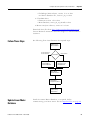
The following flow chart illustrates the required steps.
Update Linear
Motor Database
Kinetix 6000 Drive or
Kinetix 2000 Drive
Drive Model?
Set-up Connection to
Kinetix 6000 or
Kinetix 2000 Drive
Ultra3000 Drive
Set up the
Connection to an
Ultra3000 Drive
Verify Motor
Encoder Direction
Verify Motor
Encoder Resolution
Verify Linear
Motor Wiring
and Function
Update Linear Motor
Database
Publication LDL-UM001A-EN-P - March 2009
Install the current Motion Database, as required, before
commissioning your linear motor. See the Required Files on page 40.
41
Chapter 6
Configure and Start Up the LDL-Series Linear Motor
Set Up the Connection to
Kinetix 6000 or Kinetix 2000
Drive
This procedure configures the Kinetix 6000 or Kinetix 2000 drive for
your linear motor and encoder combination.
For help using RSLogix 5000 software as it applies to setting up your
linear motor, refer to Additional Resources on page 7. This procedure
assumes you are familiar with RSLogix 5000 software.
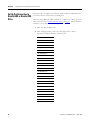
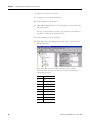
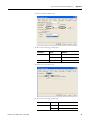
1. Click the Driver/Motor tab.
2. Click Change Catalog and select the appropriate Motor
Catalogue Number from the following list.
Cat. No.
LDL-N030120-DHTxx
LDL-N030240-DHTxx
LDL-N030240-EHTxx
LDL-T030120-DHTxx
LDL-T030240-DHTxx
LDL-T030240-EHTxx
LDL-N050120-DHTxx
LDL-N050240-DHTxx
LDL-N050240-EHTxx
LDL-N050360-DHTxx
LDL-N050360-EHTxx
LDL-N050480-DHTxx
LDL-N050480-EHTxx
LDL-T050120-DHTxx
LDL-T050240-DHTxx
LDL-T050240-EHTxx
LDL-T050360-DHTxx
LDL-T050360-EHTxx
LDL-T050480-DHTxx
LDL-T050480-EHTxx
LDL-N075480-DHTxx
LDL-N075480-EHTxx
LDL-T075480-DHTxx
LDL-T075480-EHTxx
42
Publication LDL-UM001A-EN-P - March 2009
Configure and Start Up the LDL-Series Linear Motor
Chapter 6
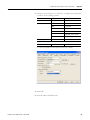
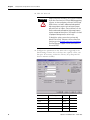
3. Using the screen image as a reference, configure the parameters
as shown in the Setting column.
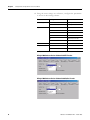
Parameter
Setting
Comment
Loop Configuration
Position Servo
–
Drive Resolution
200
5 µm encoder
500
2 µm encoder
1000
1 µm encoder
2000
0.5 µm encoder
51200
20 µm pitch Sin/Cos encoder(1)
25600
40 µm pitch Sin/Cos encoder
Motor Millimeter
–
Position Feedback
–
Drive Counts per
Real Time Axis Information
Attribute 1
(1) Requires custom database file contact Application Engineering at 631.444.6600.
4. Click OK.
5. Click the Motor Feedback tab.
Publication LDL-UM001A-EN-P - March 2009
43
Chapter 6
Configure and Start Up the LDL-Series Linear Motor
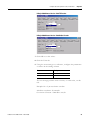
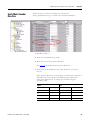
6. Using the screen image as a reference, configure the parameters
as shown in the Setting column.
Parameter
Setting
Comment
Feedback Type
TTL or Sin/Cos
For RSLogix 5000 software,V16
TTL with Hall or Sin/Cos with Hall
For RSLogix 5000 software, V17
50
5 µm encoder
125
2 µm encoder
250
1 µm encoder
500
0.5 µm encoder
50
20 µm Sin/Cos encoder(1)
25
40 µm Sin/Cos encoder
per
Millimeters
–
Interpolation Factor
4
TTL
1024
Sin/Cos
Cycles
(1) Requires custom database file contact Application Engineering at 631.444.6600.
RSLogix 5000 Software Version 15.00 and 16.00 TTL Encoder
RSLogix 5000 Software Version 15.00 and 16.00 Sin/Cos Encoder
44
Publication LDL-UM001A-EN-P - March 2009
Configure and Start Up the LDL-Series Linear Motor
Chapter 6
RSLogix 5000 Software Version 17.00 TTL Encoder
RSLogix 5000 Software Version 17.00 Sin/Cos Encoder
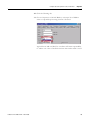
7. Click OK to set the values.
8. Click the Units tab.
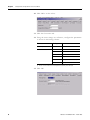
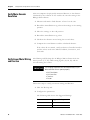
9. Using the screen image as a reference, configure the parameters
as shown in the Setting column.
Parameter
Setting
Position Units
mm
Average Velocity Timebase
0.25 s
You can change position units to inches, or other units, on this
tab.
Example for a 5 µm resolution encoder:
200 drive cnts/mm x 25.4 mm/in.
Conversion Constant = 5080 drive cnts/in.
Publication LDL-UM001A-EN-P - March 2009
45
Chapter 6
Configure and Start Up the LDL-Series Linear Motor
10. Click OK to set the values.
11. Click the Conversion tab.
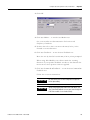
12. Using the screen image as a reference, configure the parameters
as shown in the Setting column.
Parameter
Setting
Comment
Positioning Mode
Linear
–
Conversion Constant
200
5 µm encoder
500
2 µm encoder
1000
1 µm encoder
2000
0.5 µm encoder
51200
20 µm pitch Sin/Cos encoder(1)
25600
40 µm pitch Sin/Cos encoder
(1) Requires custom database file contact Application Engineering at 631.444.6600.
13. Click OK.
46
Publication LDL-UM001A-EN-P - March 2009
Configure and Start Up the LDL-Series Linear Motor
Set Up the Connection to an
Ultra3000 Drive
Chapter 6
This procedure configures the Ultra3000 drive for your linear motor
and encoder combination.
For help using Ultraware software as it applies to setting up your
linear motor, refer to Additional Resources on page 7. This procedure
assumes you are familiar with Ultraware software.
1. Open your Motor Configurator Utility.
2. Select the linear motor catalog number.
3. From the Edit menu choose Duplicate.
4. Rename Model.
5. Click Encoder Type and select either Incremental or Sin/Cos.
6. Click Lines Per Meter and the enter value.
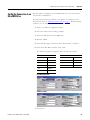
The following tables list typical values for lines per meter.
Incremental
Sin/Cos
Resolution
Value
Encoder Scale Pitch
Value
10 µm
25,000
100 µm
10,000
5 µm
50,000
40 µm
25,000
2 µm
125,000
20 µm
50,000
1 µm
250,000
0.5 µm
500,000
Incremental Encoder
Sin/Cos Encoder
7. Click Close.
Publication LDL-UM001A-EN-P - March 2009
47
Chapter 6
Configure and Start Up the LDL-Series Linear Motor
8. Open your Ultraware software.
9. Configure for your Ultra3000 drive.
10. From Workspace select Motor.
11. Click Motor Model and choose the model you created from the
pull-down menu.
If using an incremental encoder, you are finished. For Sin/Cos
encoders continue with steps12 and 13.
12. From Workspace select Encoders.
13. Click Motor Encoder Interpolation and select a value from the
pull-down menu.
This tables shows the encoder resolutions that could be
achieved when using a 20 µ Sin/Cos encoder and different
interpolation values.
48
Value
Encoder Resolution
X4
5 µm
X8
2.5 µm
X16
1.25 µm
X32
0.625 µm
X64
0.3125 µm
X128
0.15625 µm
X256
0.078125 µm
X512
0.0390 µm
X1024
0.01953125 µm
Publication LDL-UM001A-EN-P - March 2009
Configure and Start Up the LDL-Series Linear Motor
Verify Motor Encoder
Direction
Chapter 6
In this section you select controller tag, and use the
motor_ActualPostion tag to evaluate the encoder installation.
1. Disable the drive.
2. Note the ActualPostion tag value.
3. Move the axis in the positive direction.
See page 39 for definition for positive direction.
4. Verify that the ActualPostion tag value increases as the axis
moves.
If the positive direction of travel does not match what has been
defined by the motor power and Hall Sensing wiring, then
change the direction by re-wiring the encoder using the
following table.
Move
Publication LDL-UM001A-EN-P - March 2009
To
Encoder Phase
Drive CN2, pin
Encoder Phase
Drive CN2, pin
A+
1
B+
3
A-
2
B-
4
B+
3
A+
1
B-
4
A-
2
49
Chapter 6
Configure and Start Up the LDL-Series Linear Motor
Verify Motor Encoder
Resolution
This test compares the physically measured distance to the distance
calculated by the software. It also verifies the encoder setting in the
RSLogix 5000 software.
1. Measure and mark a fixed distance of travel on the axis.
2. Record the ActualPosition tag value with carriage at the starting
position.
3. Move the carriage to the end position.
4. Record the ActualPosition tag value.
5. Calculate the distance moved using the record values.
6. Compare the actual distance and the calculated distance.
If the values do not match, verify resolution of installed encoder
and the values used in the Motor Feedback, Conversion, and
Units tabs.
Verify Linear Motor Wiring
and Function
The Homing and Hookup tabs in RSlogix 5000 software check the
motor power (U, V, W), Hall sensing signals (S1, S2, S3) and the
encoder wiring are correct.
IMPORTANT
The following components must be wired correctly for your
drive and linear motor to operate properly:
• Hall Effect Module
• Coil Power Wires
• Thermistor
• Encoder
Follow this steps to verify your motor wiring and function.
1. Click the Hookup tab.
2. Configure the parameters.
The following table shows the Suggested Settings.
50
Parameter
Suggested Setting
Test increment
60.00 mm
Drive Polarity
Positive
Publication LDL-UM001A-EN-P - March 2009
Configure and Start Up the LDL-Series Linear Motor
Chapter 6
3. Click OK.
4. Click Test Marker… to run the Test Marker test.
See your encoder user documentation for location and
frequency of markers.
5. Position the coil so that it can move 60 mm (2.36 in.) in the
forward or reverse direction.
6. Click Test Feedback… to run the Test Feedback test.
Move the axis by hand at least 60 mm (2.36 in.) when prompted.
When using Allen-Bradley servo drives match the counting
direction of your position feedback encoder to the direction the
motor moves when positive current is applied.
7. Click Test Command & Feedback… to run the Test Command &
Feedback test.
Follow the on-screen instructions.
IMPORTANT
IMPORTANT
Publication LDL-UM001A-EN-P - March 2009
Be sure all the tests on the Hookup tab have passed
before proceeding.
When using Kinetix 6000 and Kinetix 2000 drives, the
Test Command Feedback test may pass even though the
Hall Effect module is not wired correctly.
51
Chapter 6
Configure and Start Up the LDL-Series Linear Motor
8. Click the Tune tab.
WARNING
Large Position Error Tolerances, such as those calculated
by the Auto Tune function in RSLogix 5000 programming
software, or when configuring a new axis with RSLogix
5000 software, can lead to undetected and repetitive
high energy impacts against axis end stops if proper
precautions are not in place. These tolerances can also
lead to undetected and repetitive high energy impacts
against unexpected obstructions. Such impacts can lead
to equipment damage and/or serious injury.
To identify the safety concerns that you have with
default Position Error Tolerance or after an Auto-Tune
Function, go to the Rockwell Automation Knowlegebase.
Click Find Technical Support Answers and search for
Answer Id 55937.
9. Configure the parameters in the Tune tab as suggested in the
Initial Setting column. Leave all other tune options off for your
first pass. If necessary, reduce the Velocity Loop Proportional
Gain to maintain stability.
52
Parameter
Initial Setting
Units
Note
Travel Limit
100
mm
Suggested
Speed
250
mm/sec
–
Torque/Force
50
% Rated
–
Direction
Forward Bi-directional
–
–
Damping Factor
0.8
–
(default)
Publication LDL-UM001A-EN-P - March 2009
Configure and Start Up the LDL-Series Linear Motor
Chapter 6
10. Click the Homing tab.
11. Choose Sequence to Switch-Marker, or Torque Level-Marker
when a repeatable power-up position is desired.
Typical linear TTL and Sin/Cos encoders will home repeatability
to within one count of resolution when their index mark is used.
Publication LDL-UM001A-EN-P - March 2009
53
Chapter 6
Configure and Start Up the LDL-Series Linear Motor
Notes:
54
Publication LDL-UM001A-EN-P - March 2009
Appendix
A
Specifications and Dimensions
Introduction
55Publication LDL-UM001A-EN-P - March 2009
This appendix provides product specifications and mounting
dimensions for your LDL-Series ironless linear motor components.
Topic
Page
Performance Specifications
56
General Specifications
61
Product Dimensions
63
55
Appendix A
Specifications and Dimensions
Performance
Specifications
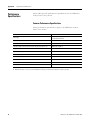
These tables provide performance specifications for the LDL-Series
ironless linear servo motors.
Common Performance Specifications
These performance specifications apply to all LDL-Series ironless
linear servo motors.
Attribute
Value
Motor type
3 phase, wye winding, synchronous permanent magnet stator,
non-ventilated linear motor
Operating speed, max
10 m/s (32.8 ft/s)
Operating voltage, (not for direct connection to AC line)
230V AC rms
Dielectric rating of motor power connections (U,V,W), to ground for 1.0 s (1)
1500V AC rms, 50/60 Hz
Cogging torque
Zero
Applied bus voltage, max (2)
325V DC
Electrical cycle length
60 mm (2.36 in.)
Coil temperature, max
130 °C (266 °F)
Insulation class
130 °C (266 °F) Class B
Thermal time constant, Ref, winding to ambient
35 min
Paint color
Black
(1) Tested during manufacturing process, Do not re-apply test voltage. Contact Application Engineering (631.344.6600) for advice on testing coils post production.
(2) Maximum cable length is 10 m (32.8 ft). Contact Application Engineering (631.344.6600) for applications requiring longer cables.
56
Publication LDL-UM001A-EN-P- March 2009
Specifications and Dimensions
Appendix A
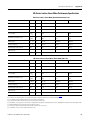
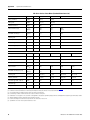
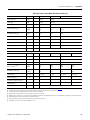
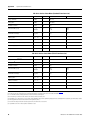
LDL-Series Ironless Linear Motor Performance Specifications
LDL-Series Ironless Linear Motor (Standard 30 mm frame size)
Attribute
Units
Symbol
LDL-N030120-DxTxx
LDL-N030240-DxTxx
LDL-N030240-ExTxx
Force, continuous (1) (2) (3) (4)
N (lbf)
Fc
63 (14)
126 (28)
Force, peak (5)
N (lbf)
Fp
209 (47)
417 (94)
Thermal resistance
°C/W
Rth
1.73
0.86
Force constant (6) (7) (8)
N/Apk
(lbf/Apk)
Kf
21.0
(4.7)
21.0
(4.7)
42.0
(9.4)
Back EMF constant p-p (6) (7) (8)
Vp/m/s
(Vp/in/s)
Ke
24.8
(0.6)
24.8
(0.6)
49.6
(1.3)
Current, peak (5) (7)
Apk (A rms)
Ip
9.9 (7.0)
19.9 (14.0)
9.9 (7.0)
Current, continuous (1) (2) (3) (4)
Apk (Arms)
Ic
3.0 (2.1)
6.0 (4.2)
3.0 (2.1)
Resistance p-p @ 20 °C (68 °F) (6) (8)
Ohms
R20
5.41
2.70
10.82
Inductance p-p (6) (8)
mH
L
8.43
4.22
16.86
Magnetic attraction
N (lbf)
Fa
0 (0)
LDL-Series Ironless Linear Motor (Thick 30 mm frame size)
Attribute
Units
Symbol
LDL-T030120-DxTxx
LDL-T030240-DxTxx
Force, continuous (1) (2) (3) (4)
N (lbf)
Fc
72 (16)
144 (32)
Force, peak (5)
N (lbf)
Fp
239 (54)
479 (108)
Thermal resistance
°C/W
Rth
1.31
0.65
Force constant (6) (7) (8)
N/Apk
(lbf/Apk)
Kf
24.1
(5.4)
24.1
(5.4)
48.2
(10.8)
Back EMF constant p-p (6) (7) (8)
Vp/m/s
(Vp/in/s)
Ke
28.5
(0.7)
28.5
(0.7)
56.9
(1.4)
Current, peak (5) (7)
Apk (A rms)
Ip
9.9 (7.0)
19.9 (14.0)
9.9 (7.0)
Current, continuous (1) (2) (3) (4)
Apk (Arms)
Ic
3.0 (2.1)
6.0 (4.2)
3.0 (2.1)
Resistance p-p @ 20 °C (68 °F) (6) (8)
Ohms
R20
7.15
3.57
14.29
Inductance p-p (6) (8)
mH
L
13.40
6.70
26.80
Magnetic attraction
N (lbf)
Fa
0 (0)
(1)
(2)
(3)
(4)
(5)
(6)
(7)
(8)
LDL-T030240-ExTxx
Coils at maximum temperature, 130 °C (266 °F), mounted to an aluminium heat sink whose area is noted in table on page 62, and at 40 °C (104 °F) ambient.
Continuous force and current based on coil moving with all phases sharing the same load in sinusoidal commutation.
For standstill conditions, multiply continuous force and continuous current by 0.9.
Coil mountings on either of the two narrow sides reduces continuous force by 10%.
Calculated at 11% duty cycle for 1.0 second max. Some applications may produce significantly higher peak forces. Call Applications Engineering (631.344.6600) for details.
Winding parameters listed are measured line-to-line (phase-to-phase).
Currents and voltages listed are measured 0-peak of the sine wave unless noted as rms.
Specifications are ±10%. Phase-to-phase inductance is ±30%.
Publication LDL-UM001A-EN-P - March 2009
57
Appendix A
Specifications and Dimensions
LDL-Series Ironless Linear Motor (Standard 50 mm frame size)
Attribute
Units
Symbol
LDL-N050120-DxTxx
LDL-N050240-DxTxx
Force, continuous (1) (2) (3) (4)
N (lbf)
Fc
96 (22)
191 (43)
Force, peak (5)
N (lbf)
Fp
317 (71)
635 (143)
Thermal resistance
°C/W
Rth
1.58
0.79
Force constant (6) (7) (8)
N/Apk
(lbf/Apk)
Kf
35.0
(7.9)
35.0
(7.9)
70.0
(15.7)
Back EMF constant p-p (6) (7) (8)
Vp/m/s
(Vp/in/s)
Ke
41.3
(1.1)
41.3
(1.1)
82.7
(2.1)
Current, peak (5) (7)
Apk (A rms)
Ip
9.1 (6.4)
18.1 (12.8)
9.1 (6.4)
Current, continuous (1) (2) (3) (4)
Apk (Arms)
Ic
2.7 (1.9)
5.5 (3.9)
2.7 (1.9)
Resistance p-p @ 20 °C (68 °F) (6) (8) Ohms
R20
7.11
3.56
14.22
Inductance p-p (6) (8)
mH
L
11.08
5.54
22.16
Magnetic attraction
N (lbf)
Fa
0 (0)
Attribute
Units
Symbol
LDL-N050360-DxTxx
LDL-N050360-ExTxx
LDL-N050480-DxTxx
Force, continuous (1) (2) (3) (4)
N (lbf)
Fc
287 (65)
383 (86)
Force, peak (5)
N (lbf)
Fp
952 (214)
1269 (285)
Thermal resistance
°C/W
Rth
0.53
0.39
Force constant (6) (7) (8)
N/Apk
(lbf/Apk)
Kf
35.0
(7.9)
105.0
(23.6)
35.0
(7.9)
70.0
(15.7)
Back EMF constant p-p (6) (7) (8)
Vp/m/s
(Vp/in/s)
Ke
41.3
(1.1)
124.0
(3.2)
41.3
(1.1)
82.7
(2.1)
Current, peak (5) (7)
Apk (A rms)
Ip
27.2 (19.2)
9.1 (6.4)
36.3 (25.6)
18.1 (12.8)
Current, continuous (1) (2) (3) (4)
Apk (Arms)
Ic
8.2 (5.8)
2.7 (1.9)
10.9 (7.7)
5.5 (3.9)
Resistance p-p @ 20 °C (68 °F) (6) (8) Ohms
R20
2.37
21.33
1.78
7.11
Inductance p-p (6) (8)
mH
L
3.69
33.25
2.77
11.08
Magnetic attraction
N (lbf)
Fa
0 (0)
LDL-N050240-ExTxx
LDL-N050480-ExTxx
(1)
(2)
(3)
(4)
(5)
(6)
(7)
(8)
Coils at maximum temperature, 130 °C (266 °F), mounted to an aluminium heat sink whose area is noted in table on page 62, and at 40 °C (104 °F) ambient.
Continuous force and current based on coil moving with all phases sharing the same load in sinusoidal commutation.
For standstill conditions, multiply continuous force and continuous current by 0.9.
Coil mountings on either of the two narrow sides reduces continuous force by 10%.
Calculated at 11% duty cycle for 1.0 second max. Some applications may produce significantly higher peak forces. Call Applications Engineering (631.344.6600) for details.
Winding parameters listed are measured line-to-line (phase-to-phase).
Currents and voltages listed are measured 0-peak of the sine wave unless noted as rms.
Specifications are ±10%. Phase-to-phase inductance is ±30%.
58
Publication LDL-UM001A-EN-P- March 2009
Specifications and Dimensions
Appendix A
LDL-Series Ironless Linear Motor (Thick 50 mm frame size)
Attribute
Units
Symbol
LDL-T050120-DxTxx
LDL-T050240-DxTxx
Force, continuous (1) (2) (3) (4)
N (lbf)
Fc
110 (25)
220 (49)
Force, peak (5)
N (lbf)
Fp
364 (82)
728 (164)
Thermal resistance
°C/W
Rth
1.19
0.60
Force constant (6) (7) (8)
N/Apk
(lbf/Apk)
Kf
40.2
(9.0)
40.2
(9.0)
80.4
(18.1)
Back EMF constant p-p (6) (7) (8)
Vp/m/s
(Vp/in/s)
Ke
47.4
(1.2)
47.4
(1.2)
94.9
(2.4)
Current, peak (5) (7)
Apk (A rms)
Ip
9.1 (6.4)
18.1 (12.8)
9.1 (6.4)
Current, continuous (1) (2) (3) (4)
Apk (Arms)
Ic
2.7 (1.9)
5.5 (3.9)
2.7 (1.9)
Resistance p-p @ 20 °C (68 °F) (6) (8)
Ohms
R20
9.42
4.71
18.83
Inductance p-p (6) (8)
mH
L
18
9
35.31
Magnetic attraction
N (lbf)
Fa
0 (0)
Attribute
Units
Symbol
LDL-T050360-DxTxx
LDL-T050360-ExTxx
LDL-T050480-DxTxx
Force, continuous (1) (2) (3) (4)
N (lbf)
Fc
329 (74)
439 (99)
Force, peak (5)
N (lbf)
Fp
1093 (246)
1457 (327)
Thermal resistance
°C/W
Rth
0.40
0.30
Force constant (6) (7) (8)
N/Apk
(lbf/Apk)
Kf
40.2
(9.0)
120.5
(27.1)
40.2
(9.0)
80.4
(18.1)
Back EMF constant p-p (6) (7) (8)
Vp/m/s
(Vp/in/s)
Ke
47.4
(1.2)
142.3
(3.6)
47.4
(1.2)
94.9
(2.4)
Current, peak (5) (7)
Apk (A rms)
Ip
27.2 (19.2)
9.1 (6.4)
36.3 (25.6)
18.1 (12.8)
Current, continuous (1) (2) (3) (4)
Apk (Arms)
Ic
8.2 (5.8)
2.7 (1.9)
10.9 (7.7)
5.5 (3.9)
Resistance p-p @ 20 °C (68 °F) (6) (8)
Ohms
R20
3.14
28.25
2.35
9.42
Inductance p-p (6) (8)
mH
L
5.88
52.96
4.41
17.65
Magnetic attraction
N (lbf)
Fa
0 (0)
(1)
(2)
(3)
(4)
(5)
(6)
(7)
(8)
LDL-T050240-ExTxx
LDL-T050480-ExTxx
Coils at maximum temperature, 130 °C (266 °F), mounted to an aluminium heat sink whose area is noted in table on page 62, and at 40 °C (104 °F) ambient.
Continuous force and current based on coil moving with all phases sharing the same load in sinusoidal commutation.
For standstill conditions, multiply continuous force and continuous current by 0.9.
Coil mountings on either of the two narrow sides reduces continuous force by 10%.
Calculated at 11% duty cycle for 1.0 second max. Some applications may produce significantly higher peak forces. Call Applications Engineering (631.344.6600) for details.
Winding parameters listed are measured line-to-line (phase-to-phase).
Currents and voltages listed are measured 0-peak of the sine wave unless noted as rms.
Specifications are ±10%. Phase-to-phase inductance is ±30%.
Publication LDL-UM001A-EN-P - March 2009
59
Appendix A
Specifications and Dimensions
LDL-Series Ironless Linear Motor (Standard 75 mm frame size)
Attribute
Units
Symbol
LDL-N075480-DxTxx
LDL-N075480-ExTxx
Force, continuous (1) (2) (3) (4)
N (lbf)
Fc
519 (117)
Force, peak (5)
N (lbf)
Fp
1723 (387)
Thermal resistance
°C/W
Rth
0.37
Force constant (6) (7) (8)
N/Apk
(lbf/Apk)
Kf
52.5
(11.8)
105.0
(23.6)
Back EMF constant p-p (6) (7) (8)
Vp/m/s
(Vp/in/s)
Ke
62.0
(1.6)
124.0
(3.2)
Current, peak (5) (7)
Apk (A rms)
Ip
32.8 (23.2)
16.4 (11.6)
Current, continuous (1) (2) (3) (4)
Apk (Arms)
Ic
9.9 (7.0)
4.9 (3.5)
Resistance p-p @ 20 °C (68 °F) (6) (8)
Ohms
R20
2.31
9.24
Inductance p-p (6) (8)
mH
L
3.60
14.40
Magnetic attraction
N (lbf)
Fa
0 (0)
LDL-Series Ironless Linear Motor (Thick 75 mm frame size)
Attribute
Units
Symbol
LDL-T075480-DxTxx
Force, continuous (1) (2) (3) (4)
N (lbf)
Fc
596 (134)
Force, peak (5)
N (lbf)
Fp
1977 (444)
Thermal resistance
°C/W
Rth
0.28
Force constant (6) (7) (8)
N/Apk
(lbf/Apk)
Kf
60.3
(13.5)
120.5
(27.1)
Back EMF constant p-p (6) (7) (8)
Vp/m/s
(Vp/in/s)
Ke
71.2
(1.8)
142.3
(3.6)
Current, peak (5) (7)
Apk (A rms)
Ip
32.8 (23.2)
16.4 (11.6)
Current, continuous (1) (2) (3) (4)
Apk (Arms)
Ic
9.9 (7.0)
4.9 (3.5)
Resistance p-p @ 20 °C (68 °F) (6) (8)
Ohms
R20
3.06
12.25
Inductance p-p (6) (8)
mH
L
5.74
22.97
Magnetic attraction
N (lbf)
Fa
0 (0)
(1)
(2)
(3)
(4)
(5)
(6)
(7)
(8)
60
LDL-T075480-ExTxx
Coils at maximum temperature, 130 °C (266 °F), mounted to an aluminium heat sink whose area is noted in table on page 62, and at 40 °C (104 °F) ambient.
Continuous force and current based on coil moving with all phases sharing the same load in sinusoidal commutation.
For standstill conditions, multiply continuous force and continuous current by 0.9.
Coil mountings on either of the two narrow sides reduces continuous force by 10%.
Calculated at 11% duty cycle for 1.0 second max. Some applications may produce significantly higher peak forces. Call Applications Engineering (631.344.6600) for details.
Winding parameters listed are measured line-to-line (phase-to-phase).
Currents and voltages listed are measured 0-peak of the sine wave unless noted as rms.
Specifications are ±10%. Phase-to-phase inductance is ±30%.
Publication LDL-UM001A-EN-P- March 2009
Specifications and Dimensions
General Specifications
Appendix A
These tables provide weight, heat sink, environmental for LDL-Series
ironless linear motors.
Weight Specifications
Weight Specifications - Motor Coil with Flying Leads
Cat. No.
Weight, Approx.
Weight, Approx.
kg (lb)
Cat. No.
LDL-N030120-DHT20
0.63 (1.38)
LDL-T050240-xHT20
1.71 (3.77)
LDL-T030120-DHT20
0.74 (1.64)
LDL-N050360-xHT20
2.03 (4.47)
LDL-N030240-xHT20
1.14 (2.51)
LDL-T050360-xHT20
2.50 (5.52)
LDL-T030240-xHT20
1.37 (3.02)
LDL-N050480-xHT20
2.67 (5.88)
LDL-N050120-DHT20
0.75 (1.66)
LDL-T050480-xHT20
3.30 (7.28)
LDL-T050120-DHT20
0.91 (2.01)
LDL-N075480-xHT20
3.32 (7.32)
LDL-N050240-xHT20
1.39 (3.07)
LDL-T075480-xHT20
4.16 (9.18)
kg (lb)
Weight Specifications - Motor Coil with Connectors
Cat. No.
Weight, Approx.
Weight, Approx.
kg (lb)
Cat. No.
LDL-N030120-DHT11
0.83 (1.83)
LDL-T050240-xHT11
1.91 (4.21)
LDL-T030120-DHT11
0.94 (2.07)
LDL-N050360-xHT11
2.23 (4.92)
LDL-N030240-xHT11
1.34 (2.95)
LDL-T050360-xHT11
2.70 (5.95)
LDL-T030240-xHT11
1.57 (3.46)
LDL-N050480-xHT11
3.50 (7.72)
LDL-N050120-DHT11
0.95 (2.09)
LDL-T050480-xHT11
4.36 (9.61)
LDL-T050120-DHT11
1.01 (2.22)
LDL-N075480-xHT11
3.52 (7.76)
LDL-N050240-xHT11
1.41 (3.11)
LDL-T075480-xHT11
4.36 (9.61)
kg (lb)
Weight Specifications - Motor Magnet Channel
Publication LDL-UM001A-EN-P - March 2009
Cat. No.
Weight, Approx.
kg (lb)
Cat. No.
Weight, Approx.
kg (lb)
LDL-NM030120
1.37 (3.02)
LDL-TM050120
1.89 (4.17)
LDL-NM030480
5.51 (12.15)
LDL-TM050480
7.57 (16.69)
LDL-TM030120
1.40 (3.08)
LDL-NM075120
2.91 (6.42)
LDL-TM030480
5.60 (12.35)
LDL-NM075480
11.64 (25.66)
LDL-NM050120
1.87 (4.12)
LDL-TM075120
2.94 (6.48)
LDL-NM050480
7.48 (116.49)
LDL-TM075480
11.76 (25.93)
61
Appendix A
Specifications and Dimensions
Carriage Weight and Heat Sink Area Requirements
Cat. No.
Required
Heat Sink Area
cm2 (in.2)
Required
Carriage Plate Weight
kg (lb)
LDL-x030120-DHTxx
774 (120)
1.4 (3)
LDL-x030240-xHTxx
1160 (180)
2.0 (4.5)
LDL-x050120-DHTxx
774 (120)
2.7 (6)
LDL-x050240-DHTxx
1160 (180)
4.0 (9)
LDL-x050360-DHTxx
1680 (260)
5.9 (13)
LDL-x050480-DHTxx
2060 (320)
7.3 (16)
LDL-x075480-xHTxx
2060 (320)
7.3 (16)
Environmental Specifications
Attribute
Value
Temperature, operating ambient
0…40 °C (32…104 °F)
Temperature, storage ambient
-30…70 °C (-22…158 °F)
Humidity, relative non-condensing
5…95%
Liquid/dust protection
IP 65
Shock, max.
20 g peak, 6 ms duration
Vibration, max
30…2000 Hz, 2.5 g peak
Certifications
Certification(1)
(when product is marked)
Standards
c-UL-us
UL recognized to U.S. and Canadian safety standards (UL 1004-1 and 840 File E230241).
European Union 2004/108/EC EMC Directive compliant with EN 61800-3:2004: Adjustable Speed
Electrical Power Drive Systems - Part 3; EMC Product Standard including specific test methods.
European Union 2006/95/EC Low Voltage Directive compliant with:
CE
• EN 60034-1:2004 Rotating Electrical Machines, Part I: Rating and Performance.
• EN 60204-1:2006 Safety of Machinery – Electrical Equipment of Machines, Part 1: General
Requirements.
(1) Refer to http://www.ab.com for Declarations of Conformity Certificates.
62
Publication LDL-UM001A-EN-P- March 2009
Specifications and Dimensions
Product Dimensions
Publication LDL-UM001A-EN-P - March 2009
Appendix A
LDL-Series ironless linear motor components are designed to metric
dimensions. Inch dimensions are conversions from millimeters.
Untoleranced dimensions are for reference.
63
64
G
Mounting holes
M4 x 0.7 8.5 (0.33),
quantity A1.
D
C
B
4.50
(0.177)
35.00 26.00
(1.378) (1.024)
60.00
(2.362)
Typical
80.00
(3.150)
A
38.00
(1.496)
H
L
F
E
D
B
A
Mounting holes
M4 x 0.7 8.5 (0.33),
quantity A1.
C
80.00
(3.150)
Dimensions for side view of linear motor coil with connectors is identical to this view with flying leads.
Refer to table on page 65 for coil mounting surface flatness requirement.
L
E
LDL-Series Ironless Linear Motor Coil Dimension (LDL-xxxxxxx-xHT11) with Connectors
Mounting holes
M4 x 0.7 7 (0.28)
typical both sides,
quantity A2.
4.50
(0.177)
35.00 26.00
(1.378) (1.024)
F
LDL-Series Ironless Linear Motor Coil Dimension (LDL-xxxxxxx-xHT20) with Flying Leads
28.00
(1.102)
Encoder
Connector
32.00
(1.260)
28.00
(1.102)
600
(24)
350
(13.9)
Power
Connector
Feedback
Connector
0.83±0.30
(0.033±.011)
Air Gap
J
Magnet channel
shown for reference.
T
0.260 (0.010)
Coil Face Runout (T.I.R.)
Hall Effect Module
I
Flying Leads
1000 mm (39.37 in.)
22.00
(0.866)
Power Cable
Flying Leads
1000 mm (39.37 in.)
Thermistor Cable
Flying Leads
1000 mm (39.37 in.)
Dimensions are in mm (in.)
Appendix A
Specifications and Dimensions
Motor Coil Dimensions
Publication LDL-UM001A-EN-P- March 2009
Publication LDL-UM001A-EN-P - March 2009
240.00
(9.449)
240.00
(9.449)
–
–
–
–
C
mm (in.)
320.00
(12.598)
320.00
(12.598)
–
–
–
–
D
mm (in.)
360.00
(14.173)
–
–
–
–
–
E
mm (in.)
440.00
(17.323)
–
–
–
–
–
F
mm (in.)
420.00
(16.535)
300.00
(11.811)
180.00
(7.087)
60.00
(2.362)
180.00
(7.087)
60.00
(2.362)
G
mm (in.)
486.00
(19.134)
366.00
(14.409)
246.00
(9.685)
126.00
(4.961)
246.00
(9.685)
126.00
(4.961)
H
mm (in.)
115.50
(4.547)
90.50
(3.563)
70.50
(2.776)
I
mm (in.)
130.00
(5.118)
100.00
(3.937)
80.00
(3.149)
J (1)
mm (in.)
4
4
2
6
Power (2)
Power (2)
Thermistor
Hall Module
0.13 (24)
0.20 (26)
0.52 (20)
0.82 (18)
Gauge
mm2 (AWG)
Foil
None
Braid
Braid
Shield Type
5.0 (0.20)
4.0 (0.16)
6.4 (0.25)
7.0 (0.28)
Cable Dia.
mm (in.)
15.0 (0.59)
10.0 (0.40)
17.0 (0.67)
18.0 (0.70)
Static Bend Radius
mm (in.)
(2) Power cable specification is dependent on coil used. See Power Cable Gauge column in the table on the top of this page.
(1) All cables are non-flex.
Conductors
Cable (1)
Cable Specifications
(1) Tolerance for J dimension is ±0.26 mm (0.010 in.).
LDL-T075480-EHTxx
LDL-T075480-DHTxx
LDL-N075480-EHTxx
LDL-N075480-DHTxx
10.80 (0.43)
8.30 (0.33)
10.80 (0.43)
8.30 (0.33)
10.80 (0.43)
8.30 (0.33)
10.80 (0.43)
8.30 (0.33)
10.80 (0.43)
8.30 (0.33)
10.80 (0.43)
8.30 (0.33)
10.80 (0.43)
8.30 (0.33)
T
mm (in.)
16
12
8
4
8
4
A1
Qty
8
6
4
2
4
2
A2
Qty
0.75 (18)
0.50 (20)
Power Cable Gauge
mm2 (AWG)
0.50 (20)
0.75 (18)
0.50 (20)
0.75 (18)
0.50 (20)
200
(7.874)
200
(7.874)
200
(7.874)
–
200.00
(7.874)
–
B
mm (in.)
LDL-T050480-xHTxx
120.00
(4.724)
120.00
(4.724)
120.0
(4.724)
–
120.00
(4.724)
–
A
mm (in.)
0.50 (20)
496.0
(19.53)
376.0
(14.80)
256.0
(10.08)
136.0
(5.35)
256.0
(10.08)
136.0
(5.35)
L
mm (in.)
LDL-N050480-EHTxx
LDL-N050480-DHTxx
LDL-N050360-xHTxx
LDL-T050360-xHTxx
LDL-N050240-xHTxx
LDL-T050240-xHTxx
LDL-T050120-DHTxx
LDL-N050120-DHTxx
LDL-T030240-xHTxx
LDL-N030240-xHTxx
LDL-T030120-DHTxx
LDL-N030120-DHTxx
Cat. No.
LDL-Series Ironless Linear Motor Coil Dimensions (LDL-xxxx-xHTxx)
0.64 (0.025)
0.38 (0.015)
0.25 (0.010)
Flatness
mm/300 x 300 (in./12 x 12)
Specifications and Dimensions
Appendix A
65
66
106.0 (4.173) 8.00 (0.315)
43.7 (1.72)
20.55 (0.809)
12.57 (0.494) 21.85 (0.860)
1) Tolerance for G dimension is +0.35 mm (+0.012 in.), -0.12 mm (-0.004 in.).
2) Tolerance for L dimension is ±0.25 mm (±0.010 in.).
3) Tolerance for Y dimension is ±0.05 mm (±0 in.002 in.).
LDL-TM075480
LDL-TM075120
LDL-NM075480
9.86 (0.388)
479.00 (18.858)
119.00 (4.685)
479.00 (18.858)
119.00 (4.685)
41.1 (1.62)
119.00 (4.685)
LDL-NM075120
12.57 (0.494) 20.33 (0.800)
479.00 18.858)
479.00 (18.858)
40.65 (1.600)
18.90 (0.744)
LDL-TM050480
LDL-TM050120
LDL-NM050480
9.86 (0.388)
119.00 (4.685)
479.00 (18.858)
119.00 (4.685)
L (2)
mm (in.)
119.00 (4.685)
76.00 (2.992) 6.35 (0.250)
18.90 (0.744)
D
mm (in.)
12.57 (0.494) 20.33 (0.800)
9.86 (0.388)
G (1)
mm (in.)
LDL-NM050120
37.80 (1.488)
T
mm (in.)
M6 x 1.0-6H thru
See table for hole quantity.
56.00 (2.205) 6.35 (0250)
H
mm (in.)
Gap will result from setting the
plates to setup dimension shown.
19.00 (0.748)
14.00 (0.551)
14.00 (0.551)
7
1
7
1
7
1
7
1
7
1
7
1
N
8
2
8
2
8
2
8
2
8
2
8
2
0.13 (0.005)
0.13 (0.005)
0.13 (0.005)
0.13 (0.005)
0.13 (0.005)
0.13 (0.005)
455.00 (17.913) 0.26 (0.010)
95.00 (3.740)
455.00 (17.913) 0.26 (0.010)
95.00 3.740)
455.00 (17.913) 0.26 (0.010)
94.00 (3.740)
455.00 (17.913) 0.26 (0.010)
95.00 (3.74)
455.00 (17.913) 0.26 (0.010)
95.00 (3.740)
W
T
H
Flatness
mm/300 x 300 (in./12 x 12)
455.00 (17.913) 0.26 (0.010)
95.00 (3.740)
Hole Y (3)
Qty mm (in.)
60.00
(2.362)
Mounting Hole Dimensions
Ø 4.00 (0.157) +0.06 (+0.002)
- 0.00 (-0.000)
T DP Both Sides
G
Dimensions are in mm (in.)
25.00
(0.984) Setup Dimension
60.00
(2.362)
Mounting Hole Dimensions
M
mm (in.)
Refer to table for magnet channel mounting surface flatness requirement.
Ø 5.00 (0.197) Thru
Ø10.00 (0.394)
See table for hole quantity.
479.00 (18.858)
40.65 (1.600)
37.80 (1.1488)
W
mm (in.)
60.00
(2.362)
N Places
60.00
(2.362)
N Places
LDL-TM030480
LDL-TM030120
LDL-NM030480
LDL-NM030120
Cat. No.
29.5
(1.16)
D
29.5
(1.16)
9.50
(0.374)
17.50
(0.689)
M
Y
L
LDL-Series Ironless Linear Motor Magnet Channel Dimensions
Appendix A
Specifications and Dimensions
Magnet Channel Dimensions
Publication LDL-UM001A-EN-P- March 2009
Appendix
B
Interconnect Diagrams
Introduction
This appendix provides wring examples to assist you in wring an
LDL-Series linear motors to an Allen-Bradley drive.
Topic
Page
Kinetix 6000 or Kinetix 2000 Drives and LDL-xxxxxxx-xHT11 Linear Motor with
a TTL Encoder
68
Kinetix 6000 or Kinetix 2000 Drives and LDL-xxxxxxx-xHT11 Linear Motor with
a Sin/Cos Encoder
69
Kinetix 6000 or Kinetix 2000 Drives and LDL-xxxxxxx-xHT20 Linear Motor with
a TTL Encoder
70
Kinetix 6000 or Kinetix 2000 Drives and LDL-xxxxxxx-xHT20 Linear Motor with
a Sin/Cos Encoder
71
Ultra3000 Drives and LDL-xxxxxxx-xHT11 Linear Motor with a TTL Encoder
72
Ultra3000 Drives and LDL-xxxxxxx-xHT11 Linear Motor with a Sin/Cos Encoder 73
Ultra3000 Drives and LDL-xxxxxxx-xHT20 Linear Motor with a TTL Encoder
73
Ultra3000 Drives and LDL-xxxxxxx-xHT20 Linear Motor with a Sin/Cos Encoder 75
Wiring Examples
67Publication LDL-UM001A-EN-P- March 2009
These notes apply to the wiring examples on the pages that follow.
Note
Information
1
Use cable shield clamp in order to meet CE requirements. No external connection
to ground is required.
2
For motor cable specifications, refer to the Kinetix Motion Control Selection
Guide, publication GMC-SG001.
3
When using Sin/Cos encoder with Kinetix 6000 drives refer to Appendix C on
page 77.
67
Appendix B
Interconnect Diagrams
Wiring Example for Kinetix 6000 or Kinetix 2000 Drives and LDL-xxxxxxx-xHT11
Linear Motor with a TTL Encoder
LDL-Series Linear Motor Coil
Kinetix 2000 or Kinetix 6000
IAM (inverter) or AM
Module
Motor Power
(MP) Connector
U
V
W
Brown
Black
1
2
Blue
Green/Yellow
3
4
Three-phase
Motor Power
GND
2090-CPWM4DF-xxAFxx,
2090-XXNPMF-xxSxx
Cable Shield
Clamp
Note 1
11
Motor Feedback
(MF) Connector
(IAM/AM) Module
A
B
C
12
13
8
6
14
10
5
4
3
2
1
WHT/Orange
Blue
N/C
WHT/Blue
Yellow
WHT/Yellow
Motor Power Cable
Note 2
N/C
WHT/Gray
TSS1
S2
S3
ECOM
+5V DC
IMIM+
BM-
Gray
White/Green
Green
WHT/Red
Red
WHT/Black
Black
Refer to low profile connector
illustration (lower left) for proper
grounding and shield termination
techniques.
TS+
BM+
AMAM+
13
14
15
16
17
Thermal
Switch
10
9
6
5
4
3
2
1
2090-XXNFMF-Sxx or
2900-CFBM4DF-CDAFxx
Feedback Cable
Note 2
AM+
AMBM+
BMIM+
IM+5VDC
ECOM
1
4
2
5
3
6
8
7
Low Profile Connector
(Use 2090-K6CK-D15M for Kinetix 6000 Drives
and 2090-K2CK-D15M for Kinetix 2000 Drives.)
TTL Encoder
Ground techniques for
feedback cable shield.
Clamp
Exposed shield secured
under clamp.
Clamp screw (2)
Turn clamp over to hold
small cables secure.
68
Publication LDL-UM001A-EN-P- March 2009
Interconnect Diagrams
Appendix B
Wiring Example for Kinetix 6000 or Kinetix 2000 Drives and LDL-xxxxxxx-xHT11
Linear Motor with a Sin/Cos Encoder
LDL-Series Linear Motor Coil
Kinetix 2000 or Kinetix
6000 IAM (inverter) or
AM Module
U
V
Motor Power
(MP) Connector
W
Brown
Black
1
2
A
B
C
Blue
Green/Yellow
3
4
Three-phase
Motor Power
GND
2090-CPWM4DF-xxAFxx,
2090-XXNPMF-xxSxx
Cable Shield
Clamp
Note 1
Motor Power Cable
Note 2
11
Motor Feedback
(MF) Connector
(IAM/AM) Module
12
13
8
6
14
10
5
4
3
2
1
TS+
WHT/Orange
Blue
N/C
WHT/Blue
Yellow
WHT/Yellow
N/C
WHT/Gray
ECOM
+5V DC
IMIM+
COS-
Gray
White/Green
Green
WHT/Red
Red
WHT/Black
Black
Refer to low profile connector
illustration (lower left) for proper
grounding and shield termination
techniques.
TSS1
S2
S3
COS+
SINSIN+
13
14
15
16
17
Thermal
Switch
10
9
6
5
4
3
2
1
2090-XXNFMF-Sxx or
2900-CFBM4DF-CDAFxx
Feedback Cable
Note 2
SIN+
SINCOS+
COSIM+
IM+5VDC
ECOM
1
4
2
5
3
6
8
7
Low Profile Connector
(Use 2090-K6CK-D15M for Kinetix 6000 Drives
and 2090-K2CK-D15M for Kinetix 2000 Drives.)
Sin/Cos Encoder
Note 3
Ground techniques for
feedback cable shield.
Clamp
Exposed shield secured
under clamp.
Clamp screw (2)
Turn clamp over to hold
small cables secure.
Publication LDL-UM001A-EN-P- March 2009
69
Appendix B
Interconnect Diagrams
Wiring Example for Kinetix 6000 or Kinetix 2000 Drives and LDL-xxxxxxx-xHT20
Linear Motor with a TTL Encoder
Kinetix 2000 or Kinetix 6000
IAM (inverter) or AM
Module
Note 3
LDL-Series Linear Motor Coil
Cable Shield
Clamp
Note 1
Motor Feedback
(MF) Connector
(IAM/AM) Module
W
V
U
1
W
V
U
Black
W
Three-phase
White
V
GND Motor Power
Red
U
TS+
TS -
Black
Black
Thermal
Switch
Power Red
White
S1
Blue
S2
Orange
S3
COM Black
11
12
13
8
1
2
3
4
5
10
14
6
Hall Effect
Module
AM+
AMBM+
BMIM+
IMPOWER
COM
Wire as shown here using
cable type appropriate for
your application.
Refer to low profile connector
illustration (lower left) for proper
grounding techniques.
Linear Encoder
Motor Power
(MP) Connector
Green/Yellow
4
3
2
TTL Encoder
Low Profile Connector
Ground techniques for
feedback cable shield.
(Use 2090-K6CK-D15M for Kinetix 6000 Drives
and 2090-K2CK-D15M for Kinetix 2000 Drives.)
Clamp
Exposed shield secured
under clamp.
Clamp screw (2)
Turn clamp over to hold
small cables secure.
70
Publication LDL-UM001A-EN-P- March 2009
Interconnect Diagrams
Appendix B
Wiring Example for Kinetix 6000 or Kinetix 2000 Drives and LDL-xxxxxxx-xHT20
Linear Motor with a Sin/Cos Encoder
Kinetix 2000 or Kinetix 6000
IAM (inverter) or AM
Module
LDL-Series Linear Motor Coil
Cable Shield
Clamp
Note 1
Motor Feedback
(MF) Connector
(IAM/AM) Module
W
V
U
1
W
V
U
Black
W
White
V
Red
U
TS+
TS -
Black
Black
Three-phase
GND Motor Power
Thermal
Switch
Power Red
White
S1
Blue
S2
Orange
S3
COM Black
11
12
13
8
1
2
3
4
5
10
14
6
Hall Effect
Module
COS+
COSSIN+
SINIM+
IMPOWER
COM
Wire as shown here using
cable type appropriate for
your application.
Refer to low profile connector
illustration (lower left) for proper
grounding techniques.
Linear Encoder
Motor Power
(MP) Connector
Green/Yellow
4
3
2
Sin/Cos Encoder
Note 3
Low Profile Connector
(Use 2090-K6CK-D15M for Kinetix 6000 Drives
and 2090-K2CK-D15M for Kinetix 2000 Drives.)
Ground techniques for
feedback cable shield.
Clamp
Exposed shield secured
under clamp.
Clamp screw (2)
Turn clamp over to hold
small cables secure.
Publication LDL-UM001A-EN-P- March 2009
71
Appendix B
Interconnect Diagrams
Wiring Example for Ultra Drive and LDL-xxxxxxx-xHT11 Linear Motor with a TTL
Encoder
LDL-Series
Linear
Motor
Coil
LDL-Series
Linear
Motor
Coil
Ultra3000 Drive
U
V
Motor Power
(TB1) Connector
W
Brown
Black
1
2
A
B
C
Blue
Green/Yellow
3
4
Three-phase
Three-phase
Motor
Power
Motor
Power
GND
2090-CPWM4DF-xxAFxx,
2090-XXNPMF-xxSxx
Cable Shield
Clamp
Note 1
11
12
13
8
Motor Feedback
(CN2) Connector
6
14
10
5
4
3
2
1
Motor Power Cable
2 Cable
MotorNote
Power
WHT/Orange
Note 2
Blue
N/C
WHT/Blue
Yellow
WHT/Yellow
TSS1
S2
S3
N/C
WHT/Gray
ECOM
+5V DC
IMIM+
COS-
Gray
White/Green
Green
WHT/Red
Red
WHT/Black
Black
COS+
SINSIN+
13
14
15
16
17
Thermal
Thermal
Switch
Switch
10
9
6
5
4
3
2
1
2090-XXNFMF-Sxx or
2900-CFBM4DF-CDAFxx
Refer
to to
lowlow
profile
connector
Refer
profile
connector
illustration
(lower
left)
forfor
proper
illustration
(lower
left)
proper
grounding
andand
shield
termination
grounding
shield
termination
techniques.
techniques.
Feedback Cable
Note 2
SIN+
SINCOS+
COSIM+
IM+5VDC
ECOM
1
4
2
5
3
6
8
7
TTL Encoder
TTL Encoder
Wire color shown for Renishaw
RGH22 linear incremental encoder
with its reference mark actuator
installed.
Ground techniques for
feedback cable shield.
Exposed shield secured
under clamp.
TS+
Cable Tie
2090-UXBB-DM15
Motor Feed Breakout Board
72
Publication LDL-UM001A-EN-P- March 2009
Interconnect Diagrams
Appendix B
Wiring Example for Ultra3000 Drive and LDL-xxxxxxx-xHT11 Linear Motor with a
Sin/Cos Encoder
LDL-Series Linear Motor Coil
Ultra3000 Drive
Motor Power
(TB1) Connector
U
V
W
Brown
Black
1
2
A
B
C
Blue
Green/Yellow
3
4
Three-phase
Motor Power
GND
2090-CPWM4DF-xxAFxx,
2090-XXNPMF-xxSxx
Cable Shield
Clamp
Note 1
11
12
13
8
Motor Feedback
(CN2) Connector
6
14
10
5
4
3
2
1
WHT/Orange
Blue
N/C
WHT/Blue
Yellow
WHT/Yellow
Motor Power Cable
Note 2
TS+
N/C
WHT/Gray
TSS1
S2
S3
ECOM
+5V DC
IMIM+
COS-
Gray
White/Green
Green
WHT/Red
Red
WHT/Black
Black
COS+
SINSIN+
13
14
15
16
17
Thermal
Switch
10
9
6
5
4
3
2
1
2090-XXNFMF-Sxx or
2900-CFBM4DF-CDAFxx
Feedback Cable
Note 2
Refer to low profile connector
illustration (lower left) for proper
grounding and shield termination
techniques.
SIN+
SINCOS+
COSIM+
IM+5VDC
ECOM
1
4
2
5
3
6
8
7
Sin/Cos Encoder
Ground techniques for
feedback cable shield.
Exposed shield secured
under clamp.
Cable Tie
2090-UXBB-DM15
Motor Feed Breakout Board
Wiring Example for Ultra3000 Drive and LDL-xxxxxxx-xHT20 Linear Motor with a
TTL Encoder
Publication LDL-UM001A-EN-P- March 2009
73
Appendix B
Interconnect Diagrams
Ultra3000 Drive
LDL-Series Linear Motor Coil
Cable Shield
Clamp
Note 1
W
V
U
1
Black
W
Three-phase
White
V
GND Motor Power
Red
U
TS+
TS -
Black
Black
Thermal
Switch
Power Red
White
S1
Blue
S2
Orange
S3
COM Black
11
12
13
8
1
2
3
4
5
10
14
6
Motor Feedback
(CN2) Connector
W
V
U
Hall Effect
Module
AM+
AMBM+
BMIM+
IMPOWER
COM
Wire as shown here using
cable type appropriate for
your application.
Refer to low profile connector
illustration (lower left) for proper
grounding techniques.
Linear Encoder
Motor Power
(TB1) Connector
Green/Yellow
4
3
2
TTL Encoder
Ground techniques for
feedback cable shield.
Exposed shield secured
under clamp.
Cable Tie
2090-UXBB-DM15
Motor Feed Breakout Board
74
Publication LDL-UM001A-EN-P- March 2009
Interconnect Diagrams
Appendix B
Wiring Example for Ultra3000 Drive and LDL-xxxxxxx-xHT20 Linear Motor with a
Sin/Cos Encoder
Ultra3000 Drive
LDL-Series Linear Motor Coil
Cable Shield
Clamp
Note 1
W
V
U
1
Black
W
Three-phase
White
V
GND Motor Power
Red
U
TS+
TS -
Black
Black
Thermal
Switch
Power Red
White
S1
Blue
S2
Orange
S3
COM Black
11
12
13
8
1
2
3
4
5
10
14
6
Motor Feedback
(CN2) Connector
W
V
U
Hall Effect
Module
COS+
COSSIN+
SINIM+
IMPOWER
COM
Wire as shown here using
cable type appropriate for
your application.
Refer to low profile connector
illustration (lower left) for proper
grounding techniques.
Linear Encoder
Motor Power
(TB1) Connector
Green/Yellow
4
3
2
Sin/Cos Encoder
Ground techniques for
feedback cable shield.
Exposed shield secured
under clamp.
Cable Tie
2090-UXBB-DM15
Motor Feed Breakout Board
Publication LDL-UM001A-EN-P- March 2009
75
Appendix B
Interconnect Diagrams
Notes:
76
Publication LDL-UM001A-EN-P- March 2009
Appendix
C
Sin/Cos Linear Encoder and Kinetix 6000
Drives
Introduction
Kinetix 6000 Drive
Feedback Connection
This appendix guides you through commissioning a linear motor with
a Sin/Cos 1V peak-to-peak output linear encoder.
Topic
Page
Kinetix 6000 Drive Feedback Connection
77
Encoder Counting Direction
78
Set Up the Axis Properties
78
For robust operation when interfacing your Sin/Cos 1V peak-to-peak
differential output linear encoder to a Kinetix 6000 drive, you should
terminate the sine and cosine signals as follows.
SIN+
150 7
Resistor
1/4 W, 5%
SINCOS+
150 7
Resistor
1/4 W, 5%
COS-
AM+
1
AM-
2
BM+
3
BM-
4
Feedback Connector
2090-K6CK-D15M
Low Profile Connector
1N5819, or equivalent
+5V DC (~5.1V DC)
(5.4V DC)
14
Add a Shottky diode for cable
lengths less then 10 m (32.8 ft).
For systems where the cable length is less than 10 m (32.8 ft), the
encoder power supply from the Kinetix 6000 drive feedback
connector should be dropped from its nominal 5.4…5.1V DC volts
with the addition of a Shottky Diode, see schematic.
77Publication LDL-UM001A-EN-P - March 2009
77
Appendix C
Sin/Cos Linear Encoder and Kinetix 6000 Drives
Encoder Counting Direction
Normally, the encoder signals will output sine-leads-cosine (AM leads
BM) when the linear encoder head is moving towards its cable,
relative to the encoder scale. SERCOS drives count this in a negative
direction.
Set Up the Axis Properties
When installing a Sin/Cos linear encoder, setup the Axis Property tabs
by doing the following.
1. Click the Motor Feedback tab.
2. Enter the following parameters.
Parameter
Value
Comment
Feedback Type
Sin/Cos
–
Cycles
25 per Millimeter For 40 µ pitch encoder scale.
50 per Millimeter For 20 µ pitch encoder scale.
Interpolation Factor
78
1024
–
Publication LDL-UM001A-EN-P - March 2009
Sin/Cos Linear Encoder and Kinetix 6000 Drives
Appendix C
3. Click the Drive/Motor tab.
4. Enter the following parameters.
Parameter
Value
Comment
Driver Resolution
25600
For 40 µ pitch encoder scale.
51200
For 20 µ pitch encoder scale.
Motor Millimeter
–
Drive Counts per
5. Click the Conversion tab.
6. Enter the following parameters.
Publication LDL-UM001A-EN-P - March 2009
Parameter
Value
Comment
Driver Resolution
25600
For 40 µ pitch encoder scale.
51200
For 20 µ pitch encoder scale.
79
Appendix C
Sin/Cos Linear Encoder and Kinetix 6000 Drives
Notes:
80
Publication LDL-UM001A-EN-P - March 2009
Index
A
air gap 18, 26
alignment tool 22, 24
aluminum straight edge 22
attraction 22
Automatic 21
automatic implantable cardioverter
defibrillator (AICD) 9
B
beryllium copper 22
bulk head connector kit 31
bumper 12, 18
burn hazard 12
bus voltage, applied 56
C
carriage 19
certifications 62
cogging torque 56
coil 17
coil power connector 27
coil weight
connectorized 61
flying lead 61
commission
Kinetix 2000 drive 42
Kinetix 6000 drive 42
Ultra-3000 drive 47
common specification 56
connector 27
encoder 17, 29
feedback 17, 28
power 17, 27
PTC thermistor 17, 28, 29
cycle length, electrical 56
D
damaged parts 21
de-rate force 22
description
motor 17
design consideration
air gap 18
bumper 18
carriage design, heat sink 19
end of travel bumper 12
linear encoder 19
dielectric rating 56
Publication LDL-UM001A-EN-P - March 2009
dimensions
coil 64
magnet channel 66
direction 49
E
encoder 31
resolution 50
encoder connector 29
encoder connector kit 31
encoder sin/cos 77
end of travel bumpers 12
end of travel impact 12
end stop 18
envelope dimensions 23
environmental specifications 62
ESD components
Hall effect ESD 12
F
feedback connector 28
ferrous material 22
final alignment 24
firmware revision 40
flying leads 31
H
Hall effect module 17
hardware requirements
magnet channel 22
heat sink 19, 62
max temperature 12
I
inspection 21
installation 21
firmware 40
motor 22
motor coil 25
software 40
insulation class 56
interconnect diagrams
wiring example notes 67
L
label
identification 10
large impacts 12
81
Index
length 16
linear encoder 19
M
magnet channel 16, 17, 22
alignment 24
alignment tool 24
maintenance 19
max. speed 13
max. temp
coil 56
motion analyzer version 40
motor
database 40
direction 49
storage 19
type 56
mounting
configuration 23
hardware
coil 25
magnet channel 22
motor coil 25
multiple motors 35
power cable 27
screw length 25
N
non-magnetic 22
O
operating
speed 56
voltage 56
P
perfomance 19
phase alignment
two motors 35
pinout
coil power 27
encoder 29
feedback 28
power connector 27
PTC thermistor 28, 29
power connector 17, 27
procedure
cleaning magent channel 19
connections 31
82
install magnet channel 22
install motor coil 25
power connection 27
verify encoder resolution 50
verify motor wiring 50
PTC thermistor connector 28
R
reference documents
A-B automation glossary 7
drive manuals 7
SERCOS interface 7
requirements
hardware requirements
coil 25
magnet channel 22, 25
requirements heat sink 62
RSLogix software screen
conversion 46
drive/motor 42
motor feedback 43
units 45
S
safety
burn 9
hazardous voltage 9
labels 9
strong magnets 9
sudden motion 12
screw quanitiy 22
SERCOS Drive 77
setup
Kinetix 2000 drive 42
Kinetix 6000 drive 42
Ultra-3000 drive 47
shipping
air freight restriction 11
dangerous goods declaration 11
form 902 instructions 11
shock absorber 18
software
required version 40
spacing
two motors 35
specifications
common 56
environment 62
standard 30 mm frame 57
standard 50 mm frame 58
standard 75 mm frame 60
Publication LDL-UM001A-EN-P - March 2009
Index
thick 30 mm frame 57
thick 50 mm frame 59
thick 75 mm frame 60
storage 19
T
tandem motors 35
temperature
max heat sink 12
Thermal 56
thermal time constant 56
time constant 56
tools 22
torque
magnet channel 22
U
unpacking 21
V
Publication LDL-UM001A-EN-P - March 2009
verify
direction 49
motor wiring 50
resolution 50
W
warning
air freight restrictions 11
automatic implantable cardioverter
defibrillator (AICD) 9
powerful forces 9
weight
coil flying lead 61
magnet channel 61
wiring 31
wiring diagram 68, 72
connectorized
Sin/Cos encoder 69, 73
TTL encoder 68, 72
flying lead
Sin/Cos encoder 71, 74, 75
TTL encoder 70
83
Rockwell Automation
Support
Rockwell Automation provides technical information on the Web to assist
you in using its products. At http://support.rockwellautomation.com, you can
find technical manuals, a knowledge base of Faqs, technical and application
notes, sample code and links to software service packs, and a MySupport
feature that you can customize to make the best use of these tools.
For an additional level of technical phone support for installation,
configuration, and troubleshooting, we offer TechConnect support programs.
For more information, contact your local distributor or Rockwell Automation
representative, or visit http://support.rockwellautomation.com.
Installation Assistance
If you experience a problem within the first 24 hours of installation, please
review the information that's contained in this manual. You can also contact a
special Customer Support number for initial help in getting your product up
and running.
United States
1.440.646.3434
Monday – Friday, 8 a.m. – 5 p.m. EST
Outside United
States
Please contact your local Rockwell Automation representative for any
technical support issues.
New Product Satisfaction Return
Rockwell Automation tests all of its products to ensure that they are fully
operational when shipped from the manufacturing facility. However, if your
product is not functioning and needs to be returned, follow these
procedures.
Publication LDL-UM001A-EN-P - March 2009 85
United States
Contact your distributor. You must provide a Customer Support case
number (call the phone number above to obtain one) to your distributor
in order to complete the return process.
Outside United
States
Please contact your local Rockwell Automation representative for the
return procedure.
PN 814062
Copyright © 2009 Rockwell Automation, Inc. All rights reserved. Printed in the U.S.A.