1
DSO
-2
25
0 US
B Ma
nu
al
11. New hardware wizard installs software and finish new hardware search
wizard.
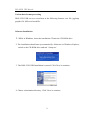
Setup DSO-2250 USB.inf under windows 2000
When DSO-2250USB.inf file is not detected automatically, you see the
following dialog box.
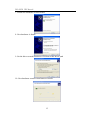
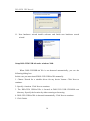
In this case you must install DSO-2250 USB.inf file manually.
1. Choose 'Search for a suitable driver for my device' button. Click Next to
continue.
2. Specify a location. Click Next to continue.
3. The DSO-2250 USB.inf file is located in DSO-2250 USB CD-ROM root
directory. Specify the location by either entering or browsing.
4. DSO-2250 USB.inf file is detected automatically. Click Next to continue.
5. Click Finish.
14