1
Click one point md hold to move otr the sueen.
lNotel Any broken stylus, ball pen oi my acute and htrsh object
LCD if you use it to operate the device.
will deshoy the
ChapterFour Primaryfunction
3.6 SD/MMC card
The aftched SDnVIMC cdd contahs the navigation softwme, map data md
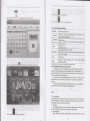
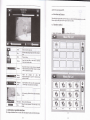
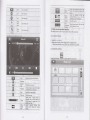
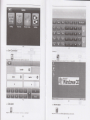
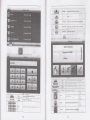
4.1 The main interface and the function
media fil€- Please insefr the ctrd conectly when use it.
(Not€) Please do not bke out the SD/MMC card when the sysbm is navigating or
4.1.1. Main menu
playing.
I NoteI
1 . Don't stress or cwe the SD,MMC card, avoid loss and bulge.
2. Avoid high tempemtue or high huidif when use md store dE cdd, don't expose
the cfid directly to sm light, let the card far away iom liquid md corosive mteial.
3. Please pay atention to the heading when insefr the SDA{MC cmd. lf you iaser the
card improper,y. you
3.7
will damage $e cild.
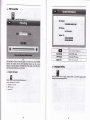
Connect with computer
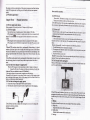
The device cm be comected with the compuEr drough the MINI USB oD iis
You cm copy the docment betuoen navigator md computer or copy the
alata ftom GPS navigator to computer so as to rccover ihe data in GPS when you de
in rced of them.
left
pd.
l.
Please
2.
confm tho GPS navigator is power on;
Comect the MINI md I L
] of USB cable with the USB pofr on the left
of cPS device md the nomal end I B
] with the Host poft on
pd
clict
3.
Please
pull out
the
MINI USB €ble afier you finished yoE opemtion, the GPS
rem
to the pre{peBtiotr interfa@.
copy the daa b rhe
smge dcvice every time
you
you
s)stm
ilah- OE corymy hk6 no responsibility to my loss
beforc
updab
of dab.
(Remdkl The GPS navigator will stop the opemtion when rt is comected with
navigator
will
(Notel Dah s*uity: PI@
o&
compuhr
(Not) ln fie Focess of commicatioq the following operations will brcak offthe
comection with computs, th€ unfinished daE will be 1ost.
l2,
3.
PullouttheMINIUSB cable;
Poweroff
Reset the system by using reset butlon or elechic switch
rhe
bp bn cotuer of fte
h@" ffi oo*,
a.r,"" *" o,*