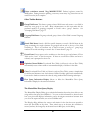
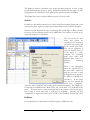
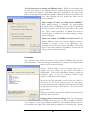
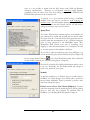
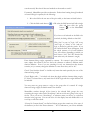
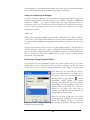
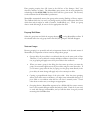
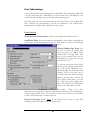
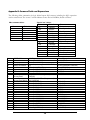
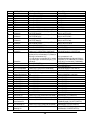
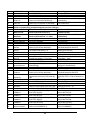
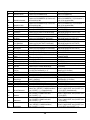
1
MASTERMINE™ SOFTWARE, INC. Business Analysis and Reporting for GoldMine® ® ® MasterMine for GoldMine v6.0 User’s Guide ii BUSINESS ANALYSIS AND REPORTING FOR GOLDMINE® MasterMine® for GoldMine® User’s Guide For Distribution with MasterMine Version 6.0 1999-2008 MasterMine Software, Inc. 840 Hampden Ave. Suite 204 St. Paul, MN 55114 Phone: (651)917-5010 Toll-free: (877) 877-7212 MasterMine software is protected under U.S. Patent # 7,185,279. All Rights to Software and Documentation reserved. GoldMine is a registered trademark of FrontRange Solutions, Inc. Microsoft, Excel, Office 97, Office 2000, Office XP, Office 2003, Office 2007 PivotTable, and MS Query are registered trademarks of Microsoft Corporation. All other trademarks are the property of their respective owners. iii iv Table of Contents INTRODUCTION ......................................................................................................................- 2 IS MASTERMINE RIGHT FOR YOU? ............................................................................................ - 2 What MasterMine can do for you...........................................................................................- 2 Who should use MasterMine?................................................................................................- 2 KNOWLEDGE REQUIREMENTS .................................................................................................... - 3 Beginning MasterMine Users ................................................................................................- 3 Intermediate MasterMine Users ............................................................................................- 4 Advanced MasterMine Users .................................................................................................- 4 NEW FEATURES IN VERSION 5.0 & 5.1 ....................................................................................... - 4 NEW FEATURES IN VERSION 6.0................................................................................................. - 6 GETTING HELP ........................................................................................................................... - 7 Technical Support ..................................................................................................................- 7 Report Writing .......................................................................................................................- 7 Training .................................................................................................................................- 8 INSTALLATION .....................................................................................................................- 10 DEMO....................................................................................................................................... - 10 LICENSE OPTIONS .................................................................................................................... - 10 REQUIRED SOFTWARE.............................................................................................................. - 11 REQUIRED HARDWARE ............................................................................................................ - 12 HOW MASTERMINE WORKS .................................................................................................... - 13 SECURITY................................................................................................................................. - 13 SETUP PROCEDURE .................................................................................................................. - 14 TROUBLESHOOTING INSTALLATION ......................................................................................... - 15 SETTING UP FOR SQL INSTALLATIONS ..................................................................................... - 16 INTEGRATION WITH GOLDMINE ADD-ON PRODUCTS ............................................................... - 17 Integrating Details Plus™ ...................................................................................................- 17 Integrating QuoteWerks®....................................................................................................- 18 LICENSING WORKSTATIONS ..................................................................................................... - 19 SHORTCUTS FOR MULTIPLE MASTERMINE INSTALLATIONS ..................................................... - 19 FILE LOCATIONS ...................................................................................................................... - 20 TERMINAL SERVICES INSTALLATION ....................................................................................... - 21 UNINSTALLING ........................................................................................................................ - 21 PREFERENCES.......................................................................................................................- 24 “General” Preferences ........................................................................................................- 24 “Toolkits” Preferences ........................................................................................................- 25 “Integration” Preferences ...................................................................................................- 26 “Compatibility” Preferences ...............................................................................................- 26 “Defaults” Preferences........................................................................................................- 27 - v CREATING NEW REPORTS ................................................................................................- 32 GOLDMINE “VIEW” OR “GO TO” MENU .................................................................................. - 32 GENERATING A NEW REPORT .................................................................................................. - 33 Contacts: ..............................................................................................................................- 34 Activities: .............................................................................................................................- 34 Details:.................................................................................................................................- 34 Opportunities, Projects, and Cases......................................................................................- 35 Technical Point: Table Joins ...............................................................................................- 36 “DESIGN NEW” ........................................................................................................................ - 36 Sales Reports........................................................................................................................- 36 “USE TEMPLATE”..................................................................................................................... - 37 Template Finder...................................................................................................................- 38 Toolkits.................................................................................................................................- 39 SELECT FIELDS TO INCLUDE ..................................................................................................... - 40 FIELD SELECTION......................................................................................................................... 42 How to find the fields you want to include............................................................................... 42 Why limit fields to include?...................................................................................................... 43 Trial Queries............................................................................................................................ 43 Field List Controls ................................................................................................................... 43 Choose a Report Name ............................................................................................................ 44 Save To..................................................................................................................................... 45 LIMITING RECORD SELECTION OR “FILTERING” .......................................................................... 45 History First Date filter ........................................................................................................... 45 Additional filtering criteria ...................................................................................................... 45 VIEW THE SQL QUERY (MENU)................................................................................................... 47 HIT “FINISH” AND THE REST IS FINE-TUNING! ........................................................................... 48 GETTING ORIENTED: REPORT PARTS AND FEATURES .............................................. 51 TERMINOLOGY:............................................................................................................................ 51 Pivot Tables ............................................................................................................................. 51 Workbooks and Reports ........................................................................................................... 51 Templates and Toolkits ............................................................................................................ 52 Database Terms ....................................................................................................................... 52 MASTERMINE SCREEN ELEMENTS ............................................................................................... 53 Pivot Table Elements ............................................................................................................... 53 FIELD COLORS ............................................................................................................................. 55 THE MASTERMINE TOOLBAR.............................................................................................. 57 REFRESH DATA ............................................................................................................................ 57 Simple Refresh ......................................................................................................................... 57 Refresh All................................................................................................................................ 57 Purge Selected Field ................................................................................................................ 57 Purge All .................................................................................................................................. 57 Sort Field and Refresh: ............................................................................................................ 57 CLONE REPORT:........................................................................................................................... 58 FORMATTING SUBMENU .............................................................................................................. 58 Hide Page fields set to show “(All)” items .............................................................................. 58 Show Page Fields With Hidden Items...................................................................................... 58 Hide Row Field Subtotals ........................................................................................................ 58 Sort Field Items........................................................................................................................ 58 Delete All Worksheets named “Sheet#”................................................................................... 58 Delete worksheets named “Log MM-DD-YYYY” .................................................................... 59 GROUP FIELD ITEMS .................................................................................................................... 59 UNGROUP FIELD ITEMS ............................................................................................................... 59 vi SEARCH FIELD ITEMS ................................................................................................................... 59 FREEZE PANES ............................................................................................................................. 59 OPTIMIZE COLUMN WIDTHS ........................................................................................................ 59 CHART ......................................................................................................................................... 59 PIVOT QUERY INFORMATION DISPLAY ........................................................................................ 59 GOLDMINE GROUP ..................................................................................................................... 63 ADD TO GOLDMINE TASKBAR ..................................................................................................... 63 SNAPSHOT/ARCHIVE ................................................................................................................... 64 PRINT SCHEDULER ....................................................................................................................... 64 FORMATTING REPORTS ........................................................................................................ 67 MOVING FIELDS AROUND ............................................................................................................ 67 REPORT TYPES ............................................................................................................................. 68 Summary Report....................................................................................................................... 68 Matrix Reports ......................................................................................................................... 69 Multi-dimensional Matrix ........................................................................................................ 69 Line-Listing Reports................................................................................................................. 70 Drill-down Report.................................................................................................................... 71 Charts and Graphs................................................................................................................... 72 Multi-table Reports and “Digital Dashboards” ...................................................................... 73 “Data Area” Alternatives ........................................................................................................ 73 TOOLS & SKILLS FOR FORMATTING AND ANALYZING ................................................................. 74 Combine Rollup/Rolldown with Item Grouping....................................................................... 78 GROUPING FIELD ITEMS ............................................................................................................... 79 Grouping Techniques and Tricks ............................................................................................. 81 PIVOT TABLE SETTINGS ............................................................................................................... 85 Format Options........................................................................................................................ 85 Grand Totals for Columns/Rows: Turns on/off totaling for columns and rows. ..................... 85 Data Options............................................................................................................................ 86 MORE TIPS & TRICKS IN EXCEL ................................................................................................... 86 Branch Off From Existing Reports .......................................................................................... 86 Auto-Refresh ............................................................................................................................ 87 Set Filters Across Worksheets (Page Selection)....................................................................... 87 Working with Notes.................................................................................................................. 88 DATA MANAGEMENT ............................................................................................................. 90 DRILL-DOWN ............................................................................................................................... 90 DRILL THROUGH TO “POP” GOLDMINE RECORDS ....................................................................... 90 CREATE AND USE GOLDMINE GROUPS ........................................................................................ 91 MMUPDATER .............................................................................................................................. 93 MMUpdater Options ................................................................................................................ 94 MMUpdater Logsheet .............................................................................................................. 95 Undo Changes.......................................................................................................................... 95 Ideas for MMUpdater tasks: .................................................................................................... 95 DEPLOYING, SHARING AND MANAGING REPORTS...................................................... 98 DON’T DISTRIBUTE. DEPLOY! ..................................................................................................... 98 SHARING REPORTS ....................................................................................................................... 99 OPENING EXISTING REPORTS ....................................................................................................... 99 Open via Windows dialog ...................................................................................................... 100 Launch from a GoldMine Taskbar......................................................................................... 100 REFRESHING REPORTS ............................................................................................................... 100 COPY AND SEND REPORTS OUTSIDE OF MASTERMINE .............................................................. 101 MODIFY UNDERLYING QUERY.......................................................................................... 104 vii WORKING WITH MS QUERY®................................................................................................... 104 Technical Note ....................................................................................................................... 105 MODIFYING YOUR QUERY ......................................................................................................... 105 Accessing MSQuery ............................................................................................................... 105 Resort Columns for Drilldown ............................................................................................... 106 Add Fields to a Query ............................................................................................................ 106 Apply SQL or dBase Functions and Expressions................................................................... 106 Adding or Changing Selection Criteria ................................................................................. 107 Adding Tables ........................................................................................................................ 108 Adding or Adjusting Joins...................................................................................................... 108 Finishing Query Changes and Returning Data...................................................................... 109 Formatting After Query Modification .................................................................................... 109 REDIRECT TO A NEW DATA SOURCE .......................................................................................... 110 MANAGING YOUR GOLDMINE BUSINESS ...................................................................... 114 INTRODUCTION TO DATA MINING .............................................................................................. 114 Data Mining Techniques........................................................................................................ 115 The Art of Presentation .......................................................................................................... 115 DYNAMIC MANAGEMENT REPORTING ....................................................................................... 116 Creating Functional Workbooks ............................................................................................ 116 Troubleshooting Reports........................................................................................................ 116 Clean up After Yourself.......................................................................................................... 117 Presentation Features ............................................................................................................ 117 DATA INTEGRITY TESTING......................................................................................................... 118 Finding “Out-liers” ............................................................................................................... 118 “Exception” Reports.............................................................................................................. 118 REFERENCES ........................................................................................................................... 120 APPENDIX A: “DETAILS” TAB REPORTING................................................................................. 120 APPENDIX B: SAMPLE SESSION .................................................................................................. 122 APPENDIX C: PRE-FORMATTED REPORTS: “TOOLKITS” AND “TEMPLATES” .............................. 127 MasterMine “Aliases” for Database Tables.......................................................................... 127 GoldMine Administrator’s Toolkit (DBMToolkit.xls) ............................................................ 129 Activity Analysis Toolkit (MMActivities.xls) .......................................................................... 131 “Sales Manager” Toolkit (SMToolkit.xls): ............................................................................ 132 “Sales Manager” Toolkit (SMToolkit.xls): ............................................................................ 132 Opportunities Toolkit (MMOpportunities.xls and MMOpportunitiesUnlinked.xls): ............. 134 Projects Toolkit (MMProjects.xls and MMProjectsUnlinked.xls): ........................................ 136 Workbooks by GoldMine Table Name (MMStandard.xls) ..................................................... 137 QuoteWerks Toolkit (MMQuoteWerks.xls): ........................................................................... 138 APPENDIX D: COMMON FIELDS AND EXPRESSIONS.................................................................... 139 APPENDIX E: A NOTE ON NOTES ............................................................................................... 153 APPENDIX F: SPECIAL FIELDS .................................................................................................... 155 APPENDIX G: OTHER FIELD CONTENTS AND CONVENTIONS ...................................................... 157 APPENDIX H: PIVOT TABLE LIMITATIONS .................................................................................. 159 APPENDIX I: LIMITATIONS WITH MICROSOFT OFFICE 97 ......................................................... 162 INDEX......................................................................................................................................... 164 viii FOREWORD This manual is designed to give you a quick introduction to using MasterMine for GoldMine®. MasterMine itself is designed to be a user-friendly, low-skill entryway to your GoldMine data, so this manual is meant to assist both novice Excel users who have no desire to develop “deep” skills, as well as those who wish to become true experts. The basic functionality everyone must learn to make use of MasterMine should not take more than an hour. For those who wish to dig deeper, this manual goes on to discuss important and useful concepts for GoldMine managers such as data mining, GoldMine database structures, and Microsoft Excel spreadsheets and Pivot Tables. We hope our explanations are clear and understandable enough to make MasterMine use easy, productive and fun, even for the most inexperienced “Data Miner”. However, this manual by itself cannot provide a thorough knowledge of any of these important management skills. We recommend that users seek further information in a variety of resources, including online training, books on data mining itself, the GoldMine Reference Manual, and the many off-the-shelf books on Microsoft Excel. The latter are often inadequate with regard to information about Pivot Tables, but you can supplement your knowledge by using Excel’s built-in Help screens. Latest Release When significant additions or changes to this manual are made, the latest release will be posted for free download at MasterMine’s website: www.mastermine.net. Likewise, current upgrades, product fixes and enhancements can be retrieved at any time from our website. ix Chapter 1 Introduction Is MasterMine Right for You? What MasterMine can do for you MasterMine data analysis and reporting tools are for users and managers of enterprises using GoldMine as their Customer Relationship Management (CRM) system. Your GoldMine data is a “mother lode” of up-to-the-minute information about your business, its internal processes and its future prospects. MasterMine tools allow you to easily and flexibly extract, organize and analyze that information, to vastly increase the value your company gets out of GoldMine. Following is a brief explanation of some ways you can use MasterMine to help master every aspect of your business. Any organization that tracks its interactions with a large number of outside contacts – in short, virtually any organization that uses GoldMine – can benefit by analyzing the flow of activity in relation to those contacts with MasterMine. Like GoldMine itself, much of the functionality in MasterMine anticipates uses in a sales environment. But remember that you can use MasterMine to create meaningful analyses for every part of your business that GoldMine® touches. Who should use MasterMine? Every manager: MasterMine software is designed for anyone managing GoldMine users. Another way to put it is: “Who needs reports?” Answer: Anyone who is responsible for the quality and quantity of workflows that are reflected in GoldMine data should have a licensed copy of MasterMine available. -2- Anyone responsible for producing measured output: GoldMine is a workflow management tool, and that makes MasterMine a tool for anyone using GoldMine to increase the efficiency of their daily activity. For example, sales representatives responsible for making a certain number of calls or appointments can record their results in GoldMine, and can measure their success against standards using MasterMine. Managers with MasterMine can measure and reward or punish; ordinary users can do better by selfmanaging to expectations, because they know how they are doing at every step of the way. Anyone needing questions answered: Is MasterMine only for doing sophisticated analysis? Hardly. Anyone who has asked for information from GoldMine and waited hours, days or weeks while someone else builds a report NEEDS MasterMine to get their own quick answer. Yes, sophisticated reports are possible, but they are not the only reason to use MasterMine. The person who asks questions knows what he or she needs for an answer – and often this requires deeper knowledge of one’s own business that only the questioner has. Knowledge Requirements This manual presumes that MasterMine users have at least the first level of knowledge described below. Most GoldMine site managers, and all GoldMine Solutions Partners, should have this level of knowledge already. MasterMine Software, Inc. provides training to achieve any desired level of user competence. Some GoldMine Solutions Partners offer training for MasterMine data mining techniques as well. Beginning MasterMine Users know the following: • • • • Comfortable with GoldMine usage. Know the names and functions of all key fields on the GoldMine contact screen. Familiar with lookups and customized codes for their business. Know or can learn basic Microsoft Excel functionality (mouse functions, manipulating data, saving and retrieving spreadsheets). …and can do the following with MasterMine: • • • • Use pre-formatted MasterMine reports to dynamically summarize and analyze sales, calling, faxing, scheduling, referral and custom profile information. Drill down to and correct data “exceptions” that may indicate serious business process or training issues, or simply data entry errors. Manage individuals and groups by performance criteria. Manage and improve all GoldMine-based business processes. -3- Intermediate MasterMine Users have the following additional knowledge: • • Familiar with standard Excel Pivot Table® functionality and MasterMine’s enhancements. Have detailed knowledge of GoldMine’s underlying database structures. …and can do the following with MasterMine: • • • • • Replace most static management reports with a standardized set of dynamic tables reflecting key company processes, updatable at the click of a mouse. Add any GoldMine field to existing MasterMine templates. Easily format tables for formal presentation to colleagues and customers. Develop new spreadsheets from all MasterMine templates, making full use of customized fields and data items. Graphically present data using Excel’s full native charting functionality. Advanced MasterMine Users have the following additional knowledge: • • • Thorough knowledge of Excel Pivot Table® and other Excel® functions. Knowledge of MS Query® functionality. Ability to use SQL functions for refined querying in MS Query. …and can do the following with MasterMine: • • • Present and analyze any conceivable data relationship by modifying template queries or constructing original PivotTables from GoldMine data. Integrate data from other applications, such as accounting, order processing, production or customer support software. Optimize queries to enable faster refreshing of large source data files. New features in Version 5.0 & 5.1 Version 5 includes a multitude of small feature enhancements and bug fixes, but some top features are these: 1. Combined Pending/History reporting The usual activity-level reporting, but combines pending and history into a single report, even allowing you to limit a report to calls, appointments, etc. or any combination. 2. Primary E-mail address as a common field (SQL only) The e-mail address for main contact appears in the field list as a C1 field, the same as any other field in the Contact1 (main account) table. -4- 3. Optional MMUpdater Add-on MMUpdater allows users to make changes in Excel and “push” these changes to GoldMine in a way that is synch-aware and conforms to GoldMine data access rules. 4. Details Plus® and QuoteWerks® Integration Automatically uses DetailsPlus field definitions when you select “Details/Profiles” on the main report screen. You get all fields from GoldMine “Profiles” available, and the ability to display and analyze them as dates or values, just like in DetailsPlus. Users of QuoteWerks version 4.0 (SQL version only!) can now access QuoteWerks-only OR QuoteWerks data linked to GoldMine account data. For example, show all open quotes for records with a Key2 value of “Active” in GoldMine. 5. Add reports to GM Taskbar for 1-button launch From inside any report, click the toolbar icon to “deploy” the report to any GoldMine user for easy, 1-button launch. Even allows you to conveniently set “automatic refresh” and to disable MSQuery or drilldown. 6. New Templates for Activity Analysis and Administration A dozen new templates, including the new “Activity Analysis” toolkit, which presents much-requested reports on “Last Completed Activity”, “Last Call”, etc. 7. Screen HTML from notes (SQL only) For SQL users whose notes in Pending or History include HTML coding, only text is displayed. 8. Formatted drilldown data Change field names or field items in your pivot table (as easy as typing over the original) so that changes follow through to drilldown sheets. 9. New "Search-Grouping" options In addition to grouping on “any” and “all” of several elements contained in a row field’s items, new options include grouping those that contain “none” of the elements listed, and allows the use of wild cards. Greatly improves onscreen grouping ability, and therefore improves data segmentation and formatting. -5- 10. Management of Background Query in Excel New “Display box” on MasterMine toolbar in Excel allows user to see underlying query, change connection string elements, and quickly investigate data source info. New features in Version 6.0 Version 6 includes a long list of enhancements, which can be viewed in detail on our website, www.mastermine.net. Here are the top 10: 1. Simpler "Report Builder" dialog Users will find it even easier to go from "I need a report that does x..." to actually having the report in seconds. A simpler, cleaner dialog makes choices clear and easy. 2. Template finder and many more templates Find needed templates from more than 125 pre-designed reports by keyword, with full description and context provided in advance. Each template is the starting point for thousands of immediately available variations. 3. Save new templates, launch "recently used" reports After choosing a template and making field selections, you may save settings under your own user-defined template name -- and recall it at will for more variations later. Also, easily launch recently used reports under the File menu. 4. Office 2007 and Windows Vista Compatibility MasterMine handles new workbook-type variations under Office 2007, and takes advantage of new features in Office 2007 to make reports even more flexible and back-end query management easier. 5. Archive pages Click a button to copy the current page out to a “static” archive workbook, or to another page within the same workbook. -6- 5. Ease-of-use features in Excel Many functions and features requested by our more than-5000 users worldwide, including: a Search dialog, new grouping and "add-to-group" dialogs, set filter settings across multiple reports in a workbook, clean up unused field buttons, delete drilldown sheets and Logsheets from MMUpdater, save the SQL password automatically in workbooks, and much more. 6. Auto-schedule report printing Submit existing reports to Windows Scheduler to run automatically every day, week, month. 7. MMUpdater enhancements Delete activity or profile records on a mass basis, update Lookups, notes (blob) fields, and update Linked Documents. MMUpdater now includes virtually every table in GoldMine that users normally access. Other ease-of-use improvements. Getting Help Technical Support Free support for installation and set-up issues is available every business day, between 8:30 and 5:00pm CST at (877) 877-7212. This support does not include normal use training, customization or report development support. To report bugs or to inquire about functionality, please send e-mail to [email protected] or visit the Knowledge Base on our website at www.mastermine.net. Report Writing MasterMine Software’s services include online report development, which can give you the most immediate possible results. For the most efficient start, have customized templates or reports set up for you by your GoldMine Solutions Partner or by MasterMine report engineers. See our website or contact your local GoldMine Solutions Partner for details. -7- Training Set-up and use of MasterMine to generate basic reports requires no special training. However, advanced reporting and integration of non-GoldMine data can be somewhat trickier. Some GoldMine Solutions Partners provide local classes or one-on-one training in MasterMine. Further training is available directly from MasterMine Software, Inc., including online one-on-one courses, or classroom training for larger groups,. See our website for details. -8- -9- Chapter 2 Installation Demo The demo allows you to experience “dynamic reporting and analysis” on your own data, before you purchase. The demo works for a limited time, and is the same software as the actual licensed product. To unlock the remaining toolkits and workbooks, you must purchase a MasterMine license and enter it using the “register now” button on the initial welcome screen. You can install and register as many MasterMine installations as you need, all using the same demo or setup file. On most systems, installation should be very automatic and won’t take more than five minutes. See “Setup Procedure” on page - 14 -. License Options Each MasterMine software license is associated with exactly one GoldMine® master license, designated during the setup procedure. If you have more than one GoldMine® master license, determine before you begin which license will be associated with this installation of MasterMine software and have the license number(s) ready when you call to register. MasterMine licensing is structured several ways, to allow you the most advantageous and cost-effective distribution of reporting and data management capabilities for your company. Named-User “Full” License: You may choose to license only a few MasterMine users, independent of your GoldMine user count. Full report creation and opening/using capabilities are available to named-user licensees. Named-User “Share” Licenses: At a reduced price, additional users who open and use reports provided by “Full” users can still take advantage of much of MasterMine’s dynamism and GoldMine-integration functionality. Share users are able to do everything a full user can do, within access limits set by the creator of each report. For example, if you have a 15-user GoldMine license but only 5 users (docked and undocked) need to make reports, while most users simply open and view “standard” reports, you may purchase a 10-user “Share” license for the majority of users. - 10 - Site License: Users of MasterMine versions earlier than V6.0 could purchase a MasterMine license that matched their GoldMine seat count, while saving on the per-seat cost. To serve these “legacy” customers, MasterMine site license seats may be purchased for an existing site license, but new site licenses are no longer sold. The site license option gives full MasterMine functionality to all users, although access can be limited at installation if desired. As a result of the requirement to match GoldMine seat counts, as the GoldMine seat count increases, MasterMine will cease to function until additional MasterMine site license seats are installed to match the GoldMine seat count. “Share” Site License: For ease of implementation, MasterMine offers a centrally administered “Share” Site License, which allows all users in GoldMine to open, manipulate, save, and “SaveAs” existing reports (subject to limitations you administer). For a single price, all GoldMine users who have MasterMine installed and accessible could launch existing reports as defined by your “Full” users. Required Software MasterMine works best with newer versions of MS Office®. In general, it is best to simply “Install all components” of MSOffice, as space considerations are rarely significant on newer machines. If you are working with MS Office 97 and do not want to upgrade, MasterMine will function but with some limitations. Please see Chapter 9: “Limitations with Office 97” for details. Note that as of Version 5.0, MasterMine Software no longer supports Office 97 installation issues without charge. Beginning with Version 6.0, some new features may be unavailable for Office 2000 users. MasterMine works with GoldMine 4.0 or higher, Standard or Corporate Edition, and works with SQL or dBase GoldMine database files. Some features that rely upon Microsoft SQL may not be available to “standard” (dBase) users. To begin, ensure that your MS Office installation includes MS Excel® and MS Query®. MSQuery is not part of the “standard installation” for Office 97 or 2000, so you must add it using your original MS Office media. For Office 2000 or higher: Select “Custom Installation” when you install Office, or rerun the Office 200 installer CD and select “Add or Remove Features”. Find Microsoft Query under “Office Tools” and select “Run from My Computer” in the setup. MSQuery will optionally self-install the first time it is used. - 11 - For Office 97 (unsupported except by special arrangement): Ensure that your Office 97® installation includes Excel 97® and the following Data Access selections: Database Drivers DBase and MS FoxPro Drivers MS Excel Driver MS SQL Server Driver (if using SQL version of MasterMine) MS Query® Data Access Objects for Visual Basic Some of these selections are not part of the “typical installation” for Office 97, so you may have to install them using your Office 97 installation medium. To install the necessary data access utilities for Office 97, run the Office 97 setup directly from CD-ROM or from your network, or click Start|Settings|Control Panel and select the Add/Remove Programs icon, find Microsoft Office 97 in the list box, and hit OK. Click the Add/Remove button, and in the provided list box, click once on “Data Access”, and then click on the “Change Option” button on the right. Hit “Select All” below the Change Option, and click OK. Finally, click once on the “Continue” button at the bottom. We recommend that you install the most current service release for Microsoft Office soon after it is released. You can obtain it from the Microsoft support website at http://support.Microsoft.com at no cost. Required Hardware MasterMine software itself occupies very little space, either on your hard drive or in memory during operation, especially when compared with GoldMine, Excel and Windows, all of which must run simultaneously for MasterMine to function. These “components” can operate together comfortably in about 512MB of RAM. Your real hardware requirements depend directly upon the size of the data files you will be analyzing. To work with relatively small GoldMine files, you should have, at a minimum, a Pentium processor with 512MB of RAM. Larger data files process much more conveniently with a faster processor and more RAM. Since Pivot Tables operate by holding and manipulating large amounts of record-level data in memory, it follows that the more memory available, the better. - 12 - To estimate memory requirements, assume you will need roughly .25 to .75KB per record and multiply by the number of records in your largest database file, probably ContHist. For example, a ContHist file with 100,000 records requires 80MB plus the roughly 48MB needed for the program files involved, totaling roughly 128MB of RAM. How MasterMine Works The MasterMine analysis engine loads your current data into MS Excel Pivot Tables to create dynamic overviews of all GoldMine® data in every possible useful combination. Based upon the internal logic of GoldMine and your customized setup, MasterMine formats the data and renames fields per your local labels in GoldMine. Managers who have used Pivot Tables in the past know that they are very easy and powerful to use, but are notoriously difficult to set up. MasterMine handles the hard part, so you can reap the benefits. The features contained in the MasterMine Toolbar, in-report Group-Building functions, Drilldown to GoldMine, and GoldMine Group Creation all uniquely integrate the power of Pivot Table reports with GoldMine to seamlessly enhance your GoldMine management capabilities. Security MasterMine has read-only access to GoldMine data (except ContGroups), so there is no danger of directly changing underlying GoldMine data. Access to GoldMine itself is through the usual log-on and other security measures, although MasterMine offers a powerful Drilldown feature that expedites the process of finding individual target records. No MasterMine user can directly affect GoldMine data that is not otherwise accessible to that user through GoldMine’s security. However, because MasterMine renders powerful overviews of your entire business, including individual and group performance data, you may wish to restrict the use of some MasterMine toolkits to the management level and those who have “master” rights of access in GoldMine itself. Certain capabilities can be denied selected users simply by removing them or by purchasing appropriate licenses: For instance, the ability to create new reports can be removed altogether by appropriate (“Share”) licensing OR by manually removing the “Create MasterMine Report” line item from the user’s “User.ini” file in the GoldMine application folder. Users with “Share” licenses can be restricted to only those reports created for them by “full-license” users. They retain the ability to work with flexible pivot capabilities, but cannot change which fields appear in their reports at the query level. - 13 - Also, consider using Excel’s native password protection for sensitive reports. While all MasterMine spreadsheets are shareable by default, Excel documents can be passwordprotected under “SaveTo” to restrict users from any access or to “read-only”. Finally, MasterMine provides convenient ways to restrict at the report level what capabilities are available to users by way of data refreshing, query modification and drilldown for detail. See “Error! Reference source not found.” on page 62. Setup Procedure Obtain the install file from the MasterMine website (www.mastermine.net) or from your local GoldMine partner/reseller. This install file is the same for demo or live versions of MasterMine. Entering the license number makes your demo “live”. 1. In order to install MasterMine, you must have GoldMine running on the workstation being set up. Log into GoldMine with the username and password of the person who will be using MasterMine. 2. If Excel is open on the machine, close it. You may want to use Windows Task Manager to ensure that all Excel processes are closed. 3. Run the setup file, “MM6Setup.exe” from the distribution medium, or copy it onto your desktop or into a suitably named folder on your system and run it from there by double-clicking on the icon. 4. Welcome screen: Click “Next>”. 5. License Agreement: If you accept, click “I accept the terms in the license agreement”, then hit “Next>”. 6. Readme Information: Read about support and report writing options, then click “Next>”. 7. Choose Destination Location: Specify your preferred destination directory for MasterMine’s program files and Click “Next>”. 8. Ready to Install: Click “”Install” 9. InstallShield Wizard Completed: Click “Finish”. After a brief pause, you should see a dialog that looks like this: - 14 - 10. Enter GoldMine Partner Information: If you are a GoldMine partner or you use one as your primary support for GoldMine, enter their name and phone number, then click “OK”. This information will appear for easy reference in MasterMine on the opening “splash” screen and under “Help”, “About MasterMine”. 11. Indicate whether components of GoldMine are used: At setup or by preference, parts of GoldMine not being used, such as Opportunities, Projects or Service can be excluded from the MasterMine dialog. MasterMine goes on to complete installation of components. A link is added to your GoldMine View menu for launching MasterMine. This link will not be visible until the same user closes and re-opens GoldMine. MasterMine installs this user manual in your local program folder for easy access. Call it up anytime using Start | Programs | MasterMine for GoldMine. Click OK to proceed. Troubleshooting Installation If you encounter any difficulties, your first resort, after this document, is MasterMine’s online troubleshooting page and online Knowledge Base, under “support” at - 15 - www.mastermine.net. Secondarily, you may get help by calling the contact number in the title page of this manual. Setting up for SQL Installations MasterMine includes an automatic function that sets up your system to use SQL databases. For GoldMine Version 6.7 and below, this function requires that the current Windows user have administrative access to the Borland Database Engine (BDE) folder. If this setup does not finish successfully, you can manually set up access to your SQL database by updating the parameters on the GMSQL tab of MMINI.xls., found in the “Support” folder within the “MasterMine” folder. Note that you MUST obtain a working username/password combination for the SQL database from your system administrator. If your GoldMine installation uses MS SQL, the first time you run MasterMine you will see this dialog: - 16 - Enter a working SQL username and password. High-security environments may require the use of a SQL username and password that have read-only capabilities in SQL. For further security, uncheck the box for “Save SQL password in each new report for automatic refresh.” Unchecking this preference causes MasterMine to ask the user for a working SQL password every time the person refreshes a report or uses MSQuery. If you have multiple SQL GoldMine databases, we recommend that you insert additional rows by hand into the GMSQL worksheet of the MMINI.xls file to accommodate each database’s SQL parameters. This eliminates the need to re-enter SQL parameters each time you access a different GoldMine database from inside GoldMine. ServerName, DBName, UserName, Password and BDEName should be well known to the SQL GoldMine administrator. These settings are easily obtained using the Borland BDEAdministrator. In GoldMine 5.x or above, go to the Tools menu and select “BDE Administrator…” In the left column, find the BDE alias that matches your current GoldMine contact set (as named in the GoldMine “Open Database” dialog) and click on it once. The parameters you need will be available on the right side of the screen. SaveTo – Indicates the default storage location of MasterMine reports generated for SQL contact sets. Integration with GoldMine Add-on Products MasterMine reporting and analysis extends your ability to work with some of the more popular GoldMine add-on products. If your GoldMine installation includes any of the products listed below, you can integrate them by entering path information in Preferences. Integrating Details Plus™ By Solica Consulting (www.solica.com) DetailsPlus is a very popular add-on for GoldMine, greatly extending the capability of one-to-many, user-defined “Profiles” on GoldMine’s Details tab. Native GoldMine makes ten text-type fields, plus one notes field, available in a Profile. DetailsPlus makes available all 14 fields plus two notes fields in the ContSupp table. Most importantly, each field can be defined as a character, numeric, or date-type field, with full data entry validation, on a userconfigurable screen layout. MasterMine reads this profile configuration so that DetailsPlus fields are formatted automatically using the proper field types. This allows you to - 17 - take advantage of MasterMine’s sophisticated numeric and date grouping and analysis capabilities, correlating DetailsPlus profile records with main account information. To set up the integration, launch the “Preferences” menu in MasterMine’s “Create New Analysis Workbook” dialog. Click on the “Integration” tab. Check the box to “Enable DetailsPlus”, then browse to or enter the path to the DetailsPlus application. Typically, this is a folder named something like: C:\Program Files\Solica\DetailsPlus containing the file DetailsPlus.ini. Once this integration is set up, MasterMine presents DetailsPlus-defined profiles in the “Profile Type” window, and Details Plus fields in the field list box as though they were native to GoldMine. Integrating QuoteWerks® Quote management software by Aspire Technologies (www.quotewerks.com) QuoteWerks is a popular stand-alone or GoldMine-integrated quoting and order processing application. QuoteWerks enables companies to handle much more sophisticated quoting, forecasting and order processing models than native GoldMine can support. MasterMine reads QuoteWerks (v4.0 or higher SQL only) document data, allowing QuoteWerks users to perform simple or sophisticated analysis of any QuoteWerks data – even in conjunction with linked GoldMine account data. To integrate QuoteWerks, launch the “Preferences” menu in MasterMine’s “Create New Analysis Workbook” dialog. Click on the “Integration” tab. In the QuoteWerks section, check the box to “Enable”, then browse to or enter the path to the QuoteWerks application. Typically, this is a folder named something like: C:\Program Files\QuoteWerks. Next, in the drop-down box below, select the name of the QuoteWerks database in your SQL server. To report through MasterMine, QuoteWerks must be defined in the same server as GoldMine, and opened using a username and password that accesses both. To create reports based on QuoteWerks data, select the “Templates” menu dropdown and click “QuoteWerks Toolkit”. In the resulting dropdown list you will find a large selection of reports on Quotes, Orders, and Invoices – each of which is configurable to virtually anything you - 18 - want to report on in QuoteWerks. Each report has a version that shows either Document- or Item-level analysis, and each can be created optionally including linked GoldMine data. Licensing Workstations The first time you run MasterMine, and any time you run it in demo mode, the software gives you the option of entering a valid license for it. Obtain a license from MasterMine directly or from your GoldMine Solutions Partner. A valid MasterMine license functions ONLY with the GoldMine installation for which it was created. If GoldMine licensing changes, and this requires a change in the GoldMine master serial number, a new MasterMine license must be obtained from MasterMine Software, Inc. (website: www.mastermine.net). Click “License Now”, read the instructions, and click “Continue” to launch the licensing dialog. Check to make sure the GoldMine serial number displayed is the correct one for the MasterMine license you are about to enter. If so, enter the numbers precisely as they are given on your license certificate or as provided by your GoldMine administrator. When finished click the “Register” button. If you have one of MasterMine’s old Site Licenses (this product is no longer sold), the final box of the Register dialog will contain “SL”. If you have a named-user license, your license number will be sequentially assigned to users. Therefore, if you have 5-user MasterMine license, each successive user will enter their license, entering “01”, “02” or “03” etc. into the last box, so that there is no overlap between users. If a user attempts to license MasterMine using a sequence number that was already assigned, the dialog will respond that the license number is already in use, and that a unique number should be entered. The computer will store a “??” in the final box until a valid, unused license number is substituted. Convenience: If your MasterMine license number is in your copy/paste buffer, you can enter it all at once by right-clicking on the first box and clicking “paste”. Shortcuts for multiple MasterMine installations 1. Installing on Multiple Machines - 19 - You can expedite the process of installing MasterMine on a number of machines with the same non-standard INI parameters. Do this if: 1. you have a SQL installation with multiple MasterMine users, OR 2. you are a GoldMine Solutions Partner and you wish to have clients call you instead of MasterMine when they are ready to license the software. In this case, update the VARName and VARPhone fields with your own information before installing generally. Copy a MMINI.xls with your preferred settings into the same folder as the mm5setup.exe on the CD, desktop or other folder from which you launch it, then run the setup as normal. MasterMine will detect the presence of your customized MMINI and substitute it for the default one. 2. Installing for Multiple Users on One Machine: In a site license situation (you have as many MasterMine licenses as GoldMine licenses), multiple users can use MasterMine on the same machine, launching while logged into their own GoldMine account. To set up the necessary “View” menu items, after MasterMine has already been installed on the workstation, log into GoldMine under the new user’s username. Hit “Start”, “Run” and in the command box, enter: c:\progra~1\master~1\mastermine.exe /NS The next time the user launches GoldMine, the “View” menu will contain the MasterMine launch items and the MasterMine add-in will be available in Excel. File Locations The MasterMine program and support files should be installed locally on each workstation to be used by a MasterMine user. MasterMine’s main files typically reside in a “Program Files” sub-tree named “MasterMine” and containing subfolders “Support” and “Toolkits”. The installer also includes a number of standard Microsoft libraries (dlls) which automatically overwrite and self-register if older versions of the same dlls are found. MasterMine appends two Excel add-ins that are invoked each time you load Excel. These add-ins include a MasterMine toolbar, which provides a number of important functions in addition to the basic “Pivot Tables” toolbar native to Excel. The add-in files called MasterMineLib_v2.xla and MMupdater.xla are copied by MasterMine into the “Library” folder of the active Microsoft Excel application folder tree, typically on the local workstation. Once standard Excel spreadsheet files (with the extension ‘.xls’) have been created from the MasterMine templates, these files reside (for dBase users) in a MasterMine subfolder - 20 - of the selected GoldMine contact set. For SQL users, the location of MasterMine reports is determined by the “SaveTo” preference (in MMINI.xls). A typical installation with a “Common” folder in the “GoldMine” folder will therefore include a “MasterMine” folder within the “Common” folder, once the first MasterMine report has been built. Once created, MasterMine reports can be stored anywhere without losing their functionality. This makes them easy to transport and share among GoldMine/MasterMine users. Terminal Services Installation MasterMine may be installed on Terminal Servers, including those using such products as “Citrix®”. SQL parameters need be entered only once, as these are stored in the central MMINI.xls file. Beyond this, simply install MasterMine on the server machine as usual, and do the following to make the software available to each user: 1. Add launch items to the user’s GoldMine “View Menu”. This may be done manually, by copying the [FileMenu] segment of one installed user’s “User.ini” file into those of other users. Alternatively, for each subsequent MasterMine user, log into GoldMine as the additional user, then double-click on the file MMInstaller.exe in the MasterMine Support folder. 2. License each user in the way they are logged in, or do this in advance for them while logged into GoldMine in step 1 above. Uninstalling MasterMine’s uninstall will remove all MasterMine program files from the machine as they were during installation. You may need to delete files or folders that have been created by users, or that have been created by the program itself. If this is the case, delete the application folder called “MasterMine” to remove any folders in the same “tree”. To complete the uninstall, you will need to perform some additional manual adjustments: GoldMine “View” menu references to MasterMine must be removed from the file yourname.ini in the GoldMine folder using any text editor. If other custom menu items exist (they would be listed under [Filemenu] in the .ini) be sure to leave them sequenced properly starting with Opt1, Opt2, etc. After running the automatic MasterMine uninstall, you will need to manually remove from Excel the reference to the MasterMine add-in. In Excel, go to the Tools menu, select “Add-ins”, de-select “MasterMineLib_v2” and hit OK. Then exit Excel. To - 21 - remove the MasterMine add-in entirely, locate the “Library” sub-folder within the Microsoft Office application tree (typically c:\program files\Microsoft Office\Officexx\Library) and delete the file “MasterMineLib_v2.xla” In some versions of MasterMine, there may also be an add-in called MMUpdater. Remove it the same way you removed MasterMineLib_v2.xla. To remove the MasterMine toolbar from Excel, go to the Tools menu, select “Customize” and find MasterMine on the “Toolbars” tab,. Select it, hit the “Delete” button and “Close”. Uninstall will not remove *.xls files initiated and saved from MasterMine templates after installation is complete. By default, these files are located (for dBase) in “MasterMine” sub-folders of the contacts sets to which they refer or (for SQL) in the folder indicated by “SaveTo” in MMINI.xls. - 22 - - 23 - Chapter 3 Preferences Launch the Preferences menu from the MasterMine “Create New Analysis Workbook” dialog. It is not mandatory to change preferences at setup time, but you may wish to go through this dialog at least once to familiarize yourself with available options. Preferences apply at the workstation level. Initial settings are held in a file called MMINI.xls, in the “Support” folder in the MasterMine application tree on each workstation. This “ini” file is updated by changing the settings in “Preferences”. Ini settings may be shared among multiple workstations by copying the file MMini.xls from one workstation to that of any other MasterMine user. They may also be updated directly by opening the MMINI.xls file in Excel and applying changes manually. On a separate tab in MMINI.xls called “GMSQL”, MasterMine keeps track of the SQL login information needed to access the SQL database. This information is required during installation and again later if MasterMine fails while attempting to log into SQL when launched. “General” Preferences Preferences set on the “General” tab affect how MasterMine builds field expressions and where reports are stored. Character(s) ending Profile field names to indicate ‘Treat field as Date’: and Character(s) ending Profile field names to indicate ‘Treat field as Numeric’: These 2-character codes designate field “types” in GoldMine detail records. See “Appendix A: “Details” Tab Reporting” on Page 120 . - 24 - Standard length to pull from Reference/Product field (0=all): The Reference field in history records is often used to contain multiple pieces of information. If you want to pull only the first x characters from the Reference field, enter a number here. Another usage: References are especially long fields and can resultin “Out of Memory” errors when querying large amounts of data on older computers using older versions of Microsoft Excel. In order to keep this to a minimum, MasterMine allows you to query Reference data in a field called “ShortRef”, which contains the first x characters of the Reference field by default. You can adjust this length for all subsequently created reports by changing the number here. Set this parameter to 0 to have ShortRef pull the entire reference field. Note that there is a full “Reference” field also available in the field list, as well as “Product” for sales-related reports, all of which pull data from the same “REF” field in the GoldMine data. Default start date for history data: When running a history report, the user designates a starting date so that queries on very large databases won’t unnecessarily bog down the process. This is the default date that comes up in the “Start Date” field on both the front screen and the filter screen. Date to substitute when date fields contain no data or unreadable date value: Querying dates into a MasterMine report can provide powerful “date range” groupings, etc. However, to accomplish this, all items in a date field must contain a valid date. If the source field is blank, null or a character-type field that contains a non-valid date, MasterMine substitutes the default “Null date.” Save SQL Reports to: MasterMine saves GoldMine reports to this location when the source data is MS SQL. For reports with dBase source data, the software automatically saves reports to the “MasterMine” folder within the GoldMine contact set folder to which they refer. “Toolkits” Preferences Toolkits are sets of report templates listed under the “Templates” menu. You can turn off toolkits you don’t use on this tab in preferences. Removing some toolkits not only reduces the number of options a user has on the “Templates” menu (thus possibly reducing confusion) but also makes loading of the software faster. Another consideration is your use of “Opportunities” and “Projects” in GoldMine. If your company does not use Opportunities or Projects, it makes sense to simply turn them off in this tab. - 25 - MasterMine provides toolkits that work with systems where, by the choice of the GoldMine administrator and formal user rules, all Opportunities are either linked to a specific Contact or not. For reporting purposes, you will want to have EITHER the Opportunities Linked to Contacts, or the Opportunities Unlinked to Contacts toolkit turned on. Likewise, turn on EITHER “Projects Linked to Contacts” or “Projects Unlinked to Contacts”, but it is unlikely you will use both. “Integration” Preferences Integration is covered under “setup” in Chapter 2. Please see “Integration with GoldMine Add-on Products” on page - 17 -. “Compatibility” Preferences Since the release of Microsoft Office 2007, not all Excel workbooks are created equal. For optimum use of MasterMine, store Office 2007 workbooks in a new format that enables background macros (extension .xlsm). This allows MasterMine workbooks to take advantage of much higher memory limits and field item count limits than before. Once created, these reports may be difficult to share with users of Office 2003 and earlier. While it is possible for users of Office 2003 to acquire a free add-in from Microsoft that allows opening and reading .xlsm files, full compatibility between versions is not possible. Pivot tables that use the higher memory limits of Office 2007 become invalidated when opened in other versions. Therefore, when creating new reports with Office 2007, it is necessary to choose which version’s format to store the report. Typically, if every computer that might be used to share MasterMine reports has Office 2007, you will want to automatically save every report as Office 2007-compatible. If only some workstations have been upgraded, you may wish to select compatibility each time a new report is created. You may set the preference to always create in Office 2003 format, but note that this will limit your memory usage to Office 2003 limits, and this may deprive you of some useful functionality. - 26 - “Defaults” Preferences MasterMine offers a number of options regarding the initial setup of newly created MasterMine workbooks. Users who have some experience with MasterMine can “shortcut” some of the formatting choices that would normally be made later in the process. In setting your choices here, bear in mind that doing so might leave users unaware of formatting choices that are available. “Hide page fields set to ‘All’” Many MasterMine reports start with a long list of fields in the Page (filtering) area of the report. The user is expected to make filtering selections or to pull these fields into the display area of the report, then “hide” the remaining fields in the Pivot Table Field List. Leaving this item unchecked produces this result. Checking this item causes all page fields for which there is no set default selection to be automatically hidden. This produces a “cleaner” report, with many fewer fields on the page. On the other hand, users need to be aware that fields can be retrieved from the Pivot Table Field List at will, by dragging and dropping. “Hide page fields with no valid items” Hiding page fields with no valid items provides a less drastic alternative to the previous item. It simply cleans up the page area of your report by removing fields that are included by default in the report, but for which there is no data in the GoldMine database. Such fields serve no purpose in the report. “Turn off subtotals for all fields” By default, every field in an Excel pivot table has the subtotaling function turned on, under the assumption that most reports are meant to sum and aggregate data. In the case of “line listing”-type reports, where many fields are dragged into the row area of the report, this selection automatically turns it off for all fields. Users then need to deliberately turn on the subtotaling function for fields where they wish to use it. To turn them back on, double-click each field button for which you wish to restore subtotaling and check “Automatic” on the left side under “subtotals”. - 27 - “Substitute blank space for ‘(blank)’ in field items” By default, blank spaces in pivot tables are represented with the written-out notation “(blank)”. For users who prefer that reports default to a true blank data field, this alternative automatically substitutes a single space instead of “(blank)” for all fields. Note that this is not related to another distinction frequently seen with SQL databases: namely, the distinction between null values and blank values. SQL Server makes this distinction, returning to Excel a null value (alphabetized at the top of the field item list) if the field has never contained a value, and returning a “” or blank (alphabetized at the bottom of the field item list and showing up by default as “(blank)”). Although MasterMine does not do this automatically, users may wish to aggregate these two forms of “empty” by grouping them into a single item, or by applying the Isnull() function in MSQuery to the field in question. “Use Logo” Check this item and enter a valid path to any image file that Excel can handle (.jpg, .bmp, .gif are the most common) to automatically print the image in the upper left corner of the report and automatically link it into the header of each page of the report. After opening the report, it can be edited or removed in Excel by going to “print preview”, hitting the “Setup” tab and then hitting the “Customer Header/Footer” button. “Always save SQL password in new reports” For maximum security in SQL, the default Excel pivot table requires the user to enter a valid SQL login username and password in order to access the underlying data each time. Typically this happens when refreshing the report or entering MSQuery to modify the underlying query. Check on this preference to store the SQL password within the Excel workbook and to use it automatically when needed. Be aware that the password is not encrypted when saved in the Excel workbook, and can therefore be hacked by a savvy user. MasterMine does NOT expose this password unencrypted in any of its functions. “Always dock toolbar on report open” For cleanest startup, some users prefer to have the MasterMine toolbar dock with the other toolbars by default. The alternative, for frequent MasterMine toolbar users, is to move it manually to the top of the Excel window when not in use. - 28 - “Hide fields list on report open” The pivot table fields list is not necessarily needed for reports with stable design and for which fields will not be dragged in and out of visibility. Hiding the fields list automatically reduces visual clutter when the report is opened. Note that the list can be opened any time from the “Pivot Table toolbar” in Excel. Document visible during ‘refresh on open’ Sometimes reports are set to “refresh on open”, reading data from the GoldMine database to make them current while loading rather than waiting for the user to manually click the “refresh” button. Checking this item makes them visible before the refresh operation begins, so that the user can see the progress of the refresh (the number of queried items appears at the bottom of the Excel window). Close dialog after report created: By default the MasterMine “Create” dialog stays in computer memory when it finishes creating your report. If you prefer to have MasterMine shut down automatically each time you run a report, check this box “on”. Excel visible during creation of report: Instead of the MasterMine “progress message”, checking this box allows you to see the creation of the pivot table in Excel, beginning with the querying of the data, including formatting fields, orienting them in the report, etc. Some users may find this view confusing, so it is best to leave it off unless you are debugging. - 29 - - 30 - - 31 - Chapter 4 Creating New Reports If you are too impatient to read this user manual, and you are already familiar with Microsoft Excel PivotTables, at least read this chapter to get started. It contains everything you need to know to generate new MasterMine reports. You can learn the rest by doing, or by reading later chapters. GoldMine “View” or “Go To” Menu MasterMine’s installation creates two entries in GoldMine’s “View” Menu (or “Go To” Menu in GoldMine Premium Edition) only for the user who was logged in during installation. After installation, these items are in that user’s “View” menu the next time the user logs into GoldMine. To add MasterMine functionality for another user on a workstation where MasterMine has already been installed, do the following: 1. Run GoldMine and log in under the new user’s name. 2. Use Windows Explorer to navigate to the MasterMine application folder (by default, it’s c:\Program Files\MasterMine\) and double-click “wksetup.exe”. MasterMine installs the view menu items for the new user (visible the next time he or she logs in). Open MasterMine Report… is a standard Windows dialog that provides access to the MasterMine-generated workbooks (reports) you have created and saved. Initially, of course, there are none, so this dialog will be empty. More on this dialog later. Create MasterMine Report… Launches the MasterMine report generator, featuring an intuitive interface that makes generation of new reports a snap. The rest of this chapter covers the usage of the MasterMine “Create” dialog. - 32 - Generating a New Report MasterMine is designed to make extracting information EASY. You simply select which “category” of information you want to report or analyze and MasterMine presents it to you in the flexible, analytical format of a pivot table. Typically, the process includes these steps: • Select data category • Select fields to include (optional) • Sort fields for drill-down presentation (optional) • Add “macro” filtering criteria (optional) • Hit “finish” These steps are explained in detail here: Select data category Select the part of GoldMine you wish to analyze or report. The top left of the main screen shows the available areas in GoldMine from which you can pull information. These include, at least: • • • Contacts Activities Details with subcategories under Contacts (Main and Additional) and Activities (Pending and History). If your organization uses GoldMine Opportunities, Projects, or (for GoldMine Premium Edition or higher) Cases, these can also appear in the list. They can be turned on at installation time (see “Installation”, page - 10 -) or at any later time using the “Preferences” dialog (page - 25 -). Your first choice specifies which GoldMine area you intend to report. Once you’ve selected the - 33 - area, you can easily build a report “from scratch” but specifying more narrowly which subtypes of each data with which you wish to work. Alternatively, the following section discusses existing template selection once the GoldMine area is specified. Contacts: You can report on only main contacts, or (by checking “Additional”) you can include the contacts on the “Contacts” tab in GoldMine in parallel to the main contacts, as though they were in one big table together. Activities: Select Pending, History, or both to report at the activity level. One “row” will be returned for each activity record, so these reports are “activity”-centric. If you select Activities, you have a secondary choice of the type of activities to include, like Calls, Appointments, etc. This list corresponds to the types of activities tracked in GoldMine under “Schedule” or “Complete” menus and displayed in the Pending and History tabs. In the dialog, simply check on which types of activities to include in the report. Sales is a special kind of activity. If you select only “Sale” in the activity type dialog, your report will be automatically formatted, and appropriate default fields selected, to do reporting on Forecast or Completed Sales. If you select multiple types of activity, or if you leave the default selection checked on (for Pending: All, for History “All-except E-mail”) you will still be able to filter or group by Activity Type within your MasterMine report. Limit your report to only one or a couple of activity types only if you wish to permanently exclude other types, for instance, if you want to create a “calling report” and know you will not be using this report to compare calling and appointments and other possible contacts with your prospects or customers. Details: (sometimes referred to as “Profiles”). If you select Details, the right side of the MasterMine dialog displays a checklist of the user-defined “Profiles” set up in your GoldMine. This is the same list you should see when you right-click in your Details tab in GoldMine, select “New”, and view the Lookups for the Detail field. - 34 - Typically, you will be reporting on one type of Detail/Profile rather than many, so check the box next to the detail type you wish. If only a single Profile is checked, the fields list below will reflect the user-defined field labels from the GoldMine setup for that Detail (Profile). If you don’t know how Details, and particularly user-defined “Profiles”, relate to the rest of GoldMine’s data, you may find it difficult to make sensible reports. You can learn more about Profiles in GoldMine’s “Help” or in the GoldMine User Manual. This will prepare you to report on this vital GoldMine data. Once you understand Profiles, you can use MasterMine to leverage this powerful component of GoldMine even better. This knowledge will also help you to set up preferences and “tweak” Profile field definitions so that you can get the most from the information contained here. If your reports do not work as expected, see the section on “Appendix A: “Details” Tab Reporting” on page 120. If you use DetailsPlus, (an add-on for GoldMine from Solica Consulting Ltd.) and you have entered the proper information in the “integration” tab in Preferences (see page - 24 -), Profiles that are defined in Details Plus will have “D+” appended at the end of the name. For these details, the fields list below will show the field labels defined in DetailsPlus, rather than the generic fieldnames like “CS.CSAddress1”, etc. or the user-defined fieldnames from GoldMine’s own setup. These fields will also reflect the proper field types (Character, Date, Numeric) defined in DetailsPlus. Opportunities, Projects, and Cases If you have these options turned on in preferences, they are available here on the front of the “create” dialog. MasterMine produces a simple default report for each of these if selected under “Design New”, but the majority of reports for these areas of GoldMine are launched using the “Use Template” option, described in the next section. Click “Finish” when ready. Having selected your target GoldMine area, you could just hit “Finish” now, to create a workbook of GoldMine accounts information. This - 35 - workbook alone could provide you with a multitude of views into your GoldMine database. However, there are many further refinements available to you. Technical Point: Table Joins Those familiar with Transact-SQL may want to know how MasterMine includes and joins tables. For most reports, MasterMine queries an Outer join (all activities, plus their associated contact information), if you include only data from the activity table and Contact1. If three tables are involved, such as Cal, Contact1, and Contact2, an inner join is used. Some templates expressly reverse this join, including all contacts regardless of whether they have activities linked to them – but also include the pertinent activities. An example is the “All Accounts – and linked pending” report (see “Use Template” below) “Design New” MasterMine is designed to make it easy to create reports from scratch, to go from idea to report in only a few seconds without necessarily loading a template. Many users will take the route offered by traditional report writing software and simply create a new report for every use, enjoying the short time to outcome and confident that there are no forgotten filters or setup quirks in their new report. For this approach, the default “Design New” serves the purpose. If you have selected the “Activities” area of your GoldMine data to view, the window under “Design New” will also display a list of Activity Types tracked by GoldMine. In the list, check one or more activity types to include in your report. By default, MasterMine produces a count of each of the selected activities in a calendar-based format. Sales Reports Selecting “Sale” only and unchecking all other types of activity produces a sales-oriented report such as “Forecasted Sales” or “Completed Sales”. Sales reports are amount-based, but also allow you to track counts, units and probabilities as appropriate. - 36 - Scenarios: A few examples of how to make selections in the “Design New” dialog: If you want a report showing: Then select: Area Button Record Type Forecasted sales for the coming year Pending Sale The past month’s calls and appointments compared to other months History Calls Appointments All activity associated with any customer, shown in one place Pending History All or All except e-mail A report of custom profile or detail records by any name Details Select the name of the profile A list of contacts (both main and supplementary) that meet certain criteria Main Additional (none) – use “filter” button Another option for quickly reaching your goal is to use one of MasterMine’s built-in report templates, which are designed to anticipate reporting or specialized query needs that users frequently encounter when working with GoldMine. The next section covers the use of these invaluable tools. “Use Template” MasterMine has more than 125 built-in report templates, each of which instantly branches off to literally thousands of variations, as needed. Using these templates wisely can get you the results you need instantly to, without needing to build every report yourself. These templates cover a wide variety of areas in GoldMine, encompassing virtually every part of GoldMine’s data that you see in the GoldMine product itself. Selecting the appropriate template can help get your desired outcome quickly, whether it is a report, a dynamic analysis or data management project. - 37 - Template Finder When you check “Use Template”, a selection of MasterMine templates appears. The list you see is ALREADY NARROWED to those appropriate for the area of GoldMine you selected on the left. Find the appropriate template by browsing through the list. As your mouse hovers over each template name, you can see the toolkit and a detailed explanation of the template in the information bubble to the right. Use this information to decide which template to select without clicking through each one. You can sort the list by report name alphabetically (default) or by toolkit, then report name, by rightclicking on the list and selecting the appropriate sorting option. How to see all available templates: For the broadest selection of templates, click “List All Templates” at the bottom of the “area” selections on the left. If you use this option, you will probably need to search by keyword to find the right template. Search for the right template by keyword You can use keywords to find the template that best suits your needs. In the space above the template list, enter keywords, separated by spaces, and click “Search”. The list is narrowed down still further to include only templates from the GoldMine area you selected on the left that have all the keywords you entered. To broaden your search, click “List All Templates” at the bottom of the area selection or remove some keywords from the search box, then click “Search” again. - 38 - Toolkits Another way to find an appropriate template is to search by “Toolkit”. MasterMine templates are grouped into job- and task-related “toolkits”, which contain report templates formatted for specific purposes. It is a good idea to familiarize yourself with the templates in the “Job-related” toolkits, as they contain many useful reports that you may not have thought of on your own, but which may help fulfill role-related responsibilities. There are two ways to see templates sorted by Toolkit. The first is to simply sort the templates in the template search window, as described above. The second is to use the Templates menu. “Templates” menu: If you are already familiar with the available templates and know which toolkit you need to use, simply click on the “Template” menu, select a toolkit, and see a dropdown list of templates contained in that toolkit. Example: Toolkit: Sales Manager Workbook: Past Due Pending Activity This one workbook can be the basis for many useful reports, each easily created in a few minutes: Your GoldMine administrator may regulate which toolkits are available to you, by removing or adding toolkits from the “Toolkits” folder within your MasterMine application folder. Some Toolkits may be enabled or disabled in the preferences page in your MasterMine interface. . In addition to the “MAIN REPORT BUILDER Toolkit”, which renders the most global overviews of GoldMine data files, MasterMine comes standard with a “GoldMine Administrator” Toolkit, “Sales Manager” Toolkit, and a toolkit for building workbooks from scratch, called “by GM Table Name”. Additional toolkits include more templates to handle general Activity Analysis, Combined Pending & History, Projects, Opportunities, and more. A discussion of each of these toolkits is available in Chapter 9: References, starting on page 120. Full calendar of Past due activities Past due calls by user Past due forecasted sales by territory Past due calls & appts by month Past due activities by user, activity type, and product category (or any custom field) • Almost any combination you can imagine • • • • • A customized toolkit may be added by your GoldMine Solutions Partner or by MasterMine Software, to simplify and speed up your implementation or to facilitate handling interaction with databases outside GoldMine. Although these toolkits look like Excel workbooks, they are password protected and are not for end-user manipulation. Selecting a toolkit on the Templates menu changes the list templates available in the “Template” listbox. Select Template: In the “Template” listbox, select a report by name. As you select a report, a summary explanation of the report appears in the display window below. The References Section (page 63) of this manual gives you some tips about the contents of each report. Most names are self-explanatory. Also, see the “Tips” in the next section on selecting the most efficient template for the reports you need. - 39 - Select Detail Level: Detail level determines the quantity of default-selected fields in the field selection list box below. This is a memorymanagement feature that is useful mainly with very large databases, or on older computer systems where memory was at a premium. In most cases, detail level 2, the default, is sufficient. A lower detail level gives you fewer fields in your report but speeds data querying and refreshing of your reports, and may allow you to load many more records than would otherwise fit into your computer’s memory. A higher level of detail gives you all possible relevant fields in the target data files, but may result in slow data querying. Detail can be “fine tuned” by selecting or de-selecting fields to be included individually. The information box below the detail level indicates the number of bytes per record that will be loaded into memory at the currently selected detail level. Multiply this times the number of records likely to be included to determine how much RAM will be required for the report. Select fields to include MasterMine defaults to include a selection of fields for the type of report you have selected. However, every field in the affected tables, including all your custom-designed fields, is available for inclusion. Under “select fields to include”, click on fields you wish to include in your report, either as filtering criteria OR for display. Each field name is preceded by a two-character table indicator, which tells explicitly which table the field comes from. The most commonly used tables are as follows: C1 – Contact1 OM – OpMgr C2 – Contact2 GS – Gsites (GoldSync Sites) CA – Cal UL – User Log CH – ContHist CS – ContSupp - 40 - MasterMine reports include a number of “pseudo-tables” inorder to facilitate the mixing of data from various similar tables. The most commonly used are as follows: CX (Contact1 and ContSupp Mixed) – includes main AND supplementary contacts in the same query. CX can mean either table, because the report overlays addresses from supplementary contacts records where this information is missing but present in the Contact1 record. PH (Pending and History) – is a special table name designating Cal or ContHist for reports that pull data from both tables in parallel. For instance, the PH.ActivityCode field pulls data from both tables and presents them as though Pending and ContHist were really one table – so your report can combine both and ignore the distinction. Field Selection In the list box in the bottom half of the report creation dialog, simply check to the left of every field you want to include in your report, either as content OR as filtering or selection criteria. Think not only of what fields you want to display, but also what conditions you want to use to select or sort what will be displayed! Obviously, your selection of fields determines the data that will be available in the reports you generate from the templateyou select. The more fields you include, the more flexible will be the reports you create. HOWEVER, pulling more fields also requires more system memory, so you should select your fields wisely, with both eventual usage and system limitations in mind. Because you can include fields just by checking them “on” in the list box, this is the easiest time to include fields you may want later. Therefore, as long as it does not unduly slow your query or cause the pivot table performance to be sluggish, you should include any related fields that may be needed for the report you are currently building AND any derivative reports you may wish to make in the future. How to find the fields you want to include In most cases, MasterMine displays fields using the User-defined Labels assigned by your GoldMine database administrator. This is so that you do not need to know and translate GoldMine labels to the underlying database fieldnames in dBase or SQL. However, the fields are sorted by database Table (Contact1, Contact2, Cal, ContHist, ContSupp, etc.) so that the user can find and connect these fields in a logical manner. Therefore, fields appear with a prefix of “C1”, C2”, etc. corresponding to the table from which they are derived. Note that MasterMine includes many “fields” that are not really fields in GoldMine! That is, they are logically derived from data that is stored in GoldMine, but the data has been converted to a more useful form for reporting purposes. To take one simple example, GoldMine stores the “duration” of an activity in the form HH:MM:SS (for hours, minutes, seconds) which is not an easily “reportable” format. In addition to providing you with the raw Duration field from completed or pending activities as GoldMine stores it, MasterMine converts this field into a numeric field called “Hours”, and another numeric field called “Minutes”, which can be easily grouped and summed for time-based reporting. This manual includes a fairly comprehensive description of the GoldMine data structure in the References section at the end. Obviously, the references here cannot include fields unique to your customized GoldMine installation. In general, note that Contact-level user-defined fields are found in the Contact2 table, and their database names begin with the letter “U”. MasterMine also includes fields from user-defined Profiles (Details) and from the Opportunity Manager and Project Manager tables. Depending on your access rights in GoldMine, you can Ctrl-DoubleClick on a field in the main GoldMine screen to see that field’s database name and definable attributes. Why limit fields to include? System performance is directly affected by the quantity of data, both number of fields and number of records from which those fields will be drawn. With a fast machine and Office XP or higher, you are limited only by the available RAM on your computer, and to some extent by the potential complexity of your displayed data (see page 158). In Office 2000 and earlier, Excel reserved only 100 MB of RAM for a given pivot table query, so bear this limitation in mind when selecting your fields. Excel 2000 users with a very large database (more than, say, 250,000 records in the tables you are pulling from) may need to be careful to limit the field selections to “necessary” fields. Trial Queries You may need to make several passes at creating your initial query to determine the optimum fields to include. MasterMine makes this convenient by leaving open the “create” dialog after you create a report. If your first query is too large (if refreshing the report seems to take an unreasonable length of time , or you receive an “Out of Memory” error or a message saying,“some fields have too many unique items to be displayed”) you can quickly run the same query after unchecking some fields. Field List Controls Beyond simply deciding WHICH fields to include, you may have additional considerations about your field selection. At the top of the field list box are several buttons that can aid you in selecting and organizing your query fields. The buttons look like this: 43 These buttons help you do the following: Sort fields for drilldown presentation The order of fields in your query determines the column order in your drilldown screens (see page 90, Drilldown for Detail). For this reason, you may want to sort the included fields in your query before hitting the Finish button to create your MasterMine workbook. Click on the “Sort Fields” button, then click ONCE on each selected field name (not the checkboxes!) in the sequence you want for them to appear in your drilldown screens. As you click, fields will rearrange themselves in the order selected. If you make a mistake, simply click “Stop Sorting” ( ) and begin again. You need not select every field that will be included. When finished, click “Stop Sorting” and continue. Show GoldMine Database names You may toggle between seeing “local field names” and seeing the actual GoldMine database field names under the list view of fields by clicking the “GoldMine” button. Uncheck default fields MasterMine checks a typical selection of fields to include in your report, based upon the area of GoldMine in which you are working. You may wish to reject this selection and start with no fields selected. If so, click the “Uncheck” button. To restore the default selection of fields, click the “check” button again. Sort unselected fields The default order of fields in the list box is either the order they appear in a typical GoldMine dialog or, for custom user-defined fields in Contact2, the order in which they were added to the database. To make it easier to find a desired field, the “Sort” button alphabetically sorts fields within the table. In combination with the “Show GoldMine Database names” button, this allows you to find and include fields using any known name or label. Choose a Report Name MasterMine assigns a default name to every report, but it makes sense to “customize” the name you put on every report you create. Not only will this protect your report from being overwritten by the next similar report that is created, it also makes it much easier to reuse and modify useful reports. Choosing a report name may seem trivial, but you will find that if your name accurately but specifically reflects either the content of the data included (i.e. “Completed Calls for Prospects with Qualifying Info”) or the specific use to which it 44 will be put (i.e. “Friday Calls and Appointments Report”), you will be able to re-use and branch off of your earlier work much more often. Save To The default SaveTo location is stored in MasterMine preferences. For dBase users, the SaveTo path is automatically a “MasterMine” subfolder of the contact set to which they refer. However, if you wish to store them elsewhere, you may specify another location in the “Save To” list box or use the “Browse…” button. Be aware that reports stored outside the default SaveTo folder will not appear when you use “Open MasterMine Report…” from the GoldMine menu. Limiting Record Selection or “Filtering” In addition to shaping your query at the field level, you may also want to limit the quantity or type of records (table rows) included. Although it is frequently easiest to simply query in a mass of data and set your filters within the report itself, where they can be changed later as needed, sometimes it helps to “pre-filter” your query. This makes a report more user- or job-specific, and therefore easier to dictate how it will be used and to limit the information available to users. It can also help optimize the size of a query, thus speeding processing and query refreshing. Caution: Novice users tend to assume that filtering in the “Create” dialog is the best way to go. However, remember that as long as your data source is not large enough to make it cumbersome and slow, it is frequently much easier, and more beneficial in most situations, to filter inside the report History First Date filter The simplest way to do this is with the “History First Date” field that appears below the field list whenever you have selected a report involving the history (ContHist) table. This dialog allows you to choose a starting date after which records are eligible to be included in the report. For installations where GoldMine has been in use for many years, this can be extremely helpful. However, note that you can typically do much finer and more flexible date grouping and selecting within the report itself (see Grouping Field Items, page 79). Don’t accidentally make your report too limited by setting date parameters that prevent you from doing worthwhile analysis later – say, comparing this year’s sales rep call counts versus last year’s. MasterMine remembers the last entered “first date”, and defaults to it next time. Additional filtering criteria 45 If desired, click “Filter’ at the bottom of the page to pre-filter your query, so that your workbooks can more elegantly pivot around only the part of data of interest to you. Filtering options are as follows: Use Active GoldMine Filter: If checked on and a filter is active in GoldMine, that filter will be applied to the new query. The checkbox is disabled if no filter is active in GoldMine. Use GoldMine Group: May be used in combination with GM filter. This powerful option limits the query to members of a GoldMine group. After the report is created, if membership in the group changes and the report is refreshed, the new group membership will be represented in the report. Groups available in this list box are those for the current GoldMine user only. If you wish to use another user’s GoldMine group as the basis for your report, clone the group to one under your own username. Note that multiple groups with identical names may be combined into a single query by using this feature. All contacts in groups with the same name are included. Note that you can use MasterMine to quickly and easily build GoldMine Groups. (See Create and Use GoldMine Groups, page 91). These groups can in turn be used to “filter” a new report. This “circular” technique is often used to methodically hone a report down to a set of records that meet many different kinds of criteria, without needing to build a single filter or query that logically includes all the criteria. Filter on Key Values:: Allows you to select a section of GoldMine data according to the contents of the key fields from GoldMine (i.e. those fields in the lower right quadrant of the standard record screen.) In most cases, these fields represent key points of information about your clients and prospects, and therefore allow you to include only major segments of your account database. For example, if you have a “Contact Type” field that includes lookup items “Clients”, “Prospects”, and “Employees”, you might use Key filtering to set up your report to exclude “Employees” since they will never by required for the report. By default, all potential values are included. Build your filter the most efficient way either by eliminating a few of the checked boxes (to exclude only a few items) or by 46 switching off whole fields and then re-including one or a few items. Hit the “Count” button to see immediately how many records match your criteria. Pre-counting is only possible for relatively simple queries – “N/A” will appear in the “Number of Matching Records” box if the query is too complex to be pre-calculated. Remember that if you set criteria for more than one field, a record must meet the criteria for BOTH fields to be included in the query. If the count is ‘0’, your criteria may be too restrictive. That is, you may have eliminated all records in the database from the query. When you hit “Finish” to run such a report, a warning message box appears and you must re-select filtering criteria. When dealing with large databases, there are several reasons to hone your query in advance. Faster loading and refreshing are obvious benefits. Most importantly, prefiltering allows you to handle limitations in Office 97 and 2000 on the number of unique items that may appear in a pivot field. Filter on History Dates: If your selected report includes a query of “history” (completed) activities, the history filter is enabled so that you can limit the query by date. This is the same “First Date” field that appears on the main MasterMine dialog screen. If you have already set the First Date on the opening screen, it will reflect the same date here. However, there are some additional considerations: By default, the “Last Date” is disabled, unless you check the associated box. DO NOT specify a last date unless you want your report to permanently exclude newer history items than those on the date you set. Remember, MasterMine reports are almost always reusable; rather than re-generating and formatting reports repeatedly, you can re-open an existing report and refresh it. Setting a “hard” last date will cause future refreshes to ignore new history items. On SQL systems, MasterMine uses optimized index querying against history records. This is important because it speeds up querying tremendously relative to queries against dBase systems, where every record must be searched and the date compared to your criteria. View the SQL Query (Menu) A technical note for users familiar with Transact-SQL: As a final step before hitting the “Finish” button to create a new MasterMine report, MasterMine allows you to view and alter the SQL Query that will be built from your selected settings to extract your data from GoldMine. If you are familiar with Transact-SQL, you can make certain changes using the SQL Query dialog. The most likely purpose here would be to alter one or more field expressions or the WHERE clause of the query, so as to affect record selection. For example, in a history report you may wish to include only records where JOHN was the UserID (the person who did the activity, which is NOT necessarily the assigned “account rep’ for the contact). To do this, set up all other fields as normal 47 in the main MasterMine dialog, then hit “SQL Query” to display and edit the query. At the bottom of the SQL Query, you could add to the existing Where clause something like AND CH.Userid = “JOHN’ This would permanently limit the current report (not the next usage of the template, which would revert to normal) to include only records completed by JOHN. Limitations to your tweaking of the SQL query in Transact-SQL: 1) You may not alter the number or sequence of fields in the query expression. 2) You may not create an outside join if more than two tables are being joined. 3) Generally, your query syntax is constrained to that which is readable by MSQuery as it accesses your SQL or dBase data using the applicable Microsoft Data Access Components (MDAC) ODBC drivers. Hit “Finish” And The Rest Is Fine-Tuning! When you have specified which part of your GoldMine information you want to see in general, and how to filter it if necessary, hit the “Finish” button. MasterMine will now extract your selected information from GoldMine, gather it into a “pivot table” object in Excel, and present it for your further arrangement and formatting. This should take only a few seconds per thousand records queried. Progress Box: MasterMine displays a progress box while creating the report, loading the necessary data from GoldMine and naming field buttons (so far as possible) according to your customized GoldMine setup. When finished, it tells you where your report has been stored. Click “OK” to begin working with the new report in Excel. Now the “hard part” is done. To come up with the report you want, you now need to organize and format it as desired. That’s it! With these few, simple steps, you are now able to extract a large portion of the most “interesting” information from GoldMine. Here’s where the fun begins! 48 Once you’ve selected your criteria and hit “Finish”, the data are extracted from GoldMine and presented for further arranging and formatting in your Excel environment. Before you go on however, consider these thoughts about the selections you make in the MasterMine interface: • The fewer files and fields that are referenced, the quicker your data refreshes. This is a very important consideration if your data files are large. • If you are working with more than 100,000 records in your queried files, be sure you have at least 100MB of unused RAM available. Otherwise, data refreshing and re-calculating can be very slow. A sure sign of memory shortage is if your hard drive seems to be working very hard during a long data loading/refreshing process. It’s probably swapping data with your memory, which is a tedious and unnecessary process. Getting more RAM is well worth it. • The end of this guide includes a handy reference (see page 120) that tells you the fields and functions contained in various GoldMine files. • Excel 2000 and earlier can display only fields containing fewer than about 9000 unique values. This DOES NOT mean that MasterMine can’t be used on your system if you have more than 9000 records in your database. Here are several suggestions for dealing with this limitation: 1. Get Office XP or higher. Each successive version dramatically raises the memory limits. 2. Consider that fields with many unique values (like Company, or Contact) can still be accessed in “drill-down” mode. So any time you need a detailed list of companies that meet various criteria, simply double-click on a pivot table segment that targets the records you want to see, and all contact info will be there. 3. Use filtering criteria (see page 45 above) to limit your overall query LOOSELY around the specific information you want to see. There is plenty of opportunity to further refine your selection once you have the information in your MasterMine workbook. Using filtering criteria up front, however, may help reduce your overall selection to a more manageable level. 49 50 Chapter 5 Getting Oriented: Report Parts and Features This chapter orients you to the various parts of a MasterMine report, and to some useful language for talking about it. Understanding these terms will help you to make sense of reporting concepts as discussed in this manual, as well as to discuss problems and solutions with colleagues and MasterMine support staff. Terminology: Pivot Tables The standard unit of a MasterMine report is a “pivot table” (trademark of Microsoft Corporation). A pivot table is an analytical structure, built into Excel, that allows the user to quickly and easily rearrange and view data from many angles. A pivot table is more generically a multi-dimensional “data cube”. Users who master the idea of “cubes” can intuitively understand exactly how moving fields around a pivot table will affect what they see. For the rest of us, the experience of simply “playing” with a pivot table more slowly but effectively gives us a feeling for how a pivot table works. Pivot tables are extremely convenient for displaying data in any scope, converting immediately from a narrow summary to finest detail. MasterMine leverages this capability and ties it to the capabilities of GoldMine to produce both a powerful analytical tool and a means of managing people, processes and data itself. Workbooks and Reports A “Workbook” is an Excel file that may contain one or many “Worksheets”. The term MasterMine “Report” may be used to refer to either a workbook OR one of the worksheets within a MasterMine workbook. It is therefore clearer to say “Workbook” or “Worksheet” to refer to the specific item, rather than a “Report”. Since “Report” is the most common way of referring to MasterMine output, we use it frequently here with the expectation that users will understand in context. Once a Report is created, initially as a single worksheet in a new Excel workbook, it can then be quickly cloned,,tweaked and multiplied into a wide range of derivative “Reports”, some as additional worksheets within the original workbook, and some as 51 whole new, renamed copies of the workbook. Users, therefore, sometimes think of every report as a template of sorts, although the term “template” has a specific meaning in MasterMine. Templates and Toolkits A “Template” is a model or set of pre-determined parameters against which a Report is created. Templates cannot be changed by the user. The reports they create, however, can be infinitely varied. MasterMine comes with more than 125 templates, each of which can be quickly filled with GoldMine data to create a new Report. Since each time a template is used, a different set of fields might be included or a different filter applied. These templates are infinitely re-usable. Beginning with version 6.0, MasterMine allows users to create new User-defined Templates. Creating a new template starts by selecting an existing “basis” template, selecting fields to include and sorting them, then saving the result with a userspecified name. Thereafter, user-defined templates appear alongside standard templates in the MasterMine template finder. MasterMine “Toolkits” are collections of templates for producing a variety of predefined reports (workbooks), each one named for its function and designed to anticipate a GoldMine management-related information need. For instance, the “Sales Manager” toolkit contains templates to generate workbooks like “Call Value” and “Past Due Pending Activities”. In turn, each of these workbooks is capable of displaying the targeted information in infinitely many formats, sorts and filters to get at a true picture of your business. Database Terms In the modern world, formerly scientific terms like “database”, “field” and “query” have seeped into the language of ordinary people, though usually without full understanding of what they mean. MasterMine attempts to make reporting easy for people who know nothing about databases, but it is helpful to understand how the technical parts of database structure and usage relate to the more common userunderstood concepts. A “Query” is a technical instruction to a database specifying the body of data to be pulled from the database into the pivot table for processing. In MasterMine, queries are in the form of Transact-SQL scripts. A single Query returns a “result set” of data, also called a “cache” of data in computer memory, which may provide the basis for one or more pivot tables in a single workbook. A database “Table” is a set of records, all with a consistent structure, containing data that logically belongs together. A database typically contains a set of tables that fit together to form a coherent set of information. The GoldMine tables used by MasterMine (Contact1, etc.) are listed elsewhere in this manual. Each table contains a number of records. 52 A “Record” in GoldMine is considered to be a single “company” or “account” or “contact” unit. The major screen consists of an Account Record that has many ancillary points of data tied to it. In a database context, a main Table called Contact1 contains one record per company. But each company can also have many “records” associated with it, contained in related tables like ContHist (History), Cal (Pending), etc. In MasterMine we speak of “Account” rather than “record” to refer to a main company contact, in the top part of the GoldMine contact screen. This is because at the database level there are many “Records” associated with each account, namely all of the history records (each line on the History tab is a “record” in this sense), calendar records, supplementary contact records, “detail” records, etc. that comprise the full body of data related to a single “Account”. A “Field” in GoldMine is a single box on the data entry screen into which you can type an item of data. In MasterMine, a “Field” roughly corresponds to one of these boxes, but since MasterMine is reporting across many GoldMine records, each “Field” in MasterMine is really a container for many such “items”. Field Items in MasterMine are the smallest units of data, comprising the “answers” that get entered into fields in GoldMine. In a MasterMine report, dragging a “Field” into the lower area of the report exposes each “Field Item” contained in the field, along with a corresponding number (either a count of occurrences or a sum of something numeric like dollar amounts) in the data area. MasterMine Screen Elements Basic manipulation of MasterMine Pivot Tables is easy and fast, but does require some getting used to. Active users of this Excel feature are relatively few, but developing good pivot table skills can be very helpful in many situations. For more in-depth discussion of PivotTable functionality, we urge you to use the extensive Microsoft Excel® help from the Excel menu. For many, the best way to learn how Pivot Tables function is simply playing with them. Most of the data relationships you want to see can be created by simple dragging and dropping. Don’t worry, you won’t damage MasterMine spreadsheets: you can always close them without saving changes, or go back to the basic MasterMine templates to start over. Most importantly, remember “Undo”. In most cases, you can undo your last change by hitting Ctrl-Z, or more slowly by clicking “Undo” in Excel’s Edit menu. Pivot Table Elements The basic elements of an Excel Pivot Table include Row, Column, Data, Page and Hidden areas, arranged as follows: 53 Page Area Row Area Column Area Hidden “Area” Data Area (All available fields listed on the Pivot Table Field List) The Row and Column areas show field items (the various possible values within a field). Row Area fields create one row per field item. The Data area shows the actual summarized data, usually either a count of items in a field or a summation of the values in a numeric field. The data area must include at least one field, but it may include multiple fields in more complex reports. The Page area includes fields containing data not currently displayed in the table, but which may be dragged into Rows or Columns. Selecting one or many items within a Page field filters what appears in the rest of the pivot table. Page Area Row Area: Row Fields Row Items Pivot Table Field List or “Hidden Area” Column Area: Column Fields Column Items Data Area The Hidden area contains all available fields, including additional page fields not displayed on the worksheet. The latter may be added to the table (“unhidden”) by dragging them from the toolbar (Office 2000) or Pivot Table field list (Office XP and higher) to the desired Pivot Table area. Fields appear bold in the hidden area if they are also displayed in the pivot table, or normal font if they are not. 54 Field Buttons in row, column and page areas have a gray background and usually correspond to specific fields in GoldMine database files. Not all GoldMine fields are available in MasterMine templates, but advanced users can add any field or portion of a field. For a full list of available fields, see the GoldMine Database Layout Reference in the back of this manual. Field Colors Note that the Field Button Color in MasterMine tables reflects the underlying data files from which the fields come. The color scheme is as follows: Blue Red Green Brown Pink Orange – – – – – – Contact1 Contact2 Cal ContHist ContSupp OpMgr Items are the contents of fields, and are visible with white backgrounds when their fields are present in the Row or Column areas, or by clicking the list box associated with the field in the page area. Usually an “item” represents a summary of all occurrences of that item in a given GoldMine field. 55 56 Chapter 6 The MasterMine Toolbar Many of the skills and techniques you will use to manipulate your pivot table involve using buttons on the MasterMine toolbar, which greatly enhance native Excel pivot table functionality.. Here is a detailed look at the functions built into the MasterMine toolbar. Refresh Data The Refresh submenu gives you several choices to refresh your Pivot Table data. Simple Refresh: Re-query the underlying data to refresh report. Refresh All: Refresh all pivot tables in the current workbook. Purge Selected Field: Purges the field of inactive items. The pivot table field “remembers” all items that have ever appeared in a field. Over time, adding new data, and changing or deleting old data in your GoldMine database can cause the item list in a field to include many obsolete items. We recommend purging old values that are no longer valid, especially after doing significant data corrections. Purge All: Purges ALL fields of Inactive Items. Report-wide purge that, for systems with slow processors or in the case of very large databases, may take considerable time. Sort Field and Refresh: Sorts items in the selected field: After initial query, each new value for a field is added at the end of the list. This function re-establishes alphabetical order for the selected field. 57 Clone Report: Creates a duplicate of the current worksheet at the end of the tab row for the current workbook. Users are expected to use this function frequently while developing custom data analysis workbooks and “dashboards”. Formatting Submenu Hide Page fields set to show “(All)” items. Too many fields in the Page area of a pivot table can be visually confusing and cluttered. This option quickly moves all unused Page fields to the Pivot Table field list. These fields can be easily retrieved by draggingand-dropping back into the report from the PivotTable field list. Show Page Fields With Hidden Items: Shows a list of Page fields that contain hidden items. Page fields containing “hidden” items may prevent records containing those items from showing in the display below. This is determined by whether the table option to “Subtotal Hidden Page Items” it turned on or off. Hide Row Field Subtotals: Hides subtotals for all fields in the Row area of the pivot table. This option is used if many fields have been pulled into the report to create a “line listing”-type report. In this case, subtotalling by every field unnecessarily complicates the report. Sort Field Items: Sorts items in the selected field in ascending alphabetical order by contents of the field. Delete All Worksheets named “Sheet#”: Deletes drill-down sheets still generically named. This helps clean up a report where many drilldowns have been performed. 58 Delete worksheets named “Log MM-DD-YYYY”: Deletes logsheets created by MMUpdater. During intensive updating, a user may create many Log sheets that are not needed once the job is complete. Other Toolbar Buttons: Group Field Items: This button groups selected field items and creates a new field in which the new group is one item. Many enhancements on this item make this the preferred method of grouping compared to Excel’s native “group” function. See “Grouping Field Items” page 79. Ungroup Field Items: Ungroups selected group. Same as PivotTable’s normal Ungroup function. Search Field Items: Search a field for specific elements or words. All field items in the group containing the sought elements are grouped and moved to the top of the field containing it. This is an excellent way to find lost items, as well as to group large numbers of records according to content. See “Content Search” page 79. Freeze Panes: Freezes panes on the worksheet so that the top row and column of Pivot Table are the “crux” of the frozen pane. If there are several Pivot Tables and none is selected, user is prompted to select one. Optimize Column Widths: For selected Pivot Table (or if there is only one Pivot Table) automatically resets column width to accommodate display of all data on the table. Chart: For selected Pivot Table (or if there is only one Pivot Table), creates a simple chart for all data and innermost row and column of labels. Excludes grand totals automatically. Users need to further customize the chart by using standard Excel charting techniques. Pivot Query Information Display: Shows or hides the MasterMine Pivot Query Information Display for the current worksheet. The MasterMine Pivot Query Display The MasterMine Display Dialog gives technical information about the pivot table you are using and the data query that underlies it. You can use this information to better control how your pivot table displays information, and to investigate connections between what you see in the report and what you see in GoldMine itself. The Display dialog indicates the sources and criteria for the data that were queried to create the PivotTable on the sheet. These criteria are set at the time the worksheet is created, and may be changed by an advanced user in MS Query via this dialog. 59 The Display is useful as a reminder of the source data being analyzed. As such, it helps prevent misinterpreting reports by giving background information that helps you trace the appearance of certain data in your report back to specific records in GoldMine. The Display has six tabs to present different aspects of the pivot table: Statistics In addition to information about the pivot table overall, Stats includes background on the selected pivot field. Again, this helps a user understand the source of data in the report. Here the user can determine the type of underlying data (usually SQL or dBase), the date the query was last refreshed against the GoldMine data, the number of records in the query and memory size of the query. The user can also see how many data caches are contained in the workbook and which one is being used by the current pivot table. This can be significant if there are memory issues or if the report is a fairly complex one containing many pivot tables with different data sources (i.e. different underlying queries). There is also information about the selected field on the pivot table, which can help the user trace a value that appears in the report to the field in GoldMine that contains it. In the image here, the user selected the pivot item “Completed” within the field “Call Result” when calling up the information display. The Display box reveals that the GoldMine field “Result Code” has a local name of “Call Result”in this report . The latter may be a more meaningful label in the context of the current report, but it helps to know what field it represents in GoldMine. Likewise, the item “Completed” is a report label for the value “COM” in the GoldMine “Result Code” field. Drilldown Set user preferences to determine how different aspects of drilldown work. 60 “Do not format data or headers on drilldown sheet”. When the user double-clicks any Data area element, a new “drilldown sheet” is created, showing in rows each record that comprises the element. MasterMine adds some formatting to this native Excel process by passing through fieldname and label substitutions the user has added to the pivot table. Checking this box disables this feature for the current workbook. “Show sample of source row fields inside GoldMine.” When drilling through to GoldMine (by double-clicking anywhere in a row of a drilldown sheet to “pop” the underlying record), this feature shows the first eight fields of the source row. This is useful, especially if you drilled down from an Activity Report, to remind the user which pending or history activity to bring up. “Open new window in GoldMine for found record.” By default, drilldown causes the currently displayed record in GoldMine to change to that of the drilled-down row, potentially “losing” the user’s place in GoldMine. This option opens a new contact window in GoldMine so that the user can easily go back to the previouscontact. Connection The connection string defines the location of the reported GoldMine data, as well as driver information. A user may change this information, for instance, if the SQL database name or server location is changed. Caution: Invalid changes to the connection string are not trapped, and may corrupt the pivot table and render it unrefreshable. In this event, immediately attempt to repair the connection string, or close the workbook without saving changes, in order to preserve the report. Note that if the SQL password is saved in your pivot table, it is obscured by ‘*******’ in the Connection box. You may enter a new username/password combination here if desired by turning on SQL password saving in “table options”. The syntax for the password line is: PWD=password; Where password is the SQL password and the line terminates with a semicolon. Changing Data Connection Strings: Note that changing the DATABASE name here may not fully accomplish a “transfer” of your report to a new server/database combination. The database reference may also be contained in the Query Text, which must be updated on the following tab. In many 61 cases, it is not possible to update both the SQL Server name AND the Database references simultaneously. Therefore, we recommend removing explicit database qualification from the Query Text first, then making changes to the SERVER and DATABASE parameters on the Connection tab. In general, it is a good practice when moving a GoldMine database from one server to another to avoid changing the database name. This will simplify updating existing MasterMine reports to use the new data location, because you will need to change the reference only to the server here. Query Text The entire Transact-SQL statement (Query) that underlies the pivot table may be viewed and analyzed, but not altered, within the Query Text tab. Users who know SQL expressions can see precisely what data transformation, if any, a field has undergone prior to being presented in the MasterMine report. Most MasterMine fields include some type of formatting, error trapping or other data transformation, so it is helpful to be able to view the expression that underlies a field here. If you wish to alter the underlying query using MSQuery, you can hit the Modify Query button beneath the query display OR ) on the Excel PivotTable toolbar while a field ON hit the “Query Wizard” button ( the pivot table is selected. (see “Modify Existing Query”, Chapter 6) Note that if you hit this PivotTable toolbar button and the cursor is not on a PivotTable, the PivotTable Wizard will attempt to create a new table with a new query. Security To prevent tampering or to disallow access to sensitive data in GoldMine, the report designer may disable and/or passwordprotect certain capabilities. Enter a password to prevent other users from altering the report: Disable access to Pivot Table Wizard (MSQuery): Prevents users from tampering with the underlying query, thereby gaining access to data they may otherwise be curtained from in GoldMine. See “Working With MS Query®” chapter 6. 62 Disable data refresh: Prevents users from updating the report with current GoldMine data. Disable drilldown: Prevents users from double-clicking on data area numbers to see the underlying information in a “line-listing” format. Do not save data with Excel workbook: Reduces size of MasterMine workbooks to as little as a few KB. Also prevents GoldMine data from being stored within the report, thereby increasing security of your data. Save SQL password with pivot table: A pivot table may have the SQL login data, including password, saved with it when the workbook is saved. Microsoft warns that saving your SQL password is not entirely secure, since hackers can open an Excel workbook to see a password stored within it. Help The “Help” tab inside the Query Display provides access to MasterMine’s underlying information, in the “About MasterMine” text window, as well as a link to this User Manual. Click on the “User Manual” to launch this manual as a .PDF file. You must have Acrobat Reader installed on the workstation. More Toolbar Buttons GoldMine Group: Create GoldMine group from all rows listed in “Drill-Down” screen. This button is enabled only when viewing a “drill-down” screen. Add to GoldMine Taskbar: Adds the current report to a GoldMine taskbar for “onebutton launch”, either in your own GoldMine or in another user’s. This is the quickest, easiest way to deploy a report for easy, repeated use. Note that other users must have MasterMine licenses to launch these reports. This dialog allows you to select any GoldMine user whose taskbar will have a button which will lauch the current workbook at will. An existing taskbar may be selected or a new one created. The Caption is the label which will accompany the new icon on the GoldMine taskbar. 63 Set security and convenience parameters in the lower frame of the dialog as follows: Auto-Refresh on Open: Causes the report to refresh against GoldMine’s data as the report is opening. Most effective when database is small enough to allow data loading without significant delay. Disable Drill-Through: Prevents the user from double-clicking on data items to see underlying data. Save Report Without Data: Vastly reduces the size of saved files (especially important if file is to be e-mailed to another user). Also promotes security by preventing storage of database data within the Excel workbook. Save SQL Password: To avoid requiring users to enter a valid username/password combination every time their report refreshes against the SQL database, you may elect to save the SQL password with the report. IMPORTANT NOTE: the SQL password is not encrypted when stored within the Excel workbook, so securityconscious users may wish to avoide saving the SQL password. Snapshot/Archive: Take a snapshot of the current worksheet, with all pivot table attributes “frozen”. This is a great way to create an archived version of the worksheet within the same workbook. You may also use this to export the current sheet to a new workbook that can be transferred to non-MasterMine users. Print Scheduler: Schedule a report to automatically print while unattended. On a pre-set schedule, using Windows Scheduler, the report automatically launches, refreshes and prints to the designated network or local printer. Reports may be scheduled to run once, weekly or monthly. Schedule the current worksheet, or the whole workbook, to print on a regular basis. 64 65 66 Chapter 7 Formatting Reports Once the MasterMine “Create Report” dialog has been used to extract your GoldMine information into Excel, the genius of working with data in a pivot table becomes immediately apparent. You can now shape and organize your data on the screen with immediate results, without the usual procedure of going back and forth to a “report designer” or a wizard. In this chapter, we’ll give you the basics for organizing data on the page, and an introduction to some tools added by MasterMine to the Excel interface that make using pivot tables together with GoldMine data and built-in features a powerful combination. Moving Fields Around A “drag-and-drop” involves simply left-clicking on the field you wish to move, and holding the clicker button down while you move the mouse to the target area for the field, then dropping the field by releasing the clicker. As you drag a field in a pivot table, notice how the mouse icon changes to a “schematic” of the pivot table itself, with the highlighted area reflecting the area of the pivot table where your mouse is hovering. Letting go of the clicker will “drop” the field into the pivot table area corresponding to the highlighted area in the mouse icon. (The rest of this manual assumes you know the names of the areas in a pivot table. If you are not familiar with the areas of a pivot table and how they relate to data layout, please refer to “Pivot Table Elements” on page 53.) In this example, the Company field is being dragged, and is hovering over the Page area of the pivot table. Therefore, the upper part of the mouse icon is highlighted in blue. Notice also that a “fuzzy line” appears between the 67 State and Source fields, indicating that the Company field would be located between these fields if the user were to drop it. Red X: If your mouse icon changes to a “Red X” instead of the pivot table schematic as you drag your field, it means that your mouse has moved past the area covered by the pivot table and instead is hovering over the raw spreadsheet. Dropping the field at this point removes it from the pivot table entirely. You can retrieve the field at any time, however, from the Hidden Area (Pivot Table Field List) which appears when you click anywhere on the pivot table and the Field List is turned on. To turn on the pivot table field list, right-click on any cell on the pivot table, and click “Show Field List” at the bottom of the short menu. By dragging and dropping fields to different areas of your pivot table, you can create all the basic reports you need. Some additional organizing and formatting is desirable, but this one simple skill gets you most of the way to a finished report in seconds. Note: This example is drawn from an Excel 2003 environment. If you have another version, your environment may vary slightly from this one, so try it on your own to see the differences. Report Types You can create an infinite variety of reports in MasterMine. Here are some basic report types and steps to create them. Summary Report The simplest report is a summary that “rolls up” information into an overview. Any report you create in MasterMine can be quickly formed into a summary like this one: In this simple summary report, a single field, Contact Type, has been dragged into the Row area. The result is a breakdown of the database showing each value in the Contact Type field in GoldMine, and a count of the occurrences of each one. Note that the Field Items shown are those that actually occur in the database, not a list of “possible” items or the list of lookups that you have defined for the field in GoldMine. If an item appears to be missing, it is probably because you do not have a real example of that item in your database. 68 Each field item is counted – so we can see that there are 112 Suspects, 58 Prospects, etc. in the database and 24 records for which the Contact Type field is blank. There are nine fields in the Page Area of the report, available to be used as filters or to be dragged down and displayed in the Row or Column Areas of the report. To create another simple summary report, you can simply drag another field into the row area and drag the “Contact Type” field out, either to the Page area above or entirely off the pivot table. Although the results from this process may seem extremely simple, they approximate the result of writing a series of SQL statements on your own (minus the wasted hours). Matrix Reports A 1 x 1 matrix report is a very simple yet powerful way to “segment” your database. To accomplish the one below, drag a second field into the Column Area of your report. The result is a “table” (also called a “cross-tab”) showing a breakdown simultaneously by both fields. In this example, the database is broken down by Contact Type and Territory. Each Contact Type is broken down by Territory (in rows) and each Territory is broken down by Contact Type (in columns). As one example, there are 15 Suspects in the MW Territory. This is obviously the simplest kind of matrix report, showing one dimension in Rows and another in Columns, creating a 2-dimensional “cube”. Note that adding this dimension changes the size and shape of the pivot table, so it occupies much more of the spreadsheet. If the cells that would be covered by the expanded pivot table contain any information, Excel will ask the user whether overwriting those cells is okay. Multi-dimensional Matrix You can drag more fields into either the Row or Column areas, thus showing more and more detail for each item in the fields already there. Adding a second field to the Row Area, to the right of the Contact Type field changes the report to look like this: 69 Note that dragging in the Industry field allows us now to see each Contact Type item broken down by both Industry and Territory. The advantage of seeing this further detail is obvious – we see a finer level of detail in our database. The disadvantage is that our report now extends beyond the boundaries of the page. Continuing to add detail will simultaneously expand the size of the pivot table, eventually making the table very difficult to read. Line-Listing Reports To create a common list-listing report, simply drag all the fields you need into the Row Area of your report, in the sequence you need them to appear. This kind of report typically shows a single line per “row” in your query. You DO NOT need to drag fields into the report that will have only a single value! These fields can be left in the Page Area of the report and the specific value simply selected in the listbox to the right of the field. This vastly improves the efficiency of your report, as well as creating an explicit “heading” at the top of the report indicating what is shown below. Once you have dragged all necessary fields into your report, you can make a choice about which fields to subtotal. Typically, in this type of report only the first one or two fields in the row area will be left with subtotals. Turn off subtotaling for each field by rightclicking on one subtotal for each field and hitting “Hide” in the submenu. You can do 70 this for all fields in the row area at once by clicking “Hide Row Field Subtotals” under the “Format” menu on the MasterMine toolbar. A typical line-listing report appears below. This report has five fields in the Row Area with all subtotals turned off except for the first row field, and no column area fields. Note that the right-most “column” is really the Data Area of the report, containing all “1”s because our report is at such a level of detail that each row of the underlying query appears as a unique row in the report. Drill-down Report Another type of Line-Listing report can be created instantly by simply double-clicking on any data area number. This automatically creates a new worksheet and your data, no longer in the form of a pivot table, appears in rows going down the page. You can think of this report in two ways: as a raw, line-by-line listing of the contents of the “drilled-down” part of the pivot table report, or as another report, formatted differently, looking at a segment of data from the pivot table. This report shows all rows of your report’s underlying query that underlie the double-clicked Data Area number. Every field from your query is included in this query, with the more interesting fields toward the left of each row and the more “technical” fields like Accountno and RecordID toward the right. 71 The order of the columns here was set when you originally created the MasterMine report. See “Field List Controls” on page 43 for instructions on setting the order at the time of report creation. These fields can also be re-arranged after the report exists. See “Resort Columns for Drilldown” on page 106. Charts and Graphs Any MasterMine report can be converted into a chart simply by clicking on the “Chart” button ( ) on the MasterMine toolbar. This creates a graphic view of the same table you are using on another worksheet in the same workbook. The full range of Microsoft Excel charting is available to make dozens of types of charts, with coloring and formatting options that run the gamut. See Excel help for further information. 72 Multi-table Reports and “Digital Dashboards” As your reporting becomes more sophisticated, you may develop reports that contain any combination of these styles. Your reports might have worksheets that contain multiple pivot tables, charts and even cell formulas created to read data from other locations (for instance, lookups from pivot tables on other worksheets). To view the same data in multiple ways on the same worksheet, you can copy an entire pivot table from one sheet to another. To do this, highlight the entire pivot table including, if necessary, some empty cells in the areas surrounding the pivot table, then copy the area and paste it to the new location on another worksheet. Adding charts is easy, and it often makes your report immediately more readable. Right-click on any chart and select “Location” from the short menu to plug the chart into a spreadsheet containing other pivot tables or charts. Using these skills, you can build a sophisticated “Digital Dashboard” that contains all the key metrics you need to manage your people and your business effectively. “Data Area” Alternatives Your Pivot Table Data area generally shows a count of the number of records in GoldMine that meet the criteria given by the corresponding column and row headings, and by filters set in the Page area. More sophisticated reports can include summed numeric data (such as sales amounts) or even dates in the data area. If you start with a MasterMine template, you will generally not need to drag fields into or out of the Data Area. MasterMine reports anticipate the best arrangement of fields to be included in the Data Area given the context of the report. As you become a more sophisticated user of MasterMine, you may find that experimenting with the Data Area is a rich source of sophisticated information. Here, our comments on the Data must remain general: If a field in the data area contains character data, the numbers displayed are counts of non-null values in that field. Because every record in GoldMine contains a value in both the RecID and AccountNo fields, these fields are most often used as the default field in 73 the Data Area. However, sometimes MasterMine uses numeric or date type data to create more interesting results. Numeric Fields: After dropping a numeric or date field into the data area, double-click on the field (not its contents) to define how that field is to be summarized. For a numeric field (such as “Amount” in a Sale record) you get a Sum of the numeric values in the field by default. You can make the pivot table perform more sophisticated calculations by changing this setting to Average, Maximum, Minimum, Product, Count of Numeric Items, Standard Deviations and Variances. You can also cause summed or counted data to show as a percentage of the Row or Column, or many other variations. Excel provides some other ways to calculate and compare data using the field definition form, including “custom calculations”, “calculated fields” and “calculated items.” Most of these options are quite sophisticated and require more in-depth discussion than we can provide here. If you wish to explore these options, use the built-in Excel Help topic “Summarize and Calculate Data In a PivotTable” to learn more. While you’re here, click on the “Number…” button to format how this number is to be presented, using decimal places, etc. Date Fields: Date fields can be displayed in the Data area. By default, dragging a date field to the data area results in it being counted, like any character field. However, you can set the field to show the “Max” or “Min” date for its row and column by doing the following: Drop a date field into the Data area, double-click the field name, set to “Max” or “Min” under “Summarize by:” and click “Number…” to format the date as desired. Tools & Skills for Formatting and Analyzing Suggestion: When you first launch MasterMine you need only hit “Create”, without selecting anything else, to see a working report you can play around with. Try these basic skills on your simple report to get used to them before moving on to create a “real” report. Once you’ve created a MasterMine report, you can begin to hone it to your specifications, setting up groups and parameters to meet your daily information needs. Filtering in the Page Area The easiest way to filter a report is simply to select an item in the dropdown list of any field or fields in the Page area of your report. This limits the display area below to only those records for which the related page field contains the selected field item. This simultaneously creates a visual confirmation of the filtering (which you will find very useful!) by displaying the selected filter value to the right of the field. With this technique, you can easily set multiple parameters for your report by selecting items within several fields in your Page area. Beginning with Excel 2007 it is possible to select multiple items within a single field in the Page Area. When you select multiple items, a “filter” icon appears on the dropdown button next to the field, so you know a filter using that field is active. 74 Earlier versions of Excel include a technique available to filter multiple field items in the Page area. To do this, you need to create a group within the field. See instructions on grouping below under “Grouping Field Items.” The steps are: 1) Move the field to the Row Area. 2) Create a group of the items you want to select and give that new group a logical name. 3) Move the grouped field back to the Page area. 4) Select the named group as a filter. Thus, your report shows only data for records where the field contains one of the items in the group. An added benefit is that you can use this group in a way similar to how you would use a single field item. Set Page Filters Across Multiple Pivot Tables and Worksheets More sophisticated reports often end up with many views of the same data, cloned into many worksheets within a single workbook. You may wish to set your filter selection once for similar reports across the entire workbook rather than going to each worksheet. Here’s how: after selecting a Page field value to filter data in one pivot table, double-click on the same value. MasterMine asks if you want to set this value for this Page field in all pivot tables in the workbook. Filtering in the Row or Column Area More simply, but with fewer visible cues, you may filter your report by hiding some field items in a displayed field. With your field in the Row or Column area, click the dropdown arrow on the right side of the field. This shows a checkbox list of all items in the field. This list includes all values that have been in this field in your GoldMine database any time this report has been refreshed. Uncheck any items that you would like to hide from your report. This filtering effect “follows” the field from then on, even if you drag the field to another area, unless you check these hidden items on again. It only stops filtering on the data shown if you drag the field off the pivot table entirely (to the Pivot Table Field List). Effects of Hiding Field Items Having hidden items in your fields can have several important implications: • Hiding field items reduces counts and sums in the data area by the amounts associated with these items. When you use the same report later, your report may be misleading unless you account for your missing “hidden” items. In addition to sheer long-run convenience, this is why we recommend using the “grouping” method of filtering, described above, wherever possible 75 • HINT: New users tend to overuse this feature. It can be very timeconsuming to check or uncheck large numbers of field items. It is easier to create a group of items that you want to display, or of the ones you want to hide. Then you can simply turn the group on or off as desired, either in the Row or Column area or, even better, in the Page Area. Read more about data grouping starting on page 79. • If you move a field containing hidden items up to the Page area, the missing items will still affect the displayed data. This may or may not be desirable. If you DO want this to happen, it is probably best to type in a hint to the user to the right of the Page area indicating the hidden values. If you DO NOT want hidden values to affect the displayed report, you can change the table attribute “Subtotal hidden page items” as desired. • Hidden items can always be revealed by moving the field to the Row Area and viewing the dropdown list associated with it. If you see unchecked field items there, re-checking them will return them to the report. Without moving the field, you can also see hidden items by double-clicking on the field in the page area and viewing the highlighted items in the “Hide” dialog. • If you have several Page area fields and are unsure whether some of them contain hidden items that might be affecting the data displayed in your report, you can reveal these fields by clicking “Show Page Fields with Hidden Items” under the “Format” button on the MasterMine toolbar. Date Ranges Filtering on a date range is very similar to filtering on any other Page Area item. Do this by clicking on the Year, Month, Quarter, Week or other date desired. All Pending and History reports in MasterMine automatically contain the “OnDate” of each activity date (the date when the activity is scheduled to occur, or has actually occurred, respectively) grouped into Years, Quarters, Months and Weeks. Selecting a date range requires, of course, that your report contain these fields to start with. Once these items are created, you will find altering the selected date range is easier than typing in start- and end-dates. You may wish to use a range based on another date from your database. To create date range selection fields, identify the field containing the data you want to filter. Use the technique described below under Date Ranges (Group Using Date Fields)” on page 83 to create your Date unit fields for easy user selection. Refresh Data With any cell on the PivotTable selected, click the button on the MasterMine or Pivot Table toolbar to retrieve current data from the GoldMine database files. 76 Sorting By default, MasterMine automatically sorts tables alphabetically by the outermost field on the left, breaking out each item in the field by the field items to the right of it, which are themselves sorted alphabetically. Thus, in the example above, Contact Type is alphabetical and, within it, the types of Industry are alphabetical (e.g. Aviation, Engineering, Food, Media, Pharmaceuticals). Pivot tables must always sort this way. That is, the outermost fields govern sorting, hierarchically from left to right (for Row Fields) and from top to bottom (for Column Fields). Manual Sort By default, when a report is first created, every field is sorted alphabetically, but its sort setting is “Manual”. That is, the user can drag field items to a new order. To manually resort field items, click once on a field item, then move the mouse to the outer edge of the same cell until the mouse icon changes to a 4-way arrow ( ). Then click and drag the item to a new location anywhere within the same field. The new order of items with the field will remain, even if the field is dragged out of the pivot table. Sort Ascending or Descending To change any field to another type of sorting, double-click on the field button itself, click “Advanced” and see the sort settings on the left side of the dialog. Select Ascending or Descending to cause the field to automatically sort all field items within it alphabetically. The default medium of sorting is the contents of the field itself. You may also choose to sort by the values in the data area corresponding to each field item. Thus, for instance, selecting “Descending” and then, in the “Using field:” list box below this, selecting a field in the Data area to sort by will result in a report showing the number of occurrences of each item within the database in descending order. When refreshing your report causes new field items to appear within the field, these new items will appear in the field at a location determined by the type of sorting that is in effect for the field. If the field is sorted Ascending or Descending, new items will automatically sort into the list at the logical location according to the sort. New items in a field that is under “Manual Sort” will appear at the end of the list. 77 Roll-up/Roll-down With multiple fields in the Row or Column areas, double-clicking any field item “Rolls down” or “Rolls up” the detail for that item. This simple but powerful activity gives you the ability to summarize OR show greater detail in an instant. The pivot table at left is an ordinary twodimensional table with one field, Region, in the Row Area and one field, Status, in the Column Area. This simple report is a clear representation of sales broken out by region and by account status. Because there are multiple sales agents operating in each region, the user (a sales manager, perhaps) may want to know how one particular region, “MW”, breaks out by UserID, thus answering the question “Within the MW region, how much sales revenue is each user bringing in?” There are many approaches to doing this. For instance, the manager could drag the region field to the page area and select “MW”, then pull the UserID field into the report. This would create a view ONLY of the MW region, preventing the person from comparing it conveniently with other regions. Another option is simply to “Roll Down” the MW field item by double-clicking on MW. A dialog asks which type of further detail to show for the MW field. In the dialog, the manager selects UserID and clicks OK. Now the manager has an in-context breakdown of MW by UserID that still allows him or her to see the proportionality between individual Users’ performance against one another AND against other regions. The manager can then proceed to roll down additional Regions, again, by double-clicking on each region as needed. He or she can roll them up again by, yet again, double-clicking on the same region names. This selective roll-up/roll-down feature should be used actively by any end user as a means to quickly understand large amounts of data and to present it for others in the most revealing fashion. Combine Rollup/Rolldown with Item Grouping The above example shows the detail you see when rolling down the items of a second field (UserID) from the database. This is very useful. However, you can also create groups within a single field, for example, grouping Sales Rep field items (the sales reps) into Regions, even though you don’t have a field in your database called “Regions”. Even 78 though it doesn’t exist as a field in the database, this allows you to treat “Region” as a field in your report, with all the capabilities of a real data field. As you learn about grouping field items in the next section, consider how the Rollup/Rolldown capability combined with this type of grouping creates a powerful interactive tool for executive-level management. It frees the user to see information summarized, in full detail or at any level in between. Combine Rollup/Rolldown capability with skillful grouping to create components for a digital dashboard that any executive can easily use to comprehend large amounts of data. Even if the executive learns nothing else about MasterMine reporting, these two skills alone are enough to provide key levers to manage their business through GoldMine. Grouping Field Items Grouping items within your report is one of the most powerful and useful features of a pivot table. With Groupings you can isolate, display or compare not just data elements but whole subsets of data that are meaningful to you, and to re-use those subsets in a variety of ways. You can build Groups “on-the-fly” in seconds using the following methods. One common example is grouping UserIDs by Sales region or division, so that even if those users are not formally “grouped” or otherwise associated within GoldMine, your reports can better reflect reality. Without grouping, the items in your report can only be summarized by values actually contained in the database. For example, a call report that shows each user’s calls broken out by result code might look like this: 79 Grouping these items logically allows us to add a great deal of meaning to our report, even though the GoldMine database itself does not contain groupings of users or of Result Codes. First we group users by East and West, according to their areas of responsibility. In this case we used “Manual Grouping”, described below: Then we group Result Codes in a logical way, by whether the called person was contacted or not, so we can better assess the value of our calling efforts: Finally, we can subtotal by group, “roll up” our groups into single items or use them as filters, whatever makes it easiest to understand our calling results. Here’s how the same report looks rolled up into a tight summary: 80 Groups can be treated just like individual field items – as filters in the Page area of your report, or as display elements (row or column items) just like regular field items. Therefore, you can compare not just calls by PAUL, PENNY and ROB as individuals, but also by region, where each region is actually a group of users instead of a separate field value, as they are in GoldMine. Grouping Techniques and Tricks To build a local “Group” in MasterMine, use one of these methods: Manually Group Field Items Highlight the items within a Row or Column field you wish to group and click the group ) on the MasterMine toolbar. You can highlight these items either by dragbutton ( selecting them if they are next to each other, or, if the desired items are not next to each other, click the first item and control-click the rest. You can add more items to your highlighted selection by control-clicking or control-drag-selecting additional ones BEFORE hitting the group button. If items in this field have not previously been grouped, MasterMine creates a new field button with the name of the old field button plus ‘2’, and opens a group naming dialog, showing the default name for the new group, “Group1”. Overwrite “Group1” with a name that reflects the group’s function or leave it as “Group1”. You can treat the new “grouped” field button the same as any other field in the PivotTable. If items in this field have already been grouped before, you may either leave the selected items grouped into a new, distinct group, or you may add the selected items to another existing group by selecting that group in the list box instead of accepting the default generic group name. Group Field Items by Content Search Sometimes you need to isolate or to group items that contain a certain value or one of several values. This is easy if there are only a few items in the field in question so you can 81 scan them easily. But what if there are hundreds or thousands to search? Fortunately, MasterMine provides an alternative. Rather than hunting through hundreds of items looking for a pattern, do the following: 1. Move the field to the row area of the pivot table, so that items are listed below it. 2. Click the field search button ( ) –OR- select the field button itself with a single click and then click the group button ( ) on the MasterMine toolbar. If you have a cell selected on the field to be searched, the dialog defaults to that field. Click “Any” to your “or” logic, “All” to use “and” logic, or “None” to use “and not” logic, as desired to guide the search. If you are confused about what will happen, read the whole sentence of #2 and substitute Any, All or None, depending on which you have chosen. “Any” and “All” function the same when only one element is sought,. Enter elements being sought, separated by commas. If a comma is part of the search term, replace the comma in the box above the elements to indicate a different multielement delimiter. Even if you are searching for only one element,but that element contains (or is) a comma, change the delimiter to some other value, such as “&”. Check “Case Sensitive Search” to include only items that match precisely the case of the elements being sought. Check “Begins with…” to include only items that begin with the elements being sought. If “None” is selected above, only items that do NOT begin with the sought elements will be included. You may enter any group name to assign to the group after it is created. If a single element is being sought, the default name is the element. MasterMine searches through all the items in the selected field, groups the ones containing the target values under “NewGroup” and moves this new group to the top of the list. Now you can use “NewGroup”, or whatever name you choose, as a selection criterion in the page area. You can also leave it in the display area and double-click on it to roll-up or roll-down detail. “Group On Content Search” can find and isolate groups that contain any, all or none of the elements you list in the “Enter elements…” box. Furthermore, you can use wildcards 82 in these elements to get all records that contain some value except for a particular character (use * as the default wildcard) or character string (using % by default) Group On Content Search Example You want to isolate completed “Call” records that users have coded different ways in the Reference field over time. Sometimes they wrote in “ABCD”, sometimes “ABXD” and sometimes “ABED”. You want to include only those whose Reference field also contains the word “sold”. In this case, you would click the “All” radio button at the top, enter the following without quotes into the box after “Enter elements to be sought, separated by commas:” AB*D, sold Finally, name the group something non-generic like “ABxD and sold”. When you hit the “OK” button, every field element visible in the row area will be searched and, if it meets the criteria, will be highlighted and grouped, then shifted (as a group) to the top of the row area. Now the user has many choices of how to use this grouping further: 1) Double-click on “ABxD and sold” to roll it up or down. 2) Drag the new field (Reference2) up to the page area and select ABxD and sold” in the dropdown list next to it, thereby filtering the report to include only those in the “ABxD and sold” group. 3) almost anything else you can do with a single field item. Date Ranges (Group Using Date Fields) Any date field can be automatically grouped by several calendar units (year, quarter, month, date) at once. This allows you, for example, to quickly organize any report around year-to-year or month-to-month comparisons, date ranges, or single dates. First, make sure the date field you wish to group is in either the Row or Column area of your report. Then select any date item in the field and click the group button ( ) on the MasterMine toolbar. Indicate your desired beginning and ending date for data to include, and highlight the time grouping(s) desired. If a certain number of days (like 7 for a week) is desired for the group, only ‘days’ may be selected. Hit “OK” to create new fields for all highlighted date unit groupings. Now you can show or hide any of your new date sub-groups, including all records dated before the “Starting at” date or after the “Ending at” date. Simply uncheck or check them as desired in the dropdown list associated with the date field. 83 Date grouping requires that ALL items in the field are of the datatype “date” (not character, number, or blank). The MasterMine query ensures this in most templates by substituting the date 01/01/1989 if the date field is null for a given record. The user may set the substitute date in MasterMine’s preferences. MasterMine automatically creates date groups when creating Pending or History reports. The OnDate field is the one used, even though activity records contain many dates from which date analysis might be made (CreateOn, LastModified, etc.). When you group dates to make date ranges, be sure to use the appropriate date field. Ungroup Field Items Select the group item and click the ungroup button ( ) on the MasterMine toolbar. If the selected item is the only group item in the field, the “grouped” field will disappear. Notes on Groups: Because grouping is so powerful, and such an important feature of the dynamic nature of MasterMine, it is important to know some key things about groups: • Groups affect all pivot tables in a workbook that rely on the same cache of data. Therefore, if your workbook contains multiple worksheets cloned from a single one, re-grouping will apply across ALL pivot tables in the workbook. • When you name a group in the dialog box that comes up when you create the group, the new name applies across all pivot tables using the same data cache. If you re-name a group after the fact, by typing over the group name directly in the pivot table, the name change will apply only to the current pivot table. • Creating a groupaffectsthe shape of the pivot table. Note that since grouping affects pivot tables across worksheets, you might cause unintended changes to a pivot table on a worksheet other than the one that is currently active. Check other sheets to make sure your changes are appropriate. • Grouping data in a MasterMine report may be a difficult skill for some to master, but it is the essential skill upon which data analysis is built. Teach all of your users to work with Groups in MasterMine, and you will take them a long way toward mastering their GoldMine data. 84 Pivot Table Settings A pivot table itself has certain settings that can dramatically affect formatting. Right-click on a pivot table and select “Table Options” from the short menu. Depending on your version of Excel, this dialog may vary somewhat from the image here. From this panel, you can set your preferences for the Pivot Table you are working with. Most selections are self-explanatory, and all are explained in the internal Excel documentation and help screens. We’ll point out just a few: Format Options Grand Totals for Columns/Rows: Turns on/off totaling for columns and rows. AutoFormat Table: If an AutoFormat has been applied to a pivot table, unchecking this option turns off autoformatting and returns the pivot table to a generic, non-formatted state. Subtotal Hidden Page Items: Can be used to include or exclude data from your report by “Hiding” items within fields in the Page Area. This can be very powerful, but it can be misleadingif you forget that you have turned it on or off. To see how this feature works, check the box on the Options panel and hit the “OK” button. Right-click on a field in the Page Area and select “Field Settings”. Now you can “hide” any of the items within the field by selecting them in the box below. Watch the Pivot Table “Grand Total” as you hit the “OK” button after hiding some items. The Grand Total will decrease by the count of the items you “hid”. Be careful: There is no other indication on the report that it excludes certain items in this field, or that subtotalling in the Pivot Table excludes them. You may wish to make a note on the sheet to this effect, so that you don’t draw false conclusions later on. Preserve Formatting: Should always be left checked if you want to retain field formatting (colors that reflect source files, for instance.) 85 Page Layout: Gives you the option of listing page fields in several parallel columns instead of one long one. This can be very useful if you like to keep a lot of fields in your Page Area for easy access. Data Options Save Data with Table Layout: Unchecking this box saves disk space when saving large Pivot Table reports. However, when reloading, you will always have to explicitly refresh data before you can see anything, unless you use... Refresh on Open: This option automatically refreshes the PivotTable upon opening. In the case of large source files, this can make loading a long process. For reports that you open several times a day and don’t need up-to-the-minute data, it’s best to leave this one unchecked. Refresh Every __ Minutes: Setting a refresh time on live reports gives you current information at any moment on key business processes, without any intervention on your part. This allows you to turn your dynamic report into a “real-time display”. Those familiar with Microsoft’s “Digital Dashboard” will appreciate how easy this makes building your own dashboard element. Background Query: Allows you to work with your PivotTable while data is loading. This can be a time saver for long refreshes, when you may want to begin moving fields around before you have your final data. Be aware that when the query finishes, different data may alter the layout you want to see. Optimize Memory: Try this one at your own risk. Microsoft introduced this feature with Office 97, but it never worked properly in that edition. We recommend closing the reports you’re not using and optimizing memory by careful field selection. More Tips & Tricks in Excel Here, in no particular order, are some additional tips that can help you get the most value from your GoldMine data. Branch Off From Existing Reports Branching off from earlier work instead of starting at square one can save you tremendous time. If you have a report that serves you well, but a variation might also be useful, don’t re-create it from scratch. Make a copy, save the original and freely create promising variations. Cloning a whole workbook is as simple as hitting “SaveAs” inside an existing report. Remember to save unchanged the report you started with, so you can go back to it at will. Often it makes sense to group reports with similar source data but different presentations into a folder by themselves. Remember also that from the toolbar, you can instantly clone any worksheet within a workbook, creating variation after variation until you have what you need. Then you can 86 go back and delete earlier versions that you didn’t need. Nothing is wasted by trying various options within a single workbook. Auto-Refresh When you deploy reports to other users, especially people not as familiar with MasterMine as you are, you should turn on Auto-refresh, since they are likely to assume that what they see is current. And here’s another twist on auto-refresh: Some users not only prefer that reports refresh as they open, but also that open reports refresh every few minutes. A welldesigned “dashboard” that shows the key metrics for the business, especially ones that summarize a lot of fast-changing information (for example, call results from a large outbound calling center) can be a powerful management tool all by itself. Set Filters Across Worksheets (Page Selection) As you clone your report from worksheet to worksheet, you create a variety of related reports within a single workbook that combine to tell a story or to serve a reporting need. For instance, you might have a workbook of Sales reps’ weekly call reports, where each tab in the workbook represents a different sales rep. When you load this report each week, you might sett the Page field “OnWeek” on every worksheet to the current week. If you have many sales reps, this can be a lot of work. There is an easier way: After setting OnWeek in the Page area on the first worksheet, double-click on the value you set. (i.e. if you set OnWeek to “07/23/08-07/30/08”, double-click on the cell containing “07/23/08-07/30/08”.) MasterMine will confirm that you want to apply this setting to all other pivot tables in the workbook with OnWeek in the Page area, and take care of it for you. By the way, reports on subsequent worksheets need not be cloned from the original sheet. They might be reports based on completely different queries. The key for this feature to operate is that each pivot table have an identically named field in the Page area. Change a Field Button Name or Label Select the field button or item and type a name that reflects its meaning in the context of the current report. You may need to select the button twice, if the first selection highlights a row or column field’s underlying data. Do not use a name that is already used elsewhere in the Pivot Table (If you do, that field will be pulled to the location of the selected field). The color of the field changes to black (an undocumented Excel “feature”). Drag any field in the table to change the color back. Change an Item Name Select an item in a row or column of the table and type a name that reflects its meaning in your context. Once the item name has changed, you can identify the original name by 87 drilling down to the underlying data and finding it in the column for the source field. Name changes like this remain in place even through data refreshes. Retrieve Hidden Page Fields The easiest way to retrieve a field is to find it in the pivot table field list and drag it into your report. However, another trick can save you time: If you know the name of the field you wish to retrieve, you may select any page field and type the name of the field exactly, as though you were changing the name on the field button. Instead, MasterMine recalls the hidden field and moves it down . Re-size Cells to Fit Data Cells sometimes do not automatically re-size to fit the data, resulting in a display of ##### signs (if columns are too narrow) or a table full of space that extends far to the right of the screen (if columns are too wide). Also, Notes fields tend to be too wide to work with conveniently when placed in the Row Area. Hit the button on the MasterMine toolbar to quickly re-size columns to fit. Set Subtotaling Behavior Select a Row or Column field, right-click it and select “Field” in the submenu. Indicate Automatic or None to add or remove subtotaling for the field, and click OK. Add or Remove Grand Totals Right-click anywhere on the table and use the submenu item “Table Options”. Select or de-select the appropriate box for “Grand totals for columns/rows”. Include Hidden Items in Totals You have the option of hiding page field items in a table. By default, hidden items are excluded from totals. To change this setting for the whole Pivot Table, right-click on the table and select “Options” from the submenu. Check or uncheck the box by “Subtotal hidden page items.” Format Numeric Field Items Right-click a data item you wish to format and select “Field” on the submenu. Then hit the “Number” button and format the numeric data in the field as desired. Working with Notes Notes fields in GoldMine are special because they are of indefinite length. This poses unique problems for reporting, which are discussed at length in Appendix E of this user manual. 88 89 Chapter 8 Data Management MasterMine can not only easily creates traditional-style reports from your GoldMine data, but also can interacts with reports and with the data itself, including directly changing and reorganizing the data within GoldMine. Here are a few of the key techniques: Drill-Down Double-click on any numeric or date item in the Data area that interests you. MasterMine creates a new worksheet, giving a line-item view of all underlying data for the item selected on the PivotTable. The column heads are your fieldnames as they appear in the pivot table version of your MasterMine report. The drill-down screen itself can be viewed as an instant report, as in “Give me a list of…” Columns appear in the order they are listed in the underlying query. You can control this order either by sorting the fields at the time you create the report, or by modifying the underlying query using MSQuery as described in a later chapter. If you have substituted new labels for any of the fieldnames or for field items, the substitute name will appear in the drilldown sheet by default. This feature can be turned off so that you see the “raw data” instead. You have several options regarding how to display data in a “drilldown sheet”, which you can control in one of two ways: From inside a drilldown sheet, double-click on the header row (row 1). Or, from the pivot table sheet, click on the information button and go to the “Drilldown” tab. Check “Do not format data or headers on Drilldown sheet” to ignore field or field item substitutions, as well as field item formatting (e.g. formatting of numeric items). Drill Through to “Pop” GoldMine Records Double-click on any cell in any record on the first Drilldown worksheet to “Drill down to GoldMine.” If the record is linked to a particular GoldMine contact, 90 that record will “pop” in GoldMine. That is, control switches to your active GoldMine application and MasterMine queries the record by account number. Excel remains active in the background, and you can safely switch back and forth between the two. In the drilldown preferences mentioned above, you can “Show sample of source row fields inside GoldMine”. MasterMine displays a list of the first eight to ten fields from the drilled-down row, thereby giving you a reminder of key information that may help you find the related information within the GoldMine record. “Open new window in GoldMine for found record” (not available on GoldMine PE) opens a new contact window to display the report record, instead of switching away from the current record in GoldMine. In rare instances, GoldMine calls up the record with the account number nearest the one you are seeking, but not necessarily the same one. MasterMine will check the account number against the target and alert you if it does not match. This might happen if your report uses old data, or data from a database other than the one currently being used by GoldMine. If you receive this warning, check in GoldMine under File Open to make sure your open GoldMine database is the same as the target of your MasterMine Pivot Table. For some reports involving pending and completed activities, there may be a “Linked to Contact” field in the PivotTable that you can set to “Yes”, meaning “include only records linked to the currently open GoldMine contact set.” Create and Use GoldMine Groups Built into GoldMine is an ability to process or update GoldMine records in groups, from two to two hundred thousand (as many account records as you have). Some important functions that are enabled by creating GoldMine groups: • E-mailing campaigns can be managed by using GoldMine Groups together with GoldMine’s e-mail client. • Records can be mass-updated (Contact-level only – that is, Contact1 and Contact2 fields)) by using GoldMine Groups together with GoldMine’s “Global Replace” function. • Calling lists can be created or pending activities scheduled for users by creating GoldMine groups. • GoldMine’s “Export” feature can be used with GoldMine Groups to export a targeted segment of records for, say, mailing or transferring to another database. See the GoldMine user manual for help with these functions. Note also that MasterMine reports can be based on either a GoldMine Filter or a GoldMine Group, so you can use this feature to make other MasterMine reports easier to produce. 91 Within GoldMine, creating Groups requires either some technical knowledge (the logic of building a SQL query) or a great deal of patience (clicking on individual records and adding them one-by-one to an existing group). MasterMine vastly increases the power of these functions by allowing you in seconds to define a complicated target set of account records (using the slicing-and-dicing capabilities of the pivot table), then drill down to a line listing of the records from which you can pick a subset or send the entire set of records to be grouped. Group Creation: In your pivot table report, select items in the Page area and include fields in the Row or Column areas to define segments graphically. By showing the number of records that meet your criteria or many potential sets of criteria, this replaces the work you would normally have to do creating many complex SQL queries to isolate your target records. From there, drill down to a line-listing page, showing a row-by-row listing of the target records. You may wish to aggregate records from several different cells in your pivot table into a single GoldMine group. Do this by grouping items (see Grouping Field Items, page 79) within the pivot table to bring them all into a single subtotal, then drilling down on the subtotal. Alternatively, you can drill down on separate items, creating separate drilldown sheets, then copy/paste data from one sheet to another. If you use this method, be sure to create only one header row, in row 1. Once you have created a drilldown sheet displaying your target records, simply hit the Group button ( ) on the MasterMine toolbar, and specify a name for the group. You may optionally specify a field (only if it is part of the original query) that will be used to sort the group members, as well as a field whose items can help you to reference records once you return to GoldMine. Group Selected Rows: If you want to build a group on only some of the rows represented in your MasterMine drilldown screen, highlight the rows or individual cells in only one column, for the rows to be included. MasterMine will detect that you have done so and build the group of only the selected rows. MasterMine creates only one group member for each account number appearing on the page. It colors the rows of would-be “duplicate” members blue, and the rows of members not found in the current GoldMine contact set red. This means you can safely create non-duplicated groups even from activity-centric reports or from any other kind of report that would contain more than one row per GoldMine account. Once you have created the group, switch over to GoldMine itself. The Group you created is sorted under the group code (by default,“MM” – some users like to use the date to help identify groups that might be kept for a long time), and may be activated using normal GoldMine procedures. 92 There are many potential uses of groups in GoldMine. You now have a capability that makes creating them far easier and faster, even without technical knowledge. MMUpdater The combination of MasterMine to build GoldMine Groups, and GoldMine’s built-in Global Replace capability is powerful – but limited. You can use it to modify data only at the account level. Sometimes you need to update pending or history activity data, data in your custom profiles, or data in your opportunities or projects. MasterMine offers an optional component to handle this need, which also makes it even easier to modify Contact1 and Contact2 data in a single step. If your GoldMine administrator has licensed you to use MMUpdater and you have Master rights as a GoldMine user, you can use MMUpdater to mass-update records in almost any GoldMine table. Remember: Always back up GoldMine data before making mass changes. It is much easier to restore a database from backup than to recover lost or damaged data record by record! On any drilldown sheet, use ordinary Excel processes (including simple typeover, drag-fill, find/replace, cell formulas, etc.) to change data in any cell. Typically, changes like this will be made in a single column at a time. When finished making changes for a column, highlight the entire column OR only the changed cells containing data you want to push into GoldMine. The selected cells need not be in contiguous rows, since you can use Ctrl-click to highlight cells one at a time or Ctrl-drag-select to add groups of cells to the highlighted set. With cells highlighted, click the MMUpdater icon ( MasterMine toolbar. ) on the Update existing data in this GoldMine table: Select the target GoldMine table to update. Tables are labeled with both a user-friendly name and the technical database table name. Use this MasterMine column to match AccountNo or RecordID of target records: A MasterMine report field containing the normally-used “match field” for the selected table will be displayed in the second field. In most cases, the default selection here is the correct one to use when MMUpdater looks up your target record in GoldMine. For the Contact1 table, the AccountNo is used. For any other table, a RecID is required. MasterMine labels RecID fields as “CXRecords,” where CX corresponds to the key table in the query behind the MasterMine report you are using. In some rare instances, you may have a variety of match fields to choose from if your MasterMine report includes multiple AccountNo or RecID fields. 93 Replace the contents of this GoldMine field: Select the target field in GoldMine to be updated. The list of fields here is all fields in the table you selected above, showing both user-friendly labels and database field names. …with the contents of this MasterMine column: Defaults to the name of the worksheet column containing your highlighted data. You may select a different column than the one that defaults. MMUpdater Options The following options can all be set to default differently in “preferences” byclicking the preferences menu. Add numbers to existing field data: If the target field is a numeric field, the value from the MasterMine worksheet is added to (rather than replacing) whatever value is already contained in the target GoldMine field. This feature is invaluable for aggregating data from many records (i.e. sale records) into a single field. Add strings to end of existing field data: If the target field is a character field, the value from the MasterMine worksheet is linked with (rather than replacing) the value contained in the target GoldMine field. Do not update GM field if source cell is blank: If a blank cell is encountered on the spreadsheet, do not update GoldMine, which would wipe out the value in the GoldMine cell. This can be useful if you selected an entire column in MasterMine before using MMUpdater, and you are not sure if your selection includes blank values. Empty target field for all GoldMine records before starting: Use thiswhen updating a field in GoldMine that will be used for aggregate reporting. In effect, this resets this field to blank for all records before MMUpdater processes. Delete records from GoldMine: Rather than update a field in the target table, you may wish to delete the record entirely. This can NOT be used to delete account records from GoldMine, but can be used for most other types of records. Note that “record” here refers to a row of information in a GoldMine table typically corresponding, for example, to a single activity on the Pending or History tabs in GoldMine, or to a “profile” record on the Details tab or an Opportunity record or sub-record. Test run (do not update GoldMine): By default, every time you use MMUpdater, this option is checked on. If you leave it checked, you WILL have another opportunity to commit changes to GoldMine, after viewing the before/after on a log sheet. We recommend leaving this value checked when making important changes. When you click the “OK” button, MMUpdater passes through all selected records and (if Test run is unchecked) updates the data in GoldMine. 94 MMUpdater Logsheet As it processes records, MMUpdater creates a “Logsheet” that displays your data in “before/after” form. This allows you to double-check that your intended changes are really the ones that will occur. It also provides you a to keep in the workbook, so you know what changes were made on this date. If you did a test run, you can now commit your changes to GoldMine from the Logsheet by clicking on the MMUpdater icon on the MasterMine toolbar again. A dialog appears asking if you are sure you want to update GoldMine. You may also update only a subset of the displayed records on your Logsheet, simply by deleting the rows of any records you do not wish to update from the Logsheet. Undo Changes If you have made updates to GoldMine, as long as the Logsheet exists and undo has not yet been performed, you can undo these changes in GoldMine. To undo, click again on the MMUpdater button on the MasterMine toolbar. You can save the Logsheet within your MasterMine workbook as long as you wish. That is, you might save and close your workbook containing the Logsheet, then open the worksheet some days later, activate the Logsheet and again click on the MMUpdater icon on the MasterMine toolbar. Ideas for MMUpdater tasks: The most common process is to type over the data in cells you wish to update in GoldMine. However, if you apply some imagination you can use MMUpdater to accomplish many other useful functions. Note that MMUpdater does NOT require you to update data “in-place”. That is, you may insert a new column in your spreadsheet and use Excel formulas to construct an entirely new value from other data on the spreadsheet, or a calculation of some kind. If you do, make sure you add a header in Row 1 and format that header the same as others in the row. You may also update, for example, a Contact2 field with the “total sales” to a given client for a particular date range, thus allowing GoldMine users to see within the contact record an accurate number representing total sales for the client. This may also help you create some otherwise tricky reports, since you can use such fields in a new MasterMine report to correlate, filter or sort on sales figures together with other demographic data. A final example is a common real-life GoldMine need – updating codes in data to match a new coding schema for pending or completed activities. Say your organization sets up new rules for coding completed calls, including a new set of “Activity Codes” and “Result Codes.” Does your existing data simply go to waste because records did not conform to the new way of doing things? This could cause you to lose valuable historical information about the activities recorded in your database. 95 With MMUpdater, starting with the pivot table itself, you can conveniently group or regroup your old codes under labels corresponding to your new codes. Some other information (i.e. from the Reference or some Contact field) may be needed in the pivot table to subdivide the data along the new lines. When you have grouped and filtered in your pivot table as necessary to get your data appropriately re-grouped, drill down and use MMUpdater to mass-change the old historical records to the new coding. Now you can apply current metrics that go back in time beyond when you actually started using the codes, possibly even to the earliest time your company used GoldMine. 96 97 Chapter 9 Deploying, Sharing and Managing Reports Sharing reports is a vital part of any reporting solution. Even a single MasterMine user needs to deploy frequently used reports for easy recall, rather than creating reports anew every time they are needed. Because MasterMine gives end users much more flexibility even with the most basic form of each report – that is, the ability to “pivot” and drill down – you have several options for deployment. Each MasterMine report has both the path to the GoldMine data stored within it, and the ability to be automatically refreshed. Being aware of this relationship helps you choose wisely among the following options: Don’t distribute. Deploy! Too many organizations “bottleneck” all reporting through a single highly trained (or not!) report writing person or department. This results in only a handful of people getting information when they need it. The rest of the people depend on the availability of this person, as well as on their own ability to accurately describe information needed,the report writer’s ability to correctly interpret it and other dubious factors, to get a report. One of MasterMine’s big advantages is that it breaks this bottleneck, putting much more power and flexibility into the hands of the end user who needs the information. The key is to send a live, refreshable changeable report to the user so he or she can “run” their own report as needed with a simple button-click. Since anyone can learn MasterMine’s most basic moves (refresh, drill-through), any user can turn a single, simple report, deployed to them by a Full Licensed user, into a wealth of information that is literally at their fingertips. A common workaround for companies with a shortage of “report writer” skills is to print reports on a regular basis, say weekly or monthly, and force users to accept the printed reports, even if they are obsolete, as the only information available to them. This not only gives users inaccurate reportsbut such centralized reports typically get muddled with information for various users, who need it presented differently for each of their jobs. At the same time, it forces all users either to “make do” with a multi-use report that only partially serves them. Eventually it becomes a bureaucratic process (printing and distributing copies of a compromise report) instead of a dynamic solution to each person’s unique information needs. With MasterMine, you can use Excel’s native “SaveTo” capability to save a unique version of a report to any disk location where another licensed MasterMine user has access. The user can launch the report at will, with current data and reorganize it on the 98 page as needed. The original “report writer” person need not be involved after the initial creation process. We urge you not to waste MasterMine’s end-user flexibility by restricting MasterMine usage to a single or only a few users. MasterMine provides inexpensive “share” licenses for precisely this reason – to give end users the full flexibility of MasterMine without the responsibility of generating reports from scratch. Sharing Reports Each MasterMine report contains a “connection string” pointing to the original source of the data. This means that MasterMine reports can be stored anywhere, albeit only refreshed when the data is available along the same path used to create the report. The most common way to share MasterMine reports is to store them on the same network location, or at least the same folder tree, for all users. The “SaveAs” location in your MasterMine preferences determines the default location of MasterMine reports. The next most common is to use the “Deploy” button on the MasterMine toolbar. The process is very simple: With the report already created and formatted as desired, click the button on the MasterMine toolbar in Excel and answer the prompts in the dialog. See the full description of this dialog under “Chapter 6 The MasterMine Toolbar” on page 63. In GoldMine Corporate Edition (version 7.0 and lower), the GoldMine taskbar is built to mimic a taskbar in Microsoft Outlook. If your taskbars are turned off, you can activate them by going to the “Window” menu and clicking “Taskbar”. You may also distribute reports by attaching them like any other Excel document to outgoing e-mails. Be aware, though, that recipients must be licensed MasterMine users, or they will not be able to open the file. Reports may also be distributed via GoldMine synchronization. To do this, attach a report as a Linked Document, or link it to a page in the GoldMine Knowledge Base. Such deployment follows the ordinary rules for linked documents in GoldMine, in particular this: Files are synchronized to other users NOT every time they are changed but rather each time they are LINKED to a GoldMine record or to the Knowledge Base. Keep this in mind when planning an enterprise-wide distribution scheme. Opening Existing Reports MasterMine reports are saved in a way that requires them to be opened using the licensed MasterMine application. Even though MasterMine reports are stored in Excel workbooks, they are protected from viewing or manipulation by unauthorized users. 99 Attempting to open a MasterMine report directly in MS Excel results in the report opening, then immediately shutting down without displaying any data. There are two typical ways to open an existing MasterMine report: Open via Windows dialog Click “Open MasterMine Report…” on your “View” (GM versions 7 and lower) or “GoTo” menu to open a standard Windows directory dialog and navigate to your report. By default, this dialog opens to the stored “SaveAs” folder designated in your MasterMine preferences. You have all the usual file-handling capabilities in this dialog, so in addition to simply opening existing workbooks, you can copy, paste, move, rename or delete files as needed. To open an existing workbook, double-click on the filename or select it and hit “Open”. If you have MasterMine reports saved elsewhere, you may navigate within the “Open” dialog to another folder on your system. Launch from a GoldMine Taskbar An even easier way to open a MasterMine report is to launch it from a taskbar icon, requiring merely a single click. Even the least-computer-skilled person can launch a MasterMine report from a GoldMine taskbar. To get the most from your GoldMine database, and to avoid duplicating work, MasterMine users should share reports by frequently “deploying” them to their own or other network users’ GoldMine taskbars. This is also one of the best ways for an experienced report “creator” in MasterMine to share reports with less experienced users. Refreshing Reports Unlike with traditional report generators, it is not necessary to create a new report every time you want to see your information in a certain format. If you have already run a workbook and formatted reports to your satisfaction, simply select “Open MasterMine Report…” from the GoldMine menu and select a report you have already formatted and saved. You can refresh your report several ways: 1. After opening the report, hit the icon on the pivot table toolbar, or under the “Refresh” button on the MasterMine toolbar. A counter on the lower left of the screen indicates refresh progress, so you can anticipate how long this will take. 2. You can set the report to refresh automatically every time it is opened, or on a periodic basis while the report is open, by checking the appropriate boxes in the 100 “Pivot Table Options” dialog. Find this dialog by right-clicking anywhere on the pivot table and selecting “Table Options…” from the short menu. When you save a formatted report, be sure to change the name to reflect more closely what you use it for. This way, it won’t be accidentally overwritten when you create a new report of the same type. Copy and Send Reports Outside of MasterMine Sometimes you need to share the results of a MasterMine report with a non-MasterMine (or even non-GoldMine) user. The easiest way to do this is to use the “snapshot” feature on the MasterMine toolbar to generate a non-MasterMine workbook containing the report. The snapshot can be attached to an e-mail or copied to another user the same as any Excel workbook. 101 102 103 Chapter 10 Modify Underlying Query Once you have created a MasterMine report, you are typically finished with SQL expressions for the purposes of that report. The rest of your “slicing and dicing” is handled graphically within the pivot table. With a well-chosen “base query”, using the pivot table functions gives you many of the same results formerly available only to those who could build a sophisticated SQL query. With this in mind, there are often cases where a report could be made more efficient, or updated, or easily improved by modifying its underlying query. Rather than go back to the report creation dialog and start over, it’s sometimes better to tweak and existing one. For that purpose, Microsoft Excel has the MSQuery utility. Working With MS Query® MSQuery is a graphical SQL query builder, provided by Microsoft to manage the query that underlies pivot tables. With MS Query, you can more closely define the data set returned from your GoldMine database. With this capability, you can: • • • Further customize reports built from MasterMine’s templates to use the unique userdefined features of your own GoldMine installation. Make your Pivot Tables as efficient as possible in handling larger database files. Vastly increase the power of all your analyses by zeroing in on key data relationships that otherwise cannot be represented in Pivot Tables. You can pre-format the data in various ways, take part or all of a given field’s data, or perform calculations on it in combination with other fields. You can also change the criteria by which data is included or excluded from the query, and integrate data tables from other sources within or outside of GoldMine. This is very powerful stuff, but… WARNING: Changing the underlying query for your PivotTable is a valuable skill best left to trained users. Accurately applying the more powerful actions in Query requires some knowledge of GoldMine data structures and some familiarity with basic dBase or SQL functions like mid(), left(), right(), trim(), etc. We encourage free-form tweaking with reports from MasterMine templates, but bear in mind that your own workbooks contain the aggregate effort you have put into them over 104 multiple sessions, including your own groupings, data labels, etc. If you change the query that underlies any Pivot Table and get an improper result, and then save your workbook, you will not be able to recover the lost report without rebuilding it yourself. This is the only way you can ruin an otherwise functional report in MasterMine. If you are not confident in your skills with MSQuery, we encourage you to seek further MasterMine training either with your GoldMine Solutions Partner or from MasterMine directly, or have us prepare some customized templates for you. Technical Note MSQuery is a wizard for building query statements using a simplified set of SQL (System Query Language) conventions, called Transact-SQL. The syntax of your Transact-SQL statements will vary depending on the underlying database type GoldMine uses. The currently supported GoldMine versions (v7.0 and higher) use Microsoft SQL or a variant (SQL Express or MSDE depending on SQL version) as its database engine. Older versions of GoldMine used dBase as a database engine, so MasterMine was built to work as seamlessly as possible with both “back ends”. MSQuery uses ODBC (Open DataBase Connectivity) data drivers, which are supplied with various releases and service packs of MS Office, to connect to the GoldMine database. If you have trouble with some templates or difficulty setting up your own Pivot Tables, especially if you are working with an older version of Excel (like Office 2000 or 97), outdated drivers may be an important cause. Get the most recent service pack from Microsoft! Fairly technical users may be already familiar with Transact-SQL, and so will be very comfortable operating in the MSQuery environment. Even if you are such a user, note that MSQuery has important limitations that may prevent using syntax that works in other situations. It is often best to use the graphical interface rather than typing changes directly into the SQL text. In this way, the most MSQuery-compatible syntax is automatically inserted. If you find that something you’ve done really should work but doesn’t, paid support is always available from MasterMine to get you unstuck. Modifying Your Query Following is a series of functional instructions to achieve specific results with MSQuery that can’t be achieved any other way. We cannot provide a complete guide to using MSQuery, although help is available directly from Microsoft. Formal MasterMine training at the higher levels includes significant work with MSQuery, in order to enable users to achieve almost any report configuration imaginable. Accessing MSQuery 1. With your cursor anywhere on a PivotTable, click the “PivotTable Wizard button” ( ) on the MasterMine Toolbar. OR, on the MasterMine Toolbar, 105 click the information button ( ), go to the “Query Text” tab and click “Modify Query”. 2. Click “Back” and then “Get Data…” 3. You may encounter an error that says “Query Wizard is unable to open the query” or something similar. Click “OK”. This opens MSQuery and contains the data previously queried. Note that using MSQuery on a large dBase database over a network, especially on databases of more than 20,000 or so records, can take up to a few minutes. If the wait is too long, consider moving the data to a local drive and accessing it there or, even better, upgrade to SQL. Once MSQuery is loaded, you can do any of the following: Resort Columns for Drilldown The order of fields in a query is significant in several ways. Sorting fields within your query affects the order of the fields as they appear in your Pivot Table Field List and, more importantly, the order of columns in your drilldown sheets. To re-sort fields in your query, click once on the column header of a field in MSQuery. Once it is highlighted, you can grab the field with another click and, while holding down the mouse button, drag the field left or right to another location. Add Fields to a Query You may wish to include additional fields in a query for several reasons, among them: • To include some regular GoldMine fields that were left out of the “base” MasterMine template • To include customized fields in Contact2.dbf beyond those distributed with GoldMine originally • To summarize on a date field grouped both in Months, Quarters and Years as well as in day groupings (like 7-day weeks), you need an additional instance of the field in order to group In Query, just below the toolbars, find the box for the table that contains your target field. (If the table is not present, reconsider whether you started with the right template!) In the list box under that table’s name, find the target field, click and drag it down to the column area. To make any adjustments, such as to specify a dBase or SQL expression using the field’s name, double-click on the column head and change the field name to the desired expression. Apply SQL or dBase Functions and Expressions Once you have added a field to your report, you may wish to apply functions. You must know SQL or dBase expression syntax to accomplish this, or use a reference book that covers these functions. There are a number of such resources online. In this example, we will change the source field to return only the first three characters of GoldMine’s source field. With MSQuery open, showing sample data below with each 106 column topped by a “header”, open the “Edit Column” dialog by double-clicking on the field header you wish to modify. In the picture, the user has double-clicked on the “Source” field header, bringing up the “Edit Column” dialog. In this dialog, the user can change the field expression by making changes in the box labeled “field:”, thus altering the data that is returned. To return the first 3 characters of the Source field, the new syntax would be: Left(rtrim(C1.SOURCE),3). Note that the new expression contains two nested functions, including the original one, Rtrim(), which trims trailing spaces from the C1.SOURCE field. As long as we are changing the contents of the field to be returned, it is also logical to change the column heading (the field name returned to the MasterMine report) to reflect the new contents by typing a new word or label in the “Column heading” box. In this case, it makes sense to change the heading to “Source3”. When finished, click “OK” and MSQuery will automatically re-query the data. Check the new returned data below the header to make sure it is the desired result. Adding or Changing Selection Criteria On the menu above, click Criteria | Add Criteria Select the desired Field, Operator and Value from the list boxes provided. You may enter a dBase or SQL expression instead of the Field name. Simple Example: You want to include only Sale records in the Cal Database that are scheduled to occur before the end of 2001. Add two criteria as follows: Field: RECTYPE OnDate Operator: Equals is less than or equal to Value: S #12/31/01# 107 Complex Example: If you want to limit your query in ContHist to include only sales of more than 10 Units, enter as follows: Field: Operator: Value: if(ContHist.UNITS is null, 0, val(ContHist.UNITS)) is greater than 10 The dBase expression is necessary because you need to make a numeric comparison with Units, which is a string field. (As a string, ‘2 ’ evaluates as greater than ‘10’.) Also, because UNITS may be null in some cases, the val() function will not interpret it without special handling. Adding Tables MasterMine provides templates for all key GoldMine database files in most useful combinations. If you are building a report from scratch, careful selection of your template makes this step unnecessary. However, if you already have a report you wish to modify, or you wish to include .dbf files from outside GoldMine, here’s how to do it: Click on the menu Table. Add Tables. Select the table you wish to add, even if it is outside the currently selected contact set, and click once on the Add button. Even if you don’t see it yet, you have already added the table. (Drag the “Add Tables” box to the side to check.) Now hit the Close button. Your query now includes one record in each table for every one in the other table. This is probably not what you wanted, so you need to specify a link, or “join” between the tables in your query, as follows. Adding or Adjusting Joins Joins are tricky, and they can lead to misinterpretation of your data, so read closely: A “Join” defines the relationship of one table to another, usually through a key field (or fields) that appear(s) in both tables. To specify a join, click on the key field in one table and drag it onto the corresponding field in the other table. For example, both the Cal and Contact1 tables,contain an “ACCOUNTNO” field. Most Cal records are “linked” to the Contact1 database through this Account number, which is unique in Contact1 (and Contact2, for that matter). Drag ACCOUNTNO from Cal onto ACCOUNTNO in Contact1 and drop it. You have created an “Inner Join”, which means that only records with at least one “mate” in the other table are included. In our example, this excludes records (for instance, GoldMine e-mail messages) in Cal that are not linked to any record in Contact1, or that are linked to records in different contact sets. It also excludes Contact1 records that have no pending activities linked to them. 108 The other kind of join is an “Outer Join”, which includes all records from one table and only records in the other that have a mate in the first. To see ALL of the records in your main selected table, you must specify an Outer Join; otherwise, you may trick yourself into thinking you are seeing all data when you are not. To re-define your join as an “Outer Join”, double-click on the joining line between the two table boxes in MSQuery. Using the three radio buttons in the Join window, select the type of join you desire and click Add, then Close. If you selected an Outer Join, the connecting line between the tables is now an arrow. Notes on Joins: Only inner joins are allowed when the query includes three or more tables. MasterMine templates based on Cal.dbf use only inner joins by default, since installations with multiple contact sets include many pending records that don’t relate to the selected contact set. It may sometimes be useful to use outer joins to view the entire schedule regardless of contact set. MasterMine templates based on ContHist.dbf use only outer joins by default, except where one or three tables are involved. To summarize: Inner Join: Includes only records with counterparts in both tables. Outer Join: Includes all records in one table and only records in the other that have a counterpart in the first. Finishing Query Changes and Returning Data If you are happy with the result of your changed query, you can return the data to your Pivot Table from the new query by clicking File | Return Data to Microsoft Excel. To cancel without returning new data, click File | Cancel and Return to Microsoft Excel. Now, from the wizard, you must include any new fields in your Pivot Table by clicking “Next” to get to “Step 3 of 4” and arranging the fields for the new table as desired. Formatting After Query Modification • • • • • Your new fields will remain “hidden” if you do not explicitly place them in the Page, Row, Column or Data areas. Any changes to field names or dBase expressions invalidate previous aliases you may have assigned. These fields must be re-introduced to the Pivot Table active areas and given new aliases. When done, click “Finished” to see your Pivot Table refreshed with the new data. You may wish to leave your user-defined field buttons black or, for consistency, to re-format the color to match the appropriate source database. Use the table of colors under References: GoldMine Data Sources as a guide. If you have changed the tables or selection criteria, we recommend refreshing your MasterMine Display Box to reflect the changes. Otherwise, you may 109 misinterpret future reports taken from this data. To refresh, click once on the yellow down-arrow button on the Display Box at upper right. Redirect to a New Data Source You may occasionally need to redirect a MasterMine report to a new data source. This might happen, for instance, if you install a new version of GoldMine and re-host data to a new server. Especially if you have a lot of reports with sophisticated setup in them, you might want to preserve that work by “re-pointing” to the new data source. You can minimize the amount of effort necessary to do this if you follow a few rules: For SQL databases: • • • Do not rename the GoldMine database itself if possible. On your new server, create usernames and passwords that are the same as on your old server. Unless you need to for security purposes, avoid using specific database owner names instead of the default “dbo”. For dBase databases: • • Keep a copy of your old database accessible during the turnover period, so that old reports can still be opened long enough to re-direct them to the new data. Because querying dBase data across a network can be very slow, consider deploying reports to the same server on which the data resides. If re-hosting from dBase to SQL: Plan to re-create your reports from scratch, as the underlying query needs to be created in a completely different syntax than the one in which it started. While it is technically possible to preserve an existing report and replace the “back-end query” with a new one, this method contains many potential pitfalls and should only be handled by an experienced technician. Contact MasterMine Software if you wish us to do this for you. With these suggestions in place, here are some technical notes that may assist you in redirecting your “data pointer” within an existing MasterMine report: If you followed the advice above and the only change in your data location is the SQL Server name, you can easily redirect reports by opening the Information Display Dialog (see The MasterMine Pivot Query Display, page 59) and going to the “Connection” tab. On this tab, overwrite the old Server name value with a new one and click “Apply Changes” below. When you next refresh, your report is current and can be saved in the same location as the old one. 110 If you changed both the GoldMine database name (SQL) and the path to the GoldMine data (dBase), you need to change both in the underlying query. We recommend calling MasterMine for online help to do something this significant. 111 112 113 Chapter 11 Managing Your GoldMine Business MasterMine reports can be used to improve management productivity and effectiveness in a variety of areas: data mining; simple, daily reporting; and data integrity testing. You may find that your own best uses are not even on this list. Keep your eyes and mind open to new opportunities to learn about your business at all times. Introduction to Data Mining Data Mining is a relatively new concept for most business managers, but a very powerful one. Simply put, Data Mining is about knowledgeably digging through and arranging your data to elicit information about every aspect of your organization. MasterMine gives you a tool to do just that. Data Mining asks the same questions you’ve been asking all along: How are we doing? What are we doing well? Where are the hidden weaknesses in our business processes? What parts of our processes should be getting priority attention? How can we use past experience to anticipate the future? How can we do more of what has worked in the past and stop doing what does not work? Keep these questions in mind as you creatively explore the views and insights MasterMine gives you about your data. Start with the familiar--a sales projection report or calls analysis report for instance, and see how you can slightly alter your viewpoint to identify a new opportunity or anticipate a problem. Suddenly, you’ll realize that, up until now, you’ve been “flying blind,” and the static management reports you had been using seem woefully inadequate to your most important task: overseeing and guiding your business process as it happens. Other chapters cover the mechanics of manipulating your data with MasterMine. This one helps use your creativity and unique knowledge about your business to turn MasterMine into your most powerful management tool. 114 Data Mining Techniques The key to Data Mining success is recognizing the important relationships in your own company and expanding your reach from there. These relationships are often expressed with phrases like “Key Progress Indicators” or “chokepoints”. Your old, static management reports are probably the best starting point of where to look. Look at your old reports and ask yourself, “If I could alter this report slightly--see the same data for only one division for one useror group of users, for one lead source, for just this month, or for this month next to last month or the same month last year…”. The possibilities quickly become apparent. How are your users grouped in your business? Group them the same way with MasterMine. Compare their performace against each other, and show trends over time. What business processes do the reports show? Calls per day and hour? Sales follow-ups by month? Use MasterMine to compare plans, projections and goals with reality. Also, consider reporting problems that you have had in the past. Are you getting too many reports that tell you only partial information or that require you to juggle several printouts to find out what you really want to know? As you get on top of what’s currently happening in your business, you may move on to planning for the future by asking “What if…?” If so, you can use your MasterMinederived data as a source of realistic “givens” while you build scenarios and models to consider different possible outcomes from altering one or two variables. A highly skilled Excel user can use MasterMine together with other scenario-building tools built into Excel to reliably plan for the future based on solid information about the past. The Art of Presentation Discovering important facts about your business is often more an art than a science. When working with pivot tables, your changes from one report to the next are so immediate that you can easily let your creativity take over, without fear of “messing something up.” You can consider this a legitimate expression of the “Art of Management” you often read about. As with any artistic endeavor, being technically proficient with the tools and techniques is only the start, but it opens up a whole world of satisfying creative opportunities. Using the techniques described earlier in this manual, you can freely “dig around” in your data for nuggets of information that tell you about your business. We call the process of altering your data and placing it in interesting configurations “analysis”, as opposed to reporting. Sometimes, you configureyour data in a new way without clearly knowing what you want to achieve, but knowing that it ought to reveal something together. Suddenly, you make an important discovery after the report is done! As you are exploring, be sure to periodically save your workbook and copy the current sheet for later use. This is very easy with the “Copy Sheet to End” button ( ) on your MasterMine toolbar. Itgives you a “snapshot” of your current report, allowing you to continue trying alternatives. You can collect the new reports thus generated into an aptly 115 named workbook (or move them to another existing workbook) by right-clicking on the tab and selecting Move or Copy…. Finally, don’t forget to add charts and graphs to your presentations, as these will often give you insight where mere numbers on the page can’t. Don’t assume that the purpose of a chart is always to make a grand presentation to someone else. Sometimes it can provide you with a key to understanding you would have otherwise missed. Dynamic Management Reporting MasterMine is to management reports what the internet is to television. You actively ask questions and probe (some say “surf” your data) rather than simply accept what‘s there. By adding interactivity, MasterMine can replace much of your static management reporting. Apart from the sheer fun of “noodling” in your data, you should aim to create a series of dynamic management reports that give you a comprehensive view of the unique key processes by which your company operates. We can’t dictate to you what these are, because your processes are unique, but these guidelines can help you work your way toward them. Creating Functional Workbooks By now, you know that dynamic management reports are much easier to create and manipulate in MasterMine than static reports created with GoldMine’s built-in report generator or a third-party software like Crystal Reports®. MasterMine reports also refresh much more quickly and are easier to copy and modify. In addition, since they allow drilling down back to your GoldMine database, MasterMine reports can help you clean up your data instead of just showing it to you. For a dBase installation of GoldMine, a new folder called “MasterMine” is created in the contact set folder associated with each GoldMine contact set.The folder contains a series of Excel workbooks (extension ‘.xls’), one for each template you have opened. The Toolkits that MasterMine providesgive you an excellent start in developing this set, but you will quickly move beyond what mere templates can do for you. Change the names of these workbooks to reflect the functions they serve. Some, like “Calls Analysis” and “Sales,” are obvious. Others might look at your “Production Processes”, “Customer Service”, “Financials” or other data, and should be named accordingly as you build them. Troubleshooting Reports While you are still new to data mining, it is a good idea to double-check your results against your old static reports to be sure that you’re getting what you think you are. If there is a lack of agreement between a MasterMine spreadsheet and a static report, here are several possible items to check: • Make sure data is refreshed. 116 • Check the selection criteria (in the MasterMine display box) for the query against the parameters for your report. • Check the selection criteria in the page area of the table. • Check to see if you have hidden items in any of your fields. • Check the logic of your table joins (see “Adding or Adjusting Joins” in Chapter 6). Clean up After Yourself Drilling down and using Show Pages can add many sheets to your workbook in a hurry. Remember to select these sheets and delete them before you finish working. Otherwise, you may find that your system RAM is quickly used up when you load the workbook again. Presentation Features Excel provides a number of formatting and display features that can help make very impressive presentations from MasterMine reports. You can learn about them in depth from the Excel help menu, or by using a number of fine books on Excel. AutoFormatting Once your data is arranged as you like it, you can select the most impressive format for presentation. Start by clicking anywhere on the Pivot Table and select menu Format | Autoformat… Now you can choose from 16 different pre-defined formats for your data, or (at the end) none. Be careful: Excel has not yet worked out the details of combining autoformatting with Pivot Tables. So when you select “none,” your Pivot Table will no longer have borders. We hope Microsoft will resolve this issue in the next version of Excel. Charts & Graphs One of Excel’s most powerful features is its built-in charting capability. You can use your MasterMine reports as the basis for any chart. Data must be arranged in a similar fashion when creating an Excel chart. ) automatically selects the innermost data MasterMine’s toolbar “Chart” button ( labels and all displayed data (and turns off grand totals) before starting the Excel Chart feature. It’s up to you to set the parameters for your chart just as you would with anExcel chart. Automatic Refresh Setting a refresh time on your live reports gives you current information at any moment on key business processes without intervention on your part. Among the many formatting features available on your Pivot Table Options panel (right-click on the table and select “Table Options…”) is “Refresh every __ minutes”on the bottom left. This allows you to turn your dynamic report into a “real-time display”. Anyone familiar with 117 Microsoft’s “Digital Dashboard” will appreciate how easy this makes building your own dashboard element. Data Integrity Testing Finding “Out-liers” One of the most powerful uses of MasterMine is finding data that don’t fit your company’s prescribed policies or that are inaccurate simply because of data entry errors. Some can be merely irritating, while others (like a sales follow-up call scheduled in the wrong year or a missed appointment) might cost you money. As you work with your regular management reports, you will often come across “outliers”, odd records that stand alone in a schedule or that don’t fit your regular data pattern. Before changing the data, check to make sure that the user who made the mistake is well informed about the correct way to enter data. You may uncover similar mistakes in a pattern that suggests training issues. Next, to correct the errors you have uncovered, MasterMine’s built-in Drilldown feature becomes very handy. Drill down to the original GoldMine record to correct the data. While there, check around for other errors in the same record. Each successive drilldowncreates new spreadsheets in your workbook. Don’t forget to delete these when the data have been corrected. Then go back to the original Pivot Table and refresh the data to ensure that your corrections are made properly. “Exception” Reports You can also build reports specifically designed to uncover data “exceptions”. For example, by grouping Users according to function and running Pivot Tables that compare user groups against activity codes or date groups, you can find records that indicate activities outside the normal process. The pre-formatted report called “Exceptions”, which is part of the Database Manager’s Toolkit, provides a starting point for this type of report. Add new reports to Exceptions.xls as you develop them and check them periodically with refreshed data. 118 119 Chapter 12 References Appendix A: “Details” Tab Reporting Reporting on Details requires special “setup” work to ensure that MasterMine reports properly reflect your information. GoldMine stores Details as character-based data. That is, even though you may have labelled it in GoldMine as “Birth date”, GoldMine does not prevent you from entering any data, not just dates, in the Birth date field. Querying profiles from GoldMine is especially difficult for most report writers because profile fields are user-defined, with each field uniquely labeled. Being highly GoldMineintegrated, MasterMine detects the user-defined labels for your GoldMine profiles, and automatically treats them as though they were regular fields. GoldMine stores all Profile data as “character” data. That is, it does not give you the option of setting “Date” or “Numeric” types to fields, and therefore it is not possible to check data entry errors (unless you use Details Plus–see page - 17 - for more information). However, MasterMine helps you get around this limitation for reporting purposes. MasterMine can automatically group dates and numbers logically and in regular units (year, month, 30-day group, etc.)–as long as fields are designated as “Date” or “Numeric” type. Set the Profile field as a “Date” at the end of the field name in the definition for the profile. To properly update the GoldMine profile definition, note the appropriate “designator” on the “General” tab in your MasterMine “Create Report” dialog. By default, these are “&&” for Date and “##” for Numeric, but you can change them to any other value in the Preferences screen. For instance, you may want to change the date designator to the word “Date”. Be aware that 120 MasterMine will then interpret any profile’s field label ending in “Date” as a date. Next, go to the GoldMine profile setup screen. Do this by starting to enter a new profile of the type you want to work with, then clicking the “Setup” tab at the top of the dialog. Note that in this example, Field4, which corresponds to the Zip field in GoldMine’s ContSupp table, is labelledDate issue&&. The “&&” at the end of the field label tells MasterMine to treat the contents of the Zip field for the profile called “GM Master License” as Dates. With this setup in place, a user can create a report on the “GM Master License” profile, grouping Licenses by date ranges of years, months, dates or any combination thereof. Likewise, the “##” designator at the end of Field5 (field “Ext” in ContSupp) tells MasterMine to return numeric data from the “Users” field, so that we can conveniently group Licensees in regular groups like 0-10, 11-20, 21-30, etc. As we’ve noted in the Installation Section, page - 17 - , you can bypass this setup and get better use of Details in GoldMine by using DetailsPlus, an add-on product from Solica Consulting, LLC. In that case, with Preferences set to read the DetailsPlus initialization file (see “Preferences”, page - 24 -) MasterMine automatically sets up fields with appropriate types and labels. 121 Appendix B: Sample Session Here is a sample of creating and formatting a MasterMine report. This example uses the “Sales Pending” report to give you valuable tips and tricks for use with all MasterMine templates. Follow along by duplicating these steps using your own database. This will result in a report that looks similar but not identical to the images here. After this run-through, try following similar steps within another report. This will give you a good feel for the many possibilities of reporting using these simple MasterMine techniques. Create the “Sales Pipeline” report 1. On the GoldMine “View” or “GoTo” menu, select “Create MasterMine Report…” 2. Click “Pending” to specify future activities. 3. In the list box to the right, click “Sale” to specify only sales records. 4. Give your report a unique name, like “Sales Pipeline”. 5. Leave “Save to:” as is for now. You only need to change this if you wish to save reports to somewhere other than the default location. If you change this setting, your report will not appear in the “Open MasterMine Report…” dialog. 6. Hit the “Create” button to generate the report. A progress bar will keep you posted on the development of the report. 7. MasterMine informs you when your report is done. Click “OK” to finish. View Data in Default Layout 8. Note that the default table shows projected and “probable” sales (multiplying the probability times the number and amount of sales) by month for all data in the file. 9. Depending on your monitor settings, you may wish to get a better view of your worksheet by changing the “zoom” on your Excel toolbar from 100% to 75%. MasterMine and Excel are best suited to a screen set for higher resolution (at least 1024 x 768 pixels). 10. If all data are not visible on the page, or some cells contain “####” instead of numbers, try hitting the autosize columns button ( ) on the MasterMine toolbar to bring them into view. 122 11. If all data are still not visible, you may want to freeze the column and row heads while scrolling to other parts of the report. To toggle this feature on or off, click the Freeze/Unfreeze Panes button ( ) on the MasterMine toolbar. What the Report Says: 12. The report currently shows pending sales broken out by year and month in the following columns: • • • • • CARecords – the count of pending sale records (in the Calendar or “CA” table) Potential Units – a sum of all units for pending sales Potential Sales Vol – a sum of all projected dollar values of sales pending Probability – CARecords adjusted for probability per sales records (a sale with 70% probability is counted as .7 of a sale and summed accordingly) Probable Units – Sum of units adjusted for probability. A 3-unit sale with 70% probability counts here as 2.1 units. 123 • Probable Sales Vol – Sum of dollar values adjusted for probability. A $500 sale with 70% probability counts here as $350. 13. The fields in column A, stacked above the table itself, are “Page” fields, available for dragging into the table itself, or (by selecting elements in their list boxes) for setting parameters for the report. Blue fields are Contact fields (from the Contact1 table in GoldMine); green fields are Calendar fields (from the Cal table in GoldMine). 14. Because the parameter “Linked to Contact” is set to “Yes”, our report includes only pending sales that are linked to a contact in the current GoldMine contact set. Manipulate Table Layout 15. To view the data for a single user, click the down arrow (list box) to the right of “USERID” and select that user. 16. You can do this for any of the criteria shown on the screen, or any combination of them. (Try this: Show the potential and probable sales for prospects from one source, like “Trade Shows”, for a given product and a particular salesperson.) 17. If you keep additional prospect group information in indexed key fields on the main GoldMine screen, the same information will appear here and be used to select criteria for your table. 18. Now change all page fields except “Linked to Contact” back to “(All),” in order to include all data. 19. Note that MasterMine automatically groups the OnDate field into years, months and weeks (the buttons “OnYear”, “OnMonth” and “OnWeek”). These buttons can be treated like any other field button by dragging and dropping them into the Row, Column or Page areas. Drag the field buttons OnMonth and OnYear up to the Page Area, drop them and replace them with USERID by dragging the button down to the Row Area. Watch the mouse icon to be sure you drop these buttons into the intended areas. Now you see all potential sales, broken out by user. 20. By the OnYear button, select “2000” to see only sales projected for the year 2000, broken out by user (presumably sales representative). 21. If you use the reference field to indicate products, drag that field down to the row area and drop it next to the USERID field button. Before you drop it, watch the mouse icon carefully to ensure that it is in the row area, and see how the shaded border between cells indicates which rank in the row area will receive the field. If you dropped to the left of USERID, the table will show sales counts by product by user. If you dropped to the right of the USERID, the table will show sales counts by user by product. These are very different types of information, both potentially very useful and easy to create from the other. Create New Data Groupings 124 22. Now return Reference to the Page Area, leaving USERID as the only Row field. 23. Most companies group their sales people by function, by territory or by product category. If your users fall into such groups, you can group them accordingly, and use these groupings as items in yet another field button. First, arrange the users in order by selecting and dragging them into the order you desire within the row area. Then, drag-select the top group of users. When they are highlighted, click the Group button ( ) on the MasterMine toolbar. This creates a new field button named “USERID2,” which includes an item called “Group 1” instead of the users selected in USERID. Click on “Group 1” once and type a name for the group that reflects the group’s function. Similarly, select and group the other users in the list. Note that there are subtotals for each of the groups created. Now you can treat the new “grouped” field button the same as any other field in the Pivot Table. Click on the USERID2 button and type a new name, such as “Sales Groups”. Drag the USERID field up to the page area to see your sales broken out by sales group. Switch the USERID and Sales Groups fields, then select a single group in Sales Groups to limit your table to one group or another. Save Useful Report to New Sheet 24. Suppose you wish to use your sales forecast by sales group on an ongoing basis, and you don’t want to re-create it from scratch every time. Save this worksheet under a separate name, so that you can continue to tweak the original sheet while preserving your work on this form. Simply click the copy sheet button ( ) on the MasterMine toolbar to create a duplicate sheet. Right-click the tab at the bottom of the new sheet and select “rename”. When the name (“Original (2)”) is highlighted, type a new name for the tab, such as“Group Sales Forecast”. Then return to the Original tab to continue developing variations. Save Variations at the Workbook Level 25. You may want to save various versions as separate workbooks, especially if different users will be using these reports. If so, use the normal “Save As” function of Excel to save the report in various formats. These can easily be shared with other licensed MasterMine users simply by sending them around as e-mail attachments or by “deploying” them as explained below. Deploy Reports to Other Users 125 26. You will probably create several different versions of this report for various users in your organization. Although based on the same information, the report needed by an individual sales rep is different from that needed by the sales manager, and still different from what top executive management needs. As you’ve seen, making variations on a single report is very easy by repeatedly cloning and reorganizing. So SHARE appropriate versions of the reports as you make them. Simply click the button on the MasterMine toolbar in Excel. Then enter the user and name of GoldMine taskbar to deploy to. Several security and convenience options are included. See Report Deployment toolbar button on page 63. End Session and Return 27. Save your changes when you exit Excel. When you want to return, just select “Open MasterMine Report…” on the GoldMine “View” menu. If you return on a later day, be sure to “Refresh” the data so that your report is always current. You do not need to keep track of where you put your report workbooks, as long as you use the default “save to” location. The Excel worksheet we have been using was automatically saved under the name “Sales Pending.xls” in the path directly beneath the target GoldMine contact set, unless you specified another location before creating it. For example, if we have been looking at data stored in Z:\Program Files\Goldmine\Common, this workbook is at “Z:\Program Files\Goldmine\Common\MasterMine\Sales Pending.xls”. 126 Appendix C: Pre-formatted Reports: “Toolkits” and “Templates” MasterMine’s pre-formatted report templates are grouped into job function- or content-related “Toolkits” to make them easier to find. These Toolkits and the templates they contain are accessed by clicking “use template” on the upper right of the main create report dialog. They can also be found listed by toolkit from the “Templates” menu. The following pages document the contents of these toolkits, which contain the bulk of templates available in MasterMine: 1. 2. 3. 4. 5. 6. 7. 8. GoldMine Administrator Activity Analysis Sales Manager Toolkit Opportunities Linked to Contacts Projects Linked to Contacts Combined Pending & History Workbooks by GM Table Name QuoteWerks To aid in report selection, the following tables list the templates available in each toolkit. Note on Custom Fields: Contact2 fields, which are custom user-defined fields, ARE available for any workbook that shows “Contact2” in the GM Tables column. Checking any C2 field on the Fields Used tab will add the Contact2 table to the query and change the join type to “inner” if it was not already. MasterMine “Aliases” for Database Tables In MasterMine documentation, as well as in MasterMine SQL queries, MasterMine uses a 2-letter alias for each GoldMine table. In the following template descriptions, the “GM Tables” are referred to with these codes or “aliases”: Most Common Tables: Alias Table Name C1 Contact1 C2 Contact2 CH ContHist CA Cal CS ContSupp OM OpMgr “Special use” tables For: Table Name Referrals Contact1 GoldSynch Sites GSSites GoldSynch Headers GSSites Knowledgebase InfoMine Alarms ContSupp Linked Documents ContSupp UserLog UserLog System Log SysLog E-mail Addresses ContSupp Lookups Lookup Group Headers ContGrps Group Members ContGrps Company Resources ResItems Alias RF GS GH AH AL LD UL SL EM LK CG G2 RI 127 GoldMine Administrator’s Toolkit (DBMToolkit.xls) Every GoldMine administrator needs tools to clean up the GoldMine database, to find errors in data entry, to streamline business processes and to clear up training issues. In addition to the main reports of the Starter Toolkit, he/she should use these tools, which are designed to help the GM administrator find data exceptions and monitor e-mail address accuracy, to fax (via automated systems like FaxRush), to synchronize via GoldSynch, etc. Suggestions about other administrative tools you’d like to see are welcome at [email protected]. Workbook Name Description GM Tables E-Mail Summary of records with and without e-mail address. Optimized for large databases, but does not include C2 (user-defined fields). C1EM E-Mail with Contact2 E-mail addresses linked to contacts and contact2 (user-defined) fields. Does NOT include records that have no e-mail address. E-mail addresses linked to contacts and contact2 (user-defined) fields. INCLUDES records that have no e-mail address. May be slow on large databases. WebSites Summary of records with and without website. C1CS Linked Documents Linked Documents, plus Contact info LDC1C2 User Log Report Hours logged in GoldMine UL Contacts - Inner Joined Open query on all Contact records. Analysis based on territory, region, other key fields and user-defined (Contact2) fields. C1C2 Missing C2 Detects Contact1 records with missing Contact2. C1C2 Faxes Pending Pending, unlinked and unsent faxes. FX or FAX in UserID (FaxRush standard). CA Faxes Sent Analysis of completed faxes, both individual and mass faxes. Result code is FAX (FaxRush standard). CH Contacts - and linked Details All Contact records and their associated Details. Includes contacts with NO Details (profiles). C1CS All Accounts - and linked pending All Contact records and any pending activities associated with them. Includes contacts with NO pending activity. C1CA No Pending Activity Contacts with no pending activities (nothing scheduled). C1XXC2 E-Mail with C2 All Contact records and history associated with them. Includes All Accounts - and linked history contacts with NO history. 129 C1EMC2 C1EMC2 C1CH Workbook Name Description GM Tables No History Activity Contacts with no history (no completed activity). C1XX Sync Log Full log of synchronizations SL Last Sync History Report of most recent sync activity for each sync site GSGH Sync Report of sync activity by site GS Alerts GoldMine Alerts assigned to contacts in "record properties" AHALC1C2 Alerts by Date GoldMine Alerts sorted by date last modified AHALC1C2 Lookups All Lookup values. Includes Zip code lookups. LK Lookups - excluding Zip codes All Lookup values except Zip codes. Faster to load and refresh than "Lookups" report. LK Group Members All group members -- shows all memberships by company, or all companies with membership. C1CGG2C2 Resource Usage Company Resources scheduled for usage, typically in pending appointments. RICA 130 Activity Analysis Toolkit (MMActivities.xls) “Activity Analysis” templates are account-centric reports that focus primarily on Most Recent Activity and Next Pending Activity. These views into your database can be used for many purposes, but we recommend using them at least to find neglected customers and opportunities, missed assignments and well- or poorly-covered territories. Workbook Name Last Completed Activity - Any type Last Completed Activity - Excluding E-mail Last Closed Sale Last Completed Sale - Closed OR Lost Last Completed Call Last Completed Appointment Last Completed Appointment or Call Pending Activity for All Contacts Pending Activity except E-Mail for All Contacts Next Pending Activity only - All Contacts Alarm Calendar Alarms by User Description For all contacts, shows only most recent completed activity or none if there is none. For all contacts, shows only most recent non-e-mail activity or none if there is none. For all contacts, shows only most recent successful closed sale. Contact information is included for ALL contacts, including those with NO sales. For all contacts, shows most recent completed sale, whether closed or lost. Contact information is included for ALL contacts, including those with NO sales. Most recent call for each contact, or none if there is none. Contact information is included for ALL contacts, including those with NO calls. Most recent appointment for each contact, or none if there is none. Contact information is included for ALL contacts, including those with NO appointments. For all contacts, shows only most recent completed call or appointment, or none if there is none. For all contacts, shows all Pending activity for each account or (Blank) if none. For all contacts, shows all Pending activity except e-mails for each account or (Blank) if none Next Pending activity for each contact record or *None if none exists. Alarms for all pending items, organized into a calendar format. All pending items, organized by UserID. Report defaults to show only those with alarm. 131 GM Tables C1CH C1CH C1CH C1CH C1CH C1CH C1CH C1CA C1CA C1CA CAC1 CAC1 “Sales Manager” Toolkit (SMToolkit.xls): Sales Managers need to monitor every aspect of their sales force’s efforts, to report to THEIR managers in order to train, coach, identify opportunities and successful techniques, and share them to motivate and discipline the sales team. These workbooks and the ones available in the more advanced “Sales Tracking Toolkit” give Sales Managers ability tool to easily get the necessary information to do their jobs successfully. Workbook Name Description GM Tables Sales Forecast by User Analysis of pending sales, including probability, schedule, $ summaries and linked to basic client info such as source, key fields, etc. CAC1C2 Sales Forecast by Product Analysis of pending sales, including probability, schedule, $ summaries and linked to basic client info such as source, key fields, etc. CAC1C2 Sales History by User Analysis of completed sales by user. CHC1C2 Sales History - Current User ONLY Analysis of completed sales by user. CHC1C2 Top Customers Top Customers by overall Amount sold, descending from the top. Rearrange to see by year, month, sales rep, etc. CHC1C2 Past Due Pending Activity Pending activities dated before today, by user, type of activity and standard contact information. CAC1C2 History Log Analysis Analysis of sales progress reflected in record of updates to key fields. CHC1C2 Weekly Activities by User Analysis of completed activities by user in selected week. CHC1C2 New Prospects Most Recent Contact Last Contact Over 90 Days Analysis of records newly added to the database (within the past 365 days). C1C2 All prospects by how recently contacted, linked with full contact info. "Last Contact" is most recent call, appointment, or e-mail successfully completed (See GM Help for "Last Contact On" definition. Use reports in "Activity Analysis" toolkit for finer distinctions of what constitutes "contact".) C1C2 Prospects not contacted in the past 90 days. e.g. no successful call, appointment or e-mail (See GM help for "Last Contact On" definition. Use reports in "Activity Analysis" toolkit for finer distinctions of what constitutes "contact".) C1C2 132 Workbook Name Description GM Tables Most Recent Attempt Analysis of all prospects by how recently an attempt was made to contact, including GM phone dial. (See definition of "Last Attempt" in GM help.) C1C2 Referrals Analysis of client referrals, by quantity and quality. CSC1RFCFC2 Referral Sales Pending Analysis of pending sales linked to the original referring client, including probability, schedule, $ summaries. CSC1CARF Referral Sales Completed Analysis of closed sales linked to the original referring client. CSC1CHRF Analysis of pending sales by client creation date, including Pending Sales by Original Entry probability, schedule, $ summaries and linked to basic client Date info like source, key fields, etc. Sales Cycle by Date Forecast Analysis of pending sales from clients added in the last 120 days, including probability, schedule, $ summaries and linked to basic client info such as source, key fields, etc. Analysis of sales cycle, which is number of days between the date the sale was forecast (CH.CreateOn date) and date sale occurred (CH.OnDate). Shows count of sales, $ summaries, etc. Sales Cycle from Date Lead Entered Analysis of sales cycle, which is number of days between sale date and the date account record was created (CreateOn for the account). Shows count of sales, $ summaries, etc. New Client Sales Pending 133 CAC1C2 CAC1C2 CHC1C2 CHC1C2 Opportunities Toolkit (MMOpportunities.xls and MMOpportunitiesUnlinked.xls): GoldMine’s Opportunities may be used in different ways, depending on the conventions set up within your business. Most companies link each opportunity to a contact record, so by default, MasterMine assumes this is the case. However, some organizations use Opportunities in such a way that the contact under which the opportunity is linked is irrelevant. Enable the appropriate one in your preferences (see Chapter 3, “Preferences”, page - 24 -). The opportunity manager table (OpMgr) contains a series of sub-tables (see GoldMine Data Structure documentation). In MasterMine, these sub-tables have the following aliases, as seen under “GM Tables” below. In most cases, the alias corresponds with the OpMgr “RecType” or record type used to identify them in GoldMine. Alias C1 C2 CH CA CS OM OK OD OC OT OP OI Table Contact1 Contact2 ContHist Cal ContSupp OpMgr OpMgr OpMgrFld OpMgr OpMgr OpMgr OpMgr For Tab Main Contacts Custom Fields History Pending Supp. Contacts Opportunities Tasks Details Influencers Team Competitor Issues Workbook Name Opportunities Description Contacts relating to Opportunities GM Tables OMC1C2 Opportunity Tasks Tasks relating to Opportunities. OM=OpMgr fields OK=Task fields OMOKC1C2 Opportunity Details Details and Linked Documents relating to Opps OMODC1C2 Opportunity Influencers Influencers relating to Opps OMOCC1C2 Opportunity Teams OMOTC1C2 Opportunity Team with Team Contact Info Opportunity Competitors Opportunity Issues Team Members relating to Opps Team Members and Opportunities they link to. For team members that are GM Contacts, Contact info of Team member is included. Competitors relating to Opps Issues for Opportunities and Opps Opportunity Forecast Forecast sales using only info in Opportunity record, not the attached Sale records on Pending tab OMC1C2 Opportunity Pending Sales Forecast Pending Sale records associated with Opportunities OMCAC1C2 Opportunity Sales Completed Completed Sales.associated with Opportunities OMCHC1C2 134 OMOTC1C2 OMOPC1C2 OMOIC1C2 Workbook Name Description GM Tables Opportunity Pending Activities All Opportunities and linked Pending Activities OMCAC1C2 Opportunity Completed Activities All Opportunities and linked Completed Activities OMCHC1C2 Opportunity Influencers Pending Activities Influencers and all associated pending activities OMOCCA Opportunity Influencers History Activities Influencers and all associated completed activities OMOCCH 135 Projects Toolkit (MMProjects.xls and MMProjectsUnlinked.xls): As with Opportunities, GoldMine’s Projects may be used in different ways, depending on the conventions set up within your business. Most companies link each project to a contact record, so by default, MasterMine assumes this is the case. However, some organizations use projects in such a way that the contact under which the project is linked is irrelevant. Enable the appropriate one in your preferences (see Chapter 3, “Preferences”, page - 24 -). The opportunity manager table (OpMgr) contains Projects as well, and these are defined by a series of sub-tables (see GoldMine Data Structure documentation). In MasterMine, these sub-tables have the following aliases, as seen under “GM Tables” below. In most cases, the alias corresponds with the OpMgr “RecType” or record type used to identify them in GoldMine. Alias C1 C2 CH CA CS PJ PK PF PC PT PI PC Table Contact1 Contact2 ContHist Cal ContSupp OpMgr OpMgr OpMgrFld OpMgr OpMgr OpMgr OpMgr For Tab Main Contacts Custom Fields History Pending Supp. Contacts Projects Tasks Details Contacts Team Issues Influencers Workbook Name Description GM Tables All Projects Contacts relating to Projects PJC1C2 Project Tasks Tasks relating to Projects PJPKC1C2 Project Details Details relating to Projects PJPFC1C2 Project Contacts Contacts relating to Projects PJPCC1C2 Project Teams Team Members relating to Projects. Shows team member information from the Project record only, not original GM contact. PJPTC1C2 Project Team with Member Contact Info Team Members who are GoldMine Contacts (not USERS or manually entered). GM Contact info for Team member includes full GM contact record. PTPJC1C2 Project Issues Issues tab for Projects PJPIC1C2 Project Sales Forecast Pending Sale records linked to projects PJCAC1C2 Project Sales Completed Completed Sales linked to Projects PJCHC1C2 Project Pending Activities Pending Activities linked to projects PJCAC1C2 Project Completed Activities Completed Activities linked to Projects. PJCHC1C2 136 Workbooks by GoldMine Table Name (MMStandard.xls) This toolkit is designed for use by those familiar with GoldMine table structures, to quickly set up custom reports based upon various table combinations. Reports work the same as with other toolkits, but are named by the GoldMine tables they contain. See “Adding or Adjusting Joins” in Chapter 7 for an explanation of Joins. Workbook Name Description GM Tables Contacts only. Include Contact2 fields in 'Fields Used' if desired. C1C2 Contact1 & 2 tables, inner joined. Contacts with C2 record missing do NOT appear at all. C1C2 Forecast sales linked to contacts and any profile record. Forecast Sales & Contact Counts one of EACH for every occurrence of a match, so & Details (Profiles) filtering must be done on the page! CACSC1C2 Contacts Only Contact1 & Contact2 Inner Joined Completed sales linked to contacts and any profile record. Completed Sales & Counts one of EACH for every occurrence of a match, so Contact & Details (Profiles) filtering must be done on the page! CHCSC1C2 Pending activities linked to contacts and any profile record. Pending Activities & Counts one of EACH for every occurrence of a match, so Contact & Details (Profiles) filtering must be done on the page! CACSC1C2 Completed activities linked to contacts and any profile Completed Activities & record. Counts one of EACH for every occurrence of a Contact & Details (Profiles) match, so filtering must be done on the page! CHCSC1C2 Supplementary Contacts Additional Contact records, linked to main contact info. CSC1C2 ContSupp Only Supplementary info, including user-defined profiles, referrals, document links, and other specialized GoldMine info. CS ContSupp & Contact Supplementary records (profiles, referrals, doc links, etc.) linked to primary contact info, including user defined fields. CSC1C2 ContHist Only All records of completed activities. History Log Analysis Analysis of ContHist log records generated if GoldMine's 'History Log' feature is turned on. Will result in 'No Records' CHC1C2 message and aborts if feature is turned off. 137 CH QuoteWerks Toolkit (MMQuoteWerks.xls): MasterMine for GoldMine includes a “QuoteWerks” toolkit that integrates GoldMine data with QuoteWerks data into seamless reports. Integration with QuoteWerks is described elsewhere in this manual. Here are details on the reports and tables available from QuoteWerks for reporting. Alias C1 C2 CH CA CS OM CX QH QI Table Contact1 Contact2 ContHist Cal ContSupp OpMgr Contact1 DocumentHeaders DocumentItems Workbook Name Quotes Quotes - GoldMine linked Quotes by Item Description GM Tables All Quotes in QuoteWerks, regardless of links to GoldMine accounts. QH Quotes linked to GoldMine Accounts C1C2QH Quotes at the Item level of detail. Only Quotes not marked "lost" are included. QIQH Quotes linked to GoldMine Accounts. Only Quotes not Quotes by Item - GoldMine linked marked "lost" are included. C1C2QIQH Orders QH Orders - GoldMine linked All Orders. All Orders linked to specific GoldMine account records. Includes access to GoldMine account fields. C1C2QH Orders by Item Orders at Item level of detail. No GoldMine detail included QIQH Orders at Item level of detail. GoldMine contact detail Orders by Item - GoldMine linked included. C1C2QIQH Invoices Invoices - GoldMine linked Invoices by Item Invoices by Item - GoldMine linked Forecast Forecast - GoldMine linked QW with GoldMine Forecast All Invoices. All Invoices linked to specific GoldMine account records. Includes access to GoldMine account fields. Invoices at Item level of detail. No GoldMine detail included Invoices at Item level of detail. GoldMine contact detail included. QH C1C2QH QIQH C1C2QIQH Forecast by part. QIQH All documents linked to GoldMine Accounts. Summarized at individual item level. C1C2QIQH Forecast based on GoldMine forecast sales, linked to QuoteWerks documents. C1C2CAQH 138 Appendix D: Common Fields and Expressions The following tables summarize the logic behind report field contents, including the SQL expression used to extract them. The “source” column indicates source files in GoldMine, aliased as follows: Most common tables: Alias C1 C2 CH CA CS OM “Special use” tables: Table Name Contact1 Contact2 ContHist Cal ContSupp OpMgr Source C1 C1 MM Field Name Contact Company C1 C1 C1 C1 C1 Linked To Contact Last Name Department Title Secr C1 PrimaryEmail C1 C1 C1 C1 C1 C1 C1 C1 C1 C1 C1 C1 C1 C1 C1 C1 PrimaryEmail Merge Phone Phone2 Phone3 Fax Ext1 Ext2 Ext3 Ext4 Address Address2 Address3 City State Zip Zip5 Alias RF GS GH AH AL LD UL SL EM LK CG G2 RI Table Name Contact1 GSSites GSSites InfoMine ContSupp ContSupp UserLog SysLog ContSupp Lookup ContGrps ContGrps ResItems SQLExpression Rtrim(C1.CONTACT) Rtrim(C1.COMPANY) isnumeric(substring(C1.ACCOUNTNO,2, 1)) Rtrim(C1.LASTNAME) Rtrim(C1.DEPARTMENT) Rtrim(C1.TITLE) Rtrim(C1.SECR) udfDBO$.udfMMPrimaryEmail(C1.ACCO UNTNO) udfDBO$.udfMMPEmailMergecodes(C1. ACCOUNTNO) Rtrim(C1.PHONE1) Rtrim(C1.PHONE2) Rtrim(C1.PHONE3) Rtrim(C1.FAX) Rtrim(C1.EXT1) Rtrim(C1.EXT2) Rtrim(C1.EXT3) Rtrim(C1.EXT4) Rtrim(C1.ADDRESS1) Rtrim(C1.ADDRESS2) Rtrim(C1.ADDRESS3) Rtrim(C1.CITY) Rtrim(C1.STATE) Rtrim(C1.ZIP) substring(C1.ZIP,1,5) 139 For: Referrals GoldSynch Sites GoldSynch Headers Knowledgebase Alarms Linked Documents UserLog System Log E-mail Addresses Lookups Group Headers Group Members Company Resources dBase Expression C1.CONTACT C1.COMPANY (C1.ACCOUNTNO Is Not Null) C1.LASTNAME C1.DEPARTMENT C1.TITLE C1.SECR C1.PHONE1 C1.PHONE2 C1.PHONE3 C1.FAX C1.EXT1 C1.EXT2 C1.EXT3 C1.EXT4 C1.ADDRESS1 C1.ADDRESS2 C1.ADDRESS3 C1.CITY C1.STATE C1.ZIP left(C1.ZIP,5) Source C1 C1 C1 C1 C1 C1 C1 C1 C1 C1 MM Field Name Postal Zone Country Dear Source KEY1 KEY2 KEY3 KEY4 KEY5 C1Notes C1 C1Notes2 C1 C1Notes3 C1 C1Notes4 C1 C1 C1 C1Notes5 MergeCodes CreateBy C1 CreateOn C1 C1 C1 CreateOn Owner Acct Last User C1 C1 Acct Last Modified C1AccountNo C2 C2 C2 C2 C2 C2 C2 C2 C2 C2 C2 Linked To Contact2 USERDEF01 USERDEF02 USERDEF03 USERDEF04 USERDEF05 USERDEF06 USERDEF07 USERDEF08 USERDEF09 USERDEF10 C2 C2 Call Back On Call Back Freq C2 LastContactOn C2 Last Attempt On C2 Meeting On SQLExpression substring(C1.ZIP,1,3) Rtrim(C1.COUNTRY) Rtrim(C1.DEAR) Rtrim(C1.SOURCE) Rtrim(C1.KEY1) Rtrim(C1.KEY2) Rtrim(C1.KEY3) Rtrim(C1.KEY4) Rtrim(C1.KEY5) udfDBO$.udfMMStripHTML(C1.NOTES) substring(udfDBO$.udfMMStripHTML(C1 .NOTES),254,253) substring(udfDBO$.udfMMStripHTML(C1 .NOTES),507,253) substring(udfDBO$.udfMMStripHTML(C1 .NOTES),760,253) substring(udfDBO$.udfMMStripHTML(C1 .NOTES),1013,253) Rtrim(C1.MERGECODES) Rtrim(C1.CREATEBY) Coalesce(C1.CREATEON, 'NullDate$') Coalesce(convert(datetime,nullif(substrin g(char(ascii(c1.accountno)+17*(isdate(su bstring(c1.accountno,1,6))1))+substring(c1.accountno,2,5),1,isdate( '2'+substring(c1.accountno,2,5))*6),'')),'N ullDate$') Rtrim(C1.OWNER) Rtrim(C1.LASTUSER) Coalesce(C1.LASTDATE,'NullDate$') C1.ACCOUNTNO isnumeric(substring(C2.ACCOUNTNO,2, 1)) C2.USERDEF01 C2.USERDEF02 C2.USERDEF03 C2.USERDEF04 C2.USERDEF05 C2.USERDEF06 C2.USERDEF07 C2.USERDEF08 C2.USERDEF09 C2.USERDEF10 Coalesce(C2.CALLBACKON,'NullDate$') C2.CALLBKFREQ Coalesce(C2.LASTCONTON,'NullDate$' ) Coalesce(C2.LASTATMPON,'NullDate$') Coalesce(C2.MEETDATEON,'NullDate$' ) 140 dBase Expression left(C1.ZIP,3) C1.COUNTRY C1.DEAR C1.SOURCE C1.KEY1 C1.KEY2 C1.KEY3 C1.KEY4 C1.KEY5 C1.NOTES mid(C1.NOTES,254) mid(C1.NOTES,507) mid(C1.NOTES,760) mid(C1.NOTES,1013) C1.MERGECODES C1.CREATEBY iif(C1.CREATEON Is Null,#NullDate$#,C1.CREATEON) iif(c1.accountno is null, #NullDate$#,datevalue(format(iif(left(c1. accountno,1)='A','200'+mid(c1.accountn o,2,5),left(c1.accountno,6)),'##/##/##'))) C1.OWNER C1.LASTUSER iif(C1.LASTDATE Is Null,#NullDate$#,C1.LASTDATE) C1.ACCOUNTNO (C2.ACCOUNTNO Is Not Null) C2.USERDEF01 C2.USERDEF02 C2.USERDEF03 C2.USERDEF04 C2.USERDEF05 C2.USERDEF06 C2.USERDEF07 C2.USERDEF08 C2.USERDEF09 C2.USERDEF10 iif(C2.CALLBACKON is null, #NullDate$#, C2.CallBackOn) C2.CALLBKFREQ iif(C2.LASTCONTON is null,#NullDate$#, C2.LASTCONTOn) iif(C2.LASTATMPON is null, #NullDate$#, C2.LASTATMPOn) iif(C2.MEETDATEON is null, #NullDate$#, C2.MEETDATEOn) Source C2 C2 C2 MM Field Name Comments Previous Result Next Action SQLExpression C2.COMMENTS C2.PREVRESULT C2.NEXTACTION C2 Action On Coalesce(C2.ActionON,'NullDate$') C2 C2 C2 Close On Coalesce(C2.CLOSEDATE,'NullDate$') Contact2 contains your user-defined fields. Fields are automatically formatted depending on their field type: CharacterField RTrim(CharacterField) C2.CharacterField Iif(C2.NumericField is null, 0, C2.NumericField) NumericField Coalesce(C2.NumericField, 0) Iif(C2.DateField is null, ‘1/1/1989’, DateField Coalesce(C2.DateField, ‘1/1/1989’) C2.DateField) CA CA CA Activity Type Activity Company Activity Contact CA.RECTYPE Rtrim(CA.COMPANY) Rtrim(CA.COMPANY) CA OnDate CA CA CA OnDay OnTime OnHour Coalesce(CA.OnDate,'NullDate$') substring(datename(weekday,Coalesce( CA.OnDate,'NullDate$')),1,3) CA.OnTime substring(CA.OnTime,1,2) CA CA CA DaysTill User ID Activity Code CA CA CA Short Reference Product Reference Datediff(day,getdate(),CA.OnDate) Rtrim(CA.USERID) Rtrim(CA.ACTVCODE) substring(rtrim(CA.Ref), 1, ShortRefLen$) Rtrim(CA.REF) Rtrim(CA.REF) CA OnWeek Coalesce(CA.OnDate,'NullDate$') CA CA CA CA Probability Duration Meeting Confirm Appointment User Convert(float,Coalesce(CA.Duration,0))/ 100 Coalesce(CA.Duration,0) CA.ACONFIRM Rtrim(CA.APPTUSER) CA CA HasNotes CANotes CA CANotes2 CA CANotes3 CA CANotes4 CA CANotes5 Coalesce(substring(CA.STATUS,2,1),0) udfDBO$.udfMMStripHTML(CA.NOTES) substring(udfDBO$.udfMMStripHTML(C A.NOTES),254,253) substring(udfDBO$.udfMMStripHTML(C A.NOTES),507,253) substring(udfDBO$.udfMMStripHTML(C A.NOTES),760,253) substring(udfDBO$.udfMMStripHTML(C A.NOTES),1013,253) CA Potential Amount Coalesce(CA.NUMBER1,0) C2 C2 141 dBase Expression C2.COMMENTS C2.PREVRESULT C2.NEXTACTION iif(C2.ActionON is null,#NullDate$#, C2.ActionOn) iif(C2.CLOSEDATE is null, #NullDate$#, C2.CLOSEDATE) CA.RECTYPE CA.COMPANY CA.COMPANY iif(CA.ONDATE Is Null,#NullDate$#,CA.ONDATE) WeekDay(CA.OnDate) CA.OnTime left(CA.OnTime,2) iif(CA.OnDate is null, #NullDate$#, CA.OnDate) - date() CA.USERID CA.ACTVCODE left(CA.Ref, ShortRefLen$) CA.REF CA.REF iif(CA.ONDATE Is Null,#NullDate$#,CA.ONDATE) iif(CA.duration is null, 0, iif(CA.RECTYPE<>'S',0,CA.duration/10 0)) iif(CA.duration Is Null,0,CA.DURATION) CA.ACONFIRM CA.APPTUSER iif(CA.status Is Null,' ',mid(CA.STATUS+' ',2)) CA.NOTES mid(CA.NOTES,254) mid(CA.NOTES,507) mid(CA.NOTES,760) mid(CA.NOTES,1013) iif(CA.NUMBER1 Is Null,0,CA.NUMBER1) Source MM Field Name SQLExpression CA Potential Units Coalesce(CA.NUMBER2,0) CA Probable Amount Coalesce(CA.NUMBER1,0)*Coalesce(C A.Duration,0)/100 CA CA CA Probable Units DirCode CreateBy Coalesce(CA.NUMBER2,0)*Coalesce(C A.Duration,0)/100 Rtrim(CA.DIRCODE) Rtrim(CA.CREATEBY) CA CA CreateOn CreateAt Coalesce(CA.CREATEON,'NullDate$') CA.CREATEAT CA CA EndDate Last User Coalesce(CA.ENDDATE,'NullDate$') Rtrim(CA.LASTUSER) CA CA Last Modified LastTime Coalesce(CA.LASTDATE,'NullDate$') CA.LASTTIME CA CA CA AlarmDate AlarmTime AlarmFlag CA CA CA CA CA Color ContactFile CAAccountNo CARecords Linked OpRecID Coalesce(CA.ALARMDATE,'NullDate$') Rtrim(CA.ALARMTIME) Rtrim(CA.ALARMFLAG) Rtrim(isnull(nullif(CA.APPTUSER,''),'Blue ')) Rtrim(CA.DIRCODE) CA.ACCOUNTNO CA.RECID CA.LOPRECID CH OnDate CH CH CH CH OnDay OnTime OnHour User ID CH CH CH CH DaysSince Activity Type Result Code Activity Code CH Short Reference CH Product CH Reference CH LogUpdate Coalesce(CH.OnDate,'NullDate$') substring(datename(weekday,Coalesce( CH.OnDate,'NullDate$')),1,3) CH.OnTime substring(CH.OnTime,1,2) Rtrim(CH.USERID) Datediff(day,Coalesce(CH.OnDate,'NullD ate$'), getdate()) CH.SRECTYPE Rtrim(CH.RESULTCODE) Rtrim(CH.ACTVCODE) Rtrim(substring(Ltrim(Stuff(CH.REF,Char index(' (oc:',CH.REF)+1,200*Charindex(' (oc:',CH.REF),' ')),1,ShortRefLen$)) Rtrim(ltrim(Stuff(CH.REF,Charindex(' (oc:',CH.REF)+1,200*Charindex(' (oc:',CH.REF),' '))) Rtrim(Ltrim(Stuff(CH.REF,Charindex(' (oc:',CH.REF)+1,200*Charindex(' (oc:',CH.REF),' '))) substring(Ltrim(Stuff(CH.REF,Charindex( ' (oc:',CH.REF)+1,200*Charindex(' (oc:',CH.REF),' ')),1,11) 142 dBase Expression iif(CA.NUMBER2 Is Null,0,CA.NUMBER2) iif(CA.NUMBER1 Is Null,0,CA.NUMBER1)* iif(CA.duration is null, 0, CA.duration/100) iif(CA.NUMBER2 Is Null,0,CA.NUMBER2)* iif(CA.duration is null, 0, CA.duration/100) CA.DIRCODE CA.CREATEBY iif(CA.CREATEON Is Null,#NullDate$#,CA.CREATEON) CA.CREATEAT iif(CA.ENDDATE Is Null,#NullDate$#,CA.ENDDATE) CA.LASTUSER iif(CA.LASTDATE Is Null,#NullDate$#,CA.LASTDATE) CA.LASTTIME iif(CA.ALARMDATE Is Null,#NullDate$#,CA.LASTDATE) CA.ALARMTIME CA.ALARMFLAG CA.APPTUSER CA.DIRCODE CA.ACCOUNTNO CA.RECID CA.LOPRECID iif(CH.Ondate is null, #NullDate$#, CH.ondate) WeekDay(CH.OnDate) CH.OnTime left(CH.OnTime,2) CH.USERID date() - iif(CH.OnDate is null, #NullDate$#, CH.OnDate) CH.SRECTYPE CH.RESULTCODE CH.ACTVCODE left(iif(CH.REF Like '%(oc:%',left(CH.REF,instr(CH.REF,'(oc: ')-1),CH.REF),ShortRefLen$) iif(CH.REF Like '%(oc:%',left(CH.REF,instr(CH.REF,'(oc: ')-1),CH.REF) iif(CH.REF Like '%(oc:%',left(CH.REF,instr(CH.REF,'(oc: ')-1),CH.REF) left(iif(CH.REF Like '%(oc:%',left(CH.REF,instr(CH.REF,'(oc: ')-1),CH.REF),instr(CH.REF,':')-1) Source MM Field Name CH LogField CH LogChange CH CH Contact CH CH CH CH or C1Contact Record Type Data Full Activity Type CH Success CH CH HasNotes CHNotes CH CHNotes2 CH CHNotes3 CH CHNotes4 CH CHNotes5 CH CHNotes6 CH CHNotes7 CH CHNotes8 CH CHNotes9 CH CH CHNotes10 Duration CH Minutes SQLExpression substring(CH.REF, 15, Charindex(':',stuff(CH.REF,1,15,''))) Ltrim(substring(Stuff(CH.REF,Charindex( ' (oc:',CH.REF)+1,200*Charindex(' (oc:',CH.REF),' '),Charindex(Char(39),CH.REF),25)) Replicate('(',sign(Charindex('oc:',CH.REF )))+Substring(CH.REF,Charindex(' (oc:',CH.REF)+5,50*Charindex(' (oc:',CH.REF)) isnull(nullif(rtrim(Replicate('(',sign(Charin dex('oc:',CH.REF)))+Substring(CH.REF, Charindex(' (oc:',CH.REF)+5,50*Charindex(' (oc:',CH.REF))),''),'('+rtrim(C1.Contact)+') ') CH.RECTYPE Rtrim(substring(CH.RECTYPE,1,2)) sign(Coalesce(ascii(substring(CH.RECT YPE,3,1)),1)-50) Coalesce(substring(CH.STATUS,2,1),0) udfDBO$.udfMMStripHTML(CH.NOTES) substring(udfDBO$.udfMMStripHTML(C H.NOTES),254,253) substring(udfDBO$.udfMMStripHTML(C H.NOTES),507,253) substring(udfDBO$.udfMMStripHTML(C H.NOTES),760,253) substring(udfDBO$.udfMMStripHTML(C H.NOTES),1013,253) substring(udfDBO$.udfMMStripHTML(C H.NOTES),1266,253) substring(udfDBO$.udfMMStripHTML(C H.NOTES),1519,253) substring(udfDBO$.udfMMStripHTML(C H.NOTES),1772,253) substring(udfDBO$.udfMMStripHTML(C H.NOTES),2025,253) substring(udfDBO$.udfMMStripHTML(C H.NOTES),2278,253) Rtrim(CH.DURATION) Coalesce(Convert(float,NullIf(IsDate(CH. DURATION),1)),Convert(float,NullIf(Char Index('S',CH.SRECTYPE)-1,-1)), convert(float,Convert(Datetime,CH.DUR ATION)))*1440 143 dBase Expression trim(mid(iif(CH.REF Like '%(oc:%',left(CH.REF,instr(CH.REF,'(oc: ')1),CH.REF),instr(CH.REF,':')+3,instr(17, CH.REF,':')-instr(CH.REF,':')-3)) trim(mid(iif(CH.REF Like '%(oc:%',left(CH.REF,instr(CH.REF,'(oc: ')-1),CH.REF),instr(17,CH.REF,':')+2)) iif(CH.REF Like '%(oc:%)%','('+left(trim(mid(CH.REF,inst r(CH.REF,'(oc:')+4)),len(trim(mid(CH.RE F,instr(CH.REF,'(oc:')+4)))-1)+')','') ('('+iif(CH.REF Like '%(oc:%)%',left(trim(mid(CH.REF,instr( CH.REF,'(oc:')+4)),len(trim(mid(CH.REF ,instr(CH.REF,'(oc:')+4)))1),trim(C1.Contact))+')') CH.RECTYPE trim(left(CH.RECTYPE+' ',2)) (mid(CH.RECTYPE,3,1)<>'U') iif(CH.status Is Null,' ',mid(CH.STATUS+' ',2)) CH.NOTES mid(CH.NOTES,254) mid(CH.NOTES,507) mid(CH.NOTES,760) mid(CH.NOTES,1013) mid(CH.NOTES,1266) mid(CH.NOTES,1519) mid(CH.NOTES,1772) mid(CH.NOTES,2025) mid(CH.NOTES,2278) CH.DURATION iif(isdate(CH.DURATION),timevalue(CH .DURATION)*1440,0) Source MM Field Name CH Hours SQLExpression Coalesce(Convert(float,NullIf(IsDate(CH. DURATION),1)),Convert(float,NullIf(Char Index('S',CH.SRECTYPE)-1,-1)), convert(float,Convert(Datetime,CH.DUR ATION)))*24 Coalesce(nullif(ISNUMERIC(Replace(C H.DURATION, ',', '.'))*-1,-1), nullif(charindex('S',CH.SRECTYPE)*-1,1), Convert(Money, Replace(CH.DURATION, ',', '.'))) Coalesce(nullif(ISNUMERIC(CH.UNITS) *-1,-1), nullif(charindex('S',CH.SRECTYPE)*-1,1), Convert(Real, CH.UNITS)) CH Amount CH Units CH CreatedOn CH DaysForcst2Sale CH CH DaysLead2Sale Last User Coalesce(CH.CREATEON,'NullDate$') DateDiff(day,CH.CREATEON,Coalesce( CH.OnDate,'NullDate$')) DateDiff(day,Coalesce(C1.CREATEON, 'NullDate$'),Coalesce(CH.OnDate,'NullD ate$')) Rtrim(CH.LASTUSER) CH CH CH CH CH Last Modified CreatedBy Linked OpRecID CHRecords CHAccountNo Coalesce(CH.LASTDATE,'NullDate$') Rtrim(CH.CREATEBY) CH.LOPRECID CH.RECID CH.ACCOUNTNO CH CS CS CS CS CS CS CS CS CS CS CS CS CS CS CS CS OnWeek CSRecordType Detail Type Detail Ref CSTitle CSLinkAcct CSCountry CSZip eMail Priority CSExtension CSState CSAddress1 CSAddress2 CSAddress3 CSDear CSPhone CSFax Coalesce(CH.OnDate,'NullDate$') Rtrim(CS.RECTYPE) Rtrim(CS.CONTACT) Rtrim(CS.CONTSUPREF) Rtrim(CS.TITLE) Rtrim(CS.LINKACCT) Rtrim(CS.COUNTRY) Rtrim(CS.ZIP) Substring(CS.ZIP,2,1) Rtrim(CS.EXT) Rtrim(CS.STATE) Rtrim(CS.ADDRESS1) Rtrim(CS.ADDRESS2) Rtrim(CS.ADDRESS3) Rtrim(CS.DEAR) Rtrim(CS.PHONE) Rtrim(CS.FAX) CSCreateOn CSCreateBy EmailMergeCodes CSLastUser CSCity Convert(datetime,coalesce(nullif(substrin g(CS.CITY,9,Isdate(Substring(CS.CITY, 9,8))*8),0),'NullDate$')) Substring(CS.CITY,1,8) Rtrim(CS.MERGECODES) Rtrim(CS.LASTUSER) Rtrim(CS.CITY) CS CS CS CS CS 144 dBase Expression iif(isdate(CH.DURATION),timevalue(CH .DURATION)*24,0) iif(CH.DURATION Like '__:__:__' Or srectype<>'S',0,iif(CH.DURATION Is Null,0,val(CH.DURATION))) iif(CH.UNITS Is Null,0,val(CH.UNITS)) iif(CH.CREATEON Is Null,#NullDate$#,CH.CREATEON) iif(CH.Ondate is null, #NullDate$#, CH.ondate) - CH.CREATEON iif(CH.Ondate is null, #NullDate$#, CH.ondate) - iif(C1.CREATEON Is Null,#NullDate$#,C1.CREATEON) CH.LASTUSER iif(CH.lastdate Is Null,#NullDate$#,CH.LASTDATE) CH.CREATEBY CH.LOPRECID CH.RECID CH.ACCOUNTNO iif(CH.Ondate is null, #NullDate$#, CH.ondate) CS.RECTYPE CS.CONTACT CS.CONTSUPREF CS.TITLE CS.LINKACCT CS.COUNTRY CS.ZIP Mid(CS.ZIP,2,1) CS.EXT CS.STATE CS.ADDRESS1 CS.ADDRESS2 CS.ADDRESS3 CS.DEAR CS.PHONE CS.FAX datevalue(iif(isdate(format(mid(cs.city,9, 8),'####-####')),format(mid(CS.CITY,9,8),'####-####'),'NullDate$')) left(cs.city,8) CS.MERGECODES CS.LASTUSER CS.CITY Source MM Field Name SQLExpression CS CS CS CS CS CSLastModified CSAccountNo CSRecords CSHasNotes CSNotes CS CSNotes2 CS CSNotes3 CS CSNotes4 CS CSNotes5 CX CX CX CX Contact Company Main or Supp Contact Last Name Coalesce(CS.LastDate,'NullDate$') CS.ACCOUNTNO CS.RECID CS.STATUS udfDBO$.udfMMStripHTML(CS.NOTES) substring(udfDBO$.udfMMStripHTML(C S.NOTES),254,253) substring(udfDBO$.udfMMStripHTML(C S.NOTES),507,253) substring(udfDBO$.udfMMStripHTML(C S.NOTES),760,253) substring(udfDBO$.udfMMStripHTML(C S.NOTES),1013,253) rtrim(CX.CONTACT)//rtrim(CS.CONTAC T) Rtrim(CX.COMPANY) CX CX CX Dept/Ref Title Secr CX Email Address CX CX CX Email MergeCodes Phone Extension CX Merge Codes CX Address CX Address Filled CX Address2 CX Address2 Filled CX Address3 CX Address3 Filled CX City 'Main'//'Supp' Rtrim(CX.LASTNAME) rtrim(CX.DEPARTMENT)//rtrim(CS.CON TSUPREF) rtrim(CX.TITLE)//rtrim(CS.TITLE) Rtrim(CX.SECR) udfDBO$.udfMMPrimaryEmail(CX.ACC OUNTNO)//udfDBO$.udfMMSuppContE mail(CS.RecID) udfDBO$.udfMMPEmailMergecodes(CX. ACCOUNTNO)//udfDBO$.udfMMSuppE mailMerge(CS.RecID) rtrim(CX.PHONE1)//rtrim(CS.PHONE) rtrim(CX.EXT1)//rtrim(CS.EXT) rtrim(CX.MERGECODES)//rtrim(substrin g(CS.MERGECODES,2,20)) rtrim(CX.ADDRESS1)//rtrim(CS.ADDRE SS1) rtrim(CX.ADDRESS1)//rtrim(Coalesce(nu llif(CS.ADDRESS1,''), CX.ADDRESS1)) rtrim(CX.ADDRESS2)//rtrim(CS.ADDRE SS2) rtrim(CX.ADDRESS2)//rtrim(coalesce(su bstring(CS.ADDRESS2,1,datalength(CS. ADDRESS2+CS.ADDRESS1)),space(as cii(CS.ADDRESS1)/ascii(CS.ADDRESS 1)),CX.ADDRESS2)) rtrim(CX.ADDRESS3)//rtrim(CS.ADDRE SS3) rtrim(CX.ADDRESS3)//rtrim(coalesce(su bstring(CS.ADDRESS3,1,datalength(CS. ADDRESS3+CS.ADDRESS1)),space(as cii(CS.ADDRESS1)/ascii(CS.ADDRESS 1)),CX.ADDRESS3)) rtrim(CX.CITY)//rtrim(Coalesce(nullif(CS. City,''), CX.City)) 145 dBase Expression iif(CS.LASTDATE is null, #NullDate$#,CS.LastDate) CS.ACCOUNTNO CS.RECID CS.STATUS CS.NOTES mid(CS.NOTES,254) mid(CS.NOTES,507) mid(CS.NOTES,760) mid(CS.NOTES,1013) CX.CONTACT//CS.CONTACT CX.COMPANY 'Main'//'Supp' CX.LASTNAME trim(CX.DEPARTMENT)//trim(CS.CON TSUPREF) trim(CX.TITLE)//trim(CS.TITLE) CX.SECR CX.PHONE1//CS.PHONE CX.EXT1//CS.EXT CX.MERGECODES//mid(CS.MERGEC ODES,2,20) CX.ADDRESS1//CS.ADDRESS1 CX.Address1//iif(CS.ADDRESS1 is Null, CX.ADDRESS1, CS.ADDRESS1) CX.ADDRESS2//CS.ADDRESS2 CX.Address2//iif(CS.ADDRESS1 is Null, CX.ADDRESS2, CS.ADDRESS2) CX.ADDRESS3//CS.ADDRESS3 CX.Address3//iif(CS.ADDRESS1 is Null, CX.ADDRESS3, CS.ADDRESS3) CX.CITY//IIF(CS.CITY is null, CX.CITY, CS.CITY) Source MM Field Name CX State CX Zip CX Postal Zone CX CX Country Fax CX CX CX CX CX CX CX CX CX Fax Filled Dear Source KEY1 KEY2 KEY3 KEY4 KEY5 CXNotes CX CXNotes2 CX CXNotes3 CX CXNotes4 CX CX CXNotes5 CreateBy CX CX CreateOn Owner CX Acct Last User SQLExpression rtrim(CX.STATE)//rtrim(Coalesce(nullif(C S.State,''), CX.State)) rtrim(CX.ZIP)//rtrim(Coalesce(nullif(CS.ZI P,''), CX.ZIP)) substring(CX.ZIP,1,3)//substring(Coalesc e(nullif(rtrim(CS.ZIP),''), rtrim(CX.ZIP)),1,3) rtrim(CX.COUNTRY)//rtrim(Coalesce(null if(CS.COUNTRY,''), CX.COUNTRY)) rtrim(CX.FAX)//rtrim(CS.FAX) rtrim(CX.FAX)//rtrim(Coalesce(nullif(CS. FAX,''), CX.FAX)) rtrim(CX.DEAR)//rtrim(CS.DEAR) Rtrim(CX.SOURCE) Rtrim(CX.KEY1) Rtrim(CX.KEY2) Rtrim(CX.KEY3) Rtrim(CX.KEY4) Rtrim(CX.KEY5) udfDBO$.udfMMStripHTML(CX.NOTES) substring(udfDBO$.udfMMStripHTML(C X.NOTES),254,253) substring(udfDBO$.udfMMStripHTML(C X.NOTES),507,253) substring(udfDBO$.udfMMStripHTML(C X.NOTES),760,253) substring(udfDBO$.udfMMStripHTML(C X.NOTES),1013,253) Rtrim(CX.CREATEBY) coalesce(convert(datetime,char(ascii(CX .accountno)+17*(isdate(substring(CX.acc ountno,1,6))1))+substring(cx.accountno,2,5)),'NullDat e$') Rtrim(CX.OWNER) rtrim(CX.LASTUSER)//rtrim(CS.LASTUS ER) CX CX CX Acct Last Modified C1AccountNo CXRecords Coalesce(CX.LASTDATE,'NullDate$')//C oalesce(CS.LASTDATE,'NullDate$') CX.ACCOUNTNO//CX.ACCOUNTNO CX.RECID//CS.RECID 146 dBase Expression CX.STATE//IIF(CS.STATE is null, CX.STATE, CS.STATE) CX.ZIP//IIF(CS.ZIP is null, CX.ZIP, CS.ZIP) left(CX.ZIP,3)//left(iif(CS.ZIP is null, CX.ZIP, CS.ZIP),3) CX.COUNTRY//IIF(CS.COUNTRY is null, CX.COUNTRY, CS.COUNTRY) CX.FAX//CS.FAX CX.FAX//IIF(CS.FAX is null, CX.FAX, CS.FAX) CX.DEAR//CS.DEAR CX.SOURCE CX.KEY1 CX.KEY2 CX.KEY3 CX.KEY4 CX.KEY5 CX.NOTES mid(CX.NOTES,254) mid(CX.NOTES,507) mid(CX.NOTES,760) mid(CX.NOTES,1013) CX.CREATEBY iif(isdate(format(mid(CX.ACCOUNTNO, 2,5),'199#/##/##')),datevalue(format(mid (CX.ACCOUNTNO,2,5),iif(left(CX.ACC OUNTNO,1)='A','200#/##/##','199#/##/# #'))),#NullDate$#) CX.OWNER CX.LASTUSER//CS.LASTUSER iif(CX.LASTDATE Is Null,#NullDate$#,CX.LASTDATE)//iif(C X.LASTDATE Is Null,#NullDate$#,CX.LASTDATE) CX.ACCOUNTNO//CX.ACCOUNTNO CX.RECID//CS.RECID Source MM Field Name SQLExpression dBase Expression Opportunity Manager Sub-Tables: OM OD OK OT OP OI OC Opportunities (Main table) Details Tasks Team Members Competitors Issues Influencers OM OM OM OM OM Opp Record Type Stage Manager Opp Flags Opp Company OM Opp Contact OM OM OM OM OM OM OM OM Reason Win-Loss Opportunity Opp Status Opp Code Opp Source F1 F2 F3 Rtrim(OM.RECTYPE) Rtrim(OM.STAGE) Rtrim(OM.USERID) Rtrim(OM.FLAGS) Rtrim(OM.COMPANY) LEFT(rtrim(OM.CONTACT), abs(charindex('OZ', OM.RECTYPE)1)*len(rtrim(OM.CONTACT))) left(rtrim(OM.CONTACT), charindex('OZ', OM.RECTYPE)*len(rtrim(OM.CONTACT ))) Rtrim(OM.NAME) Rtrim(OM.STATUS) Rtrim(OM.CYCLE) Rtrim(OM.SOURCE) Rtrim(OM.F1) Rtrim(OM.F2) Rtrim(OM.F3) OM Opp StartDate Coalesce(OM.StartDate,'NullDate$') OM Opp CloseDate Coalesce(OM.ClosedDate,'NullDate$') OM Opp CloseBy OM Age OM StartDateTo Actual Close OM StartDateTo Projected Close Coalesce(OM.CloseBy,'NullDate$') Datediff(day,Coalesce(OM.StartDate,'Nul lDate$'), getdate()) Datediff(day,Coalesce(OM.StartDate,'Nul lDate$'), Coalesce(OM.ClosedDate,'NullDate$')) Datediff(day,Coalesce(OM.StartDate,'Nul lDate$'), Coalesce(OM.CloseBy,'NullDate$')) OM OM Opp Forecast Opp Units Coalesce(Convert(Real, OM.ForAmt),0) Coalesce(Convert(Real, OM.F3),0) OM Opp Probability Coalesce(Convert(Real, OM.ForProb),0) 147 OM.RECTYPE OM.STAGE OM.USERID OM.FLAGS OM.COMPANY iif(left(OM.RECTYPE,2)<>'OZ', OM.CONTACT, '') iif(left(OM.RECTYPE,2)='OZ', OM.CONTACT, '') OM.NAME OM.STATUS OM.CYCLE OM.SOURCE OM.F1 OM.F2 OM.F3 iif(OM.StartDate is null, #NullDate$#, OM.StartDate) iif(OM.ClosedDate is null, #NullDate$#, OM.ClosedDate) iif(OM.CloseBy is null, #NullDate$#, OM.CloseBy) date() - iif(OM.StartDate is null, #NullDate$#, OM.StartDate) iif(OM.ClosedDate is null, #NullDate$#, OM.ClosedDate) - iif(OM.StartDate is null, #NullDate$#, OM.StartDate) iif(OM.CloseBy is null, #NullDate$#, OM.CloseBy) - iif(OM.StartDate is null, #NullDate$#, OM.StartDate) iif(OM.ForAmt Is Null,0,val(OM.ForAmt)) iif(OM.F3 Is Null,0,val(OM.F3)) iif(OM.ForProb Is Null,0,val(OM.ForProb)) Source MM Field Name OM Opp ProbableAmount OM OM Opp CloseAmount Opp Notes OM Opp Notes2 OM Opp Notes3 OM Opp Notes4 OM OM OM OM OK OK OK OK OK OK OK OK OK OK OD OD OD OD Opp Notes5 Opp ID OMAccountNo OppRecords OKRecType Task User Task Reference Task Status Task Priority Task Begin Date Task End Date Task PctDone OKAccountNo TaskRecords ODRectype Item Reference Sync OD OD OD OD OD Detail CreatedOn Linked Doc Whole Link DetailRecords Detail Notes OD Detail Notes2 OD Detail Notes3 OD Detail Notes4 OD OT OT OT OT OT OT Detail Notes5 OTRectype Team Member MemberDepartment MemberTitle MemberRole OTAccountNo SQLExpression Coalesce(Convert(Real, OM.ForAmt),0)*Coalesce(Convert(Real, OM.ForProb),0)/100 Coalesce(Convert(Real, OM.CloseAmt),0) udfDBO$.udfMMStripHTML(OM.NOTES) substring(udfDBO$.udfMMStripHTML(O M.NOTES),254,253) substring(udfDBO$.udfMMStripHTML(O M.NOTES),507,253) substring(udfDBO$.udfMMStripHTML(O M.NOTES),760,253) substring(udfDBO$.udfMMStripHTML(O M.NOTES),1013,253) OM.OPID OM.ACCOUNTNO OM.RECID Rtrim(OK.RECTYPE) Rtrim(OK.USERID) Rtrim(OK.COMPANY) Rtrim(OK.STATUS) Rtrim(OK.STAGE) OK.STARTDATE OK.CLOSEBY OK.CLOSEAMT OK.ACCOUNTNO OK.RECID OD.RECTYPE Rtrim(OD.FNAME) Rtrim(OD.FVALUE) substring(OD.LINKEDDOC,8,1) convert(datetime,substring(OD.LINKEDD OC,23,8)) substring(OD.LINKEDDOC,47,30) OD.LINKEDDOC OD.RECID udfDBO$.udfMMStripHTML(OD.NOTES) substring(udfDBO$.udfMMStripHTML(O D.NOTES),254,253) substring(udfDBO$.udfMMStripHTML(O D.NOTES),507,253) substring(udfDBO$.udfMMStripHTML(O D.NOTES),760,253) substring(udfDBO$.udfMMStripHTML(O D.NOTES),1013,253) OT.RECTYPE Rtrim(OT.CONTACT) Rtrim(OT.COMPANY) Rtrim(OT.NAME) Rtrim(OT.STATUS) OT.ACCOUNTNO 148 dBase Expression iif(OM.ForAmt Is Null,0,val(OM.ForAmt))* iif(OM.ForProb Is Null,0,val(OM.ForProb))/100 iif(OM.CloseAmt Is Null,0,val(OM.CloseAmt)) OM.NOTES mid(OM.NOTES,254) mid(OM.NOTES,507) mid(OM.NOTES,760) mid(OM.NOTES,1013) OM.OPID OM.ACCOUNTNO OM.RECID OK.RECTYPE OK.USERID OK.COMPANY OK.STATUS OK.STAGE OK.STARTDATE OK.CLOSEBY OK.CLOSEAMT OK.ACCOUNTNO OK.RECID OD.RECTYPE OD.FNAME OD.FVALUE mid(OD.LINKEDDOC,8,1) iif(isdate(format(mid(OD.LINKEDDOC,2 3,8),'####/##/##')),datevalue(format(mid (OD.LINKEDDOC,23,8),'####/##/##')),# NullDate$#) mid(OD.LINKEDDOC,47) OD.LINKEDDOC OD.RECID OD.NOTES mid(OD.NOTES,254) mid(OD.NOTES,507) mid(OD.NOTES,760) mid(OD.NOTES,1013) OT.RECTYPE OT.CONTACT OT.COMPANY OT.NAME OT.STATUS OT.ACCOUNTNO Source OT OP OP OP OP OP OP OP OP MM Field Name TeamRecords OPRectype Competitor Product Strengths Weaknesses Rating Status CompContact OP OP Linked Comp Notes OP Comp Notes2 OP Comp Notes3 OP Comp Notes4 OP OP OP OI OI OI OI OI OI OI OI Comp Notes5 OPAccountNo CompetitorRecords OIRectype Issue Issue Priority Issue Status Issue Start Issue User Issue Notes Issue Notes OI Issue Notes2 OI Issue Notes3 OI Issue Notes4 OI OI OI OC OC OC OC OC OC OC Issue Notes5 OIAccountNo IssueRecords OCRectype InfluencerCompany InfluencerContact Title Role OCAccountNo InfluencerRecords SQLExpression OT.RECID OP.RECTYPE Rtrim(OP.COMPANY) Rtrim(OP.NAME) Rtrim(OP.STATUS) Rtrim(OP.CYCLE) Rtrim(OP.SOURCE) Rtrim(OP.STAGE) Rtrim(OP.CONTACT) substring('No Yes',3*datalength(OP.ACCOUNTNO)/20 +1,3) udfDBO$.udfMMStripHTML(OP.NOTES) substring(udfDBO$.udfMMStripHTML(O P.NOTES),254,253) substring(udfDBO$.udfMMStripHTML(O P.NOTES),507,253) substring(udfDBO$.udfMMStripHTML(O P.NOTES),760,253) substring(udfDBO$.udfMMStripHTML(O P.NOTES),1013,253) OP.ACCOUNTNO OP.RECID OI.RECTYPE Rtrim(OI.COMPANY) Rtrim(OI.STAGE) Rtrim(OI.STATUS) OI.STARTDATE Rtrim(OI.USERID) OI.NOTES udfDBO$.udfMMStripHTML(OI.NOTES) substring(udfDBO$.udfMMStripHTML(OI .NOTES),254,253) substring(udfDBO$.udfMMStripHTML(OI .NOTES),507,253) substring(udfDBO$.udfMMStripHTML(OI .NOTES),760,253) substring(udfDBO$.udfMMStripHTML(OI .NOTES),1013,253) OI.ACCOUNTNO OI.RECID OC.RECTYPE Rtrim(OC.COMPANY) Rtrim(OC.CONTACT) Rtrim(OC.CYCLE) Rtrim(OC.STATUS) OC.ACCOUNTNO OC.RECID 149 dBase Expression OT.RECID OP.RECTYPE OP.COMPANY OP.NAME OP.STATUS OP.CYCLE OP.SOURCE OP.STAGE OP.CONTACT iif(OP.ACCOUNTNO is null, 'Yes', 'No') OP.NOTES mid(OP.NOTES,254) mid(OP.NOTES,507) mid(OP.NOTES,760) mid(OP.NOTES,1013) OP.ACCOUNTNO OP.RECID OI.RECTYPE OI.COMPANY OI.STAGE OI.STATUS OI.STARTDATE OI.USERID OI.NOTES OI.NOTES mid(OI.NOTES,254) mid(OI.NOTES,507) mid(OI.NOTES,760) mid(OI.NOTES,1013) OI.ACCOUNTNO OI.RECID OC.RECTYPE OC.COMPANY OC.CONTACT OC.CYCLE OC.STATUS OC.ACCOUNTNO OC.RECID Source MM Field Name SQLExpression dBase Expression PJ.RECTYPE Rtrim(PJ.NAME) Rtrim(PJ.COMPANY) Rtrim(PJ.CONTACT) Rtrim(PJ.USERID) Rtrim(PJ.CYCLE) Rtrim(PJ.STATUS) Rtrim(PJ.STAGE) Rtrim(PJ.SOURCE) coalesce(PJ.STARTDATE, 'NullDate$') coalesce(PJ.CLOSEBY, 'NullDate$') coalesce(PJ.CLOSEDDATE, 'NullDate$') datediff(day, Coalesce(PJ.STARTDATE, getdate()), getdate()) datediff(day,PJ.STARTDATE,coalesce(P J.Closeddate, getdate())) datediff(day,getdate(),Coalesce(PJ.CLO SEBY, getdate())) udfDBO$.udfMMStripHTML(PJ.NOTES) substring(udfDBO$.udfMMStripHTML(PJ .NOTES),254,253) substring(udfDBO$.udfMMStripHTML(PJ .NOTES),507,253) substring(udfDBO$.udfMMStripHTML(PJ .NOTES),760,253) substring(udfDBO$.udfMMStripHTML(PJ .NOTES),1013,253) Rtrim(PJ.F1) Rtrim(PJ.F2) Rtrim(PJ.F3) Rtrim(PJ.FLAGS) PJ.OPID PJ.ACCOUNTNO PJ.RECID Rtrim(PK.RECTYPE) Rtrim(PK.USERID) Rtrim(PK.COMPANY) Rtrim(PK.STATUS) Rtrim(PK.STAGE) PJ.RECTYPE PJ.NAME PJ.COMPANY PJ.CONTACT PJ.USERID PJ.CYCLE PJ.STATUS PJ.STAGE PJ.SOURCE PJ.STARTDATE PJ.CLOSEBY PJ.CLOSEDDATE Project Manager Sub-Tables: PJ PK PD PF PT PI PC Projects Tasks Details Contacts Team Issues Influencers PJ PJ PJ PJ PJ PJ PJ PJ PJ PJ PJ PJ Project Record Type Project Proj Company Proj Contact Manager Proj Code Proj Status Proj Stage Proj Source Start Date End Date Actual End PJ PJ PJ Age DaysFromStartToAc tualEnd DaysFromTodayUnti lEndDate Proj Notes PJ Proj Notes2 PJ Proj Notes3 PJ Proj Notes4 PJ PJ PJ PJ PJ PJ PJ PJ PK PK PK PK PK Proj Notes5 F1 F2 F3 ProjectFlags ProjectID PJAccountNo ProjectRecords PKRecType Task User Task Reference Task Status Task Priority PJ 150 date() - PJ.STARTDATE PJ.CLOSEDDATE-PJ.STARTDATE PJ.Closeby - date() PJ.NOTES mid(PJ.NOTES,254) mid(PJ.NOTES,507) mid(PJ.NOTES,760) mid(PJ.NOTES,1013) PJ.F1 PJ.F2 PJ.F3 PJ.FLAGS PJ.OPID PJ.ACCOUNTNO PJ.RECID PK.RECTYPE PK.USERID PK.COMPANY PK.STATUS PK.STAGE Source PK PK PK PK MM Field Name Task Begin Date Task End Date Task PctDone Task Notes PK Task Notes2 PK Task Notes3 PK Task Notes4 PK PK PK PF PF PF PF Task Notes5 PKAccountNo TaskRecords PFRectype Detail Item Detail Reference Detail Notes PF Detail Notes2 PF Detail Notes3 PF Detail Notes4 PF PF Detail Notes5 Sync PF PF PF PF PT PT PT PT PT PT PT PI PI PI PI PI PI PI Detail CreatedOn Linked Doc Whole Link DetailRecords PTRectype Team Member Department Title Role PTAccountNo TeamRecords PIRectype Issue Issue Priority Issue Status Issue Start Issue User Issue Notes PI Issue Notes2 PI Issue Notes3 SQLExpression PK.STARTDATE PK.CLOSEBY PK.CLOSEAMT udfDBO$.udfMMStripHTML(PK.NOTES) substring(udfDBO$.udfMMStripHTML(P K.NOTES),254,253) substring(udfDBO$.udfMMStripHTML(P K.NOTES),507,253) substring(udfDBO$.udfMMStripHTML(P K.NOTES),760,253) substring(udfDBO$.udfMMStripHTML(P K.NOTES),1013,253) PK.ACCOUNTNO PK.RECID Rtrim(PF.RECTYPE) Rtrim(PF.FNAME) Rtrim(PF.FVALUE) udfDBO$.udfMMStripHTML(PF.NOTES) substring(udfDBO$.udfMMStripHTML(PF .NOTES),254,253) substring(udfDBO$.udfMMStripHTML(PF .NOTES),507,253) substring(udfDBO$.udfMMStripHTML(PF .NOTES),760,253) substring(udfDBO$.udfMMStripHTML(PF .NOTES),1013,253) substring(PF.LINKEDDOC,8,1) convert(datetime,substring(PF.LINKEDD OC,23,8)) substring(PF.LINKEDDOC,47,30) PF.LINKEDDOC PF.RECID Rtrim(PT.RECTYPE) Rtrim(PT.CONTACT) Rtrim(PT.COMPANY) Rtrim(PT.NAME) Rtrim(PT.STATUS) PT.ACCOUNTNO PT.RECID Rtrim(PI.RECTYPE) Rtrim(PI.COMPANY) Rtrim(PI.STAGE) Rtrim(PI.STATUS) PI.STARTDATE Rtrim(PI.USERID) udfDBO$.udfMMStripHTML(PI.NOTES) substring(udfDBO$.udfMMStripHTML(PI. NOTES),254,253) substring(udfDBO$.udfMMStripHTML(PI. NOTES),507,253) 151 dBase Expression PK.STARTDATE PK.CLOSEBY PK.CLOSEAMT PK.NOTES mid(PK.NOTES,254) mid(PK.NOTES,507) mid(PK.NOTES,760) mid(PK.NOTES,1013) PK.ACCOUNTNO PK.RECID PF.RECTYPE PF.FNAME PF.FVALUE PF.NOTES mid(PF.NOTES,254) mid(PF.NOTES,507) mid(PF.NOTES,760) mid(PF.NOTES,1013) mid(PF.LINKEDDOC,8,1) iif(isdate(format(mid(PF.LINKEDDOC,2 3,8),'####/##/##')),datevalue(format(mid (PF.LINKEDDOC,23,8),'####/##/##')),# NullDate$#) mid(PF.LINKEDDOC,47) PF.LINKEDDOC PF.RECID PT.RECTYPE PT.CONTACT PT.COMPANY PT.NAME PT.STATUS PT.ACCOUNTNO PT.RECID PI.RECTYPE PI.COMPANY PI.STAGE PI.STATUS PI.STARTDATE PI.USERID PI.NOTES mid(PI.NOTES,254) mid(PI.NOTES,507) Source MM Field Name PI Issue Notes4 PI PI PI PC PC PC PC PC PC PC Issue Notes5 PIAccountNo IssueRecords PCRectype ContactCompany ContactName ContactTitle ContactRole PCAccountNo ContactRecords SQLExpression substring(udfDBO$.udfMMStripHTML(PI. NOTES),760,253) substring(udfDBO$.udfMMStripHTML(PI. NOTES),1013,253) PI.ACCOUNTNO PI.RECID Rtrim(PC.RECTYPE) Rtrim(PC.COMPANY) Rtrim(PC.CONTACT) Rtrim(PC.CYCLE) Rtrim(PC.STATUS) PC.ACCOUNTNO PC.RECID 152 dBase Expression mid(PI.NOTES,760) mid(PI.NOTES,1013) PI.ACCOUNTNO PI.RECID PC.RECTYPE PC.COMPANY PC.CONTACT PC.CYCLE PC.STATUS PC.ACCOUNTNO PC.RECID Appendix E: A Note on Notes Notes fields in GoldMine are of unlimited length, which poses a challenge to users who want to work with them in reporting or analysis. In order to make them manageable, MasterMine extracts Notes fields from your data in sequentially numbered segments, each 253 bytes (characters) long. These segments, with names like “CS.Notes”, “CSNotes2”, “CSNotes3”, etc. must remain contiguous in the MasterMine query in order for MasterMine to handle them properly, as described below. The user must decide how many of these segments to use for the job at hand. Although notes can be theoretically of unlimited length, consider what the maximum length of one of your notes might be in practice or, alternatively, how much of the longer notes you are willing to ignore for your report. A typical user might decide that everything they need is probably contained in the first 253 characters of the notes, and therefore would include only CS.Notes (not CS.Notes2, etc.) in their query. If you need more than the first 253 characters, check on additional segments as necessary. Be sure to start at the first notes field and check on additional segments sequentially. Checking too many notes fields will make your report querying very inefficient and may overflow machine memory in extreme cases. In your pivot table, these segments behave the same as any other field except as follows: 1. If you display a notes field in your pivot table Row Area, the “AutoAdjust Columns” button ( ) on the MasterMine toolbar sets the width of that column to 50 characters and wraps its content into multi-line cells for easier viewing. 2. In the Row area, non-printable characters in the field such as carriage returns and linefeeds appear as square boxes (□) and do not cause an actual carriage return. 3. When you drill down, all note segments are re-joined into a single column and reformatted for easy reading. Inexperienced users often don’t realize that seeing notes is very easy to do by drilling through a MasterMine report to “pop” the relevant GoldMine record. If possible, include notes only if you know you will need to see them in your report. HTML code in Notes fields GoldMine includes HTML formatting codes in notes fields in its default setup. SQL versions of MasterMine since 5.1 have automatically included an “HTML filter” to prevent these codes from appearing in reports. This filter is a user-defined SQL function of the form, udfDBO$.udfMMStripHTML(CS.NOTES). For users of dBase-based GoldMine (Standard edition), no such filter is possible. However, we recommend turning off the HTML feature in GoldMine for any notes field you intend to use in reports. Remember, there are notes fields in several different tables: Contact1, ContHist, Cal, and ContSupp. 153 To turn off HTML coding (and thereby leave only text in your notes fields), add the following lines, as appropriate, to your GM.INI file in the [GoldMine] section: HTML_CAL_Notes=0 HTML_CONTHIST_Notes=0 HTML_CONTACT1_Notes=0 HTML_CONTSUPP_Notes=0 This will disable HTML notes for whichever tables you include in the list (you need not do all four). Remember, this will affect only newly saved notes, entered after you make this change. When finished editing GM.INI, log into GoldMine again. All future notes you create will be without HTML. 154 Appendix F: Special Fields In addition to fields loaded without any formatting, a number of important “expression” fields are included for more penetrating analyses. Fields of detail level ‘4’ are included only if pre-defined as part of a report or if you expressly select them on the tab “Fields Used” in expert mode. They can all be added manually, if necessary, after a report exists, by going to MSQuery and adding them to the query. Contact1 (main table containing basic contact information) Field Name Contains Linked To Contact Postal Zone PrimaryEmail Useful For Featured in these toolkit reports: Yes or No if Pending or History record is Distinguishing records that are not tied to All reports including CA and linked to a contact in the currently open the currently selected GoldMine contact CH linked to Contact1 GoldMine contact set set First 3 digits of zip code Sorting by Sectional Center Facility for All Contact1 reports mailing, sometimes for territory splitting (SQL only) Returns the e-mail of the E-mail lists, exporting GoldMine data to All reports using Contact1 contact if “Primary” is designated or if only outside vendors, etc. one exists for the contact. Contact2 (supplementary table to basic contact information) Field Name Contains Linked To Contact CUSTOM FIELDS Yes or No if Pending or History record is linked to a contact in the current GoldMine contact set User customized fields, non-standard in GoldMine Useful For Featured in these toolkit reports: Distinguishing records that are not tied to All reports including CA and the currently selected GoldMine contact CH linked to Contact2 set Including all kinds of customized data Cal (table of pending activities) Field Name Contains Useful For OnDay Weekday name on which pending activity Building Calendar-type tables is scheduled to occur OnHour First 2 characters of OnTime Summarizing by hour within OnDate DaysTill Days between today and OnDate Prioritizing, calculating average days until activities are due, etc. Short ReferenceFirst N characters of “Reference” field, Summarizing on Reference field without where N is a default stored in the including 60 characters per record in the MasterMine ini file (MMINI.xls) query (saves RAM) HasNotes Yes or No, if pending record contains Tracking level of activity/data entry by data in the notes field creator of pending records Potential Numeric dollar value of pending sales Summing pending sale volume Amount Featured in these toolkit reports: Calendar Calendar New Client Pending Sales All tables with CAL data All tables with CAL data Potential Units Numeric value of pending unit sales Summing pending unit sales Sales Pending, Referral Sales Pending, New Client Sales Pending, etc. “ Probable Dollar value of pending sales times Amount probability Probable Units Pending unit sales times probability Weighted Sales projections “ Weighted sales projections “ 155 Special Fields (cont’d) ContHist (table of completed activities) Field Name Contains Useful For Featured in these toolkit reports: History Calendar Day of the week on which activity took Building calendar-type tables place. DaysSince Number of days since event occurred. Ageing, prioritizing activities LogUpdate Designates how many fields were updated History Log reporting works best if all LOG History Log at once and recorded in a history “LOG” records are “1”s. Use this field to multiplerecord update LOG records LogField Field whose updating is recorded in a Tracking sales progress and general History Log “LOG” record in history contact updates. OnDay LogChange Change that was made to LogField and recorded in “LOG” record. Tracking sales progress and general contact updates. History Log CH Contact Person actually contacted. Blank if none Seeing who was actually contacted given in history record. CH or C1Contact Person actually contacted. Contains “Contact” field from Contact1 if there is none given in the ContHist record. Tracking actual contact instead of merely the “lead” contact from Contact1. HasNotes Yes or No, if there are notes in the Contact record. Duration field converted to a decimal number of minutes. Tracking level of activity/data entry by creator of history record Tracking time on phone, time doing various activities, timesheets, billing records, etc. Tracking time on phone, time doing various activities, timesheets, billing records, etc. Minutes Hours Days2Sale Duration field converted to decimal number of hours. All tables with ContHist data Calls Completed, Call Value Timesheet Days difference between the date of sale Calculating sales cycle, tracking followup Sales Cycle (OnDate) and date the sale record was by sales reps. created as a pending record (CreateOn). 156 Appendix G: Other Field Contents and Conventions • OnDate is pre-grouped into Year, Month, Day and Week groups and appropriately renamed. Other Date fields can be similarly grouped by the end user. • Dates appear as 1/1/1989 if they are null. This enables grouping by month, year, etc. Records appearing under this date are good candidates for “data integrity checking”. • Special fields: Reports involving an “outer join” (where all records from Cal or ContHist file are included and ONLY those in Contact1 or Contact2 where there is an ACCOUNTNO match) have a field called “Linked to Contact”. A “Yes” in this field indicates that the target record is linked to the selected contact set. By default, this field is set to “Yes” in templates, if there are any linked records at all. Report results can be misleading if the user fails to pay attention to this field’s setting. • RECTYPE (in Cal and ContHist) is parsed into three fields for easier interpreting: The first character (or SRECTYPE if present) denotes the general Record Type. The left two characters denote a more detailed categorization, so the button is called “Record Type (Detail)”. The third character of RECTYPE (“U” if unsuccessful) is interpreted in the “Success” Field button. See the GoldMine Reference Manual for database structures and internal logic. • MasterMine provides a “Short Reference” field consisting of the first “n” characters of the “REF” field in Cal and ContHist, where “n” is a preference set in the MMINI.xls. This assists efficient loading, since the REF fields in these files are 80 and 65 characters long, respectively. If you need the entire REF field, select it specifically on the “Fields” tab in “Expert Mode” when creating a report. • The REF field in History is stripped of the “(oc:” contact reference. This reference appears separately in the “CH Contact” field. • Sales projection reports include “calculated fields” for probable sales. That is, projected sales counts and dollar amounts are multiplied by the “probability”, taken from the NUMBER1 field in Cal. • The “Company” field in the CAL database contains either contact or company information, according to settings in GoldMine. It’s best to rely on a report that joins Cal and Contact1, and use C1.Company for true Company information. • Field buttons are re-named as described in the table in References called “GoldMine Data Sources” • The DURATION field (in Cal and ContHist) is interpreted according to context: __:__:__ format is converted to a decimal number of minutes for easier summary If the first character is a number, the value of numeric characters up to the first nonnumeric character is returned. If first character is a string, 0 is returned. If the field data is null, 0 is returned. 157 The corresponding field button is named “Minutes” or “Sales” as appropriate, or “Minutes|Sales$” if both types of record are possible. • RECID is included in most tables as the most reliable “count” field, labelled “XXRecords” where XX represents the source file. Since count fields in the data area increment only if data are present in the field, and RECID is the most likely to include some data, we prefer to use this field for counts in the data area. Be careful: if you use another field as a “count of” data field, only records with non-null values in the target field get counted. It’s easy to trick yourself into believing false results. 158 Appendix H: Pivot Table Limitations There are certain limits to what can be displayed in a Pivot Table. The limits are a direct consequence of the extraordinary flexibility and agility that Pivot Tables offer you in displaying your data, because Excel keeps all your data in live memory. As Excel has evolved over the years, these limitations have made each major release of Excel, and therefore MasterMine, even MORE useful. Here’s a summary of the specifications and limitations for the succession of Excel releases. Read below for a full explanation of what these limitations actually mean in practice: Limited Feature Excel 2000 Excel XP Excel 2003 Excel 2007 Max. Unique Items per Field (for display) 8,000 32,768 32,768 1 Million Rows Allowed in Pivot Table 64,000 64,000 64,000 1 Million Columns Allowed in Pivot Table 255 255 255 16,000 No maximum. No maximum. No maximum. No maximum. 100MB Available RAM Available RAM Available RAM Column Field “Intersections” 32,768 possible intersections 32,768 Actual intersections 32,768 Actual intersections 1 Million Actual intersections Row Field “Intersections” 2.1Billion possible intersections Maximum Number of Records Maximum Query Size 2.1Billion Actual 2.1Billion Actual intersections intersections Limited by available memory Pivot Tables are best suited to display up to a few screens full of data at a time. If they are wisely used, they can almost always display what you need to see when you need to see it. However, they (and, by extension, MasterMine) are of limited use as a "data dumping" device as opposed to an analytical/summary reporting or simple line-listing device. 159 Maximum Number of Records There is no fixed maximum number of records you can use when you create a Pivot Table. In practice, creating a Pivot Table from an external database that contains a very large number of records can strain the performance of the workstation on which Excel is running, and can take a very long time to complete, if your query is so large that it uses up all available RAM Maximum Query Size With Office 2000 or lower, you will receive an “Out of Memory” error if you try to query more than 100MB of data. For Office XP and later, there is no fixed maximum size to Pivot Table cache memory. The maximum size is usually limited only by the amount of available memory on your computer. Data Intersections: Column Fields and Row Fields For Office 2003 and below, your Pivot Table limits the number of fields you can put simultaneously in the Row and/or Column areas of your report. There is NOT a fixed limit on the number of fields, however. The limit is set by the product of all unique items in each of the fields in the row or column area. This limitation is much less significant for later versions of Office. As long as the data are in the page area, the limitation is primarily a function of RAM. However, once they are brought down into the Pivot Table Row or Column Area, the data start running into these pre-defined limits. The key issue is the number of data “intersections” that are set up. Suppose, for example, you add three fields to the Row area of your report, and each of these fields has 100 possible values (“unique items”) within it. There are, then, 100 cubed (100^3) possible combinations, or 1,000,000 “intersections”. With Office 97 or Office 2000, Excel creates a memory location for each possible combination of these values, because any given record might have any combination of these items in it. In the Row area, your pivot table is limited to 2.1 billion intersections. In the column area, the limit is 32,768 intersections. With Office XP and later, Excel holds these intersections in memory ONLY if there is actual data that would occupy them. That is, an intersection is “used” only if your query actually contains at least one row whose fields contain the item in each of the three fields represented by that intersection. In practice, your data probably will not have a representative of each of these combinations in it, so beginning with Office XP, your pivot table can accommodate vastly more fields in the row or column area without hitting the limit. Example: Assume you create a Pivot Table that contains five column fields. The fields contain 10, 5, 2, 40 and 3 items, respectively. The product of these values is 10 x 5 x 2 x 40 x 3, or 12,000 possible “intersections”. 160 If you try to add one more field that contains three items, the product would be 12,000 x 3, or 36,000. Because this number exceeds the maximum product of the items, you receive the following error message: Not enough memory to completely display Pivot Table. Note that worksheets in Microsoft Excel are limited to 256 columns. Because of this, even if you successfullycreate a Pivot Table that contains a large number of column fields, you may not be able to display the entire expanded Pivot Table. Managing Row Fields: The product of the number of items in all row fields in a Pivot Table cannot exceed 2^31 (2 raised to the 31st power), or approximately 2.1 billion items. The same logic that applies to column fields also applies to row fields. Assuming you wanted to build a report whose first several columns consisted of personal data, such as names and phone numbers, and that each name and number was unique in the report, you could include the following before running into the 2.1 billion limit: 3 columns of 1,285 unique items each (1,285 to the 3rd power is less than 2.1Billion) 4 columns of 215 unique items each (215 to the 4th power < 2.1Billion) 5 columns of 73 unique items each (73 to the 5th power < 2.1 Billion) 6 columns of 35 unique items each, etc. (35 to the 6th power < 2.1 Billion) Items per Field This is the most significant pivot table limit as far as reporting is concerned. A field in the Page, Row, or Column areas of your pivot table may not contain more unique items than the limits shown in the table above. If you attempt to pull in a field containing more items than he limit, you will be shown an error message. This limitation is the best reason to upgrade to a later version of Office if you have a large database, that is, one containing more than, say, 20,000 account records or, if you wish to report on details of completed activities, more than 30,000 history records. 161 Appendix I: Limitations with Microsoft Office 97 At the time of this release, MasterMine for GoldMine® contains no known incompatibilities with Microsoft Excel 97® except for those documented here. These documented limitations are inherent to Office 97 (specifically MSQuery®) and are therefore not subject to correction. Sophisticated users who find these limitations intolerable are advised to upgrade to a newer Office version in order to get the fullest possible functionality with MasterMine for GoldMine®. Reports generated under Excel 97 are fully upwardly compatible with Excel 2000 and higher. Attempting to directly modify the query underlying a MasterMine-created Pivot Table (using “Get Data” in screen 2 of 4 in the Pivot Table Wizard, which invokes MSQuery) is likely to result in loss of assigned button names and the loss of formatting in the current PivotTable. If you have already done this, you can undo it by pressing Ctrl-Z, or exit the spreadsheet without saving. Workarounds: Load the unmodified spreadsheet on another machine in a higher version of Excel, make the change and save it. This will preserve formatting. The saved document can be loaded in Excel 97 and will function normally. Generate a new report using the MasterMine for GoldMine interface. Click the “Fields” tab and alter the selection of fields for inclusion in the new report. When the report is created, re-format the report as the earlier one was. 162 Index 1-Button launch ................................................ 69 Add-in, Excel ................................... - 26 -, - 27 AutoFormatting..............................................123 Automatic Refresh .........................................123 Background Query ........................................... 92 Bug Reporting..............................................- 13 Calculated Fields..............................80, 110, 163 Change a Field Button Name .........................93 Change an Item Name..................................... 93 Changing Data Connection Strings ............... 68 Charting..........................................- 10 -, 65, 123 Clone .................................................................. 64 Column Area ............................................ 60, 166 Column Order................................................... 50 Content Search.................................................. 88 Create MasterMine Report… ........... - 38 -, 128 Customization .............................- 13 -, 110, 111 Data Area........................................................... 60 Data Cleanup...................................................124 Data Mining...................................- 9 -, 120, 121 Date Ranges.................................................82, 89 dBase expressions...........................................112 Demo Limitations .......................................- 16 Detail Level ..................................................- 46 Details Plus...................................................- 23 DetailsPlus ....................................................- 41 Digital Dashboard ............................................ 92 Disable data refresh.......................................... 69 Disable drilldown ............................................. 69 Disable drillthrough ......................................... 70 Display Box .....................................................123 refresh...........................................................116 Display Box show/hide................................... 65 Display Dialog................................................... 65 Drilldown........................................................... 67 Drill-Down ..................- 9 -, - 19 -, 96, 123, 124 Duplicate Worksheet .............................. 64, 131 export ................................................................. 70 Field Button Color ........................................... 61 Field Items......................................................... 61 Fields ACCOUNTNO ..........................................163 COMPANY.................................................163 DURATION...............................................163 Linked to Contact................................ 97, 163 Minutes.........................................................164 ONDATE ................................................... 163 RECID......................................................... 164 RECTYPE................................................... 163 REF .............................................................. 163 Short Reference .......................................... 163 Success ......................................................... 163 File Locations .................- 20 -, - 26 -, - 27 -, 51 filter .....................................................................51 Filtering...............................................................51 Key Field.........................................................52 Filters ..................................................................93 First Date............................................................51 Forecast ........................................................ - 40 Format Numeric Fields....................................94 Formatting numbers ..........................................................80 PivotTables........... See PivotTable:formatting Freeze Panes .............................................65, 129 GoldMine Administrator’s Toolkit .......... - 45 GoldMine Filters...............................................52 GoldMine Groups ..................................... 52, 69 GoldMine taskbar .............................................69 GoldMine Taskbar......................................... 106 Grand Totals......................................................94 Grouping dates.......................................................... 82, 89 items .......................................................65, 131 numerics..........................................................80 on content search ..........................................88 Headings.............................................................93 Help.....................................................................69 Hidden Area................................. 60, 81, 94, 115 Hidden Items.....................................................91 hide items in a field...........................................91 How to deploy a report....................................69 How to... add fields to an existing query.................. 112 add MasterMine users............................. - 38 add/remove subtotals...................................94 create a MasterMine report.................... - 38 drill down for detail ......................................96 manage existing reports.....................106, 122 refresh data in an existing report 63, 92, 106, 123 troubleshoot reports .................................. 122 Installation.........................................- 16 -, - 20 - 164 Multiple .....................................................- 25 Integration of non-GoldMine data- 10 -, - 14 , 110 Items Per Field................................................167 joins................................................................- 42 Joins ......................................................... 114, 123 Label ................................................................... 93 Large File Handling......See Memory: managing usage Licensing ........................................... - 16 -, - 20 limit query size .................................................. 53 Line Listing........................................................ 96 Memory managing usage ............................... - 46 -, 123 MS Office 97® .................................................168 MS Office installation.................................- 17 MS Office® ...................................................- 17 MS Query®................................. 66, 68, 110, 168 Notes ......................................................... 94, 159 Numeric data.................................... - 23 -, - 30 Open MasterMine Report… ............ - 38 -, 132 Page Area .....................................................60, 91 Page Filters ........................................................ 81 Page Layout ....................................................... 92 PivotTable formatting .............................. 65, 91, 123, 128 functionality................................................... 59 limitations.....................................................165 memory usage.................................. - 18 -, 165 preferences...................................................... 91 Wizard...........................................................111 PivotTable Options.See PivotTable formatting Preferences ...................................................- 30 Preserve Formatting......................................... 91 Profile field as Date.......................................................- 30 as Numeric................................................- 30 profiles..............................................................126 Profiles ..........................................................- 40 Purge................................................................... 63 Refresh ............................................................... 63 Refresh on open ............................................... 70 Refresh Query ........... - 10 -, 55, 63, 82, 92, 123 periodic.................................................. 92, 123 Refreshing Reports.........................................106 Report................................................................. 57 Report Builder Templates ..........................- 45 Requirements hardware ................................................... - 18 knowledge................................................... - 9 memory................................... - 18 -, - 46 -, 55 software..................................................... - 17 Row Area...................................................60, 167 Sales............................................................... - 40 Sales Manager’s Toolkit ............................. - 45 Save Data with Table Layout ..........................92 Save report without data..................................70 Save SQL password..... - 23 -, - 34 -, 67, 69, 70 Schedule printing ..............................................70 Search..................................................................88 Security ....................................... - 19 -, - 23 -, 68 select report criteria ....................................... 130 Selecting Fields ............................................... 110 Selecting Reports.................................- 45 -, 133 Setup.............................................................. - 20 ShortRef........................................................ - 31 Show GoldMine Database names ..................50 Show Pages ..................................................... 123 snapshot..............................................................70 Sort Fields ..........................................................50 Sort fields for drilldown...................................50 Sort unselected fields........................................50 Sorting.................................................................83 SQL expressions ............................................ 112 SQL Installation .......................................... - 22 SQL Query.........................................................53 Subtotal Hidden Page Items............................91 Summarize numeric data..................................80 Support .................................. - 10 -, - 12 -, - 13 System Requirements ......................- 17 -, - 18 Template.............................................................58 Toolbars MasterMine....................................- 26 -, - 28 Toolkit ................................................................57 Toolkits................................- 45 -, 122, 124, 133 Training ...................................... - 9 -, - 14 -, 111 Troubleshooting............................................. 122 Uncheck default fields......................................50 Ungroup .............................................................65 Uninstalling .................................................. - 27 Upgrades......................................................... - 6 User Manual.......................................................69 User-defined Fields........................................ 133 User-defined Template.....................................58 Website ........................................................... - 6 Workbook ..........................................................57 165