1
Digital Video Recorder User Manual
Table of Contents
1
Introduction ................................................................................................................................................................... 7
1.1 DVR Introduction............................................................................................................................................................................................. 7
1.2 Main Features ................................................................................................................................................................................................. 7
2
Hardware Installation .................................................................................................................................................. 10
2.1 Install Hard Drive .......................................................................................................................................................................................... 10
2.1.1 Install Hard Drive ................................................................................................................................................................................. 10
2.2 Front Panel Instructions ................................................................................................................................................................................ 11
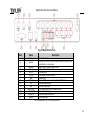
2.3 Rear Panel Instructions ................................................................................................................................................................................. 13
2.3.1 Rear Panel Interface............................................................................................................................................................................ 13
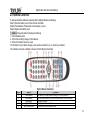
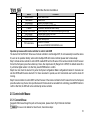
2.4 Remote Controller ......................................................................................................................................................................................... 15
2.5 Control with Mouse ....................................................................................................................................................................................... 16
2.5.1 Connect Mouse ................................................................................................................................................................................... 16
2.5.2 Use Mouse.......................................................................................................................................................................................... 17
3
Basic Function Instruction.......................................................................................................................................... 18
3.1 Power On/Off ................................................................................................................................................................................................ 18
3.1.1 Power on ............................................................................................................................................................................................ 18
3.1.2 Power off ............................................................................................................................................................................................ 18
3.2 Login ............................................................................................................................................................................................................ 19
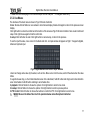
3.3 Live preview.................................................................................................................................................................................................. 19
3.3.1 Live playback ...................................................................................................................................................................................... 20
4
Main menu setup guide ............................................................................................................................................... 21
4.1 Basic configuration ........................................................................................................................................................................................ 22
4.1.1 System ............................................................................................................................................................................................... 22
3