1
Off (APO) function will automatically shut
down the instrument if no front-panel
buttons are pressed within any 20-minute
period. To disable the APO function, power
on the unit in a special way by pressing and
holding the DEW button while pressing the
button. The LCD will confirm that you
are disabling the APO function by displaying
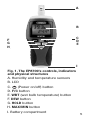
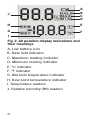
its complete set of icons (see Fig. 2) until
you release the DEW button. The APO
function will be enabled the next time you
power on the unit in the normal way.
To power off the EP8709, press and hold
the
button for at least 3 seconds.
TRACKING MIN AND MAX LEVELS
After being powered on, the EP8709
automatically operates in “Recording” mode
for the purpose of tracking maximum and
minimum RH and ambient temperature
values over the duration of a measurement
“session”.
To display the maximum RH and ambient
temperature values measured during the
current measurement session, press the
MAX/MIN button once. The text MAX will
appear at the right of the RH readout and
both readouts will indicate the highest
values (of RH and ambient temperature)
measured since 1) the meter was last
powered on, or 2) the Min/Max memory
was reset (by entering and exiting Min/Max
mode.)
9