1
720P Wireless IR PT IP Camera
ICA-W7100
Appendix F: Troubleshooting & Frequently
Asked Questions
Features
The video and audio codec is
adopted in the device.
The maximum number of users
that
accesses
the
device
simultaneously.
The device can be used outdoors
or not.
The device utilizes H.264 compressions to provide high quality
images. The audio codec is defined as PCM/ G.711.
The maximum number of users is limited to 2. However, it also
depends on the total bandwidth accessed to this device from clients.
The maximum data throughput of the device is around 20~25Mbps
for UDP mode and 10Mbps for HTTP mode. Therefore, the actual
number of connected clients is varying by streaming mode, settings
of resolution, codec type, frame rate and bandwidth. Obviously, the
performance of the each connected client will slow down when many
users are logged on.
The device is used indoor only.
Installing this device
The network cabling is required for
the device.
The device will be installed and
work if a firewall exists on the
network.
The user name and password used
for the first time or after factory
default reset
Forgot
the
password
username
and
Forgot the IP address of the
device.
PLANET IP Finder II program
cannot find the device.
The device uses Category 5 UTP cable allowing 10 and/
100BASE-TX networking.
If a firewall exists on the network, port 80 is open for ordinary data
communication. The HTTP port and RTSP port need to be opened
on the firewall or NAT router.
User name = admin and password = admin.
Note that it’s all case sensitive.
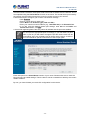
Follow the steps below.
1. Open the IP Finder II and search this device.
2. Press “Restore Factory” button to restore all settings to factory
default setting.
Check IP address of device by using PLANET IP Finder II program
or restore the device to default by pressing the hardware reset
button over 10 seconds.
z Re-power the device if you cannot find the unit within 1 minute.
z Do not connect device over a router. PLANET IP Finder II
program cannot detect device over a router.
z If IP address is not assigned to the PC that is running PLANET IP
Finder II program, then PLANET IP Finder II program cannot find
device. Make sure that IP address is assigned to the PC properly.
z Antivirus software on the PC might interfere with the setup
program. Disable the firewall of the antivirus software during
setting up this device.
z Check the firewall setting of your PC or Notebook.
Internet Explorer does not seem to
work well with the device
Make sure that your Internet Explorer is version 6.0 or later. If you
are experiencing problems, try upgrading to the latest version of
Microsoft’s Internet Explorer from the Microsoft webpage.
PLANET IP Finder II program fails
to save the network parameters.
Network may have trouble. Confirm the parameters and connections
of the device.
Accessing this device
z
Cannot access the login page and
other web pages of the Internet
Camera from Internet Explorer
z
Maybe the IP address of the Internet camera is already being
used by another device or computer. To confirm this possible
problem, disconnect the Internet camera from the network first,
and then run the ping utility to check it out.
Maybe due to the network cable. Try correcting your network
- 58 -