1
HeartVUE system. User’s Guide
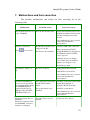
7. Malfunctions and their correction
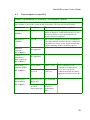
The possible malfunctions and actions for their correcting are in the
following table.
Malfunction
Probable reason
The CD disk cannot be read The CD disk became dusty.
by the CD-ROM.
Corrective actions
Extract the CD disk from the CDROM and carefully clean the dick
with the cleaning based on the
alcohol.
If the malfunction is not corrected
contact the manufacturer
representative.
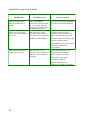
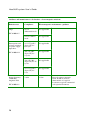
The New examination
button
is not active.
The PC-ECG module is not
plugged to the PC.
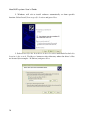
The driver is not installed.
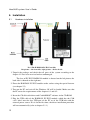
Check the USB cable connection.
Make sure that the PC-ECG
module KARDi2/4 is plugged into
the USB hub with the external
source of power.
Install the driver (see chapter
5.1.1). If the driver is installed update it (see chapter 5.1.2).
Restart the program.
The indicator “Mode” is
red.
The error occurred.
Replug the PC-ECG module.
Reinstall the system driver.
If the malfunction is not corrected
contact the manufacturer
representative.
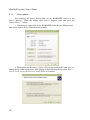
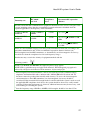
The MCS USB Medical
Devices is not appeared in
the Computer management.
The KARDiDSP is not
displayed in the Device
Manager under the MCS
USB Medical Devices.
The connection between PC Check the connection between PC
and PC-ECG module
and PC-ECG module, or
failure.
replug the PC-ECG module.
The system driver is not
installed.
Install the system driver.
The heart portraits have a
black line.
The fonts or buttons of the
CardioDM-06® software’s
interface are changed.
The video drivers are not
updated.
Update the video drivers.
If the malfunction is not corrected
contact the manufacturer
representative.
21