1
User Manual Titanium X
Keys/Touch Points
Power Key: To power on/off Titanium X, press and hold
power key for a few seconds on top of your phone. When
Titanium X is ON, press the power key once to activate or
deactivate the screen.
Home key ( ): Touch the key to return to the home
screen. In idle screen, touch and hold the key to view
recently accessed features.
Options key ( ): In standby mode, touch the key to set
wallpaper, manage apps, access to system settings. Touch
it to view menu options.
Back key (
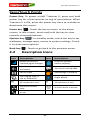
2.2
Icons
): Touch to go back to the previous menu.
Description Icons
Descriptions
Icons
Descriptions
Shows the phone’s
network signal strength.
Show the phone’s
battery capacity.
Speaker has been
activated.
You have unread SMS.
Call on hold
USB storage Turned on.
The ringing type is
set on Vibration.
Flight Mode
3G network in use.
2G network in use.
You have missed
calls.
A clock alarm is active.
In call
-9-