1
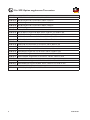
Referring documents
Type
Management Guide
Description
Westermo OS management guide
Document number
6101-3201
Factory default on L108-F2G-S2 EX / L208-F2G-S2 EX
It is possible to set the unit to factory default settings by using two straight standard
Ethernet RJ-45 cables.
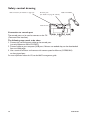
1. Power off the switch and disconnect all Ethernet cables (copper and fibre).
2. Connect one Ethernet cable between Ethernet ports 3 and 6, and the other between
Ethernet ports 4 and 5.
The ports need to be connected directly by an Ethernet cable, i.e., not via a hub or
switch. Use a straight cable – not a cross-over cable – when connecting the ports.
3. Power on the unit.
4. Wait for the unit to start up. Control that the ON LED is flashing red.
The ON LED flashing indicates that the unit is now ready to be reset to factory
default. You now have the choice to go ahead with the factory reset, or to skip factory
reset and boot as normal.
• Go ahead with factory reset: Acknowledge that you wish to conduct the factory reset by unplugging the
Ethernet cables. The ON LED will stop flashing.
This initiates the factory reset process*, and after approximately 1 minute the unit
will restart with factory default settings. When the switch has booted up, the ON
LED will show a green light, and is now ready to use.
• Skip the factory reset:
To skip the factory reset process, just wait for approximately 30 seconds
(after the ON LED starts flashing RED) without unplugging the Ethernet cables. The switch will conduct a normal boot with the existing settings.
* Note Do not power off the unit while the factory reset process is in progress.
6643-22701
23