1
Basic operation
•
Balance
o
Equalizer-You
o Adjusts the volume of the left and right speakers.
o
Surround
•
Auto Volume
can select the frequency
SoundoTurns the surround
Control
SPDIF
Note:
Type°Selects
sound effect on or off.
- Turns automatic
preset range to eliminate
°
you want to adjust and change its value.
volume control on or off. The option keeps the audio in a
large spikes in volume.
the SPDIF type. You can select PCH, Dolby Digital, or Off.
Via SPDIF Type, you can choose the optical digital audio out type. If Audio Volume
Control is On,
that means audio out control is activated.
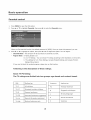
1.
Press MENU to open the OSD option
2.
Press A or T to highlight
Setup,
,
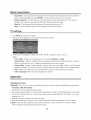
Press A or T to highlight
an option, then press _[ or _ to adjust the option. You can adjust:
o OSD Language
then press _ to enter the Setup
menu.
- Use the right or left arrow button to choose the OSD Language among English, Spanish
and French.
•
Screen
Mode
- Use the arrow button to choose the aspect ratio between picture width and picture height
(High Definition
(Standard
o
16:9 pictures will be displayed in original format
Definition
4:3) are Normal, Wide, Zoom and Cinema.
DPMS - This is a good function for a computer
screen on or off. For example,
computer
•
16:9, named Wide). The options for SD
if the computer
monitor. When DPMS is on, the computer
will control the
is in sleep mode, the screen will be switched off. If the
is activated, the screen also is activated.
Time Setup
_ You can set up the exact time by yourself. You can also set up Sleeper Time and Auto Sleep
Time.
o Caption:
There are three items in it - Analog Closed Caption,
Digital Closed Caption and Digital Caption
Style.
Analog Closed Caption: CCI, CC2, CC3, CC4, TEXTI,TEXT2, TEXT3, TEXT4.
Digital
Closed
Digital
Caption
broadcaster,
Caption:
Defau|t
Service2, Service3, Service4, ServiceS, Service6.
Style: There are two Caption Styles. One is the automatic
function set as the
while the other is the custom style where you can adjust the font size, color,
opacity, background
Reset
Servicel,
color etc., accordingly.
- Every TV has its original
setting before leaving the factory. So this function
restore these settings.
17
helps you