1
Appendix
Wall-mounting
Bracket
Installation
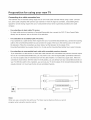
1. Drill four holes according
to the illustrated
dimension
and insert expanding
bolts(4pcs
of MS, bolt hole diameter=8mm,
length =70ram) into the holes.
220ram
or 320mm
E
E
LO
_)
2.Mount two fixture disks onto the wall-mounting
wall=mounting
bracket to the expanding
bolts.
bracket
using
bolts.
Fix the
t
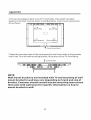
3.Lay the TV on a plane table which could bear enough weight,
and cover the
surface of the table with soft cloth to avoid damage to LCD panel. Remove the
four bolts fixing the stand and remove the stand from TV.
22