1
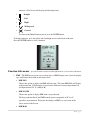
antennae’s. The Screen will display the following forms:
•
Straight
•
Left
•
Right
•
Widespread
•
Crossed
To return to the Main Function screen, press the ENTER button.
To change functions, press the up/left and down/right arrows on the front of the unit.
Press the ENTER button to select a function.
Function Sub-menus – press the down arrow and scroll through functions to access these sub-menus.
1. EMF – The EMF screen can be set to various types of EMF displays once select the display
type will become the default on the main screen.
• EMF ION
Choose this option to display for EMF and Ion count. The name EMF ION will display
in the main menu. ION detection is based on the difference between input channel A
and Input channel B. X = ABS(A-B)
• EMF SCOPE
Choose this option to display EMF with a scope function.
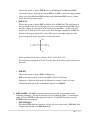
The Scope function Reads the EMF from the greatest magnitude of X,Y or Z
regardless of polarization. Then plots the changes in EMF as a wave form on the
lower section of the Screen.
• EMF BAR
9|Page