1
E-MANUAL
Thank you for purchasing this Samsung product.
To receive more complete service, please register
your product at
www.samsung.com/register
Model______________ Serial No.______________
Contents
Preference Features
Channel Menu
• Connecting to the Network
123
• Setting up a Wired Network
134
• Setting up the Wireless Network
147
51
• Managing the Network Connected Devices
175
57
• Setting the Time
186
• Blocking Programmes
203
• Economical Solutions
208
• Picture In Picture (PIP)
212
• Other Features
217
• Support Menu
245
• Connecting the TV
1
• Using the INFO button (Now & Next guide)
7
• Using the Channel Menu
9
• Memorising Channels
• Other Features
Basic Feature
• Changing the Preset Picture Mode
62
• Adjusting Picture Settings
65
• Changing the Picture Size
70
• Changing the Picture Options
81
• Using the TV with Your PC
100
• Changing the Preset Sound Mode
104
• Adjusting Sound Settings
106
Advanced Features
• Videos (In AllShare Play)
599
• Using the 3D function
271
• Photos (In AllShare Play)
618
• Smart Hub
290
• Music (In AllShare Play)
635
• Customizing the Home Screen
317
• Recorded TV (In AllShare Play)
649
• Using Samsung Apps
350
• Timeshift
662
• Search
361
• Using the DLNA Function
672
• Your Video
369
• Using the MHL function
683
• Family Story
386
• Anynet+ (HDMI-CEC)
689
• Fitness
441
• Kids
453
• Web Browser
469
• Skype
499
• SMART Interaction
502
• Specification for SMART Interaction
543
• AllShare Play
555
• Using the AllShare Play
582
• My list (In AllShare Play)
586
Other Information
• Troubleshooting
706
• Picture Quality (Troubleshooting)
710
• Sound Quality (Troubleshooting)
718
• No Picture / No Video (Troubleshooting)
723
• Aerial(Air / Cable) Connection (Troubleshooting)
727
• PC Connection (Troubleshooting)
730
• Network Connection (Troubleshooting)
731
• Recording / Timeshift (Troubleshooting)
732
• Others (Troubleshooting)
741
• Anynet+ (HDMI-CEC) (Troubleshooting)
754
• AllShare Play (Troubleshooting)
762
• Smart Hub (Troubleshooting)
763
• Web Browser (Troubleshooting)
765
• Using the Smart Touch Control
773
• Supported Subtitle and AllShare Play file formats
805
• Teletext Feature
814
• Anti-theft Kensington Lock
820
• Licence
825
Connecting the TV
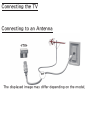
Connecting to an Antenna
<TV>
or
The displayed image may differ depending on the model.
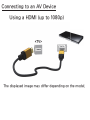
Connecting to an AV Device
Using a HDMI (up to 1080p)
<TV>
The displayed image may differ depending on the model.
Using a Component (up to 1080p)
<TV>
The displayed image may differ depending on the model.
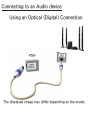
Connecting to an Audio device
Using an Optical (Digital) Connection
<TV>
The displayed image may differ depending on the model.
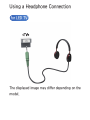
Using a Headphone Connection
for LED TV
<TV>
The displayed image may differ depending on the
model.
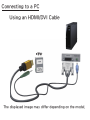
Connecting to a PC
Using an HDMI/DVI Cable
<TV>
The displayed image may differ depending on the model.
Using the INFO button (Now & Next guide)
The display identifies the current
channel and the status of certain audiovideo settings.
The Now & Next guide shows daily
TV programme information for each
channel according to the broadcasting
time.
●● Scroll l, r to view information for a
desired programme while watching the
current channel.
●● Scroll u, d to view information for
other channels. If you want to move to
the currently selected channel, select
E using your remote.
Some country, if Digital Text is set to
Enable, the EPG (Electronic Programme
Guide) will work.
Using the Channel Menu
Press the ™ button to select the menu
you want to use. Each screen will be
displayed.
Guide
™ → Guide
The EPG (Electronic Programme Guide)
information is provided by broadcasters.
Using programme schedules provided
by broadcasters, you can specify
programmes you want to watch
in advance so that the channel
automatically changes to the selected
programme channel at the specified
time. Programme entries may appear
blank or out of date depending on a
channel status.
NN Some country, if Digital Text is
set to Enable, the EPG (Electronic
Programme Guide) will work.
Using Channel View
●● a (Sche. Mgr): Displays the Schedule
Manager.
●● b (-24 Hours): Viewing the list of
programmes to be broadcasted before
24 hours.
●● { (+24 Hours): Viewing the list of
programmes to be broadcasted after 24
hours.
●● } (Ch. Mode): Select the type of
channels you want to display on the
Channel View window.
●● ` Information: Displays details of the
selected programme.
●● k Page: Move to next or previous page.
●● E Watch / Enter: When selecting the
current programme, you can watch the
selected programme. / Displays detailed
information of the selected channel.
NN This function may not be supported
depending on the country.
Channel
™ → Channel
Using this function, you can delete
channels, set favourite channels and
edit the channel name for analogue
broadcasts.
NN The available items may differ
depending on the selected antenna
source.
●● All
Shows all channels.
●● TV
Shows TV channels.
●● Radio
Shows radio channels.
●● Data/Other
Shows data channels and other
channels.
●● Analogue
Shows analogue channels.
●● Favourites 1 – Favourites 5
Shows all favourite channels, in up to
five groups. Each group has separate
channels.
NN The TV displays favourites only if
you have added favourites using Edit
Favourites in the Tools menu.
NN If the highlight located in the
Favourites 1 – Favourites 5 category,
you can change the name of
category by selecting b using your
remote.
●● Recently Viewed
Shows the most recently viewed
channels.
●● Most Viewed
Shows the most frequently viewed
channels.
Using the coloured and function buttons
with Channel
●● b Delete
Delete the selected channel(s).
●● ` Information
Displays details of the selected channel.
●● k Page
Scrolls the channel list to the next or
previous page.
●● E Select / Deselect
Selects or deselects a channel.
●● T Tools
Displays the option menu.
●● R Return
Return to the previous menu.
Using the Tools menu with the Channel
●● Edit Favourites
Lets you assign channels you watch
frequently to a favorites group and
remove channels from a favorites
group. You access Edit Favourites on
the Tools menu.
1.Select Edit Favourites. The Edit
Favourites screen appears.
2.Select a using your remote. The
selected channel will be added to the
favourite group.
NN Also, you can select a channel in
the Edit Favourites screen.
NN You can add a favourite channel
to any one of the groups. To
change favourites group, select }
using your remote. Each time you
select }, a favourites group will
be changed.
3.When done, select OK. The channel
is made a favourite and is assigned
to the favourite group you selected.
N On the Channel screen, the TV
displays the “ ” symbol next
to the channel, indicating it is a
favourite.
● Lock / Unlock
Lock a channel so that the channel
cannot be selected and viewed.
N This function is available only when
the Channel Lock is set to On.
● Rename channels
(Appears only if you have selected an
analogue channel.)
Lets you assign a name of up to five
characters to an analogue channel. For
example, Food, Golf, etc. This makes it
easier to find and select the channel.
●● Edit Channel Number
Edit the channel number by select the
numbers.
NN This function may not be supported
depending on the region.
●● Sorting (digital channels only)
Change the list ordered by channel
name or number.
●● Channel Info
Displays information of channel signal.
The item may differ depending on
channel.
●● Delete
Delete a channel to display the
channels you want.
●● Select All / Deselect All
Select all channels in the list. / Deselect
all channels you selected.
To delete a channel from a Category
list on the Channel screen, follow these
steps:
1.If you want to delete a channel,
select a category of the channel.
2.Select a channel in the category list.
A c mark appears to the left of the
channel.
NN You can select more than one
channel.
NN If you select the selected channel
again, a c mark disappears.
3.Open the Tools menu using your
remote.
4.Select Delete. The message Delete
the selected channels? appears.
Select OK.
NN You can delete the selected channel
immediately by selecting b using
your remote.
NN When you delete a channel in the
Recently Viewed or Most Viewed
category, the channel will disappear
from the category list. But, the
channel is not deleted.
To set channels as favourites, follow
these steps:
1.Select the All category.
2.Select a channel. A c mark appears
to the left of the channel.
NN You can select more than one
channel.
NN If you select the selected channel
again, a c mark disappears.
3.Open the Tools menu using your
remote.
4.Select the Edit Favourites. The Edit
Favourites screen appears.
5.Select a using your remote. The
selected channel will be moved to
the favourite group.
NN Also, you can select a channel in
the Edit Favourites screen.
NN You can add a favourite channel
to any one of the groups. To
change favourites group, select }
using your remote. Each time you
select }, a favourites group will
be changed.
6.When done, select OK. The channel is
made as a favourite and is assigned
to the favourite group you selected.
N The TV displays the “ ” symbol
next to the channel, indicating it
is a favourite.
Using the coloured and function
buttons with Edit Favourites
● On the Edit Favourites screen, you
can use these functions buttons:
– a Add
Add selected channels to the
favourites group.
–– } Change Fav.
Change the favourites group.
Each time you select } using
your remote, the favourites group
changes.
–– Ÿ Go To
Move to the Highlight to a channel
number immediately by pressing
the number button using your
remote.
–– R Return
Return to the previous menu.
●● When you highlight a favourite
channel in a favourites group on the
Edit Favourites screen, you can use
these options:
–– a Delete
Delete the selected channel.
–– b Change order
Change the favourite group list
order.
–– { Copy
Copy a selected channel to other
favourites groups.
–– } Change Fav.
Change the favourites group.
Each time you select } using
your remote, the favourites group
changes.
–– Ÿ Go To
Move to the Highlight to a channel
number immediately by pressing
the number button using your
remote.
–– R Return
Return to the previous menu.
To remove a channel from a favourites
group, follow these steps:
1.Select the favourite’s group category.
2.Select a channel in the favourites
group. A c mark appears to the left
of the channel.
NN You can select more than one
channel.
NN If you select the selected channel
again, a c mark disappears.
3.Open the Tools menu using your
remote.
4.Select Delete. The message Do you
want to delete the selected item(s)?
appears.
5.Select OK. The message Deleted the
selected item(s). appears.
N You can delete the selected
channel from the list of favourites
group immediately using the b
function.
Display Icons Used in the Channel screens
: An analogue channel.
c: A channel selected.
: A favourite channel.
: A locked channel.
Schedule Manager
™ → Schedule Manager
Using this function, you can set
the TV to display a desired channel
automatically on a day and at a time of
your choice.
NN You must set the current time first
using the Time → Clock function
in the System menu to use this
function.
To use Schedule Viewing, follow these
steps:
1.On the Schedule Manager screen,
select a using your remote.
2.A pop up screen will appear. Select
Schedule Viewing.
3.Set Aerial, Channel, Repeat, and
Start Time.
●● Aerial
Select the desired antenna source.
●● Channel
Select Channel to view the channel
numbers. Select the desired channel.
NN You can only select memorised
channels.
NN You can also enter the channel
number directly using the number
buttons on the standard remote or
the number function button on the
Smart Touch Control.
●● Repeat
Select Once, Manual, Sat~Sun,
Mon~Fri or Everyday. If you select
Manual, you can set the day you
want.
NN The c mark indicates a day you’
ve selected.
Date: You can set a desired date.
NN The Date is available only when
you select Once in Repeat.
●● Start Time
You can set the start time you want.
3.When done, select the OK, The
selected channel is scheduled for
viewing.
NN On the Schedule Manager screen,
you can view a list of Schedule
Viewing.
To delete an item in a list of scheduled
viewing, follow these step:
1.On the Schedule Manager screen,
highlight an item you want to delete.
2.Open the Tools menu using your
remote.
3.Select the Cancel schedule. The
Cancel selected list(s)? message
appears.
4.Select Yes. The selected schedule is
cancelled.
NN If you press the INFO button
for Standard Remote Control
select Info
or
for Smart Touch Control
after Highlighting an item, the
Information screen appears. On
the Information screen, you can
change or cancel the Schedule
Viewing.
Cancel schedule: Cancel the
Schedule Viewing.
Edit Schedule: Change the
Schedule Viewing.
Return: Return to the previous
screen.
To use the Schedule Recording, follow
these steps:
(Digital channels only)
Allows you to make a reservation to
record a programme scheduled for
broadcast.
Set the current time first to use this
function.
1.Select Schedule Manager. The
Schedule Manager screen will be
displayed.
2.Select a using your remote. A pop
up screen will appear.
3.Select the Schedule Recording.
NN We recommend using a USB
HDD with at least 5,400 rpm, but
a USB HDD of RAID type is not
supported.
NN A USB storage device cannot
record until it completes the
Device Performance Test.
NN USB memory stick is not
compatible.
4.Set the Aerial, Channel, Repeat, Date,
Start / End Time.
NN If you want to play a recorded
programme, refer to Recorded TV
in the e-Manual.
Channel List
Using this function, you can view the
channel list, programme information,
favourite channel, and manage of
Schedule Viewing.
1.Press the CH LIST button
Remote Control
for Standard
or select CH List
Smart Touch Control
for
. The Channel List
screen is displayed immediately.
2.Change a channel or channel list
mode.
Using the coloured and function buttons
with the Channel List
NN If you press the INFO button for
Standard Remote Control
or select Info
for Smart Touch Control
, the TV displays
details of the selected program.
●● { Programme View / Channel View
Displays the programme when digital
channel is selected. Returns to the
channel view.
●● lr Ch. Mode / Channel
Move to the type of channels you want
to display on the Channel List screen. /
On Programme View screen, change a
channel.
●● E Watch / Information
Watches the channel you select.
/ Displays details of the selected
programme.
●● k Page
Move to next or previous page.
Using the Schedule Viewing in Channel List
You can use Schedule Viewing in
Channel List to schedule a digital
channel programme for viewing.
The TV will turn on and display the
digital channel programme when the
programme begins.
1.Select CH LIST function using your
remote. The Channel List screen
appears.
2.Select a desired digital channel.
3.Select { using your remote. The TV
displays the programme list of the
selected channel.
4.Select a desired programme in the
programme view, and then select
Information using your remote.
5. On the Information screen, select
the Schedule Viewing. The selected
programme is scheduled.
N If you want to cancel Schedule
Viewing, follow Steps 1 through 4,
and then select Cancel schedule.
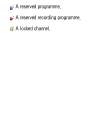
Channel Status Display Icons
: An analogue channel.
: A reserved programme.
: A reserved recording programme.
: A locked channel.
Memorising Channels
Country
Menu → Channel → Country
Select your country so that the TV can
correctly auto-tune the broadcasting
channels.
NN The PIN input screen appears. Enter
your 4 digit PIN number.
Auto Tuning
Menu → Channel → Auto Tuning
Scans for a channel automatically and
stores in the TV.
NN Automatically allocated programme
numbers may not correspond
to actual or desired programme
numbers. If a channel is locked using
the Channel Lock function, the PIN
input window appears.
●● Digital & Analogue / Digital / Analogue:
Select the channel source to memorise.
When selecting Cable → Digital &
Analogue or Digital: Provide a value to
scan for cable channels.
Manual Tuning
Menu → Channel → Manual Tuning
Scans for a channel manually and
stores in the TV.
NN If a channel is locked using the
Channel Lock function, the PIN input
window appears.
NN This function may not be supported
depending on the region.
When Aerial Source is set to Air or Cable
●● Digital Channel Tuning: Scans for a
digital channel.
NN The Bandwidth function may not be
supported depending on the region.
1.Select the New.
2.Select the Search. When scanning
has finished, a channel is updated in
the channel list.
●● Analogue Channel Tuning: Scans for a
analogue channel.
1.Select the New.
2.Set the Programme, Colour System,
Sound System, Channel and Search.
3.Select the Store. When scanning has
finished, a channel is updated in the
channel list.
Channel mode
●● P (programme mode): When tuning is
complete, the broadcasting stations
in your area have been assigned to
position numbers from P0 to P99.
You can select a channel by entering
the position number in this mode.
●● C (aerial channel mode) / S (cable
channel mode): These two modes
allow you to select a channel by
entering the assigned number for
each aerial broadcasting station or
cable channel.
Other Features
Guide Type
Menu → Channel → Guide Type
(Depending on the country)
You can select a different type of
Guide.
●● Guide: Uses the guide programme
provided by Samsung.
●● Auto: Uses the guide programme
provided by through digital broadcasts.
Transfer Channel List
Menu → Channel → Transfer Channel List
(Depending on the country)
NN The PIN input screen appears. Enter
your 4 digit PIN number.
Imports or exports the channel map.
You should connect USB storage to use
this function.
●● Import from USB: Import channel list
from USB.
●● Export to USB: Export channel list to
USB. This function is available when
USB is connected.
Fine Tune
Menu → Channel → Fine Tune
(Analogue channels only)
If the reception is clear, you do not
have to fine tune the channel, as this is
done automatically during the search
and store operation. If the signal is
weak or distorted, fine tune the channel
manually. Scroll to the left or right until
the image is clear.
NN Settings are applied to the channel
you’re currently watching.
NN Fine tuned channels that have been
saved are marked with an asterisk “*”
on the right-hand side of the channel
number in the channel banner.
NN To reset the fine-tuning, select the
Reset.
Crosstalk noise reduction
Menu → Channel → Crosstalk noise
reduction
(Analogue channels only)
This function reduces diagonal noise in
the picture caused by signal crosstalk
(interference). If your TV picture
displays diagonal noise or distortion
when you watch, turn on this function.
Changing the Preset Picture Mode
Picture Mode
Menu → Picture → Picture Mode
Picture modes apply preset adjustments
to the picture.
NN When your TV is connected to a PC
via an HDMI to DVI cable, you can
only select Entertain and Standard.
●● Dynamic
Suitable for a bright room.
●● Standard
Suitable for a normal environment.
●● Natural for LED TV / Relax for PDP TV
Suitable for reducing eye strain.
●● Movie
Suitable for watching movies in a dark
room.
●● Entertain
Suitable for watching movies and
games.
NN Only available when the TV is
connected to a PC via an HDMI to
DVI and an HDMI to HDMI cables.
Adjusting Picture Settings
Backlight
for LED TV
/ Cell Light
for PDP TV
Menu → Picture → Backlight / Cell Light
Adjusts the pixel brightness. 20 is the
brightest setting.
Contrast
Menu → Picture → Contrast
Adjusts contrast level. Values closer to
100 mean bigger light/dark contrast.
Brightness
Menu → Picture → Brightness
Adjusts brightness level. Values closer
to 100 mean brighter screen.
Sharpness
Menu → Picture → Sharpness
Adjusts sharpness of picture. Values
closer to 100 mean a sharp image.
Colour
Menu → Picture → Colour
Adjusts colour saturation level. Values
closer to 100 mean more intense
colours.
Tint (G/R)
Menu → Picture → Tint (G/R)
Adjusts tint levels for green and red.
Values closer to 100 mean greater
intensity for that colour.
To adjust picture quality, follow these steps:
1.Select an option you want to adjust.
When you select an option, a slider
screen appears.
2.Adjust the option value using your
remote.
NN When you change an option value,
the change will affect the OSD menu
also.
NN When your TV is connected to a PC
via an HDMI to DVI cable, Colour and
Tint (G/R) is not available.
NN You can adjust and store settings for
each external device connected to
the TV.
NN Lowering picture brightness reduces
power consumption.
Changing the Picture Size
Screen Adjustment
Menu → Picture → Screen Adjustment
Using this function, you can select
various picture size and aspect ratio
options.
●● Picture Size
Your cable box / satellite receiver may
have its own set of screen sizes as
well. However, we highly recommend
you use your TV's 16:9 mode most of
the time.
If you have set Double (à, Œ) mode
in PIP (Picture-in-Picture), you cannot
adjust the Picture Size.
Auto Wide: Automatically adjusts the
picture size to the 16:9 aspect ratios.
16:9: Adjusts the picture size to 16:9 for
DVDs or wide broadcasting.
Wide Zoom: Magnifies the picture size
more than 4:3.
Zoom: Magnifies the 16:9 wide pictures
vertically to fit the screen size.
4:3: The default setting for a movie or
normal broadcasting.
NN Do not watch in 4:3 format for a long
time. Traces of borders displayed
on the left, right and centre of the
screen may cause image retention
(screen burn) which is not covered
by the warranty.
Screen Fit: Displays the full image
without any cut-off when HDMI (720p
/ 1080i / 1080p) or Component (1080i /
1080p) signals are inputted.
Smart View 1: Reduces the 16:9 picture
by 50%
for LED TV
Smart View 2: Reduces the 16:9 picture
by 25%
for LED TV
NN Smart View 1 is enabled only in
HDMI mode.
NN Smart View 2 is enabled only in
HDMI or DTV mode.
NN The picture size can vary when you
play content from Videos in AllShare
Play.
●● Zoom/position
Adjusts the picture zoom and position.
Zoom is only available if Picture Size is
set to Zoom. Position is only available
if Picture Size is set to Wide Zoom,
Zoom, or Screen Fit.
To use the Zoom function after
selecting Zoom, follow these steps:
1.Select Zoom.
2.On the Zoom/position screen, select
Zoom, and then zoom in or zoom out
using your remote.
3.When done, select Zoom again, and
then select Close.
4.To reset the picture, press Reset.
To use the Position function after
selecting Wide Zoom, Zoom or Screen
Fit, follow these steps:
1.Select the Position.
2.On the Position screen, select
Position, and then move the picture
to position you want using your
remote.
3.When done, select Position again,
and then select Close.
4.To reset the picture position, select
Reset.
Picture Sizes available by Input Source:
–– ATV, AV: Auto Wide, 16:9, Wide
Zoom, Zoom, 4:3
–– Component (480i, 480p, 576i, 576P):
16:9, Wide Zoom, Zoom, 4:3
–– DTV: Auto Wide, 16:9, Wide Zoom,
Zoom, 4:3, Smart View 2
for LED TV
–– Component(720p): 16:9, Wide Zoom,
Zoom, 4:3
–– Component(1080i, 1080p): 16:9, Wide
Zoom, Zoom, 4:3, Screen Fit
–– HDMI (720p, 1080i, 1080p): 16:9,
Wide Zoom, Zoom, 4:3, Screen Fit,
Smart View 1
2
for LED TV
, Smart View
for LED TV
NN The Auto Wide function may not
available depending on the country.
NN Depending on the input source, the
picture size options may vary.
NN The available items may differ
depending on the selected mode.
NN HD (High Definition): 16:9 -
1080i/1080p (1920x1080), 720p
(1280x720)
NN You can adjust and store settings
for each external device you have
connected to an input on the TV.
Select the Source, and then adjust
the settings.
●● 4:3 Screen Size
(Depending on the country)
Available only when picture size is set
to Auto Wide. You can determine the
desired picture size at the 4:3 WSS
(Wide Screen Service) size or the
original size. Each European country
requires different picture size.
NN Not available in Component or HDMI
mode.
Changing the Picture Options
Advanced Settings
Menu → Picture → Advanced Settings
Using this function, you can configure
advanced picture settings to create
your preferred picture.
NN Advanced Settings is available only
when the Picture Mode is set to
Standard or Movie mode.
NN When connecting a PC using an
HDMI-DVI cable, you can only
make changes to White Balance and
Gamma.
●● Dynamic Contrast
Adjusts the screen contrast.
●● Black Tone
Select the black level to adjust the
screen depth.
●● Flesh Tone
Emphasizes pink “Flesh Tone.”
●● RGB Only Mode
Displays the Red, Green and Blue
colours so you can make fine
adjustments to hue and saturation.
●● Colour Space
Adjusts the range and variety of colours
(the colour space) available to create
images.
NN To adjust Colour, Red, Green, Blue
and Reset, set the Colour Space to
Custom.
●● White Balance
Adjusts the colour temperature for a
more natural picture.
R-Offset / G-Offset / B-Offset:
Adjusts each colour’s (red, green, blue)
darkness.
R-Gain / G-Gain / B-Gain: Adjusts each
colour’s (red, green, blue) brightness.
Reset: Resets the White Balance to its
default settings.
●● 10p White Balance
Lets you control the white balance
by adjusting the red, green, and blue
brightness in 10 point intervals.
NN Available when the Picture Mode is
set to Movie. Available for all video
source.
NN Some external devices may not
support this function.
Interval: Select the interval to adjust.
Red: Adjusts the red level.
Green: Adjusts the green level.
Blue: Adjusts the blue level.
Reset: Resets the 10p White Balance to
its default settings.
●● Gamma
Adjusts the primary colour intensity.
●● Expert Pattern
Use the Expert Pattern function to
calibrate the picture. If the OSD menu
disappears or a menu other than the
Picture menu is opened, the TV saves
the calibration and the Expert Pattern
screen disappears.
Off: Turns the Expert Pattern function
off.
Pattern1: This test screen demonstrates
the effect of your display settings on
shades of grey and black.
Pattern2: This test screen demonstrates
the effect of your display settings on
colours.
NN After selecting Pattern1 or Pattern2,
you can adjust any of the advanced
settings for the desired effect.
NN While the Expert Pattern is running,
the TV does not output sound.
NN Only enabled in Component, and
HDMI modes.
●● xvYCC
Setting xvYCC on increases picture
detail and enlarges the colour space
when you are watching movies input
from an external device (e.g. BD/DVD
player) connected to the TV’s HDMI or
Component IN jacks.
NN Available only when you set
the Picture Mode to Movie and
the external input to HDMI or
Component.
NN Some external devices may not
support this function.
●● Motion Lighting
Reduces power consumption by
reducing screen brightness when the
picture on the screen is in motion.
NN This feature is not supported in 3D
mode.
NN Only available in Standard mode.
NN When you change the Backlight
for LED TV
/ Cell Light
for PDP TV
,
Contrast, or Brightness, the TV sets
Motion Lighting to Off.
●● Black enhancer for LED TV
Adjust black colour depth to enhance
picture perspective.
Picture Options
Menu → Picture → Picture Options
Using this function, you can configure
additional picture settings to suit your
preference.
NN When your TV is connected to a PC
via an HDMI to DVI cable, you can
only make changes to Colour Tone.
●● Colour Tone
Select the colour temperature.
NN Warm1 or Warm2 will be deactivated
when the Picture Mode is set to
Dynamic.
NN You can adjust and store settings for
each external device connected to an
input on the TV. Select Source and
then adjust the settings.
●● Digital Noise Filter
If the broadcast signal received by your
TV is weak, you can activate the Digital
Noise Filter feature to reduce any static
and ghosting that may appear on the
screen.
Auto Visualisation: When changing
analogue channels, displays signal
strength.
NN When the signal is weak, try all the
options until the TV displays the best
picture.
NN Only available for analogue channels.
NN When the bar is green, you are
receiving the best possible signal.
●● MPEG Noise Filter
Reduces MPEG noise to provide
improved picture quality.
●● HDMI Black Level
Lets you adjust the screen depth by
selecting a black level.
NN Available only in HDMI mode.
●● Film Mode
Sets the TV so that it senses and then
processes film signals from all sources
automatically and adjusts the picture
for optimum quality.
NN Available in TV, AV, Component (480i
/ 1080i) and HDMI (1080i).
●● Motion Plus for LED TV
Removes drag from fast scenes with
a lot of movement to provide a clearer
picture.
NN The Info screen on your TV displays
the resolution and frequency of the
incoming signal (60Hz), but not the
frequency the TV is generating for
the image it is displaying by using
Motion Plus function.
NN If noise occurs on the screen, please
set up the Motion Plus to Off. If
Motion Plus is Custom, you can
set up the Blur Reduction, Judder
Reduction or Reset manually.
NN If Motion Plus is Demo, you can
compare the difference of on and off
modes.
Blur Reduction: Adjusts the blur
reduction level from video sources.
Judder Reduction: Adjusts the judder
reduction level from video sources
when playing films.
Reset: Reset the custom settings to the
factory defaults.
NN The info screen on your TV displays
the resolution and frequency of
the incoming video signal (60 Hz).
This displayed frequency is not the
frequency of the picture the TV is
displaying when you have Motion
Plus on.
NN If noise occurs on the screen, please
set Motion Plus to Off. If Motion Plus
is set to Custom, you can control
Blur Reduction and Judder Reduction
manually and use Reset to reset both
to their default settings.
NN If Motion Plus is set to Demo, you
can compare the difference between
a picture with Motion Plus On and
Motion Plus Off.
●● LED Motion Plus for LED TV
Removes drag from fast scenes with
a lot of movement to provide a clear
picture.
Reset Picture
Menu → Picture → Reset Picture
Resets your current picture mode to its
default settings.
Using the TV with Your PC
Using Your TV as a Computer (PC)
Display
Entering the Video Settings (Based on
Windows 7)
For your TV to work properly as a
computer display, you must enter the
correct video settings after you have
connected the TV to your PC.
NN Depending on your version of
Windows and your video card, the
procedure on your PC will probably
differ slightly from the procedure
presented here.
NN However, the same basic information
will apply in most cases. (If not,
contact your computer manufacturer
or Samsung Dealer.)
1.Click “Control Panel” on the
Windows start menu.
2.Click “Appearance and Themes”
in the “Control Panel” window. A
display dialogue box appears.
3.Click “Display”. Another display
dialogue box appears.
4.Click the “Settings” tab on the
display dialogue box.
–– On the Settings tab, set the
correct resolution (screen size).
The optimal resolution for this TV
is 1920 x 1080.
–– If a vertical-frequency option
exists on your display settings
dialogue box, select “60” or “60
Hz”. Otherwise, just click “OK”
and exit the dialogue box.
Changing the Preset Sound Mode
Sound Mode
Menu → Sound → Sound Mode
Sound modes apply preset adjustments
to the sound.
NN If Speaker Select is set to External
Speaker, Sound Mode is disabled.
●● Standard
Selects the normal sound mode.
●● Music
Emphasizes music over voices.
●● Movie
Provides the best sound for movies.
●● Clear Voice
Emphasizes voices over other sounds.
●● Amplify
Increase the intensity of high-frequency
sound to allow a better listening
experience for the hearing impaired.
Adjusting Sound Settings
Sound Effect
Menu → Sound → Sound Effect
NN If Speaker Select is set to External
Speaker, Sound Effect is disabled.
NN Available only when the Sound Mode
is set to Standard.
●● Virtual Surround
This function provides a virtual 5.1
channel surround sound experience
through a pair of speakers using HRTF
(Head Related Transfer Function)
technology.
●● Dialog Clarity
This function allows you to increase
the intensity of over background music
or sound effects so that dialogue can
be heard more clearly.
●● Equaliser
The Equaliser displays a series of
sliders. Use the arrow buttons to select
a slider, and then change the slider’s
value. To Reset the Equaliser, select
Reset. A pop-up appears asking if you
want to reset. Select Yes. To exit, select
Close.
Balance L/R: Adjusts the balance
between the left and right speaker.
100Hz / 300Hz / 1kHz / 3kHz / 10kHz
(Bandwidth Adjustment): Adjusts the
volume level of specific bandwidth
frequencies.
Reset: Resets the Equaliser to its default
settings.
3D Audio
Menu → Sound → 3D Audio
3D audio technology provides the
immersive sound corresponding to the
pop-up effect of 3D video by using
audio depth control in perspective.
NN Available only when watching 3D
images.
Broadcast Audio Options
Menu → Sound → Broadcast Audio Options
●● Audio Language
(Digital channels only)
Change the default value for audio
languages.
NN The available language may differ
depending on the broadcast.
●● Audio Format
(Digital channels only)
When sound is emitted from both the
main speaker and the audio receiver,
a sound echo may occur due to the
decoding speed difference between the
main speaker and the audio receiver. In
this case, use the TV Speaker function.
NN Audio Format option may differ
depending on the broadcast. 5.1ch
Dolby digital sound is only available
when connecting an external speaker
through an optical cable.
●● Audio Description
(Not available in all locations) (Digital
channels only)
This function handles the Audio Stream
for the AD (Audio Description) which
is sent along with the Main audio from
the broadcaster.
NN Audio Description (Off / On): Turn
the audio description function on or
off.
NN Volume: Adjust the audio description
volume.
Additional Settings
●● DTV Audio Level
(Digital channels only)
This function allows you to reduce the
disparity of a voice signal (which is one
of the signals received during a digital
TV broadcast) to a desired level.
NN According to the type of broadcast
signal, MPEG / HE-AAC can be
adjusted between -10dB and 0dB.
NN To increase or decrease the volume,
adjust between the range 0 and -10
respectively.
●● SPDIF Output
SPDIF (Sony Philips Digital InterFace) is
used to provide digital sound, reducing
interference going to speakers and
various digital devices such as a DVD
player.
Audio Format
You can select the Digital Audio output
(SPDIF) format.
NN The available Digital Audio output
(SPDIF) format may differ depending
on the input source.
Audio Delay
Lets you correct timing mismatches
between the audio track and the video
when you are watching the TV and
listening to digital audio output from
the TV through an external device such
as an AV receiver. When you select the
Audio Delay function, a slider screen
appears. Adjust the option value using
your remote (0ms ~ 250ms).
●● Dolby Digital Comp
This function minimizes signal disparity
between a dolby digital signal and a
voice signal (i.e. MPEG Audio, HE-AAC,
ATV Sound).
NN Select Line to obtain dynamic sound,
and RF to reduce the difference
between loud and soft sounds at
night time.
Line: Set the output level for signals
greater or less than -31dB (reference)
to either -20dB or -31dB.
RF: Set the output level for signals
greater or less than -20dB (reference)
to either -10dB or -20dB.
Speaker Settings
Menu → Sound → Speaker Settings
●● Speaker Select
If you are listening to the sound track
of a broadcast or movie through an
external receiver, you may hear a
sound echo caused by the difference
in decoding speed between the TV’s
speakers and the speakers attached to
your audio receiver. If this occurs, set
the TV to External Speaker.
NN When Speaker Select is set to
External Speaker, the TV’s speakers
are turned off. You will hear sound
through the external speakers only.
When the Speaker Select is set to TV
Speaker, both the TV’s speakers and
the external speakers are on. You
will hear sound through both.
NN When the Speaker Select is set to
External Speaker, the volume buttons
and mute functions will not operate
and the sound settings will be
limited.
NN If there is no video signal, both
the TV’s speakers and the external
speakers will be mute.
●● Auto Volume
Normal: Automatically equalizes the
volume level when switching to another
channel.
Night: Automatically equalizes and
decrease the volume level on each
channel, so each channel is quieter.
Night is useful at night, when you may
want to keep the volume low.
NN To use the volume control of a
connected source device, set Auto
Volume to Off. If Auto Volume is
set to Normal or Night, adjusting
the volume control of a connected
source device may have to effect.
Reset Sound
Menu → Sound → Reset Sound
Reset all sound settings to the factory
defaults.
Connecting to the Network
The Wired Network Connection
There are three ways to attach your TV
to your LAN using cable:
NN For illustrations of the three kinds of
wired network connections, see your
paper user's manual.
–– You can attach your TV to your
LAN by connecting the LAN port on
the back of your TV to an external
modem using a LAN cable.
–– You can attach your TV to your LAN
by connecting the LAN port on the
back of your TV to router which is
connected to an external modem.
Use LAN cable for the connection.
–– You may be able to attach your TV
to your LAN by connecting the LAN
port on the back of your TV directly
to a network wall outlet using a
LAN cable. Note that the wall outlet
is attached to a modem or router
elsewhere in your house.
NN If you have a Dynamic Network,
you should use an ADSL modem or
router that supports the Dynamic
Host Configuration Protocol (DHCP).
Modems and routers that support
DHCP automatically provide the IP
address, subnet mask, gateway, and
DNS values your TV needs to access
the Internet so you do not have to
enter them manually. Most home
networks are Dynamic Networks.
NN Some networks require a Static IP
address. If your network requires a
Static IP address, you must enter the
IP address, subnet mask, gateway,
and DNS values manually when you
set up the network connection. To
get the IP address, subnet mask,
gateway, and DNS values contact
your Internet Service Provider (ISP). If
you have a Windows computer, you
can also get these values through
your computer.
NN You can use ADSL modems that
support DHCP if your network
requires a Static IP address. ADSL
modems that support DHCP also let
you use Static IP addresses.
The Wireless Network Connection
NN For an illustration of the wireless
network connection, see your paper
user's manual.
You can connect your TV to your LAN
through a standard wireless router or
modem.
This TV supports the IEEE 802.11a/b/g
and n communication protocols.
Samsung recommends using IEEE
802.11n. When you play video over a
network connection using IEEE 802.11
a/b or g, the video may not play
smoothly.
NN To use a wireless network, your TV
must be connected to a wireless
router or modem. If the wireless
router or modem supports DHCP,
your TV can use a DHCP or static IP
address to connect to the wireless
network.
NN Select a channel on the wireless
router or modem that is not currently
being used. If the channel set for the
wireless router or modem is currently
being used by another device nearby,
this will result in interference and
communication failure.
NN Your TV supports only the following
wireless network security protocols:
–– Authentication Mode: WEP,
WPAPSK, WPA2PSK
–– Encryption Type: WEP, TKIP, AES
NN If you select the Pure High-
throughput (Greenfield) 802.11n
mode and the Encryption type is set
to WEP, TKIP on your AP (access
point) or wireless router, Samsung
TVs will not support a connection
in compliance with new Wi-Fi
certification specifications.
NN If your wireless router or modem
supports WPS (Wi-Fi Protected
Setup), you can connect to the
network via PBC (Push Button
Configuration) or a PIN (Personal
Identification Number). WPS will
automatically configure the SSID and
WPA key in either mode.
NN If your router, modem, or device is
not certified, it may not connect to
the TV.
NN Connection Methods: You can set up
the wireless network connection in
four ways:
–– Using Auto Setup (with the Auto
Network Search function)
–– Using Manual Setup
–– Using WPS(PBC)
–– Using Plug & Access
Setting up a Wired Network
Network Settings
Menu → Network → Network Settings
Set up the wired network connection so
you can use various Internet services
such as Smart Hub and AllShare Play
and perform software upgrades.
Automatic Wired Network Setup
You can configure your TV's wired
network connection automatically when
connecting your TV to a network that
supports DHCP.
NN If you have connected a LAN cable,
the wired network set up screen
appears automatically.
To set up your TV’s wired network
connection automatically, follow these
steps:
1.Go to the Network Settings screen.
(Menu → Network → Network
Settings)
2.Select Start. The network test screen
appears and verifies the network
connection.
3.When the connection has been
verified, the "You are connected
to the Internet. If you have any
problems using online services,
please contact your Internet service
provider." message appears. Select
OK.
NN If the connection process fails, check
the LAN port connection.
NN If the automatic process cannot find
the network connection values or
if you want to set the connection
manually, go to the next section,
"Manual Network Setup."
Manual Wired Network Setup
You can configure your TV's wired
network connection manually when
connecting your TV to a network that
requires a Static IP address.
Getting the Network Connection Values
To view the Network connection values
on most windows computers, follow
these steps:
1.Right click the Network icon on the
bottom right of the screen.
2.In the pop-up menu that appears,
click Status.
3.On the dialogue that appears, click
the Support tab.
4.On the Support Tab, click the Details
button. The Network connection
values are displayed.
To set up your TV's wired network
connection manually, follow these
steps:
1.Go to the Network Settings screen.
(Menu → Network → Network
Settings)
2.Select Start. The network connection
screen appears and the verification
process starts.
3.Select Stop. The verification process
stops. Select IP Settings on network
connection screen. The IP Settings
screen appears.
4.Select the IP Mode, and then set the
IP Mode to Manual.
5.Go to the IP Address entry field, and
then select the IP Address using the
remote.
6.Enter the first portion of the IP
Address (for example, 105) into the
first entry field using your remote.
When done, go to the next field.
7.Enter the next portion of the IP
Address. When done, go to the next
field.
8.Repeat the entry process for each
field in the IP Address.
NN If you make a mistake when
entering a number, re-enter the
number to correct it.
9.When done, go to the Subnet Mask
fields.
10.Repeat the same entry process for
Subnet Mask, Gateway, and DNS
Server.
11.When done, select OK. The network
test screen appears and the
verification process starts. When the
connection has been verified, the
"You are connected to the Internet. If
you have any problems using online
services, please contact your Internet
service provider." message appears.
Select OK.
Network Status
You can check the current network and
Internet status.
If the wired network connection failed...
●● No network cable found.
Check if your network cable is plugged
in. If it is connected, make sure that
the router is turned on. If it is on, try
turning if off and on again.
●● IP auto setting failed.
Try the following to set your IP address
automatically or set your IP address
manually by selecting IP Settings.
1) Ensure that DHCP server is enabled
on the router. 2) Unplug and re-plugin the router. 3) Contact your Internet
Service Provider for more information.
●● Unable to connect to the network.
Try the following: check if your IP
address is set correctly in IP Settings.
Contact your Internet Service Provider
for more information.
●● Connected to your local network, but
cannot connect to the Internet.
Check the DNS settings in IP Settings
or contact your Internet Service
Provider to access the Internet.
●● Network setup complete, but cannot
connect to the Internet.
Contact your Internet Service Provider
to access the Internet.
Setting up the Wireless Network
Network Settings
Menu → Network → Network Settings
Set up the wireless network connection
so you can use various Internet services
such as Smart Hub and AllShare Play
and perform software upgrades.
Automatic Wireless Network Setup
Most wireless networks have an
optional security system that requires
devices that access the network to
transmit an encrypted security code
called an Access or Security Key. The
Security Key is based on a Pass Phrase,
typically a word or a series of letters
and numbers of a specified length you
were asked to enter when you set up
security for your wireless network.
If you use this method of setting up
the network connection, and have a
Security Key for your wireless network,
you will have to enter the Pass Phrase
during the automatic or manual setup
process.
NN Depending on your router or modem,
you may be able to use a WPS PIN
instead.
To set up your TV’s wireless network
connection automatically, follow these
steps:
1.Go to the Network Settings screen.
(Menu → Network → Network
Settings)
2.Select Start. The network function
searches for available wireless
networks. When done, it displays a
list of the available networks.
3.In the list of networks, select a
network you want to connect to and
then select Next.
NN If the wireless router is set to
Hidden (Invisible), you have to
select Add Network and enter
the correct Network Name (SSID)
and Security Key to establish the
connection.
4.If the Enter security key screen
appears, go to step 5. If you selected
a wireless router that does not have
security, go to step 7.
5.To set up wireless security, enter the
Security Key or a WPS PIN using the
keyboard on the Enter security key
screen.
NN To enter letters, highlight and
select each letter. To enter
numbers, highlight and select
each number or press the number
buttons on your remote.
NN To shift to capital letters (or from
capital letters to lower case),
select the Caps or Shift button.
NN To display symbols and
punctuation, select
letters, select
. To redisplay
again.
N You should be able to find the
Pass Phrase on one of the set up
screens you used to set up your
router or modem.
6. When done, select Next if you
entered a Security Key or WPS PIN
if you entered a PIN. The network
connection screen appears and the
verification process starts.
7.When the connection has been
verified, the “You are connected
to the Internet. If you have any
problems using online services,
please contact your Internet service
provider.” message appears.
NN If the network does not accept the
Security Key or PIN, select Retry
or select IP Settings to enter the
settings manually.
NN If you want to set up the connection
manually, select IP Settings. Then, go
to the next section, “Manual Network
Setup”.
Manual Wireless Network Setup
You can configure your TV's wireless
network connection manually when
connecting your TV to a network that
requires a Static IP address or if the
automatic connection process has
failed.
Getting the Network Connection Values
To view the Network connection values
on most Windows computers, follow
these steps:
1.Right click the Network icon on the
bottom right of the screen.
2.In the pop-up menu that appears,
click Status.
3.On the dialogue that appears, click
the Support tab.
4.On the Support Tab, click the Details
button. The Network connection
values are displayed.
To set up your TV's wireless network
connection manually, follow these
steps:
1.Go to the Network Settings screen.
(Menu → Network → Network
Settings)
2.Select Start. The network function
searches for available wireless
networks. When done, it displays a
list of the available networks.
3.In the list of networks, select a
network you want to connect to and
then select Next.
NN If the wireless router is set to
Hidden (Invisible), you have to
select Add Network and enter
the correct Network Name (SSID)
and Security Key to establish the
connection.
4.If the Enter security key screen
appears, go to step 5. If you selected
a wireless router that does not have
security, go to step 7.
5.To set up wireless security, enter the
Security Key or a WPS PIN using the
keyboard on the Enter security key
screen.
NN To enter letters, highlight and
select each letter. To enter
numbers, highlight and select
each number or press the number
buttons on your remote.
N To shift to capital letters (or from
capital letters to lower case),
select the Caps or Shift button.
N To display symbols and
punctuation, select
letters, select
. To redisplay
again.
N You should be able to find the
Pass Phrase on one of the set up
screens you used to set up your
router or modem.
6.When done, select Next if you
entered a Security Key or WPS PIN
if you entered a PIN. The network
connection screen appears and the
verification process starts.
7.Select Stop. The verification process
stops. Select IP Settings on the
network connection screen. The IP
Settings screen appears.
8.Select IP Mode, and then set the IP
Mode to Manual.
9.Go to the IP Address entry field, and
then select the IP Address using the
remote.
10.Enter the first portion of the IP
Address (for example, 105) into the
first entry field using your remote.
When done, go to the next field.
11.Enter the next portion of the IP
Address. When done, go to the next
field.
12.Repeat the entry process for each
field in the IP Address.
NN If you make a mistake when
entering a number, re-enter the
number to correct it.
13.When done, go to the Subnet Mask
fields.
14.Repeat the same entry process for
Subnet Mask, Gateway, and DNS
Server.
15.When done, select OK. The network
connection screen appears and the
verification process starts. When the
connection has been verified, the
"You are connected to the Internet. If
you have any problems using online
services, please contact your Internet
service provider." message appears.
WPS(PBC) Network Setup
If your router has a WPS(PBC)
button, you can configure your TV's
wireless network connection using the
WPS(PBC) button quickly and easily.
To set up your TV's wireless network
connection using WPS(PBC), follow
these steps:
1.Go to Network Settings screen.
(Menu → Network → Network
Settings).
2.Select Start. The Network function
searches for available wireless
networks. When done, it displays a
list of the available networks.
3.Select the WPS(PBC).
4.Press the WPS(PBC) button on your
router within 2 minutes. Your TV
automatically acquires all the network
setting values it needs and connects
to your network.
5.The network connection screen
appears, and network setup is done.
Plug & Access Network Setup
The Plug & Access function lets you
easily connect your Samsung TV to
your Samsung wireless router(sold
separately) by using a USB memory
stick to transfer the setup information
from the router to the TV. If your
non-Samsung wireless router does
not support Plug & Access, you
must connect using one of the other
methods.
NN You can check for equipment that
supports Plug & Access on www.
samsung.com.
To set up your TV's wireless network
connection using Plug & Access, follow
these steps:
1.Turn on the Samsung wireless router
and your TV.
2.Insert a USB memory stick into the
USB port in your Samsung wireless
router. Check the router’s LED’s to
make sure it is on (Blinking → on).
3.Take the USB memory stick out of
the router, and then insert it into
a USB port on your Samsung TV.
The memory stick downloads the
connection information.
4.Wait until the connection is
automatically established.
NN If Plug & Access does not connect
your TV to your wireless router,
a popup screen appears on the
screen notifying you of the failure.
If you want to try using Plug &
Access again, disconnect the USB
memory stick, reset the router, and
then try again from Step 1. You
can also choose one of the other
connection setup methods.
5.The network connection screen
appears, and the network setup is
done.
NN If the wireless router’s settings
change or you install a new wireless
router, you must perform the Plug &
Access procedure again, beginning
from Step 1.
Network Status
You can check the current network and
Internet status.
If the wireless network connection failed...
●● Wireless network connection failed.
No wireless router selected. Go to
Network Settings to select your router.
●● Unable to connect to wireless router.
Try the following: check if the router
is turned on, and if it is, try turning it
off and on again. Check if you need to
enter a security key to use the router.
●● IP auto setting failed.
Try the following to set your IP address
automatically or set your IP address
manually by selecting 'IP Settings'.
1) Ensure that DHCP server is enabled
on the router. 2) Unplug and re-plugin the router. 3) Contact your Internet
Service Provider for more information.
●● Unable to connect to the network.
Try the following: check if your IP
address is set correctly in IP Settings.
Contact your Internet Service Provider
for more information.
●● Connected to your local network, but
cannot connect to the Internet.
Check the DNS settings in IP Settings,
or contact your Internet Service
Provider to access the Internet.
●● Network setup complete, but cannot
connect to the Internet.
Contact your Internet Service Provider
to access the Internet.
Managing the Network Connected Devices
Wi-Fi Direct
Menu → Network → Wi-Fi Direct
Set to connect the TV to wireless
mobile devices. Using this function, you
can connect wireless mobile devices to
your TV directly without a router.
NN To use this function, your mobile
device should be supported by the
Wi-Fi Direct.
To connect your mobile device with
your TV using Wi-Fi Direct, follow
these steps:
1.Turn on the Wi-Fi Direct device and
activate its Wi-Fi Direct function.
2.Go to the Wi-Fi Direct screen.
(Network → Wi-Fi Direct) The TV
starts to search devices, and then
displays the devices on the Wi-Fi
Direct screen.
3.Turn on the Wi-Fi Direct function on
your device. Select the desired Wi-Fi
device.
–– For PBC: Press the WPS(PBC)
button on your Wi-Fi device
within 2 minutes. The Connecting
popup appears, followed by
the Connected pop-up. When it
closes, you should see the device
listed on the Wi-Fi Direct screen
as connected.
–– For PIN: Input the displayed
PIN number on your device.
The Connecting popup appears,
followed by the Connected popup. When it closes, you should
see the device listed on the Wi-Fi
Direct screen as connected.
NN If you want to disconnect the
device, select the connected
Wi-Fi device, and then select
Disconnect.
Soft AP
Menu → Network → Soft AP
Using this function, you can connect
the TV to your mobile devices if your
mobile device does not support Wi-Fi
Direct.
The Soft AP screen lets you set the
options for connecting Wi-Fi devices.
●● Soft AP
Turns Soft AP on or off. When Soft AP
is set to On, your mobile devices can
find the TV's network name in their WiFi connection list.
●● Security Key
Enter a Security Key at least 8
characters long using the remote
control. Select Done when finished.
–– If the security key is not at least
8 characters long, Done is not
available.
–– To connect a mobile device to the
TV, you must input the security key
into the device.
–– If network does not operate correctly,
check the security key again. An
incorrect security key may cause a
malfunction.
AllShare Settings
Menu → Network → AllShare Settings
AllShare Play lets you play Videos,
Photos, or Music located on your PC or
your DLNA compatible device on the
TV using a network connection. It also
lets you control the TV through these
devices.
The AllShare Settings screen lists your
network connected AllShare devices
and their IP addresses. Through this
screen, you can allow a device to
access the TV, deny access, or delete
the device from the AllShare list.
The AllShare Settings screen only
displays devices if you have established
networked connections to AllShare
devices. Otherwise, it will be empty.
To use the AllShare network function,
you must install the AllShare network
software on your PC. For details on set
up options, refer to "Using the AllShare
Play Functions".
Device Name
Menu → Network → Device Name
Enter a name for this TV. This name will
be shown on network remote controls
and devices using AllShare Play.
NN A keyboard appears on the screen.
Key in a name for your TV manually
using your remote. When finished,
select Done.
NN To enter letters, highlight and select
each letter. To enter numbers,
highlight and select each number or
press the number buttons on your
remote.
N To shift to capital letters (or from
capital letters to lower case), select
the Caps or Shift button.
N To display symbols and punctuation,
select
. To redisplay letters, select
again.
Setting the Time
Time
Menu → System → Time
NN The time you set will appear when
you press the INFO button
Remote Control
Touch Control
or select Info
for Standard
for Smart
.
●● Clock
Set the clock to use the various timer
features of the TV.
NN If you disconnect the power cord,
you have to set the clock again.
Clock Mode: Set the current time
manually or automatically.
–– Auto: The TV sets the current time
automatically using the time from a
digital channel.
NN You must have the cable or an
antenna connected to the TV to
set the time automatically.
NN Depending on the broadcast
station and signal, the auto time
set up may not be correct. In this
case, set the time manually.
–– Manual: Set the current time
manually.
Clock Set: Set the Date and Time
manually. You can set the current date
and time using your remote.
NN Available only when the Clock Mode
is set to Manual.
Time Zone: Select your time zone.
NN The Time Zone function may not be
supported depending on the region.
NN This function is only available when
the Clock Mode is set to Auto.
●● Sleep Timer
Automatically shuts off the TV after a
preset period of time. (30, 60, 90, 120,
150, or 180 minutes).
NN Select a period of time using your
remote. To cancel the Sleep Timer,
select Off.
●● On Timer
Set On Timer so that your TV turns on
automatically at a time and on a day
of your choosing. You can set up three
separate On Timer configurations(On
Timer 1, On Timer 2, On Timer 3) and
select the source of the content the TV
plays when it turns on: an air or cable
channel, a USB device, or a set-top box
connected to one of the TV's inputs
(HDMI1, AV, etc.).
NN You must set the clock before you
can use the On Timer function.
Setup: Select Off, Once, Everyday,
Mon~Fri, Mon~Sat, Sat~Sun or Manual.
If you select Manual, you can choose
the days you want On Timer to turn on
your TV.
NN The c mark indicates days you’ve
selected.
Time: Set the time that the TV turns on
automatically.
Volume: Set the desired volume level.
Change the volume level using your
remote.
Source: To select the source of the
content that will play when the TV
turns on. You can:
–– Select TV and have the TV display a
specific air or cable channel.
–– Select USB and have the TV play
back photo or audio files from a USB
device.
–– Select a source on your TV (HDMI1,
HDMI2, Component, etc.) that you
have connected a set-top box to, and
have the TV display a channel from
the set-top box.
NN The USB device must be connected
to your TV before you can select
USB.
NN If you select a source other than TV
or USB, you must:
Have a cable or satellite set-top
box attached to that source
Set the set-top box to the
channel you want to watch when
the TV goes on.
Leave the set-top box turned on.
NN When you select a source other than
TV the Aerial and Channel options
will disappear.
Aerial (when the Source is set to TV):
Select ATV or DTV.
Channel (when the Source is set to TV):
Select the desired channel.
Music / Photo (when the Source is set
to USB): Select a folder in the USB
device that contains music that you
want played when the TV turns on
automatically or a folder that contains
music and a folder that contains photo
files. If you select both, the TV will
display the photos you selected as it
plays the music you selected.
To select folders on the USB device,
follow these steps:
1.Select Music. The TV displays a
single folder (the Root folder) and
the type or name of the device.
2.Select the type or name of the device
you want to play. A list of folders on
the selected device appears.
NN If there are no folders on your
device, move the highlight to
the Select, and then select the
Root folder. The Timer screen re-
appears with the name of the
device in the Music field. Go to
Step 4.
3.Highlight a folder that contains
music, highlight the Select next to
it. The Timer screen re-appears with
the folder name in the Music field.
4.If you want the TV to display photos
as the music you chose plays, select
Photos, and then repeat the same
process.
5.When done, select the Close at the
bottom of the screen.
NN You must select a music file. You
cannot select only a photo file.
NN If there is no music file on the USB
device or you don’t select a folder
containing a music file, the Timer
function does not operate correctly.
NN If there is only one photo file in the
USB, the slide show will not play.
NN If a folder name is too long, the
folder cannot be selected.
NN Each USB you use is assigned its
own folder. When using more than
one of the same types of USB, make
sure the folders assigned to each
USB have different names.
NN We recommend that you use a USB
memory stick and a multi card
reader when using the On Timer. The
On Timer function may not work
with USB devices that have a built-in
battery, MP3 players, or PMPs made
by some manufacturers because the
TV can take too long to recognize
these devices.
NN If you set the On Timer to play a file
saved on a USB HDD, it may take up
to 40 seconds or more to play the
file after the TV is turned on.
●● Off Timer
Set Off Timer so that your TV turns off
automatically at a time and on a day
of your choosing. You can set up three
separate Off Timer configurations. (Off
Timer 1, Off Timer 2, Off Timer 3)
NN You must set the clock before you
can use the Off Timer.
Setup: Select Off, Once, Everyday,
Mon~Fri, Mon~Sat, Sat~Sun or Manual.
If you select Manual, you can choose
the days you want Off Timer to turn off
your TV.
NN The c mark indicates days you’ve
selected.
Time: Set the time that the TV turns off
automatically.
Blocking Programmes
Security
Menu → System → Security
Using this function, you can configure
programme related security options.
Every time you access the Security
functions, the PIN screen will appear
and you must enter that PIN. The PIN
screen closes and the Security menu
appears.
●● Channel Lock
Lock channels in Channel menu, to
prevent unauthorized users, such as
children, from watching unsuitable
programme.
NN Available only when the Source is
set to TV.
●● Programme Rating Lock
(Depending on the country)
When turned on, the Programme
Rating Lock feature can automatically
block programmes that you deem
inappropriate for your children.
You must enter a PIN (personal
identification number) before you can
set or change any of the Programme
Rating Lock restrictions.
NN The items of Programme Rating Lock
differs depending on the country.
●● Change PIN
The Change PIN screen will appear.
Choose any 4 digits for your PIN and
enter them in the Enter New PIN. Reenter the same 4 digits in the Confirm
New PIN. When the Confirm screen
disappears, select Cancel. The TV has
memorised your new PIN.
How to watch a restricted programme or
movie
If the TV is tuned to a restricted
programme or movie, the Programme
Rating Lock will block it.
The screen will go blank and the
message This channel is blocked by
Channel lock settings. Please enter PIN
to unblock. appears. Enter the PIN to
unblock the programme or movie using
your remote.
Economical Solutions
Eco Solution
Menu → System → Eco Solution
●● Energy Saving
Lets you adjusts the brightness of
the TV in order to reduce power
consumption. If you select Picture Off,
the screen is turned off, but the sound
remains on. Press any button except
the volume button to turn on the
screen.
●● Eco Sensor
To enhance your power savings, the
picture settings will automatically
adapt to the light in the room.
NN If you adjust Backlight for LED TV /
Cell Light
for PDP TV
in the Picture
menu, the Eco Sensor is set to Off
automatically.
/ Min Cell
Min. Backlight
for LED TV
Light
: When the Eco Sensor
for PDP TV
is set to On, you can manually adjust
the minimum screen brightness.
NN If the Eco Sensor is set to On, the
display brightness may change
(become slightly darker or brighter)
depending on the surrounding light
intensity. You can control the screen’
s minimum brightness with the Min.
Backlight
for LED TV
for PDP TV
function.
●● No Signal Power Off
/ Min Cell Light
To avoid unnecessary energy
consumption, you can set how long
you want the TV to remain on if it’s not
receiving a signal.
●● Auto Power Off
The TV will automatically turn off
if you don’t press a button on your
remote or TV controller within 4 hours
to prevent overheating.
Picture In Picture (PIP)
PIP
Menu → System → PIP
You can watch a programme whose
signal has passed through the TV’s
tuner and watch video from one
external video source simultaneously.
If you have a Blu-ray player connected
to the TV, for example, you can watch
a TV programme and the Blu-ray movie
at the same time by using the PIP
feature.
NN While Smart Hub or Programme
Rating Lock is on, you cannot use
the PIP.
●● PIP
Activate or deactivate the PIP function.
●● Channel
Select the channel for the sub-picture
screen.
●● Size
Select a size for the sub-picture screen.
●● Position
Select a position for the sub-picture
screen.
NN In Double (à, Œ) mode, you
cannot select Position.
●● Sound Select
You can choose to listen to the sound
from the main picture or the sub
picture.
NN If you turn the TV off while watching
in the PIP mode, the PIP function is
reset to Off. When you turn your TV
on, you must turn PIP on again to
watch in the PIP mode.
NN You may notice that the picture in
the PIP screen becomes slightly
unnatural when you use the main
screen to view a game or karaoke.
NN PIP does not work when the 3D
function is active.
NN PIP Settings: The picture from the
external video source will be in the
main screen and the picture from
the TV’s tuner will be in the PIP subpicture screen.
–– Main picture: Component, HDMI
–– Sub picture: TV
Other Features
Language
Menu → System → Language
●● Teletext Language
Set a desired language for teletext.
NN English is the default in cases where
the selected language is unavailable
in the broadcast.
●● Preferred Language
Select a language, which will be the
default language when a channel is
selected.
Device Manager
Using this function, you can set up
a keyboard or mouse to use with the
TV. You can view your device lists and
adjust keyboard or mouse settings in
this menu.
NN Depending on the model of the USB
HID keyboard and mouse may not be
compatible with your TV.
NN You can connect a keyboard and
mouse at the same time.
●● Keyboard settings
Lets you use a USB or Bluetooth
keyboard with your TV. If you want
to use a USB keyboard, connect it to
the USB port. If you want to use a
Bluetooth keyboard, connect it using
the Bluetooth function.
NN You can use the keyboard only when
the QWERTY keypad screen appears
in the Web Browser.
Select keyboard
Select which keyboard to use from your
keyboard list. You can only use one
keyboard at a time, even if several are
connected.
Add Bluetooth Keyboard
You can add a Bluetooth keyboard.
Keyboard Options
Sets the default options for the
keyboard language and type.
–– Keyboard Language: Set a language
for your keyboard.
–– Keyboard type: Set what a type of
keyboard you're using to enter text.
–– Switch Input Language: Select a key
sequence to change switching input
language.
●● Mouse settings
Lets you use a USB or Bluetooth mouse
with your TV. If you want to use a USB
mouse, connect it to the USB port. If
you want to use a Bluetooth mouse,
connect it using the Bluetooth function.
You can use a mouse in the TV's menu
in the same way you use a mouse on
your PC.
Select mouse
Select which mouse to use from your
mouse list. You can only use one
mouse at a time, even if several are
connected.
Add Bluetooth mouse
You can add a Bluetooth mouse.
Mouse Options
Sets the default options for the mouse
buttons.
–– Primary Button: Select the main
button you want to use to click and
select on screen.
–– Pointer Size: Set the size of the onscreen mouse pointer.
–– Pointer Speed: Select the speed of
the mouse pointer.
Using the TV's menu with a mouse
1.Connect a USB or Bluetooth mouse
on your TV.
2.Click a primary button you selected.
The Mouse Tools pop-up appears.
3.Select Smart Hub or Menu in Go To.
4.Use the mouse the same way
you would use a mouse on your
computer. For example, to open
Channel on the Smart Hub screen,
click the Channel icon.
NN To exit an entry field that does not
close, click R Return.
NN To exit a menu or Smart Hub screen,
click R Return.
NN To hide the mouse pointer, move it
slightly off the bottom of the screen.
Subtitle
(On-Screen Text Messages)
Menu → System → Subtitle
Use this menu to set the Subtitle mode.
●● Subtitle
Switches subtitles on or off.
●● Subtitle Mode
Sets the subtitle mode.
●● Subtitle Language
Sets the subtitle language.
NN If the programme you are
watching does not support the
Hearing Impaired function, Normal
automatically activates even if the
Hearing Impaired mode is selected.
NN English is the default in cases where
the selected language is unavailable
in the broadcast.
Digital Text
NN The Digital Text function may not be
supported depending on the region.
If the programme broadcasts with
digital text, this feature is enabled.
MHEG (Multimedia and Hypermedia
Information Coding Experts Group):
An International standard for data
encoding systems used in multimedia
and hypermedia. This is at a higher level
than the MPEG system which includes
data-linking hypermedia such as still
images, character service, animation,
graphic and video files as well as
multimedia data. MHEG is user runtime
interaction technology and is being
applied to various fields including VOD
(Video-On-Demand), ITV (Interactive
TV), EC (Electronic Commerce), teleeducation, tele-conferencing, digital
libraries and network games.
Screen Burn Protection
for PDP TV
To reduce the possibility of screen
burn, this unit is equipped with Pixel
Shift screen burn prevention technology.
Pixel Shift moves the picture slightly on
the screen.
The Pixel Shift Time setting allows
you to programme the time between
movements of the picture in minutes.
Your TV also has the following
additional screen burn protection
functions:
–– Pixel Shift
–– Auto Protection Time
–– Scrolling
–– Side Grey
●● Pixel Shift
Using this function, you can set the
TV to move pixels minutely on the
PDP screen in a horizontal or vertical
direction to minimize after images on
the screen.
Available Pixel Shift settings and
optimum settings:
Horizontal
–– Available Settings: 0 – 4 (pixels)
–– Optimum settings for TV/AV/
Component/HDMI: 4
Vertical
–– Available Settings: 0 – 4 (pixels)
–– Optimum settings for TV/AV/
Component/HDMI: 4
Time (minutes)
–– Available Settings: 1 – 4 min
–– Optimum settings for TV/AV/
Component/HDMI: 4 min
NN The Pixel Shift value may differ
depending on the monitor size
(inches) and mode.
NN This function is not available in
the Screen Fit mode.
●● Auto Protection Time
If the screen displays a still image for
a certain period of time you define, the
TV activates the screen saver to prevent
the formation of burnt in ghost images
on the screen.
●● Scrolling
This function removes after-images on
the screen by illuminating all the pixels
on the screen according to a pattern.
Use this function when there are after
images or symbols on the screen,
especially when you displayed a still
image on the screen for a long time.
NN The after-image removal function
has to be executed for a long time
(approximately 1 hour) to effectively
remove after-images on the screen.
If the after-image is not removed
after you apply the function, repeat
the function.
NN Press any button to cancel this
feature.
●● Side Grey
When you watch TV with the screen
ratio set to 4:3, using the Side Grey
function can prevent damage to the
edges of the screen by adjusting the
white balance on the extreme left and
right sides.
Auto Protection Time
for LED TV
If the screen displays a still image for
a certain period of time you define, the
TV activates the screen saver to prevent
the formation of burnt in ghost images
on the screen.
General
Menu → System → General
●● Game Mode
When you have connected a game
console such as a PlayStation™ or
Xbox™ to the TV, you can enjoy a
more realistic gaming experience if you
set the Game Mode on.
Precautions and limitations for Game
Mode
–– Before disconnecting a game console
and connecting another external
device, set Game Mode to Off.
–– If you display the TV menu in Game
Mode, the screen shakes slightly.
NN Game Mode is not available when
the input source is set to TV.
NN Set Game Mode to On only after
connecting a game console. If you
turn Game Mode on before you have
attached the game console, you may
notice reduced picture quality.
NN If Game Mode is set to On, Picture
Mode is set to Standard and Sound
Mode is set to Movie automatically.
●● BD Wise
Provides the optimal picture quality
for Samsung DVD, Blu-ray, and Home
Theatre products which support BD
Wise. When the BD Wise is set to On,
the picture mode is automatically
changed to the optimal resolution.
NN Available when you connect
Samsung products that support BD
Wise through an HDMI cable to the
TV.
●● Menu Transparency
Adjust transparency of menu box.
●● Sound Feedback
Your TV gives sound feedback when
you use TV. Sound Feedback is enabled
by default. Turn off Sound Feedback or
adjust its volume.
●● Panel Lock
Lock or unlock all the keys on the front
panel at once. When Panel Lock is on,
none of the keys on the front panel
operate.
●● Boot Logo
Displays the Samsung logo when the
TV is turned on.
●● Anti Flicker
Remove flickering by adjusting camera
power-line frequency.
●● Light Effect for LED TV
You can turn the LED on/off on the
front of TV. Turn it off to save power or
if the LED is too bright for you.
NN Set the Light Effect to Off to reduce
the power consumption.
NN The colour of light may vary
depending on the model.
Anynet+ (HDMI-CEC)
Menu → System → Anynet+ (HDMI-CEC)
Allows you to control all connected
Samsung devices that support anynet+
with your Samsung TV’s remote.
For details on set up options, refer
to the “Anynet+ (HDMI-CEC)”
instructions.
DivX® Video On Demand
Menu → System → DivX® Video On
Demand
Shows the registration code authorized
for the TV. If you connect to the DivX
web site and register with 10-digit
registration code, you can download
the VOD activation file. Once you play
it using AllShare Play, the registration
is completed.
NN For more information on DivX(R)
VOD, visit http://vod.divx.com.
Support Menu
e-Manual
Menu → Support → e-Manual
The e-Manual is built into your TV.
Open the e-Manual to learn how to use
your TV are many features.
NN For the detailed information about
the e-Manual Screen, refer to “How
to view the e-Manual” in the User’s
Manual.
Self Diagnosis
Menu → Support → Self Diagnosis
●● Picture Test
Use to check for picture problems.
Picture Test displays a high definition
picture that you can examine for flaws
or faults.
Yes: Select Yes if the test picture
does not appear or there is noise or
distortion in the test picture. There
may be a problem with the TV. Contact
Samsung’s Call Centre for assistance.
No: Select No if the test picture
displays properly. There may be a
problem with your external equipment.
Please check your connections. If the
problem persists, refer to the external
device’s user manual.
●● Sound Test
Use the built-in melody to check for
sound problems.
NN If you hear no sound from the TV’
s speakers, before performing the
sound test, make sure Speaker Select
is set to TV Speaker in the Sound
menu, and then try the speakers
again.
NN You will hear the melody during the
test even if you have set Speaker
Select to External Speaker or have
muted the sound.
Yes: Select Yes if you can hear sound
from only one speaker or from neither
speaker during the sound test. There
may be a problem with the TV. Contact
Samsung’s Call Centre for assistance.
No: Select No if you can hear sound
from the speakers. There may be a
problem with your external equipment.
Please check your connections. If the
problem persists, refer to the external
device’s user manual.
●● Signal Information
(Digital channels only)
The reception quality of over-theair HD channels is either perfect or
the channels are unavailable. Signal
Information displays HD channel
signal strength so you can adjust your
antenna to increase signal strength and
receive HD channels.
●● Reset
Reset all setting to factory defaults
except for your network settings.
To reset your TV to its default settings,
follow these steps:
1.Go to the Reset menu. (Support →
Self Diagnosis → Reset)
2.The PIN input screen appears. Enter
the four digit security PIN using your
remote.
NN If you have not changed the PIN,
enter the default PIN, 0-0-0-0.
You can change the PIN using the
Change PIN option.(System →
Security → Change PIN)
3.When done, the PIN screen
disappear. The message "All settings,
except network settings, will return
to factory defaults." appears.
4.Select Yes. All settings are reset.
The TV will turn off and on again
automatically. The Setup screen
appears. For more information about
Setup, see the paper user manual.
●● Troubleshooting
If your TV seems to be having a
problem, access the troubleshooting
guide for a solution.
Software Update
Menu → Support → Software Update
The Software Update menu lets you
upgrade your TV’s software to the
latest version.
Current Version: This is the software
version already installed in the TV.
Upgrading to the Latest Version you can
upgrade in five ways:
–– By USB
–– Online
–– By Channel
(Depending on the country)
–– Alternative Software
–– Standby Mode Upgrade
The five methods are explained in the
following pages.
NN Be careful not to turn off the power
until the upgrade is complete. The
TV will turn off and on automatically
after completing the software
upgrade. When you upgrade
software, all video and audio
settings you have made will return to
their default settings. We advise you
to write down your settings so that
you can easily reset them after the
upgrade.
●● By USB
To upgrade the By USB, follow these
steps:
1.Visit www.samsung.com.
2.Click Support at the top of the page.
3.On the Support page, enter your
model number in the Find Your
Product field, and then press Enter or
click Find Product.
4.Under Downloads on the left side,
click Get downloads. The Download
Center screen appears.
5.Click Firmware on the left side of the
page.
6.On the Firmware tab, click the file
icon on the right, and then click Save
File on the pop-up that appears.
7.Extracts the exe archive to your
computer. You should have a single
folder with the same name as the
exe file.
8.Copy the folder to a USB flash drive.
9.Turn on the TV, and then insert the
USB flash drive into the USB port of
the TV.
10.In the TV’s menu, go to Support →
Software Update.
11.Select the By USB.
NN Please be careful not to remove
the USB drive until the upgrade is
complete.
●● Online
The Online function lets you download
the upgrade software directly from the
Internet into your TV and then upgrade
the software in one operation. To use
Online, you must have configured your
TV to connect to your network and the
TV must be connected to the Internet.
See the "Setting up the Wired or
Wireless Network" instructions.
To upgrade using the Online, follow
these steps:
1.Select the Online. The Connecting to
Server message appears.
2.If there is a download available,
the Download popup appears with
a progress bar and the download
starts.
3.When the download is complete,
the Upgrade Query screen appears
with three choices: Upgrade Now,
Upgrade Later, or Don't Upgrade.
–– If you select Upgrade Now, the TV
upgrades the software, turns off,
and then turns on automatically.
–– If you do not make a selection
in one minute or select Upgrade
Later, the TV stores the new
upgrade software. You can
upgrade the software later using
the Alternative Software function.
–– If you select Don't Upgrade, the
TV cancels the upgrade.
●● By Channel
(Depending on the country)
Upgrade the software using the
broadcasting signal.
NN If the function is selected during
the software transmission period,
software will be automatically
searched and downloaded.
NN The time required to download the
software is determined by the signal
status.
●● Alternative Software
The Alternative Software option
lets you upgrade using a file the TV
downloaded earlier, but you decided
not to install immediately, or a file
downloaded by the TV in Standby
Mode (See Standby Mode Upgrade in
the next section).
To upgrade using Alternative Software,
follow these steps:
1.If upgrade software has been
downloaded, you will see the
software version number to the right
of Alternative Software.
2.Select Alternative Software.
3.The TV displays a message asking if
you want to upgrade. Select Yes. The
TV begins the upgrade.
4.When the upgrade is complete, the
TV turns off automatically, and then
turns on.
●● Standby Mode Upgrade
You can set the Standby Mode Upgrade
function so that the TV downloads new
upgrade software when it is in Standby
mode.
In Standby mode, the TV is off, but
its Internet connection is active. This
allows the TV to download upgrade
software automatically, when you are
not using it. Because the TV is turned
on internally, the screen may glow
slightly. This phenomenon may continue
for more than 1 hour until the software
download is complete.
To set Standby Mode Upgrade, follow
these steps:
1.Select the Standby Mode Upgrade.
2.Select Off, 1 hour later, 2 hours later,
0:00, 2:00, 12:00 or 14:00.
–– 1 hour later / 2 hours later / 0:00
/ 2:00 / 12:00 / 14:00: The TV will
notify you with a pop up message
when new upgrade software is
available.
–– On: If you select On, the TV will
automatically download new
upgrade software when it is in
Standby mode with the power off.
NN To use the Standby Mode Upgrade
function, your TV must be connected
to the Internet.
Contact Samsung
Menu → Support → Contact Samsung
View this information when your TV
does not work properly or when you
want to upgrade the software. You
can find information regarding our call
centres and how to download products
and software.
Remote Management
Menu → Support → Remote Management
Remote Management lets our Call
Center access and control your
Samsung Product remotely to
troubleshoot a problem. Use Remote
Management only when you have a
problem, and contact our Call Center
first, before you activate Remote
Management.
You can find the current number of
our Call Center on the Support page
at www.samsung.com under Contact
support.
Smart Hub
Menu → Support → Smart Hub
Smart Hub lets you connect to the
Internet and enjoy a variety of Internet
and multimedia contents. For more
information on how to use the Smart
Hub, see “Smart Hub” in the e-Manual.
Using the 3D function
3D
Menu → Picture → 3D
This exciting new feature enables you
to view 3D content. To fully enjoy
this feature, you must need a pair of
Samsung 3D Active Glasses to view 3D
video.
IMPORTANT HEALTH AND SAFETY
INFORMATION FOR 3D PICTURES.
Read and understand the following safety
information before using the TV’s 3D function.
[[ Warning
Some viewers may experience
discomfort while viewing 3D TV such
as dizziness, nausea and headaches.
If you experience any such symptom,
stop viewing 3D TV; remove the 3D
Active Glasses and rest.
Watching 3D images for an extended
period of time may cause eye strain.
If you feel eye strain, stop viewing
3D TV; remove your 3D Active
Glasses and rest.
A responsible adult should frequently
check on children who are using the
3D function. If there are any reports
of tired eyes, headaches, dizziness, or
nausea, have the child stop viewing
3D TV and rest.
Do not use the 3D Active Glasses
for other purposes (such as general
eyeglasses, sunglasses, protective
goggles, etc.)
Do not use the 3D function or 3D
Active Glasses while walking or
moving around. If you use the 3D
function or 3D Active Glasses while
walking or moving around you
can injure yourself by running into
objects, tripping, or falling.
●● 3D Mode
Select the 3D input format.
NN If you want to experience the 3D
effect fully, put the 3D Active Glasses
on first, and then select the 3D Mode
from the list below that provides the
best 3D viewing experience.
Off
: Turns the 3D function off.
: Changes a 2D image to 3D.
: Displays two images next to each
other.
: Displays one image above another.
for LED TV
: Displays the images for
the left and right eye alternately in
rows.
for LED TV
: Displays the images for
the left and right eye alternately in
columns.
for LED TV
: Displays the images for
the left and right eye alternately in
pixels.
for LED TV
: Displays the images for
the left and right eye alternately in
frames.
NN The 3D Mode may differ depending
on the input signal.
NN Some file formats may not support
.
NN The
,
and
are available when
your PC is connected through an
HDMI/DVI cable.
NN The
displays the frequency (60Hz
only) when the TV’s resolution is
1920 x 1080.
●● 3D Effect for LED TV
Adjust 3D effects like perspective and
depth for your preferred 3D viewing
experience.
3D Effect: Adjust the perspective and
depth settings. If you select Auto, the
TV adjusts the perspective and depth
settings automatically in accordance
with the 3D input source. If you select
Manual, you can adjust the perspective
and depth to your liking.
3D Perspective: Adjusts the overall 3D
perspective of the on-screen image.
Depth: Adjusts the overall depth.
●● 3D Perspective for PDP TV
Adjusts the overall 3D perspective of
the on-screen image.
●● Depth for PDP TV
Adjusts the overall depth.
●● L/R Change
Swaps the left and right pictures.
●● 3D → 2D
Displays the image for the left eye only.
NN This function is deactivated when the
3D Mode set to
or
Off
.
●● 3D Auto View for LED TV
If you set the 3D Auto View to
On, TV will switches the TV to 3D
automatically. If you set the 3D Auto
View to Message Notice, a message
screen appears when the TV receives
a 3D signal. Then you can view a 3D
image by selecting 3D using your
remote.
NN When you run some applications
(such as Smart Hub, etc.), TV will not
switch to 3D. To switch to 3D, you
must exit the application first.
●● 3D Optimisation for LED TV
Automatically adjusts the picture
overall to provide an optimal 3D effect.
Support resolution (16:9 only)
HDMI
3D Format
/
Frame Packing
Resolution
Frequency (Hz)
1280 x 720p
50 / 59.94 / 60 Hz
1920 x 1080i
50 / 59.94 / 60 Hz
1920 x 1080p
23.98 / 24 / 25 / 29.97 /
30 / 50 / 59.94 / 60 Hz
1280 x 720p
50 / 59.94 / 60 Hz
1920 x 1080i
50 / 59.94 / 60 Hz
1920 x 1080p
23.98 / 24 / 25 /
29.97 / 30 Hz
Component
Resolution
Frequency (Hz)
1280 x 720p
50 / 59.94 / 60 Hz
1920 x 1080i
50 / 59.94 / 60 Hz
1920 x 1080p
23.98 / 24 / 25 / 29.97 / 30 / 50 / 59.94 / 60 Hz
DTV
Resolution
Frequency (Hz)
1280 x 720p
50 / 59.94 / 60 Hz
1920 x 1080i
50 / 59.94 / 60 Hz
1920 x 1080P
25 Hz
Videos / Photos (In AllShare Play)
NN Refer to "Supported Subtitle and
AllShare™ file formats" in the Other
Information section.
Resolution supported for HDMI PC mode
for LED 7000 Series and above
The optimal resolution for 3D in the
HDMI PC mode is 1920 x 1080.
If the input resolution is not 1920 x
1080, the TV may not display images
properly in 3D display or full screen
mode.
How to watch the 3D images
Some 3D modes may not be available
depending on the format of the image
source.
To watch in 3D, you must wear 3D
Active Glasses and turn the glasses on
by pressing the power button.
1.Go to the 3D screen. (Picture → 3D)
2.Select the 3D Mode, The 3D Mode
screen appears.
3.Set the 3D Mode of the image you
want to view.
Read These Notes Before Using the 3D
Function...
The 3D Mode is set to Off
automatically when you access
Smart Hub function.
The 3D Mode is set to its memorised
configuration value automatically
when you change the input source.
Some Picture functions are disabled
in 3D mode.
PIP is not supported in 3D mode.
3D Active Glasses from Samsung’s
previous IR type 3D products and 3D
glass from other manufacturers are
not supported.
When the TV is initially powered on,
it may take some time until the 3D
display is optimized.
The 3D Active Glasses may not work
properly if there is any other 3D
product or electronic device turned
on near the glasses or TV. If there
is a problem, keep other electronic
devices as far away as possible from
the 3D Active Glasses.
Be sure to stay within the viewing
angle and optimum TV viewing
distance when watching 3D pictures.
Otherwise, you may not be able to
see 3D effects properly.
The ideal 3D viewing distance is
three times or more the height of the
screen. For example, if your screen
is two feet high, you should sit at
least six feet from the screen. We
recommend sitting so that your eyes
are level with the screen.
Smart Hub
Menu → Support → Smart Hub
Using Smart Hub, you can stream
movies, videos, and music from the
Internet, access various for pay or freeof-charge applications and view them
on your TV.
Application content includes news,
sports, weather forecasts, stock market
quotes, maps, photos, and games.
NN You can also start this function by
pressing the ™ button on the remote
control.
Notice
Samsung Electronics takes no legal
responsibility for any interruption of
the Smart Hub service caused by the
service provider for any reason.
Application services may be provided
in English only and the contents
available may vary, depending on
your area.
For more information about a Smart
Hub service, visit the web site of the
applicable service provider.
The Smart Hub service downloads
and processes data via the Internet
so that you can enjoy the Internet
contents on your TV screen. If the
Internet connection is unstable,
the service may be delayed or
interrupted. Furthermore, the
player may turn off automatically
in response to conditions on the
Internet. If this occurs, check the
Internet connection and try again.
The services provided are subject
to change by the Smart Hub service
provider without notice.
The Smart Hub service contents may
differ depending on the player’s
firmware version.
For pay DivX contents with copy
protection can only be played
through composite, a component or
HDMI cable.
If the TV displays these icons at the
bottom left of the screen, you can
use corresponding functions:
: Voice Control (System → Voice
and motion control → Voice Control)
: Motion control (System →
Voice and motion control → Motion
control)
: An USB or Bluetooth Mouse
(the device must connected to the
TV). (System → Device Manager →
Mouse settings)
To start Smart Hub for the first time, follow
these steps:
1. Press the ™ button.
2. The Smart Hub screen appears.
3. The General Disclaimer screen
appears. Select Agree.
NN Screens can take a few seconds
to appear.
4.The Samsung Service Privacy policy
screen appears. Select Agree.
5.The Update Pop-up appears. Select
OK.
6.The Service Update screen appears
and installs a number of services and
applications. When done, it closes.
The Smart Hub screen displays
the downloaded applications and
services. This may take some time.
NN Smart Hub may close momentarily
during the installation process.
NN A number of screens may appear
after installation. You can close
them or let them close on their
own.
7.To start an application, select an
application using your remote.
Using the Keypads and Keyboards
A number of Smart Hub applications
display a numeric keypad or a QWERTY
keyboard so you can enter account
names, passwords, and other data.
In most applications, you can toggle
between the numeric keypad and the
QWERTY keyboard by selecting the b
button.
Using the Numeric Keypad
When the keypad is displayed, you
can use your remote to enter letters
in lower or upper case, numbers,
punctuation, and symbols.
There are two ways to enter characters,
in the ABC mode and in the XT9 mode.
Method 1: Using the keypad of ABC
type.
Example: Inputting “105Chang”.
1.Select the TTX/MIX key three times
using your remote to change the
input mode from lower case to
numbers.
2.Select 1, 0 and 5 in numerical order
on your remote.
3.Select the TTX/MIX key three times
using your remote to change the
input mode from numbers to upper
case.
4.Select 2 three times using your
remote to input C.
5.Select the TTX/MIX key three times
using your remote to change the
input mode from upper case to lower
case.
6.Input the rest of “Chang” using your
remote in the same way. When done,
select OK.
Method 2: Using the Keypad of XT9
type.
To change to XT9 mode, follow these steps:
A.With the Numerical keypad displayed,
open the Tools menu using your
remote.
B.On the Tools menu, select XT9 text
input.
C.Select On, and then select OK.
Example: Inputting“105Chang”.
1.Select the TTX/MIX key three times
using your remote to change the
input mode from lower case to
numbers.
2.Select 1, 0 and 5 in numerical order
on your remote.
3.Select the TTX/MIX key three
times using your remote to change
the input mode from numbers to
capitalized case.
4.Select in sequence: 2, 4, 2, 6, 4. A
thin window appears at the top of
the screen displaying a list of words
you can enter Select “Chang” from
the list by selecting } using your
remote.
NN If “Chang” is not displayed in the
list, select + to create your own the
dictionary. Add your own word to
your dictionary.
Using the QWERTY Keypad
If you have a USB or Bluetooth
keyboard attached to the TV, and the
screen is displaying the QWERTY
keyboard, you can use the attached
keyboard just like a regular keyboard.
Type a character and the character
appears on the screen.
If you don't have a USB or Bluetooth
keyboard attached and the QWERTY
keyboard is displayed, use your remote
to highlight and then select letters,
numbers, and symbols on the keyboard
one at a time.
NN Select the Caps or Shift button to
display Capital letters. Select again
to re-display lower case.
NN Select the 1 F button to display
symbols and icons. Select again to
re-display letters.
NN If XT9 text input is On, words will
appear in a ribbon at the top of the
page. Select the } button to select a
word in the ribbon.
Using the coloured and function
buttons with the QWERTY Keypad
●● a Delete All
Delete all inputted character.
●● b Numeric / QWERTY
Toggles the keypad mode between
Numeric keypad mode and QWERTY
mode.
NN When the keypad is set to
QWERTY mode, you can input
characters using a USB or
Bluetooth keyboard connected on
the TV.
●● T Settings
Displays the options menu.
Input Language: select an input
language.
XT9 text input: Turns the XT9 word
function on or off. Available in both
Numeric Keypad and QWERTY mode
when you use the remote or a mouse
to select and enter characters.
●● E Enter
Enter the selected character.
●● R Return
Return to the previous menu.
●● π Prev Page
Display the previous set of symbols/
icons.
NN Available only when the keypad
screen is in symbol/icon mode (F).
●● µ Next Page
Display the next set of symbols/
icons.
NN Available only when the keypad
screen is in symbol/icon mode (F).
Creating an Account
To establish your own, exclusive
configuration of Smart Hub, create your
own Samsung account.
NN You must use an e-mail address as
an ID.
NN You can register up to 10 User
Accounts.
NN You do not need an account to use
Smart Hub.
To create an account, follow these
steps:
1.On the Smart Hub screen, select a
using your remote. The Login screen
appears.
NN When using the Smart Touch
Control, press the ReturnR button to
close the button screen and use the
button.
2.Select Create Account using your
remote. The Create Account screen
appears.
3.Select Samsung Account. An entry
screen and keypad appear.
4.Use the keypad to enter your e-mail
address. This will serve as your ID.
NN If you have a Bluetooth or USB
keyboard attached to the TV, use the
keyboard to enter the e-mail address.
Then, in Steps 6 through 10, use
the keyboard to enter the required
password. Note that after you type
in the e-mail address and password,
you will need to use your remote to
continue.
5.When done, select OK. The Login
screen reappears.
6.Select Password. The Password
screen and a keypad appear.
7.Use the keypad to enter a password.
The password can be any
combination of letters, numbers, and
symbols.
NN Select a using your remote to
display or hide the password as
you enter it.
8.When done, select OK.
9.Select Confirm Password. The
Password screen and a keypad reappear.
10.Repeat Steps 7 and 8.
11.When done, select Create Account.
The Confirmation window appears.
12.Select OK. The Continue to register
service ID window appears.
13.Select OK.
NN If you don’t have existing provider
accounts or do not want to register
existing accounts at this time, select
Cancel. You can also let the window
close on its own in about a minute.
14.The Link to other accounts window
appears.
NN If you have existing accounts
with any of the listed providers,
you can associate the provider
account and the provider account
password with your Samsung
Account. Registration makes it
easier to access the provider’s web
site. For registration instructions,
go to Step 2 in Account Manager
under Settings in the “Configuring
Smart Hub with Settings” section
of this manual.
Customizing the Home Screen
●● a Login / Logout
To log in to your Samsung account,
follow these steps:
1.With the Smart Hub main screen
displayed on your TV, select a
using your remote. The Login screen
appears.
2.Select the ^ next to the Samsung
Account entry filed. A drop down list
appears.
NN If you want to input your Samsung
Account name manually, select
the Samsung Account entry field.
A keypad screen appears. Input
your Samsung Account manually.
When done, go to Step 4.
NN If you use the Face recognition
function to have the TV memorize
your face, you can log in to your
Samsung account using the
Face Recognition Mode without
inputting your account name.
For more detailed information
about Face recognition, see the
"SMART Interaction" section in
the e-Manual.
3.Select your ID from the list that
appears. The Login screen reappears.
4.Select Password. The Password
window and a keypad appear.
5.Enter your password using your
remote. When done, select OK.
NN If you want Smart Hub to enter
your password automatically, select
Remember my password. after you
have entered your password. A c
mark appears. Smart Hub will now
enter your password automatically
when you select or enter your ID.
NN If you want to log in to Smart Hub
automatically when Smart Hub
function starts, select Sign me in
automatically. A c mark appears.
NN If you forget your Samsung account
password, you can reset it. Select
b using your remote. A popup
message appears. Select OK. Smart
Hub will send a guide to your e-mail
address that explains how to reset
your password.
●● b Wallpaper
You can change the background image
on the Smart Hub home screen.
●● { Account Manager
Lets you register your service provider
accounts, delete or deactivate your
Samsung account, and register or
reset face recognition. For more
information about Account Manager,
see "Configuring Smart Hub with the
Settings Menu" in this section.
NN Available only when you have logged
in to Smart Hub.
Using the Tools menu with Smart Hub
NN Depending on the icons and folders
displayed on the Smart Hub screen,
some of the functions listed below may
not appear.
●● Login / Logout
Log in or log out of your Samsung
account.
●● Wallpaper
You can change the background image
on the Smart Hub home screen.
●● Move
The Move function lets you change the
screen position of an application or a
folder.
To use the Move function, follow these
steps:
1.Select an application icon or a folder,
and then open the Tools menu using
your remote.
2.Select the Move. A position change
screen appears.
3.Move the icon using your remote.
When the icon is in the position of
your choice, select the icon. The
application icon moves to its new
location.
●● Move to Folder
The Move to Folder function lets you
move an application to a folder.
To use the Move to Folder function,
follow these steps:
1.Select an application, and then open
the Tools menu using your remote.
2.Select the Move to Folder. The Move
to Folder window opens.
3.Select a folder using your remote.
A move finished message appears.
Select OK. The message window
closes. The application has been
moved to the folder.
NN If you select an application in a
folder, you can use the Move to
Folder to move the application to the
Smart Hub screen.
To access an application in a Folder
1.On the Smart Hub screen, select a
folder. The folder opens.
2.Select an application you want to
execute. The application service
starts.
●● Delete
The Delete function lets you delete
applications from Smart Hub.
To use the Delete function, follow these
steps:
1.Select an application, and then open
the Tools menu using your remote.
2.Select the Delete. The message
Do you want to delete the selected
item(s)? appears.
3.Select OK. The application is deleted.
●● New Folder
The New Folder function lets you create
and name new folders. You can move
applications into the folders you have
created.
To use the New Folder function, follow
these steps:
1.Open the Tools menu using your
remote.
2.Select the New Folder in the menu.
The New Folder pop-up and a
keyboard screen appear.
3.Using the keyboard and your remote,
enter a name for the folder.
4.When done, select OK at the bottom
of the screen. The New Folder screen
closes and the New Folder appears
on the Smart Hub screen.
●● Rename Folder
The Rename Folder function lets you
rename folders.
To use the Rename Folder function,
follow these steps:
1.Select a folder, and then open the
Tools menu using your remote.
2.Select the Rename Folder. The
Rename Folder window and a
keyboard screen appear.
3.Enter a new name using your remote
or edit the old name.
4.When done, select OK. The Rename
Folder window closes and the new
or revised name appears below the
folder.
NN Depending on the application, this
function may not be supported.
●● Lock
The Lock function lets you lock some
applications in Smart Hub so they
cannot be opened without entering the
password.
NN Depending on the application, this
function may not be supported.
To use the Lock function, follow these
steps:
1.Select an application, and then open
the Tools menu using your remote.
2.Select Lock. The Security window
appears.
3.Enter your security PIN using the
remote. If you have not created a
PIN, enter “0-0-0-0”.
4.A confirmation message screen
appears. Select OK. The message
screen closes and a lock symbol
appears to left of the application.
●● Unlock
NN Depending on the application, this
function may not be supported.
To use the Unlock function, follow
these steps:
1.Select a locked application, and then
open the Tools menu using your
remote.
2.Select Unlock. The Security window
appears.
3.Enter your security PIN using the
remote. If you have not created a
PIN, enter “0-0-0-0”.
4.A confirmation message screen
appears. Select OK. The message
screen closes and the lock symbol to
left of the application disappears.
●● Information
Depending on application, you can
view the detailed information about the
selected application.
NN You can also lock or unlock
the application on the Detailed
Information screen.
Configuring Smart Hub with the Settings
Menu
The Settings menu gives you access to
account management, account reset,
and account properties functions. To
use these three functions, you must be
logged into your Samsung Smart Hub
account.
To access the Settings menu, and then
select a menu item, follow these steps:
1.Open the Tools menu using your
remote.
2.Select Settings. The Settings window
appears.
3.Select a menu item using your
remote.
●● Account Manager
The Account Manager menu contains
functions that let you register your
service provider accounts, and delete or
deactivate your Samsung account.
Link to other accounts: If you have
existing accounts with any of the
providers listed by the Link to other
accounts function, you can associate
the provider account and the provider
account password with your Samsung
account. If you associate the account,
you will be able to log onto the
account through Smart Hub easily,
without entering your account name or
password.
NN Before register your site account,
corresponding application should be
installed in the Smart Hub.
To use the Link to other accounts
function, follow these steps:
1.In the Account Manager menu, select
the Link to other accounts. The Link
to other accounts window appears.
2.Select an application you want
to associate with your Samsung
account.
3.In the pop-up that appears, select
Register.
4.In the Link to other accounts entry
screen, enter your site ID and
password using your remote. When
done, select OK.
NN This is the ID and password you
normally use to access your
account on this application.
5.If you have entered the ID and
password correctly, the Registered
successfully. message appears.
6.If want to add another service
application, and then repeat Steps
2 through 4 to associate another
service application.
7.When done, select OK.
Remove from TV account list: Cancels
all the currently registered Service
Accounts that appear on the Link to
other accounts screen.
Deactivate account: Deactivates your
Samsung Account and deletes it and all
your account settings entirely from the
Smart Hub.
Face recognition: Registers your face
in your Samsung account. For more
information about Face registration,
see "Face recognition" in the SMART
Interaction section.
Transfer recognised face: Delete your
face registration from your Samsung
Account.
●● Service Manager
Auto Ticker: You can set Auto Ticker to
come on when the TV powers.
NN The Ticker application provides
useful News, Weather, and Stock
Market information. Before you can
set the Auto Ticker on, you must
download the Ticker application into
Smart Hub.
NN Depending on your country, the
Ticker application may have a
different service or not be supported.
Push Notification Settings: When on,
Push Notification displays a notification
message when an event takes place in
an application installed on Smart Hub.
The TV will display the notification
message and allow you to view details
of the event even while you are viewing
TV.
●● Reset
The Reset function initializes all
downloaded applications, erases all
user accounts and settings from the TV,
and resets all Smart Hub settings to the
factory default settings. It then restarts
Smart Hub as if it were starting for the
first time.
Your account, however, remains on
the Smart Hub server. To log into your
account, enter your ID and password
on the Login screen.
To use the Reset function, follow these
steps:
1.In the Settings menu, select Reset.
The Reset screen appears.
2.Enter security password using your
remote.
NN The default PIN set is “0-0-0-0.”
NN The Smart Touch Control is not available .
If you forget the PIN code, press
the remote control buttons in the
following sequence in Standby
mode, which resets the PIN to “00-0-0”: MUTEM → 8 → 2 → 4 →
P (Power on).
3.After a few moments, Smart Hub
automatically resets. The screen may
go black, and then Smart Hub reappears. In a few moments, it starts
the re-initialization procedure.
4.To complete the re-initialization, go
to Step 2 in "To start Smart Hub for
the first time, follow these steps:"
section of this manual.
●● About Smart Hub
The About Smart Hub menu contains
functions that display information
about Smart Hub.
More: Lists information about Smart
Hub including version number, memory
usage, and the unique product ID.
Terms of Service Agreement: Display
the Terms of Service Agreement.
Using Samsung Apps
Samsung Apps
™ → Samsung Apps
Samsung Apps is a store from which
you can download applications to use
on Samsung TV/AV equipment.
You can enjoy a variety of contents
such as videos, music, photos, games,
useful information etc. using the
downloaded applications.
New applications are added regularly.
Using the coloured and function buttons
with Samsung Apps
●● a Login / Logout
Log in to or log out of your Samsung
account.
●● b Filter by Price
To toggle the view between All, Paid
and Free.
●● { Sort
To sort the applications by
Recommended, Name, Date or
Downloaded.
NN You can sort all categories except
Most Popular.
●● } View Mode
Each time you select } using your
remote, the View Mode toggles
between basic mode and thumbnail
mode.
●● π Previous
Move to previous page.
●● µ Next
Move to next page.
●● T Tools
Displays the option menu.
●● R Return
Moves to previous menu.
Using Samsung Apps by category
The following categories are available:
●● What's New?
User can easily find newly (latest)
registered application.
●● Most Popular
Displays the most popular applications
for users.
●● Video
Includes apps that provide video media
such as movies, TV shows, and short
length videos.
●● Game
Includes various game apps such as
sudoku and chess.
●● Sports
Includes apps that provide sports
content such as game results, images,
and short length video.
●● Lifestyle
Includes apps that provide lifestyle
media services such as music, personal
photo management tools, and social
networking such as Facebook and
Twitter.
●● Information
Includes apps that provide information
content such as news, financial
information, stock quotes, weather, etc.
●● Education
Includes apps that provide education
content such as story books, dictionary,
VOD (Video on Demand) for kids etc.
●● My Apps
My Apps provides information about
your available App cash coupon and
information about the apps you have
already purchased or installed on your
TV.
NN You can purchase App cash that you
can use to buy applications through
tv.samsungapps.com.
NN Downloaded apps displays the list
of free apps that are installed on the
TV.
●● Help
If you have questions about Samsung
Apps, check this section first.
To search for an application in Samsung
Apps, follow these steps:
1.On the Samsung Apps screen, select
Search Samsung Apps. The Search
window and keyboard appears.
2.Enter a keyword using your remote.
The keyword should be part of the
name of an application. For example,
enter f-a-c-e to search for Facebook.
3.When done, select OK at the bottom
of the keyboard.
4.Wait until the search result screen
displays. After Samsung Apps
displays the results, you can select
an application you want in the search
result screen.
NN You can find a keyword in the search
history If you have searched using
that keyword before.
NN If you have a keyboard and/or a
mouse connected to your TV, you
can use the mouse to select the
Search Samsung Apps field and the
keyboard to type in the keyword.
Search
™ → Search
(May not be available, depending on
your country.)
Easily search for and access content
from diverse sources (e.g. applications,
Your Video, AllShare Play)
1.On the Smart Hub, select Search at
the top of the screen or press the
Search button on your remote.
2.If you want to input a search term
directly, Enter search keyword. entry
field. A keypad screen appears. Enter
the search term using your remote.
NN If you want to search by category,
select a category below the field
using your remote.
Using the Search function by category
●● Your Video
Personalize your movie-watching with
a customized video on demand (VOD)
recommendation service.
●● Most searched
You can search by selecting a key word
in the key word list. The key word list
displays words you frequently use for
searches.
●● Top application
You can search applications and
services in the application list. The
application list displays apps that users
download frequently.
●● Search history
You can find the keyword in the search
history list if you searched a keyword
before.
Using the coloured and function buttons
with Search
●● b Refresh
Refresh the Search function.
●● T Tools
You can set general parameters for the
Search function or delete the search
history.
●● R Return
Return to the previous menu.
Using the Tools menu with Search
●● General Settings
Keyword recommendation: Turns the
Keyword Recommendation function on
or off.
Search area: Sets a search scope. The
default is allowed all application.
To customize a search area, follow
these steps:
1.On the Search screen, open the
Tools menu using your remote.
2.Select General Settings.
3.Select an application in the Search
area. A c mark disappears from the
check box.
NN When you remove the c mark,
you remove that application from
the search scope. Only checked
applications are included.
4.When done, select RETURNR.
●● Search history
Lets you delete previously used
keywords from the search history list.
Also, If you select Delete All, you can
delete all your search history.
To delete a search history keyword,
follow these steps:
1.On the Search screen, open the
Tools menu using your remote.
2.Select Search history.
3.Select a keyword in the Keyword list.
4.Press E on the standard remote
or tap the touch pad on the Smart
Touch Control. The keyword
disappears from the list.
Your Video
™ → Your Video
(May not be available, depending on
your country.)
Using this service from Smart Hub, you
can get video recommendation, search
for movies from multiple providers, and
stream or purchase movies. To stream
or purchase movies, you must have the
vendors app installed in Smart Hub.
Depending on the vendor, you may also
need a vendor account.
Using the Your Video Search Tab
1.On the Smart Hub screen, select
Your Video.
2.If this is the first time you have
accessed Your Video, the Privacy
Notice appears. Read the notice, and
then select Agree.
3.When the Your Video screen appears,
it displays a list of recommended
movies with Recommended at the
top of the screen highlighted. Move
the highlight from the top of the
screen down to the first movie, and
then scroll the movies to the right to
view all the movies in the list.
4.To see additional lists of movies,
move the highlight back to the top
of the screen. You can select - in
addition to Recommended - New
releases, Top 20 films, Top 20 TV
shows, and From friends.
5.To select a movie, highlight it, and
then press the E button on the
standard remote or press the touch
pad on the Smart Touch Control.
The movie's Data screen appears.
On this screen you can view Basic
Information, Director/Cast, Photos,
Awards, and Related Movies.
6.To watch the movie, select Watch. A
list of online vendors that have the
movie available for rent or purchase
appears. Renting usually means you
can stream the movie for a certain
number of hours or days.
NN To go to a vendor's web site,
you must have that vendor's app
installed in Smart Hub. To install
apps, access Samsung Apps on
the main Smart Hub screen.
7.You can search for a particular
movie. To search, select { with your
remote. The Search Entry screen and
a keyboard appear.
8.Enter the name of the movie into
the Search field. As you enter
characters, the Search function will
display suggestions below. You can
either continue entering characters,
or, if your movie appears, move the
highlight down and select it. The
movie's Data screen appears (See
Steps 5 and 6).
NN If you are entering using a
keyboard, you can either press
Enter or you can move the
highlight down using the down
arrow key.
Using the Function and Coloured
Buttons on the Search Tab
●● a Login / Logout
To login to your Smart Hub account
or log out.
●● { Search
To search for movies or videos (Steps
7 and 8).
●● T My Page
Displays your My Video Bookmarks,
Likes/Shares (if you have a Facebook
or Twitter account registered in
Smart Hub), and lets you establish
certain Preferences.
●● R Return
Return to the previous menu.
Using Function and Coloured Buttons
on a Movie's Data Page
●● a Login / Logout
To log in to your Smart Hub account
or log out.
●● b Bookmark / Unbookmark
To bookmark a movie or video or
to remove the bookmark. When you
bookmark, Bookmark appears on the
left side of the screen. Bookmarked
movies or videos are listed on My
Page.
●● { Search
To search for movies or videos (Steps
7 and 8).
●● } Home
To go to the My Video Home screen.
●● T My Page
Displays your My Video Bookmarks,
Likes/Shares (if you have a Facebook
or Twitter account registered in
Smart Hub), and lets you establish
certain Preferences.
●● R Return
Return to the previous page or menu.
Using the Your Video Genre Tab
When you start Your Video, the Your
Video screen displays the Search tab.
You can also display the Genres tab
which sorts movies and videos by
genre.
1.On the Your Video Search tab, move
the highlight to the bottom of the
screen, and then select Genres. The
Genres tab appears.
2.On the Genres tab, select either
Movies or TV show on the left side
of the screen
3.On the right side of the screen,
select the genre (Action/adventure,
Animated, etc.). Your Video displays
the Genre Movie or TV Show List
screen with the movies or TV shows
in the genre you selected.
4.Highlight a movie or TV show and
then select it. The Data screen for
that movie or TV show appears.
Using the Function and Coloured
Buttons on a Genre Movie or TV Show
List Screen
●● a Login / Logout
To log in to your Smart Hub account
or log out.
●● b Genres
To re-display the Genres tab.
●● { Search
To search for movies or videos.
●● } Sort
To sort movies or videos by Ratings,
Year, or Title.
●● T My Page
Displays your My Video Bookmarks,
Likes/Shares (if you have a Facebook
or Twitter account registered in
Smart Hub), and lets you establish
certain Preferences.
●● R Return
Return to the previous page or menu.
Using My Page
My Page displays your My Video
Bookmarks, Likes/Shares (if you have a
Facebook or Twitter account registered
in Smart Hub), and lets you establish
certain Preferences. When the T My
Page icon is displayed at the bottom
of a screen, select or press T Tools.
My Page appears displaying your
bookmarked movies and videos. Select
a bookmarked movie or video, access
your Likes/Shares, or view or change
your Preferences.
Using the Function and Coloured
Buttons on the My Video Screen
●● a Login / Logout
To log in to your Smart Hub account
or log out.
●● { Search
To search for movies or videos.
●● } Home
To go to the My Video Home screen.
●● R Return
Return to the previous page or menu.
Family Story
™ → Family Story
Family Story feature allows you to
share photos, messages, and events
with your family.
●● Create Group
If you are starting Family Story for
the first time, you can create a family
group and invite members to join.
●● Invite Members
After creating a group, you can invite
the family members who you want to
share your family's photos and events
with to join.
●● Join Group
If you were invited to join a family
group by a family member, you can
select Join Group to enjoy Family Story
services.
NN You must be logged into your Smart Hub
account to create a family group, access
your group, or use Family Story.
To create a family group, follow these
steps:
1.On the Smart Hub screen, select
Family Story. The Family Story
screen appears.
2.Select Create Group. The Create and
invite pop-up appears.
3.Select OK. The Family Story
agreement appears. Read the
agreement, and then select Agree.
NN It is required to agree with the
terms prior to using Family Story.
4.Enter a Group Name, Your Name, and
Your Phone Number without dashes
using your remote.
NN If you want to add a group image,
select an image box. (An external
device containing photos must be
connected to your TV via USB.)
NN * Fields marked with an asterisk
are required.
5.When done, select Done. The group
creation is completed.
NN If you want to invite members to
your group, select Invite Members.
If you want to go your Family
Story, select Go to Family Story. If
you selected Invite Members, go
to Step 4 in the procedure below.
To invite members to your Family Story
group, follow these steps:
1.From the starting menu in Family
Story, open the Tools menu using
your remote, and then select Group
Members. The Group Members
screen appears.
2.Select Invite Members. The Invite
pop-up appears.
3.Select OK. The Invite Members
screen appears.
4.Select Select to enter a message..
The keypad screen appears.
5.Enter member's name using your
remote. When finished, select OK on
the bottom of the keyboard, and then
select Done.
6.Select Phone number or Samsung
account ID. The keypad screen reappears.
7.Enter the prospective member's
phone number or Samsung account
ID using your remote. When finished,
select OK on the bottom of the
keyboard, and then select Done.
NN If you want to add more
prospective members, select
Add Member, and repeat Steps 4
through 7.
8.When finished adding members,
select Done. The Member Invitation
Completed screen appears.
9.If invited by phone number, 4-digit
invite code will be generated and
the code needs to be shared with
the member. If invited by Samsung
account, the member will be notified
about the invitation via e-mail. Select
OK to finish.
To join a group using the received invite
code, follow these steps:
1.Start Family Story and accept the
terms.
2.You will see a pop-up message
asking about invitation type. If
you were invited by phone number,
please select Invite Code. If you were
invited by Samsung account, please
select Samsung Account.
3.If joining by Samsung Account, a
list of invitations from your family
groups will be displayed. Select
Accept to join. You can select Deny
if you don't want to join the inviting
group.
4.If joining by Invite Code, first enter
your phone number using your
remote. When done, select Done.
Then you will see a list of invitations
from your family groups. Select
Accept to join. You can select Deny
if you don't want to join the inviting
group. Enter the 4-digit invite code
shared by your family member, and
then select Deny to finish.
5.Select OK. Joining your family group
has been completed.
Creating an Album
You can upload pictures from a USB
device and create a picture album
which other group members can view
and add to.
To create a picture album, follow these
steps:
1.Attach a USB device containing the
pictures you want to upload to the
picture album to your TV.
2.Log into your Smart Hub account,
and then start Family Story.
3.Highlight and select the "create
album" icon on the left side of the
Family Story screen or select b
Create using your remote. The Create
screen appears.
4.Highlight and select Add on the
Album tab. The File Browser screen
appears.
5.Highlight and select the USB device.
The device opens, displaying either
folders or picture files.
6.If picture files are displayed,
highlight and select each file you
want to upload. A check appears on
each file.
7.If folders are displayed, highlight and
select the folder that contains the
pictures you want to upload. Then,
select each file you want to upload.
A check appears on each file.
NN Your can highlight and select the
Select All button on the right side
if you want to select all displayed
pictures.
8.When finished, highlight and select
the OK button on the right side. The
Create screen re-appears displaying
some or all the photos you want to
upload.
NN To delete a photo from the
upload queue, select T Tools.
In the Tools menu, select Delete
Photos. Either highlight and select
individual photos or select Delete
All. When done, select the Delete
button on the bottom of the page.
A pop-up appears asking whether
you want to delete the photos.
Select Yes.
9.Highlight and select the Done button
on the bottom of the screen. The
photos are uploaded, and then the
Story of the Day screen appears,
displaying the photos.
10.Select R Return. The Cover Story
(Main Family Story) screen appears
displaying the photos.
NN The Cover Story screen runs a
continuous slide show of photos
you uploaded. It also displays
some of the photos on a "shelf"
below the slide show area.
Deleting a Picture
To delete a picture, follow these steps:
1.On the Cover Story screen, highlight
and select the strip of photos on the
bottom left. The Story of the Day
screen appears.
2.Highlight and select the photo you
want to delete.
3.Select T Tools.
4.In the Tools menu, select Delete. A
message appears asking if you want
to delete the photo.
5.Select OK. The picture is deleted.
Editing a Picture
The Edit function lets you add a memo
to a picture or add the picture to an
event.
To edit a picture, follow these steps:
1.On the Cover Story screen, highlight
and select the strip of photos on the
bottom left. The Story of the Day
screen appears.
2.Highlight and select the photo you
want to edit.
3.Select T Tools.
4.In the Tools menu, select Edit. The
Edit screen appears.
5.To add a memo, highlight and select
the "enter Memo" field. The Enter
Memo screen and keyboard appear.
6.To add the picture to an event,
highlight and select Find event.
The Events list screen appears. Use
the left and right arrow buttons to
change the month. Use the up and
down arrow buttons to select an
event. Press Enter when done.
7.After you have added a memo
or added the photo to an event,
highlight and select Done on the
bottom of the screen.
Creating a Memo
You can create a memo that all group
members can see.
To create a memo, follow these steps:
1.Log into your Smart Hub account,
and then start Family Story.
2.Highlight and select the "create
memo" display on the right side of
the Family Story screen or select b
Create using your remote. The Create
screen appears.
3.On the Memo tab, highlight and
select the "enter Memo" area. The
Enter memo screen and keyboard
appear.
4.Use your remote to highlight and
select letters. If you have a USB
or Bluetooth keyboard attached to
the TV, use the Keyboard to type in
letters.
5.When done, select OK on the on
screen keyboard, press E on the
standard remote, or press the touch
pad on the Touch Control. If you
are using a physical keyboard, press
the Enter key on the key board. The
Create screen re-appears displaying
the memo.
NN To edit the memo, highlight and
select the "enter Memo' area
again. The Enter memo screen
and key board re-appear.
6.Highlight and select the Done button
on the bottom of the screen. The
Story of the Day screen appears
displaying the memo.
7.Select R Return to go back to the
main Family Story screen.
Deleting a Memo
To delete a memo, follow these steps:
1.On the Cover Story screen, highlight
and select the memos on the right
side of the screen. The Story of the
Day screen appears.
2.Highlight and select the memo you
want to delete.
3.Select T Tools.
4.In the Tools menu, select Delete. A
message appears asking if you want
to delete the memo.
5.Select OK. The memo is deleted.
Editing a Memo
To edit a memo, follow these steps:
1.On the Cover Story screen, highlight
and select the memos on the right
side of the screen. The Story of the
Day screen appears.
2.Highlight and select the memo you
want to edit.
3.Select T Tools.
4.In the Tools menu, select Edit. The
Edit screen appears.
6.Highlight and select the Edit field.
The Memo screen and keyboard
appears. Edit the memo, and then
press Enter when done.
7.The Edit screen re-appears. Highlight
and select Done on the bottom of the
screen.
Creating an Event
You can create a record of an event,
such as a birthday party or a wedding,
with pictures, that all group members
can see. You can also create a record
for a future event.
To create an event, follow these steps:
1.Attach a USB device containing the
pictures of the event that you want
to upload to your Family Story.
2.Log into your Smart Hub account,
and then start Family Story.
3.Highlight and select the "create
event" display on the right side of
the Family Story screen or select b
Create using your remote. The Create
screen appears.
4.On the Event tab, highlight and select
the Event title field. The Event Title
screen and keyboard appear.
5.Use your remote to highlight and
select letters. If you have a USB
or Bluetooth keyboard attached to
the TV, use the keyboard to type in
letters.
6.When done, select OK on the on
screen keyboard, press E on the
standard remote, or press the touch
pad on the Touch Control. If you
are using a physical keyboard, press
ENTER on the keyboard.
7.Highlight and select Done on the
Event Title screen with your remote.
The Event Tab reappears.
8.User your remote to highlight and
select the "Enter Description" field.
The Enter Description screen and
keyboard appear.
9.Enter a description of the event the
same way you entered the Event
Title in Step 5. When done, close
the Enter Description screen the
same way you closed the Event Title
screen in Steps 6 and 7.
10.Highlight and select the From field.
The Time Settings screen appears.
Use the up and down arrow buttons
on your remote to change the values
in each field. Use the left and right
arrow buttons to move from field to
field. Press Enter when done.
11.Hightlight and select the To field. The
Time Setting screen appears. Set the
To time the same way you set the
From time in Step 10.
12.To define the Event Type, highlight
and select the Change button. The
Event Type list appears.
13.Use the up and down arrow buttons
on your remote to select an event
type. When done, press E or press
the touch pad on the Touch Control.
The Event Tab re-appears.
14.To add photos, highlight and select
the Add button. The File Browser
appears.
15.Highlight and select the USB device.
The device opens, displaying either
folders or picture files.
16.If picture files are displayed,
highlight and select each file you
want to upload. A check appears on
each file.
17.If folders are displayed, highlight and
select the folder that contains the
pictures you want to upload. Then,
select each file you want to upload.
A check appears on each file.
NN Your can highlight and select the
Select All button on the right side
if you want to select all displayed
pictures.
18.When finished, highlight and select
the OK button on the right side. The
Event Tab re-appears displaying
some or all the photos you want to
upload.
NN To delete a photo from the
upload queue, select T Tools.
In the Tools menu, select Delete
Photos. Either highlight and select
individual photos or select Delete
All. When done, select the Delete
button on the bottom of the page.
A pop-up appears asking whether
you want to delete the photos.
Select Yes.
19.When done entering all information
and selecting all photos, highlight
and select the Done button at the
bottom of the Event Tab. Family
Story uploads the photos you
selected and then displays the Story
of the Day screen.
20.Select R Return to go back to the
main Family Story screen.
Deleting an Event
To delete an event, follow these steps:
1.On the Cover Story screen, highlight
and select the events on the bottom
right side of the screen. The Story of
the Day screen appears.
2.Highlight and select the event you
want to delete.
3.Select T Tools.
4.In the Tools menu, select Delete. A
message appears asking if you want
to delete the event.
5.Select OK. The event is deleted.
Editing an Event
To edit an event, follow these steps:
1.On the Cover Story screen, highlight
and select the events on the bottom
right side of the screen. The Story of
the Day screen appears.
2.Highlight and select the event you
want to edit.
3.Select T Tools.
4.In the Tools menu, select Edit. The
Edit screen appears.
5.Edit the elements in the event in the
same fashion you first entered them.
6.To remove a photo, highlight the
photo, and then Select T Tools.
7.In the Tools menu, select Disconnect
photos.
8.Highlight and select individual photos
or highlight and select Select All.
9.Highlight and select Delete. A
message appears asking if you want
to delet the photos. Select Yes.
10.When finished editing, highlight and
select Done at the bottom of the
page.
Functions on the Cover Story (Main) Screen
On the Cover Story screen, you can
launch a slide show, display individual
pictures, view memos, and view events.
Launching a Slide Show
1.On the Cover Story screen, highlight
and select the large Slide Show area.
This is the portion of the screen
that displays constantly changing
pictures. The slide show starts. The
slide show controls are displayed
momentarily, then disappear.
2.To stop or start the slide show and
to re-display the controls, press E
on your remote.
3.To view individual pictures, stop the
slide show, and then press the left or
right arrow button on your remote.
4.To change the speed of the slide
show, select the † or … button.
5.To end the slide show, select R
Return.
Viewing Individual Pictures
1.On the Cover Story screen, highlight
and select the strip of photos on
the bottom left. The Story of the
Day screen appears displaying the
individual photos.
2.Highlight and select a photo. The
individual photo is displayed.
●● To add a comment about the
photo, highlight and select the Add
Comment button or select b. The
Comment screen and keyboard
appear.
●● To watch a slide show that includes
the picture, highlight and select the
picture. The slide show begins.
●● To watch a slide show together
with another member of your group,
select {. This function lets you and
another member of your group watch
the same slide show on your own
TVs, even if you are thousands of
miles apart.
Viewing Individual Memos
1.On the Cover Story screen, highlight
and select the memos displayed
on the right side. The Story of the
Day screen appears displaying the
individual memos.
2.Highlight and select a memo. The
individual memo is displayed.
●● To add a comment about the
memo, highlight and select the
Add Comment button or select b.
The Comment screen and keyboard
appear.
Viewing Individual Events
1.On the Cover Story screen, highlight
and select the events displayed
on the right side. The Story of the
Day screen appears displaying the
individual events.
2.Highlight and select an event. The
individual event is displayed.
●● To add a comment about the
event, highlight and select the Add
Comment button or select b. The
Comment screen and keyboard
appear.
●● To watch a slide show of the pictures
saved in the event, highlight and
select the pictures at the bottom left
of the screen. The slide show begins.
The Tools Menu Functions
The Tools Menu appears on most of
the Family Story screens. This section
provides a run down of all the Tools
Menu functions by screen.
Tools Menu Functions on the Cover
Story Screen
Group Members: Lists the current group
members and the current prospective
members with invitations.
My groups: Lists the groups you are a
member of. Also lets you access your
groups.
Settings: Lets you edit your profile
information and set whether your group
will allow new content, new members,
new invitations, and issue event
reminders.
Logout: Logs you out of Family Story
and your Smart Hub account. Returns
you to the Smart Hub screen.
Create: Takes you to the Create screen
where you can create a photo album,
memo, or event record.
Updates: Lets you know if there is an
update for the Family Story application,
and lets you download and install it.
Tools Menu Functions on the Story of
the Day Screen
Filter: Lets you select what to view
on the Story of the Day screen by
category: All, Album, Memo, Event.
View by Member: Lets you view entries
(Albums, Memos, Events) by member.
The rest of the functions - Group
Members, My groups, Settings, Logout,
and Updates - are the same functions
as the Cover Story screen functions.
Other Functions on the Story of the
Day Screen
The Story of the Day screen also has
a date filter function on the bottom of
the screen.
Date created / Date Uploaded: You
can sort the items on the Story of
the Day screen by Date created or
Date Uploaded by highlighting and
then selecting the Date created/Date
Uploaded slider button.
You can also quickly move to the
month certain items occurred or were
uploaded by selecting a highlighted
number on the monthly number bar.
You can also select a year, and then a
month. When you select a month, Family
Story displays the items that were
uploaded or occurred in that month.
Fitness
™ → Fitness
The Fitness application provided by
Smart Hub lets you track and manage
a fitness and exercise programme you
create.
NN To use Fitness, you should be logged
in the Smart Hub.
Read these notes before exercising...
NN Please warm-up or stretch before
exercising.
NN Stop exercising immediately if you
feel pain, or dizzy, exhausted, or
short of breath.
Create Your Profile
When you start Fitness for the first
time, you should create your own
profile. On the Fitness screen, select
Create your profile. A pop-up message
appears. Select Create your profile. The
Personal Trainer/Create Profile screen
appears.
1.To go to next step, press the right
arrow button on your standard
remote or sweep a finger to the right
on the Smart Touch Control. The
Name pop-up appears.
2.Select First Name. The Username
screen and keyboard appear. Enter
your name. When done, Select OK.
3.Select Last Name. The Username
screen and keyboard re- appear.
Enter your last name. When done,
Select OK.
4.Press the right arrow button on your
standard remote or sweep a finger
to the right on the Smart Touch
Control. The Gender pop-up appears.
5.Highlight and select your gender.
When you select our gender, you
will see a black dot appear in your
selection.
6.Press the right arrow button on your
standard remote or sweep a finger to
the right on the Smart Touch Control
until the Date pop-up appears.
7.Enter your birth date using your
remote. It will be used to personalize
some parameters for you.
8.Press the right arrow button on your
standard remote or sweep a finger
to the right on the Smart Touch
Control. The Units pop-up appears.
9.Select your preferred units. The
selected units will be applied
throughout the Fitness app. Move to
the right again. The Height pop-up
appears.
10.Enter your height. This will be used
to calculate your body mass index
(BMI). Move to the right again. The
Weight pop-up appears.
11.Enter your weight. This will be used
to calculate your body mass index
(BMI). Move to the right again. The
application calculates your BMI.
12.The creation of your profile is
finished. The TV displays your profile
information and BMI. To start the
Fitness app, select Enjoy Fitness.
Using Fitness with categories
●● Exercise
Provides information on your exercise
goal, current status and recommended
contents.
●● Progress
Provide information on your basic body
profile, exercise progress, achievement
of your goals, etc.
●● Edit
Edit lets you change or adjust your
fitness goals.
Selecting Exercise Programmes
Fitness displays a number of exercise
videos and programmes you can use to
help you reach your fitness goals. Each
of these videos and programmes must
be downloaded from Samsung Apps.
Videos labeled VOD (Video on Demand)
are part of a group of free exercise
videos. We suggest you download
those first.
To download a VOD programme or
video, follow these steps;
1.On the Fitness screen, highlight and
select a programme. A message
appears asking you if you want to
go to Samsung apps.
2.Select Yes. The Samsung Apps
screen appears.
NN This may take a few minutes.
3.If this is the first time you have
download a VOD programme or
video, you will be directed to
download the VOD video app that
lets you download and play all the
VOD exercise videos.
4.Follow the directions on the screen
to download the VOD video app.
5.After the video app has been
downloaded, press RETURNR several
times to go back to the Fitness
screen.
6.You can now select and play any of
the VOD videos.
NN As you play these videos, Fitness
notes the video you are using and
calculates the number of calories
you have burned, base on the
video.
Kids
™ → Kids
The Smart Hubs Kids app provides a
quick app launcher and a recommended
list of kids and education-related
applications and contents your kids can
start easily and quickly. It also provides
management tools that let you control
what your kids can view in the app and
how long they can watch.
Using Kids with categories
●● Playground
Displays recommended contents and
applications. When you select an
application or content, the TV executes
the application or contents immediately.
NN You can add up to 40 items to the
recommended list. See "My choice"
in this section.
NN You can edit the contents list. For
more detailed information, refer to
"My choice" in this section.
NN Most of the content must be
downloaded from Samsung apps. To
download, follow the directions on
the screen. When the download is
complete, press RETURNR repeatedly
until the Kids app reappears. Start
the contents or app by highlighting
and then selecting it.
●● Sticker Book
Displays the Sticker Books with the
stickers your kids received. Also, it can
be share with your Family Story.
Your kids can receive the sticker through
these methods:
–– By User (parent): You can present a
sticker using the Present Stickers
function in the Parents menu.
–– Automatically: Kids presents a sticker
while the child is watching content.
Creating a Sticker Book
1.If you want to create a new Sticker
Book, select Sticker Book on the top
of the screen, and then Create a New
Sticker Book at the bottom of the
screen. The Create New Sticker Book
screen appears.
2.Enter the Sticker Book's name using
your remote. When done, select
Next.
3.Select a colour for the Sticker Book.
When done, select Next.
4.Check the created sticker book. If
you want to change a name, select
Edit. If you want to change a colour,
select Back.
5.When done, select Done. A new
Sticker Book is created.
NN You can create a new sticker book.
Maximum number of books is 10.
NN You can check arrived stickers by
highlighting and selecting New
Sticker. Only ten new sticker types
are displayed in New Sticker at one
time.
●● Browse all
Displays the kids or education-related
applications list and all contents list.
NN When you select an application
or contents, if the application or
contents has not been installed
on the TV, the TV displays the
corresponding download screen from
the Samsung Apps screen.
To use Browse All, follow these steps:
1.On the Browse all screen, select
a character. The contents for that
character appears on the right.
2.Select the kind of contents you want.
Videos: Displays the video contents
of the corresponding character.
Games: Displays the game contents
of the corresponding character.
Stories: Displays the e-book contents
of the corresponding character.
3.The detailed information screen for
the selected contents appears. You
can play the contents, share the
contents with your Family Story, add
the contents to My choice, and give
the contents a rating.
NN If you were purchased already, you
can play the contents. If you are
not purchased, you can download
the contents in the Samsung Apps.
●● Parents
Lets you edit the Playground, give
stickers to your kids, check usage time,
and set the watching limit alarm.
My choice
You can add or delete contents in the
Playground. The Playground displays
the added contents only.
To add or delete contents in the
Playground, follow these steps:
1.On the Parents screen, select My
choice. The My choice screen
appears.
NN My choice contains content you
added through the Browse all
screen.
2.Select contents you want to add or
delete in the list. A pop-up message
appears.
3.Select Yes.
4.The selected contents is added or
deleted.
Present Stickers
When your kids do a good job today,
you can present a sticker to them.
To present a sticker to your kids, follow
these steps:
1.On the Parents screen, select Present
Stickers. The Present Stickers screen
appears.
2.Select a sticker you want to present.
A pop-up message appears.
3.Select Yes.
4.Select a sticker book you want to
put the sticker into, and then select
Present.
NN If you want to check a sticker
book, select Check Now. You can
check the stickers in the selected
sticker book.
5.The sticker is placed in the sticker
book you selected.
History
Lets you check how long your kids
have used the app through a graph.
Also, lets yo check how long your kids
have used each video or content item.
Change a date or content title using
your remote.
Set Alarm
Lets you set how long your kids can
watch. When the time is up, the alarm
window appears.
To set the time your kis can watch,
follow these steps:
1.On the Parents screen, select Set
Alarm. The Set Alarm screen
appears.
2.Select Timer.
3.Select amount of time. The alarm is
set.
Web Browser
™ → Web Browser
(May not be available, depending on
your country.)
Using this function provided by the
Smart Hub, you can surf the Internet on
your TV.
1.On the Smart Hub screen, select Web
Browser. The Web Browser screen
appears.
2.Surf the Internet in the same way as
on a PC.
Using the coloured and function buttons
with the Web Browser
●● b Control Panel
Shows or hides the control panel at the
top of the screen.
●● { Link Browsing / Pointer Browsing
You can change the cursor to Link
Browsing mode or Pointer Browsing
mode. In Pointer Browsing mode, you
use a pointer to select items on the
screen in the same way you use a
pointer on a computer. In Link Browsing
mode, you move a blue rectangle
from link to link on the screen by
pressing the directional keys on your
remote. Pointer Browsing is best if
you have a mouse attached to the TV.
Link Browsing only works if you are
browsing using your remote.
NN When you select Pointer Browsing,
you cannot use the remote to select
items in the Tools Menu.
NN In Pointer Browsing Mode, you can
use the arrow keys on your remote
to move the pointer.
●● } PIP
Turns PIP on or off. With PIP on, you
can watch TV while using the Web
Browser.
●● T Tools
Displays the Tools menu.
Control Panel: Shows or hides the
control panel in the top of the screen.
Link Browsing / Pointer Browsing: You
can change the cursor to Link Browsing
mode or Pointer Browsing mode.
PIP: Turns PIP on or off.
PIP Settings: Lets you select where
the PIP window is displayed on the
screen and which sound source the TV
plays, sound from the main screen (the
browser) or sound from the sub screen
(the PIP window).
Add to Bookmark: Add the current
page to your Bookmarks.
Enable Grabbing / Disable Grabbing:
You can move a current web page in
the direction you choose. To move
a web page, select a page, and then
move it in the direction you wish using
your remote.
NN Available only when the cursor is set
to Pointer Browsing.
●● πµ Scroll up/down
You can scroll the page up or down.
●● R Return
Close the Web Browser.
Using the Control Panel with Web Browser
The Web Browser has a series of icons
across the top of the screen which
provide a number of useful functions.
With these icons, you can easily
use the Web Browser. The icons are
described below, starting with the icon
on the far left of the screen.
●● Back
Moves to the previous web page.
NN If there is no previous web page, this
icon will not work.
●● Forward
Moves to the next web page.
NN If there is no next web page, this
icon will not work.
●● Refresh / Stop
Refreshes the current page or stops the
current connection from loading.
●● Home Page
Goes to the URL you specified as
you’re the home page.
●● Zoom
You can select a zoom level of 50%,
75%, 100%, 125%, 150%, 200%, 300%
and Fit to screen.
●● Bookmarks
You can bookmark the current page
or select a favourite page to visit
from the bookmark list. You can also
sort by Date, Name, or Times Visited.
To sort, select the Sort. When you
select Enter URL, you can enter in a
new URL address directly using your
remote or mouse and bookmark it.
When you highlight a bookmark, the
Options button appear on the right. In
the Options pop-up, you can edit the
selected page or delete the selected
page from bookmark list.
By clicking the Text/Image button in
the upper right of the screen, you can
toggle the Bookmarks list between text
descriptions of bookmarked pages and
images of the bookmarked pages.
The Bookmarks screen can also
display your Browsing History and the
Windows list which contains a list of
the browser windows that are currently
active.
Using the Tools menu with Bookmark
●● Delete All
Delete all bookmark lists.
●● Add to Bookmark
Bookmarks the current page.
●● Import bookmarks
You can import a bookmark file
saved on another device such as a
PC.
●● Export bookmarks
You can export a bookmark file from
your TV to another device connected
to your TV.
●● History
Displays the History screen. You can
select a web page to visit in the History
list. You can also sort by Date, Name,
or Times Visited. To sort, select Sort.
When you select Enter URL, you can
enter in a new URL address directly
using your remote or mouse. When you
highlight a page, the Options button
appear on the right. In the Options
pop-up, you can delete the selected
page from the history list or add the
selected page to bookmark.
NN If you want to delete all entries in the
history lists, open the Tools menu
and then select Delete All.
●● URL
Shows the URL of the current page. If
you select the URL field, the URL pop-
up appears. Using your remote, you
can enter a new URL directly.
Windows List
Displays list or images of open windows
(the Windows List). You can open
window from the list (using Open new
window), select and access a window
in the list, select and close a window
in the list, or close all windows. When
you select Enter URL, you can enter a
new URL address directly using your
remote or mouse. By clicking the Text/
Image button in the upper right of the
screen, you can toggle the Windows
list between text descriptions of open
windows and images of the open
windows.
Using the Tools menu with Windows
List
●● Open new window
Open a new web browser window.
The new web browser page
automatically displays the home
page.
●● Close all windows
Close all the currently opened
windows listed in Windows List.
After closing all windows, the TV
opens a new web browser window
automatically. The new web browser
window automatically displays the
home page.
●● Search
Lets you search the web. When you
access the Search entry field, the
Search screen appears.
To search the web by word input,
follow these steps:
1.On the Search screen, select the
search engine.
2.Select Enter search keyword.. The
keyboard screen appears.
3.Enter the word you want to to use
as the keyword using your mouse
or remote. The TV searches using
the keyword and search engine you
selected.
●● Share
Share the current web page with your
Family Story.
●● Options
You can configure the Web Browser
settings.
Configuring the Web Browser Using Options
Move the cursor to the top of the
screen, and then select the Options
icon.
●● Reading Tool
Provides an easy-to-read page by
enlarging the main text. Reading Tools
is not available for all pages.
●● Approved Sites
Allows to restrict your children’s
access to inappropriate web pages.
Therefore, this function allows access
of only the registered web sites.
NN Every time you access the Approved
Sites, the PIN screen appears. The
first time you access Approved Sites,
enter the default PIN, 0-0-0-0 using
the numbers keypad on your remote.
You can change the PIN using the
Reset password for Approved Sites
function. See below.
Approved Sites feature: Turns the
Approved Sites function on or off.
Reset password for Approved Sites.:
Change the Approved Sites password.
Add current site: Lets you add the
currently displayed web site to the
Approved Sites list.
Manage Approved Sites: Lets you key
in URLs to add to the Approved Sites
List and delete sites from the Approved
Sites list.
NN If you turn Approved Sites on and
have not added any sites to the
Approved Sites list, you will not be
able to access any Internet sites.
●● Private Browsing
Enable or disable the Privacy mode.
When the Privacy mode is enabled, the
browser does not retain the URLs of
sites you visit. If you want to enable
Private Browsing, select Yes.
If the Private Browsing function is
running, the “Stop” icon appears in
front of the URL at the top of the
screen. To disable Private Browsing,
select it again when Private Browsing is
enabled.
●● PIP Settings
Lets you configure the PIP function.
PIP Position: Select a position for the
PIP sub-picture.
Sound: Select the audio source you will
hear - Main or Sub - when PIP is on.
●● Web Browser Settings
You can configure Web Browser
options.
Set as homepage: You can set the
home page.
–– Most visited: Set the most frequently
visited URL as the home page.
–– Current Page: Sets the current page
as the home page.
–– Bookmarks: Sets the bookmarks URL
as the home page.
–– Enter URL: Lets you key in the URL
of the page you want for your home
page. The keyboard works like a cell
phone texting keyboard.
Pop-up blocking Setting: Turns the
Pop-up Block on or off.
Ad Block Settings: You can determine
whether to block advertisements
and select the URLs for which
advertisements are blocked.
–– Ad Blocker: Turns the Ad Blocker on
or off.
–– Block current page: Adds the current
page to the blocked list.
–– Manage blocked sites: You can add
a website for which advertisements
will be blocked by directly keying in
the URL, or you can delete a website
from the list.
General: You can delete your personal
information.
–– Delete history: Deletes the website
history.
–– Delete browsing data: Deletes
Internet access information such as
cookies.
–– Reset Settings: Reset all web
browser settings to the factory
defaults.
–– Hide Menu: Turns the control panel
auto-hide on or off. If you select on,
the control panel on the top will be
hidden and only appear when you
move the pointer to the top of the
screen.
Encoding: You can set the Encoding
setting for web pages to Automatic or
Manual.
–– Auto select: Turns automatic
Encoding for web pages on or off.
The browser selects the appropriate
encoding format automatically.
–– Settings: Select an encoding format
from a list of encoding formats
manually. The format is applied to all
pages.
Pointer: You can set the speed of the
cursor when the cursor is set to Pointer
Mode.
–– Pointer Speed: Select a pointer
speed.
Browser Information: Displays the
version and copyright information for
the Web Browser.
Skype
™ → Skype
Skype created a little piece of software
that makes communicating with people
around the world easy and fun.
With Skype you can say hello or share
a laugh with anyone, anywhere. And
if both of you are on Skype, it’s free.
Communicate with people around the
world!
NN For more information, download the
Skype user’s manual from “www.
samsung.com.”
[Legal Statement]
Due to the various capabilities of
products featuring the Samsung Smart
Hub - Content Service, as well as
limitations in the available content,
certain features, applications, and
services may not be available on all
devices or in all territories.
Some features on Smart Hub may
also require additional peripheral
devices or membership fees that
are sold separately. Please visit
http://www.samsung.com for more
information on specific device
information and content availability.
The services and availability of content
through Smart Hub are subject to
change from time to time without prior
notice.
SMART Interaction
Using this function, you can access and
control menu options and functions
using speech, motions or face
recognition.
INFORMATION BOOKLET DISCLAIMER
●● Facial Recognition Log-in
In order for Face recognition to
function, a thumbnail image of your
face will be stored in your TV for
logging-in purposes.
Logging into the Smart Hub using Face
recognition may be less secure than
using an ID and password.
●● TV Camera Usage
Before using the TV Camera, you
should be aware that under some
circumstances and under certain legal
conditions your use misuse of the TV
Camera can result in legal liability for
you. By using the TV Camera, you agree
that you will not use the camera (i) in
locations where cameras are generally
prohibited (such as bathrooms, locker
rooms or changing rooms), (ii) in any
manner that will result in an invasion
of a person’s privacy or (iii) in violation
of any applicable laws, regulations or
statutes.
When you use a TV camera, you should
check whether a tape attached or not
in rear of the TV camera, and then you
can use a TV camera after adjust a
camera angle. When you don't want to
use a TV camera, we recommend to use
after a camera lens fixes to upwards. In
this case, Face recognition and Motion
control functions is not available.
Voice Control
Menu → System → Voice and motion
control → Voice Control
Enable or disable the voice recognition
function. Lets you access and control
menu options and functions using
speech.
NN For accurated voice recognition, refer
to the Standard Voice Command
list at the Samsung web site (www.
samsung.com → support → Manuals
& Downloads).
NN Voice Control function can be
affected recognition by unclear
pronunciation, voice level, or
surrounding noise.
NN To use Voice Control, you must
pronounce words and phrases clearly
and correctly in the language you
selected in Voice Language.
NN Ambient noise may cause Voice
Control to malfunction. (Appropriate
surrounding noise: Below 40dB)
Your TV can "hear" your voice
commands in two ways:
–– Using the TV’s microphone. (Distant
Recognition)
NN We are recommended using Voice
Control function within about 4M
with your TV. You can check the
usable distance by using Voice
Control Environment Test (System
→ Voice and motion control →
Voice Control → Voice Control
Environment Test).
–– Using the VOICE˜ button on
your Smart Touch Control. (Close
Proximity Recognition)
NN When you use the TV's microphone,
the words may not be recognized
because of ambient noise. If this
occurs, try using the VOICE˜ button
on Smart Touch Control. The TV
will be able to recognize a voice
command more easily.
NN The VOICE˜ button on your remote
is always activated. If you want to
use the TV's microphone, turn on
Voice Control (System → Voice and
motion control → Voice Control).
NN Say a voice command to proper
volume into the microphone of your
remote within 10 – 30 cm. If voice
level is too small or large, voice
command may not be recognized.
NN If a menu option or function is not
supported by the Voice Control
function, we suggest trying the
Motion control function. To use the
Motion control, raise your hand while
opening it toward the screen, hold it
for a moment and then wave it 3~4
time to the left and right. Motion
control starts. If the Motion control
starts, the cursor is displayed at the
centre of the screen and the Motion
guide bar size is at the bottom of the
screen.
●● Voice Control
Turns the Voice Control function on or
off.
NN The VOICE˜ button on your remote
is always activated.
●● Voice Language
Select the recognition language you
want to use.
●● Trigger words
You can select the Trigger words
that start the Voice Control function.
Alternatively you can turn on your TV
using the Trigger words if Voice Control
function is set to On.
–– If the Trigger words is set to Hi TV,
say Hi TV Power On.
–– If the Trigger words is set to Smart
TV, say Smart TV Power On.
●● Voice command bar size
Set the Voice command bar size mode
to Minimum or Full. Minimum displays
the least number of words and phrases
you can use. Full displays all the words
and phrases.
●● Voice Sensitivity
You can configure the sensitivity of
Voice recognition.
–– Howling: Select howling levels.
–– Recognition responsiveness: Select
the responsiveness level of Voice
recognition.
●● Voice Control Environment Test
You can test the amount of ambient
noise level detected by the TV
microphone.
–– Noise Test: This test checks the
amount of ambient noise detected
by the TV microphone. Too much
ambient noise will prevent Voice
Command from functioning. To run,
select Next using your remote. The
test start and takes a few seconds.
Please keep as quiet as possible
during the test.
–– Mic & Speaker Test: Determines
if the sound from the TV speaker
picked up by the TV microphone
will disrupt Voice Command. To run,
select Start using your remote. The
test start and takes a few seconds.
Please keep as quiet as possible
during the test.
NN Available only when Speaker
Select is set to TV Speaker.
–– Voice Control Test: This test checks
the volume level and clarity of your
voice for use with Voice Control.
Select Start using your remote. After
the test starts, say the test words
listed in the instructions as loudly
and clearly as you can.
NN If the test is not successful, select
Retest, and then say the words
loudly and clearly again.
To use the Voice Control function, follow
these steps:
NN If Voice Control function is set to On, the
TV may be turned on automatically by
effect of the ambient environment.
1.Say a Trigger words that you
selected into the microphone
embedded in the TV or press the
VOICE˜ button on your Smart Touch
Control. The TV displays the Voice
command bar size.
NN When you use Voice Control,
the TV's volume is set to 5
automatically.
2.Say a word or phrase listed in the
Voice command bar size. If you use
the VOICE˜ button on your remote,
release the button.
NN Pronounce the word or phrase
clearly and correctly in the
language you selected in Voice
Language.
3.Wait until recognition is complete,
and then say the next command in
the same fashion.
NN To exit the Voice Control mode,
say Trigger words or "Cancel"
using the TV's microphone or
press the RETURNR button.
Using the Voice Text Input Mode
1.Say a "Search All" while in the Voice
Control mode.
NN When you use a QWERTY keypad
screen, you can use the Voice
Text Input Mode. Say the Trigger
words that you selected into
the microphone embedded in
the TV or press and hold the
VOICE˜ button on your Smart
Touch Control. You cannot use it
for some UIs such as URL input
boxes.
2.Say the word or phrase you wish to
search for.
3.The TV executes the spoken function.
NN Voice Control performance levels will
vary based on the language spoken.
Motion control
Menu → System → Voice and motion
control → Motion control
Enable or disable Motion control
function. Lets you control your TV by
moving the TV cursor using specific
gestures.
N Motion control function can be
affected recognition by motion
posture, or ambient brightness
conditions.
NN Some applications may not support
Motion control.
NN You may experience physical fatigue
when you use the Motion control for
a long time.
NN To use the Motion control, please
avoid direct sunlight.
NN We are recommended using Motion
control function within about 1.5M
~ 4M with your TV. TV Camera's
recognition range may differ
depending on the angle of camera
or other conditions. You can check
the recognition ragne of TV camera
by using Motion control environment
test (System → Voice and motion
control → Motion control → Motion
control environment test).
●● Motion control
Turns the Motion control function on or
off.
●● Motion guide bar size
Set the Motion guide bar size mode to
Minimum or Full.
●● Motion control environment test
Lets you test the brightness of room
and the camera angle.
–– Brightness Test: This test checks to
see if your room is bright enough
for Motion control to work properly.
Select Start using your remote. The
test start takes only a few seconds.
(Appropriate ambient brightness: 50
– 500 Lux)
NN Do not illuminating a sunlight or
lights directly into the camera
lens.
NN Make sure that the camera lens is
not cloaked by an object.
–– Camera Angle Test: On the Camera
Angle Test screen, select Start using
your remote. A rectangle appears on
the screen. Move yourself into the
rectangle by adjusting the camera
or moving yourself in front of the
camera. If you are not within the
rectangle position, the test may not
work properly. After aligning your
body with the TV, raise your hand
while opening it toward the screen,
hold it for a moment and then wave
it 3~4 times to the left and right.
To use the Gesture Control function, follow
these steps:
1.To use the Motion control , raise
your hand while opening it toward
the screen, hold it for a moment and
then wave it 3~4 time to the left and
right. Motion control starts. If the
Motion control starts, the cursor is
displayed at the centre of the screen
and the Motion guide bar size is at
the bottom of the screen.
2.Control the TV using your hands. For
the useable gestures, see below.
NN Note that the Motion control function
closes if your hands go out of the
camera range.
NN While using Motion control, if you
use the other device (i.e. remote
control, keyboard, etc.) Motion
control closes.
Controlling the TV with your hands using
gesture
●
Access Motion control
– Action: Spreads your hand in the
direction of the camera, and shake
it three or four times from a side to
side.
●
Pointing Navigation
Moves the cursor to the position you
want.
– Action: Spread your hand and guide
the cursor to position you want.
●
Run
Selects an item or executes a command
that is indicated by the cursor or is
highlighted.
– Action: Clench your fists.
N When you are viewing a page, you
can use the Run action to move the
page in the direction you want. To
move a page, clench your fist, keep
it clenched, and then move it in
the direction you want the page to
move. Note that not all pages can be
moved..
●
Back
Return to the previous menu.
– Action: Spread your hand and rotate
it counterclockwise.
● Channel / Volume Control
Changes the channel or adjusts the
volume.
N If you use the Motion control
function while watching a channel,
the channel / volume control screen
appears.
–– Action: Use the Pointing Navigation
to move the cursor to the channel or
volume controller, and then uses the
Run motion to adjust the channel or
volume.
NN If you use the Run motion once, it
has the same effect as pressing a
button on your remote. If you hold
the Run motion, it has the same
effect as pressing and holding a
button on your remote.
●
Scroll
Scroll the page in the direction you
want. For example, suppose that you
want to scroll down.
N Some applications may not support
this function.
1. Move the cursor to the bottom of the
screen (page scroll zone) using the
Pointing Navigation motion.
2.Move the cursor to the centre of the
screen using the Pointing Navigation
action.
3.The page will move down.
Face recognition
™ → Tools → Settings → Account Manager
→ Face recognition
Enable or disable face recognition
function. Lets you register your face in
your Samsung account. Also, you can
log in to the Samsung account using
the Face recognition function without
inputting your account ID or password.
NN You can register your face with only
one account.
To register your face with your Samsung
account, follow these steps:
NN To use this function, you must log into
Smart Hub. If you don't have a Samsung
account, you must create one before
using this function. To create your
Samsung account, refer to “Creating an
Account” in Smart Hub.
1.On the Smart Hub screen, open the
Tools menu using your remote and
then select Settings.
2.Select Account Manager. The
Account Manager screen appears.
3.Select Face recognition. The Face
recognition screen appears.
4.Move your face into the square in the
centre of the screen, and then wait
until the square changes from red to
green.
NN If Face recognition fails, select
Retry, and then try again.
5.When done, your face is now
registered in your Samsung account.
The Continue to Register Service
window appears.
NN If you want to register service
later, select OK. You can register
services later using the Link to
other accounts in the Smart
Hub menu (Tools → Settings →
Account Manager → Link to other
accounts).
To log in to your Samsung account using
Face recognition, follow these steps:
NN If you use Face recognition to log
into Smart Hub, it may be less secure
than logging in with a password.
1.With the Smart Hub screen displayed,
select a using your remote. The
Samsung Account screen appears.
2.Select Face Recognition Mode. The
Face recognition screen appears.
NN To return to the Samsung Account
screen, select Password mode.
3.The TV starts Face recognition.
Face the front of the TV screen.
The TV will recognize your face
automatically.
NN A Green square indicates a
registered face. A red-square
indicates an unregistered face.
NN If the TV fails to recognize your
face, try again.
4.The TV logs you into your Samsung
account automatically.
NN If the TV recognizes two or more
the Samsung account list appears.
Select your account to log in.
NN If your face is unregistered, you
can register your face in your
Samsung account. Follow steps 4
through 5 in the “To register your
face to your Samsung account,
follow these steps:” procedure
above.
NN If you have no account, you can
create one. For more detailed
information, refer to “Creating an
Account” (Advanced Features →
Smart Hub) in the e-Manual.
Specification for SMART Interaction
Voice Control
Wake On Voice
Environmental and
Evaluation Criteria
Condition
Evaluation Item
Management
Specifications
Surrounding Noise
~ 40dB
Distance
1M ― 4M
Required Voice Level
60 dB or higher
Angle
±30˚
TV Volume(dB)
Step 0
Supported Languages
16 languages
Supported languages may differ depending
on the model or Go to Photos List setting.
Magic Word
Environmental and
Evaluation Criteria
Condition
Evaluation Item
Management
Specifications
Surrounding Noise
~ 40dB
Distance
1M ― 4M
Required Voice Level
60 dB or higher
Angle
±30˚
TV Volume(dB)
Step 10
Supported Languages
16 languages
Supported languages may differ depending
on the model or Go to Photos List setting.
Embedded Voice Recognition
Environmental and
Evaluation Criteria
Condition
Evaluation Item
Management
Specifications
Surrounding Noise
~ 40dB
Distance
1M ― 4M
Required Voice Level
60 dB or higher
Angle
±30˚
TV Volume(dB)
Step 5
Supported Languages
16 languages
Supported languages may differ depending
on the model or Go to Photos List setting.
NN To view all commands list of desired
language, refer to the Guide at the
Samsung web site (www.samsung.com
→ Support → Manuals & Downloads).
Motion control
Conditions for Recognition
Environmental and
Evaluation Criteria
Condition
Evaluation Item
Management
Specifications
Operating Speed
Slow / Fast
Distance
1.5M ― 4M
Environment
[Illumination]
50Lux ― 500Lux
Horizontal Angle
±15˚
Background
Recognition
White or Grey
Vertical Angle
±10˚
Face recognition
Conditions for Recognition
Environmental and
Evaluation Criteria
Condition
Evaluation Item
Management
Specifications
Skin Colour
White, Yellow, Black,
Indian, Hispanic
Distance
1.5M ― 4M
Environment
[Illumination]
50Lux ― 500Lux
Horizontal Angle
±15˚
Background
Recognition
White or Grey
Vertical Angle
±10˚
Response Time
2 sec (for 1 person) ―
8 sec (for 5 persons)
Smart Touch Control
Touch
Environmental and
Evaluation Criteria
Condition
Evaluation Item
Management
Specifications
Within 300 msec.
(Connected State)
Distance
30cm
Response Time
Within 1.5 sec.
(Disconnected State)
4M
Vertical Angle
0˚ ― 20˚
Horizontal Angle
0˚ ― 85˚
Server Voice
Environmental and
Evaluation Criteria
Condition
Evaluation Item
Management
Specifications
Surrounding Noise
45 ― 50dB
Voice Recognition
Distance
10cm ― 30cm
Remote Control
Operating Distance
30cm ― 4M
Required Voice Level
60 dB or higher
TV Volume (dB)
Step 50
Supported Languages
16 languages
Response Time
~ 5 sec
Hot Keys
Environmental and
Evaluation Criteria
Condition
Evaluation Item
Connected State
Management
Specifications
30cm
Distance
Disconnected
State (IR)
4M
Vertical Angle
0˚ ― 20˚
Horizontal Angle
0˚ ― 85˚
Pairing
Environmental and
Evaluation Criteria
Condition
Distance
30cm
Evaluation Item
Management
Specifications
30cm
Distance
Angle
0˚
4M
Environment
The operation should
not be effected.
0˚
Angle
Response Time
1min.
45˚
Panel Key
Usability
Environmental and
Evaluation Criteria
Condition
Temperature/Humidity
0˚C ~ 50˚C
50% ~ 75%
TV Camera
Internal
Evaluation Item
Management
Specifications
Environmental and
Evaluation Criteria
Condition
Surrounding Noise
~ 40dB
Evaluation Item
Management
Specifications
1M
Distance (AF
Operation)
Environment
[Illumination]
30Lux ― 500Lux
4M
45˚(Horizontal)
Temperature/Humidity
0℃ ― 50℃
50% ― 75%
Angle (AF Operation)
20˚(Vertical)
External
Environmental and
Evaluation Criteria
Condition
Surrounding Noise
― 40dB
Evaluation Item
Management
Specifications
1M
Distance (AF
Operation)
Environment
[Illumination]
30Lux ― 500Lux
4M
45˚(Horizontal)
Temperature/Humidity
0℃ ― 50℃
50% ― 75%
Angle (AF Operation)
20˚(Vertical)
AllShare Play
™ → AllShare Play
View or play photos, music, and movie
files located on a USB Mass Storage
Class (MSC) device, a PC, or a DLNA
device (a cell phone, for example) on
your TV.
NN To view content on a USB device,
you must plug the device into a USB
port on the TV.
NN If you want to use a USB HDD, we
recommend using a USB HDD that
has a power adapter.
NN To play content located on your PC
or on a DLNA compatible cell phone,
you must connect your PC and the
TV to your network and download
and install the AllShare network
software on your PC. In addition,
to play content located on a DLNA
compatible device, you must have a
wireless network.
Connecting a USB Device
1.Turn on your TV.
2.Connect a USB device containing
photo, music and/or movie files to
the USB port on the TV.
3.When a USB device is connected to
the TV, the New device connected.
window appears. Select a category
you want to play among Videos,
Photos and Music.
NN The TV may display the files on the
USB device automatically if it is the
only device connected.
4.The AllShare Play Music, Photos, or
Videos screen appears. If the USB
device has folders, the TV displays
a list of folders. Highlight and then
select a folder. If the USB device
does not have folders, the TV will
display files or thumbnails.
5.Highlight and then select a file to
view or play.
NN To select a different Content
Type or Device Type, press the
RETURNR button repeatedly until
the AllShare Play main screen
appears.
NN For more information about
playing back files, see the section
of this manual starting with
"Controlling Video Playback".
Disconnecting a USB Device
Method 1: Using the SOURCEs
button.
1.Press the SOURCEs button
Standard Remote Control
Source
for
or select a
for Smart Touch Control
.
2.Select a desired USB device, and
then press the TOOLST button
Standard Remote Control
Touch Control
appears.
or T
for
for Smart
button. The Tools menu
3.Select Safely Remove USB Device,
and then wait until the selected USB
device is disconnected. You can
remove a USB device from the TV.
Method 2: Using the AllShare Play
home screen.
1.Go to AllShare Play home screen. (™
→ AllShare Play)
2.Select any category except My list,
and then press the E button
for
Standard Remote Control
Touch Pad
or press the
for Smart Touch Control
.
3.Select a desired USB device, and
then press the TOOLST button
Standard Remote Control
Touch Control
or T
for
for Smart
button. The Tools menu
appears.
4.Select Safely Remove USB Device,
and then wait until the selected USB
device is disconnected. You can
remove a USB device from the TV.
NN To remove a USB device from the TV,
we recommend use Safely Remove
USB Device function.
Read this information before using AllShare
Play with a USB device.
Restrictions and Cautions
Before connecting your device to the
TV, please back up your files ensure
against file damage or data loss.
SAMSUNG is not responsible for any
data file damage or data loss.
Connect a USB HDD to the dedicated
USB (HDD 5V 1.0A) port.
Do not disconnect a USB device
while it is being read by the TV.
If you connect a USB device with a
USB extension cable, the TV may not
recognize the USB device or read the
files on the device.
If a USB device you connect to the
TV is not recognized, the files on the
device are corrupted, or a file in the
list is not played, connect the USB
device to a PC, format the device,
re-copy the files to the device, and
then try playing again.
If a file you deleted from the PC is
still found when you run Smart Hub,
use the “Empty the Recycle Bin”
function on the PC to permanently
delete the file.
If your PC cannot construct a
functional database of saved files
on a USB device because there is no
free space on the USB device, you
may not be able to view any new
files you have added, even though
you have saved these files to the
USB device.
Supported Devices
Certain types of USB Digital camera
and audio devices may not be
compatible with this TV.
AllShare Play supports only USB
Mass Storage Class (MSC) devices.
MSC is a Mass Storage Class BulkOnly Transport device. Examples of
MSC include Thumb drives, Flash
Card Readers, and USB HDD (USB
HUB are not supported). Devices
should be connected directly to the
TV’s USB port.
More than 3TB USB HDD is not
supported.
If more than 2 PTP devices are
connected, you can only use one at
a time.
If more than two MSC devices are
connected, some of the devices may
not be recognized.
A USB device that requires high
power (more than 500mA or 5V)
may not be supported.
If the TV has no input during the
time set in Auto Protection Time, the
Screensaver will run.
The power-saving mode of some
external hard disk drives may be
released automatically when you
connect them to the TV.
File system and formats
The USB function might not work
properly with unlicensed multimedia
files.
MTP (Media Transfer Protocol) is not
supported.
The file system supports FAT16,
FAT32, and NTFS.
AllShare Play supports only the
Sequential jpeg format. It does not
support the Progressive jpeg format.
The higher the resolution of the
image, the longer it takes to display
on the screen.
The maximum supported JPEG
resolution is 15360 X 8640 pixels.
If a file is corrupted or the TV does
not support the file type, the Not
Supported File Format. message
appears.
If the files are sorted by Folder view,
the TV can display the names of up
to 1000 files in each folder.
If the number of files and folders
saved on a USB storage device is
over approximately 8000, some files
and folders may not appear and
some folders may be unopen able.
The TV cannot play MP3 files with
DRM that have been downloaded
from a for pay site. Digital Rights
Management (DRM) is a technology
that supports the creation,
distribution, and management of
digital content in an integrated
and comprehensive way, including
protecting the rights and interests of
content providers, preventing illegal
copying of contents, and managing
billings and settlements.
Even if a file you want to play is
encoded in a supported format, an
error message may appear due to a
sub container or profile problem.
Connecting to a PC through a network
You can play pictures, music, and
videos located on your PC through a
network connection using AllShare
Play.
NN For more information on how to
configure your TV and connect it to
your network, refer to “Setting up
the Network” in this manual.
NN To view content located on your
PC, you must have connected your
TV and your PC to your LAN and
downloaded and installed AllShare
PC Software on your PC.
NN We recommend you locate both
your TV and PC in the same
network subnet. IP addresses have
four parts, separated by periods
(111.222.333.444). If your TV and PC
are in the same subnet, the first 3
parts of the TV IP address and the
PC IP address (111.222.333) will be
the same and only the last part (the
host address) will be different.
The following AllShare Play functions
are not supported when you are playing
media from a PC connected through a
network:
NN The Background Music and
Background Music Setting functions.
NN Sorting files by preference in the
Photos, Music, and Videos folders.
–– The † (REW) or … (FF) function
while a movie is playing.
Additional Notes
NN DivX DRM is not supported.
NN Set your PC firewall programme
so that AllShare PC Software is a
permitted programme.
NN Depending on the Internet server,
when you use AllShare Play through
a network connection:
–– The sorting method may vary.
–– The Scene Search function may
not be supported.
–– The Resume function, which
resumes playing of a video, may
not be supported.
–– The Resume function does
not support multiple users. (It
memorizes only the point where
the most recent user stopped
playing a video.)
–– The search function may not
work depending on the content
information.
NN You may experience file stuttering
while playing a video in AllShare
Play through a network connection.
You can play the content in the Web storage
on TV. Follow the instructions below:
–– Enter the AllShare Play service
on TV → Select a content type of
Music, Photo, and Video → Select
SugarSync → Select a file to play.
–– Visit www.sugarsync.com and you
can upload PC contents to the Web
stroage (SugarSync). However, you
can use the TV to play the content
in the PC only where the uploading
path is Web Archive - AllShare Play
- Music / Photos / Videos
–– You can also use the TV to play the
content in a AllShare Play - enabled
mobile device where the uploading
path is specified as above.
–– When you visit the www.allshareplay.
com website, you will see how you
can upload the content on your PC
to the Web storage (SugarSync).
Using the AllShare Play
AllShare Play enables you to enjoy the
following services. You need to log in
to your Samsung account to use web
storage or social services.
AllShare Play can play various contents
in three ways:
–– Using USB Device: You can play
videos, photos, or music from a
connected USB device.
–– Using DLNA or Web storage: You can
play various contents from devices
connected to your home network or
web storage.
–– Using Social Services: You can play
some content from social services
such as Family Story, Facebook or
Picasa.
NN Before using Facebook or Picasa, it
should be installed in the Smart Hub.
NN To use SugarSync, Facebook,
or Picasa, you should log in
to corresponding application.
Alternatively, you can register your
application account in to your
Samsung account. To register
your application account, refer to
"Configuring the Smart Hub with
Settings" in the Smart Hub section.
NN To use Family Story, you should log
in to your Samsung account. Before
using Family Story, you should join a
group at least one more.
NN You can transfer a desired content to
other device connected to the TV.
Contents Type
USB
Camera
Supported transfer device
DLNA, SugarSync, Family
Story, Picasa, Facebook
DLNA
DLNA
USB
SugarSync
USB
Family Story
USB
Picasa
USB
Facebook
USB
Mobile device
USB
My list (In AllShare Play)
™ → AllShare Play → My list
Using this function, you can access
content easily and quickly.
●● Recently played
Displays a list of recently played video,
photo or music files. If you have a file
you want to play again, use this list.
NN When you play a file from the
Recently played list, and the USB
device is not connected or the file
is not found, the "Unable to find the
file." message appears.
NN The Recently played list can have up
to 48 files. The files are arranged so
that the most currently played files
are at the top of the list.
NN Recently played files located on a
mobile phone may not play.
●● What's new
Displays newly saved videos, photo,
or music files on a connected USB
device or your PC. If you have a newly
updated file you want to play, use this
category.
●● Playlist
Displays the Playlist files saved on the
USB device or your PC. If you want to
play a playlist, select the playlist. The
selected playlist plays immediately.
NN You can create up to 12 playlists.
NN You can add up to 100 files to a
single playlist.
NN You can only add one type of
content to a single playlist. For
example, you can only add music
files to a playlist that includes music
files.
Creating a Playlist
1.On the AllShare Play main screen,
select Videos, Photos, or Music on
the left side of the screen.
2.On the right side of the screen,
highlight and select the device that
has the files you want in the playlist.
AllShare Play displays the folders
and/or files on the device.
3.If AllShare Play is displaying folders,
highlight and select the folder that
contains the files you want. If it is
only displaying files, go to Step 4.
4.Highlight a file, and then open the
Tools menu using your remote,
5.Highlight and select Add to Playlist.
6.Highlight and select a file you want
to add. The c mark appears in the
check box.
7.Repeat Step 6 to select additional
files.
NN To select all the files in the list,
select Select All. To cancel a
selection, select the file again.
8.When done, select Add. The Add to
Playlist screen appears.
9.Select Create new. The Create a new
playlist.. screen appears.
10.Enter playlist name using your
remote or accept the default name.
11.When finished, Select Done. The new
playlist is created. The Added popup appears.
12. Select Play to play now or OK to
play later.
To add music files a playlist, follow
these steps:
1.On the AllShare Play main screen,
select Videos, Photos, or Music on
the left side of the screen.
NN You must select the kind of
content that is already in the
playlist. For example, if you want
to add files to a music playlist,
you must select Music.
2.On the right side of the screen,
highlight and select the device that
has the files you want in the playlist.
AllShare Play displays the folders
and/or files on the device.
3.If AllShare Play is displaying folders,
highlight and select the folder that
contains the files you want. If it is
only displaying files, go to Step 4.
4.Highlight a file, and then open the
Tools menu using your remote.
5.Highlight and select Add to Playlist.
6.Highlight and select a file you want
to add. The c mark appears in the
check box.
7.Repeat Step 6 to select additional
files.
NN To select all the files in the list,
select Select All. To cancel a
selection, select the file again.
8.When done, select Add. The Add to
Playlist screen appears.
9.Highlight and select the playlist you
want to add the files to. The Added
pop-up appears.
10.Select Play to play now or OK to
play later.
NN To play your playlist, refer to
"Playing the Playlist" in My list
section.
To delete one or more files in the
Playlist, follow these steps:
1.On the AllShare Play main screen,
select My list.
2.In the Playlist area at the bottom of
the screen, highlight the playlist you
want to edit.
3.Open the Tools menu using your
remote, and then select Edit playlist.
The Edit playlist screen appears.
4.Select a file you want to delete. The
c mark appears in the check box.
5.Repeat Step 4 to select additional
files.
NN To select all the files in the list,
select Select All. To cancel a
selection, select the file again.
6.When done, select Remove. A popup message appears.
7.Select Yes. The selected file(s) has
been removed from the playlist.
Videos (In AllShare Play)
™ → AllShare Play → Videos
You can play video files saved on USB
device and/or your PC.
NN For more information about the
subtitle formats and codec formats,
refer to "Supported Subtitle and
AllShare Play file formats" in the
Other Information section.
Playing a Video
1.On the AllShare Play screen, select
Videos.
2.Highlight and select the device you
want to play.
3.If AllShare Play displays folders,
highlight and select the folder that
contains the file you want, then go
to Step 4. If AllShare Play displays
files only, go directly to Step 4.
4.Highlight and select the desired video
on the file list screen.
NN If you stop the video while it is
playing, you can play the video
later from the point where you
stopped it.
NN The file name appears on the top
of the screen with the video's
playing time.
NN If video time information is
unknown, the playing time and
progress bar are not displayed.
Video playback control buttons
●● †, …
Each time you select † or … using
your remote, the playback speed
change as follows. († 1 / † 2 / † 3 /
… 1 / … 2 / … 3)
●● l, r Standard remote control / Slide a
finger to the left or right
Smart Touch
Control
Jump to backward or forward from
current position.
●● ∑
Pause the scene.
–– For Slow Motion: In pause mode,
select …. Each time you select …
using your remote, the playback
speed is reduced in this order „
1/8 / „1/4 / „1/2. The playback
speed is displayed in the upper
left corner.
–– For Step Mode: In pause mode,
select ∑. Each time you select ∑
using your remote, a new frame
will be appear.
NN To return to normal speed
playback, select r using your
remote.
NN The product does not play sound
in Step mode or Slow Motion.
NN Slow Motion and Step Mode
operate only in the forward
direction.
Using the Tools menu with Videos
●● On the file list screen, you can use the
following these options:
–– View
Lets you sort the file list by one of
four sort criteria.
–– Play selection
Lets you select one or more files to
play immediately.
–– Send
Lets you send your video files to
your Web storage or other devices.
NN If you want to use this function,
you must log in to Smart Hub.
–– Login / Logout
You can login to or logout of your
Samsung account.
–– Add to Playlist
Lets you create playlists. When you
create playlists, you can play a series
of videos that you want to watch
easily and quickly.
–– Go to playlist
Moves to the Playlist screen.
–– Information
Displays detailed information about
the selected file.
●● During playback, you can use the
following options on the Tools menu:
–– Go to Videos List
Stops the video and takes you to the
file list screen.
–– Play from the beginning
You can restart a video file from the
beginning.
–– Scene Search
You can use the Scene Search
function during playback to view or
start a movie from the scene of your
choice.
NN If the index information in the
file damaged or the file does not
support indexing, you will not
be able to use the Scene Search
function.
–– Title Search
You can search the video using the
left and right arrow keys or input
a playing time directly using your
remote.
–– Time Search
Search the video or input the play
time directly using your remote.
–– Repeat Mode
You can play a single movie file or
all the files on the play list screen
repeatedly.
–– Picture Size
Lets you adjust the picture size to
your preference.
–– Picture Mode
You can change the Picture Mode.
–– Sound Mode
You can change the Sound Mode.
–– Audio Language
You can watch to the video in one of
supported languages. The function is
enabled only when you play streamtype files which support multiple
audio formats.
–– Subtitle
Lets you view with language
subtitles. You can select a specific
language if the subtitle file contains
multiple languages.
–– Subtitle Settings
Displays the Subtitle Settings. You
can select subtitle options such as
colour and transparency.
–– Information
Displays detailed information about
the selected file.
NN The functions available on the Tools
menu at one time depend on the
characteristics of the video you
are playing. All functions are not
necessarily available for all videos.
Using the View function with Video Files
NN When you use the AllShare Play
function with your Web storage
rather than a USB device, View is not
supported.
1.To sort files in the file lists, select }
using your remote. The View screen
appears.
2.Select sort criteria.
●● Folder view
Displays the folders on the device
in alphabetical order. To view the
file names and thumbnails, select a
folder.
●● Title
Sorts and displays the files by title
in Symbol / Number / Alphabet /
Special order.
●● Latest Date
Sorts and displays files by the latest
create date.
●● Earliest Date
Sorts and displays files by the
earliest create date.
Send your video files
Lets you send your video files to your
Web storage or other devices.
NN To use Send, you must be logged in
to Smart Hub.
1.To send video files in the file list,
open the Tools menu using your
remote, and then select Send.
2.Select a video file you want to send.
The c mark appears in the check
box.
3.Repeat Step 2 to select additional
tracks.
NN To select all the files in the list,
select Select All. To cancel a
selection, select the file again.
4.When done, select Send. The Send
screen appears.
5.Choose the destination device to
send, and then select Send.
6.From these steps, please follow the
instructions on the screen.
Photos (In AllShare Play)
™ → AllShare Play → Photos
Viewing a photo (or slide show)
NN For more information about the
supported image formats, refer to
"Supported Subtitle and AllShare
Play file formats" in the Other
Information section.
1.On the AllShare Play screen, select
Photos.
2.On the right side of the screen,
select the device that has the photos
you want to view.
3.If AllShare Play displays folders,
select the folder that contains the
photos you want, then go to Step
4. If AllShare Play displays photo
thumbnails, go directly to Step 4.
4.To start a slide show, select ∂ using
your remote.
NN To view another photo manually,
press the l or r button.
remote control
Standard
/ To change a photo
manually, slide a finger to left or
right on the Touch Pad.
Smart Touch
Control
NN During the slide show, all files in
the file list are displayed in order,
starting from the file you selected.
NN When viewing a photo file or slide
show, you can add background
music if you have music files on
same device.
NN If you select the wrong
background music, you cannot
change the music until the BGM
has finished loading.
Photo playback control buttons
●● † / …
The slide show speed change as
follow (Slow, Normal, Fast). The
speed is displayed in the upper right
of the screen.
●● l, r Standard remote control / Slide
finger to left or right
Smart Touch
Control
Go to the previous or next photo.
●● ∫
Return to the file list screen.
●● ∂
Start the slide show.
●● ∑
Pause the slide show.
Using the Tools menu with Photos
●● To use the Tools menu with photos,
you must first highlight a photo file
on the file list screen. After you have
highlighted a photo on the file list
screen, you can use the following
options in the Tools menu:
–– View
Lets you sort the file list by one of
four sort criteria.
–– Play selection
Lets you select one or more files to
play immediately.
–– Send
Lets you send your photo files to
your Web storage, Social Services or
other devices.
NN To use Send, you must be logged
in to Smart Hub.
–– Login / Logout
You can login to or logout of your
Samsung account.
–– Add to Playlist
Lets you create playlists. When you
create playlists, you can play a series
of photos easily and quickly.
–– Go to playlist
Moves to the Playlist screen.
–– Information
Displays detailed information about
the selected file.
●● When playing a photo file, you can use
the following options:
–– Go to Photos List
Moves to the file list screen.
–– Start Slide Show / Stop Slide Show
You can start or stop a slide show.
Alternatively, select ∂ to start a slide
show or ∑ to stop a slide show using
your remote.
–– Slide Show Speed
You can select the slide show speed
during the slide show. Alternatively,
select † or … using your remote.
–– Slide Show Effect
You can set various slide show
effects.
–– Background Music On / Background
Music Off
You can turn on or turn off
background music.
–– Background Music Setting
You can set and select background
music when watching a photo file or
slide show.
–– Picture Mode
You can change the Picture Mode.
–– Sound Mode
You can change the Sound Mode.
NN Available only when Background
Music is set to on.
–– Zoom
You can zoom into images in full
screen mode.
–– Rotate
You can rotate images.
–– Information
Displays detailed information about
the selected file.
Using the View function with Photo Files
NN When you use the AllShare Play
function with Family Story, Facebook,
or Picasa rather than a USB device,
View is not supported.
1.To sort files in the file lists, select }
using your remote. The View screen
appears.
2.Select sort criteria.
●● Folder view
Displays the folders on the device
in alphabetical order. To view the
file names and thumbnails, select a
folder.
●● Title
Sorts and displays the files by title
in Symbol / Number / Alphabet /
Special order.
●● Latest Date
Sorts and displays files by the latest
create date.
●● Earliest Date
Sorts and displays files by the
earliest create date.
●● Monthly
Sorts and shows photo files by
month.
Send your photos
Lets you send your photo files to your
Web storage, Social Services or other
devices.
NN To use Send, you must be logged in
to Smart Hub.
1.For example, suppose that you want
to send with your Family Story.
2.To send photo files in the file list,
highlight a file, open the Tools menu
using your remote, and then select
Send.
3.Select a photo file you want to send.
A c mark appears in the check box
on the left.
4.Repeat Step 3 to select additional
tracks.
NN To select all the files in the list,
select Select All. To cancel a
selection, select the file again.
5.When done, select Send. The Send
screen appears.
6.Choose the destination device to
send to.
7.Choose the family group to share
with. A pop-up window appears.
8.Enter a message to send to the
family group you selected.
NN In the QWERTY keyboard screen is
displayed, you can use a keyboard
connected to the TV to enter the
message.
9.When done, select Send.
Music (In AllShare Play)
™ → AllShare Play → Music
Playing Music
NN For more information about the
supported music file formats, refer
to "Supported Subtitle and AllShare
Play file formats" in the Other
Information section.
1.On the AllShare Play screen, press
the arrow button to select Music.
2.Select the device that contains the
files you want to play.
3.If AllShare Play displays folders,
highlight and select the folder that
contains the music files you want,
then go to Step 4. If AllShare
displays only files, go directly to
Step 4.
4.Select the desired music file in the file
list or select ∂ using your remote.
NN To move to a previous page, select
b using your remote. To move to
the next page, select { using your
remote.
NN When the music is playing, you
can fast forward or fast rewind
the music file by selecting † or …
using your remote.
NN If the sound is abnormal when you
play MP3 files, adjust the Equaliser
in the Sound menu. (An over
modulated MP3 file may cause a
sound problem.)
Music playback control buttons
During playback, you can use additional
functions at the bottom right of the
screen.
●● Play / Pause
You can start or pause a music file.
Alternatively, you can select ∂ or ∑
using your remote.
●● Repeat Mode
You can play one or all the music
files shown in the file list repeatedly.
●● Shuffle Mode
You can play the music files
sequentially or randomly.
●● Sound Mode
You can change the Sound Mode.
Using the Tools menu with Music
●● To use the Tools menu with Music,
you must first highlight a music file
on the file list screen. After you have
highlighted a music file on the file
list screen, you can use the following
options in the Tools menu:
–– View
You can sort the file list by one of
four sort criteria.
–– Play selection
Lets you select one or more files to
play immediately.
–– Send
Lets you send your music files to
your Web storage, or other devices.
NN To use Send, you must be logged
in to Smart Hub.
–– Login / Logout
You can login to or logout of your
Samsung account.
–– Add to Playlist
Lets you create playlists. When you
create playlists, you can play a group
of music files easily and quickly.
–– Go to playlist
Moves to the Playlist screen.
–– Encoding
You can select an encoding format
from the encoding format list.
–– Information
Displays detailed information about
the selected file.
Using Play Selection with music files
1.Highlight a music file in the file list.
2.Open the Tools menu using your
remote, and then select Play
selection.
3.Select the track you want to add. A
c mark appears in the check box on
the left.
4.Repeat Step 3 to select additional
files.
NN To select all the files in the list,
select Select All. To cancel a
selection, select the file again.
5.Select Play. The selected music files
play.
Using View with Music files
NN When you use the AllShare Play
function with your Web storage
rather than a USB device, View is not
supported.
1.To sort files in the file lists, select }
using your remote. The View screen
appears.
2.Select sort criteria you want.
●● Folder view
Displays the folders on the device
in alphabetical order. To view the
file names and thumbnails, select a
folder.
●● Title
Sorts and displays the files by title
in Symbol / Number / Alphabet /
Special order.
●● Artist
Sorts the music files by artist in
alphabetical order.
●● Album
Sorts the music files by album in
alphabetical order.
●● Genre
Sorts the music files by the genre.
Send your music files
Lets you send your music files to your
Web storage, or other devices.
NN To use the Send Function, you must
be logged in to Smart Hub.
1.To send music files in the file list,
open the Tools menu using your
remote, and then select Send.
2.Select a music file you want to send.
The c mark appears in the check
box.
3.Repeat Step 2 to select additional
tracks.
NN To select all the files in the list,
select Select All. To cancel a
selection, select the file again.
4.When done, select Send. The Send
screen appears.
5.Choose the destination device to
send, and then select Send.
6.From these steps, please follow the
instructions on the screen.
Recorded TV (In AllShare Play)
™ → AllShare Play → Recorded TV
To use the recording or Timeshift
function, the connected USB device
must be available for recording. Device
format is recommended to use USB
HDD.
NN During the Device formatting, do
not disconnect the device while
formatting is in progress. If you
format the device, all files will be
deleted.
NN Before formatting your device to
the TV, please back up your files to
prevent them from damage or loss of
data. SAMSUNG is not responsible
for any data file damage or data
loss.
To record a current broadcasting programme
Allows you to record a programme
currently being broadcasted.
Set the current time first to use this
function.
1.When you record a broadcast
programme, select ∏ using your
remote. A pop up window will
appear.
NN We recommend using a USB
HDD with at least 5,400 rpm, but
a USB HDD of RAID type is not
supported.
NN A USB storage device cannot
record until it completes the
Device Performance Test.
2.Select Length to set up the recording
time, and then select OK.
Playing Recorded TV Programme
1.On the AllShare Play screen, select
Recorded TV.
2.Select the device you want to play.
3.Select the desired recorded TV file in
the file list.
NN To move a previous page, select
π using your remote. To move a
next page, select µ.
4.Select ∂.
●● The selected file is displayed on the top
with its playing time.
Playback control button with Recorded TV
●● †, …
Each time select †, … your remote, the
playback speed change as follows. (†
1/†2/†3/†4/†5/†6/†7/…
1/…2/…3/…4/…5/…6/…7)
●● l, r Standard remote control / Slide to left
or right direction
Smart Touch Control
Jump to backward or forward from
current position.
●● ∑ button
Pause the scene.
–– In pause mode, select … using your
remote. Each time select … using
your remote, the playback speed is
reduced to „1/8 / „1/4 / „1/2.
–– In pause mode, select ∑ using your
remote. Each time the ∑ function is
selected, a new frame will be appear.
NN To return to normal speed
playback, select r using your
remote.
NN The product does not play sound
in stop mode.
NN Stop motion operates only in the
forward direction.
Using the Tools menu with Recorded TV
●● On the file list screen, you can use the
following these options:
–– Play Current Group
Will play the contents of the selected
groups.
–– View
You can sort the file list by selecting
sort criteria you want.
–– Play selection
You can play by selecting the desired
music file in the file list.
–– Delete
Deletes the file from the list.
–– Add to Playlist
Lets you make your own playlist.
When you use the playlist, you can
play music you want to listen easily
and quickly.
–– Go to playlist
Moves to Playlist screen.
–– Lock/Unlock
To enable or disable the lock.
–– Device Management
On the device can scan and format.
●● The following functions are available
only in selected content item.
–– Rename
Change the name of the content.
–– Information
Displays detailed information about
the selected file.
●● During playback, you can use the
following these options:
–– Go to Recorded List
Moves to the file list screen.
–– Play from the beginning
You can restart a video file from the
beginning.
–– Title Search
You can move directly to another
title.
–– Time Search
Search the video or input the play
time directly using your remote.
–– Repeat Mode
You can play movie files repeatedly.
–– Picture Size
You can adjust the picture size to
your preference.
–– Picture Mode
You can change the Picture Mode.
–– Sound Mode
You can change the Sound Mode.
–– Information
Displays detailed information about
the selected file.
Timeshift
Using the Timeshift function
If you missed a live broadcast, you can
see from the recorded broadcast using
this feature.
1.When you watch a broadcast
programme, select ∂ using your
remote to start the Timeshift
function.
2.If you want to stop the Timeshift
function, select ∫ using your remote.
NN The Timeshift mode operates for
a maximum of 90 minutes.
NN The Timeshift function is not
supported for analogue channels.
NN The Timeshift functions are
disabled for channels locked with
Channel Lock.
Before using the Timeshift and a record
function...
Recorded videos are DRM (digital rights
management) protected and cannot be
played on a PC or other TVs. Note that
files saved on the TV cannot be used
after the main board is changed.
NOTE
●● We recommend using a USB HDD with
at least 5,400 rpm, but a USB HDD of
RAID type is not supported.
●● The availability of both recording and
the Timeshift function may differ
depending on picture quality and the
free space on the hard disk drive.
●● USB memory stick is not compatible.
●● When the Timeshift is used to the
gunwales, the pause may be cancelled.
●● If the 5% free memory space limit of
the USB storage device is reached,
the current recording process will be
closed.
●● When recording is performed by both
the PVR (Personal Video Recorder)
function and a device that supports the
HDMI-CEC feature, recording by the
PVR function takes precedence.
●● If the USB device has failed the Device
Performance Test, the USB device must
go through the Device Format and
Device Performance Test again before
you record with the Guide or Channel.
●● The Timeshift functions can only be
used with a USB storage device that
completed the Device Performance
Test.
●● If you attempt the recording or
Timeshift function with a device that
did not have the Device Performance
Test, the function will not start.
●● If any function that turns off the TV
(Sleep Timer, Off Timer, etc.) is set for
a time that conflicts with recording,
the TV will be turned off once the
recording is complete.
●● For the Schedule Recording operation,
the USB device requires 1.5GB of free
space.
●● The Schedule Recording function
requires 100MB of free space on the
USB device.
●● If the free space of the USB device
decreases to less than 50MB while
a Schedule Recording is operating,
the Schedule Recording function is
automatically terminated.
●● When both the Schedule Recording
and Timeshift functions are running,
and the free space on the USB device
decreases to less than 500MB, only
the Schedule Recording function is
automatically terminated.
●● The Timeshift function continues even
after changing the digital channel and
users can watch past programs using
the saved Timeshift data.
–– If the TV enters a state where the
Timeshift function is not supported
(application execution, input signal
switching, analogue channel change,
etc.), the Timeshift data are not
saved.
●● If the TV enters a state where the
Timeshift function is not supported
(application execution, input signal
switching, analogue channel change,
etc.) while the Timeshift function is
running, it is automatically terminated
without an additional message being
displayed.
●● If a user tunes to a digital channel, the
suspended Timeshift function resumes
automatically.
Using the DLNA Function
™ → AllShare Play
You can play media contents including
videos, photos, and music saved on
your mobile phones or the other devices
(such as your PC) by controlling them
on the TV via the network.
For more information, visit
“www.samsung.com” or contact
the Samsung call centre. Mobile
devices may need additional software
installation. For details, refer to each
device’s user’s guide.
NN If your Samsung TV connects to
a non-Samsung DLNA server, a
compatibility issue may occur during
video playback.
NN By connecting your Samsung TV to
a network via AllShare Play, you can
use Samsung’s original functions as
follows:
–– Playback of various video formats
(DivX, MP4, 3GP, AVI, ASF, MKV,
etc.)
–– Video thumbnail feature
–– Bookmark function (to resume
video playback)
–– Auto-chaptering (scene
navigation)
–– Digital content management
–– Compatibility with various subtitle
formats (SRT, SMI, SUB, TXT,
TTXT)
–– Search with file names
–– And many others
NN To use the original DLNA functions
of Samsung fully, it is recommended
that you use the AllShare Play
software provided in your TV.
AllShare Settings
Menu → Network → AllShare Settings
Shows a list of mobile phones or
connected devices which have been set
up to use AllShare Settings with this
TV.
NN The AllShare Settings function is
available in all devices which support
DLNA DMC.
●● Allowed / Denied: Allows / Blocks the
devices.
●● Delete: Deletes the devices from the
list.
NN This function only deletes the name
of the device from the list. If the
deleted device is turned on or tries to
connect to the TV, it may appear on
the list again.
To play the media contents of the
devices connected to DLNA function,
follow these steps:
1.On the AllShare Play screen, select
the kind of content you want to play:
Videos, Photos, Music.
2.On the right side of the screen,
select DLNA. The TV displays the
list of devices connected using the
DLNA function.
3.Select a device. AllShare displays
the accessible files or folders on the
device.
4.Select a file in the file list. The
selected file will play.
Playing media contents saved on DLNA
devices
1.Connect the mobile phone or other
devices which support AllShare Play
function.
2.Play media contents on the device. A
popup screen appears on the bottom
of your TV.
3.Select Allow to accept the connected
device. The media contents of the
device can now play on your TV.
NN You can find the allowed devices
on AllShare Settings.
NN An alarm window appears
informing you that media contents
(videos, photos, music) sent from
a mobile phone will be displayed
on your TV. The contents are
played automatically 3 seconds
after the alarm window appears.
–– If you close the alarm window
using your remote when the
alarm window appears, the media
contents are not played.
NN The first time a device accesses
your TV through the media
function, a warning pop up
window appears. Select Allow.
This permits the phone to access
the TV freely and use the Media
function to play content.
NN To turn off media contents
transmissions from a mobile
phone, set the device to Denied in
the AllShare Settings.
NN Contents may not play on your TV
depending on their resolution and
format.
NN Some buttons may not work
depending on the type of media
content.
NN Using the mobile device, you can
control the media play. For details,
refer to each device’s user’s
guide.
Using the MHL function
You can enjoy videos, photos and
music files on your TV when you
connect it to a mobile device that
supports Mobile High-Definition Link
(MHL) function.
NN To use the MHL function, you need
an MHL-certified mobile device.
You can check if your mobile device
is MHL certified on the device
manufacturer's website. To find a list
of MHL-certified devices, visit the
official MHL website (http://www.
mhlconsortium.org).
To use the MHL function, follow these
steps:
1.With an MHL-dedicated cable,
connect the USB port of the mobile
device and the HDMI IN 3 (MHL) port
of the TV.
NN You can also connect the HDTV
adapter.
2.Select Source using your remote.
The Source screen appears.
3.Select HDMI3.
4.Play the file.
NN To use the MHL function, you must
upgrade the software to the latest
version.
NN When you use an MHL cable, only
the HDMI IN 3 (MHL) port of the TV
supports the MHL function.
NN This product is officially MHL-
certified. If you encounter any
problem when using the MHL
function, please contact the
manufacturer of the mobile device.
NN Some mobile devices (products) may
not support the function depending
on the performance or the function
of the device.
NN Since the TV screen is wider than
the mobile device screen, the visual
quality may seem degraded.
NN When you use an MHL-dedicated
cable, you can charge the connected
mobile device even if the TV is in
standby state.
NN The TV remote control supports the
following buttons:
for Standard Remote Control
u / d / l / r (Menu navigation)
† (REW), … (FF), E (select)
∂ (play), ∑ (pause), ∫ (stop)
e (Move to previous menu)
for Smart Touch Control
Menu navigation: Slide your finger in the
Touch Pad from one side to the other.
Press the button in the top centre of
Touch Pad. The TV displays these
control functions:
–– † (REW), … (FF), E (select), ∂ (play),
∑ (pause), ∫ (stop), e (Move to
previous menu)
Anynet+ (HDMI-CEC)
Menu → System → Anynet+ (HDMI-CEC)
Anynet+ is a function that enables
you to control all connected Samsung
devices that support Anynet+ with your
Samsung TV’s remote. The Anynet+
system can be used only with Samsung
devices that have the Anynet+ feature.
To be sure your Samsung device
has this feature, check if there is an
Anynet+ logo on it.
NN You can only control Anynet+
devices using the TV’s remote
control, not the buttons on the TV.
NN The TV remote control may not work
under certain conditions. If this
occurs, reselect the Anynet+ device.
NN The Anynet+ functions do not
operate with other manufacturers’
products.
NN For instructions explaining how to
connect Anynet+ external devices,
refer to the device’s user manual.
You must connect an Anynet+ device
using an HDMI cable. Some HDMI
cables may not support Anynet+
functions.
NN Anynet+ works when the AV device
supporting Anynet+ is in the standby
or on status.
NN Anynet+ supports up to 12 AV
devices in total. Note that you can
connect up to 3 devices of the same
type.
NN However, you can connect only one
Anynet+ Home Theatre. To connect
an Anynet+ Home Theatre, connect
the Home Theatre to the TV using an
HDMI cable then:
–– To hear sound from the Home
Theatre’s front, left and right
speakers and the subwoofer only,
connect a digital optical cable
between the DIGITAL AUDIO OUT
(OPTICAL) port on your TV and the
Digital Audio Input on the Home
Theatre.
–– To hear 5.1 channel audio, connect
HDMI cables to your Anynet+ DVD
player, satellite box, etc. Then,
connect the DIGITAL AUDIO OUT
(OPTICAL) port on your DVD player,
Satellite Box, etc. (i.e. Anynet+
Device 1 or 2) directly to the Home
Theatre, not the TV.
Anynet+ (HDMI-CEC) Menu
t → Anynet+ (HDMI-CEC)
The Anynet+ menu changes depending
on the type and status of the Anynet+
devices connected to the TV.
●● View TV
Change from Anynet+ mode to TV
broadcast mode.
●● Device List
Shows the Anynet+ device list.
●● (device_name) Menu
Shows the menu of the connected
device. E.g. if a DVD player is
connected, the disc menu of the DVD
player will appear.
●● (device_name) Tools
Shows the Tools menu of the
connected device. E.g. if a DVD
player is connected, the Tools menu
of the DVD player will appear.
NN Depending on the device, this
menu may not be available.
●● (device_name) Title Menu
Shows the title menu of the disc in
the connected device. E.g. If a DVD
player is connected, the title menu
of the movie in the DVD player will
appear.
NN Depending on the device, this
menu may not be available.
●● Receiver
Sound is played through the receiver.
Setting up Anynet+ (HDMI-CEC)
●● Anynet+ (HDMI-CEC)
To use the Anynet+ Function, Anynet+
(HDMI-CEC) must be set to On.
NN When the Anynet+ (HDMI-CEC)
function is disabled, all the Anynet+
related operations are deactivated
●● Auto Turn Off
Set an Anynet+ Device to turn off
automatically when the TV is turned
off.
NN If Auto Turn Off is set to Yes,
running external devices will turn off
at the same time as the TV powers
off.
NN May not be enabled depending on
the device.
●● Receiver
You can listen to sound through a
receiver (i.e. Home Theatre) instead of
the TV Speaker.
Switching between Anynet+ Devices
1.Open the Tools menu using your
remote, and then select Anynet+
(HDMI-CEC).
2.Select Device List. The Device List
screen appears.
NN If you cannot find a device you
want, select Refresh to refresh the
list.
3.Select a device, and then wait until
the switch to the selected device is
completed.
NN The Device List menu appears
only when you set Anynet+
(HDMI-CEC) to On in the System
menu.
NN Switching to the selected device
may take up to 2 minutes. You
cannot cancel the switching
operation while switching is in
progress.
NN If you have selected an Anynet+
device using the Source function,
you cannot use the Anynet+
function. Make sure to switch
to an Anynet+ device using the
Device List function.
Listening through a Receiver
You can listen to sound from the TV
through a receiver (i.e. Home Theatre)
instead of the TV Speaker. To listen to
sound through a receiver, go to Receiver
screen (System → Anynet+ (HDMICEC) → Receiver). Then select Receiver
and set to On.
NN If your receiver supports audio
only, it may not appear in the
device list.
NN The receiver will work when you
have properly connected the
optical in jack of the receiver to
the DIGITAL AUDIO OUT (OPTICAL)
port of the TV.
NN When the receiver (i.e. Home
Theatre) is set to on, you can
hear sound output from the TV’
s Optical jack. When the TV is
displaying a DTV (air) signal, the
TV will send out 5.1 channel sound
to the receiver. When the source
is a digital component such as a
DVD player and it is connected
to the TV via HDMI, you will hear
only 2 channel sounds from the
receiver.
Using the ARC function
You can listen to sound from the TV
through a receiver connected using
an HDMI cable without connecting
a separate optical cable. To listen to
sound through a receiver using the ARC
function, go to Receiver screen (System
→ Anynet+ (HDMI-CEC) → Receiver).
Then select Receiver and set to On.
NN To use the ARC function, a receiver
which supports the HDMI-CEC and
ARC features must be connected to
the HDMI IN 2 (ARC) port.
NN To disable the ARC function,
set the Receiver to Off. Even if
the TV transmits the ARC signal
continuously, the receiver will be
blocked from receiving the signal.
Troubleshooting
Menu → Support → Self Diagnosis →
Troubleshooting
To view a list of all troubleshooting
items, go to e-Manual home screen
(Menu → Support → e-Manual → Other
Information) or press the SUPPORT
button, and then search a desired item
by selecting a chapter.
NN When you use a SMART Interaction
function, check whether the
corresponding menu turned on.
(Menu → System → Voice and
motion control)
NN Voice Control function can be
affected recognition by unclear
pronunciation, voice level, or
surrounding noise. For accurate voice
recognition, refer to the Standard
Voice Command list at the Samsung
web site (http://www.samsung.com).
NN Voice Control performance may vary
depending on the language.
NN Motion control function can be
affected recognition by brightness of
room and brightness of recognized
face. Alternatively, recognition
rate of Motion control may differ
depending on the TV camera's angle
or the operating speed. Therefore,
we recommend to adjust a ambient
brightness and TV camera's angle
before using Motion control.
If you have other questions, call
Samsung customer Service or visit
"http://www.samsung.com".
Picture Quality (Troubleshooting)
First, perform the Picture Test and to
see if your TV is properly displaying
the test image.
(Go to Menu → Support → Self
Diagnosis → Picture Test)
If the test image is properly displayed,
the poor picture may be caused by the
source or signal.
The TV image does not look as good as it
did in the store.
If you have an analogue cable / set
top box, upgrade to a digital set top
box. Use HDMI or Component cables
to deliver HD (high definition) picture
quality.
NN Many HD channels are up scaled
from SD(Standard Definition)
contents.
Cable / Satellite subscribers: Try HD
stations from the channel line up.
Antenna connection: Try HD stations
after performing Auto Tuning.
Adjust the Cable/Set top box video
output resolution to 1080i or 720p.
Make sure you are watching the
TV at the minimum recommended
distance based on the size and
definition of the signal.
The picture is distorted: macro block error,
small block, dots, pixelization
The compression of video contents
may cause picture distortion
especially in fast moving pictures
such as those in sports and action
movies.
A weak or bad quality signal can
cause picture distortion. This is not a
TV issue.
Mobile phones used close to the TV
(cca up to 1m) may cause noise in
the picture on analogue TV.
Colour is wrong or missing.
If you’re using a component
connection, make sure the
component cables are connected
to the correct jacks. Incorrect or
loose connections may cause colour
problems or a blank screen.
There is poor colour or brightness.
Adjust the Picture options in the TV
menu (go to Picture mode / Colour /
Brightness / Sharpness)
Adjust the Energy Saving option in
the TV menu (go to Menu → System
→ Eco Solution → Energy Saving)
Try resetting the picture to view the
default picture settings (go to Menu
→ Picture → Reset Picture)
There is a dotted line on the edge of the
screen.
If the Picture Size is set to Screen
Fit, change it to 16:9.
Change cable / satellite box
resolution.
The picture is black and white.
If you are using an AV composite
input, connect the video cable
(yellow) to the Green jack of
component on the TV.
When changing channels, the picture
freezes or is distorted or delayed.
If the TV is connected to a cable
box, try to reset the box. (Disconnect
and then reconnect the AC cord and
wait until the cable box reboots. It
may take up to 20 minutes.)
Set the output resolution of the cable
box to 1080i or 720p.
Sound Quality (Troubleshooting)
First, perform the Sound Test to
determine if your TV audio is operating
properly. (Go to Menu → Support →
Self Diagnosis → Sound Test)
If the audio is OK, the sound problem
may caused by the source or signal.
There is no sound or the sound is too low
at maximum volume.
Check the volume setting of the
device (Cable/Sat Box, DVD, Blu-ray
etc.) connected to your TV.
The picture is good but there is no sound.
Set the Speaker Select option to TV
Speaker in the Sound menu.
If you are using an external device,
make sure the audio cables are
connected to the correct audio input
jacks on the TV.
If you are using an external device,
check the device’s audio output
option (ex. you may need to change
your cable box’s audio option to
HDMI if you have the box connected
to your TV using an HDMI cable.)
If you are using a DVI to HDMI cable,
a separate audio cable is required.
If your TV has a headphone jack,
make sure there is nothing plugged
into it.
Reboot the connected device by
disconnecting, and then reconnecting
device’s power cable.
The speakers are making an inappropriate
noise.
Check the cable connections. Make
sure a video cable is not connected
to an audio input.
For antenna or cable connections,
check the signal strength. Low signal
level may cause sound distortion.
Perform a Sound Test. (Support →
Self Diagnosis → Sound Test)
No Picture / No Video (Troubleshooting)
The TV won’t turn on.
Make sure the AC power cord is
securely plugged in to the wall outlet
and the TV.
Make sure the wall outlet is working.
The TV turns off automatically.
Ensure the Sleep Timer is set to Off
in the Setup menu.
If your PC is connected to the TV,
check your PC power settings.
Make sure the AC power cord is
plugged in securely to the wall outlet
and the TV.
When watching TV from an antenna
or cable connection, the TV will turn
off after 10~15 minutes if there is no
signal.
There is no picture/Video.
Check cable connections (remove
and reconnect all cables connected
to the TV and external devices).
Set your external device’s (Cable /
Set top Box, DVD, Blu-ray etc) video
outputs to match the connections
to the TV input. For example, if an
external device’s output is HDMI,
it should be connected to an HDMI
input on the TV.
Make sure your connected devices
are powered on.
Be sure to select the TV’s correct
source by select Source using your
remote.
Aerial(Air / Cable) Connection
(Troubleshooting)
The TV is not receiving all channels.
Make sure the Antenna cable is
connected securely.
Please try Setup to add available
channels to the channel list. Go
to Menu → System → Setup and
wait for all available channels to be
stored.
Verify the Antenna is positioned
correctly.
The picture is distorted: macro block error,
small block, dots, pixelization.
The compression of video contents
may cause picture distortion,
especially with fast moving pictures
such as those in sports and action
movies.
A weak signal can cause picture
distortion. This is not a TV problem.
PC Connection (Troubleshooting)
A “Mode Not Supported” message appears.
Set your PC’s output resolution so it
matches the resolution supported by
the TV.
The video is OK but there is no audio.
If you are using an HDMI connection,
check the audio output setting on
your PC.
Network Connection (Troubleshooting)
The wireless network connection failed.
Make sure the TV is connected to a
wireless IP sharer (router).
Recording / Timeshift (Troubleshooting)
The USB device is not recognized or a
Device Format, Checking Device or Device
Performance Test fails.
See the manual for the USB device
to check that the USB device supports
recording.
If the USB device has a lock, ensure
it is off.
Check that the USB device can be
formatted when connected to the
PC. Connect the USB to the TV
and format it. (Formatting may fail
intermittently.)
If a Device Performance Test or
formatting failed, it means that there
is a problem with the USB hardware
or the performance of the USB
hardware is too low.
A message prompts me to format a USB
device that has been working well.
If the USB device has a lock, ensure
it is off.
Recover the USB device using the
recovery function in Checking
Device.
The recording function does not work.
Check that a USB device is
connected.
Check that the channel is a
recordable digital channel.
If the signal is weak or does not
exist, the recording function will
automatically be closed.
The TV will not record if the USB
device has no free memory space.
Check that this is not the case.
Timeshift Mode does not work.
Check that a USB device is
connected.
Radio channels and analogue
broadcasts are not supported.
Data broadcast channels are not
supported.
If the signal is weak or does not
exist, the Timeshift Mode function
will automatically be closed.
Timeshift Mode cannot be performed
if the USB device has no free
memory space. Check that this is not
the case.
USB memory stick is not supported.
Please use the USB HDD type.
A message indicates a performance test
failure, and the recording and Timeshift
Mode functions do not work.
These problems may occur if you
use a low-performance USB device
that does not support recording. We
recommend using a USB HDD with
at least 5 400 rpm, but a USB HDD
of RAID type is not supported.
A scheduled recording has failed.
A scheduled recording is disabled
for certain operations (formatting,
performance test, error checking,
deleting) that access the file system
of a USB device.
If there is no USB device connected,
the TV will not record even if the
scheduled time is reached.
The TV will not record if the USB
device has no free memory space.
Check that this is not the case.
If you record a channel locked with
Programme Rating Lock, the PIN
input window will appear when you
try to play back the recording.
Several recording devices are connected but
the TV stopped recording.
If multiple recording devices are
connected and the device set as
Default Recording Device has no
free memory space, the recording
function will be closed. Attempt
recording again. The device with
the most free memory space will
automatically be set as Default
Recording Device and the TV will
start recording.
Others (Troubleshooting)
The picture won’t display in full screen.
HD channels will have black bars
on either side of the screen when
displaying up scaled SD (4:3)
contents.
Black bars will appear on the top
and bottom of the screen when you
watch movies that have aspect ratios
different from your TV.
Adjust the picture size options on
your external device or set the TV
picture size to full screen.
The cable/set top box remote control
doesn’t turn the TV on or off, or adjust the
volume.
Programme the Cable/Set top box
remote control to operate the TV.
Refer to the Cable/Set user manual
for the SAMSUNG TV code.
A “Mode Not Supported” message appears.
Check the supported resolution of the
TV, and adjust the external device’s
output resolution accordingly. Refer
to the resolution settings in the User
manual.
There is a plastic smell from the TV.
This smell is normal and will
dissipate in a short time
The TV Signal Information is unavailable in
the Self Diagnosis menu.
This function is only available with
digital channels from an Antenna /
RF/Coax connection.
The TV is tilted to the side.
Remove the base stand from the TV
and reassemble the stand.
There are difficulties assembling the stand
base.
Make sure the TV is placed on a
flat surface. It is necessary to use
magnetized screw driver if you
cannot remove the screws from the
TV.
The channel menu is greyed out.
(Unavailable)
The Channel menu is only available
when you select the TV source.
Your settings are lost after 30 minutes or
every time the TV is turned off.
If the TV is in the Store Demo
mode, it will reset audio and picture
settings every 30 minutes. Change
the settings from Store Demo mode
to Home Use mode in the Setup
procedure. Select TV in the Source
using your remote, and go to Menu
→ System → Setup.
You have intermittent loss of audio or
video.
Check the cable connections and
reconnect them.
Loss of audio or video can be
caused by using overly rigid or thick
cables. Make sure the cables are
flexible enough for long term use.
If mounting the TV to the wall, we
recommend using cables with 90
degree connectors.
You see small particles when you look
closely at the edge of the frame of the TV.
This is part of the product’s design
and is not a defect.
The PIP menu is not available.
PIP functionality is only available
when you are using a HDMI or
components source.
You turned the TV off 45 minutes ago, and
it turned on again.
It is normal. The TV operates the
OTA (Over The Aerial) function itself
to upgrade firmware downloaded
whilst your watching TV.
There are recurrent picture/ sound issues.
Check and change the signal/source.
A reaction may occur between the rubber
cushion pads on the base stand and the top
finish of some furniture.
To prevent this, use felt pads on
any surface of the TV that comes in
direct contact with furniture.
You can keep your TV as optimum
condition to upgrade the latest
firmware on web site (samsung.com →
Support → Downloads) by USB.
POP (TV’s internal banner ad) appears on
the screen.
Select Home Use under Setup mode.
For details, refer to the Setup Feature.
The Plasma TV is making humming noise.
for PDP TV
Plasma TVs typically make
a soft humming sound. This is normal.
It’s caused by the electrical charges
that are used to create the images on
the screen.
If the humming sound is loud, you may
have set the brightness on the TV too
high. Try setting the brightness lower.
You can also have loud humming if the
back of your Plasma TV is too close to
a wall or other hard surface. Also, try
rerouting your connection cables.
An improperly installed wall mount can
also create excessive noise.
Image Retention (Burn In) Issue.
for PDP TV
To minimize the possibility
of screen burn, this unit is equipped
with Pixel Shift screen burn reduction
technology. Pixel Shift lets you set the
picture so it moves slightly up and
down (Vertical Line) and side to side
(Horizontal Dot). The regular, slight
movement of the picture reduces screen
burn in.
Anynet+ (HDMI-CEC) (Troubleshooting)
Anynet+ does not work.
Check if the device is an Anynet+
device. The Anynet+ system supports
Anynet+ devices only.
You can connect only one receiver
(home theatre).
Check if the Anynet+ device power
cord is properly connected.
Check the Anynet+ device’s Video/
Audio/HDMI cable connections.
Check whether Anynet+ (HDMI-CEC) is
set to On in the Anynet+ setup menu.
Check whether the TV remote control is
in TV mode.
Check whether the remote control is
Anynet+ compatible.
Anynet+ doesn’t work in certain
situations. (Searching channels,
operating Smart Hub or Setup, etc.)
If you have removed and then
reconnected the HDMI cable, please
make sure to search devices again or
turn your TV off and on again.
I want to start Anynet+.
Check if the Anynet+ device is properly
connected to the TV and check if the
Anynet+ (HDMI-CEC) is set to On.
(Menu → System → Anynet+ (HDMICEC))
Open the Tools menu using your
remote and then select Anynet+ (HDMICEC). Then select a menu you want.
I want to exit Anynet+.
Select View TV in the Anynet+ menu.
Go to the Source screen using your
remote and select a non- Anynet+
device.
The message Connecting to Anynet+ device
... appears on the screen.
You cannot use the remote control
when you are configuring Anynet+ or
switching to a view mode.
Use the remote control after the TV has
completed Anynet+ configuration or
has finished switching to Anynet+.
The Anynet+ device does not play.
You cannot use the play function when
Setup is in progress.
The connected device is not displayed.
Check whether or not the device
supports Anynet+ functions.
Check whether or not the HDMI cable is
properly connected.
Check whether Anynet+ (HDMI-CEC) is
set to On. (Menu → System → Anynet+
(HDMI-CEC))
Search Anynet+ devices again.
Anynet+ requires an HDMI connection.
Make sure the device is connected to
your TV with an HDMI cable.
Some HDMI cables may not support
Anynet+ functions.
If the connection is terminated because
there has been a power failure or the
HDMI cable has been disconnected,
please repeat the device scan.
The TV sound is not output through the
receiver.
Connect the optical cable between TV
and the receiver.
The ARC function enables digital output
of sound using the HDMI IN 2(ARC) port
and can only be operated when the TV
is connected to an audio receiver that
supports the ARC function.
AllShare Play (Troubleshooting)
This file may not be playable properly.
This may appear because of the
high bit rate of the content. Content
generally will play but could experience
some playability issue.
Smart Hub (Troubleshooting)
Some application contents only appear in
English. How can I change the language?
The Application content language may
be different from the application user
interface language.
The ability to change the language
depends on the service provider.
Some application services do not work.
Check with the service provider.
Refer to the help website for application
service provider information.
When a network error occurs, I can only use
the setting menu.
If network connection doesn’t work,
your service might be limited, as all
functions except the setting menu need
to be connect to the internet.
Web Browser (Troubleshooting)
1.To open Web Browser, select Web
Browser in Smart Hub. Unlike a PC,
the Web Browser may be displayed
differently.
2.The Web Browser is not compatible
with Java applications.
3.When you attempt to download a
file, and the file could not be saved,
an error message will appear.
4.Access may be blocked to some
websites or to web browsers
operated by certain businesses.
5.Playback of Flash video may be
restricted.
6.E-commerce, for purchasing
products online, is not supported.
7.Scrolling a web page that allows
only part (and not all) of the page
to be scrolled may cause corrupted
characters.
8.ActiveX is not supported.
9.Some options cannot be accessed
in Link Browsing mode. (To access
such options, switch to Pointer
Browsing mode.)
10.Some text may appear corrupted
because the number of supported
fonts is limited.
11.The response to a command on the
remote or the screen display may be
delayed temporarily if a web page is
currently loading.
12.Copy and Paste are not supported.
13.When writing emails or posting
messages, some functions (Such as
changing the size or colours.) may
not be supported.
14.The number of bookmarks and logs
that can be saved is limited.
15.The maximum number of windows
that can open at the same time
may vary depending on browsing
conditions or the TV model.
16.The web browsing speed depends on
the network conditions.
17.PIP will automatically be deactivated
if a video is played in the browser.
Videos may not commence playback
after PIP interruption and a possible
refresh for the page may be required.
18.The Web Browser can play MP3
audio files only.
19.The function for importing or
exporting bookmarks is compatible
with bookmark files in a particular
file format only. (Compatible format:
Netscape-bookmark-file-1)
20.When you import or export
bookmarks, the folder tree is not
included.
21.If you import the bookmark file to a
Computer from the TV, the bookmark
file will be saved in “Samsung Smart
TV Bookmark” folder.
22.If the time is not set in the menu
(Menu → System → Time → Clock),
the history information may not be
saved.
23.Visited web site history is saved
in chronological order and will be
removed from the list by oldest page
accessed.
24.Some video or audio content may
not play during Flash playback
depending on the video/audio codec
supported.
25.A sudden change in the picture
brightness inside the video window
may affect the brightness of the
surrounding stationary picture.
PDP TV
for
Using the Smart Touch Control
Improved user convenience has been
provided so that you can switch the channel
and adjust the volume with just your
fingertips while focusing on the TV screen.
In addition, the built-in touch pad removes
the need for a mouse when you change the
menu settings and search for something on
the Internet.
Smart Touch Control at a Glance
● P: Turns the TV on and off.
● w / v: Adjusts the Volume.
● < / >: Changes channels.
●● RETURNR: Returns to the previous
menu.
●● VOICE˜: Lets you access the Voice
Control function. When you press
the button, the TV displays the
command list. You can speak using the
microphone embedded in your remote.
NN For more detailed information
about the Voice Control function,
see "SMART Interaction" in the
e-manual.
●● NUMBERš: Displays the Number button
screen. You can select a number using
the Touch Pad.
●● ™: Brings up the Smart Hub
applications. See e-Manual chapter
Advanced Features → Smart Hub. To
exit an application that is running
easily, press the ™ button.
NN If you don’t press any button within 30
seconds, the Smart Touch Control is set
to Sleep mode automatically. To wake
up the Smart Touch Control, press the
Touch Pad.
NN If you use the integrated remote control
for a BD home theater some functions
may be unavailable. Therefore, using
Anynet+ is recommended.
Initial Pairing
After you have run the Initial Setup
on your TV, you should connect your
Smart Touch Control to your TV.
1.Point the Smart Touch Control toward
the TV's IR Blaster and press any key
on the Smart Touch Control.
2.The connection icon appears at the
bottom left of the screen and the
Smart Touch Control is automatically
connected to the TV.
NN If you want to perform the pairing
process again, press the reset button
in the centre of the back cover using
a pin or the tip of an unbent paper
clip. The Smart Touch Control will be
initialized.
Smart Touch Control PAIRING Reset
button.
Calibrating the Touch Pad
To calibrate the touch pad on the Smart
Touch Control, follow these steps:
1. Press the NUMBERš button for 3
seconds. The calibration starts.
2.When done, all the LEDs on the top
of the Smart Touch Control blink
twice simultaneously.
NN While calibrating, don't touch the
touch pad.
NN If the touch pad looses accuracy,
recalibrate the touch pad by
repeating Steps 1 and 2.
Using the Touch Pad
To display the shortcut functions list on the
bottom of the screen, press the ‹ button
at the bottom of the touch pad. This list
includes Menu, Source, CH List, 3D and
other functions.
To display the colour and playing control
functions on the top of the screen, press
the ∏∏∏∏ button on the top of the touch
pad.
●● To Move the Highlight
Rest your finger on the touch pad, and
then slide it from one side to the other,
from top to bottom, or bottom to top.
NN To move the Highlight continuously,
flick your finger across the touch
pad from right to left, left to right,
top to bottom, or bottom to top.
●● To Select an item
Press the Touch Pad.
●● To Open the History screen
Press the Š button on the left side of
the Touch Pad. A list of recently used
functions appears. You can select a
function again using the Touch Pad
easily and quickly.
●● To Open the Tools menu
Press the T button on the right side
of the Touch Pad. Quickly select
frequently used functions.
●● To Open the colour, playing control and
exit functions.
To display the colour, exit and play
control functions on the top of the
screen, press the ∏∏∏∏ button on the
top of the touch pad.
e: Close all menus shown on the
screen.
● To Open the Shortcut Functions Screen.
Press the ‹ button in the bottom
centre of the Touch Pad. You can select
a desired function (e.g. Menu (m),
Source (s), Info (`), etc.) easily.
● Using the Mute function
– If you press and hold the Touch Pad,
it has same effect as pressing the
MUTEM button on your remote.
– However, if you press and hold the
touch pad when using Web Browser,
the Touch Pad switches to the Scroll
mode. When you press the Touch
Pad again, the Scroll mode switches
general mode.
–– Press the Touch Pad or RETURNR
button to return to the general mode.
To Enter a channel number using the
Smart Touch Control
1.While watching a broadcast, press
the NUMBERš button on the Smart
Touch Control. The TV displays the
number button screen.
2.Using the touch pad, highlight a
number, and then press the touch
pad. The TV displays a list of
channels that start with the number
you selected.
3.Using the touch pad, highlight the
channel in the list you want, and
then press the touch pad.
NN You can also change the channel by
touching the up or down channel
icon on the touch pad. If you touch
the touch pad immediately after, the
TV displays the list of memorised
channels. Select a channel by moving
or flicking your finger up or down,
and then pressing the touch pad.
Using the Smart Touch Control with IR
Blaster
When you connect IR Blaster to your
TV, you can control connected external
devices through your TV using the
Smart Touch Control.
IR Blaster Pairing
1.Turn the IR Blaster on, and if the LED
blinks, connect the IR Blaster to the
TV.
2.Briefly point the IR Blaster toward
the IR sensor of the TV and press the
PAIRING button at the bottom.
3.The connection icons appear on the
bottom left of the screen, and the TV
connects to IR Blaster automatically.
NN If the connection process failed,
please turn off and on the IR Blaster,
try again from step 2.
NN To set an Universal Remote Control
after pairing an IR Blaster, select Yes.
Precautions for Using an IR Blaster
NN To use an IR Blaster, the IR Blaster
must be located nearby with external
devices connected to the TV.
NN Note that it should be no obstacle
between the external device's IR
receiver and an IR Blaster.
NN Install the IR Blaster within 50 cm
and 45 degrees of the up, down, left
and right directions of the IR sensor
of the external device.
NN If you control an external device by
using the Smart Touch Control, the
IR Blaster sends an IR signal into a
corresponding external device.
Setting up the Universal Remote Control
Lets you control a Set-Top-Box (STB)
or a BD player or both connected to the
TV using your Smart Touch Control.
After you connect the device to the TV,
the Smart Touch Control can control
the navigation, number, and other keys
needed to operate and control the
device.
NN The Universal Remote Control can
adjust TV's volume, but STB's
volume cannot be adjusted. Watch
STB after adjusting STB's volume to
appropriate level.
NN Depending on the version of an
application, the Universal remote
setup instructions may differ. In this
case, please follow the instructions
on the screen.
To connect an external device to your
Smart Touch Control, follow these
steps:
1.Select Add a device to control, and
then press the touch pad.
2.Select an external device from the
connected devices, and then press
the touch pad.
3.Select the port used to connect the
external device, and then press the
touch pad.
NN Make sure that the selected device
is on. If it is turned off, turn the
power on and press Refresh.
4.Select Search brands, and then press
the Touch Pad. A keyboard and an
entry field appear. Enter the first
few letters of the brand name of
your device using the Smart Touch
Control, and then select Done at the
bottom of the keyboard. In the list
that appears below the entry field,
select the brand name of your device,
and then press the touch pad.
NN If you want to search the brand
of STB (Set-Top box), you can
search the STB by using the brand
name or a cable provider.
5.Select Search model, and then press
the touch pad. A keyboard and an
entry field appear. Enter the first few
letters and numbers of the model
name of your device using the Smart
Touch Control, and then select Done
at the bottom of the keyboard. In
the list that appears below the entry
field, select the model name of your
device, and then press the touch pad.
NN If the search for model name does
not work properly, search with a
part of the model name or use the
Search for recommended model
code.
6.Select Download, and then press
the touch pad. Download the
configuration data for the IR Blaster
in the same way.
7.When all the settings are complete,
select the Complete button and press
the touch pad.
NN To reset IR Blaster and Smart Touch
Control, press the ‹ button on
Smart Touch Control, and then select
Universal remote setup.
Using the Search for Recommended Model
Code
1.In the Search model name step in
the integrated remote control setup,
select the Recommended and press
the touch pad.
2.Select Download to download the
recommended model code.
3.Point the Smart Touch Control
forward to the TV's IR sensor and
press the touch pad to test if the
device works.
4.If the downloaded recommended
model code does not work, repeat
the steps from step 3.
NN When you use the BD home theatre
by using Universal Remote, some
buttons may not be supported. In
this case, we recommend to use
Anynet+ (HDMI-CEC) function.
LED Indicator Statuses on the Touch
Control
● Watch TV (The TV + STB LEDs are lit.)
You can control the TV and Set-top box
using the universal remote. (Press the
Volume button to adjust the TV volume,
press the channel button to change the
STB channels, etc.)
● Watch Movie (The TV + BD Player LEDs
are lit.)
You can control the TV and BD player
using the universal remote. (Press the
Volume button to adjust the TV volume,
press the TOOLS button to open the BD
players option menu, etc.)
● TV (TV LED is lit.)
You can only control the TV using the
universal remote.
Supported Subtitle and AllShare Play file
formats
Subtitle
External
–– MPEG-4 timed text (.ttxt)
–– SAMI (.smi)
–– SubRip (.srt)
–– SubViewer (.sub)
–– Micro (.sub or .txt)
–– SubStation Alpha (.ssa)
–– Advanced SubStation Alpha (.ass)
–– Powerdivx (.psb)
Internal
–– Xsub
Container: AVI
–– SubStation Alpha
Container: MKV
–– Advanced SubStation Alpha
Container: MKV
–– SubRip
Container: MKV
–– MPEG-4 timed text
Container: MP4
Supported image resolutions
File Extension
Type
Resolution
*.jpg
*.jpeg
JPEG
15360 x 8640
*.png
PNG
1920 x 1080
*.bmp
BMP
1920 x 1080
*.mpo
MPO
15360 x 8640
Supported music file formats
File Extension
Type
Codec
Comments
*.mp3
MP3
MPEG1 Audio Layer 3
*.m4a
*.mpa
*.aac
*.ac3
MPEG4
AAC
*.flac
FLAC
FLAC
The Seek (jump) function is not
supported.
Supports up to 2 channel
*.ogg
OGG
Vorbis
Supports up to 2 channel
*.wma
WMA
WMA
WMA 10 Pro supports up to 5.1
channel. WMA lossless audio is
not supported.
Video Codec
NN Some video files in flash format might
not play well depending on the codec
type.
File
Extension
*.avi
*.mkv
*.asf
*.wmv
*.mp4
*.mov
*.3gp
*.vro
*.mpg
*.mpeg
*.ts
*.tp
*.trp
*.mov
*.flv
*.vob
*.svi
*.m2ts
*.mts
*.divx
Container
Video Codec
Frame rate
(fps)
Bit rate
(Mbps)
Audio Codec
DIVX
3.11/4.x/5.x/6.x
MPEG4 SP/ASP
H.264 BP/MP/HP
AVI
MKV
ASF
MP4
3GP
VRO
VOB
PS
TS
Motion JPEG
1920 x
1080
Window Media
Video v9
30
6 – 30
MPEG2
MPEG1
VP6
640 x 480
WebM
VP8
Other Restriction
AC3
LPCM
ADMPCM(IMA,
MS)
AAC
HE-AAC
WMA
DD+
MPEG(MP3)
DTS Core
G.711(A-Law,
μ-Law)
4
SVAF
MVC
*.webm
Resolution
30
1920 x
1080
24 / 25 / 30
40
6 – 30
8
Vorbis
NN Video content will not play, or not
play correctly, if there is an error in
the content or the container.
NN Sound or video may not work if the
contents have a standard bit rate/
frame rate above the compatible
Frame/sec listed in the table above.
NN If the Index Table is in error, the Seek
(Jump) function is not supported.
NN When you play video over a network
connection, the video may not be
played smoothly.
NN The menu may take longer to appear
if the video’s bit rate exceeds
10Mbps.
NN Some USB/digital camera devices
may not be compatible with the
player.
Video decoder
●● Supports up to H.264, Level 4.1
●● H.264 FMO / ASO / RS, VC1 SP / MP /
AP L4 and AVCHD are not supported.
●● For all Video codecs except MVC, VP8,
VP6:
–– Below 1280 x 720: 60 frame max
–– Above 1280 x 720: 30 frame max
–– GMC 2 over is not supported.
●● Supports only SVAF Top/Bottom and
Side by Side.
●● Supports only BD MVC Spec.
Audio decoder
●● WMA 10 Pro supports up to 5.1 channel.
WMA lossless audio is not supported.
●● RealAudio 10 lossless is not supported.
●● QCELP, AMR NB/WB are not supported.
●● If Vorbis is only in Webm container,
supports up to 2 channel.
Teletext Feature
(Depending on the country)
The index page of the Teletext service
gives you information on how to use
the Service. For Teletext information
to be displayed correctly, channel
reception must be stable. Otherwise,
information may be missing or some
pages may not be displayed.
NN You can change Teletext pages by
select numeric using your remote
control.
Teletext on / mix / off: Activates the
Teletext mode for the current channel.
Press the button twice to overlap
the Teletext mode with the current
broadcasting screen. Press it one more
time to exit teletext.
Store: Stores the Teletext pages.
Size: Displays the teletext on the upper
half of the screen in double-size. To
move the text to the lower half of
the screen, press it again. For normal
display, press it once again.
Hold: Holds the display at the current
page, in the case that there are
several secondary pages that follow
automatically. To undo, press it again.
Colour buttons (red, green, yellow, blue):
If the FASTEXT system is used by the
broadcasting company, the different
topics on a Teletext page are colourcoded and can be selected by coloured
buttons. Press the colour corresponding
to the topic of your choice. A new
colour coded page is displayed. Items
can be selected in the same way. To
display the previous or next page,
select corresponding coloured button.
Mode: Selects the Teletext mode (LIST
/ FLOF).If pressed during LIST mode,
switches the mode to List save mode.
In List save mode, you can save a
Teletext page into a list using the 8
(store) button.
Sub-page: Displays the available subpage.
Page up: Displays the next Teletext
page.
Page down: Displays the previous
Teletext page.
Index: Displays the index (contents)
page at any time while you are viewing
Teletext.
Reveal: Displays the hidden text
(answers to quiz games, for example).
To display the normal screen, press it
again.
Cancel: Shrinks the Teletext display to
overlap with the current broadcast.
Typical Teletext page
Part
A
B
C
D
E
F
Contents
Selected page number.
Broadcasting channel identity.
Current page number or search indications.
Date and time.
Text.
Status information. FASTEXT information.
Anti-theft Kensington Lock
1
<TV Rear>
2
<Optional>
A Kensington Lock is a device you can
use to physically fix your TV in place
when using it in a public place.
You wrap the Kensington Lock’s cable
around a large, immobile object and
then attach the lock to the Kensington
slot on the back of the TV.
The appearance and locking method
may differ from the illustration below
depending on the manufacturer.
Refer to the manual provided with
the Kensington Lock for additional
information on proper use. The
Kensington Lock is not supplied by
Samsung.
NN Please find a “K” icon on the rear of
the TV. The Kensington slot is beside
the “K” icon.
To lock the product, follow these steps:
1.Wrap the Kensington Lock cable
around a large, stationary object
such as desk or chair.
2.Slide the end of the cable with the
lock attached through the looped
end of the Kensington Lock cable.
3.Insert the locking device into the
Kensington slot on the product.
4.Lock the lock.
NN These are general instructions. For
exact instructions, see the User
manual supplied with the locking
device.
NN The locking device has to be
purchased separately.
NN The location of the Kensington slot
may be different depending on the
TV model.
Licence
DivX Certified® to play DivX® video up to HD 1080p,
including premium content.
DivX®, DivX Certified® and associated logos are
trademarks of Rovi Corporation or its subsidiaries and are
used under licence.
ABOUT DIVX VIDEO: DivX® is a digital video format created by DivX, LLC, a
subsidiary of Rovi Corporation. This is an official DivX Certified® device that
plays DivX video. Visit divx.com for more information and software tools to
convert your files into DivX videos.
ABOUT DIVX VIDEO-ON-DEMAND: This DivX Certified® device must be
registered in order to play purchased DivX Video-on-Demand (VOD) movies.
To obtain your registration code, locate the DivX VOD section in your device
setup menu. Go to vod.divx.com for more information on how to complete
your registration.
Covered by one or more of the following U.S. patents: 7,295,673; 7,460,668;
7,515,710; 7,519,274
Manufactured under licence from Dolby Laboratories.
Dolby and the double-D symbol are trademarks of Dolby
Laboratories.
Manufactured under licence from DTS Licensing Limited.
DTS, the Symbol, and DTS and the Symbol together are
registered trademarks of DTS, Inc. ⓒ 2011 DTS, Inc. All
Rights Reserved.
The terms HDMI and HDMI High-Definition Multimedia
Interface, and the HDMI Logo are trademarks or registered
trademarks of HDMI Licensing LLC in the United States and
other countries.
Open Source Licence Notice
In the case of using open source software, Open Source Licences are available
on the product menu.
Open Source Licence Notice is written only English.