1
PIMS Staff Reporting Webinar
EMPLOYEE MASTER
General Tab
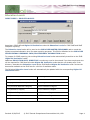
EMPL > EMPLOYEE MASTER/GENERAL TAB
The fields located on the Employee Master/General tab are used in PIMS Staff reporting, as follows:
SS No = Social Security Number: Nine-digit number of identification for non-certificated staff if no PPID
(Professional Personnel ID) is available.
ID = Alternate Staff ID: a unique number used to identify an employee.
Last = Last Name Long, First = First Name Long, Mid = Middle Name, Suf = Name Suffix.
Address 1, Address 2, City, State, Zip
Phone= Home Phone: telephone number including area code.
Birth Date- Birth Date: Month, day and year an individual was born.
Gender - Gender Code: M=Male or F=Female
Status- Staff Type: F= Full-time, P= Part-time
Email Address: Required. Used to identify the email address for an employee. This field is used, in
conjunction with the Job Description, to create PVAAS user accounts.
NOTE: To include directly employed or contracted Security Staff in the PIMS Staff reports you must create
an EMPLOYEE MASTER /GENERAL tab. All required fields on the General tab must be populated. If they
are contracted employees select a Status of ‘Self-pay’ to restrict them from Payroll.
Revised: 9/24/2015
© 2015 Central Susquehanna Intermediate Unit, USA
Page 9