1
Multi-Format Scaler Switch with HDBaseT
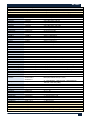
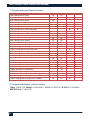
Command
R Keylock
Response
R Keylock X
Notes
Get Current Keylock Status X = 0,1,2,3
S IP X
S SB X
S GW X
S DHCP 1
S DHCP 0
S IP X
S SB X
S GW X
S DHCP 1
S DHCP 0
IP X
DHCP Y
X = VALID IP address.
X = VALID Subnet Address
X = VALID Gateway Address
Enable DHCP
Disable DHCP
X = Current IP address of the Unit.
Y = Current DHCP status (1 = Enabled , 0 = Disabled)
R Ipconfig
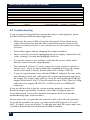
6.0 Troubleshooting
If you are experiencing problems getting the scaler to work properly, please
use the following troubleshooting suggestions.
o
Make sure the power LED is lit on the front panel. If not check power
connection and ensure that all of the connections between sources and
outputs are firmly secured. Loose connections are the number one cause
of issues.
o
Select other inputs, and try changing the output resolution.
o
Power cycle the system by unplugging the power supply connected to the
scaler, waiting 5 seconds and plugging it back in.
o
If a specific source is not working, verify that the source works when
directly connected to the output display.
o
The command “S Reset 1” can be sent to the scaler in order to initiate a
factory reset. Please be advised that this command will reset all settings
on the scaler back to factory default (and set IP config to DHCP).
o
If you are experiencing issues with the HDBaseT output of the unit, make
sure that the twisted-pair cable meets the system requirements and check
the length. Try using a short cable as a test. Be advised that the HDBaseT
output of this unit is Lite™ (Class B) rated for up to 230ft (70m) at 1080p,
and it does not support IR, RS-232, or PoH (power over HDBaseT)
extension.
If you are still not able to get the system working properly, contact Hall
Research support (preferably via email or the form on support page of
www.hallresearch .com) with a detailed description of the issue and the
troubleshooting steps you have taken.
Do not open or try to repair the unit yourself as this will void your warranty.
To return the extender for repair, you must contact HR Support at 714-6416607, via email, or on our website. To ship the unit back for repair, make sure
to obtain a Return Material Authorization (RMA) number.
12