1
TIWAY Host Adapter Driver Help
7
Host Adapter Setup
The driver uses the Host Adapter unit to gain access to the TIWAY network. During a session, the driver may
need to initialize, configure, and reset the adapter. Some of the adapter settings must be set using the unit's DIP
switches, whereas other settings can be made through the Channel Properties. The Host Adapter switch settings
that must be configured are as follows:
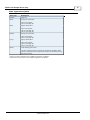
1. NITP Protocol Selection: Switches 1 of DIP switch 1.
2.
Host Port Baud Rate: Switches 5 to 8 of DIP switch 2. The DIP switch baud rate should match the baud
rate that was selected in the Communications tab of Channel Properties. This is the baud rate the driver
will use to communicate with the adapter over the RS232 link.
Note: For information on all adapter DIP switch settings, commands, and parameters, refer to the TIWAY 1 UNILINK Host Adapter User's Manual.
Creating a New TIWAY Host Adapter Channel
When creating a new TIWAY Host Adapter channel, users may find it easier to accept the default settings in the
Channel Wizard and then edit the settings later through the Channel Properties.
Note 1: If the driver finds that the adapter is not configured at power up or after a reset, the Configure Adapter
(Command 20) will be sent along with the parameters specified in the Adapter tab of Channel Properties.
Note 2: If an irrecoverable error condition is encountered, the driver may need to issue a software reset adapter
command. Once the adapter has had time to reset, the driver will proceed with the recovery sequence.
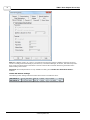
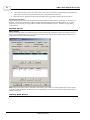
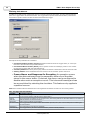
Adapter
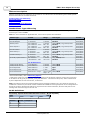
Descriptions of the parameters are as follows:
l
Adapter Type: This parameter specifies the type of adapter to use for communications with the TIWAY
network. Options include the UNILINK adapter or the TIWAY 1 adapter.
www. kepware.com