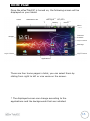
1
HOW TO USE EZEE’TAB10C
• TURN ON/OFF EZEE’TAB10C
To turn on / off eZee’Tab10C, press the POWER button for 3
seconds. To turn off select " turn off the MID".
• ENABLE/DISABLE LCD
Once the eZee’Tab10C is turned on, short press POWER to turn
off the LCD screen, and you will save energy. To turn on the
LCD screen, press POWER again.
Note: The screen is locked when the screen is off; to unlock
the screen, pull the lock icon from bottom to up.
• OPERATION OF THE TOUCH SCREEN
There are three ways to operate the screen of your tablet:
1. Touch any icon on the screen to launch the application.
2. Hold: touch any icon on the home screen and hold. For
example, touch an icon on the home screen and hold, a trash
icon ( ) will appear on the right screen; drag the selected
icon on the trash to remove the icon from the home screen.
3. Drag: Drag your finger from left to right or vice versa to
scroll the screen.
14