1
4-14
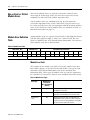
Module Data, Status, and Channel Configuration
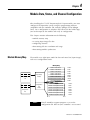
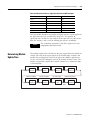
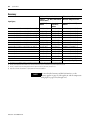
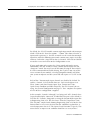
The update time defines the rate at which an input channel is scanned
and its channel data word is updated.
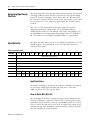
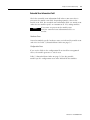
Selecting Enable/Disable Cyclic Calibration (Word 6, Bit 0)
Cyclic calibration functions to reduce offset and gain drift errors due to
temperature changes within the module. By setting word 6, bit 0 to 0, you
can configure the module to perform calibration on all enabled channels.
Setting this bit to 1 disables cyclic calibration.
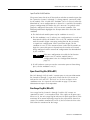
You can program the calibration cycle to occur whenever you desire for
systems that allow modifications to the state of this bit via the ladder
program. When the calibration function is enabled (bit = 0), a calibration
cycle occurs once for all enabled channels. If the function remains
enabled, a calibration cycle occurs every five minutes thereafter. The
calibration cycle of each enabled channel is staggered over several
module scan cycles within the five minute period to limit impact on the
system response speed.
See Effects of Autocalibration on Module Update Time on page 4-34.
Determining Effective
Resolution and Range
Publication 1769-UM004A-EN-P
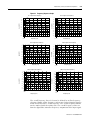
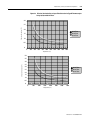
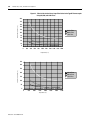
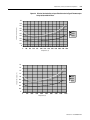
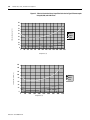
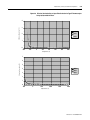
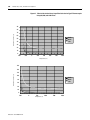
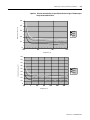
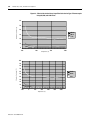
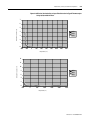
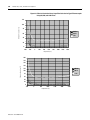
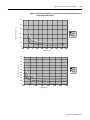
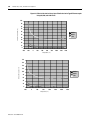
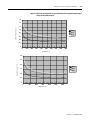
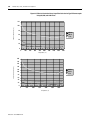
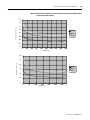
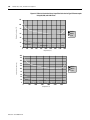
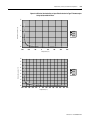
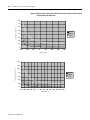
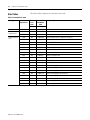
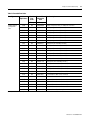
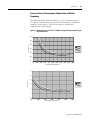
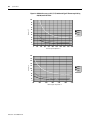
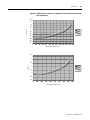
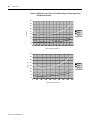
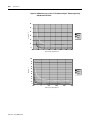
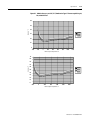
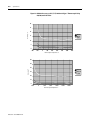
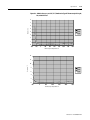
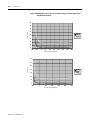
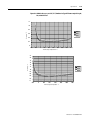
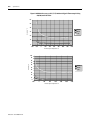
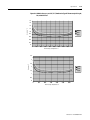
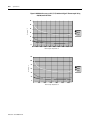
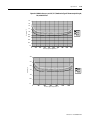
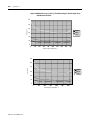
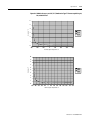
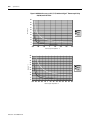
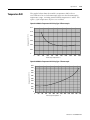
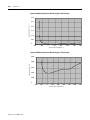
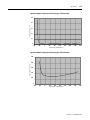
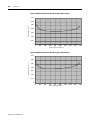
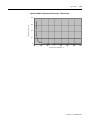
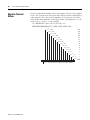
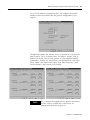
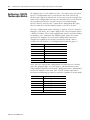
The effective resolution for an input channel depends upon the filter
frequency selected for that channel. The following graphs provide the
effective resolution for each of the range selections at the six available
frequencies. These graphs do not include the affects of unfiltered input
noise. Choose the frequency that most closely matches your requirements.