1
10
RX3i PROFINET Controller
GFK-2573L
IC695PNC001-AK
Issue
Description
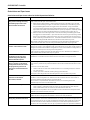
IOC SW Fault with large
configurations
When storing a configuration to the PNC001 that is close to the upper limit of the
controlling PLC’s user memory, the store may fail with an IOC SW Fault logged in the PLC’s
I/O Fault table. The work-around to resolve this issue is to clear the PLC’s existing
configuration and store the configuration again.
The Push and Hold behavior of the
PNC001 Restart Pushbutton
results in the CRU320 taking up to
1 second to detect that PNC001 is
no longer available
When the PNC001 reset button is held down for more than 1 second, the CRU320 can take
up to 1 second to detect the loss of the PNC001 (after the PNC001 module resets). This
causes a delay in the CPU signaling the Loss of IOC, and in taking the appropriate fault
actions (setting point faults, stopping the controller if Loss of or Missing I/O Controller faults
are configured as Fatal, etc.)
In a Hot Standby Redundancy System, if the system is synchronized and the PNC001 in
question is in the active unit, this also causes a delay in the redundant system failing over
to the backup unit. If this delay exceeds the Redundancy Data Hold Time (RDHT) for a given
I/O Device, that IO Device will disconnect from the backup unit before the failover occurs.
It is not recommended to use the PNC001 reset button in a normally operating system. If
the reset button must be used, it is recommended to first attempt a brief press and release
of the PNC001 reset button (the PNC001 should reset as soon as the button is released).
Only if the first attempt fails should the PNC001 button be depressed until the PNC001
resets (approximately 2-3 seconds).
Breaking and reconnecting an
MRP ring by pulling either of the
two MRM ports of the PNC001
causes extra ring open/close
faults
In some cases, if the network is broken and repaired at either of the two ring ports of a
PNC001 configured to be the MRM, extra I/O Bus Fault-Redundant Ethernet network ring
broken (open) and I/O Bus Fault-Redundant Ethernet network ring okay (closed) faults are
logged in both the I/O Fault Table and the PNC001 Local Log when the ring is repaired.
These additional faults can safely be ignored as long as the last fault to be logged is I/O Bus
Fault-Redundant Ethernet network ring okay (closed).
Additional verification of ring status can be obtained by issuing a show rdnMedia command
using the PNC001’s CLI interface.
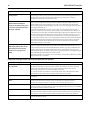
Restrictions and Open Issues related to the Command Line Interface
Restriction/Open Issues
Description
Invalid help response for invalid
CLI commands
Occasionally, the CLI will return invalid help suggestions if the user attempts to get help on
an invalid command by using the question mark key. Attempting to issue the command
based on this help text will result in an Error: Bad command response from the CLI.
Use the help command to view a list of available commands.
For more information on available CLI commands, please refer to the PACSystems RX3i
High-Speed I/O LAN Command Line Interface Manual, GFK-2572A or later.
Page function not available
The output paging function, as described in the shConfig command, is not currently
functioning.
Response to invalid command
entry
The error message displayed in response to an invalid show port help command does not
provide useful information. Example: show port fdp help is an invalid command.
To see a list of valid parameters for the show port command, type show port ?
telnetd command response
The CLI does not echo the new number of max connections in its response to the telnetd
<maxconnections> command. However, the command still functions properly, and updates
the maximum number of telnet connections.
log details command response
When displaying numerous local log table entries using the log details command,
sometimes erroneous blank characters appear within the display. Use the log details <log
entry number> command to view the disrupted log table entry. Example: log details 99.
term command response
Occasionally, the CLI does not respond to the term command. To recover, restart the
terminal emulation program.