1
manual 5p.~8p.
Products and functions
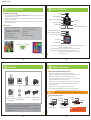
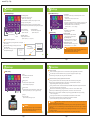
Names and functions
AI safety driving assistant device
Holder
It is a cutting-edge product with FCWS, LDWS and BLACKBOX(2CH simultaneous recording) function to deliver
essential information for safety driving.
Separate 2-channel camera views front and rear view simultaneously and you can check the view on the spot
through 3.5” full touch wide LCD.
Built-in GPS receiver: It receives GPS signals, sets the operation speed and saves the time and location of the
accident while saving the video.
Angle adjusting bolt
Rear camera connection(R.Cam)
Micro SD card(M.SD)
Camera lens
VTR17LD
Speaker
Audio input(MIC)
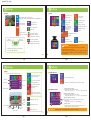
Main functions
Forward Collision Warning System(FCWS)
Normal, event, parking, manual(forced) recording
Lane Departure Warning System(LDWS)
Built-in battery discharge preventing circuit
BLACKBOX(2CH simultaneous recording)
3.5” Full touch wide LCD
Built-in GPS receiver
Exclusive PC viewer
Security warning light (Blue LED)
Reset
Power connection (DC 12V~24V)
Direction indicator connection(T/C)
SD card format
Automatic memory managing
GPS receiver connection(GPS)
Real time front/rear view checking
3.5” Touch LCD
Power LED(Red LED)
Left LDWS
Right LDWS
FCWS
Real time front / rear view
3.5” Full touch wide LCD
Security warning LED: In parking mode, it blinks rapidly when it detects physical impact or motion
and warnsz that BlackBox is recording.
Direction indicator connecting port: Connect the cable that comes with the product.
Angle adjusting bolt: Adjust angle between the main body and the holder.
Adjust angle for optimal performance according to car models
(car, SUV, large van, bus, truck).
5p
6p
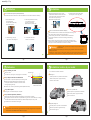
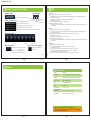
Components
Installation requirements
Check the items below before installing the product:
GPS
VTR17LD
VTR17LD
User Manual
Main body/holder
User manual
External GPS Cable
Cigar Jack(DC12V~24V)
Make sure the surface for installation is flat and the engine is turned off.
All essential parts/components are in the box; check and follow the installation instructions.
The manual covers installation instructions for car, SUV, large van, bus and truck.
For bus or truck, the installation is similar to that for cars except for the installation location;
please refer to ‘detail installation instructions’ for each part.
Re-install the product if it doesn’t work properly by referring to the installation instructions.
Make sure to connect the rear camera with BlackBox not connected to the power cable.
Keep the windshield clean.
Tinted windows or heat rays deteriorate video quality of the rear camera.
Remove the protection plastic sheets from the front/rear camera lenses after installation.
Caution
Micro
SD
Adapter
Micro SD card
Tape for fixing,
(built in the main body), cable organizing clip
SD card Adapter
Power cable
Direction indicator
connecting cable
Check whether all components are included as shown above after purchasing the product.
Contact the store of your purchase if any component is damaged or does not perform properly.
Components above are subject to change for better performance.
(Images above are to help consumers with understanding the product and may be different from
the actual product.)
7p
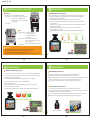
This product is designed to be embedded therefore make sure to apply power
before completing installation and check for normal saving function of the front/rear video.
Pin arrangement of each terminal
VCC
TXD
GND
GPS
connecting cable
+ACC Yellow
+B Red
Turn Left Yellow
Turn Right Red
GND
- GND Black
Direction indicator
connecting cable(T/C)
8p
Power cable
Warning Make sure the marked part
not touching any metal part of the car
with the power ON.