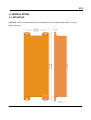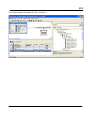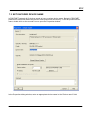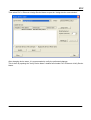
1
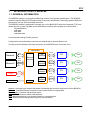
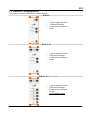
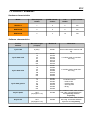
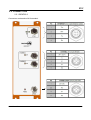
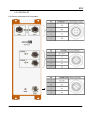
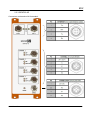
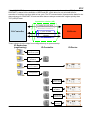
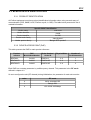
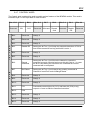
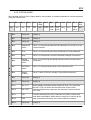
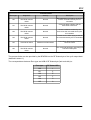
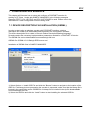
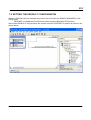
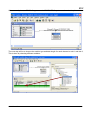
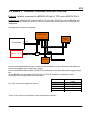
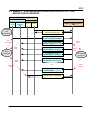
BPNF 80 USER MANUAL Reference of the document: MU-BPNF80-1.3-EN BALOGH SA BALOGH TAG 189 Rue d’Aubervilliers - CP 97 - 75886 Paris Cedex 18 - France Tel: 33 (0)1 44 65 65 00 Fax: 33 (0)1 44 65 65 10 Web: http://www.balogh-rfid.com 3637 Old US-23 Brighton, Michigan MI 48114, USA Tel: USA (800) 252-RFID (7343) (810) 360-0182 Canada (800) 258-RFID (7343) Fax: (810) 360-0237 BPNF TABLE OF CONTENTS 1. INTRODUCTION TO BPNF80........................................................................6 1.1 GENERAL INFORMATION..............................................................................................6 1.2 PRODUCT REFERENCES..............................................................................................7 1.3 PRODUCT SUMMARY....................................................................................................8 2 INSTALLATION.............................................................................................9 2.1 MOUNTING......................................................................................................................9 2.2 CONNECTION...............................................................................................................10 2.2.1 BPNF80 2.......................................................................................................................... 10 2.2.2 BPNF80 2D........................................................................................................................ 11 2.2.3 BPNF80 4D........................................................................................................................ 12 2.3 INTERFACE DESCRIPTION.........................................................................................13 2.3.1 POWER SUPPLY (24VDC)................................................................................................13 2.3.2 NETWORK INTERFACE (ETH 1 / ETH 2).........................................................................13 2.3.3 TCF INTERFACE (CHANNEL X).......................................................................................14 2.3.4 LEDS................................................................................................................................. 14 3 COMMUNICATION......................................................................................15 3.1 ADDRESSES.................................................................................................................15 3.1.1 MAC ADDRESS.................................................................................................................15 3.1.2 IP ADDRESS..................................................................................................................... 15 3.2 PROTOCOL...................................................................................................................15 3.3 OTHERS SERVICES.....................................................................................................15 3.3.1 FIRMWARE UPDATE (MAINTENANCE)...........................................................................15 3.3.2 SUPERVISION, CONFIGURATION AND DIAGNOSTIC....................................................16 3.4 INITIALISATION.............................................................................................................16 4 CONFIGURATION.......................................................................................17 4.1 IP PARAMETERS..........................................................................................................17 4.1.1 USING « BALOGH ETHERNET CONFIG » APPLICATION...............................................17 4.1.2 USING WEB SERVER.......................................................................................................19 4.1.3 USING DCP PROTOCOL..................................................................................................21 4.2 RADIO-FREQUENCY PARAMETERS..........................................................................21 5 PROFINET PROTOCOL.............................................................................22 5.1 GENERAL INFORMATION............................................................................................22 5.2 FUNCTIONALITIES.......................................................................................................24 5.2.1 CLASS OF CONFORMANCE............................................................................................24 5.2.2 REAL-TIME (RT) CYCLE TIME.........................................................................................24 5.3 BPNF80 DEVICE IDENTIFICATION.............................................................................25 5.3.1 PRODUCT IDENTIFICATION............................................................................................25 5.3.2 DEVICE ACCESS POINT (DAP)........................................................................................25 MU-BPNF-1.3-EN 3/63 BPNF 5.4 BPNF80 MODULES PRESENTATION..........................................................................28 5.4.1 CYCLIC UID READ MODULE...........................................................................................28 5.4.2 CYCLIC DATA READ MODULES......................................................................................28 5.4.3 CYCLIC DATA WRITE MODULES.....................................................................................29 5.4.4 CYCLIC DATA GENERIC MODULES................................................................................31 5.4.5 ACYCLIC PARTIAL MODULE............................................................................................33 5.4.6 ACYCLIC FULL MODULE..................................................................................................35 5.4.7 CONTROL WORD.............................................................................................................38 5.4.8 STATUS WORD................................................................................................................. 39 5.4.9 RF STATUS BYTE............................................................................................................. 40 5.5 OPERATIONAL DESCRIPTION....................................................................................40 5.5.1 CYCLIC MODULES PROCESS.........................................................................................40 5.5.2 ACYCLIC MODULES PROCESS.......................................................................................41 5.6 CYCLIC READ REQUEST EXECUTION SEQUENCE.................................................42 5.7 CYCLIC WRITE REQUEST EXECUTION SEQUENCE...............................................43 5.8 ACYCLIC 'PARTIAL' MODULE READ REQUEST EXECUTION SEQUENCE.............44 5.9 ACYCLIC 'PARTIAL' MODULE WRITE REQUEST EXECUTION SEQUENCE...........45 5.10 ACYCLIC 'FULL' MODULE READ REQUEST EXECUTION SEQUENCE.................46 5.11 ACYCLIC 'FULL' MODULE WRITE REQUEST EXECUTION SEQUENCE...............47 6 DIAGNOSTICS AND ALARMS...................................................................48 7 CONFIGURATION EXAMPLE....................................................................50 7.1 DEVICE DESCRIPTION FILE INSTALLATION (GSDML).............................................50 7.2 SETTING THE PRODUCT CONFIGURATION.............................................................51 7.3 SET ENCODER DEVICE NAME...................................................................................54 7.4 SETTING RF PARAMETERS........................................................................................57 8 MAINTENANCE..........................................................................................58 8.1 FAULT INFORMATION ACCESS..................................................................................58 8.2 PROFINET ACTIVE CONNECTION..............................................................................59 8.3 REBOOT SERVICE.......................................................................................................59 8.4 FIRMWARE UPDATE....................................................................................................59 9 ANNEXES...................................................................................................60 9.1 ANNEX 1 : BALOGH STATUS BYTE............................................................................60 9.2 ANNEX 2 : CURRENT CONSUMPTION CALCULATION.............................................61 9.3 ANNEX 3 : SYNCHRONOUS OPERATION FOR ACYCLIC 'FULL' MODULE READ REQUEST.............................................................................................................................62 9.4 ANNEX 4 : SYNCHRONOUS OPERATION FOR ACYCLIC 'FULL' MODULE WRITE REQUEST.............................................................................................................................63 MU-BPNF-1.3-EN 4/63 BPNF FOREWORD Aim of this manual This manual shows how to install and use a BPNF80. An initial introduction describes BPNF80 in general followed by a presentation of the BPNF80 2, BPNF80 2D and BPNF80 4D products. Document reference encoding The reference coding structure for a manual is: MU-<product name>-V.E-L where: MU = User Manual V = version E = evolution (minor modification) L = language used for the manual Updates 1.0 : creation 1.1 : Id led modification 1.2 : add annexes 3 and 4 1.3 : add acyclic modules, diagnostic description and optional functions Glossary RFID : Radio-frequency Identification CRC : Cyclical Redundancy Check UID : Unique Identifier TAG : object accessed using RFID RTC : Real Time Cyclic Important Note Information in this document is not binding. BALOGH Company reserves the right to modify our product in line with our policy of continuous product development. BALOGH Company will not be responsible of possible consequences or errors due to worst use of the product. The use of this device must ensure that all the necessary steps have been taken to verify that the application meets all performance and safety requirements. Profinet is managed by Profibus and Profinet International (PI). MU-BPNF-1.3-EN 5/63 BPNF 1. INTRODUCTION TO BPNF80 1.1 GENERAL INFORMATION The BPNF80 module is a single board Ethernet solution for Automatic Identification. The BPNF80 module integrates BALOGH’S Passive Radio Frequency Identification Technology and the Ethernet architecture into one field mountable enclosure. The BPNF80 module is designed to manage two or four BALOGH Transceiver channels (TCF) and allows the user to pass Tag data across an Ethernet network with a simple set of instructions : Tag identification read data write data read/write data It communicates using Profinet protocol. Configuration and maintenance services are realised with a internal Web server. The figure below illustrates the basic properties of the BPNF80 (the 4 channels one): BPNF80 Network Interface Ethernet réseau Interface Ethernet Network* Power supply User Alimentation Leds TCF Interface TCF TAG TCF Interface TCF TAG TCF Interface TCF TAG TCF Interface TCF TAG Network: the supervisor network that sends commands and receives responses from the BPNF80 Network*: extended Ethernet network to chain others Ethernet equipements Power supply : interface that provides power User: user that observes status Leds behavior TCF: Balogh transceiver used to radio-frequency communication TAG: object accessed using radio-frequency communication MU-BPNF-1.3-EN 6/63 BPNF 1.2 PRODUCT REFERENCES The 3 product models of BPNF80 are detailed below: ------------------------------------------------------------- BPNF80 2 ---------------------------------------------------------- – – – – 1 power supply interface 1 Ethernet interface 2 transceivers interfaces 5 leds ------------------------------------------------------------ BPNF80 2D --------------------------------------------------------- – – – – 1 power supply interface 2 Ethernet interfaces 2 transceivers interfaces 6 leds ------------------------------------------------------ BPNF80 4D (full version) ---------------------------------------------- – – – – – MU-BPNF-1.3-EN 1 power supply interface 2 Ethernet interfaces 4 transceivers interfaces 12 leds Opto-isolated product 7/63 BPNF 1.3 PRODUCT SUMMARY Hardware characteristics Model Ethernet ports number RFID channel number Led number Opto-isolated BPNF80 2 1 2 5 No BPNF80 2D 2 2 6 No BPNF80 4D 2 4 12 Yes Profinet modules Max data Length (in bytes) Module ID Information Cyclic UID 8 (UID) 0x0001 One module used to retreive UID tag 8 16 32 64 128 256 512 0x0101 0x0102 0x0104 0x0108 0x0110 0x0120 0x0140 Cyclic data write 8 16 32 64 128 256 512 0x0201 0x0202 0x0204 0x0208 0x0210 0x0220 0x0240 Cyclic data generic 8 16 32 64 128 256 512 0x0301 0x0302 0x0304 0x0308 0x0310 0x0320 0x0340 Acyclic patial 64 K (64 pages of 1 K) 0x1000 Acyclic full 64 K (64 pages of 1 K) 0x2000 Software characteristics Cyclic data read MU-BPNF-1.3-EN 7 modules used to read data into a tag 7 modules used to write data into a tag 7 modules used to: - retreive UID - read tag data - write tag data - fill tag One module to read, write, fill data into a tag. Command bytes are sent cyclically and data acyclically. One module to read, write, fill data into a tag. Command and data bytes are sent acyclically. 8/63 BPNF 2 INSTALLATION 2.1 MOUNTING A BPNF80 must be mounted using four 5 mm diameter screws (length under head 10 mm). House sizes are: MU-BPNF-1.3-EN 9/63 BPNF 2.2 CONNECTION 2.2.1 BPNF80 2 Connectors are based on M12 standard: MU-BPNF-1.3-EN 10/63 BPNF 2.2.2 BPNF80 2D Connectors are based on M12 standard: MU-BPNF-1.3-EN 11/63 BPNF 2.2.3 BPNF80 4D Connectors are based on M12 standard: MU-BPNF-1.3-EN 12/63 BPNF 2.3 INTERFACE DESCRIPTION 2.3.1 POWER SUPPLY (24VDC) This interface uses a M12 5 pins male connector to power the BPNF80. It is required to use a regulated 24 VDC power supply, applying +24VDC on pin 1 and 0 VDC on pin 4. The maximum power consumption may vary with number of transceiver connected. The others pins (2, 3, 5) must be not connected. The next table presents the typical and maximum current consumption for each of the BPNF80 products and does not take into account the transceivers (TCF) consumption. To know TCF consumption, please see specific TCF specification sheet. Consumption (mA) Product BPNF80 2 BPNF80 2D BPNF80 4D Typical (out of TCF) 125 132 170 Maximal (out of TCF) 150 150 185 To calculate the maximal power consumption of an architecture, see the annex 2 where an exemple is given for a BPNF80 2D. 2.3.2 NETWORK INTERFACE (ETH 1 / ETH 2) Ethernet uses a M12 4 pins D coded female connector to be interface with the supervisor. A standard 10/100 Mbps link can be used. The 2 connectors named 'ETH 1' and 'ETH 2' are managed identically by the BPNF80 (Importante note: “ BPNF80 2 ” product has only one Ethernet connection). So, supervisor or Ethernet network extention could be plugged with no difference in the one or the second Ethernet connector. Product network configuration (described in chapter 4) is done with Web server pages reached from the network interface. BPNF80 IP address can also be modified with a specific application named 'Balogh Ethernet Config'. This tool is responsible for finding products even if IP parameters are not on the same network or are unknown. This application is described in the chapter 4. The Ethernet industrial protocol is Profinet (described in chapter 5). MU-BPNF-1.3-EN 13/63 BPNF 2.3.3 TCF INTERFACE (CHANNEL X) TCF (Balogh transceivers) are connected via M12 5 pins female connectors. This interface provide power and communication to TCF. BPNF80 products provide 2 or 4 TCF interfaces in function of their models: - 2 channels: BPNF80 2D and BPNF80 2, - 4 channels: BPNF80 4D. Use a shielded cable to connect TCF with BPNF80. 2.3.4 LEDS Led Number changes in function of product models. The table below describes led operating: MU-BPNF-1.3-EN 14/63 BPNF 3 COMMUNICATION 3.1 ADDRESSES 3.1.1 MAC ADDRESS Each BPNF80 has a predefined address, named MAC address (Media Access Control), unique, composed of 6 bytes in this format : high bytes : 3 bytes that give compagny identifiant, for Balogh is 0050C2h, low bytes : 3 bytes that give product family. For BPNF80, this 3 bytes are written on the housing side: 10 8x xx For BPNF80 products with 2 Ethernet interfaces (BPNF80 2D and BPNF80 4D), each of the Ethernet port also has a unique MAC address. ETH1 and ETH2 MAC address numbers are: - ETH1 MAC address = (the Product MAC address) + 1 - ETH2 MAC address = (the Product MAC address) + 2 Example: a BPNF80 2D with the MAC address 0x0050C2108FA6, its ETH1 port has the MAC address 0x0050C2108FA7 and the ETH2 port 0x0050C2108FA8. 3.1.2 IP ADDRESS Each BPNF80 has the default IP address : 0.0.0.0. as required by Profinet specifications. In use, this address is set by Profinet supervisor but It can be set by user (static IP) or forced by a DHCP server (see chapter 4 to configure the BPNF80). 3.2 PROTOCOL The BPNF80 is a Profinet IO device compliant with 2.3 Profinet IO specification version. All BPNF80 Profinet explanations are given in chapter 5. 3.3 OTHERS SERVICES 3.3.1 FIRMWARE UPDATE (MAINTENANCE) It is possible to update BPNF80 firmware using the Web server. The procedure is given into the chapter 7. MU-BPNF-1.3-EN 15/63 BPNF 3.3.2 SUPERVISION, CONFIGURATION AND DIAGNOSTIC HTTP protocol can be used to (for example): detect TAG on each TCF channel, show BPNF80 configuration and see current parameters, modify IP address via a html page, display diagnotics counters. To establish a HTTP session, user must have a web browser on the used station and connect it to the BPNF80 IP address. 3.4 INITIALISATION At power on, the BPNF80 initialisation is done and the leds gives the information below: 1- MODE led lights in green (Bootloader) 2- MODE led lights in red (Bootloader) 3- MODE led flashing fastly in orange (basic services launching) 4- MODE led flashing slowly in green (Ethernet stack initialisation) 5- MODE led in green (normal operation) BPNF80 boot time is about 20 seconds (it does not depend on IP addressing mode). MU-BPNF-1.3-EN 16/63 BPNF 4 CONFIGURATION 4.1 IP PARAMETERS 4.1.1 USING « BALOGH ETHERNET CONFIG » APPLICATION BPNF80 configuration can be done via Ethernet interface using 'Balogh Ethernet Config' application or using a Web Browser. « Balogh Ethernet Config » tool appears like this: buttons have these functions: Open Web Interface Launch a web browser on the product web server home page. Configure IP Settings Easy to use interface to change IP parameters. Device Info Give general information like product name, firmware version, Network parameters … Reboot Device Force a software reboot of the product. Refresh List Start a product research into the network. About Relative information of Balogh Ethernet Config version. Close Close application. MU-BPNF-1.3-EN 17/63 BPNF Example: Suppose a BPNF80 2D connected to a 192.168.1 network address. When the application is launched, the product could be detected as: Click on the 'Configure IP Settings' button, the window below is displayed: In this example the BPNF80 are configured using a DHCP server. It is possible to modify these parameters so as to force the product to have other network adresse 1.2.3: MU-BPNF-1.3-EN 18/63 BPNF Warning : Password is the one defined for the product. By default is balogh . Click on the 'Apply' button that new parameters are set into the product. The product must be restarted for changes to take effect. Click on 'Reboot Device' button. After few seconds (product restart), the BPNF80 2D is detected, click on 'Refresh List' button. Even if the product has a different network configured, it is well detected by the application: 4.1.2 USING WEB SERVER Web browser can be used even if the product has the same network parameters than the station of configuration (PC). To connect to BPNF80 web server, enter the IP address of the product in the address bar. Set or retrieve IP address using 'Balogh Ethernet Config' if necessary. The product is protected by a user account, please give Account name and password (by default it is 'root' and 'balogh'). MU-BPNF-1.3-EN 19/63 BPNF The BPNF80 home page is: Click on the BPNF80 'Configuration' link to go to the configuration page. « Ipv4 Settings » field is used to change IP settings: Once configuration is chosen (DHCP ou user static address), click on This message must be displayed: button. Settings have been saved. You must reboot for changes to take effect. It indicates that the BPNF80 must be reboot for new parameters are set. For this, just need to click on the 'Reboot' link. On the reboot page click on bouton. The product is restarting with the new parameters. To test that the new IP was changed on the device, re-enter the new address in the brower. MU-BPNF-1.3-EN 20/63 BPNF 4.1.3 USING DCP PROTOCOL The Discovery and basic Configuration Protocol (DCP) is used by the Profinet IO-Controller during connection to assign the IP address of the BPNF80. 4.2 RADIO-FREQUENCY PARAMETERS the RF parameters are always written during the communication establishment phase (in Profinet Protocol) beetween the IO-Controller and the IO-Device (BPNF80). This is the only way to configure these parameters. It is possible to choose between 3 radio frequency modes used to configure the communication between the TCF and the TAG. These 3 modes are selected per channel, they are: – ISO & extended ISO (index 0): the default mode complying with the ISO15693 and 18000-3 standards. The used rate si 26Kbits/s. Data exchanges are done in bloc number and a bloc size can be 4 or 8 bytes length (depend of TAG used). – Balogh 52K (index 1): Balogh radiofrequency protocol used with Balogh TAG (named TAM). This mode has 2 benefits, its rate is double at 52Kbits/s (allowing shorter dialogue times) and data can be exchanged in byte. – ISO 15693 26/52Kbps (index 2): a specific mode used by TAG with Fujitsu microchip inside. In this mode the transceiver transmission uses a 26Kbits/s rate and the reception uses a 52Kbits/s rate. Data exchanges are done in bloc number of 8 bytes length. The index number is the number transmitted during Profinet device configuration to choose the RF mode. MU-BPNF-1.3-EN 21/63 BPNF 5 PROFINET PROTOCOL 5.1 GENERAL INFORMATION PROFINET is the open industrial Ethernet standard of PROFIBUS & PROFINET International (PI) for automation. PROFINET uses TCP/IP and IT standards, and is in effect, real-time Ethernet. The PROFINET concept features a modular structure so that users can select the cascading functions themselves. They differ essentially because of the type of data exchange to fulfill the partly very high requirements of speed. In conjunction with PROFINET, the two perspectives PROFINET CBA and PROFINET IO exist. PROFINET CBA is suitable for the component-based communication via TCP/IP and the real-time communication for real-time requirements in modular systems engineering. Both communication options can be used in parallel. PROFINET IO was developed for real time (RT) and isochronous real time (IRT) communication with the de-centralized periphery. The designations RT and IRT merely describe the real-time properties for the communication within PROFINET IO. To achieve these functions, three different protocol levels are defined: - TCP/IP for PROFINET CBA and the commissioning of a plant with reaction times in the range of 100ms - RT (Real-Time) protocol for PROFINET CBA and PROFINET IO applications up to 1 ms cycle times - IRT (Isochronous Real-Time) for PROFINET IO applications in drive systems with cycles times of less than 1ms Interfacing the peripherals devices such as BPNF80 is implemented by PROFINET IO. Its basis is a cascading real-time concept. PROFINET IO defines the entire data exchange between controllers (devices with "master functionality") and the devices (devices with "slave functionality"), as well as parameter setting and diagnosis. PROFINET IO is designed for the fast data exchange between Ethernet-based field devices and follows the provider-consumer model. The configuration of an IO-System has been kept nearly identical to the "look and feel" of PROFIBUS. A PROFINET IO-system consists of the following devices: - The IO-Controller, which controls the automation task. - The IO-Device, which is a field device such as an encoder, monitored and controlled by an IO-Controller. - The IO-Supervisor is software typicall y based on a PC for setting parameters and diagnosing individual IO-Devices. An application relation (AR) is established between an IO-Controller and an IO-Device. These ARs are used to define communication relations (CR) with different characteristics for the transfer of parameters, cyclic exchange of data and handling of alarms. The characteristics of an IO-Device are described by the device manufacturer in a General Station Description (GSD) file. The language used for this purpose is the GSDML (GSD Markup Language) an XML based language. The GSD file provides the supervision software with a basis for planning the configuration of a PROFINET IO system. MU-BPNF-1.3-EN 22/63 BPNF Within PROFINET IO, process data and alarms are always transmitted in real time (RT). Real time in PROFINET is based on the definition of IEEE and IEC, which allow for only a limited time for execution of real-time services within a bus cycle. The RT communication represents the basis for the data exchange for PROFINET IO and real-time data are always treated with a higher priority than TCP (UDP)/IP data. Application relation (AR) Config./Acyclic data Standard transfers IO-Controller IO-Device Cyclic IO data Alarms RT transfers These scheme give the steps from configuration up to system startup: IO-Supervisor (engineering) IO-Controller IO-Device Configuration of profinet IO system Assignment of IP address Assignment of Device address Configuration Checking of Device name Assignment of IP address Connection establishment Data exchange MU-BPNF-1.3-EN 23/63 BPNF 5.2 FUNCTIONALITIES 5.2.1 CLASS OF CONFORMANCE BPNF80 IO-Device is in accordance with Conformance Class B and theirs functionalities supported are: – Profinet IO with Real-time communication – Cyclic input and output – Acyclic parameter data (Read / Write record) – Device diagnostics (alarms) – Identification & Maintenance I&M0 (HW/FW) – Topology information (LLDP) – Port-related network statuses (PDEV) – Network diagnostic via IP (SNMP) BPNF80 IO-Device supports others functionalities that are not Class B standard but optional: – Extended device identification (location designation, installation date ...) I&M 1-4 – Automatic addressing after device replacement – MRP (Media Redundancy Protocol) only for product with 2 Ethernet ports (with 'D' letter in commercial references) 5.2.2 REAL-TIME (RT) CYCLE TIME BPNF80 can be used for process real-time IO-data transfer with a cycle time of up to 8 ms. It is important to set the RT cycle time Interval for an update time suitable for the application. The update time chosen determines how often the IO-Controller will receive Input Image updates from the BPNF80. A very long RT cycle time will result in events taking place at the BPNF80 module that may never seen by the IO-Controller. MU-BPNF-1.3-EN 24/63 BPNF 5.3 BPNF80 DEVICE IDENTIFICATION 5.3.1 PRODUCT IDENTIFICATION All Profinet equipment must have unique identification information when using severals ways of communication (DCP, SNMP, LLDP, Profinet acyclic, in GSD). The table below presents the list of needed information: Specific BPNF identification Vendor name “BALOGH” Vendor identifier 0x295 Device identifier 0x1000 Product main family “Ident System” Vendor product family “Balogh RFID product” 5.3.2 DEVICE ACCESS POINT (DAP) This table presents the DAP for each product reference: Product refrence DAP ModuleIdentNumber Order Number / Order ID PhysicalSlots Number of PortSubmodule BPNF80 2 0x1200 BPNF80 2 0..2 1 BPNF80 2D 0x2200 BPNF80 2D 0..2 2 BPNF80 4D 0x2400 BPNF80 4D 0..4 2 Each DAP has a startup parameter by radiofrequency channel. This parameter is the RF mode defined in chapter 4.2. So as to configure the slot (RF channel) during initialisation, the parameter for each slot must be: MU-BPNF-1.3-EN value RF mode 0 ISO & extended ISO 1 Balogh 52K 2 ISO 15693 26/52Kbps 25/63 BPNF BPNF80 2 DAP Module 0: Device Access Point Information Value Module ID 0x1200 Information “Profinet interface for 2 TCF transceivers (1 Ethernet port)” Vendor Name “BALOGH” Order Number “BPNF80 2” Hardware release “B” Software release “V.1.0.0.0” Category “Ident Systems” Startup parameters Value range RF mode channel 1 0x0 to 0xF* RF mode channel 2 0x0 to 0xF* *used values: 0 to 2 BPNF80 2D DAP Module 0: Device Access Point Information Value Module ID 0x2200 Information “Profinet interface for 2 TCF transceivers (2 Ethernet ports)” Vendor Name “BALOGH” Order Number “BPNF80 2D” Hardware release “B” Software release “V.1.0.0.0” Category “Ident Systems” Startup parameters Value range RF mode channel 1 0x0 to 0xF* RF mode channel 2 0x0 to 0xF* *used values: 0 to 2 MU-BPNF-1.3-EN 26/63 BPNF BPNF80 4D DAP Module 0: Device Access Point Information Value Module ID 0x2400 Information “Profinet interface for 2 TCF transceivers (4 Ethernet ports)” Vendor Name “BALOGH” Order Number “BPNF80 4D” Hardware release “B” Software release “V.1.0.0.0” Category “Ident Systems” Startup parameters Value range RF mode channel 1 0x0 to 0xF* RF mode channel 2 0x0 to 0xF* RF mode channel 3 0x0 to 0xF* RF mode channel 4 0x0 to 0xF* *used values: 0 to 2 The next chapter presents the cyclic and acyclic modules with respectively function to: – cyclic module to Read UID TAG – cyclic modules to Read data into a TAG – cyclic modules to Write data into a TAG – cyclic and acyclic modules that realise many commands into a TAG (read, write, write/read, fill, detect UID ….) MU-BPNF-1.3-EN 27/63 BPNF 5.4 BPNF80 MODULES PRESENTATION The documentation named “Profinet Balogh Module Exemples” present in details the S7 LAD samples of read and write command executions. You can find it into the Balogh Technical center : www.technical.balogh-rfid.com/fr . 5.4.1 CYCLIC UID READ MODULE A single module so as to continuously read the UID TAG on a channel. Used with RF status byte or Status word, the UID TAG can be: – if Target Present bit = 0 (Status word) or TAG Presence bit = 0 (RF status byte) => The UID data is the last UID TAG pesented in front of the transceiver – if Target Present bit = 1 (Status word) or TAG Presence bit = 1 (RF status byte) => The UID data is the one of the TAG currently in front of the transceiver Module 0x0001: Read UID Information Value Module ID 0x0001 Module name “Read UID” Information “Read continously the UID tag” Input data Offset in the module Length in bytes Control word 0 2 Output data Offset in the module Length in bytes Status word 0 2 RF status byte 2 1 UID value 3 8 Acyclic parameter Default value Value range None None None 5.4.2 CYCLIC DATA READ MODULES Different modules could be used to read data into a TAG on a channel. These read only modules present parameters to control the read command: – Address : address word where the read starts into the TAG memory. This address is given for a TAG memory mapping in byte. – Size : size word is the read data length given in a granularity of byte. – Timeout : the wait time before terminating the attempt to execute the command and generating an error. Time interval is 10ms (1 = 10ms, 2 = 20ms …): – 0 value => the command is executing immediately – 0xFFFF value => the wait time is infinite (command will be executed only if a TAG is been presented in front of the transceiver). MU-BPNF-1.3-EN 28/63 BPNF 7 read only modules are presented below, the differentiation is done with their size of read data. Mapping of modules Input data Offset in the module Length in bytes Control word 0 2 Address 2 2 Size 4 2 Timeout 6 2 Output data Offset in the module Length in bytes Status word 0 2 RF status byte 2 1 Data read 3 ** Module ID Module Name ** Length in bytes (size of “Data read”) 0x0101 Read 8 bytes CYC 8 0x0102 Read 16 bytes CYC 16 0x0104 Read 32 bytes CYC 32 0x0108 Read 64 bytes CYC 64 0x0110 Read 128 bytes CYC 128 0x0120 Read 256 bytes CYC 256 0x0140 Read 512 bytes CYC 512 5.4.3 CYCLIC DATA WRITE MODULES Different modules could be used to write data into a TAG on a channel. These write only modules present parameters to control the write command: – Address : address word where the write starts into the TAG memory. This address is given for a TAG memory mapping in byte. – Size : size word is the write data length given in a granularity of byte. – Timeout : the wait time before terminating the attempt to execute the command and generating an error. Time interval is 10ms (1 = 10ms, 2 = 20ms …): – 0 value => the command is executing immediately – 0xFFFF => the wait time is infinite (command will be executed only if a TAG is been presented in front of the transceiver). – Data to write : MU-BPNF-1.3-EN the values of the data bytes to write into the memory TAG 29/63 BPNF 7 write only modules are presented below, the differenciation is done with their size of write data. Mapping of modules Input data Offset in the module Length in bytes Control word 0 2 Address 2 2 Size 4 2 Timeout 6 2 Data to write 8 ** Output data Offset in the module Length in bytes Status word 0 2 RF status byte 2 1 Module ID Module Name ** Length in bytes (size of “Data to write”) MU-BPNF-1.3-EN 0x0201 Write 8 bytes CYC 8 0x0202 Write 16 bytes CYC 16 0x0204 Write 32 bytes CYC 32 0x0208 Write 64 bytes CYC 64 0x0210 Write 128 bytes CYC 128 0x0220 Write 256 bytes CYC 256 0x0240 Write 512 bytes CYC 512 30/63 BPNF 5.4.4 CYCLIC DATA GENERIC MODULES Generic modules could be used to realise many functions into a TAG on a channel. These functions are defined into a byte named Command that can has value and corresponding function defined in this table: Command (the 3th byte into generic module) Value Description 1 Read data 2 Write data 3 Write and read data 4 Fill data (with a byte value) 5 Get last UID Write and read data command (0x3) is used to write data into a TAG and to read data from a TAG with the same request. Write request is realised first and the parameters are sent using write address, size and data to write elements into the module. After the write, the read request is done and parameters used are read address and read size. The result of the read command are placed into the data read element into the module. Fill data command (0x4) is used to fill a TAG memory area with a specific pattern. This pattern is the first byte of the Data to write element in the module. The address and the size are the ones used for Write command. Get last UID command (0x5) is used to retreive the last or current UID TAG as explained in the Read UID module (see chapter 5.4.1). The UID value is present into the first 8th bytes of the Data read element in the module. All the paramters of the modules are: – Command – Read address : address word where the read starts into the TAG memory. This address is given for a TAG memory mapping in byte. – Read size read size word is the asked read data length given in a granularity of byte. – Write address : address word where the write starts into the TAG memory. This address is given for a TAG memory mapping in byte. – Write Size size word is the write data length given in a granularity of byte. MU-BPNF-1.3-EN : : : byte command to set the request. 31/63 BPNF – Timeout : – Data to write : the values of the data bytes to write into the memory TAG. Also used to transmit the fill pattern byte. – Data read the result of the data read from the TAG memory. Also used to retreive Last UID TAG if Get last UID command is asked. : the wait time before terminating the attempt to execute the command and generating an error. Time interval is 10ms (1 = 10ms, 2 = 20ms …): – 0 value => the command is executing immediately – 0xFFFF => the wait time is infinite (command will be executed only if a TAG is been presented in front of the transceiver). 7 Generic modules are presented below, the differenciation is done with their size of managed data. Mapping of modules Input data Offset in the module Length in bytes Control word 0 2 Command 2 1 Read address 3 2 Read size 5 2 Write address 7 2 Write size 9 2 Timeout 11 2 Data to write 13 ** Output data Offset in the module Length in bytes Status word 0 2 RF status byte 2 1 Data read 3 ** Module ID Module Name ** Length in bytes (size of “Data to write” and “Data read”) MU-BPNF-1.3-EN 0x0301 Generic 8 bytes CYC 8 0x0302 Generic 16 bytes CYC 16 0x0304 Generic 32 bytes CYC 32 0x0318 Generic 64 bytes CYC 64 0x0310 Generic 128 bytes CYC 128 0x0320 Generic 256 bytes CYC 256 0x0340 Generic 512 bytes CYC 512 32/63 BPNF 5.4.5 ACYCLIC PARTIAL MODULE Acyclic “partial” module could be used to realise many functions into a TAG on a channel. These functions are defined into a byte named Command that can has value and corresponding function defined in this table: Command (the 3th byte into generic module) Value Description 1 Read data 2 Write data 3 Write and read data 4 Fill data (with a byte value) 5 Get last UID Write and read data command (0x3) is used to write data into a TAG and to read data from a TAG with the same request. Write request is realised first and the parameters are sent using write address, size and data to write elements into the module. After the write, the read request is done and parameters used are read address and read size. The result of the read command are placed into the data read element into the module. Fill data command (0x4) is used to fill a TAG memory area with a specific pattern. This pattern is the first byte of the Data to write element in the module. The address and the size are the ones used for Write command. Get last UID command (0x5) is used to retreive the last or current UID TAG as explained in the Read UID module (see chapter 5.4.1). The UID value is present into the first 8th bytes of the Data read element in the module. All the paramters of the modules are: – Command – Read address : address word where the read starts into the TAG memory. This address is given for a TAG memory mapping in byte. – Read size read size word is the asked read data length given in a granularity of byte. – Write address : address word where the write starts into the TAG memory. This address is given for a TAG memory mapping in byte. – Write Size : size word is the write data length given in a granularity of byte. – Timeout : the wait time before terminating the attempt to execute the command and generating an error. Time interval is 10ms (1 = 10ms, 2 = 20ms …): – 0 value => the command is executing immediately – 0xFFFF => the wait time is infinite (command will be executed only if a TAG is been presented in front of the transceiver). MU-BPNF-1.3-EN : : byte command to set the request. 33/63 BPNF Control, status and request parameters are sent cyclically. The data part is sent acyclically using the Write/read record functions over the non real-time channel. Data write record index 0x0200 to 0x023F Data to write: the values of the data bytes to write into the memory TAG. Also used to transmit the fill pattern byte. This record is accessed by page of 1024 bytes maximum length each. The total length of this record is 64 Kbytes (64 pages of 1 Kbytes). The first data write page of 1 Kbytes is accessible using the record index 0x0200, the second page using the record 0x0201 and so on for the last page (64th) using the record index 0x023F. Data read record index 0x0100 to 0x013F Data read: the result of the data read from the TAG memory. Also used to retreive Last UID TAG if Get last UID command is asked. This record is accessed by page of 1024 bytes maximum length each. The total length of this record is 64 Kbytes (64 pages of 1 Kbytes). The first data read page of 1 Kbytes is accessible using the record index 0x0100, the second page using the record 0x0101 and so on for the last page (64th) using the record index 0x013F. Partial module is presented below. MU-BPNF-1.3-EN 34/63 BPNF Mapping of modules Input data Offset in the module Length in bytes Control word 0 2 Command 2 1 Read address 3 2 Read size 5 2 Write address 7 2 Write size 9 2 Timeout 11 2 Output data Offset in the module Length in bytes Status word 0 2 RF status byte 2 1 Acyclic records Index Length in bytes 0x0200 0x0201 ... 0x023F 0x0100 0x0101 ... 0x013F 1st K 2nd K ... 64th K 1st K 2nd K ... 64th K Data write Data read 5.4.6 ACYCLIC FULL MODULE Acyclic “full” module could be used to realise many functions into a TAG on a channel. These functions are defined into a byte named Command that can has value and corresponding function defined in this table: Command (the 3th byte into generic module) Value Description 1 Read data 2 Write data 3 Write and read data 4 Fill data (with a byte value) 5 Get last UID Write and read data command (0x3) is used to write data into a TAG and to read data from a TAG with the same request. Write request is realised first and the parameters are sent using write address, size and data to write elements into the module. After the write, the read request is done and parameters used are read address and read size. The result of the read command are placed into the data read element into the module. MU-BPNF-1.3-EN 35/63 BPNF Fill data command (0x4) is used to fill a TAG memory area with a specific pattern. This pattern is the first byte of the Data to write element in the module. The address and the size are the ones used for Write command. Get last UID command (0x5) is used to retreive the last or current UID TAG as explained in the Read UID module (see chapter 5.4.1). The UID value is present into the first 8th bytes of the Data read element in the module. Control and status are sent cyclically. Request parameters and data part are sent acyclically using the Write/read record functions over the non real-time channel. Parameter record index 0x0010 – 0x001A This record is 11 bytes length, it gives access to the paramters of the modules that are: – Command : – Read address : address word where the read starts into the TAG memory. This address is given for a TAG memory mapping in byte. – Read size read size word is the asked read data length given in a granularity of byte. – Write address : address word where the write starts into the TAG memory. This address is given for a TAG memory mapping in byte. – – Write Size Timeout size word is the write data length given in a granularity of byte. the wait time before terminating the attempt to execute the command and generating an error. Time interval is 10ms (1 = 10ms, 2 = 20ms …): – 0 value => the command is executing immediately – 0xFFFF => the wait time is infinite (command will be executed only if a TAG is been presented in front of the transceiver). : : : byte command to set the request. Mapping of parameter record MU-BPNF-1.3-EN Parameter name Offset in the record Length in bytes Command 0 1 Read address 1 2 Read size 3 2 Write address 5 2 Write size 7 2 Timeout 9 2 36/63 BPNF Data Write Record Index 0x0200 to 0x023F Data to write: the values of the data bytes to write into the memory TAG. Also used to transmit the fill pattern byte. This record is accessed by page of 1024 bytes maximum length each. The total length of this record is 64 Kbytes (64 pages of 1 Kbytes). The first data write page of 1 Kbytes is accessible using the record index 0x0200, the second page using the record 0x0201 and so on for the last page (64th) using the record index 0x023F. Data Read Record Index 0x0100 to 0x013F Data read: the result of the data read from the TAG memory. Also used to retreive Last UID TAG if Get last UID command is asked. This record is accessed by page of 1024 bytes maximum length each. The total length of this record is 64 Kbytes (64 pages of 1 Kbytes). The first data read page of 1 Kbytes is accessible using the record index 0x0100, the second page using the record 0x0101 and so on for the last page (64th) using the record index 0x013F. Full module is presented below. Mapping of modules Input data Offset in the module Length in bytes Control word 0 2 Output data Offset in the module Length in bytes Status word 0 2 RF status byte 2 1 Acyclic records Index Length in bytes Parameters 0x0010 11 0x0200 0x0201 ... 0x023F 0x0100 0x0101 ... 0x013F 1st K 2nd K ... 64th K 1st K 2nd K ... 64th K Data write Data read MU-BPNF-1.3-EN 37/63 BPNF 5.4.7 CONTROL WORD The Control word contains bits used to enable various features of the BPNF80 module. This word is located at byte 0 of the Input data for each module. Bits 15-13 Bit12 Bit11 Bits 10-8 Bit 7 Reserved CC1 CC0 Reserved Soft reset Bit 6 Bits 5-4 Bit 3 Bits 2-0 Repeat cmd Reserved Disable ER Reserved Bit 0 Reserved Always 0 Bit 1 Reserved Always 0 Bit 2 Reserved Always 0 Disable ER Setting this bit True (1) will stop the automatic detection of TAG in front of the transceiver as long as this bit is set to 1. Reserved Always 0 Reserved Always 0 Bit 6 Repeat command Setting this bit True (1) will force the channel to repeat the command currently executed as long as this bit is set to 1. In case the bit is reset during the execution of a command the current command will be completed. Bit 7 Soft Reset Setting this bit True (1) will cancel any pending command at Channel of reset Error code in Balogh Status. Reserved Always 0 Reserved Always 0 Bit 10 Reserved Always 0 Bit 11 CC1 Command counter higher bit (CC1) and lower bit (CC0) to trig request => force to start the command execution. Bit 12 CC0 Bit 13 Reserved Always 0 Bit 14 Reserved Always 0 Bit 15 Reserved Always 0 C Bit 3 o n t Bit 4 r o Bit 5 l w o Bit 8 r d Bit 9 MU-BPNF-1.3-EN 38/63 BPNF 5.4.8 STATUS WORD Word located at byte 0 of the Output data for each module, it provides feedback for events requested using the Control word: Bit 15 Bit 14 Bit 13 Bit12 Res. CD1 CD0 Ack. CC1 Bit11 Ack. CC0 Bits 10-9 Res. Bit 8 Bit 7 Target Soft Present reset ACK Bit 6 Bit 5 Bit 4 Bit 3 Repeat cmd active Busy Error Disable ER active Bits 2-0 Res. Bit 0 Reserved Always 0 Bit 1 Reserved Always 0 Bit 2 Reserved Always 0 Disable ER active Set to 1 to inform that automatic TAG detection is not active on the current channel. Error Set to 1 to inform that the current command is in fault statement. Busy Set to 1 to inform that a current command is always in execution. Repeat command active Set to 1 to inform that the repeat function is active on the current command. Soft Reset active Set to 1 to inform that the reset on the channel is ACK. Target Present Set to 1 when a TAG is currently in front of the transceiver. Bit 9 Reserved Always 0 Bit 10 Reserved Always 0 Bit 11 Ack. CC1 Bit 12 Ack. CC0 Acknowledge command counter higher bit (Ack. CC1) and lower bit (Ack. CC0). Its inform the start execution of the current command when theirs values are the same as Control word bits CC1-CC0. Bit 13 CD1 Bit 14 CD0 Counter data higher bit (CD1) and lower bit (CD0) to inform that new data are available. When data are ready to be retreive at the end of command execution, this counter data is increased. Bit 15 Reserved Always 0 S Bit 3 t a t Bit 4 u s Bit 5 Bit 6 Bit 7 w o Bit 8 r d MU-BPNF-1.3-EN 39/63 BPNF 5.4.9 RF STATUS BYTE The byte number 2 of the Output data for each module provides the status of the current command that has been executed. This byte includes the Command Execution Status bit, which can be used for verifying the execution of a command. This bit is initially high at power up and will transition low when a command has been accepted by the BPNF80. Upon completion of the command, it will return high. At that time, all other status bits will also be valid. The command status result is held until the execution of the next command or loss of power. See annex 1 for details. 5.5 OPERATIONAL DESCRIPTION 5.5.1 CYCLIC MODULES PROCESS Communicating with the BPNF80 is a simple process involving only a few steps. In order for the BPNF80 to execute a Command a Contol Word and its related Command Parameters must be transmitted to the BPNF80. The BPNF80 uses the Output RTC frame to accomplish this action. The Output RTC frame is the cyclic data produces by the IO-Controller which is consumed by the IOdevice. In the Modules defined before, it's the data field named “Input data” (from the IO-Device's point of view). A Command for a module is comprised of multiple bytes and words of information. The first word of each module is the Control Word ,this word acts as a trigger to instruct the BPNF80 to evaluate the Command Parameters that will follow and determine if a valid Command request is present. The usage of the Control Word is key to the behavior of the BPNF80. Because this word acts as a trigger its default value is normally set to zero: - when the value of CC1-CC0 bits does not change within the Control Word the BPNF80 will ignore that Command Request Field. - when a valid instruction is placed within this word (using Control word bits CC1-CC0) the BPNF80 will validate the Command parameters and begin the execution of the command. Hint: To minimize the number of PLC operations the user can preload the Command Parameters of each required Command Request Field upon initialization of the PLC program. Then all that is required to execute a Command request is the writing of the Control Word when action is required. Once a Command request is initiated the BPNF80 uses the Input RTC frame to convey the Execution Status of command in progress. The Input RTC frame is the cyclic data consmes by the IO-Controller which is produced by the IOdevice. In the Modules defined before, it's the data field named “Output data” (from the IO-Device's point of view). MU-BPNF-1.3-EN 40/63 BPNF For all module, the frist word of information is referred as the Status Word that is used to track the execution progress of each command. The Status Word is associated with each Control Word in the module. This information is continuously communicated back to the IO-Controller. When a valid instruction is received the BPNF80 updates the Status Word associated with the Control Word at the start of the commands execution and will set the Acknoledge Command Counter bits ( Ack.CC1-Ack.CC0 ). Upon completion of the command, this word will be updated again with the Counter data bits (CD1CD0) returned and any relevant fault information if generated will be updated. The IO-Controller will monitor this word to determine when a command has completed. Using the same way, the Rf status byte presented in all module can be used to trig command execution. At the start of the commands execution, BPNF set the Execution status bit low ( 0 ). Upon completion of the command, this byte will be updated again with the Execution status bit returned high ( 1 ). General and specific fault bits are updated if an error occurs. Important notice: the cyclic Input and Output RTC frame can not exceed 1440 bytes. This maximum length includes data modules bytes and Profinet protocol overhead bytes. 5.5.2 ACYCLIC MODULES PROCESS Contrary to cyclic modules, acyclic ones use acyclic read/write records to send data and/or parameters. The Control and Status mechanism stays cyclic using RTC frames as it is explained in the previous chapter. The changes are for the parameters and data bytes exchanged. For “Partial” acyclic module, request paramters stays into Output RTC image (named 'input data'). Only write and read data are sent using acyclic records (see memory mapping into the chapter named “Acyclic partial module”). For “Full” acyclic module, request paramters, write and read data are sent using acyclic records (see memory mapping into the chapter named “Acyclic full module”). MU-BPNF-1.3-EN 41/63 BPNF 5.6 CYCLIC READ REQUEST EXECUTION SEQUENCE Step 1 * BPNF80 IO-Controller Output RTC image : Load parameters Command parameter fields : Command (in Generic module) Number Of Bytes Starting Address Time Out Load Command parameters into the Command request field in the module Step 2 * BPNF80 IO-Controller Output RTC image : Send command Send a command to the Control Word related the Command Counter bits requiring execution Control Word : Monitor Command Counter bits CC1-CC0 Step 3 IO-Controller Input RTC image : BPNF80 Status Status Word (running command) High byte Monitor related Status Word testing for the Acknowledge Command Counter bits and/or RF status byte for the Execution status bit to transition Low Ack.CC1/ Ack.CC0 RF Status byte Execution status bit low (0) Step 4 IO-Controller Input RTC image : Monitor related Status Word testing for the Counter Data bits and/or RF status byte for the Execution status bit to transition high. Retrieve read TAG data from the Data read bytes. Low byte BPNF80 Status (end of execution) + Read TAG data Status Word High byte Low byte CD1-CD0 / incremented RF Status byte Execution status bit high (1) Data read Read bytes into the TAG memory * Important notice: Step 1 and Step 2 can be done on the same step. MU-BPNF-1.3-EN 42/63 BPNF 5.7 CYCLIC WRITE REQUEST EXECUTION SEQUENCE Step 1 * BPNF80 IO-Controller Output RTC image : Load parameters Command parameter fields : Command (in Generic module) Number Of Bytes Starting Address Time Out Load Command parameters into the Command request field in the module Step 2 * IO-Controller Output RTC image : Send data to write into the TAG memory using the Data to write bytes. BPNF80 Send command + Write TAG data Control Word Monitor Command Counter bits CC1-CC0 Data to write Retreive write data to send write command into the TAG Send a command to the Control Word related the Command Counter bits requiring execution. Step 3 IO-Controller Input RTC image : Status BPNF80 (running command) Status Word High byte Monitor related Status Word testing for the Acknowledge Command Counter bits and/or RF status byte for the Execution status bit to transition Low Low byte Ack.CC1/ Ack.CC0 RF Status byte Execution status bit low (0) Step 4 IO-Controller Input RTC image : Monitor related Status Word testing for the Counter Data bits and/or RF status byte for the Execution status bit to transition high. Status BPNF80 (end of execution) Status Word High byte Low byte CD1-CD0 / incremented RF Status byte Execution status bit high (1) * Important notice: Step 1 and Step 2 can be done on the same step. MU-BPNF-1.3-EN 43/63 BPNF 5.8 ACYCLIC 'PARTIAL' MODULE READ REQUEST EXECUTION SEQUENCE Step 1 * BPNF80 IO-Controller Output RTC image : Load parameters Command parameter fields : Command (in Generic module) Number Of Bytes Starting Address Time Out Load Command parameters into the Command request field in the module Step 2 * BPNF80 IO-Controller Output RTC image : Send command Send a command to the Control Word related the Command Counter bits requiring execution Control Word : Monitor Command Counter bits CC1-CC0 Step 3 IO-Controller Input RTC image : BPNF80 Status (running command) Monitor related Status Word testing for the Acknowledge Command Counter bits and/or RF status byte for the Execution status bit to transition Low Status Word High byte Ack.CC1/ Ack.CC0 RF Status byte Execution status bit low (0) Step 4 IO-Controller Input RTC image : Low byte BPNF80 Status (end of execution) Monitor related Status Word testing for the Counter Data bits and/or RF status byte for the Execution status bit to transition high. Status Word High byte Low byte CD1-CD0 / incremented RF Status byte Execution status bit high (1) Step 5 BPNF80 IO-Controller Read record request Read TAG data from the Data read bytes. Read TAG data Record : data read Send TAG memory read bytes * Important notice: Step 1 and Step 2 can be done on the same step. MU-BPNF-1.3-EN 44/63 BPNF 5.9 ACYCLIC 'PARTIAL' MODULE WRITE REQUEST EXECUTION SEQUENCE Step 1 * BPNF80 IO-Controller Output RTC image : Load parameters Command parameter fields : Command (in Generic module) Number Of Bytes Starting Address Time Out Load Command parameters into the Command request field in the module Step 2 IO-Controller Write record request BPNF80 Write TAG data Send TAG data to be written into the TAG memory. Record : data write Retreive write data to send write command into the TAG Step 3 IO-Controller Output RTC image : Send command Send a command to the Control Word related the Command Counter bits requiring execution. BPNF80 Control Word Monitor Command Counter bits CC1-CC0 Step 4 IO-Controller Input RTC image : Status (running command) Monitor related Status Word testing for the Acknowledge Command Counter bits and/or RF status byte for the Execution status bit to transition Low Input RTC image : Monitor related Status Word testing for the Counter Data bits and/or RF status byte for the Execution status bit to transition high. MU-BPNF-1.3-EN Status Word High byte Low byte Ack.CC1/ Ack.CC0 RF Status byte Execution status bit low (0) Step 5 IO-Controller BPNF80 BPNF80 Status (end of execution) Status Word High byte Low byte CD1-CD0 / incremented RF Status byte Execution status bit high (1) 45/63 BPNF 5.10 ACYCLIC 'FULL' MODULE READ REQUEST EXECUTION SEQUENCE Step 1 * BPNF80 IO-Controller Write record request Load parameters Send a write request to set the Command parameters into the Command record data in the module Record : parameters Command (in Generic module) Number Of Bytes Starting Address Time Out Step 2 * BPNF80 IO-Controller Output RTC image : Send command Send a command to the Control Word related the Command Counter bits requiring execution Control Word : Monitor Command Counter bits CC1-CC0 Step 3 IO-Controller Input RTC image : BPNF80 Status (running command) Monitor related Status Word testing for the Acknowledge Command Counter bits and/or RF status byte for the Execution status bit to transition Low Input RTC image : High byte Low byte Ack.CC1/ Ack.CC0 RF Status byte Execution status bit low (0) Step 4 IO-Controller Status Word BPNF80 Status (end of execution) Monitor related Status Word testing for the Counter Data bits and/or RF status byte for the Execution status bit to transition high. Status Word High byte Low byte CD1-CD0 / incremented RF Status byte Execution status bit high (1) Step 5 BPNF80 IO-Controller Read record request Read TAG data from the Data read bytes. Read TAG data Record : data read Send TAG memory read bytes See annex 3 to have a synchronous operation description. MU-BPNF-1.3-EN 46/63 BPNF 5.11 ACYCLIC 'FULL' MODULE WRITE REQUEST EXECUTION SEQUENCE Step 1 * IO-Controller BPNF80 Write record request Record : parameters Send a write request to set the Command parameters into the Command record data in the module Load parameters Command (in Generic module) Number Of Bytes Starting Address Time Out Step 2 IO-Controller Write record request BPNF80 Write TAG data Send TAG data to be written into the TAG memory. Record : data write Retreive write data to send write command into the TAG Step 3 IO-Controller Output RTC image : Send command Send a command to the Control Word related the Command Counter bits requiring execution. BPNF80 Control Word Monitor Command Counter bits CC1-CC0 Step 4 IO-Controller Input RTC image : Status (running command) Monitor related Status Word testing for the Acknowledge Command Counter bits and/or RF status byte for the Execution status bit to transition Low Input RTC image : Status Word High byte Low byte Ack.CC1/ Ack.CC0 RF Status byte Execution status bit low (0) Step 5 IO-Controller BPNF80 BPNF80 Status (end of execution) Monitor related Status Word testing for the Counter Data bits and/or RF status byte for the Execution status bit to transition high. Status Word High byte Low byte CD1-CD0 / incremented RF Status byte Execution status bit high (1) See annex 4 to have a synchronous operation description. MU-BPNF-1.3-EN 47/63 BPNF 6 DIAGNOSTICS AND ALARMS BPNF80 uses the Alarm real time communication channel to send or receive diagnostic data. Diagnostics signaling by the BPFN80 can be general faults (slot error, initialisation error …) or process faults (RFID contract error, transceiver connection failure ...). Some of these Device faults need a physical maintenance to correct the problem, in this case the “severity” level is “maintenance required”. For the others faults, the “severity” level can be “maintenance demanded” or “normal”. All diagnostics (identification number is named 'Error type') are details in the tables below. General faults Error type Diagnostic Severity 16 Slot out of order Maintenance Demanded 17 Internal error 1 Maintenance Demanded Please restart the equipment. If the problem persists, it may be necessary to replace the equipment. 18 Internal error 2 Maintenance Demanded Please restart the equipment. If the problem persists, it may be necessary to replace the equipment. 19 Internal error 3 Maintenance Demanded Please restart the equipment. If the problem persists, it may be necessary to replace the equipment. 20 Internal error 4 Maintenance Demanded Please restart the equipment. If the problem persists, it may be necessary to replace the equipment. 21 Internal error 5 Maintenance Demanded Please restart the equipment. If the problem persists, it may be necessary to replace the equipment. MU-BPNF-1.3-EN Description Slot not available. Please restart the equipment. If the problem persists, it may be necessary to replace the equipment. 48/63 BPNF Process faults Error type Diagnostic Severity Description 100 The RFID contract failed Normal Bad parameter received by the device into the command sent by the IOController. 101 The RFID contract failed Normal 102 The RFID contract failed Normal 103 The RFID contract failed Normal Timeout occurs when trying to execut the command sent by the IO-Controller. 104 Transceiver failure Maintenance Demanded Transceiver disconnected. Please check the cable. 105 The RFID contract failed Normal The command has begun executing but has been interrupted. Communication problem with the internal RF transceiver. Incorrect address received by the device into the command sent by the IO-Controller. The process faults are also provided by the BPNF80 into the RF Status byte of the cyclic output data (detailed in annex 1). The correspondence between Error type and LSB of RF Status byte (fault code bits) is: MU-BPNF-1.3-EN Error type RF Status LSB 100 1 101 5 102 E 103 F 104 C 105 A 49/63 BPNF 7 CONFIGURATION EXAMPLE This chapter will illustrate how to setup and configure a PROFINET encoder for working in RT Class 1 mode with SIMATIC MANAGER. In the following examples Siemens STEP 7 V5.4 +SP5 PLC and CPU 315F-2PN/DP is used. Please refer to the manufacturer if other configuration tools are being used. 7.1 DEVICE DESCRIPTION FILE INSTALLATION (GSDML) In order to start using an absolute encoder with PROFINET interface, a device description file needs to be downloaded and imported to the configuration software. The device description file is called a “Generic Station Description Markup Language” file and contains the necessary implementation parameters needed for a PROFINET IO device. The GSDML file can be downloaded from www.balogh-rfid.com GSDML file: GSDML-V2.31-Balogh-RFID-xxxxxx.xml Installation of GSDML-files in SIMATIC MANAGER: 1) Select Options -> Install GSD File and click the “Browse” button to navigate to the location of the GSD file. If a bitmap picture representing the encoder is requested, make sure that the bitmap file is located in the same folder as the GSDML file. A bitmap file is included in the zip-file downloadable from www.balogh-rfid.com. 2) Select the GSD file and click the “Install” button to start installing the selected GSD file. MU-BPNF-1.3-EN 50/63 BPNF 7.2 SETTING THE PRODUCT CONFIGURATION When the GSD file has been installed the product can be found in the SIMATIC MANAGER-> HW Config under PROFINET IO->Additional Field Devices->Ident systems->BALOGH RFID product Select either BPNF80 2. Drag and drop the encoder onto the PROFINET IO system as shown in the picture below. MU-BPNF-1.3-EN 51/63 BPNF When correctly done, a BPNF will appear on the PROFINET IO system as shown in the picture below. The next step will be to choose the module type and data length for each channel on slot 1 and slot 2, This is done by choosing different modules: MU-BPNF-1.3-EN 52/63 BPNF The chosen module will appear on slot 1 and slot 2. MU-BPNF-1.3-EN 53/63 BPNF 7.3 SET ENCODER DEVICE NAME In PROFINET network all IO devices needs to have a unique device name. Balogh's PROFINET products are delivered without any device name preset from the factory. To set the product device name, double click on the encoder icon to open the Properties window. In the Properties dialog window, enter an appropriate device name in the “Device name” field. MU-BPNF-1.3-EN 54/63 BPNF Then select PLC-> Ethernet->Assign Device Name to open the “Assign device name window”. After changing device name, it is recommended to verify the performed changes. This is done by opening the “Verify Device Name” window found under PLC->Ethernet->Verify Device Name. MU-BPNF-1.3-EN 55/63 BPNF In the ”Verify Device Name” dialog window, verify that the “Device name” has changed and the status is OK as shown in the picture below. MU-BPNF-1.3-EN 56/63 BPNF 7.4 SETTING RF PARAMETERS This chapter describes how to change the user parameters in the encoder. To set the RF parameters double click on the BPNF80-2 Slot: Select the parameters tab Change the “RF mode selected” for each channel MU-BPNF-1.3-EN 57/63 BPNF 8 MAINTENANCE Using the same way that configuration, it is possible to have access to maintenance with the Web server. To connect to BPNF80 web server, enter the IP address of the product in the address bar. If the product is protected by a user account, please give Account name and password (by default it is 'root' and 'balogh'). 8.1 FAULT INFORMATION ACCESS Open the html page 'Troubleshooting' using the Web server menu. This page displays dynamic tables with counters (since the product has started): - Ethernet exchanges information => tab Network stats - Number of active connexions by used protocol => tab Used protocol - Channel status, operations and results => tab RFID operations - The last radiofrequency 50 operations (by channel) that terminated in error with execution dating (since the product has started) => tab Last 50 RF errors - user can do an actions to blink LEDs => tab Actions To find specific faults that could have occurred during radiofrequency exchanges, the table RFID operations gives : - number of detected TAG - number of realised operation and details between the success ones and fault ones - number of error detected (global and by error type) - the hexa code of the last error (the status LSB gives the error maening) and his execution dating - the hexa code of the live status and a information of command execution MU-BPNF-1.3-EN 58/63 BPNF To have the meaning of the Status and so to know in detail the error meaning of the status LSB bits, please see annex 1. 8.2 PROFINET ACTIVE CONNECTION It is possible to know if a Profinet connection is active. For this, open the html page ‘Troubleshooting’ (see chapter 4 to establish a connection with the Web server). Update the html page using the keyboard F5 button. 8.3 REBOOT SERVICE At any moment it is possible to reboot the BPNF80 using the Web server. For this, open the html page 'Reboot' and click on the button . If the BPNF80 restarts, the message 'Rebooting...' is displayed in the Web server page. 8.4 FIRMWARE UPDATE To update the BPNF80 firmware, choose 'Update firmware' menu in the Web server. If the product is protected by a user account, please give Account name and password (by default it is 'root' and 'balogh'). Using the button select the file named 'image.bin' corresponding to the new firmware. After that click on the button to send the new firmware into the BPNF80. The message 'Upload in progress. Please wait...' tells that the upload is in progress. Once the update is done the message below is displayed on the top of the Web server page: Automatically the BPNF80 restarts on the new firmware. MU-BPNF-1.3-EN 59/63 BPNF 9 ANNEXES 9.1 ANNEX 1 : BALOGH STATUS BYTE Status byte gives service information with the next bits: Bit number 7 Execution bit : 1 if no command is in execution 0 when the command is in execution 6 Not used 5 TAG presence => 1 if a TAG is present in front of transceiver. 4 Fault bit => 1 if error (fault describs with bits 0 to 3). MSB LSB ! Description 0 to 3 Fault code (enable if bit 4 = 1) : see next table Status byte is reliable if only bit 7 is equal to 1 (finished operation) : B7 B6 B5 Execution TAG presence B4 B3 B0 Fault bit Fault code 0 0 1 1 Fault quartet example : A0h means that the request has been executed and the TAG is present. LSB : hexa 3 2 1 0 1 0 0 0 1 Invalid parameter in the request 5 0 1 0 1 Internal channel communication fault A 1 0 1 0 Unable to complete the TAG dialog C 1 1 0 0 Transceiver or transceiver connection failure E 1 1 1 0 Tag adressing error F 1 1 1 1 TAG dialog fault (ex : time-out expired) MU-BPNF-1.3-EN <--- bit n° meaning 60/63 BPNF 9.2 ANNEX 2 : CURRENT CONSUMPTION CALCULATION Example: network composed of a BPNF80 2D (with 2 TCF) and a MOF100 PN D Architecture is: a BPNF80 2D connected with a TCF100 and a TCF18 PLA. On this BPNF80 2D a MOF100 PN D is linked to the network. The IO-Controller uses Profinet protocol to managed the equipments. This diagram presents the assembly: BPNF80 2D ALIM IO-Controller Power : 24 V ETH1 ETH2 TCF1 MOF100 PN D TCF2 ALIM Ethernet Power ETH1 ETH2 Tee TCF100 TCF18 PLA Current consumption balance must be done for this architecture so as to determine the maximum current consumption on the 24V Power supply. In this case BPNF80 2D and MOF100-PN D are connected on the same 24V power supply using a tee. On the BPNF80 are connected a TCF100 and a TCF18 PLA and theirs maximum current consumptions are respectively 90mA and 70mA. For a DC 24 V power supply the calcul is: BPNF80 2D TCF100 TCF18 PLA MOF100 PN D Total Max current cons. in mA 150 90 70 120 430 That is to say 430 mA of maximum current consumed on the 24V. MU-BPNF-1.3-EN 61/63 BPNF 9.3 ANNEX 3 : SYNCHRONOUS OPERATION FOR ACYCLIC 'FULL' MODULE READ REQUEST IO-Controller Cyclic Input Ouput ACKCC1/0 CD0/1 CC1/0 Prepare read command BPNF80 Acyclic Read record Write record Memory mamangement unit Acyclic Write => read command and params Cyclic Outputs => increment Control Counter Set execution Cyclic Inputs: monitor Ack Control Counter (changed) Req ack. Read command Cyclic Inputs: monitor Control Data (unchanged) Cyclic Inputs: monitor Control Data (unchanged) Data ready Retreive data Read req. Req ack. Command execution Cyclic Inputs: monitor Control Data (unchanged) ... Data ready Cyclic Inputs: monitor Control Data (changed) Acyclic read => read data MU-BPNF-1.3-EN 62/63 BPNF 9.4 ANNEX 4 : SYNCHRONOUS OPERATION FOR ACYCLIC 'FULL' MODULE WRITE REQUEST IO-Controller Cyclic Input Ouput ACKCC1/0 CD0/1 CC1/0 BPNF80 Acyclic Read record Write record Memory mamangement unit Acyclic Write => write command and params Prepare write command Acyclic write => write data Cyclic Outputs => increment Control Counter Cyclic Inputs: monitor Ack Control Counter (changed) Set execution Req ack. Write command Cyclic Inputs: monitor Control Data (unchanged) Cyclic Inputs: monitor Control Data (unchanged) Write req. Req ack. Command execution Cyclic Inputs: monitor Control Data (unchanged) End of execution ... Cyclic Inputs: monitor Control Data (changed) MU-BPNF-1.3-EN End of write execution 63/63