1
EB1 BACKUP®
GET THE BEST FROM THE BEST
BATTERY REPLACEMENT
LOCKOUT TAILCAP (US PAT. RE40125)
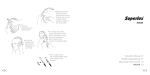
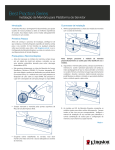
1. Unscrew head counterclockwise and remove.
2. Remove old battery and dispose of properly.
Your SureFire illumination tool has been designed and manufactured
to provide years of reliable service. Please review this manual to
ensure optimal performance.
Most SureFire illumination tools ship preloaded with
batteries. To load or replace battery:
Most SureFire illumination tools feature a lockout tailcap, which prevents accidental activation during storage or transport. The tailcap
may need to be enabled prior to light operation.
To enable, rotate tailcap clockwise until light activates when tailcap
pushbutton is pressed, providing momentary-on light output.
To lock out tailcap, rotate counterclockwise until light will not
activate when pressed.
ENABLE
3. Insert new 123A lithium battery with positive (+) terminal oriented
forward.
4. Replace head by screwing on clockwise. Press pushbutton (with
tailcap enabled) to test.
BATTERY INFORMATION & WARNINGS
DISABLE
For complete battery information and warnings, reference the enclosed BATTERY INFORMATION / WARNING insert in your illumination
tool’s original packaging or visit www.surefire.com/batteries.
LIGHT OPERATION
Press or click pushbutton tailcap switch once for high output. Return
to off and press or click on again, within two seconds, for low output.
PRESS TO
ACTIVATE
MAINTENANCE
Wipe with a clean, dry cloth. For tips on maintaining your SureFire
illumination tool, visit www.surefire.com/faqs-maintenance.
ACCESSORIES
SureFire makes a full line of accessories for most of its illumination tools.
For a complete listing, visit www.surefire.com/partsaccessories.
Patents: RE40125, 6547415, 6712485
SureFire S2 LED
Tested To Comply
EB1 BACKUP®
With FCC Standards
FOR HOME OR OFFICE USE
This unit has
approval