1
GETTING STARTED
INTRODUCTION
In the world of computers and printers, information can be
sent or received in two forms: serial or parallel. Information that
is sent serially is like a railroad train: each message is a single
car that arrives separately as it comes down the track.
On the other hand, imagine an eight lane super highway
with eight cars traveling side by side, and all arriving simultaneously. This is how parallel information travels.
Normally, the Apple IIc, IIc+, and IIGS and Macintosh
computers send out serial information, expecting a serial printer.
The Grappler 9 Pin is a unique printer cable that actually
converts information from serial to parallel. This conversion
allows you to connect your Apple to a parallel printer instead of
an ImageWriter, thus increasing the number of printer choices
available to you.
WHAT’S IN THE PACKAGE:
You should receive with your Grappler 9 Pin, in addition to
this manual.
1. One Grappler 9 Pin Unit
2.One Power Supply
3.One Apple Ic Adapter Cable
INSTALLING THE GRAPPLER 9 PIN
Use these instructions to hook up the Grappler 9 Pin
1.TURN OFF POWER TO THE APPLE (MAC) AND
TO YOUR PRINTER.
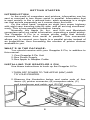
2. Observe the illustration below and make note of four
items: (A) printer connector; (B) computer cable; (C)
wall transformer and cable; and (D) DIP switch.
2