Download CF7+ version

Transcript
CFMGR
Users Manual
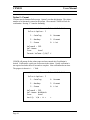
File Listing Screen
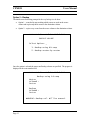
The listing is presented as pages. An indicator (<n/n>) shows the current page number.
All actions are preformed on the current page. The following is an example:
Name:
VOL1
- Free 1244 Used 356
CMD Filename
Size Type/No. 10 P <1/1>
--- ---------- ---- ----------- N CATALOG
4 PROGRAM
U COPY
N CATALOG2
4 PROGRAM
U MOVE
N CFINFO/O
10 DIS/FIX 80 U
0
N CFMGR
33 PROGRAM
P
N CFMGR/O
244 DIS/FIX 80 P
N CMGRS
32 PROGRAM
P DELETE
N EXAMPLE
3 PROGRAM
U
0
N LOAD
6 PROGRAM
U
N SLOAD
14 DIS/FIX 80 U
N VCATALOG
4 PROGRAM
U
CTRL-E:Page-Up CTRL-X:Page Down
•
•
•
•
•
•
•
•
Page 6
“Name:” is the name of the volume.
“-“ (dash) indicates the volume is not protected. If it were a “+” plus sign would
show.
“Free” is the number of sectors left on the volume
“Used” is the number of sectors used by the volume and by the files
“CMD” is the column where the following actions can be invoked:
o C – copy
o D – delete
o M – move
o T – type (display on screen)
o P – print (only displayable files)
“Filename” is the column where each file name is shown. Changing the filename
in this column causes the file to be renamed to the new name.
“Size” is the number of sectors the file occupies in the volume
“Type/No.” indicates the type of file and the record length (if appropriate). The
values are:
o PROGRAM
o DIS/FIX (display/fixed length)
o DIS/VAR (display/variable length)
o INT/FIX (internal/fixed length)
o INT/VAR (internal/variable length)