1
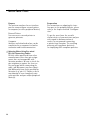
Interface Port
Purpose
The moisture analyzer has an interface
port for connecting an external printer
or computer (or other peripheral device).
External Printer
You can use an external printer to
generate printouts.
Computer
Analyses and calculated values can be
transmitted to a computer for further
evaluation and for documentation.
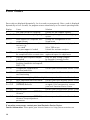
! Warning When Using Pre-wired
RS-232 Connecting Cables:
RS-232 cables purchased from other
manufacturers often have pin assignments that are incompatible with
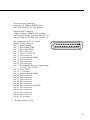
Sartorius products. Be sure to check the
pin assignments against the chart on
the next page before connecting the
cable, and disconnect any lines identified differently from those specified by
Sartorius (e.g., pin 11). Failure to do so
may damage or even completely ruin
your moisture analyzer and/or peripheral
device(s).
26
Preparation
For instructions on adapting the interface port to the peripheral device, please
refer to the chapter entitled “Configuration.”
To get the most from the versatile
characteristics of your moisture analyzer
with regard to documentation of
results, we recommend connecting
a printer from Sartorius. The resulting
printouts will contribute decisively
to simplifying GLP-compliant practices.