1
iCN 600 series | User Manual
12. The Map Screen Pop-up Menu
The Pop-up menu allows you to access navigational functions from the Map screen.
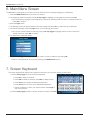
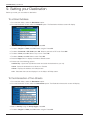
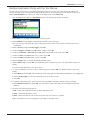
1. Move round the Map screen using the 8-way toggle; Zoom using + and - on the Zoom/Brightness button.
2. Press OK to display the cross-hair on the Map screen.
• To remove the cross-hair press ESC.
3. Position the intersection of the cross-hair on a destination using the 8-way toggle. Where the cross-hair
intersect on a street, the street name will display on the Map screen.
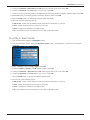
4. Press OK to select the street as your destination. The Pop-up menu will display.
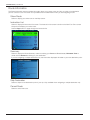
5. You can choose one of the following options;
Navigate To
Calculates a route from your current location
Set as Start Location
Sets the location as your departure point
Add to Favorites
Allows you to save your location as a Favorite or Shortcut
Show Details
Displays the Address Details screen
Add Avoid Area*
Defines an area on the map that is avoided during your journey
Delete Avoid Area*
Deletes an Avoid Area if enabled
Nearest POI
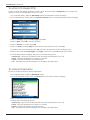
Displays the Destination-POI screen. Page displays the Select nearest POI
screen or further screens if available.
6. Press OK to confirm your selection
* iCN 635, 650 only
21