1
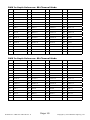
DMX Value In-Depth Reference Guide (continued)
Function
Value
What It Does
Speed
000 <--> 255
(fast <--> slow)
Virtual Color Wheel
000
011
012
051
052
091
092
131
132
171
172
211
212
251
<--> 010
<--> 250
<--> 255
No Function
Blue
Blue (+ green)
Teal
Teal (- blue)
Green
Green (+ red)
Yellow
Yellow (- green)
Red
Red (+ blue)
Magenta
Magenta (- red)
Blue
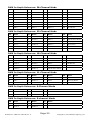
Dimming Mode
000
011
021
031
041
051
061
071
081
091
<-->
<-->
<-->
<-->
<-->
<-->
<-->
<-->
<-->
<-->
010
020
030
040
050
060
070
080
090
255
Default (as set in the LED menu)
Linear curve
Square law curve
Inverse square law curve
S-curve
Linear curve (smooth)
Square law curve (smooth)
Inverse square law curve (smooth)
S-curve (smooth)
Default (as set in the LED menu)
ID Function
000
010
021
031
<-->
<-->
<-->
<-->
010
020
030
255
No Function
1 ID per each 1, ex. 210 = ID21, 211=ID22
1 ID per each 10, ex. 010 <--> 019 = ID1
No function
ID Address
000 <--> 255
<--> 050
<--> 090
<--> 130
<--> 170
<--> 210
Control fixture(s) ID number 0-255
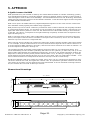
LED Pixel Group Configurations
Below are illustrations of the fixtures 7 pixel group configurations. Note that there are 2 different LED
groups for 23ch and 28ch modes, that are distinguishable from each other by the trailing dot displayed on
the LED control panel.
68ch/60ch
1
2
3
4
5
6
7
8
9
10
11
12
28ch (mode 1)
1
1
1
2
2
2
3
3
3
4
4
4
28ch. (mode 2)
1
2
3
4
1
2
3
4
1
2
3
4
23ch (mode 1)
1
1
1
1
2
2
2
2
3
3
3
3
23ch. (mode 2)
1
2
3
1
2
3
1
2
3
1
2
3
18ch
1
1
1
1
1
1
2
2
2
2
2
2
11ch/6ch/5ch
1
1
1
1
1
1
1
1
1
1
1
1
Page 18
PixelStorm™ COB User Manual Rev. A Copyright © 2015 Blizzard Lighting, LLC