1
Telephone settings
Using the menu
You can use the menu of the telephone base
or a cordless handset to change the
telephone settings.
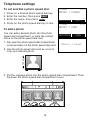
1. Press MENU when idle.
2. Press or until the screen displays the
desired feature menu.
3. Press SELECT on the cordless handset/
SELECT on the telephone base to enter
that menu.
• To return to the previous menu, press
CANCEL on the cordless handset/CANCEL
or BACK on the telephone base.
• To return to idle mode, press and hold CANCEL.
Ringer volume
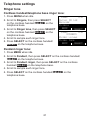
Telephone base ringer volume:
• Press VOL or VOL when idle.
Handset ringer volume:
• Press VOL+ or VOL- when idle.
Pendant ringer volume:
• Press VOL+ or VOL- when idle.
20