1
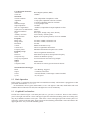
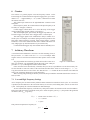
• For manually triggered generation of a tone burst, set Trigger Mode
to Triggered and Output Mode to Tone Burst. Set Trigger Source to
Manual.
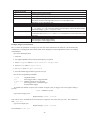
The tone burst pattern is specified by the Trigger Cycles On, Off settings. Trigger Cycles On sets the number of complete cycles in the burst.
Trigger Cycles Off sets the number of cycles between bursts.
Trigger Cycles Repeat effectively sets the number of tone bursts.
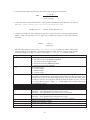
The total number cycles is constrained, according to the following:
(Non + Nof f ) × Nrepeats < 216
where
Non
Nof f
Nrepeats
is the number of ON cycles in each burst
is the number of OFF cycles in each burst
is the number of tone burst repeats.
A tone burst is best observed with a digital storage oscilloscope set to Single Shot. On the generator, set up
the tone burst configuration as above. Set the scope to single-shot triggering. Reset the scope sweep. Actuate
Manual Trigger on the generator. The scope should capture the desired tone burst.
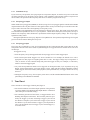
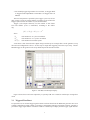
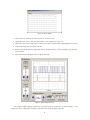
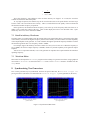
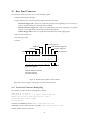
Figure 5: Tone Burst Oscilloscope Display
Figure 5 shows these tone bursts captured by a Syscomp CGR-101 CircuitGear oscilloscope in single-shot
mode.
3.1 Triggered Tone Burst
It is possible to use an external trigger signal to initiate each tone burst from the WGM-201 generator. Here is an
example configuration. In this example, we describe a configuration using the CircuitGear CGR-101 generator to
provide the trigger signal and the CircuitGear CGR-101 oscilloscope to display both the trigger signal and tone
7