1
Contents
1
Introduction
2
2.1
2.2
2.3
3
3.1
3.2
3.3
4
4.1
4.2
4.3
4.4
4.5
4.6
5
5.1
5.2
Getting Started
Achieving the Best Performance
Safety Instructions
Recycling Kramer Products
Overview
Multi-Functional VDS System
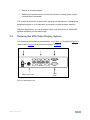
Defining the VDS Video Display System
Expanding the VDS System
Connecting the VDS
Connecting an Optional Remote Computer
Connecting the CAT 5 Cables
Connecting the Power Supply
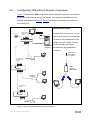
Configuring a CBT Application
VDS Detailed Connections
Configuring VDS without Remote Computers
Operating the VDS system
VDS Control Unit
Adjusting the Picture Quality
1
2
2
3
3
4
4
5
7
8
8
8
8
8
10
11
13
13
13
6
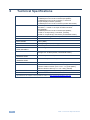
Technical Specifications
14
Figures
Figure 1: Broadcaster Unit
Figure 2: Line Splitter
Figure 3: Remote Unit
Figure 4: Remote Dual Screen
Figure 5: Control Unit and Optional Remote Computers
Figure 6: Detailed Connections
Figure 7 VDS Configuration without Remote Computers
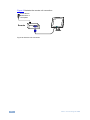
Figure 8: Remote Unit Connection
Figure 9: Control Unit Panel
5
6
6
6
9
10
11
12
13
VDS – Contents
i