1
REMOTE CONTROL AND OPERATION
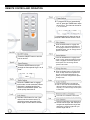
To program the unit to automatically
turn off, press the TIMER button when
the unit is on. The timer can be set for
1, 2, or 4 hours.
To program the unit for Auto-on turn on,
press the TIMER button when the is off.
Press the ODOR button to engage odor
mode. In odor mode the Plasma Generator is engaged and the fan speed runs at
the fastest speed. You can change the fan
speed in odor mode.
Press the ON/OFF button to turn the
unit on and off.
Press the ANION button to engage anion
mode. In anion mode the negative ion Generator is engaged and the fan speed runs
at low speed. You can change the fan
speed in odor mode.
Press the SPEED button to cycle
through the fans speeds: High, Low, &
Mute
Low
High
Mute
Press the TURBO button to engage
turbo mode. In turbo mode the Plasma
Generator is engaged and the fan
speed runs at the fastest speed. This
mode quickly cleans the air.
Press the SLEEP button to engage sleep
mode. In sleep mode the fan speed runs
at mute or low speed depending on air
quality. You cannot change the fan speed
in sleep mode.
Press the AUTO button to engage auto
mode. In auto mode the unit automatically
adjust the plasma generator according to the
air quality. You cannot change the fan speed
in auto mode.
This mode is not available on this model.
Hold the LOCK button for over 2 seconds to lock the remote control. To
unlock the remote, press the LOCK
button again for more than 2 seconds.
Press the LUM button to the brightness of
the LED indicator lights. With each press
the lights will adjust between bright-darkdark-bright. The Sensor lights will cycle
between bright-dark-off.
7