1
Pre-filling Follow-Up Tests
Every time you create a new test for someone, you will need to fill in height, weight, age,
resistance, and Reactance. Any change in these parameters will need to be noted
accurately in order for the composition assessment results to be accurate.
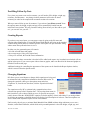
When you start a follow-up test for someone, if you activate "pre-fill test records" from
the options menu, the height, weight, and age will be automatically loaded from the
individual’s last test date. This way, instead of asking "how tall are you? how old are you?
etc", you can ask "Are you still.…"
Creating Reports
If you have a test record open, you can create a report by going to the file menu and
selecting either Print Report or Create PDF Report. Print Report will bring up the standard
window asking which printer to send the report to. PDF report will open a window asking
what to name the report and where to save it.
In either case, the generated report will contain:
• all of the selected charts and graphs,
• the average ranges if they were selected and,
• if they were selected, the Food & Fitness information.
Any item on these three screens that is checked will be added to the report. Any item that is not checked will not
appear in the report. If you want a report with no charts or graphs, make sure that all of the charts and graphs are
turned off on the results page.
Additional settings for controlling the appearance of the reports can be found in the Report Options window,
which is accessed from the Options menu.
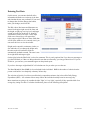
Changing Equations
BC allows you to create Report so change which equations are being used
to estimate the body composition information from the BIA results. To
change the equations, either go to the options menu and select
"Equations" or, from the test data form, click the “Equation Selection”
button.
The equations used by BC to estimate body composition have been
collected into groups called “Equation Sets”. The top drop-down menu in
this form allows you to choose which set to use. In general, most people
usually choose either the “NHANES-III” equation set for the majority of their individuals. If you need guidance
in selecting an equation set, the Help button will display a brief description of each one. These descriptions can
also be found in the Expanded Topics section of this manual.
Until recently, the only way to estimate Basal Metabolic Rate (BMR) without doing calorimetry was to use a
formula, such as Harris-Benedict, which relied strictly on anthropometric values like height, weight, age, and
BC 4.0 User's Guide
19
Rev 20150306