1
SitePlayer Software Manual
SitePlayer Overview
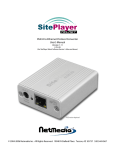
Welcome to SitePlayer™, the World’s smallest Ethernet web server. The first product in a family of embedded web servers
designed to enable any microprocessor-based device to become web enabled easily and inexpensively. In approximately
one square inch, SitePlayer includes a web server, 10baseT Ethernet controller, flash web page memory, graphical object
processor, and a serial device interface. SitePlayer is a plug in module that can also be used as a web enabled option,
product upgrade, or to retrofit older products. Example applications include audio equipment, appliances, thermostats, home
automation, industrial control, process control, test equipment, medical equipment, automobiles, machine control, remote
monitoring, and cellular phones.
SitePlayer is a web server coprocessor that handles web protocols and Ethernet packets independently of the device
processor. Web traffic does not effect the device processor, which also adds a measure of security. Communications
between SitePlayer and the device is accomplished through objects sent through a standard two wire serial port. No TCP/IP
or network code is required.
SitePlayer can also be used in some applications in a “stand alone” mode where simple I/O can be performed. SitePlayer has
8 configurable I/O pins which can also be used as four 8 bit PWMs or DACs, frequency generators, or event counters. These
functions are available to a device processor also.
SitePlayer contains a powerful object system called SiteObjects™ which allow graphical images, text, music, links, radio
buttons or checkboxes to change based on live data from the device processor without the need for CGI scripts or Java
programming. A web page can contain a graphical knob rotated to a position, a switch can be toggled up or down, or a link
can change based on a variable in the device processor.
Standard web authoring tools are used to make the pages for SitePlayer. Web pages are downloaded to SitePlayer’s flash
memory over the Internet. SitePlayer firmware updates are also downloadable keeping SitePlayer current. A library of
graphical knobs, switches, LEDs and other user interface tools are provided for web page development.
SitePlayer Process for Creating a Project
The code that tells SitePlayer how to perform and what web pages to serve must be defined by the SitePlayer Definition file
and assembled into the SitePlayer Binary image using SiteLinker. This in turn, is downloaded to SitePlayer through your
Ethernet connection. You can serve your web pages and interact with your device by using the SitePlayer module or
SitePlayerPC. The chapters of this manual correspond to the steps involved in the creation of your SitePlayer project:
1.
2.
3.
4.
Define and create your objects using a text editor with a SitePlayer Definition File (.SPD)
Create your web pages using an HTML editor
Assemble and Download SitePlayer Binary file (.SPB) using SiteLinker program
Surf SitePlayer or SitePlayerPC using web browser
Documentation for Serial Transmitting and Receiving is located in Appendix A. Appendix B contains a list of the SitePlayer
Definition File’s Reserved Symbols.
SitePlayer Data Flow
In the illustrated example below, the picture of the integrated
circuit represents your device processor. It acts as a smart
thermostat which controls the Air Conditioning unit based on
information it gathers such as current temperature and
setpoint. This same information is written through the serial
port to SitePlayer (see Serial Transmitting and Receiving)
and stored in the memory locations defined by the Objects of
the SitePlayer Definition file (see Object Section). When web
pages are requested from SitePlayer, it substitutes the
Object value for each SiteObject it encounters (see
SiteObjects in HTML) and serves the information to your web
browser via the Ethernet port.
1