1
ECE 2035
Project 2: Angry Monkeys v1.0
Fall 2013
Part 2: Implement Angry Monkeys
Now that you have completed the preliminary steps, you will develop the game engine and
control interface needed to play a game of Angry Monkeys with the mbed. The front end will
load a game world and send a sparse array representation of the world to the mbed. Your
program will need to do three things: use the pushbuttons to take in user inputs, calculate the
game physics and collisions based on user inputs and the game state, and provide hints for how
to hit the monkeys.
A number of functions that will be needed to send messages to the front end are provided in the
mbed shell. A list of their usage and functionality can be found in ‘Messaging Functions.pdf’ in
the project files.
Part 2A: User inputs
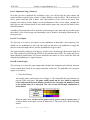
The first step is to retrieve user inputs via the pushbuttons to determine a shot trajectory. You
should use two pushbuttons to move the shot angle up and down, one pushbutton to toggle the
shot power between high and low, and one pushbutton to trigger a shot.
The angle should be limited to 0-90 degrees, and the power should toggle between the high and
low values defined by PHIGH and PLOW in the provided mbed shell. The angle and power
inputs should be printed on the LCD screen attached to the mbed, as well as sent to the front end
using the paaUpdate(power, angle) function.
Part 2B: Game Engine
The next step is to create the game engine that calculates the animations and collision detection
for the cannon shots based on user inputs and game world state. The guidelines for your game
engine are as follows:
1. Game World Array:
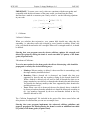
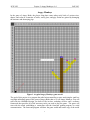
An example game world can be seen in Figure 1. The cannonball and shot indicator are
not part of the world array. The game world is made up of a tree, which is comprised
of tree and branch tiles, and monkeys. Each tile has a strength, the number of shots
it can sustain before it is destroyed. The color of each tile/strength combination is
shown below:
Type/Strength
1 2 3 4 5
Tree
Branch
Monkey
When the game starts, the state of the game world is given to you as a sparse array in
a format similar to the sparse vectors in Homework 2. The array will be in the following
format:
int world[N];
3