1
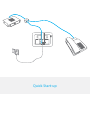
Quick start-up
Usage
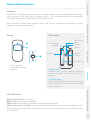
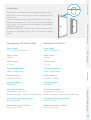
Open the case and remove the battery activation
strip. Self-testing will start for 30 seconds.
When the sensor is in operation, if it is triggered
more than twice within 3 minutes, it will switch
to standby mode to save power. If no movement
is detected within the next 3 minutes, the sensor
goes back to working mode.
Connect Button
Navigate through the menu of the control panel and reach "ADD A NEW" (Wireless Sensor).
Press the Connect button at the back of the motion sensor or trigger the sensor (by moving in
front of it) to register the detector in the control panel.
To check if the registration is complete, refer to the instructions in the table on page 10
"TEST MODE".
Control Panel Operations
Register in the control panel
Installation
If two detectors are installed in the same detection scope, adjust the location to avoid
interferences and false alarms.
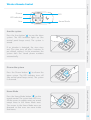
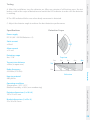
2.2 m
Ground
The detector is more sensitive to
cross movements than vertical
movements.
Top view
Bottom
Side view
Safety and Troubleshooting
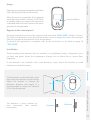
Fix the bracket on the wall with screws
and attach the detector to the bracket.
Adjust the bracket to change the
detection distance and angle. It is
recommended to mount the detector
2.2 m from the ground.
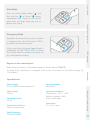
Accessories
Top
SMS Operations
Avoid mounting the detector close to windows, air conditioner, heater, refrigerator, oven,
sunshine and places where the temperature changes fast or where the air stream flows
frequently.
27