1
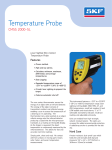
Temperature Probe CMSS 2000-SL
www.skf.com/reliability
3
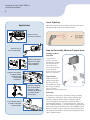
Display
How It Works
User Interface Display
Infrared thermometers
measure the surface
temperature of an opaque
object. The unit’s optics
sense emitted, reflected,
and transmitted energy,
which is collected and
focused onto a detector.
The unit’s electronics translate the information into a
temperature reading which is displayed on the unit. The
laser is used for aiming purposes only.
A
Backlight “On” symbol
B
°F / °C symbol
C
High Alarm and Low
Alarm symbol
D
Temperature values
for the MAX, MIN,
DIF, AVG, HAL (high
alarm), LAL (low
alarm), and logged
temperatures
Measuring Temperature
E
Symbols for MAX,
MIN, DIF, AVG, HAL,
LAL, PRB
F
LOG icon shows
log Mode for data
storage
G
Current temperature
value
Units measure the surface temperature of objects. To
measure temperature, pull and hold the trigger while
pointing at the target to be measured (See Distance and
Spot Size). A temperature reading appears on the display.
If the thermometer is subject to large changes in ambient
temperatures (hot to cold or cold to hot), allow 30 minutes
for temperature stabilization before taking measurements to
ensure accuracy.
H
SCAN or HOLD
I
Emissivity symbol and
value
Storing Data
J
Low Battery, Lock, and Laser “On” symbols
The thermometer is capable of storing up to 12 data
locations. The infrared temperature, temperature unit (°C or
°F) and emissivity are also stored.
Buttons
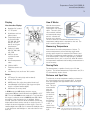
Distance and Spot Size
1
SET button (for setting high and low alarm)
2
Up and Down buttons
3
MODE button (for cycling through the Mode loop)
4
Laser/Backlight on/off button (pull trigger and press
button to activate laser/backlight)
5
LOG button (for storing data)
To achieve an accurate temperature reading, unit must be
the correct distance from the targeted object. A singular
laser spot highlights the approximate center of the spot
measurement
area. This spot
measurement
area gets
larger the
farther away
you are from
the target.
The ratio of
the Distanceto-Spot Size,
or D:S, is
shown in the
diagram to the
NOTE: The unit measures the average surface
right.
temperature inside the measurement spot.
In SCAN mode, the LCD displays both the current
temperature (G) and selected Mode function (D, E) in °C/°F
(B). The unit will HOLD the last reading for 7 seconds after
the trigger is released; the word HOLD appears (H). When
the battery is low, the battery icon is displayed, but the
unit will continue to function; when the battery is dead, the
display will be blank, and the unit will no longer function. To
activate the laser and backlight, pull the trigger. Press the
laser/backlight button (4) once to activate the backlight, twice
to turn both laser and backlight on, and a third time to turn
them off.