1
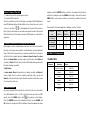
140-181
182-189
190-231
232-239
240-247
248-255
Fast Close Slow Open
Open
Fast Open Slow Close
Open
Random Strobe
Open
Pan/Tilt Speed
000-255
Fast -> Slow
9
Function
000-069
070-079
080-089
090-099
100-109
110-119
120-199
200-209
210-249
250-255
Null
Blackout while Pan/Tilt Move
Null
Blackout when Color changes
Null
Blackout when Gobo changes
Null
Reset All
Null
Sound Active
10
Dimmer
000-255
0~100%
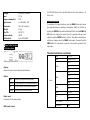
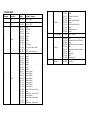
10 CHANNEL MODE
Channel
Function
Value
Percent / Setting
1
Pan1
000 - 255
Pan 0°~ 540°
2
Pan Fine
000 - 255
0~100%
3
Tilt
000-255
Tilt 0°~ 270°
4
Tilt Fine
000-255
0~100%
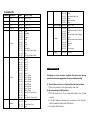
000-007
008-014
015-021
022-028
029-035
036-042
043-049
050-056
057-127
128-189
190-193
194-255
000-007
008-015
016-023
024-031
032-039
040-047
048-055
056-063
064-071
072-079
080-087
088-095
096-103
104-111
112-119
120-127
128-189
190-193
194-255
000-007
008-015
016-131
132-139
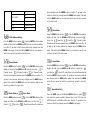
White
Light Blue
Pink
Orange
Green
Blue
Yellow
Red
Split colors
Color Scroll Fast to Slow
Stop
Color Scroll Slow to Fast
Gobo 1 (Open)
Gobo 2
Gobo 3
Gobo 4
Gobo 5
Gobo 6
Gobo 7
Gobo 8
Gobo 1 Shake
Gobo 2 Shake
Gobo 3 Shake
Gobo 4 Shake
Gobo 5 Shake
Gobo 6 Shake
Gobo 7 Shake
Gobo 8 Shake
Gobo Scroll, Fast to Slow
Stop
Gobo Scroll , Slow to Fast
Close
Open
Strobe Slow->Fast
Open
5
6
7
Colour
Gobo
Shutter
8
4.Troubleshooting
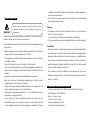
Following are a few common problems that may occur during
operation and some suggestions for easy troubleshooting:
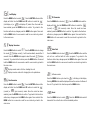
A. The unit does not work, no light and the fan does not work
1. Check the connection of the power and the main fuse.
B. Not responding to DMX controller
1. DMX LED should be on. If not, check DMX cables to see if linked
correctly.
2. If the DMX address is showing but no response to the controller,
check the address settings and DMX polarity.
3. Try another DMX controller.