1
STORING AND RECALLING
MEASUREMENTS
The LT2234C can store up to 96 measurements of rpm and
recall them in the order in which they were made and stored.
Individual measurements or series of measurements can only
be stored while the Measure button is pressed and held.
When the Measure button is released, the contents of the instrument’s memory are frozen. When the Measure button is
pressed again, the memory’s contents are erased.
To store an individual measurement, press the MEM button
(callout 1-5) before releasing the Measure button.
To store a series of measurements, press the MEM button
after each measurement. Remember not to release the Measure button until you have completed storing the entire series
of measurements.
To recall an individual measurement, press the MEM button once and hold it. The display will show the last measurement stored—unless the Measure button was pressed in the
interim.
To recall a series of stored measurements, you have three
options.
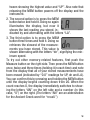
1. One is to press the MEM button once and hold it. Doing
so will illuminate the display, which will show the highest
of the measurements stored in memory, along with the word “UP”. Note
that if you continue holding the MEM
button, the display will alternate be8