Transcript
* This product is made to be operated by passengers other than the driver.
Driver should not be operating the NAVI while driving.
NO:A
We would like to thank you for your purchasing Beat-Sonic NAVI-Controller.
Please read this user's manual carefully before using the product to ensure
proper use, operation and retention of warranty services.
ffi Wamtng: InstallatiOn
***
*
**
Choose an installation location where it does not interfere with driving and handling.
Make sure installation does not damage piping, tanks, wires, etc.
Do not install in places with moisture, humidity, and dust.
Beatsonic is not responsible for any problems, damages, injuries, illegal acts, etc., caused while using this
product.
Disconnect all battery minus end while working with cables.
Always use protective tape to secure wires.
ffi Before Matntenance Check-up
NAVI-Controller Operatton Manual
l
-
·This product utilizes a manual switching operation so please install where it can be easily accessible.
nil~
lo.L.......U
\
NAVI Usage (Default)
Unable to manipulate when in motion .
**
***
Before going into maintenance, please check the installation and harness connections.
If problem continues, disassemble the product and return to the retail location where purchased or contact
Beatsonic for maintenance.
If maintenance is desired, please write the condition on paper and attach with warranty.
A fee will be charged if claiming without warranty.
Warranty can be used only when disassembling, fixing , adjusting, and changing is done by Beatsonic.
j _L( ) 1
-~---r ~~AM~
NAVI Manipulation
Able to manipulate when in motion.e
*While manipulating NAVI, an error occurs with the car location, maintenance information, etc.
Also, once the switch is back into its original position , the car location needs time to reset.
(Depending on driving condition, environmental circumstance, navigation capability, etc., the time for the
NAVI to return changes.)
**
Product is guaranteed from defects for 1 year from the date of purchase.
Check all writing on the warranty, such as purchased date, purchased location, etc., and keep it in a safe
place for future purposes.
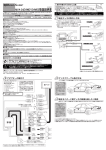
The location of the connector is dtfferent for each vehtcle model, so after checktng the package
and tnstructtons label, disassemble the TV monitor and others and then connect.
*No matter if the switch is on or off, the television cannot be viewed while in motion.
IDBack of Meter Panel
When meter panel is disassembled, NAVI unit can be found in the back. Pull out the connector that resembles
the NVK main system's connector and connect to NVK, then connect NVK connector to NAVI unit
Female
Male
NAVI-Controller
•NAVIUnit
·TV Monitor
Car Coupler
Etc.
'------"
Stag Beetle End
To
bJJ= = =
GPScoupler
Body Earth .......~------
ID Back of TV Monitor
After disassembling the center panel, unscrew the TV monitor and pull out the unit
On the back of the TV monitor, pull out the connector that resembles the NVK main system' s connector and
connect to NVK, then connect NVK connector to TV connector.
IDLower inside of Audio Unit
• lnsen the NAVI·Con1rollet be«ween the Navi unit
end car coupler.
• conll6d the maehW3. wt'liCtl nM GPS oouptor
After pulling out the center panel, the NAVI unit can be found once the TV, audio, etc., is separated.
Pull out the connector that resembles the NVK main system's connector and connect to NVK, then connect NVK
connector to NAVI unit
Installed, with the coupler.
• connect lhe machine, wn.ch has Stag beetle end
installed. with the Body earth.
ID Under the Center Console
When the center console is pulled out, the NAVI unit can be found.
Pull out the connector that resembles the NVK main system's connector and connect to NVK, then connect NVK
connector to NAVI unit.
Connector LocatiOns
IDUnder the Driver's Seat
Pull forward the driver's seat and look for the NAVI unit under the seat
Pull out the connector that resembles the NVK main system's connector and connect to NVK, then connect NVK
connector to NAVI unit.
In Under the Passenger Seat
Pull forward the passenger seat and look for the NAVI unit under the seat
Pull out the connector that resembles the NVK main system's connector and connect to NVK, then connect NVK
connector to NAVI unit.
!&Above center of Trunk
Open the trunk and disassemble the front The NAVI unit can be found on the top, above center of the trunk.
Pull out the connector that resembles the NVK main system's connector and connect to NVK, then connect NVK
connector to NAVI unit.
IIii Lower center of Trunk
Open the trunk and disassemble the front. The NAVI unit can be found on the lower center of the trunk.
Pull out the connector that resembles the NVK main systerm's connector and connect to NVK, then connect NVK
connector to NAVI unit.
lmLeft of Trunk
Open the trunk and disassemble the front. The NAVI unit can be found on the left of the trunk.
Pull out the connector that resembles the NVK main system's connector and connect to NVK, then connect NVK
connector to NAVI unit
lll!lRight of Trunk
Open the trunk and disassemble the front The NAVI unit can be found on the right of the trunk.
Pull out the connector that resembles the NVK main system's connector and connect to NVK, the connect NVK
connector to NAVI unit
~~~~~--------------------------------~
The way to separate the center panel for each brand of automobtle IS dtfferent, so please obtatn
all necessary materials from the dealer and operate wtth caution.
0
I• Back of NAVI Unit
Unscrew and pull out the NAVI unit On the back of the NAVI unit, pull out the connector that resembles the
NVK main system's connector and connect to NVK, then connect NVK connector to NAVI unit
(Location of NAVI unit installation is different for every vehicle so contact the dealer. )
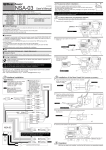
Stop car engine and disconnect the battery minus end.
@Locate NAVI unit/TV monitor. Separate the seat, meter, etc. as needed.
@) Pull out the connector that looks similar to the NAVI-Controller' s connector from
the NAVI unit/TV monitor.
Connect the pulled out connector to the NAVI-Controller and connect the NAVI-Controller's connector to the
NAVI unit/TV monitor.
8
~
Connect the battery minus end and conduct a test drive.
Check if the NAVI is able to be manipulated while driving.
* Test drive must be conducted by two or more people.
* Someone, other than the driver, must check for movement.
*II a car has a security system installed, all cables must be in the original position before testing.
If there is a problem with NAVI and television while driving, make sure the connector is connected properly.
Q) Once everything is working properly, use the provided double-sided tape to place the NAVI-Controller in a
fixed position, where it does not interfere with the switch and any other parts.
After it is stable, return all separated parts to the original position and then the installation is over.
BEAT-SONIC AUDIO ACCESSORIES
CAR AUDIO ACCESSORIES