1
BL-NavLV Quick Start Guide - 2
2
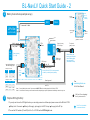
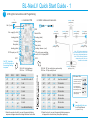
Battery Connections (example set-up)
1
USB
(set-up
program
available)
Must be
ground
ESC
Motor
T connector Y cable
LiPo Bat
Must be
ground
(up to 6 cells)
Must be
ground
Arrows show must be
ground, if connected
black - ground
Bat.
(e.g.
9v)
Gear up / or any
RC Rx output
LiPo
Check
red - power
Rx
Back-up battery
(7v ~ 24v)
To Bat or any
RC Rx input
BEC output
High
On
On
Low
On
Off
D1
On for
ULTRA
bright
mode
4
3
On
On
Mid
Off
Off
Low
On
Off
black - ground
4
If main LiPo fails, RC Rx / servos operated
via the 9v (or similar) back-up battery
D2
On to
invert
switch
3 way RC Tx switch
Sw
Landg.
Nav.
High
Cable to deploy the
landing gear coincident
with the landing lights
being switched on
(See tables to the left)
red - 5v
Input switches between
Nav and landing lights
2 way RC Tx switch
Sw
Landg.
Nav.
To optional
gear up servo
black - ground
red - 5v
See
www.bluelight-tech.com
for full User Manual
Note 1 : Ground (black) wires on the 3 pin connectors MUST BE on the outside edges of the BL-NavLV PCB
Note 2 : You will need to make your own connection cables, depending on specific requirements and battery connectors you use
PCB Red LED on or flashing?
Don’t fly the attached LiPo !
1
Simple LED Lights Only
1. If you only want to use the LED lights function you can simply connect one of these input power sources to the BL-NavLV PCB:
Battery to the T connector
Battery to Ext supply
5v supply to the RC Rx input
5v supply to the RC o/p
2. Then set the DIP switches (D1 and D2) to ALL off, or D1 SW4 on for ULTRA bright mode.
Free PC tool is available
for advanced features