1
GH-M Rate Monitor
Siemens S7-200 Controller
Part Number: 882.00724.00
Bulletin Number: BF2-600
Effective: 02/08/2007
Write Down Your Serial Numbers Here For Future Reference:
_________________________
_________________________
_________________________
_________________________
_________________________
_________________________
We are committed to a continuing program of product improvement.
Specifications, appearance, and dimensions described in this manual are subject to change without notice.
DCN No. ____________
© Copyright 2008
All rights reserved.
ii
Shipping Info
Unpacking and Inspection
You should inspect your equipment for possible shipping damage.
Thoroughly check the equipment for any damage that might have occurred in transit, such as
broken or loose wiring and components, loose hardware and mounting screws, etc.
In the Event of Shipping Damage
According to the contract terms and conditions of the Carrier, the responsibility of the
Shipper ends at the time and place of shipment.
Notify the transportation company’s local agent if you discover damage.
Hold the damaged goods and packing material for the examining agent’s inspection. Do not
return any goods before the transportation company’s inspection and authorization.
File a claim with the transportation company. Substantiate the claim by referring to the
agent’s report. A certified copy of our invoice is available upon request. The original Bill of
Lading is attached to our original invoice. If the shipment was prepaid, write us for a
receipted transportation bill.
Advise customer service regarding your wish for assistance and to obtain an RMA (return
material authorization) number.
If the Shipment is Not Complete
Check the packing list as back-ordered items are noted on the packing list. You should have:
; GH-M Rate Monitor Frame
; Display Enclosure w/ connecting cable (cable in PLC enclosure on frame)
; Calibration Weight
; Weigh Hopper (May be mounted on the frame)
; Bill of lading
; Packing list
; Operating and Installation packet
; Electrical schematic and panel layout drawings
; Component instruction manuals (if applicable)
Re-inspect the container and packing material to see if you missed any smaller items during
unpacking.
If the Shipment is Not Correct
If the shipment is not what you ordered, contact the parts and service department
immediately at (847) 273-7700. Have the order number and item number available.
Hold the items until you receive shipping instructions.
iii
Returns
Do not return any damaged or incorrect items until you receive shipping instructions from the
shipping department.
Credit Returns
Prior to the return of any material, the manufacturer must give authorization. A RMA
number will be assigned for the equipment to be returned.
Reason for requesting the return must be given.
ALL returned material purchased from the manufacturer returned is subject to 15% ($75.00
minimum) restocking charge.
ALL returns are to be shipped prepaid.
The invoice number and date or purchase order number and date must be supplied.
No credit will be issued for material that is not within the manufacturer’s warranty period
and/or in new and unused condition, suitable for resale.
Warranty Returns
Prior to the return of any material, the manufacturer must give authorization. A RMA
number will be assigned for the equipment to be returned.
Reason for requesting the return must be given.
All returns are to be shipped prepaid.
The invoice number and date or purchase order number and date must be supplied.
After inspecting the material, a replacement or credit will be given at the manufacturer’s
discretion. If the item is found to be defective in materials or workmanship, and it was
manufactured by our company, purchased components are covered under their specific
warranty terms.
iv
Table of Contents
CHAPTER 1: SAFETY................................................................ 7
1-1
1-2
1-3
How to Use This Manual ............................................................................................. 7
Safety Symbols Used in this Manual .....................................................................7
Warnings and Precautions .......................................................................................... 9
Responsibility ............................................................................................................ 10
General Responsibility ........................................................................................10
Operator Responsibility .......................................................................................10
Maintenance Responsibility.................................................................................12
Reporting a Safety Defect ...................................................................................12
CHAPTER 2: FUNCTIONAL DESCRIPTION ........................... 13
2-1
2-2
2-3
2-4
2-5
Models Covered in This Manual................................................................................ 13
General Description................................................................................................... 13
Accessories .........................................................................................................13
Customer Service................................................................................................13
Typical Features and Components ........................................................................... 14
Mechanical Features ...........................................................................................14
Controller Features..............................................................................................14
System Component Description ..........................................................................14
Extruder Inductive Proximity Switch .................................................................. 15
Surge Hopper ....................................................................................................... 15
Weigh Hopper...................................................................................................... 16
Operator Control Panel Display........................................................................... 16
Optional Components................................................................................................ 20
Profibus DP Slave ...............................................................................................20
Pneumatic Slide Gate below surge hopper .........................................................20
Low Level Proximity Sensors ..............................................................................21
Safety Features ......................................................................................................... 21
CHAPTER 3: INSTALLATION.................................................. 22
3-1
3-2
3-3
3-4
3-5
Uncrating the Equipment........................................................................................... 22
Mechanical Installation .............................................................................................. 22
Site Requirements ...............................................................................................22
Mounting Configurations .....................................................................................22
Machine Mount.................................................................................................... 23
Electrical Connections............................................................................................... 23
Pneumatic Connections ............................................................................................ 24
Initial Set-up .............................................................................................................. 25
Mechanical Set-up...............................................................................................25
Weigh Hopper Installation................................................................................... 25
Extruder RPM connection ................................................................................... 25
Final Connections ................................................................................................ 26
Controller Set-up .................................................................................................26
GH Controller Menu Structure ............................................................................ 28
Rate Monitor Calibration ..................................................................................... 28
Rate Monitor Calibration ..................................................................................... 29
v
3-6
WTP/RPM Calibration Page................................................................................ 31
This page is used to monitor the lbs/hr per RPM analyzer and is used as a tool for
tuning the WTP Algorithm Options mentioned later in this book....................... 31
Hopper Size Setup ............................................................................................... 31
Extruder Setup ..................................................................................................... 32
Hauloff Setup and Encoder Calibration Page (GH Full Control ONLY) ............ 32
Alarm Setup ......................................................................................................... 33
Vacuum Bypass Setup ......................................................................................... 33
Initial Startup ............................................................................................................. 35
CHAPTER 4: OPERATION....................................................... 36
4-1
4-2
Start-up...................................................................................................................... 36
General Operation...............................................................................................36
Quick Start Procedure .........................................................................................36
Generic................................................................................................................. 36
Operation Procedures ............................................................................................... 36
Operator Displays................................................................................................36
Alarm Flags .........................................................................................................38
CHAPTER 5: MAINTENANCE ................................................. 39
5-1
5-2
5-3
Preventative Maintenance Schedule......................................................................... 39
Preventative Maintenance......................................................................................... 40
Corrective Maintenance ............................................................................................ 40
CHAPTER 6: TROUBLESHOOTING ....................................... 42
6-1
Introduction................................................................................................................ 42
CHAPTER 7: APPENDIX.......................................................... 44
7-1
7-2
7-3
7-4
Warranty and Spare Parts......................................................................................... 44
Warranty Specifications.......................................................................................44
Warranty Restrictions ..........................................................................................44
Warranty Liabilities ..............................................................................................44
Customer Responsibilities ...................................................................................45
Annex B Information ............................................................................................45
Addendum (Service Supervisor Information) ............................................................ 47
Programmable Settings .......................................................................................47
Customer Setup Menu ........................................................................................52
Siemens S7-200 Communications Manual ............................................................... 53
ITEMS IN BLUE ARE READ ONLY! ITEMS IN BLACK ARE WRITE ONLY! .......... 53
CHAPTER 8:............................................................................... 54
CHAPTER 9: ITEM ................................................................... 55
Parts Department ................................................................................................61
Service Department.............................................................................................61
Sales Department................................................................................................61
Contract Department ...........................................................................................61
vi
Chapter 1: Safety
1-1
How to Use This Manual
Use this manual as a guide and reference for installing, operating, and maintaining your rate
monitor. The purpose is to assist you in applying efficient, proven techniques that enhance
equipment productivity.
This manual covers only light corrective maintenance. No other maintenance should be
undertaken without first contacting a service engineer.
The Functional Description section outlines models covered, standard features, and safety
features. Additional sections within the manual provide instructions for installation, preoperational procedures, operation, preventive maintenance, and corrective maintenance.
The Installation chapter includes required data for receiving, unpacking, inspecting, and setup
of the GH hopper. We can also provide the assistance of a factory-trained technician to help
train your operator(s) for a nominal charge. This section includes instructions, checks, and
adjustments that should be followed before commencing with operation of the GH Hopper.
These instructions are intended to supplement standard shop procedures performed at shift,
daily, and weekly intervals.
The Operation chapter includes a description of electrical and mechanical controls, in
addition to information for operating the GH Hopper safely and efficiently.
The Maintenance chapter is intended to serve as a source of detailed assembly and
disassembly instructions for those areas of the equipment requiring service. Preventive
maintenance sections are included to ensure that your GH hopper provides excellent, long
service.
The Troubleshooting chapter serves as a guide for identification of most common problems.
Potential problems are listed, along with possible causes and related solutions.
The Appendix contains technical specifications, drawings, schematics, parts lists, and
available options. Refer to this section for a listing of spare parts for purchase. Have your
serial number and model number ready when ordering.
Safety Symbols Used in this Manual
The following safety alert symbols are used to alert you to potential personal injury hazards.
Obey all safety messages that follow these symbols to avoid possible injury or death.
DANGER!
DANGER indicates an imminently hazardous situation that, if not avoided,
will result in death or serious injury.
WARNING!
WARNING indicates a potentially hazardous situation or practice that, if
not avoided, could result in death or serious injury.
Caution!
CAUTION indicates a potentially hazardous situation or practice that, if
not avoided, may result in minor or moderate injury or in property damage.
Bulletin Number
Chapter 1: Safety
7 of 61
Figure 1: Safety Tags and Warning Labels
Tag
Description
Tag
Pinch Point Slide Gate
Read Operation &
Installation Manual
Shear Point Rotating
Mixer
Earth Ground
High Voltage Inside
Enclosure
PE
Shear Hazard Rotating
Auger
Bulletin Number
Description
Chapter 1: Safety
Protected Earth Ground
Lifting Point
8 of 61
1-2
Warnings and Precautions
Our equipment is designed to provide safe and reliable operation when installed and operated
within design specifications, following national and local safety codes. This may include, but
is not limited to OSHA, NEC, CSA, SPI, and any other local, national and international
regulations.
To avoid possible personal injury or equipment damage when installing, operating, or
maintaining this equipment, use good judgment and follow these safe practices:
; Read and follow these operation and installation instructions when installing,
operating, and maintaining this equipment. If these instructions become
damaged or unreadable, additional copies are available from the manufacturer.
; Follow all SAFETY CODES.
; Keep fingers away from slide gates, augers, clean-outs, and calibration hatches.
Automatic operation may start unexpectedly, A PINCH HAZARD CAPABLE OF
CAUSING BODILY INJURY EXISTS ANY TIME THE POWER IS ON.
; Wear SAFETY GLASSES and WORK GLOVES.
; Work only with approved tools and devices.
; Disconnect and/or lock out power and compressed air before servicing or maintaining
the equipment.
; Use care when LOADING, UNLOADING, RIGGING, or MOVING this
equipment.
; Operate this equipment within design specifications.
; OPEN, TAG, and LOCK ALL DISCONNECTS before working on equipment.
You should remove the fuses and carry them with you.
; NEVER PUT FINGERS OR TOOLS IN AN AUGER OR SLIDE GATE AREA.
; Make sure the equipment and components are properly GROUNDED before you
switch on power.
; Do not restore power until you remove all tools, test equipment, etc., and the
equipment and related components are fully reassembled.
; Only PROPERLY TRAINED personnel familiar with the information in this
manual should work on this equipment.
We have long recognized the importance of safety and have designed and manufactured our
equipment with operator safety as a prime consideration. We expect you, as a user, to abide
by the foregoing recommendations in order to make operator safety a reality.
Bulletin Number
Chapter 1: Safety
9 of 61
1-3
Responsibility
These machines are constructed for maximum operator safety when used under standard
operating conditions and when recommended instructions are followed in the maintenance
and operation of the machine.
All personnel engaged in the use of the machine should become familiar with its operation as
described in this manual.
Proper operation of the machine promotes safety for the operator and all workers in its
vicinity.
Becoming familiar with materials, inspection, speed limitations, screens, and guard
maintenance and total user responsibility will assist you in learning potential areas in need of
observation for danger.
Each individual must take responsibility for observing the prescribed safety rules as outlined.
All caution, warning and danger signs must be observed and obeyed. All actual or potential
danger areas must be reported to your immediate supervisor.
General Responsibility
No matter whom you are, safety is important. Owners, operators and maintenance personnel
must realize that every day, safety is a vital part of their jobs.
If your main concern is loss of productivity, remember that production is always affected in a
negative way following an accident. The following are some of the ways that accidents can
affect your production:
• Loss of a skilled operator (temporarily or permanently)
• Breakdown of shop morale
• Costly damage to equipment
• Downtime
An effective safety program is responsible and economically sound.
Organize a safety committee or group, and hold regular meetings. Promote this group from
the management level. Through this group, the safety program can be continually reviewed,
maintained, and improved. Keep minutes or a record of the meetings.
Hold daily equipment inspections in addition to regular maintenance checks. You will keep
your equipment safe for production and exhibit your commitment to safety.
Please read and use this manual as a guide to equipment safety. This manual contains safety
warnings throughout, specific to each function and point of operation.
Operator Responsibility
The operator’s responsibility does not end with efficient production. The operator usually has
the most daily contact with the equipment and intimately knows its capabilities and
limitations.
Plant and personnel safety is sometimes forgotten in the desire to meet incentive rates, or
through a casual attitude toward machinery formed over a period of months or years. Your
employer probably has established a set of safety rules in your workplace. Those rules, this
manual, or any other safety information will not keep you from being injured while operating
your equipment.
Bulletin Number
Chapter 1: Safety
10 of 61
Learn and always use safe operation. Cooperate with co-workers to promote safe practices.
Immediately report any potentially dangerous situation to your supervisor or appropriate
person.
REMEMBER:
• NEVER place your hands or any part of your body in any dangerous location.
• NEVER operate, service, or adjust the rate monitor without appropriate training and
first reading and understanding this manual.
• NEVER try to pull material out of the rate monitor with your hands while it is
running!
Before you start the GH Hopper check the following:
• Remove all tools from the unit;
• Be sure no objects (tools, nuts, bolts, clamps, bars) are laying in the feeding area.
Note: If your rate monitor has been inoperative or unattended, check all
settings before starting the unit.
Note: At the beginning of your shift and after breaks, verify that the controls
and other auxiliary equipment are functioning properly.
Note: Keep all safety guards in place and in good repair. NEVER attempt to
bypass, modify, or remove safety guards. Such alteration is not only
unsafe, but will void the warranty on your equipment.
Note: When changing control settings to perform a different mode of
operation, be sure selector switches are correctly positioned. Locking
selector switches should only be adjusted by authorized personnel and
the keys removed after setting.
Report the following occurrences IMMEDIATELY:
• Unsafe operation or condition
• Unusual action
• Leakage
• Improper maintenance
Note: NEVER stand or sit where you could slip or stumble into the rate
monitor while working on it.
Note: DO NOT wear loose clothing or jewelry, which can be caught while
working on a rate monitor. In addition, cover or tie back long hair.
Note: Clean the rate monitor and surrounding area DAILY, and inspect the
machine for loose, missing or broken parts.
Note: Shut off power to the GH Hopper when it is not in use. Turn the switch
to the OFF position, or unplug it from the power source.
Bulletin Number
Chapter 1: Safety
11 of 61
Maintenance Responsibility
Proper maintenance is essential to safety. If you are a maintenance worker, you must make
safety a priority to effectively repair and maintain equipment.
Before removing, adjusting, or replacing parts on a machine, remember to turn off all electric
supplies and all accessory equipment at the machine, and disconnect and lockout electrical
power. Attach warning tags to the disconnect switch.
When you need to perform maintenance or repair work on a rate monitor above floor level,
use a solid platform or a hydraulic elevator. If there is a permanently installed catwalk
around your rate monitor, use it. The work platform should have secure footing and a place
for tools and parts. DO NOT climb on unit, machines, or work from ladders.
If you need to repair a large component, use appropriate handling equipment. Before you use
handling equipment (portable “A” frames, electric boom trucks, fork trucks, overhead cranes)
be sure the load does not exceed the capacity of the handling equipment or cause it to become
unstable.
Carefully test the condition of lifting cables, chains, ropes, slings, and hooks before using
them to lift a load.
Be sure that all non-current carrying parts are correctly connected to earth ground with an
electrical conductor that complies with current codes. Install in accordance with national and
local codes.
When you have completed the repair or maintenance procedure, check your work and remove
your tools, rigging, and handling equipment.
Do not restore power to the rate monitor until all persons are clear of the area. DO NOT start
and run the unit until you are sure all parts are functioning correctly.
BEFORE you turn the rate monitor over to the operator for production, verify all enclosure
panels, guards and safety devices are in place and functioning properly.
Reporting a Safety Defect
If you believe that your equipment has a defect that could cause injury, you should
immediately discontinue its use and inform the manufacturer.
The principle factors that can result in injury are failure to follow proper operating procedures
(i.e. lockout/tagout), or failure to maintain a clean and safe working environment.
Bulletin Number
Chapter 1: Safety
12 of 61
Chapter 2: Functional Description
2-1
Models Covered in This Manual
This manual provides operation, installation, and maintenance instructions for rate monitors
of various extrusion rates and specifications. See below for a list of available models.
• GH-M-10 Rate Monitor (50-600 pounds/hour) with Siemens S7-200 Controls
• GH-M-20 Rate Monitor (300-1,500 pounds/hour) with Siemens S7-200 Controls
• GH-M-40 Rate Monitor (1,000-2,500pounds/hour) with Siemens S7-200 Controls
Model numbers are listed on the serial tag. Make sure you know the model and serial number
of your equipment before contacting the manufacturer for parts or service.
Rate monitoring systems are as varied as the applications they service. All gravimetric rate
monitors are sized to meet the specific requirements stated by the Customer at the time of
purchase.
2-2
General Description
Rate monitors are designed to measure the extrusion rate of plastic pellets and regrind.
Standard equipment is not designed to measure powder or any other materials. Optional
equipment may be purchased to measure the extrusion rate of powders.
Accessories
The manufacturer offers a variety of standard options for GH-M rate monitors including knife
gates, low-level proximity switches, Profibus DP Slave communication modules, and hoppers
specifically designed to measure the extrusion rate of powders. All accessories are designed
and manufactured to ensure proper results for your application.
Customer Service
The intent of this manual is to familiarize the operator and maintenance personnel with these
rate monitors and help your organization get the maximum service from your equipment. If
you have any questions regarding installation, service, repair, custom equipment, or
applications, please do not hesitate to contact us for the information required. Prices for
additional equipment, accessories, or repair parts will be furnished promptly upon request.
Note: If you desire to use a rate monitor for an application other than that for
which it was purchased, please contact your sales representative or our
factory to verify compatibility of the equipment with the new process.
Misapplication of the equipment could result in injury to the operator or
damage to the equipment.
Bulletin Number
Chapter 2: Functional Description
13 of 61
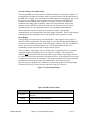
Figure 2: Equipment Specifications
Model
Maximum Extrusion Rate, lbs/hr (kg/hr)
10
20
40
600 (272)
1200 (680)
2500 (1134)
Weigh Hopper Capacity, cu.ft. (Liters)
0.35 (10)
0.7 (20)
1.41 (40)
10
20
40
Load Cell Capacity, kgs
Approximate Dimensions, in. (mm) Height (5)
1 @ 10 kg
1 @ 20 kg
1 @ 30 kg
34.5 (875)
51.5 (1308)
56.5 (1435)
Width (5)
26.0 (650)
37.5 (952)
37.0 (940)
Depth (5)
22.0 (560)
37.0 (940)
40.0 (1016)
Typical Weigh Hopper Size, lbs.
2-3
Typical Features and Components
Mechanical Features
• Removable stainless steel weigh hoppers.
• Stainless steel surge (supper supply) hopper with integral air cylinder and urethane
dump cone.
• Precision 1/10% span accurate cantilever load cell weighing system
• Inductive extruder tracking proximity switch.
• Rugged industrial mild steel painted frame.
• Cast aluminum spool with drain and purge ports.
Figure 4: Typical GH Siemens S7-200 PLC Enclosure
Controller Features
• LCD touch-screen interface display operator control panel with 8’ cable
• Siemens S7-200 CPU 226 PLC
• Thermocouple Input card for loadcell
• Manual key switch control function for reload
• Visual Alarm
• Full control diagnostics
• Profibus DP Slave Module
System Component Description
This section describes the various components of the rate monitor system.
Bulletin Number
Chapter 2: Functional Description
14 of 61
Extruder Inductive Proximity Switch
The extruders RPM must be reported to the GH-M controller for the system to function. To
accomplish this, an inductive proximity switch is provided to let the GH-M controller know
the RPM of the extruder. This switch should be field mounted in an appropriate way to read
the extruder’s true RPM. It is important this switch is reading the actual RPM of the
Extruder, and not an RPM before a gearbox, for example. Chapter 3 will detail the
installation and wiring of this component. Because it is field mounted, wiring of the
proximity switch will NOT be done at the factory and we do not provide any custom
mounting brackets for your application as these vary depending on the equipment.
This measurement can also be achieved by writing the extruder’s rpm through
communications (see document at the end of this manual for details). If this is done through
communications then it eliminates the need to install the extruder proximity switch.
Surge Hopper
The surge hopper is located on top of the GH-M frame. These hoppers store a supply of
material to fill the weigh hopper. The surge hopper is sized based on the total throughput of
the extrusion rate monitoring system. Each surge hopper contains a 24V DC solenoid that is
used to open and close the internal dump cone. The internal urethane dump cone is
mechanically opened and closed with a compressed air cylinder.
The rate monitor’s surge hopper does not include any level indication devices as standard
equipment. Optional surge hopper low-level sensors are available. The rate monitor
controller will alarm if it runs out of material while trying to fill the weigh hopper, but lowlevel sensors will alert floor personnel to the problem sooner. If an optional low-level sensor
is purchased, it will activate a visual alarm. This optional proximity switch can be mounted
anywhere the customer desires and is not mounted unless specifically requested.
The refill system is equipped with a manual key switch to open and close the surge hopper.
This three position key switch is located on the front of the PLC enclosure.
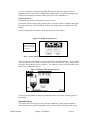
Figure 5: Typical Surge Hopper
Figure 6 Refill Switch Positions
Position
AUTO
Description
The rate monitor controller automatically controls surge hopper
functions.
OPEN
Dump cone gate open all the time
CLOSE
Dump cone closed all the time
Bulletin Number
Chapter 2: Functional Description
15 of 61
Each surge hopper is supplied with a lid. Standard lids contain a cutout to accept a vacuum
receiver. A blank lid may also be provided if specified.
If the rate monitor is being refilled from a mezzanine-mounted GH Hopper, the surge hopper
lid will have a tube stub on it.
The surge hopper will be mounted on the frame at the factory. The 24V dc solenoid will also
be factory wired. In some rare cases, it may be necessary to remove the surge hopper for
shipping purposes
Weigh Hopper
The weigh hopper is located within the GH-M frame. The hopper size is set within the
controls. Default for refilling to occur is 50% of the weigh hopper size.
The weigh hopper on the rate monitor is used to weigh the material entering the extrusion
process. Once the weigh hopper goes below 50% of its set weight capacity the solenoid valve
on the surge hopper will open, allowing material to fall from the surge hopper to the weigh
hopper. The surge hopper solenoid will close once the weigh hopper reaches its set weight
capacity.
Details for installing and removing the weigh hopper are included in the next section. The
weigh hopper will need to be installed before operation can begin. It is necessary to remove
the weigh hopper for shipment, so the loadcell is not damaged.
When the weigh hopper is installed use care not to damage the load cell. Position the hopper
Note: Use care when replacing the weigh hopper, since the load cells are
delicate weighing instruments and can be easily damaged. Do not use
force to push in the weigh hopper.
Note: Load cells, if damaged, will have to be sent back to the manufacturer for
testing and evaluation.
Note: Make sure no part of the load cell bracket is touching the plastic housing
on the load cell. This could result in inaccurate weight readings. If
necessary the plastic on the loadcell can be trimmed back
tube stub as close to the center of the hole in the bottom of the frame as possible.
Operator Control Panel Display
The operator control panel includes an 8-foot (2.4 m) cable and can be remote mounted (not
recommended) adjacent to the GH Hopper. The panel can be unplugged and removed if
necessary. The cable provides 24VDC power to the display, as well as communications to
the PLC.
A programmable logic controller (PLC) controls the rate monitor operation. This design
provides excellent performance along with an easily replaceable control panel in the unlikely
failure of any computer or electronic part.
After installation and setup, the GH-M will begin monitoring the system process once the rate
monitor detects an extruder speed.
The following figures show some typical screens of the GH-M rate monitor.
Bulletin Number
Chapter 2: Functional Description
16 of 61
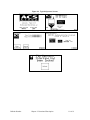
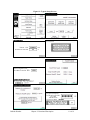
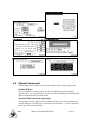
Figure 8: Typical Siemens S7-200 Controller Touch Screen Display
Figure 9: Controller Pushbuttons & Touchscreen Tags
Button
Function
(Power On)
(Power Off)
Turns power on to the GH Hopper controller.
(Found on the back of the controller.)
Turns power off to the GH Hopper controller.
(Found on the back of the controller.)
Stops GH Hopper & restarts controller.
Press to move back one screen level in
controller function.
Move forward one screen level in controller
function.
Bulletin Number
Chapter 2: Functional Description
17 of 61
Figure 10: Typical Operator Screens
Bulletin Number
Chapter 2: Functional Description
18 of 61
Figure 11: Typical Setup Screens
Bulletin Number
Chapter 2: Functional Description
19 of 61
2-4
Optional Components
The following is a list of options, which your rate monitor may have been equipped with:
Profibus DP Slave
In lieu of an inductive proximity switch, the extruder’s RPM may be written through
communications. To accomplish this you need to write the speed through from a Profibus DP
Master as mentioned at the end of this manual
Pneumatic Slide Gate below surge hopper
The surge hopper can be equipped with a pneumatic slide gate in lieu of the air cylinder and
urethane dump cone. The knife gate is opened and closed by the PLC. A 24 VDC solenoid is
used to open and close the knife gate.
Bulletin Number
Chapter 2: Functional Description
20 of 61
WARNING!
Slide gates create a pinch-point hazard
Low Level Proximity Sensors
Detects material supply problems before rate monitor hoppers are empty. A 24VDC
capacitive proximity switch is utilized for this option. The proximity switch is wired directly
into the PLC enclosure. If there is a material supply problem, a visual alarm is activated.
2-5
Safety Features
This section includes information on safety devices and procedures that are inherent to the
rate monitor system. This manual is not intended to supersede or alter safety standards
established by the user of this equipment. Instead, the material contained in this section is
recommended to supplement these procedures in order to provide a safer working
environment.
Bulletin Number
Chapter 2: Functional Description
21 of 61
Chapter 3: Installation
3-1
Uncrating the Equipment
Rate monitors are shipped mounted on a skid, enclosed in a plastic wrapper, and contained in
a crate.
1. Remove crate from around the rate monitor.
2. Secure strap of proper lifting capacity.
Caution!
Use approved safety straps or chains to lift the rate monitor.
3. Lift the rate monitor until strap is taut.
4. Remove bolts attaching bottom of the rate monitor to shipping skid.
3-2
Mechanical Installation
It is the intent of this section to familiarize the reader with the proper site requirements and
installation procedures of the GH-M rate monitoring system. The information in this section
is NOT meant to replace or supersede an established local or company implemented
procedures. It is meant to enhance them.
The installation procedure should be used as a general guideline for the proper installation
steps required to install a rate monitoring system.
1. Lift the rate monitor and position over machine throat.
2. Set in position and secure by tightening four bolts.
3. Remove lifting strap.
4. Mount the material conveying system receivers on the top of the rate monitor’s surge
hopper. If a mezzanine mounted GH Hopper is being used to supply material to the
rate monitor, attach the flex hose to the top of the surge hopper.
5. Install the weigh hopper onto the load cell bracket. Tighten the two supplied thumb
screws to the flange on the weigh hopper.
Note: Use extreme care when tightening bolts on top of the load cells so you do
not spring the load cells. The load cells are extremely delicate and should
be treated with care!
6. Check to see that the weigh hopper is completely unrestricted. The load cell bracket
should not touch any part of the plastic housing on the load cell. The tube stub on the
bottom of the weigh hopper should not touch any part of the cast spool. If either of
these conditions are not met, inaccurate weight readings may result.
Site Requirements
This section describes site requirements in detail. These requirements are broken down into
mechanical mounting, electrical connections and pneumatic connections.
Mounting Configurations
The rate monitoring system must be machine mounted.
Bulletin Number
Chapter 3: Installation
22 of 61
Machine Mount
The GH-M rate monitor must be machine mounted. There are a few items to review before
placement and mounting of the rate monitor system begins.
First, verify the machine flange dimensions match the cast spool-mounting flange.
Verify that the machine throat is physically capable of supporting the rate monitoring system
with a full load of material and vacuum loading equipment installed.
Note: While in operation, the rate monitoring system applies horizontal and
vertical pressures to the mounting flange. If there is a question as to the
mechanical stability of a mounting flange, contact the manufacturer’s
engineering department.
Verify all clearances on the top and beside the processing machine. This is to insure that all
motors, hoppers, control panels, etc. have adequate room for proper operation and servicing.
Refer to the assembly drawing with the unit for actual height and width dimensions.
Note: Allow at least 36” clearance around the rate monitor to provide
adequate room for cleaning, servicing, etc.
Using proper lifting equipment, lift the rate monitor. Affix the rate monitor to the processing
machine.
Note: Larger rate monitors may need to be braced as part of the installation.
Take care to insure proper orientation with adequate access to operator controls, mix
chamber, and metering units.
Note: Never weld on the rate monitor, support stand, machine or mezzanine
without first removing the control panel and verifying that the rate
monitor is properly grounded.
3-3
Electrical Connections
The standard rate monitor system is designed to operate on 120/1/60 or 220/1/60 supply
voltage. For exact current requirements, check the GH Hopper serial number tag, located on
the right side of the PLC enclosure.
If a step down transformer was provided, it should never be used to power anything other
than the rate monitor. Loading equipment, etc. must be powered by another power source. As
well as possibly overloading the transformer, the additional equipment may induce power line
noise that may affect the operation of the rate monitor
The transformer will be mounted and wired by the customer or your installer. If company or
local codes require fusing or disconnects, these items must be supplied, wired, and mounted
by the customer.
Note: Each rate monitor MUST be connected to a separate source of power.
Do not connect other electrical equipment, especially self-contained
hopper loaders, on the same line as the rate monitor.
Ensure that the power entrance location on the rate monitor panel remains unchanged. Make
sure that the proper size wire and proper wire routing techniques are used when installing the
Bulletin Number
Chapter 3: Installation
23 of 61
supply wiring to the control panel. Care must be taken to ensure that the supply wiring does
not interfere with the low voltage DC wiring.
The rate monitor is supplied with a plug that functions as the disconnect device. The mating
receptacle must be installed no higher than 5’ feet (1.6 m) above the floor. Make sure your
installation conforms to your regional electrical standards.
Please refer to the supplied electrical schematics for detailed connection points for the supply
power.
3-4
Pneumatic Connections
The rate monitoring system uses plant-supplied compressed air to operate the surge hopper.
CLEAN AND DRY air must be supplied to the rate monitor. The air supply should be filtered
through a 5 micron air filter with a water separator. Oil should not be used unless air dryers
are installed on the compressed air supply. In this situation, an oiler may be required on the
rate monitor to keep the air cylinder seals lubricated.
Usage is about 5 cu. inches per refill.
A single 1/8” NPT standard pipe thread fitting is provide on the surge hopper solenoid to
supply air.
Caution!
To prevent damage to the equipment, do not exceed 60 psi (4.14 bar) air
pressure.
Caution!
Always disconnect the compressed air supply when working on any part of
the rate monitor.
Bulletin Number
Chapter 3: Installation
24 of 61
3-5
Initial Set-up
This section will discuss the mechanical setup and control system setup of the rate monitor
system. After reading this section, you should be familiar with the mechanical setup and the
electronic control setup of the rate monitor.
Mechanical Set-up
Weigh Hopper Installation
It is necessary to install the weigh hopper. Remove the weigh hopper from the shipping box
and install it onto the load cell bracket. Two provided thumbscrews are used to secure the
weigh hopper to the load cell bracket.
Figure 12: Picture of Weigh Hopper
Note: THE WEIGH HOPPER ASSEMBLY MUST HANG FREELY AND BE
FREE FROM FRICTION, WITH NO MECHANICAL
OBSTRUCTIONS OTHER THAN THE LOAD CELL ITSELF.
It is very important the tube stub of the weigh hopper does not touch the supplied dust ring.
It is also important the flange of the weigh hopper be completely flush with the load cell
bracket.
Extruder RPM connection
The supplied inductive proximity switch must be mounted to accurately read the Extruder’s
RPM. The extruder’s speed may be reported to the controller via communications (see
communications section at the end of this manual).
The proximity switch must be mounted securely, and read the actual RPM of the extruder.
Supplementary documentation on this proximity switch is provided from its manufacturer.
To wire the supplied inductive proximity switch the PLC enclosure, please refer to the
supplied wiring schematics.
Bulletin Number
Chapter 3: Installation
25 of 61
If you are writing the extruder speed through Profibus then the proper setting has to be
changed to measure the extruder’s RPM with communications. For details on changing the
settings for measuring the extruder’s RPM, please refer to the Addendum 7-4.
Final Connections
Connect the rate monitor to the appropriate power source.
Connect the compressed air piping, ensuring that a 5-micron air filter is installed, along with
the proper water trap. Verify that 60-psi of clean, dry compressed air is supplied to the GH
Hopper.
After powering up the rate monitor, the following screen will be shown:
Figure 13: Display Startup Screen
Touch here to skip
quickly to the Recipe
Screen (Next Screen
in sequence).
Note: It may take 45-50 seconds for the screen to appear.
This screen displays the software version of both the PLC and the PanelView. The Controller
will stay on this screen for about 10 seconds or you can touch the ACS icon to quickly skip to
the Recipe Screen (Next Screen in sequence). The software versions are also available on the
Panel View Configuration Screen.
Figure 14: Display Main (Recipe) Screen
To access the Setup Menu to change the controller features, refer to the following pages of
this manual.
Controller Set-up
This section describes the proper setup of the rate monitoring system control parameters.
These parameters are operator changeable; however, these items should only require setup
Bulletin Number
Chapter 3: Installation
26 of 61
during the initial installation. Only authorized personnel should change them. For security
reasons, the menu that is used to access these parameters is password protected.
Many of the variables and setup parameters have been preset at the factory and do not need to
be changed. However, this section of the manual will address all of the rate monitor setup
parameters that were available at the time of printing. The purpose of this is to familiarize the
reader with all the setup parameters and their usage.
A complete listing of all default values is provided at the end of this manual.
Bulletin Number
Chapter 3: Installation
27 of 61
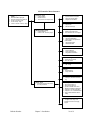
GH Controller Menu Structure
“Recipe” Page
(Start)
¾
¾
¾
¾
¾
Extruder RPM is displayed
Extruder throughput is displayed
Access “Inventory” Page
Access “Setup” Page
“Next” to access “Inventory” page.
“Inventory” page
¾ Clear Inventory
¾ Manual Control
¾ “Next” returns to “Recipe” page
Recipe Format
¾
¾
¾
System Rate & Line Speed
Weigh Per Length Mode
Weight Per Area Mode
Hopper Setup
¾
¾
“Manual Control” Page
¾
¾
Reload ON/OFF
Return to the “Inventory” Page
Hopper size
Reload Percentage
Extruder Setup
¾
¾
Maximum Extruder RPM
GHF Extruder Max. Throughput
Hauloff Setup
¾
¾
¾
¾
Hauloff enable/disable
Read/ Do Not read speed from
COEX Master
Hauloff Max Speed
Calibrate Encoder
Calibration
¾
¾
¾
Scale Calibration
Direct Scale Readout
Weight/RPM Calibration
Panel View Config
¾ Panel view GH version
¾ PLC GH version
Units
¾
Lbs. vs Kgs.
Password
¾
¾
New Password
Verify Password
Alarm Log
¾ View, print, and clear the alarm
log
“Setup” Page
¾
Touch the ACS icon and enter in
the “user password”
Alarm Setup
¾ Min System Speed %
¾ Max System Speed %
¾ System Unstable Alarm Time
¾
¾
¾
¾
Maximum allowed reload time
Hopper % for low level alarm
Hopper % for no material alarm
Out of material alarm silence
delay
Vacuum Bypass Setup
¾ Configure how many much
material is stored in the supply
hopper.
Bulletin Number
Chapter 3: Installation
28 of 61
Rate Monitor Calibration
The load cell on a rate monitor is FACTORY CALIBRATED. Since the load cell can be
subject to shock loading during shipping, moving, etc., we recommend that they be
recalibrated.
The heart of the rate monitor system is the load cell and the supplied calibration weight.
Since the load cell is weighing the amount of material entering the process, proper
calibration of the load cell is essential for the correct and accurate operation of the rate
monitor. This calibration must be performed upon initial installation and startup. The
calibration should also be checked once a month with a calibration weight and if
necessary recalibrated to ensure that it has not been damaged in the normal routine of
removing and replacing the weigh hopper for cleaning.
The calibration of the load cell is accomplished by using two reference points on the output
of the load cell scale. The first of these points is known as the “Tare Weight”. This is the
weight of the empty weigh hopper assembly on the load cell. This is also known as the zero
weight point (starting point) of the scale. This zero or starting point must be initialized with
an empty weigh hopper. There must be no binding or leverage put on the load cell.
The second weight point used in the load cell calibration procedure is a known amount of
weight for the weigh hopper. A calibration weight is provided with all rate monitors. The
calibration weight is stamped with its actual weight on top. If this is not available, any object
with a known weight accurate to the nearest 1/1000th of a pound, in the 2 - 10 lb. range,
proportional to your size rate monitor, will suffice. (The weight should be as close as possible
to the weigh hopper’s capacity.) The weight will be in pounds, unless the rate monitor is
provided for metric operation. In the case of a metric display, the weight to be used is
calibrated in kilograms.
Given the two weight points on the load cell scale, the controller should determine any other
weight on the load cell span. This is limited to the maximum capacity of the load cell. The
standard load cell used on rate monitors has a span accuracy of 1/10%.
The maximum capacity of each load cell is clearly marked on top of the load cell. This value
will be indicated in kilograms (1 kg = 2.2 lbs.).
Note: It is not necessary to calibrate the weight scale on a brand new rate
monitor, although it is recommended that the calibration be checked
periodically to ensure that the reported inventory totals are accurate.
Weigh Hopper (Load Cell) Calibration
1. From the “Recipe” Page, touch the Manufacturer’s icon and enter “5413”, then press
the “Enter˝ key.
2. Touch “Calibration” and then “Scale Calibration”.
Bulletin Number
Chapter 3: Installation
29 of 61
Figure 15: Display Calibration Menu Screen
Go Back to
Setup Directory
3. Once in “Scale Calibration”, enter in the scale calibration weight value stamped on
the side of the weight.
4. The controller will prompt you to empty the weigh hopper and press “OK”.
5. After touching OK, the controller will display “PLEASE WAIT...”
6. Next, the controller will ask you to hang the calibration weight on the weight hopper
and press OK.
7. Finally, the controller will ask you to remove the calibration weight and press “OK”
to complete the calibration.
8. The controller will verify that the calibration was done correctly by showing
“Calibration Successful.”
9. Press “Done” until you have reached the Recipe screen.
Figure 16: Display Calibration Screen
Enter in the Calibration
Weight
Current Loadcell
Bits
Press here to perform
the calibration
Follow
Instructions
Go Back to the
Calibration Directory
Verifying Calibration (Recommended on a periodic basis to ensure accuracy)
1. From the “Recipe” Page, touch the Manufacturer’s icon and enter “5413”, then press
the “Enter” key.
2. Touch “Calibration” and then “Direct Scale Readout”
3. Ensure the weigh hopper is empty.
4. Locate the weight display for the load cell directly below “Current Bits.” Write
down the displayed value.
Bulletin Number
Chapter 3: Installation
30 of 61
5. Add the calibration weight to the weigh hopper and write down the value displayed
in “weight”, as in step 4.
6. Subtract the values recorded in step 4 from step 5. This is the measured weight. If
the measured weight is within a 0.003 pounds of the weight stamped on the
calibration weight, then you are within spec. If not, follow the steps above to
calibrate the rate monitor. (If your rate monitor is frequently out of calibration,
verify the operator is being cautious removing the weigh hopper.)
7. Press “Done” until you have reached the Recipe screen.
8. ***Anything in the Diagnostics Menu that is not covered here is in the Detailed
Controller Setup Section***
WTP/RPM Calibration Page
This page is used to monitor the lbs/hr per RPM analyzer and is used as a tool for tuning the
WTP Algorithm Options mentioned later in this book.
Hopper Size Setup
The weigh hopper size is factory set. In may be necessary, however, to change this value due
to varying bulk densities of material.
1. Enter the Setup Menu.
2. Select “Hopper Setup”
3. Enter the required size for the weigh hopper (should be close to full)
4. Set the refill percentage to 50%.
5. Press done to return the setup menu.
Figure 17: Hopper Setup
Bulletin Number
Chapter 3: Installation
31 of 61
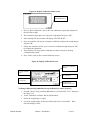
Extruder Setup
Use this page to setup the Maximum Extruder RPM. This is critical for GH Monitor
units and GHF feeder units. This value is automatically calculated with GH Full Control
units.
Also for GHF Feeder units you will need to program in the maximum LBS/HR of the
extruder for the feeder’s target LBS/HR calculation.
Figure 17: Hopper Setup
Hauloff Setup and Encoder Calibration Page (GH Full Control ONLY)
Use this page to enable the hauloff option of the GH Full Control Unit. The unit should
be set to “Do not read speed from COEX Master” if a COEX AB does not exist. If it
does then this setting is automatically setup by the COEX Master. The Hauloff max
speed must be entered if you are not using an encoder (see mechanical options to turn this
feature on/off). If you are using an encoder then you must calibrate the encoder by
running the line at a known speed, hand measuring the line speed with a tachometer,
entering the speed into the ft/min box, and then clicking the “click here” box. You can
also manually modify this calibration by adjusting the “Distance per revolution of
encoder”.
Figure 17: Hopper Setup and Encoder Calibration Page
Bulletin Number
Chapter 3: Installation
32 of 61
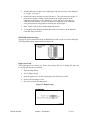
Alarm Setup
This screen allows the operator to configure the alarm settings for the rate monitor. To
configure the alarms do the following:
6. Enter the Setup Menu.
7. Once in the Setup menu, press “Alarm Setup.” This will take you to the “Alarm
Setup” screen.
Figure 18: Alarm Setup Screen
Changes weigh hopper
weight for no material
alarm.
Change the Alarm
Silence Display
8. Press the “Done” key at the bottom to exit this screen. Min/Max Speed Limits restrict
the usable gravimetric range that the GH will permit in order to continue gravimetric
measurement. If the system becomes unstable for more than the “System unstable
alarm time” then an alarm will notify the operator. The Hopper% for low level
should always be set below the reload percentage (hopper setup page) and the
Hopper% for no material alarm should always be set below the low level %.
Vacuum Bypass Setup
Enter in the amount of material that is stored above the reload valve. This is only used if you
are using the easy change over feature.
Bulletin Number
Chapter 3: Installation
33 of 61
Figure 32: PanelView Configuration Screen
Bulletin Number
Chapter 3: Installation
34 of 61
3-6
Initial Startup
The system will begin monitoring the process rate once an RPM reading from the Extruder is
detected. Again, this RPM must be communicated to the PLC through the supplied inductive
proximity switch, or through the Profibus DP Slave module. The extruder icon on the recipe
page will become animated, indicating the extruder is running and the measured Extruder
RPM will be displayed. If the system does not automatically start loading upon starting of
the extruders then check this value for trouble shooting.
At this point, the controller will refill the weigh hopper to its set weight capacity.
The GH-M rate monitor will start tracking the extruder as soon as it is started.
The displayed value may be far from the actual value the first time the system is ran. The
GH-M goes through a learning process with each material. This is indicated by a “Steady
Process” indicator on the main recipe page. Upon starting the line you should always give
the hopper time to analyze the flow and give you a “Steady Process” before making
adjustments based on the displayed throughput.
The initial learning process will be complete when the “Steady Process” indicator is
displayed on the recipe screen. You are now ready to run the unit as normal. The “Steady”
flag indicates that the measured throughput in reliable and can be used for control.
The system will automatically stop loading the hopper upon stopping the extruder. There is
no need to manually start/stop a GH-M unit.
Bulletin Number
Chapter 3: Installation
35 of 61
Chapter 4: Operation
4-1
Start-up
General Operation
1. As long as the “steady” flag is present, the system will run and monitor your process
rate without interaction giving you a continuous real-time measurement.
2. If the extruder is stopped then the GH system will stop automatically.
Quick Start Procedure
Generic
1. Calibrate the weigh hopper before running the system (This will improve inventory
and measured throughput accuracy.).
2. Ensure the surge hopper has adequate material to fill the weigh hopper.
3. Verify the extruder’s RPM is being supplied to the controller.
4. Wait for the “Steady Process” indicator to appear and then use the measured extruder
throughput for control.
4-2
Operation Procedures
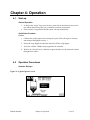
Operator Displays
Figure 33: Typical Operator Screen
Bulletin Number
Chapter 4: Operation
36 of 61
Figure 34: Typical Manual Control Operator Screen
While the rate monitor system is in operation, there are a couple of displays available to the
operator. These displays are selected simply by pressing the “NEXT” key when the unit is
running. The default display shown when the rate monitor is in run mode is the Recipe
Screen.
.
Figure 35: Typical Inventory Display Operator Screen
Bulletin Number
Chapter 4: Operation
37 of 61
Alarm Flags
An alarm message will be shown if any alarm condition occurs. A message will pop up on
the screen until the alarm condition is resolved. The operator can press “OK” on this pop-up
to hide the screen temporarily, but if the alarm condition is still unresolved, then the message
will reappear after a short delay. During an alarm condition, a visual alarm will be activated.
The following is a list of all alarm names and descriptions:
Alarms with Descriptions
Hopper low level alarm: Hopper is about out of material
Hopper out of material: Hopper is out of material
Inventory cleared: Operator has cleared the inventory (only logged)
Extruder no rpm detected_alarm: ONLY ON GH FULL CONTROL
Extruder no flow detected_alarm: ONLY ON GH FULL CONTROL
Hauloff drive failure alarm: ONLY ON GH FULL CONTROL
Loadcell over max alarm: check loadcell circuit
Reload too long alarm: First indication that you are about to run out of material
System not stable alarm: System has been unstable for too long.
hopper flow over allowed max: System rate is above allowed maximum setting
extruder overspeed: Extruder is out of allowed linear range
extruder underspeed: Extruder is out of allowed linear range
hauloff overspeed: Hauloff is out of allowed linear range (ONLY ON FULL CONTROL)
hauloff underspeed: Hauloff is out of allowed linear range (ONLY ON FULL CONTROL)
feeder overspeed (GHF only): GHF Feeder is running too fast
feeder underspeed (GHF only): GHF Feeder is running too slow
plc battery low: replace battery with power on as soon as possible
Figure 48: Typical Manual Control Operator Screen
The dump valve opens as soon as you touch the “Reload Off” button. The button then
changes to show “Reload On”.
Note: The system will stop if you attempt to turn the manual reload on. This
could be devastating if you are running the extruder.
Print Inventory
The print inventory menu item is used to produce on demand, inventory printouts. Before
selecting this item, be sure that the printer is properly connected and ready. This function will
generate an inventory.
Bulletin Number
Chapter 4: Operation
38 of 61
Chapter 5: Maintenance
5-1
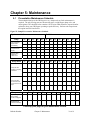
Preventative Maintenance Schedule
The mechanical design of the GH Hopper is very simple and very little maintenance is
required. The only moving parts are the metering gates, weigh hopper dump valve, and
mixer agitator. The checklist below contains a list of items which should be inspected and/or
replaced to keep your GH Hopper operating at peak efficiency. Perform each inspection at
the regular intervals listed below.
Figure 52: Sample Preventative Maintenance Schedule
System model #
Daily
Serial #
Date/
By
Date/
By
Date/
By
Date/
By
Date/
By
Date/
By
Date/
By
Date/
By
Date/
By
Date/
By
Date/
By
Date/
By
Date/
By
Date/
By
Date/
By
Date/
By
Date/
By
Date/
By
Date/
By
Date/
By
Date/
By
Date/
By
Date/
By
Date/
By
Date/
By
Date/
By
Inspect hopper for
any loose partstighten them
immediately.
Verify quality of
compressed air
supply.
Inspect weigh
hopper for
obstructions.
Every week
Verify the rate
monitor is properly
calibrated.
Check to make
sure that all hose
connections are air
tight.
Every month
Jan
Feb
Mar
Apr
May
Jun
Jul
Aug
Sep
Oct
Nov
Inspect air regulator
and air safety
circuits, if equipped.
Recalibrate rate
monitor If necessary.
Photocopy this page for your maintenance records
Bulletin Number
Chapter 5: Maintenance
39 of 61
Dec
5-2
Preventative Maintenance
Our GH Hoppers need periodic maintenance to provide long dependable service. Check these
elements regularly:
• Check functionality of safety circuit daily.
• Maintain proper air pressure and drain water from trap assembly on regulator – as
required.
5-3
WARNING!
Always remove plug and disconnect power before servicing hopper.
WARNING!
Always read operating manual before operating or servicing hopper.
Corrective Maintenance
Electrical
This section is designed to give the operator an overview of the electrical system that controls
the GH Hopper system. Since the hopper’s control panel is a self-contained pluggable item,
seldom will a maintenance person be required to enter the control panel. For purposes of
understanding the system, it is advisable that the maintenance personnel be familiar with not
only the internal workings of the control panel, but also with the input and output signals to
the GH Hopper.
This section includes the following:
• Internal components of the control panel
• Input signal to the control panel
• Output signals from the control panel
Internal Components of the Control Panel
Note: See Installation Packet supplied with unit for complete electrical
schematics.
This section describes the internal components of the GH Hopper system control panel. It is
not the intent of this section to completely familiarize the reader with the details on industrial
control panel construction or standards, but simply to familiarize the reader with the major
components inside the control panel.
The customer must supply 120/1/50 or 60 (or 220/1/50 or 60) via wires L1 & L2 (N). Please
insure that the earth ground connection is properly connected to an established earth ground.
• “Power on” is indicated by a lighted on/off switch.
• “Reload” switch controls the vertical reload gate above the hopper.
• “Safety Active” light displays status of safety interlock circuit. Audible alarm horn
alerts operator to GH Hopper fault.
Bulletin Number
Chapter 5: Maintenance
40 of 61
Input Signals to Programmable Controller
The rate monitor system has two main input signals that it uses from the extrusion process:
the weigh hopper load cell, and the extruder speed reference. This, of course, does not include
the operator touch-screen input.
The extruder speed reference is generated from the supplied inductive proximity switch, or is
wrote to the PLC through the Profibus DP Slave module.
Load cells require +12 volts DC to operate. This is known as the load cell’s excitation
voltage.
Output Signals from Programmable Controller
The rate monitoring system uses several output control signals to control the process. All of
these are very similar in nature.
The surge hopper refill solenoid is controlled by a PLC output.
Bulletin Number
Chapter 5: Maintenance
41 of 61
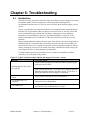
Chapter 6: Troubleshooting
6-1
Introduction
The utmost in safety precautions should be observed at all times when working on or around
the machine and the electrical components. All normal trouble-shooting must be
accomplished with the power off, line fuses removed, and with the machine tagged as out of
service.
The use of good quality test equipment cannot be over-emphasized when troubleshooting is
indicated. Use a good ammeter that can measure at least twice the AC and DC current that
can be encountered for the machine. Be sure that the voltmeter has at least minimum
impedance of 5,000 OHMS-per-volt on AC and 20,000 OHMS-per-volt on DC scales.
Popular combination meters, VOM and VTVM can be selected to provide the necessary
functions.
Before making haphazard substitutions and repairs when defective electrical components are
malfunctioning, we recommend that you check the associated circuitry and assemblies for
other defective devices. It is common to replace the obviously damaged component without
actually locating the real cause of the trouble. Such hasty substitutions will only destroy the
new component. Refer to wiring diagrams and schematics.
Locating mechanical problems, should they occur, is relatively straightforward. When
necessary, refer to the parts catalog section.
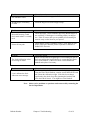
Figure 53: Typical Troubleshooting Problems and Suggested Corrective Actions
Problem
Nothing happens when I start
the extruder
Corrective action
Check to make sure that air is hooked up and the regulator gauge
reads at precisely 60 PSI.
Look on the Recipe Screen. If you don’t see a displayed Extruder
RPM then check the inductive proximity switch. If you do see a
displayed RPM then check the hopper’s calibration
“Interface has been Locked” is
shown
Click “Unlock” and enter in your User Password.
I’ve forgotten my User
Password
Contact the Service Department.
PLC Battery Low
Change out the PLC with your spare and reprogram new unit.
Send old PLC back to Manufacturer for repair.
Bulletin Number
Chapter 6: Troubleshooting
42 of 61
Problem
PLC Module Loaded
Corrective action
Normal after a software upgrade. Follow on-screen instructions.
Weigh hopper occasionally
overfills.
Lower the hopper size under “Hopper Setup”
Problem
Corrective action
Recorded Inventory Totals
don’t match what I’ve actually
used
Check the hopper’s scale calibration and verify that the hopper is
not overfilling. If the hopper is overfilling, adjust your hopper
size. If this is correct, then you are probably not accounting for
material scrap or other items in your process.
Printer did not print
Check that the printer is a SERIAL printer. If not, then you will
need to either get a SERIAL printer or purchase a SERIAL to
PARALLEL converter.
Problem
The feeder calibration values
are moving too much.
Problem
I can’t calibrate the Scale
without an error message.
Corrective action
Check to ensure that the weigh hopper is not touching any part of
the frame and that the loadcell bracket is not touching the plastic
cover of the loadcell. If these have been verified then check
loadcell and replace if necessary.
Corrective action
This Is caused by the difference in bits not being large enough.
Using the Direct Scale Readout, examine current loadcell bits with
and without the calibration weight. If the bits do not change
significantly, then check for pellets jamming the loadcells and
check the loadcell circuit. You might have a bad loadcell.
Note: Other service problems or questions can be answered by contacting the
Service Department.
Bulletin Number
Chapter 6: Troubleshooting
43 of 61
Chapter 7: Appendix
7-1
Warranty and Spare Parts
Unless otherwise specified, this product includes a Standard ONE YEAR PARTS
WARRANTY.
Warranty Specifications
The manufacturer hereby expressly warrants all equipment manufactured by it to be free from
defects in workmanship and material when used under recommended conditions, as set forth
in the operating manuals for such equipment. THE FOREGOING EXPRESS WARRANTY
IS EXCLUSIVE AND IN LIEU OF ALL OTHER WARRANTIES, GUARANTEES,
AGREEMENTS, AND SIMILAR OBLIGATIONS OF THE COMPANY AND/OR
MANUFACTURER (UNLESS OTHERWISE SPECIFIED IN THE SPECIFIC PRICE
PAGE OR LIMITED BY THE MANUFACTURERS’ WARRANTY FOR PARTS). The
Company’s obligation is limited to repair or replace FOB the factory any parts that are
returned, prepaid, within one year of equipment shipment to the original purchaser, and
which in the Company’s opinion, are defective. Any replacement part assumes the unused
portion of this warranty.
Warranty Restrictions
This parts warranty does not cover any labor charges for replacement of parts, adjustment
repairs, or any other work. This warranty does not apply to any equipment which, in the
Company’s opinion, has been subjected to misuse, negligence, or operation in excess of
recommended limits, including freezing or which has been repaired or altered without the
Company’s express authorization. If the serial number has been defaced or removed from the
component, the warranty on that component is void. Defective parts become the property of
the warrantor and are to be returned immediately, without any further use or handling.
Warranty Liabilities
THE COMPANY EXPRESSLY DISCLAIMS ANY AND ALL LIABILITY FOR ANY
SPECIAL, CONSEQUENTIAL OR INCIDENTAL DAMAGES OR EXPENSES THAT
RESULT FROM THE USE OF THIS PRODUCT. Some states do not allow the exclusion or
limitation of special, consequential or incidental damages, so the above limitation may not
apply to you. The Company’s obligation for parts not furnished as components of its
manufactured equipment is limited to the warranty of the manufacturers of said parts. The
company neither assumes nor authorizes any other persons to assume for it any liability in
connection with the sale of its equipment not expressed in this warranty. No person, agent,
manufacturer, distributor, dealer, installer or company is authorized to change, modify or
extend the terms of this warranty in any manner whatsoever.
The time within which an action must be commenced to enforce any obligation of the
Company’s arising under this warranty, or under any statute or law of the United States or
any state thereof, is hereby limited to the duration of this warranty. Some states do not permit
this limitation, so the above may not apply to you. This warranty gives you specific legal
rights and you may also have other rights which vary from state to state. For transactions
involving the potential applicability of international law or that of a foreign country,
this warranty policy and the procedures hereunder shall be governed by
applicable federal and state law, but not by the United Nations Convention on Contracts for
the Sale of Goods.
Bulletin Number
Chapter 7: Appendix
44 of 61
Customer Responsibilities
Any sales, use, or other tax incident to the replacement of parts under this warranty is the
responsibility of the purchaser.
Annex B Information
The following design information is provided for your reference:
1. No modifications are allowed to this equipment that could alter the CE compliance
2. Ambient temperature:
40 degrees Celsius – Maximum (104 degrees
Fahrenheit)
3. Humidity range:
50% relative humidity
4. Altitude:
Sea level
5. Environment:
Clean, dust-free and non-explosive
6. Radiation:
None
7. Vibration:
Minimal, i.e. machine mounting
8. Special installation requirements: Clean, dry compressed air 1 cfm @ 60 psi (1.7
m³/hr @ 4.14 bar)
9. Allowable voltage fluctuation:
+/- 10%
10. Allowable frequency fluctuation: Continuous
+/- 1%
Intermittent
+/- 2%
11. Nominal supply voltage:
120/1/60 or 220/1/50/60 (Verify on serial number tag)
12. Earth ground type:
TN (system has one point directly earthed through a
protective conductor)
13. Power supply should include a neutral power connection.
14. Over-current protection is supplied in the GH Hopper, but additional protection
should be supplied by the user.
15. The plug on the power cord serves as the electrical disconnect device.
16. Unit is not equipped with three-phase motors.
17. Functional identification
18. Cable support may be required for power cord, depending on final installation.
19. No one is required to be in the interior of the electrical enclosure during the normal
operation of the unit. Only skilled electricians should be inside the enclosure for
maintenance.
20. Doors can be opened with a screwdriver, but no keys are required.
21. Two-hand control is not required or provided.
22. All hoppers should be moved around and set in a place with a lift truck or equivalent.
23. There are no frequent repetitive cycles that require manual control⎯repetitive
functions are automatic while the GH Hopper is operating.
24. An inspection report detailing the functional test is included with the GH Hopper.
25. The machine is not equipped with cableless controls.
26. Color-coded (harmonized) power cord is sufficient for proper installation.
Bulletin Number
Chapter 7: Appendix
45 of 61
Figure 57: Typical Surge Hopper Assembly Parts List
#
2
3
4
5
DESCRIPTION
Lid (Smaller vacuum receivers)
Lid (Larger vacuum receivers)
Lid (Tube Stub for Mezz. Mounted GH Hopper)
1/8” NPT fitting
1/4” NPT fitting
Bulkhead
Brass elbow
6
24V DC Solenoid
7
8
Dump cone
Air cylinder
1
010
08223-1
NA
08223-2
020
872.00769.00
872.00783.00
35085K, 35086K
35154, 35155
35146
35118
040
872.00830.00
-
33128
15370
33126
15237
33073
33011G
Figure 60: Typical Weigh Hopper Assembly Parts List
#
1
2
3
DESCRIPTION
WEIGH HOPPER
LOAD CELL
LOAD CELL
BRACKET
010
822.00382.00
61-1010E-10KG
020
822.00383.00
A0564528
040
822.00384.00
A0564546
872.00669.00
Figure 64: Typical Siemens S7-200 Controller Main Parts List
#
1
2
3
4
5
6
7
10
Description
Siemens S7-200 CPU 226
Siemens EM277 Profibus DP Slave
Siemens TC-EM-231 Analog Module
24V DC Power Supply
12V DC Power Supply
Alarm Light Yellow Strobe 24V DC
Glass Fuse – 3.0 amp (115v unit)
120V Light (power switch)
ALL MODELS
744.00157.00
744.00170.00
744.00191.00
A0563932
739.00027.00
A0565889
A0542207
715.01034.02
Figure 65: Typical Siemens S7-200 Display Main Parts List
#
1
2
3
Description
Complete Display Panel (TP177 with Bopla Box)
Siemens TP177 Micro Touch Screen
Display – 8 ft Connection Cable
Display – 50 ft Connection Cable
Bulletin Number
Chapter 7: Appendix
All MODELS
892.01327.00
744.00159.00
A0565856
A0565899
46 of 61
7-2
Addendum (Service Supervisor Information)
Note: Untrained personnel of the rate monitor controller, should not use this
section of the manual and/or program can be compromised!
Note: Hidden, programmable features and hidden menu pages should not be
made available to floor operators. These pages include the Service
Supervisor Information addendum located in this section. Unauthorized
changes to these factory settings by inexperienced operators may
prevent the unit from operating properly, and may void part or all of the
warranty.
Caution!
After all selections are made: Keep pressing the “Done” key until the unit
returns to the Recipe menu.
Note: Inexperienced operators or inexperienced plant personnel should not
access programmable features. Unauthorized changes may prevent the
rate monitor from operating properly and may void part or all of the
warranty.
Note: Call the Service Department for assistance or for further explanation of
these or any other programmable features, which may or may not be
shown in this manual.
Note: Information included in this manual is subject to change without notice.
Passwords
• User Password
“5413”
• Maintenance Password
“3145348”
Caution!
Maintenance password should only be supplied to qualified personnel!
The program can be compromised.
Programmable Settings
The rate monitor software program has been designed to allow some customizing to achieve
certain desired operating parameters. The following is a listing of the selections that are
“field” programmable, followed by the procedure for doing so.
Pressing the manufacturer’s icon when in the “Setup” Directory Screen menu accesses this
menu.
Figure 67: Typical Operator Setup Screen
Touch this icon and
enter in the Service
Password to access
the Engineering Only
Directory
Bulletin Number
Chapter 7: Appendix
47 of 61
Enter the long password “3145348” and press “Enter”. The factory setup section displays the
“Engineering Only” screen. The screen similar to that shown below should be displayed and
use the keystrokes described herein to change or toggle the parameters.
Figure 68: Typical Engineering Only Setup Screen
Go back to
Setup
Directory
Select the desired menu to advance to the screens listed below. The exit to the “Setup”
screen select “Done”
Figure 69: Typical Advanced Weight Options Screen
Advanced Weight Options Screen
*Increase the “Time to settle hopper after reload valve has shut” if the hopper needs more
time to settle after reloading
*Increase “No flow timer” and decrease “No flow bits” to reduce nuisance “no flow” alarms.
Set to “0” will disable this alarm.
Figure 70: Typical WTP Alogorithm Options
WTP Algorithm Options Screen
Bulletin Number
Chapter 7: Appendix
48 of 61
The method that is used to calculate the measured lbs/hr is entirely adjustable to fit any
application. The three methods that can be used is “Extruder Pulse Count Method”, “Percent
of Hopper Method”, or “Full hopper Method”. You cannot use the “Extruder Pulse Count
Method” if you are writing the extruder speed through communications instead of using our
inductive proximity switch.
Extruder Pulse Count Method
This method updates the weight every “Number of Pulses for Calculation” detected by the
extruder proximity switch. This is not the most automated method of the 3 choices, but has
it’s advantages. If you are using an unusually large extruder and running it in production at a
very low speed then this method works best because the snapshot is taken at the same
rotational position of the extruder and eliminates errors in measurement that are caused by the
pulsing of the feed throat.
Percent of hopper Method (DEFAULT)
This is the most automated and responsive of the 3 choices. The snapshot sample is based on
the “Percent of Hopper for Calculation” setting. The smaller you make this setting the
quicker the hopper will update. If this value is set too small then you will be measuring the
instantaneous throughput of the feed throat instead of the average loss-in-weight. The
average consumption at the feed throat always equals what is coming out at the die.
However, the instantaneous feed throat usage is not equal to the usage at the die. This is due
to the pressure barrier sections and design of your extruder. The goal of the GH system is to
accurately control and measure what is coming out the die and not to respond to nuance
changes at the feed throat. It is not recommended that you reduce this setting unless
consulting engineering or service and you fully understand this feature.
Full Hopper Method
This is the most stable of all 3 choices. Upon reloading a weight snapshot and time are used
to calculate the overall usage since the last reload. This is also the least responsive setting.
WTP/RPM Filter
When switching between the 3 methods you need to understand the sample time and
configure the “WTP/RPM Filter” appropriately. A good example of this is that by default the
hopper is configured to reload at 50% (keeps material in the vertical section of the hopper),
sample in “Percent of Hopper Method” at 20%, and uses a filter of “9”. If it is desired to
switch to the “Full Hopper Method” then you don’t need a filter of “9”. A filter of “9” uses
10 points. At a sample of “20%” you get 2 samples per reload. It would therefore take 5
reloads to fill the analyzer upon starting the line. After that the measurement will be updated
with each and every 20%. When switching to the “Full Hopper Method” you only need a
filter of “4” to achieve the same time frame of samples, but the response will be much
dampened to any oscillation or error in measurement. If using the “Extruder Pulse Count
Method” then you must do the math to determine what sample time frame you need.
Steady WTP/RPM Window
Bulletin Number
Chapter 7: Appendix
49 of 61
No matter which method you chose the analyzer compares the series of measurements to the
“Steady WTP/RPM Window” percent to determine if the measurements are stable. If this is
set too small the system might never give you a “Steady Process” indication. If set too big
then the system could respond to nuance changes in the loadcell and cause an erratic response
in your control system. When set properly the weigh hopper can be hit with a hammer (not
recommended) and it will not cause any error in the displayed measurement. Another more
common procedure would be if an operator intermittently adds a processing agent to the
extruder by dumping it directly into the weigh hopper. This will not cause any error due to
the measurement algorithm that was previously mentioned.
Max Allowed WTP/RPM
If a lbs/hr per RPM value is every calculated above this setting then the GH will ignore the
sample. This is to prevent an operator from draining a hopper while running and causing an
erroneous, but consistent measurement. The flow through an open drain tube is very
consistent and would cause the extruder to respond by speeding up unless this value is setup.
By default this is disabled and must be configured by a knowledgeable service person. After
running for some time you can go to the WTP/RPM Calibration page and observe the average
WTP/RPM factor. You can then set this value above that by 200-300 % to eliminate the error
caused by draining the hopper while running.
Figure 71: Typical Mechanical Options Screen
Should be factory
set to “GH
Hopper Mode”
Used to change
the pulses per
revolution of
the extruder
Go back to
Engineering Only
Directory
Mechanical Options Screen
For a GH-M rate monitor, the “GH Hopper Mode” should always be enabled. This option
should be factory set for a rate monitor. The option exists because this software is used for
other products.
The mechanical options screen also allows the user to set the method of obtaining the
extruder’s RPM. This setting should also be factory set.
If writing the extruder RPM through Profibus then the unit should be set to “Write Ext RPM
through COM (F13:1).
If the extruder’s RPM is being measured with the supplied proximity switch the unit should
be set to “Measure Ext RPM with Prox”. If the mechanical device to measure the extruder’s
speed presents more than one pulse per revolution, this value may be changed on the
“Mechanical Options” page also. Simply input the number of pulses per revolution in the
“Extruder PPR” field.
Bulletin Number
Chapter 7: Appendix
50 of 61
The hauloff encoder setting is not functional for the rate monitor controller.
The “GHF feeder max RPM” setting is not functional for the rate monitor controller.
Figure 72: Typical Analog Options
Analog options screen
This screen is not used with the GH-M Rate Monitor. Adjust appropriately for GH Full
Control units.
Figure 73: Typical Diagnostics Screen
Go back to
Engineering
Only Directory
Diagnostics Screen
Use this screen for trouble shooting and making tuning adjustments. Typically make an
adjustment, reset high/lows, and then weight for some time to observe this page.
Bulletin Number
Chapter 7: Appendix
51 of 61
Customer Setup Menu
Units
This screen allows the user to change the GH Hopper’s unit of measurement. The entire GH
Hopper can be configured in either Kgs. or Lbs., while the Target vs. Actual data can be
configured for either regardless of the GH Hopper’s units.
Bulletin Number
Chapter 7: Appendix
52 of 61
7-3
Siemens S7-200 Communications Manual
The Siemens GH Hopper uses a S7-200 CPU 226 processor communicating acting as a DP Slave using a
EM277 Siemens Profibus module. The node address is configured via 2 dials on the front of the module
that is located in the PLC rack. The GSD file requires the user to specify where in memory the top of the
input data block is located (area where the master will write to us). This address if V1300 and should be
added to the GSD file before being downloaded.
EXPLANATION OF INPUT ANNOTATION:
I – 16BIT UNSIGNED INTEGER
I(D) -32BIT UNSIGNED INTEGER
I(F) -32BIT IEEE FLOAT
I,BIT X –SINGLE BIT VALUE
EXPLANATION OF OUTPUT ANNOTATION:
O – 16BIT UNSIGNED INTEGER
O(D) -32BIT UNSIGNED INTEGER
O(F) -32BIT IEEE FLOAT
O,BIT X –SINGLE BIT VALUE
The Profibus interface module has 32 words (1-32) in the input block and 32 words (1-32) in the output
block. Starting at word “1”.
ALL BIT REFERENCES IN THIS MANUAL REFER TO THE BIT ORDER OF A 16-BIT SIEMENS
WORD. SIEMENS USES BIG ENDIAN/LITTLE ENDIAN PRINCIPLES AND THEREFORE THE
FIRST BYTE IS ACTUALLY THE MOST SIGNIFICANT BYTE. BIT 0 OF THE FIRST WORD
REFERS TO THE LEAST SIGNIFICANT BIT. THIS BIT IS STORED AT THE START OF THE
SECOND BYTE OF THE WORD. IF VW1300 WAS THE 16-BIT WORD BEING ADDRESSED,
THEN BIT 0 OF THIS WORD WOULD ACTUALY BE V1301.0 AND NOT V1300.0. SINCE ALL
PROFIBUS DATA IS IN WORDS WE REFER TO THIS STANDARD FORMAT THROUGHOUT
THE MANUAL.
Below are the items that can be accessed for the hopper:
7-4 ITEMS IN BLUE ARE READ ONLY! ITEMS IN BLACK ARE
WRITE ONLY!
Bulletin Number
Chapter 7: Appendix
53 of 61
Chapter 8:
Bulletin Number
Chapter 8:
54 of 61
Chapter 9: Item
GENERAL HOPPER INFO
1. hopper_weight_percent,O23 (0-1150), easy to use scale to show weight
2. total_weight_minus_tare O(F) 24, this is the material weight
3. reload_output, O1,BIT 4, to show reloading
HOPPER MODE STATUS
1. ramp_to_stop_engaged,O1,BIT 0
2. monitor_mode_engaged, O1,BIT 1
3. control_by_rpm_engaged, O1,BIT 2
4. control_by_weight_engaged, O1,BIT 3
5. alarm active, O32, BIT 0
6. system heart beat, O32, BIT 1
HOPPER MODE CONTROL
1. ramp_to_stop_pushed,I1,BIT 0 (toggle this bit to stop line)
2. monitor_mode_pushed, I1,BIT 1 (toggle this bit to put in monitor mode)
3. control_by_rpm_mode_pushed, I1,BIT 2 (toggle this bit to put unit in rpm mode)
4. control_by_weight_mode_pushed, I1,BIT 3 (toggle this bit to put unit in weight mode)
HOPPER ALARMS
1. hopper_low_level_alarm,O2,BIT 0
2. hopper_out_of_material_alarm, O2,BIT 1
3. hopper_over_filling_alarm, O2,BIT 2
4. extruder_no_rpm_detected_alarm, O2,BIT 4
5. extruder_no_flow_detected_alarm, O2,BIT 5
6. hauloff_drive_failure_alarm, O2,BIT 6
7. loadcell_over_max_alarm, O2,BIT 7
8. reload_too_long_alarm, O2,BIT 8
9. alarm active, O32, BIT 0
INVENTORY INFO
1. clear_inventory, I1,BIT 4 (toggle this to clear all inventory, you must also reset this bit after
completion)
2. hopper_inventory,O(F) 3
3. hauloff_accumalated_length,O(F) 5
EXTRUDER SETPOINT INFO
1. entered_extruder_rpm_target, I(F) 2 (write desired rpm here)
2. extruder_rpm_target, O(F) 7
3. extruder_rpm_instant, I(F) 4 (write rpm value here if you are not using the extruder prox signal for
the calculation)
4. actual_extruder_rpm_instant,O(F) 9
HAULOFF SETPOINT INFO
1. entered_hauloff_speed_target,I(F) 6 (write desired line speed here)
2. hauloff_speed_target,O(F) 11 (TARGET GENERATED BY SYSTEM)
Bulletin Number
Chapter 9: Item
55 of 61
3. current_measured_hauloff_speed,O(F) 13 (ACTUAL MEASURED)
RECIPE SETPOINT INFO
1. entered_recipe_target,I(F) 8 (write desired recipe entry here such as lbs/hr,lbs/ft,lbs/ft2)
2. recipe_running_target,O(F) 15 (running target based on hopper mode)
3. recipe actual value,O (F) 17 (compare this to target for accuracy)
4. ext_wtp_target,O(F) 19 (lbs/hr or kgs/hr depending if the system is in imperial or metric)
5. ext_wtp_average,O(F) 21 (lbs/hr or kgs/hr depending if the system is in imperial or metric)
6. layflat,I(F) 10
7. change entered extruder rpm target, I1,BIT 5 (toggle to load entered extruder rpm target, you must
also reset this bit after completion)
8. change entered hauloff speed, I1,BIT 6 (toggle to load entered hauloff speed, you must also reset this
bit after completion)
9. change entered recipe target, I1,BIT 7 (toggle to load entered recipe target, you must also reset this bit
after completion)
10. change layflat, I1,BIT 8 (toggle to load layflat value, you must also reset this bit after completion)
STEADY FLAGS
1. system_stable, O1,BIT 5
2. extruder_rpm_stable, O1,BIT 6
3. extruder_wtp_stable, O1,BIT 7
4. hauloff_stable, O1,BIT 8
DESIRED SHUTDOWN TIME (WRITE A “0” TO DISABLE)
1. desired shutdown time in minutes,I(F) 12
Bulletin Number
Chapter 9: Item
56 of 61
WRITING SETPOINTS EXPLANATION
Extruder RPM set points, recipe set points, and haul-off set points can be wrote to while the unit is in stop
mode. After engaging either RPM mode or Weight mode then the appropriate values will be applied.
While in RPM mode the target recipe value will be overwrote by what the current actual running value is.
This ensures that when you transfer to “Weight Mode” that the line set points do not change. This acts as
a virtual cruise control for your line. Bring the extruder and haul-off up to the desired outputs and then
place the unit in “Weight Mode” to maintain the ratio even as the screen pack builds up material over
time.
The Extruder RPM set points and haul-off set points can be modified while in RPM mode and the unit
will respond immediately.
The Recipe set point can be modified while in Weight mode. Some recipe set points may include the
extruder RPM or the haul-off speed depending on the recipe mode selection. If the recipe mode selection
is lbs/ft and the second entry is set to extruder rpm input then the target lbs/ft and the extruder rpm is set
by the operator while the PLC calculates the target feet/min needed to achieve the desired recipe.
No set points can be modified while in “Monitor Mode”. The PLC will take constant snap shots of the
extruder RPM, haul-off speed, and recipe set points and will write these to ensure a “bump-less” transfer
when entering into either RPM Mode or Weight Mode.
The system can be placed in “RPM Mode”, or “Monitor Mode” from stop at any time. The system can go
from “RPM Mode”, “Weight Mode”, or “Monitor Mode” into stop mode at any time as well. However,
there are restrictions when transferring between other modes. The system must be stable before it will
allow you to transfer from “RPM Mode” into “Weight Mode”. Also the system must be stable when
transferring from “Monitor Mode” to “RPM Mode”. If you are in “Monitor Mode” you must transfer into
“RPM Mode” and then stabilize before going into “Weight Mode”.
SHUTDOWN SEQUENCE EXPLANATION
The hopper has the ability to shutdown the loading system prior to the line shutting off to eliminate
material in the supply hopper. If you write any non-zero value to “ desired shutdown time in minutes”
then the GH will calculate based on the current process rate, recipe, and preset (at the touch screen)
“supply weight” (amount of material that the supply hopper will store) when it should disable each
vacuum conveyer for each individual hopper. If the GH runs out of material prior to it’s expecting time
then it is up to the operator to reset the “desired shutdown time in minutes” to allow it to convey and
continue loading. An example would be an hour before the operator wants to shutdown they would enter
in the shutdown time of 60 minutes into a touch screen cell on your master controller. Your controller
would then write a value of 60 to the “desired shutdown time in minutes” and would write to us the
process rate. The blender would use this process rate and other items to determine when it should disable
the loaders. Based on that data the blender decides to disable the loading for GH five minutes before the
countdown time of the original 60 minutes has passed. However at 2 minutes prior to the original
countdown time hopper 1 runs out of material and alarms “Hop Out of Material”. The operator at that
time can either shutdown the line 2 minutes early or can change the value of “60” to “0” and the system
will reload the GH again. At that time the operator can enter a value of “2” minutes and the system will
disable the loaders for the last 2 minutes of the run. This feature will require tuning and practice on the
part of the operator to achieve the correct shutdown sequence, but if done properly will save the operator
time and work in having to empty out full supply hoppers.
Bulletin Number
Chapter 9: Item
57 of 61
GH INPUT BLOCK (WRITE HERE)
PLC WORD
ADDRESS
V1300
PLC
BYTE
ADDRESS WORD
V1301.0
1
V1301.1
V1301.2
V1301.3
V1301.4
V1301.5
TYPE
INT
V1301.6
V1301.7
V1300.0
V1302
V1304
V1306
V1308
V1310
V1312
V1314
V1316
V1318
V1320
V1322
V1324
V1326
V1328
V1330
V1332
V1334
V1336
V1338
V1340
V1342
V1344
V1346
V1348
V1350
V1352
V1354
V1356
V1358
V1360
V1362
Bulletin Number
2
3
4
5
6
7
8
9
10
11
12
13
14
15
16
17
18
19
20
21
22
23
24
25
26
27
28
29
30
31
32
FLOAT
FLOAT
FLOAT
FLOAT
FLOAT
INT
DESCRIPTION
bit 0= ramp to stop pushed
bit 1= monitor mode pushed
bit 2= rpm mode pushed
bit 3= control by weight mode pushed
bit 4= clear inventory
bit 5= change entered extruder RPM
target
bit 6= change entered hauloff speed
bit 7=change entered recipe target
bit 8=change layflat
entered extruder RPM target MSW
entered extruder RPM target LSW
extruder RPM instant MSW
extruder RPM instant LSW
entered hauloff speed MSW
entered hauloff speed LSW
entered recipe target MSW
entered recipe target LSW
layflat MSW
layflat LSW
desired shutdown time in minutes
not used
not used
not used
not used
not used
not used
not used
not used
not used
not used
not used
not used
not used
not used
not used
not used
not used
not used
not used
not used
Chapter 9: Item
58 of 61
GH OUTPUT BLOCK READ HERE)
PLC WORD
ADDRESS
V1364
V1366
V1368
V1370
V1372
V1374
V1376
V1378
V1380
V1382
V1384
V1386
V1388
V1390
V1392
V1394
V1396
V1398
V1400
V1402
V1404
V1406
V1408
PLC
BYTE
ADDRESS WORD
V1365.0
1
V1365.1
V1365.2
V1365.3
V1365.4
V1365.5
V1365.6
V1365.7
V1364.0
V1367.0
2
V1367.1
V1367.2
V1367.3
V1367.4
V1367.5
V1367.6
V1367.7
V1366.0
3
4
5
6
7
8
9
10
11
12
13
14
15
16
17
18
19
20
21
22
23
V1410
24
V1412
V1414
V1416
25
26
27
Bulletin Number
TYPE
INT
INT
FLOAT
FLOAT
FLOAT
FLOAT
FLOAT
FLOAT
FLOAT
FLOAT
FLOAT
FLOAT
INT
FLOAT
DESCRIPTION
bit 0= ramp to stop engaged
bit 1= monitor mode engaged
bit 2= control by rpm mode engaged
bit 3= control by weight mode engaged
bit 4= reload output on
bit 5= system stable flag
bit 6= extruder rpm stable flag
bit 7= extruder throughput stable flag
bit 8= hauloff stable flag
bit 0= hopper low level alarm
bit 1= hopper out of material alarm
bit 2= hopper over filling alarm
bit 3= not used
bit 4= no extruder rpm detected alarm
bit 5= no extruder flow detected alarm
bit 6= hauloff drive failure alarm
bit 7= loadcell over max alarm
bit 8= reload too long alarm
hopper inventory MSW
hopper inventory LSW
hauloff accumalated length MSW
hauloff accumalated length LSW
extruder RPM target MSW
extruder RPM target LSW
actual extruder RPM instant MSW
actual extruder RPM instant LSW
hauloff speed target MSW
hauloff speed target LSW
current measured hauloff speed MSW
current measured hauloff speed LSW
recipe running target MSW
recipe running target LSW
recipe actual value MSW
recipe actual value LSW
extruder WTP Target MSW
extruder WTP Target LSW
extruder WTP average MSW
extruder WTP average LSW
Hopper percent weight (0-1150)
Total weight minus tare (material weight)
MSW
Total weight minus tare (material weight)
LSW
not used
not used
Chapter 9: Item
59 of 61
V1418
V1420
V1422
V1424
V1426
Bulletin Number
V1427.0
V1427.1
28
29
30
31
32
not used
not used
not used
INT
bit 0=alarm active
bit1=heart beat (alternates every .5 second)
Chapter 9: Item
60 of 61
Technical Assistance
Parts Department
Call Spare Parts Express toll-free 8am-8pm EST (800) 423-31839 or Phone: (847) 273-7700;
Fax (847) 273-7812.
OEM quality replacement and spare parts ensure operation at design specifications. Please
have the model and serial number of your equipment when you call. Consult the Customer
Parts List included in your information packet for replacement part numbers.
Service Department
Call toll free (800) 423-3183 8am-8pm EST – Emergency service available 24 hours a day.
We have a qualified service department ready to help. Service contracts are available for most
of our products.
Sales Department
Call (847) 273-7700 Monday through Friday 8am-5pm CST.
Our products are sold by a worldwide network of independent sales representatives. Contact
our sales department for the name of the sales representative nearest you.
Contract Department
Call (847) 273-7700 Monday through Friday 8am-5pm CST. Let us install your system.
The Contract Department offers any or all of these services: project planning; system
packages including drawings; equipment; labor; construction materials; and union or nonunion installations.
Bulletin Number
Chapter 9: Item
61 of 61